> ## Content Index
> Fetch the complete content index at: https://internalnote.com/llms.txt
> Use this file to discover other available public pages before exploring further.
# Zendesk Dark Mode - Do not underestimate the power of the Dark side
- URL: https://internalnote.com/zendesk-dark-mode/
- Published: 2025-03-24T09:00:10.000Z
- Updated: 2025-07-08T12:48:38.000Z
- Description: Zendesk announced support for Dark mode in Agent Workspace.
- Author: Thomas Verschoren
- Tags: Agent Workspace
Some articles can be written as a single sentence:
> Zendesk announced an EAP for a Dark mode option. And it's awesome.
There. That's it. The entire article. Since images tell more than a thousand words, I'll leave you with the following two screenshots 😅.
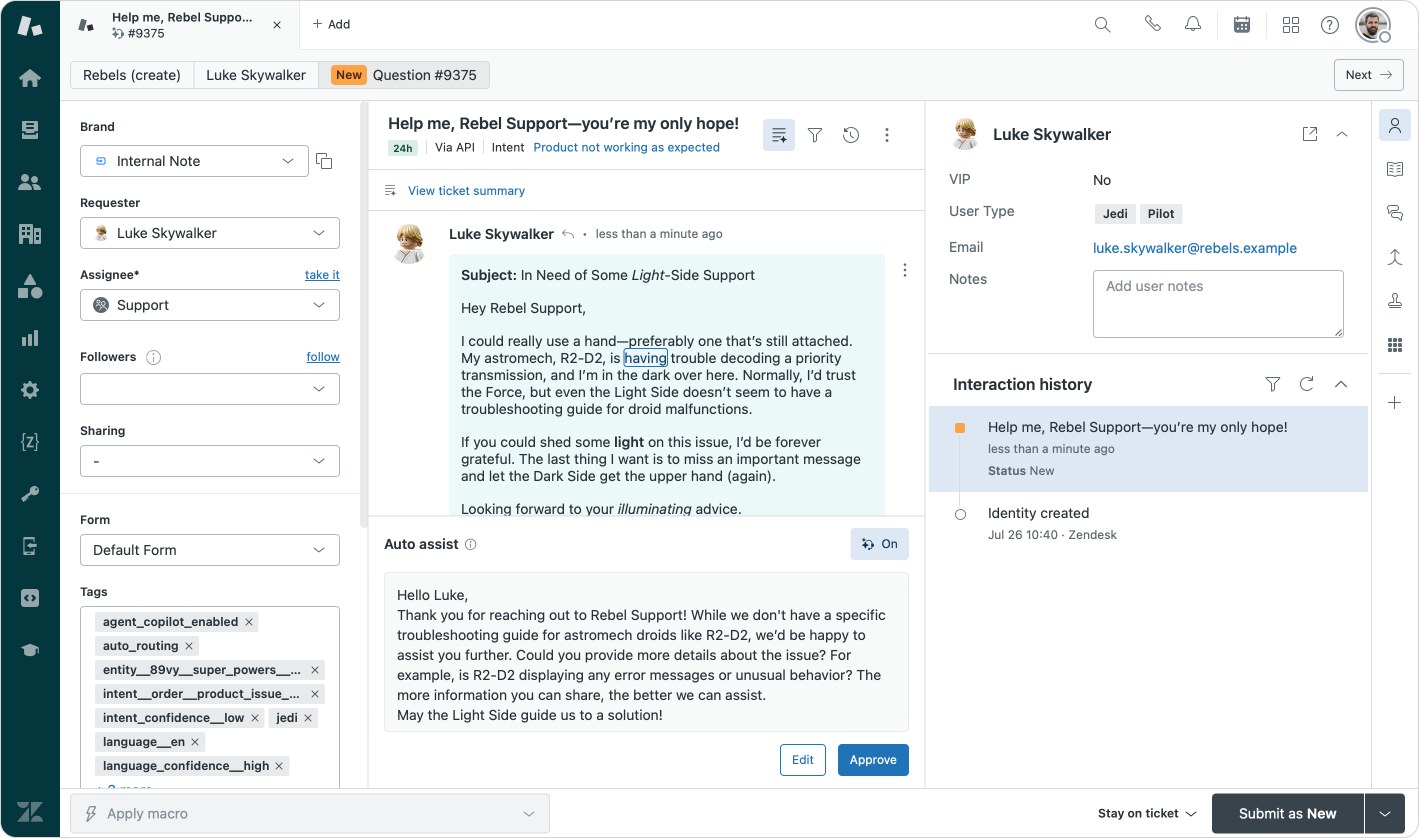
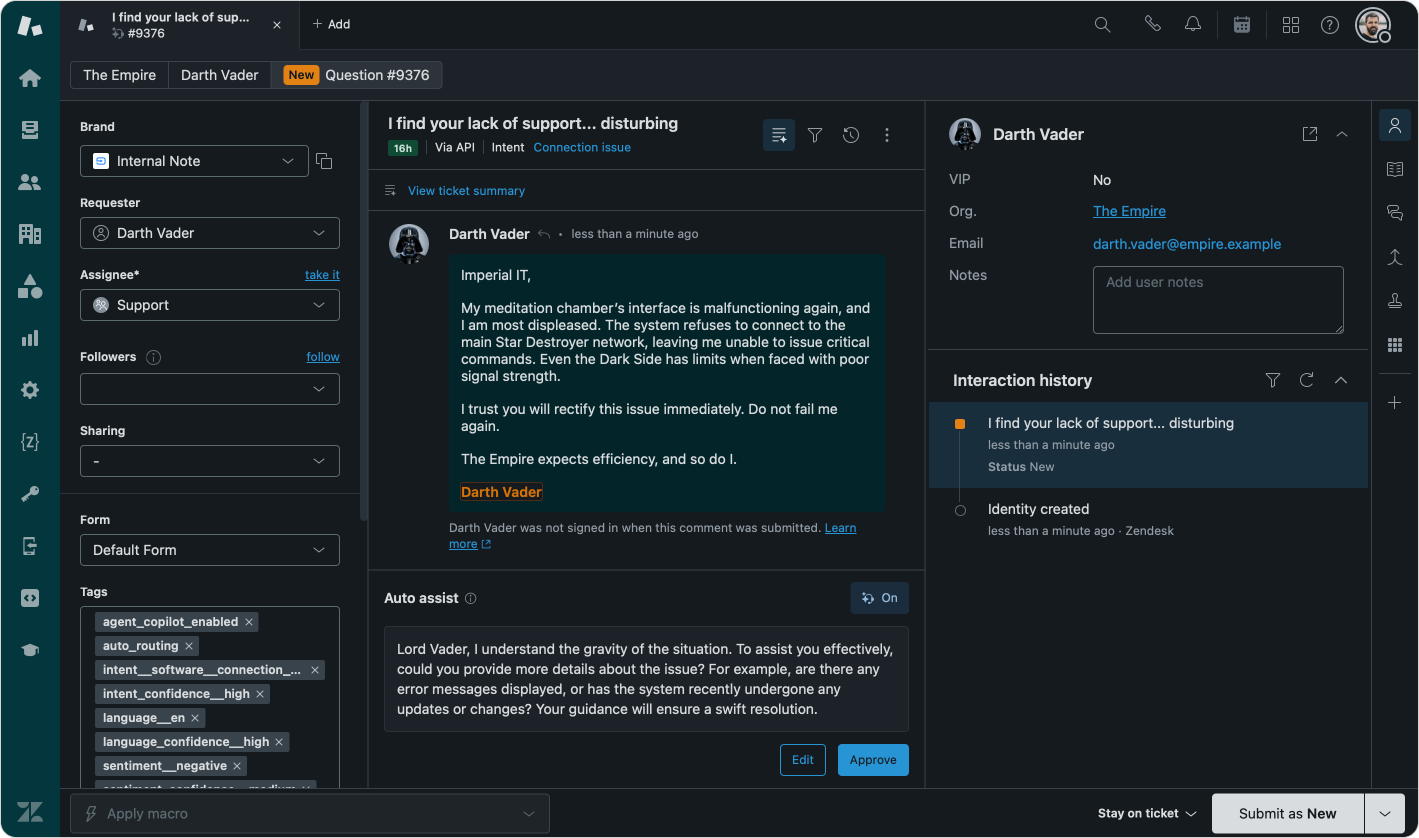
Light Mode and Dark Mode
All kidding aside, this is an awesome update that checks off one of the most requested features for Agent Workspace for many a user.
Zendesk finally added support for a proper Dark mode ui for its Agent Workspace interface as a new EAP this week. (Rollout starts March 24th)
What's nice with this Dark Mode is that it's not *just* a swap of black and white. The background has a subtle `#151A1E` blueish-black color, and white text gets a nice `#D8DCDE` grayish tint. And many elements are shifted to a more saturated darker tint.
I think we shouldn't underestimate the effort here. Every element of Agent Workspace, including the Customer, Organization and Custom objects tabs are reworked in this new dark mode, as well as all of the Context Panel elements.
🌔
This article has a custom CSS overwrite to render the blog in Dark Mode for the occasion!
# How to enable the new Dark Mode
Enabling the new Dark Mode display mode for Zendesk is as easy as toggling the Dark mode option in the Agent interface settings. The setting applies to all agents and **only** affects Agent Workspace. Zendesk Explore, the Admin Center and other elements are currently still light-mode only. (One can hope for a *Copenhagen at Night* Help Center theme soon?)

Enabling the new Dark mode
Once enabled Agents will get notified that the new Dark mode option is available for them.

Alerting agents about the new feature
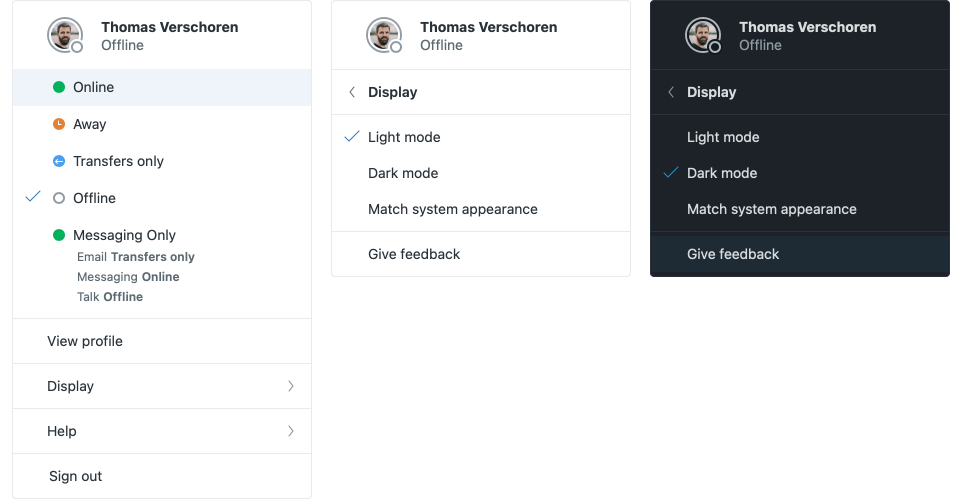
Within an Agent's profile dropdown, they can then choose for Light mode, Dark mode or Matching the system appearance. I've toggled mine to that last option so Zendesk stays in sync with the rest of my macOS environment.
Agents can always jump back into their Profile dropdown to toggle to another display mode.
# Marketplace Apps
As an [App Developer](https://tripelhop.com/?ref=internalnote.com), I'm interested in making sure my own apps are compatible with the latest Zendesk features. In the past I enabled features like the new flexible width, support for 100% vertical height for pinned apps, and now well, we also need to support the new Dark mode.
For those that use the Zendesk Garden UI framework, you're in luck. These components come by default with support for Color schemes
[Zendesk GardenGarden is the design system by Zendesk. It’s where we grow the components, standards, and tools that product designers use every day.Zendesk Garden](https://garden.zendesk.com/components/color-scheme-provider?ref=internalnote.com)
My apps make use of [Tailwind CSS](https://tailwindcss.com/docs/dark-mode?ref=internalnote.com) so I wondered if they would *just* work. Enabling Dark mode in Tailwind can be done by adding styles with a `dark-` prefix on your CSS
```html
Order #54879
```
Making sure you follow the Zendesk Dark mode becomes as easy as:
```javascript
```
With the following result:
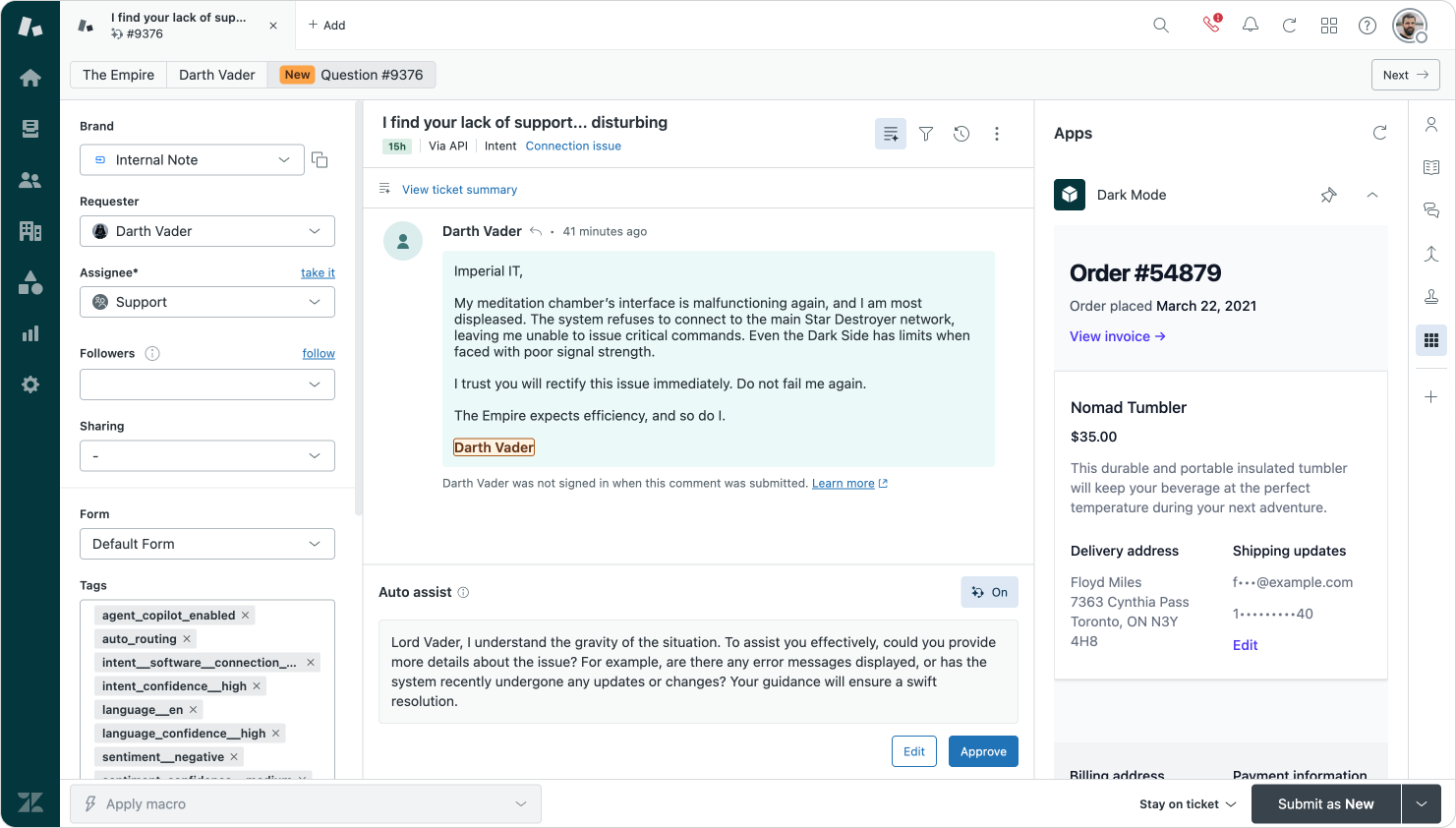
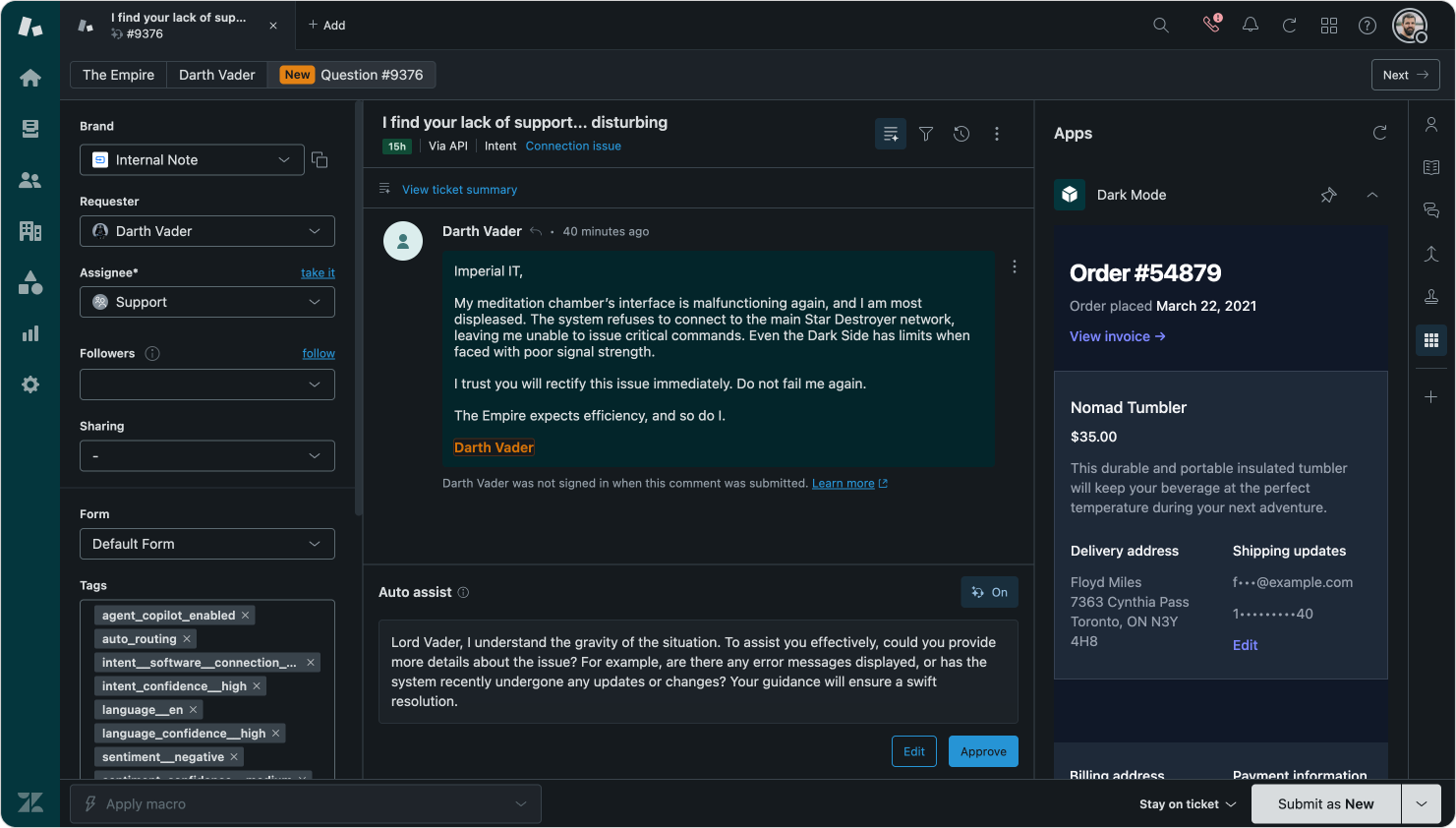
The same sidebar app in Light and Dark mode
Kinda nice that it all *just works.* We'll be updating [our apps](https://tripelhop.com/?ref=internalnote.com) soon with support for Dark mode, and I'm sure the [bigger Marketplace partners](https://internalnote.com/tag/sponsor/) will also follow soon!
## Sign up for Internal Note
Turning Zendesk into practice. – A newsletter about Zendesk written by Thomas Verschoren.
Subscribe
Email sent! Check your inbox to complete your signup.
No spam. Unsubscribe anytime.