

Building AI-ready Knowledge in Zendesk
Zendesk helps businesses build AI-ready knowledge bases that power faster, consistent, and personalized customer service. By connecting, governing, and optimizing knowledge, Zendesk enables AI Agents and Agent Copilot to automate routine queries and assist agents for better resolutions at scale.

Building AI-ready Knowledge in Zendesk
Zendesk helps businesses build AI-ready knowledge bases that power faster, consistent, and personalized customer service. By connecting, governing, and optimizing knowledge, Zendesk enables AI Agents and Agent Copilot to automate routine queries and assist agents for better resolutions at scale.

On this page
AI is changing what customers expect from support. Faster responses, more consistent answers, personalised resolutions. As I covered in previous articles on this website, knowledge is at the heart of making that happen.
The Help Center remains an important channel for self-service. But knowledge has quietly taken on a bigger role. It now powers AI Agents that handle routine questions without any human involvement, and feeds Agent Copilot the context it needs to help agents reply more effectively.
Getting your knowledge AI-ready means rethinking how you approach your content. Not just as articles for customers, but as a connected asset that drives resolution across every channel and every interaction.
That's what this article is about: how to build and maintain that foundation so your knowledge works as hard as your AI does.
Why AI-readiness starts with knowledge
A knowledge base is more than just an organised library of support content. It's your service organisation's single source of truth, containing critical information in various formats: articles, instructional videos, images. It also connects to external knowledge repositories like Confluence pages or internal wikis.
But its importance goes well beyond being a reference point for customers. The knowledge base forms the bedrock of modern customer service. It powers self-service directly, and it underpins the AI capabilities of the Resolution Platform. AI Agents rely on it to handle routine, low-value enquiries automatically. Agent Copilot draws from it to surface relevant information to human agents at exactly the right moment.
When that knowledge is connected thoughtfully and kept accurate, it means consistent, reliable information is available across every channel and to every type of user.
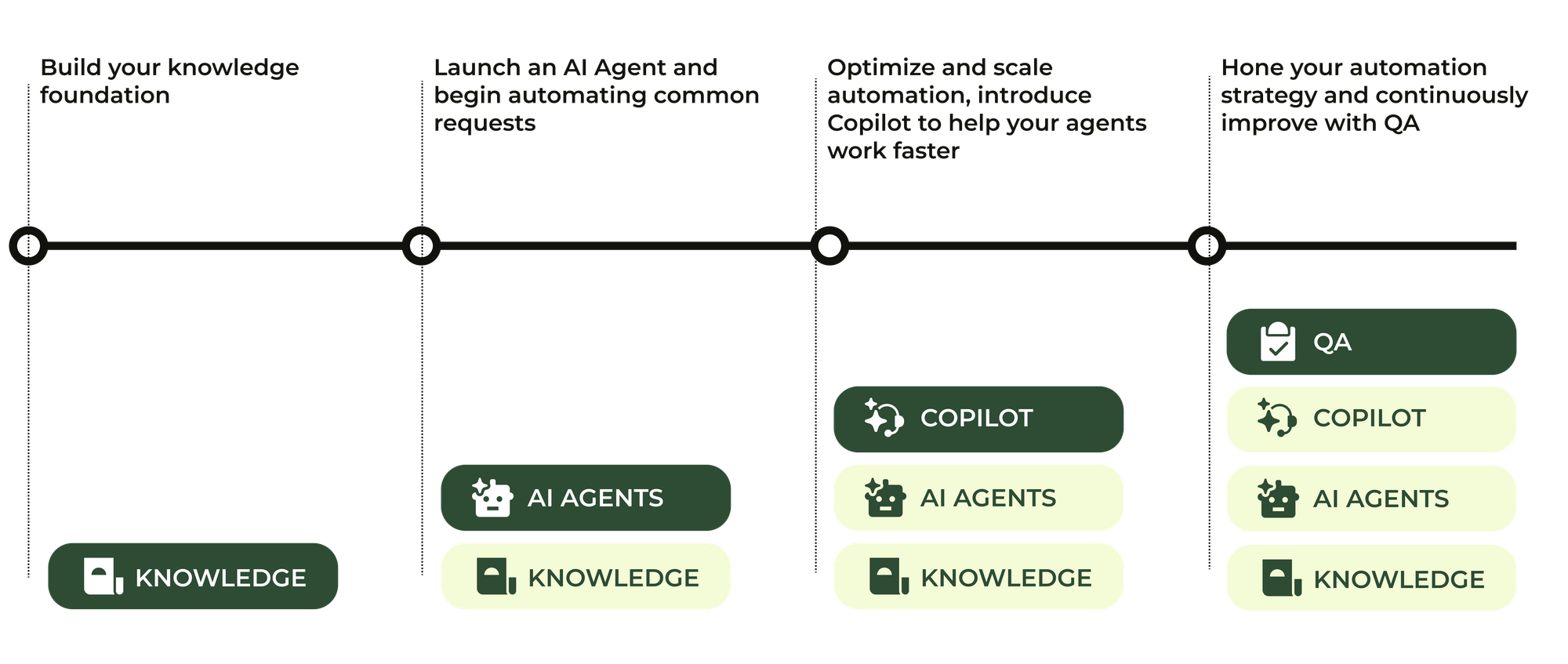
The promise of AI rests on this foundation. Accurate, up-to-date knowledge leads to faster and more dependable resolutions. Fragmented or outdated content does the opposite: it creates confusion, inconsistent experiences, and erodes trust in your AI tools.
Within Zendesk's AI Maturity Framework, knowledge is the essential starting point. Moving from basic automation through agent assistance to fully autonomous AI Agents all depends on having knowledge that is robust, well-organised, and current.
What’s AI-ready knowledge?
For AI-powered resolutions to be accurate and trustworthy, your knowledge needs to meet a few critical standards:
- Accurate and current. Outdated content is the fastest way to undermine trust. When knowledge is reliable and up to date, customers get dependable answers and AI can do its job consistently.
- Connected and consistent. Fragmented knowledge sources lead to fragmented experiences. AI works best when it draws from a single, harmonised foundation where answers don't conflict with each other.
- Structured and searchable. Well-structured knowledge, aligned with customer intents, makes it easier for both AI and humans to find what they need quickly. That means clear and descriptive titles, articles focused on a single idea, and bullet points or numbered steps that are easy to scan.
- Governed and measurable. Good knowledge management requires defined ownership, regular review cycles, and usage analytics tied to business outcomes like resolution times and self-service rates. Without governance, quality and relevance drift over time.
Together, these attributes form the foundation of AI-ready knowledge. They're what allows Zendesk's Resolution Platform to deliver smarter automation, better agent workflows, and consistent customer experiences.
Moving to an AI-powered support experience also means changing the way we interact with knowledge. We're seeing that shift play out in a few distinct ways:
| Traditional Approach | AI-Ready Approach |
|---|---|
| Knowledge is a destination (i.e. a help center) | Knowledge is an infrastructure that powers every resolution |
| Knowledge can be “set and forgotten” | Knowledge must be continuously governed and improved |
| Knowledge is written primarily for humans | Knowledge must be readable and retrievable by AI |
How to build AI-ready knowledge
Becoming AI-ready isn't a one-time project. It's an ongoing journey of planning, building, launching, and refining your knowledge assets. Each phase feeds into the next, forming a learning loop that helps your organisation adapt alongside your customers and your AI capabilities.
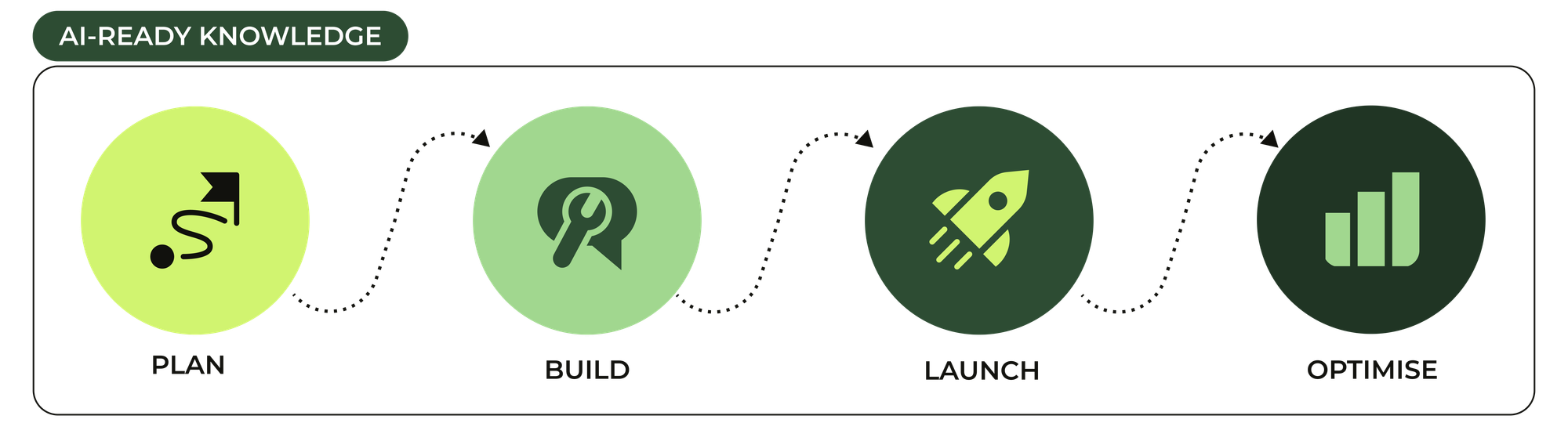
Step 1: Plan
Start by setting clear business goals and understanding the different audiences your knowledge needs to serve: customers, agents, and AI. Take stock of where your content stands today, identify the gaps, and align knowledge creation to the customer intents that matter most. Get governance structures in place early so your knowledge stays accurate, relevant, and accountable as it scales.
Step 2: Build and connect
Turn your plan into practice by creating well-structured, standardised articles that directly address user needs. Connect disparate knowledge sources, from internal wikis to external repositories, into a single unified foundation. Tools like Knowledge Builder can help accelerate content creation and make sure your knowledge base is both comprehensive and optimised for AI retrieval.
Step 3: Launch and activate
Put your knowledge to work across channels. Enable generative search to surface instant, relevant answers. Give agents seamless access to knowledge within their existing workflows. Deploy AI Agents to handle frequent queries automatically, always backed by clear confidence thresholds and escalation paths.
Step 4: Optimise and improve
Use analytics and user feedback to spot where things can be better. Work with agents and customers to fill gaps, refine content, and keep pace with evolving needs. Regular review cycles and iterative updates are what keep your knowledge base growing smarter over time.
Plan
Set your vision and foundation
Consider your team's goals
Before anything else, get clear on what you're actually trying to achieve. Your goals will shape your entire knowledge strategy, from what you write to how you measure success.
Are you trying to increase your automated resolution rate? That means giving your AI Agents the articles and procedures they need to deflect tickets without agent involvement. Is the priority raising CSAT? Then the focus shifts to accuracy and completeness: answers that are consistently right build customer trust faster than anything else. Or are you looking to reduce average handling time? In that case, surfacing the right article to agents at the right moment via Agent Copilot is where your energy should go.
Each goal points to different KPIs. Automated resolution rate and deflection volume matter most if you're chasing automation. Knowledge gap closure rate and article usage become important when improving AI quality. Time-to-first-reply and agent productivity metrics tell the story when the focus is on agent efficiency. Getting this straight early means you're not just building a knowledge base; you're building one that moves the numbers you care about.
Identify your audience and how AI and knowledge will serve them
The first distinction to make is whether you're building for customer service, employee service, or both. On the customer service side, your audience is external: customers reaching out about orders, bookings, billing, or product issues. On the employee service side, your audience is internal: employees contacting IT about a broken device, HR about a leave request, or facilities about an office issue. The nature of those questions is fundamentally different. Employee service tends to involve more service requests and policy queries, handled by specific departments with strict access controls. That affects not just what you write, but how you structure and restrict your knowledge. Worth knowing that Zendesk now offers a dedicated Employee Service Suite alongside the traditional Customer Service Suite, and these typically run as separate instances, so your knowledge strategy needs to account for that split from the start.
Within each context, knowledge serves multiple audiences at once. Your Help Center articles reach customers or employees directly through self-service browsing and generative search. Those same articles power your AI Agents, feeding generated replies across the web widget and messaging channels. In Agent Workspace, agents access the same knowledge base through the Knowledge panel in the Context Panel sidebar. Agent Copilot draws from it too, suggesting replies based on your articles and procedures combined. Each audience has different needs. Customers and employees need clear, jargon-free language. Agents need enough procedural detail to act. AI needs clean structure and unambiguous instructions to retrieve and apply content reliably. Writing for all three at once requires deliberate choices about structure, tone, and scope.
Baseline knowledge health and map top intents
Before you start creating or restructuring content, take stock of what you already have and where the gaps are.
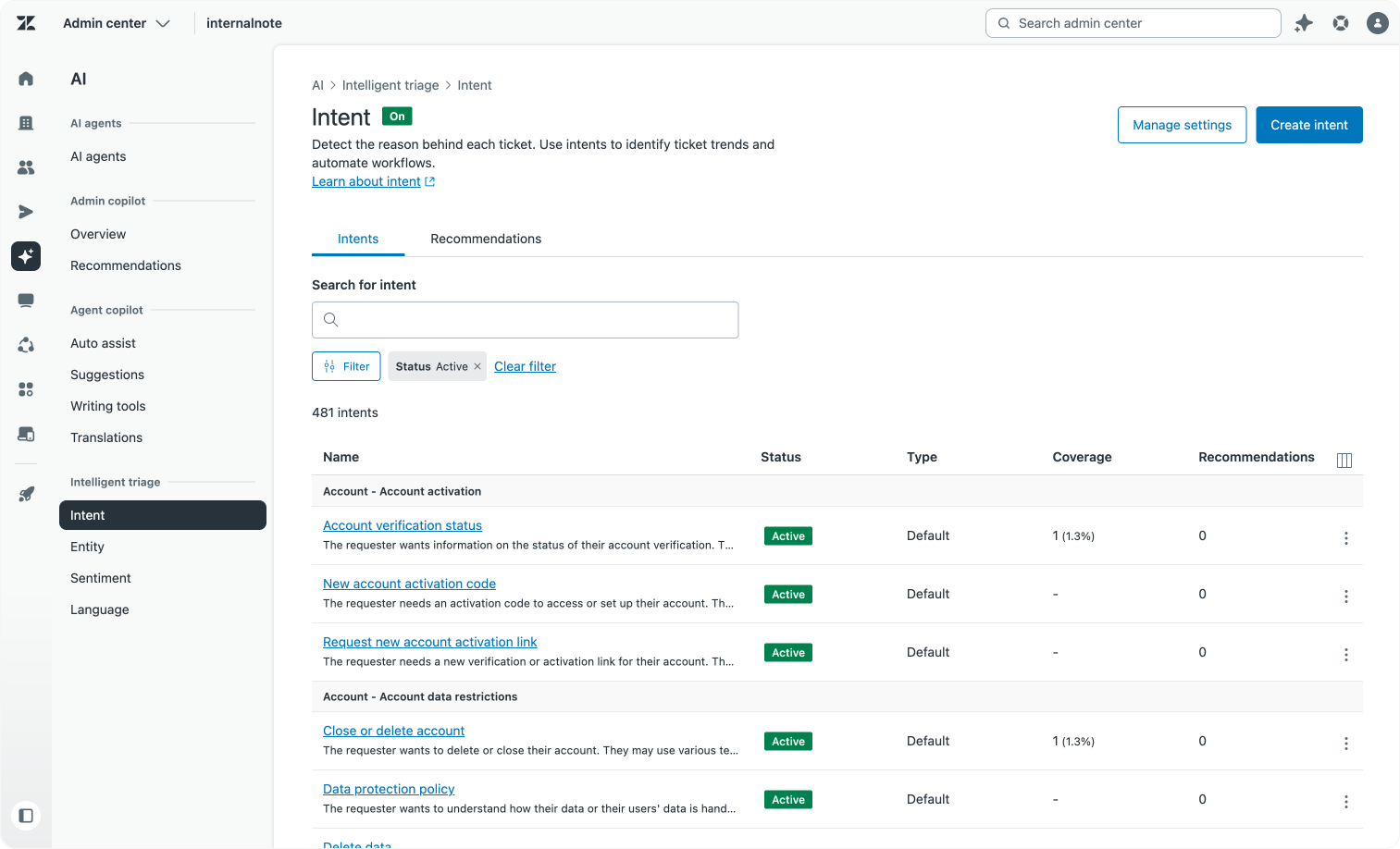
In Zendesk, a good starting point is the Intelligent Triage dashboard in Analytics. This shows which intents are detected most frequently across your incoming tickets, giving you a data-driven view of what customers are actually asking about rather than what you assume they're asking about. Cross-reference that with your self-service metrics: which searches in your Help Center return no results? Which articles have high view counts but low resolution rates? These signals point directly to where your knowledge is missing or falling short.
If you're pulling in knowledge from outside the Help Center, map those sources too. Zendesk currently supports Confluence as a knowledge connector, with SharePoint, Notion, Asana and Google Drive on the roadmap. Understanding what lives where helps you avoid duplication and decide what should be centralised versus kept external.
This audit will almost always turn up gaps, overlaps and inconsistencies. Those are exactly the things that trip up AI. An AI Agent drawing from two conflicting articles about the same topic will produce inconsistent answers, and inconsistent answers erode trust fast.
Establish ownership and governance rules
A knowledge base without governance will drift. Articles go stale, ownership gets unclear, and before long you've got outdated content feeding your AI Agents answers that are no longer correct.
Zendesk Guide offers a few native tools to help here. On Suite Enterprise, you can use content verification to mark articles as verified and set review dates, flagging content automatically when it's due for a check. Article labels and section structure let you organise content in ways that make ownership clear and audits easier. For teams working across multiple brands or departments, Zendesk's permissions model lets you control who can create, edit and publish content, so governance doesn't rely entirely on people remembering to do the right thing.
Beyond tooling, the habits matter just as much. Assign clear owners to content areas. Build review cadences tied to product and policy change cycles. Connect knowledge quality metrics, such as article usage rates, failed search queries and knowledge gap alerts from Agent Copilot, to your broader service goals. When knowledge is treated as a living product with real owners and real accountability rather than a one-off project, it stays useful for both your customers and your AI.
Build & connect
Create consistent, connected content
Understand and prioritise key customer issues
Before writing a single article, get clear on what your customers are actually asking. In Zendesk, the Intelligent Triage dashboard in Analytics is a good starting point: it shows which intents are detected most frequently across incoming tickets, giving you a data-driven picture of what drives contact volume. Cross-reference that with your macro usage, failed Help Center searches, and knowledge gap alerts surfaced by Agent Copilot. Together these signals tell you not just what customers ask, but where your existing knowledge is already falling short.
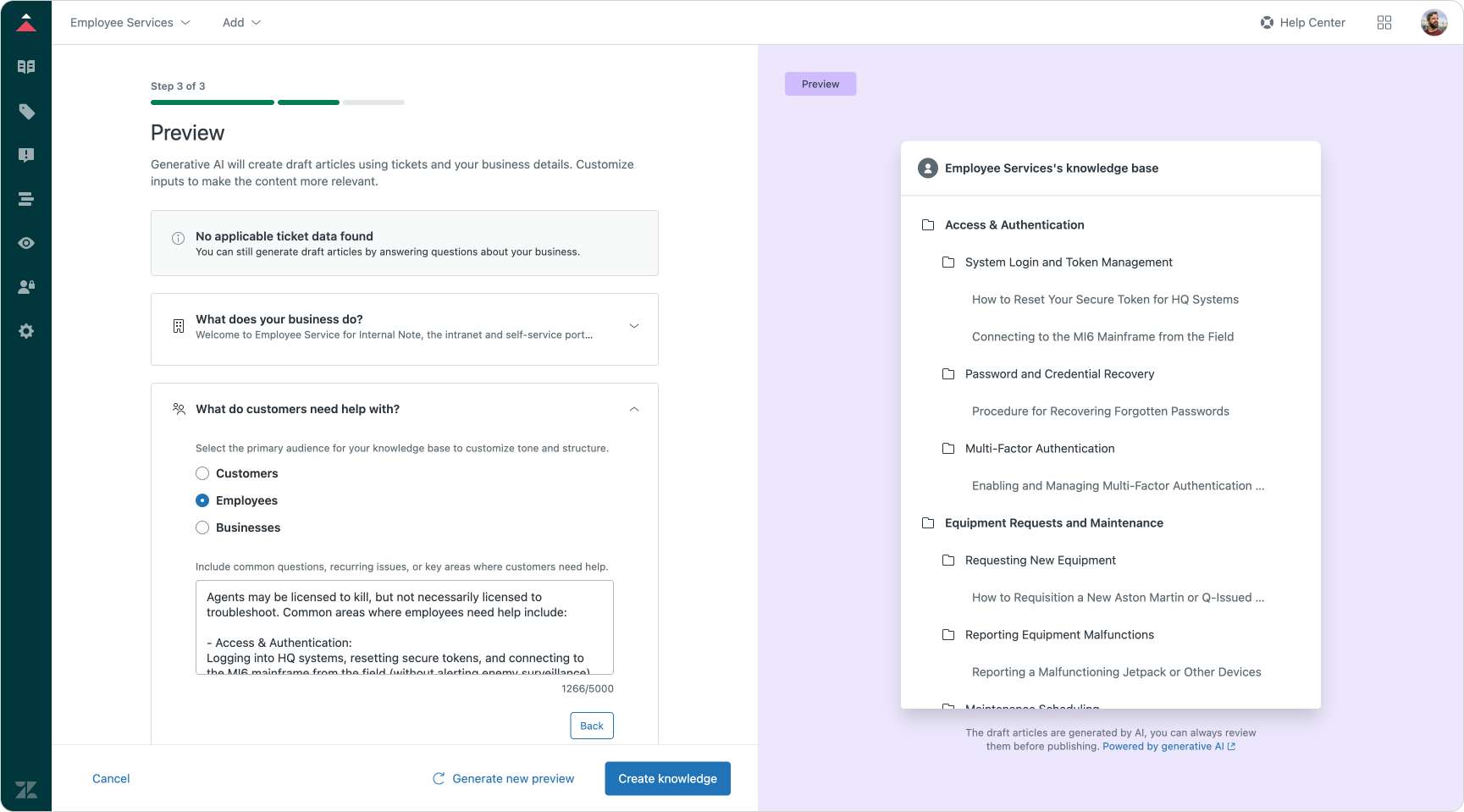
If you're starting from scratch with no Help Center at all, Knowledge Builder can give you a significant head start. It analyses your tickets from the last 30 days, looking at both the issues customers raise and the solutions agents provide, and uses that to generate a category structure filled with draft articles. The output won't be publish-ready, but it shifts your team's job from writing to validating, which is a much faster way to get knowledge out the door. Once you have a working Help Center and AI Agent generating replies, your analytics takes over and shows you what to write next.
Build consistent, structured and reusable content
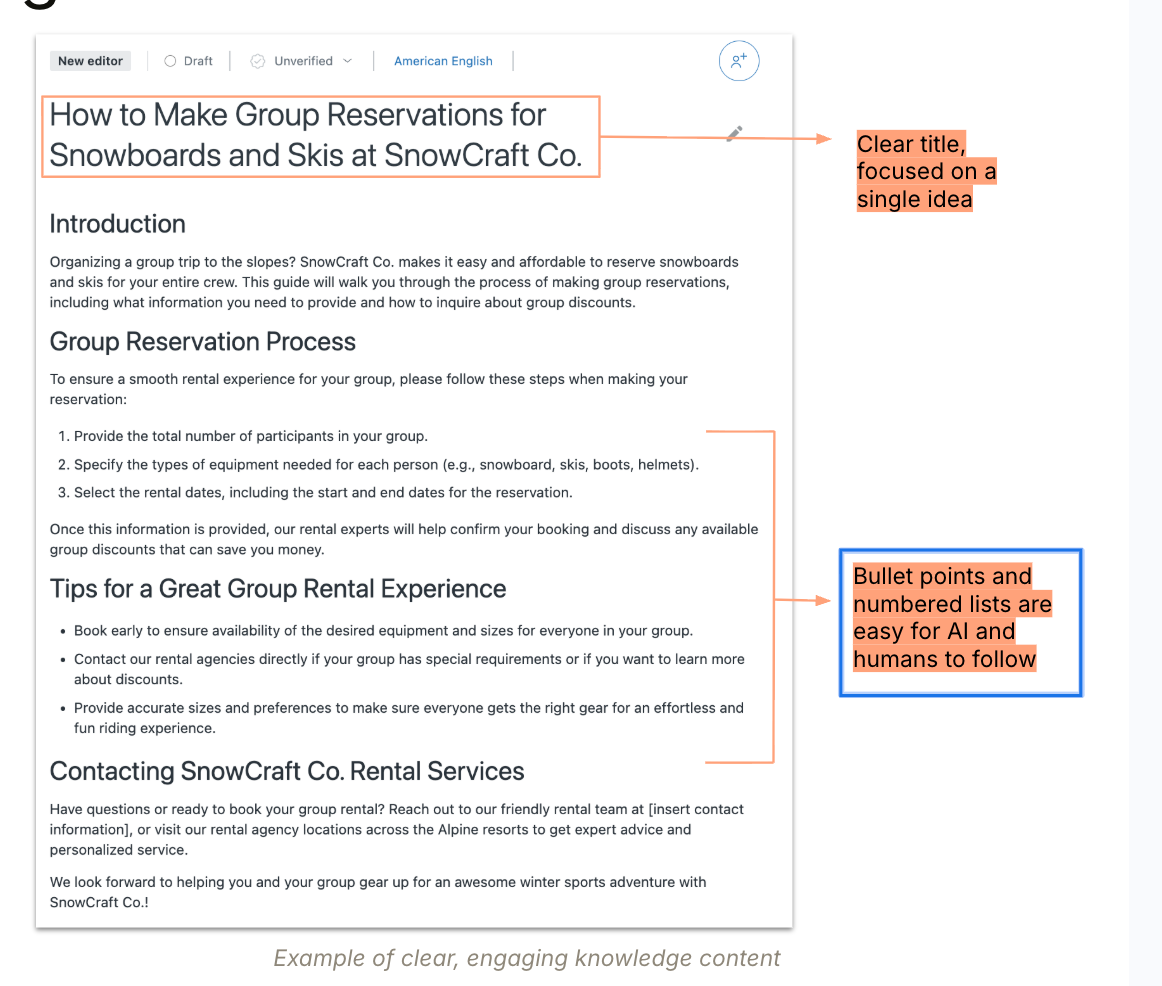
With priorities clear, the focus shifts to how you write. Keep each article focused on a single topic. Use clear, descriptive titles and a consistent hierarchy of headings so that both humans and AI can navigate the content quickly. Where the same information applies in multiple contexts, such as a procedure shared across IT and HR teams, Zendesk's Article Multi-placement lets you publish one article across up to 10 different sections and brands without creating duplicates you'll have to maintain separately.
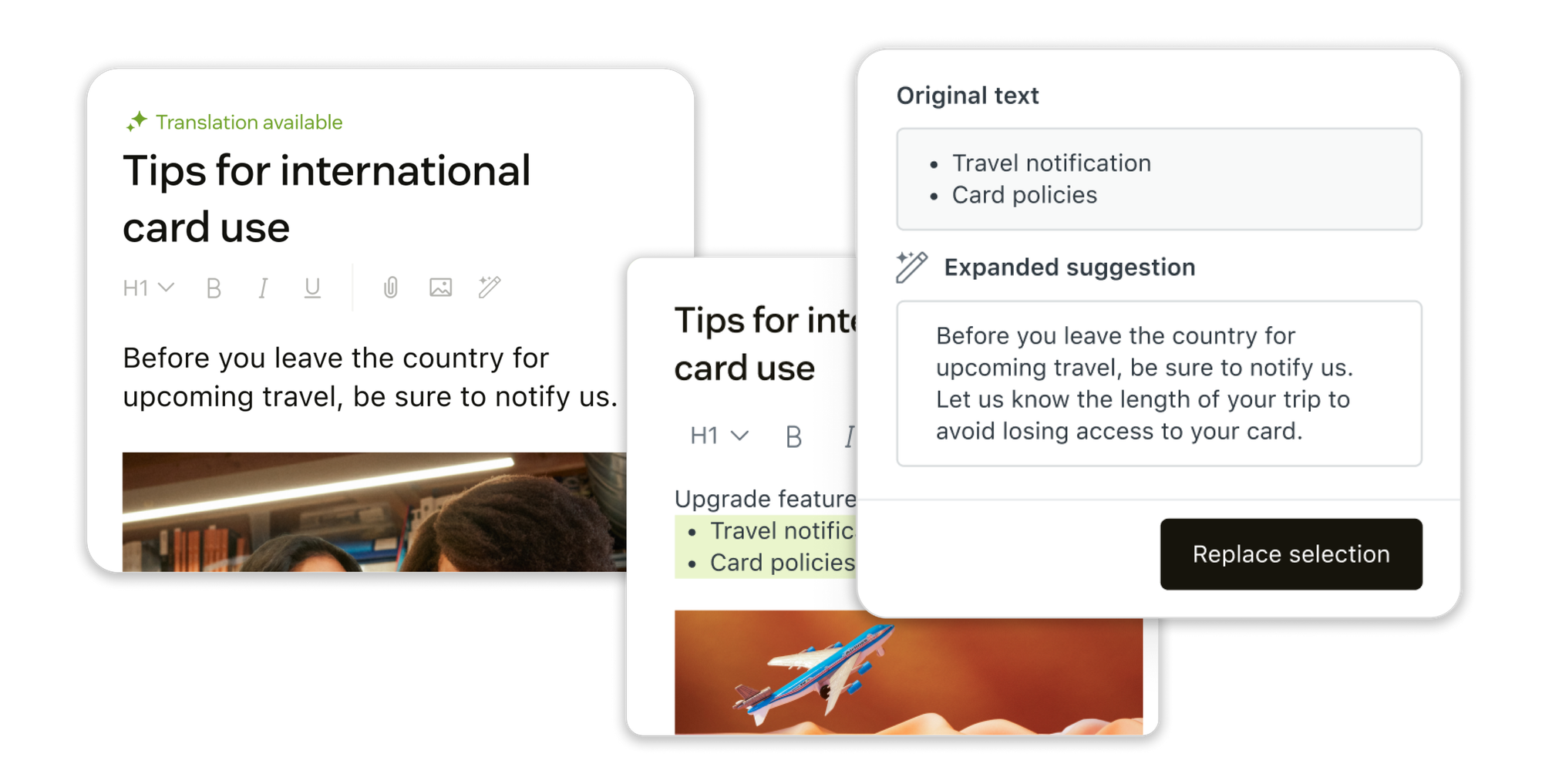
Zendesk's article editor has a growing set of AI writing tools to help here too. You can expand bullet points into full articles, simplify dense or technical content, shift the tone to match your audience, and generate a summary block for longer pieces. There's also built-in AI translation, which takes your existing article and produces translations consistent with your tone of voice and product terminology across your entire Help Center.
Optimise content for AI and customer clarity
Writing for AI requires a few deliberate habits. Keep language simple and direct. Avoid "if this, then that" conditional logic in articles, as it tends to confuse generative models. Structure steps as numbered lists rather than nested instructions, and prefer plain text over tables since AI struggles to parse tabular data reliably. If you include images or videos, always add descriptive text or ALT tags alongside them, as AI cannot interpret visual content on its own.
It's also worth separating customer-facing articles from agent-facing ones. Content written for agents can include internal procedures, escalation paths, and system-specific guidance that would be confusing or inappropriate for customers. Zendesk's segment controls let you restrict articles to agents and admins only, keeping them available in the Knowledge panel in Agent Workspace without surfacing them in the public Help Center.
Integrate and connect external knowledge sources
Your Help Center is rarely the only place knowledge lives. For many teams, critical information sits in Confluence pages, SharePoint sites, Google Drive folders, internal wikis, or your main website. Leaving these sources disconnected from Zendesk means your AI Agents and agents are only working from part of the picture.
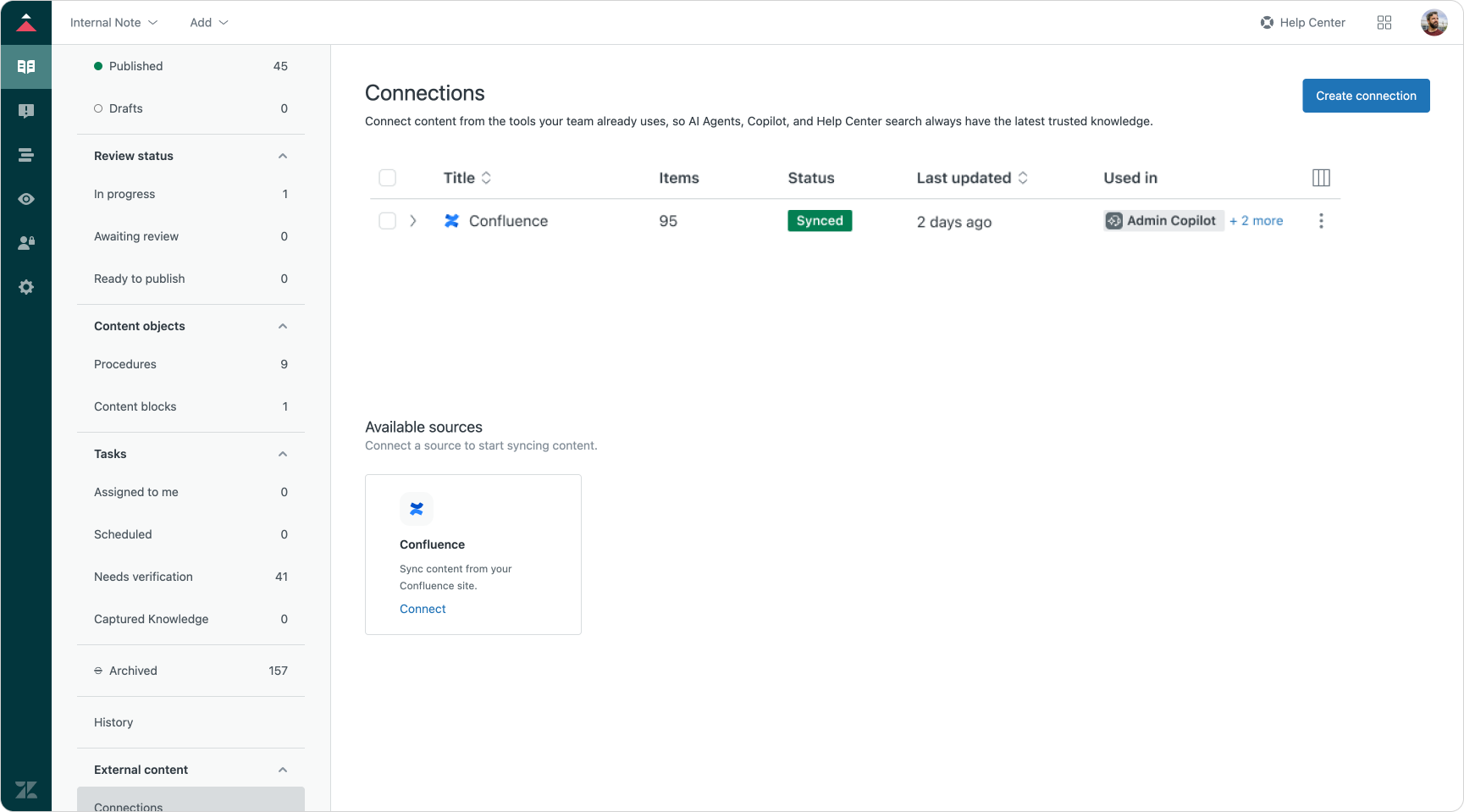
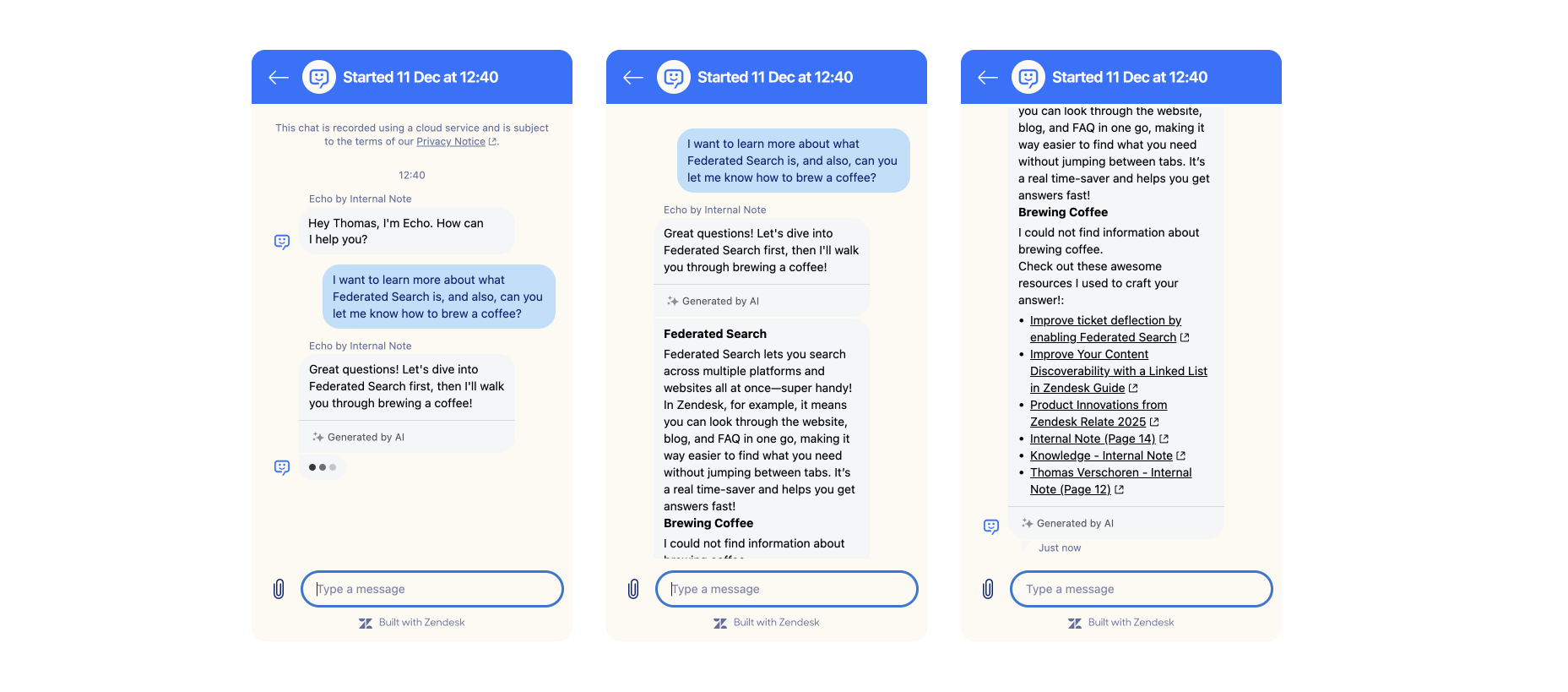
Zendesk addresses this through its knowledge graph: a unified index that brings external sources alongside your Help Center articles. Public websites can be indexed via Federated Search or a dedicated web crawler, making your product pages and documentation available as knowledge sources without any duplication. For internal tools, Knowledge Connectors handle the sync: Confluence is already supported, with SharePoint, Notion, Asana and Google Drive on the roadmap. Once connected, content from these sources appears natively in Agent Workspace and feeds AI Agents just as Help Center articles do, with usage feeding back into your analytics. The key advantage of native connectors over custom-built alternatives is that knowledge gaps and improvement suggestions propagate across all indexed sources, not just your Help Center.
Launch & activate
Deliver knowledge where it matters
Launch your help centre with AI-ready knowledge
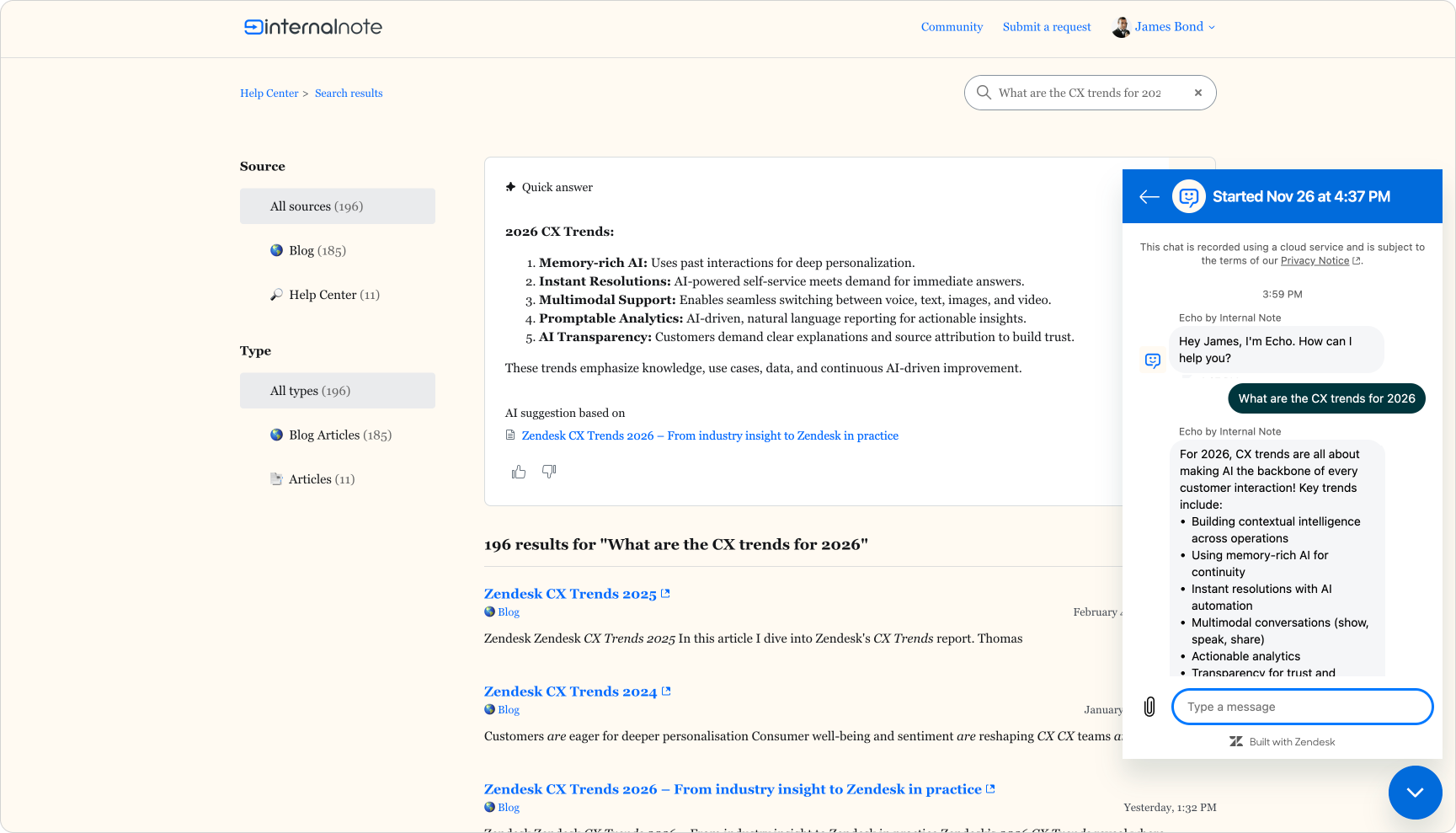
The most visible step in activating your knowledge base is enabling generative search on your Help Centre. Zendesk's Quick Answers feature places a generated response at the top of search results, drawn from your knowledge sources, so customers get a direct answer rather than a list of articles to parse. It works across both your Help Centre and the Knowledge panel in Agent Workspace, where agents get the same generated answer alongside the full article for reference. Quick Answers is now included for all Zendesk Suite customers and works across both Help Center articles and any external sources you've connected via Federated Search.
For article pages themselves, Article Summaries offer a similar benefit: a short, AI-generated overview at the top of longer articles, giving customers a quick signal of whether the content is relevant before they read on. Both features can be added without touching your article content, but they perform best when the underlying articles are well-structured and focused on a single topic.
Train human agents on how to use knowledge
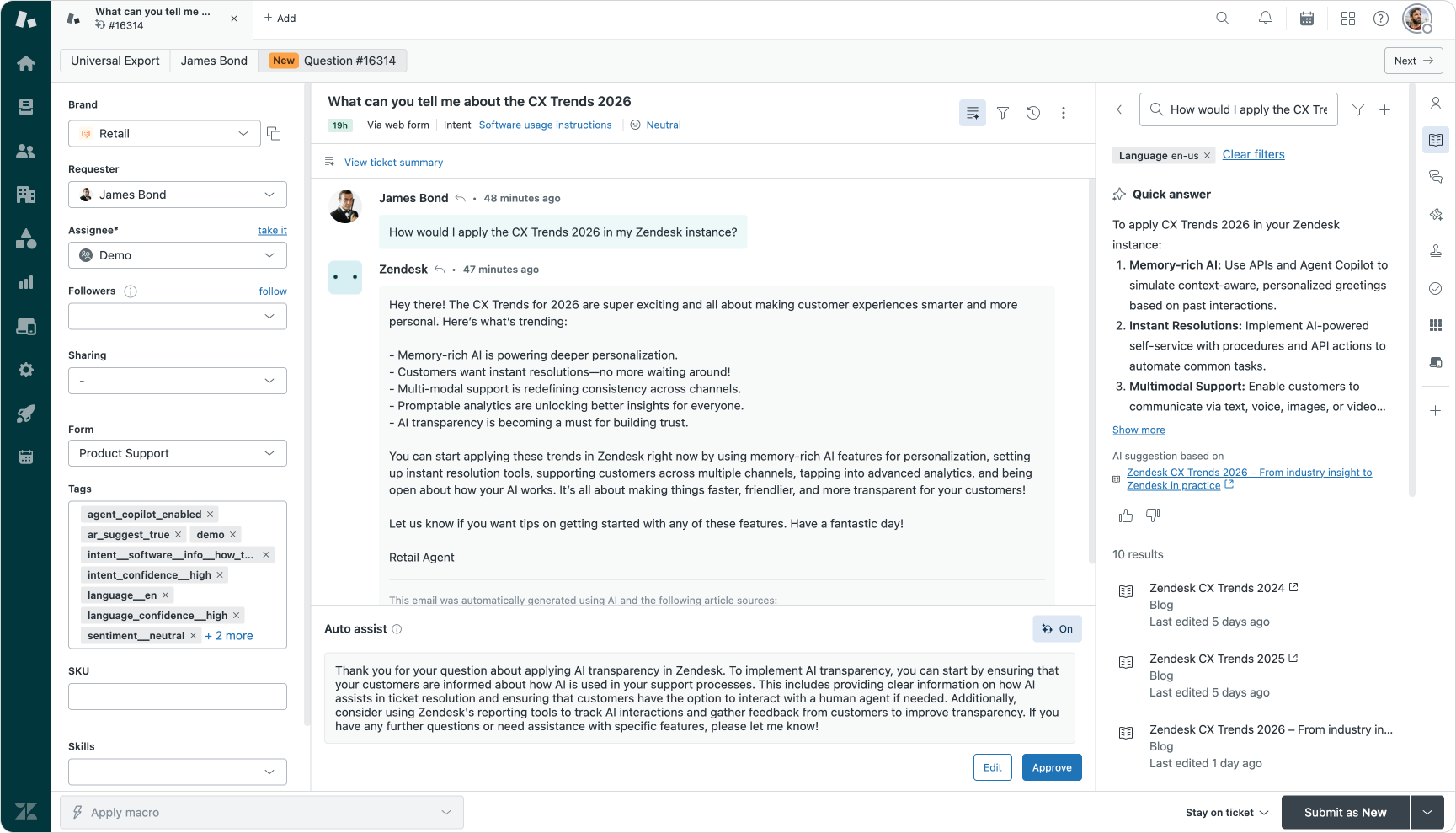
Agents are one of the most valuable and often underused parts of your knowledge feedback loop. In Agent Workspace, the Knowledge panel in the Context Panel sidebar surfaces Quick Answers and relevant articles based on the current conversation. Agents can share articles directly in replies, which both resolves the immediate question and nudges customers towards self-service for future interactions.
Equally important is what agents do when knowledge falls short. The Knowledge panel lets agents flag articles as outdated or incomplete without leaving their workflow, feeding updates directly back into the content cycle. Agent Copilot takes this further by suggesting replies based on your articles and procedures in auto-assist mode. Training agents to evaluate those suggestions critically, rather than accepting them uncritically, is key. A well-tuned Agent Copilot setup paired with agents who understand its outputs is significantly more effective than either working in isolation.
Scale automated resolutions with AI agents grounded in knowledge
Connecting AI Agents to your verified knowledge sources lets you automate high-volume, routine questions at scale. Start with your top customer intents, which the Intelligent Triage dashboard in Analytics will surface for you. Build out use cases for those intents first, since that's where you'll see the fastest impact on your automated resolution rate.
Escalation paths matter as much as the automation itself. Every AI Agent procedure should end somewhere deliberate: a resolution, a loop back to gather more context, or a clean handover to a human agent with full conversation history attached. As you expand automation, monitor your AI Agents closely via the automated resolutions dashboard in Admin Center. Resolution rates, unresolved conversation patterns, and the points where customers most often request a human agent are all signals that show you where to refine your procedures and fill knowledge gaps. The feedback loop between your analytics and your content is what moves your automation rate from a starting point to something genuinely impactful.
Optimise & improve
Keep your knowledge fresh and accurate
Monitor and measure AI and knowledge performance
Good knowledge management is driven by data. Zendesk gives you several places to look. The Knowledge report in Analytics tracks article performance, search queries, and, with the dedicated Quick Answers tab, how your generative search responses are landing with customers. Failed searches and low-rated Quick Answers are direct signals of content gaps. The Intelligent Triage dashboard shows you which intents are coming in at volume but aren't being resolved automatically, pointing to where new or improved articles would have the most impact.
On the AI Agent side, the automated resolutions dashboard in Admin Center tracks how many conversations are being resolved without agent involvement, and where that process is breaking down. Unresolved conversations and escalation patterns are worth reviewing regularly. They tell you whether your knowledge is genuinely answering the question or just surfacing something adjacent. The AI Insights Hub in Admin Center pulls this together further, offering specific recommendations for your setup and, more recently, the ability to generate and deploy trigger changes directly from those insights.
Collaborate and iterate for continuous improvement
Your agents see the gaps before your analytics do. The Knowledge panel in Agent Workspace lets them flag articles as outdated or incomplete without leaving the ticket they're working on. That flag goes straight back into the content workflow, making agents active contributors to the quality of your knowledge base rather than passive consumers of it.
The article editor's AI writing tools make acting on those flags faster. Agents or content owners can expand a rough note into a full article, simplify a dense procedure, or shift the tone to match the right audience, all without starting from scratch. Combined with built-in AI translation, it becomes realistic to keep a multilingual knowledge base current without a dedicated translation team.
Beyond agents, keep an eye on your Help Center search data, community posts, and CSAT comments. These surfaces often surface frustration with missing or unclear content before it shows up in your ticket volume.
Evolving your knowledge for the future
Building AI-ready knowledge is a strategic commitment and an ongoing journey. As this article has shown, successful AI adoption depends on having a solid foundation of accurate, connected, and well-governed knowledge that serves customers, agents, and AI in equal measure.
To keep that foundation strong, consider making these five strategies a regular part of how you manage knowledge:
- Analyse ticket data. Identify the issues that matter most to your customers so your content creation stays focused and impactful.
- Look beyond tickets. Use macros, tags and community feedback to build a fuller picture of customer pain points.
- Leverage what already exists. Agents' informal notes, internal wikis and older help articles are often a goldmine. Use them to accelerate your knowledge base rather than starting from scratch.
- Listen to your community. Monitor forums and social channels to catch emerging questions and knowledge gaps before they show up in your ticket volume.
- Optimise for AI. Clear structure, simple language and thoughtful labelling make knowledge easier for both AI and humans to find and use.
Together, these strategies form a continuous loop: plan, build, launch, monitor and refine. Each pass makes your knowledge sharper and more effective. Treat knowledge as a strategic product with real owners and real metrics, and it becomes the foundation that lets your AI scale reliably.
AI readiness is not a one-time project. It's an ongoing capability. The teams that invest in their knowledge foundations today are the ones best placed to deliver genuinely better service tomorrow.