

How to eliminate duplicate tickets and adopt the new AI Agent ticket model for AI Agents Advanced
Zendesk now creates a ticket for every interaction, unifying AI and human workflows into one ticket throughout the conversation. This might cause duplicates for previous workarounds. The article explains ticket lifecycle changes and how to adapt.

How to eliminate duplicate tickets and adopt the new AI Agent ticket model for AI Agents Advanced
Zendesk now creates a ticket for every interaction, unifying AI and human workflows into one ticket throughout the conversation. This might cause duplicates for previous workarounds. The article explains ticket lifecycle changes and how to adapt.

On this page
Zendesk’s approach to automation is built around a continuous learning loop. Every customer interaction feeds into quality assurance, intent detection, and knowledge improvement. But for that loop to work, one thing is essential: complete visibility across all conversations.
Until recently, that visibility wasn’t always there.
AI conversations that weren’t escalated lived separately from tickets in Agent Workspace. Only escalated interactions became tickets, which meant reporting, QA, and optimisation were all working with an incomplete picture. To solve this, many customers built their own workarounds, manually creating tickets to ensure conversations were logged and usable.
Those workarounds were not wrong. They were necessary. But they’re no longer needed.
AI Agent Tickets
With the introduction of AI-agent tickets, every interaction, whether handled by AI or a human, is now automatically created and tracked as a ticket from the very beginning. Every interaction will create a ticket, either an AI Agent ticket for logging purposes, or it's converted to a Support ticket after escalation. This feature can be enabled today, or starting May 4th, it'll be enabled for every customer as a core platform feature.
 Thomas Verschoren
And while this major shift in how tickets are created does require some getting used to, it closes a major gap in the learning loop:
every interaction is now visible, measurable, and improvable in one place
For some existing customers, however, this change introduces an unexpected challenge: duplicate tickets.
Why duplicate tickets are happening
Even before these tickets, resolved by an AI Agent, were created automatically in Zendesk, some customers already used workarounds in their setup to log resolved interactions in Agent Workspace.
But now that Zendesk offers this capability out of the box, there's two mechanisms running simultaneously. The native AI Agent ticket feature, and those tickets manually created via a Create Ticket step, an API Integration, or email escalation. Which results in two tickets being created in your instance.
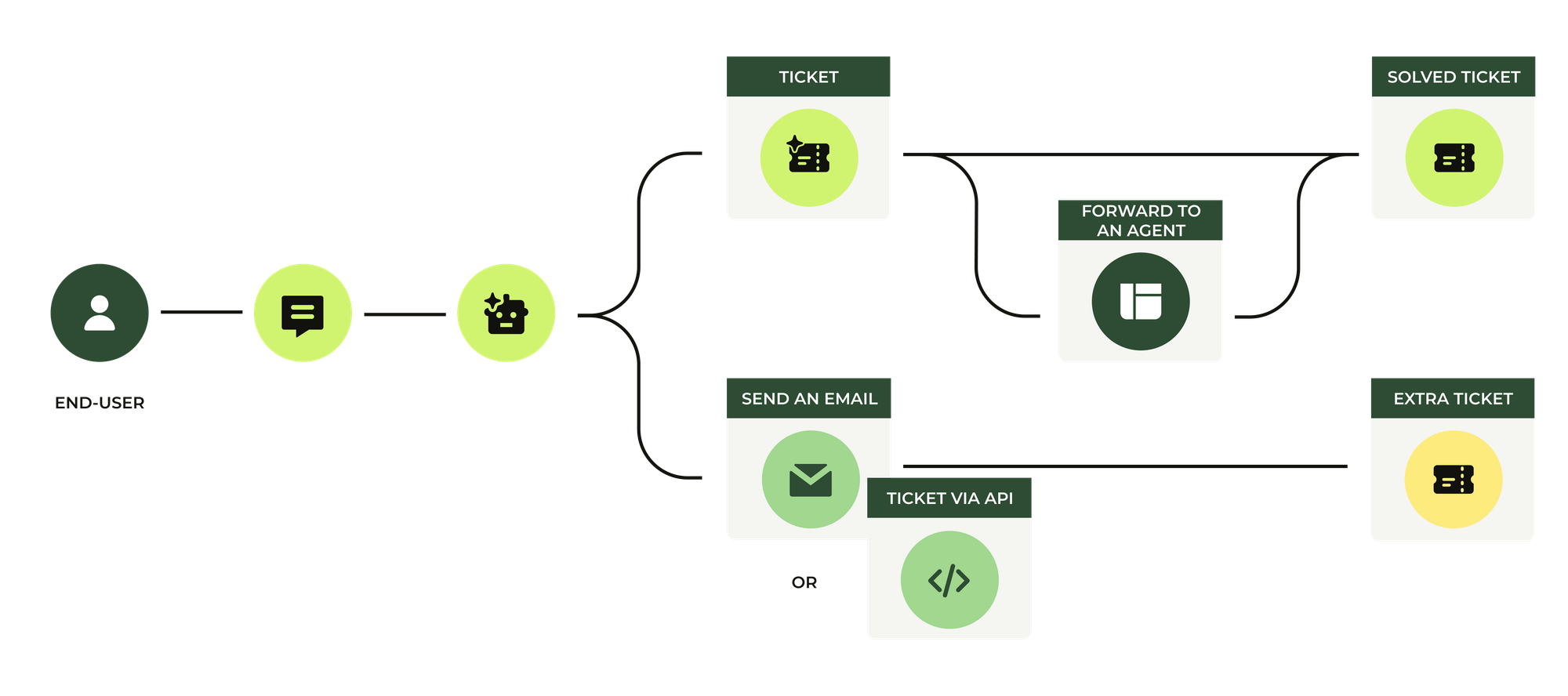
Typically, this flow looks like this:
- A native AI-agent ticket created at the start of the conversation
- A new ticket added after the conversation resolves, or upon escalation via a custom setup.
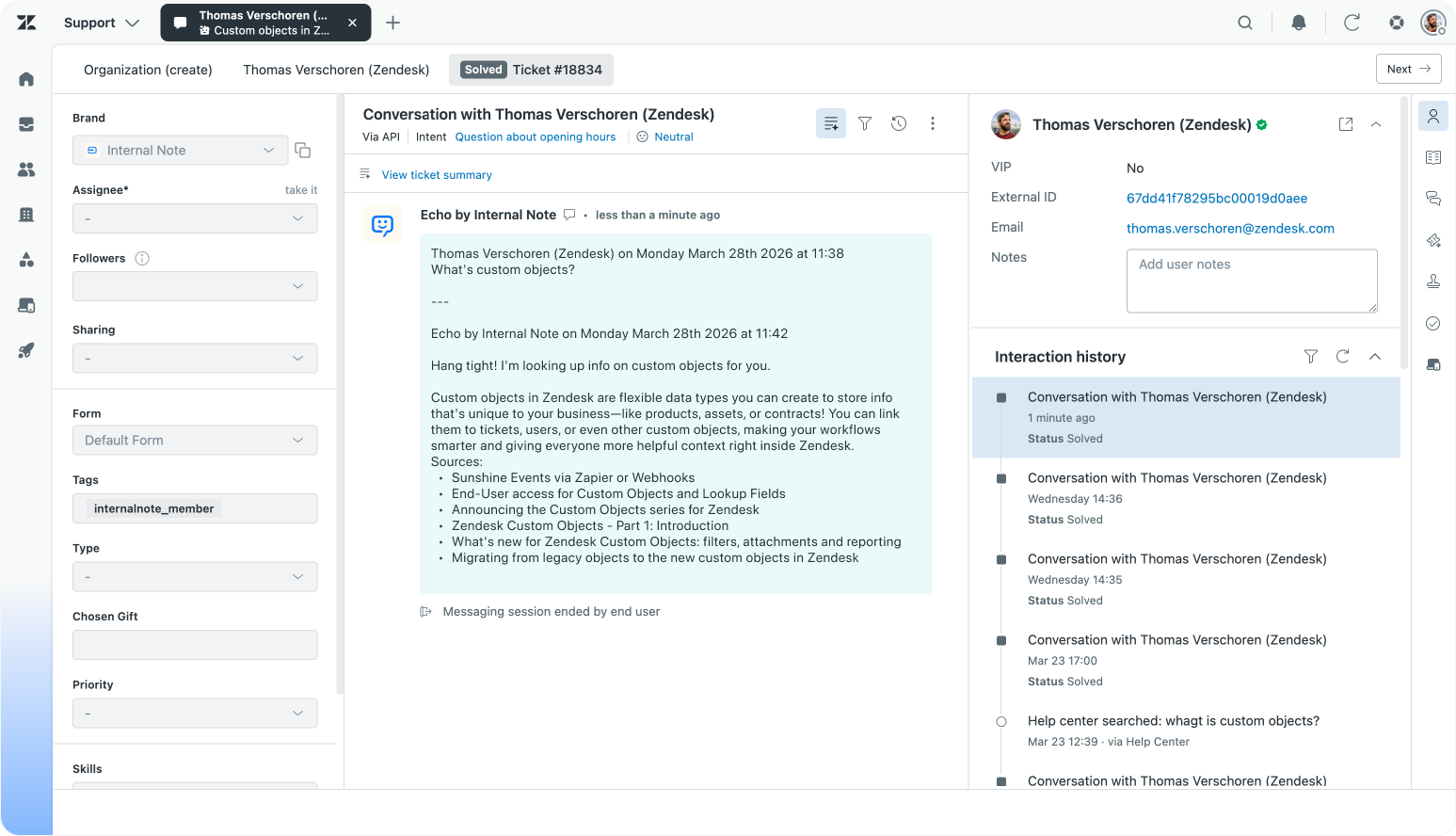
The result is two tickets for the same conversation. This means context is split across tickets, reporting becomes inconsistent, human agents work on the wrong tickets, and QA and analytics lose accuracy since some tickets reflect a resolution, while others remain in limbo.
How tickets work today
To understand how to fix duplication, it helps to understand the ticket lifecycle first. I wrote an in-depth overview on this blog if you want the details, but for now a short summary should suffice.
 Thomas Verschoren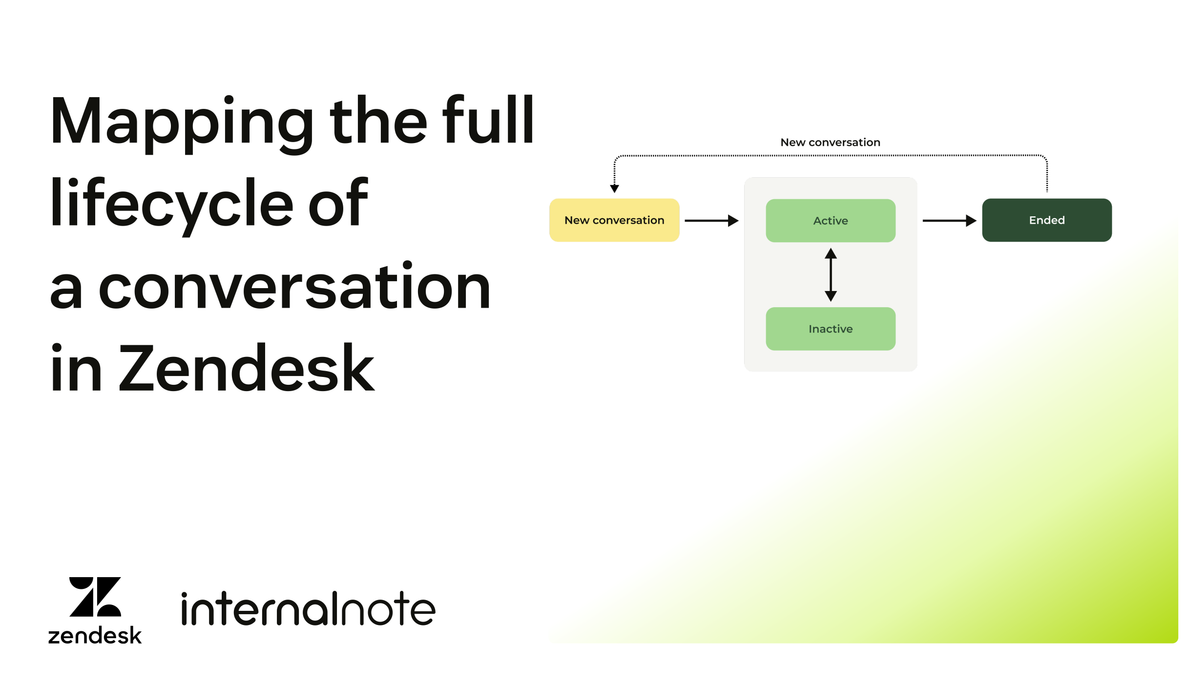
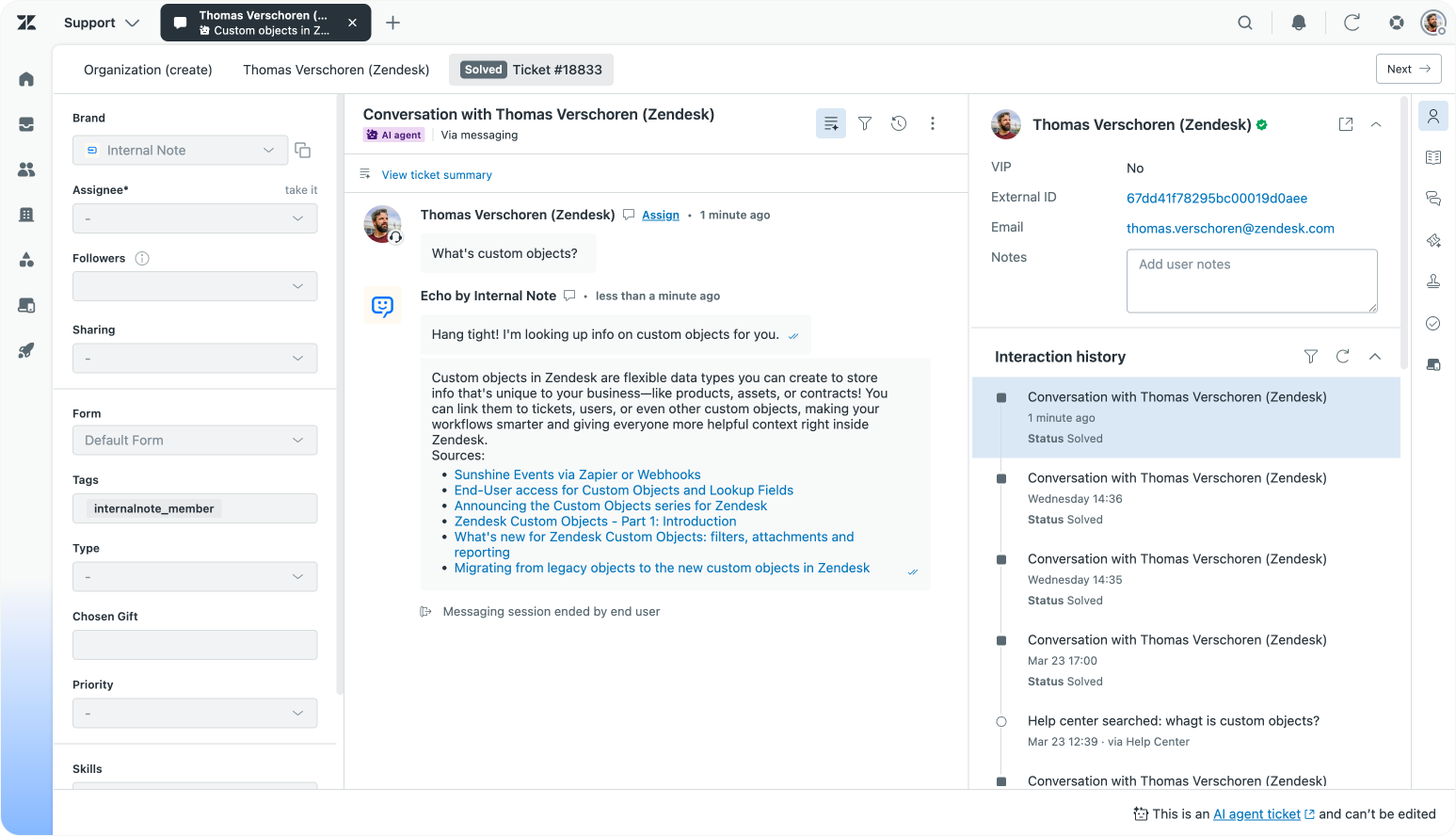
The moment a customer starts a conversation with your AI agent, a ticket is created automatically. This ticket is immediately visible in Agent Workspace and is updated in real time as the conversation progresses.
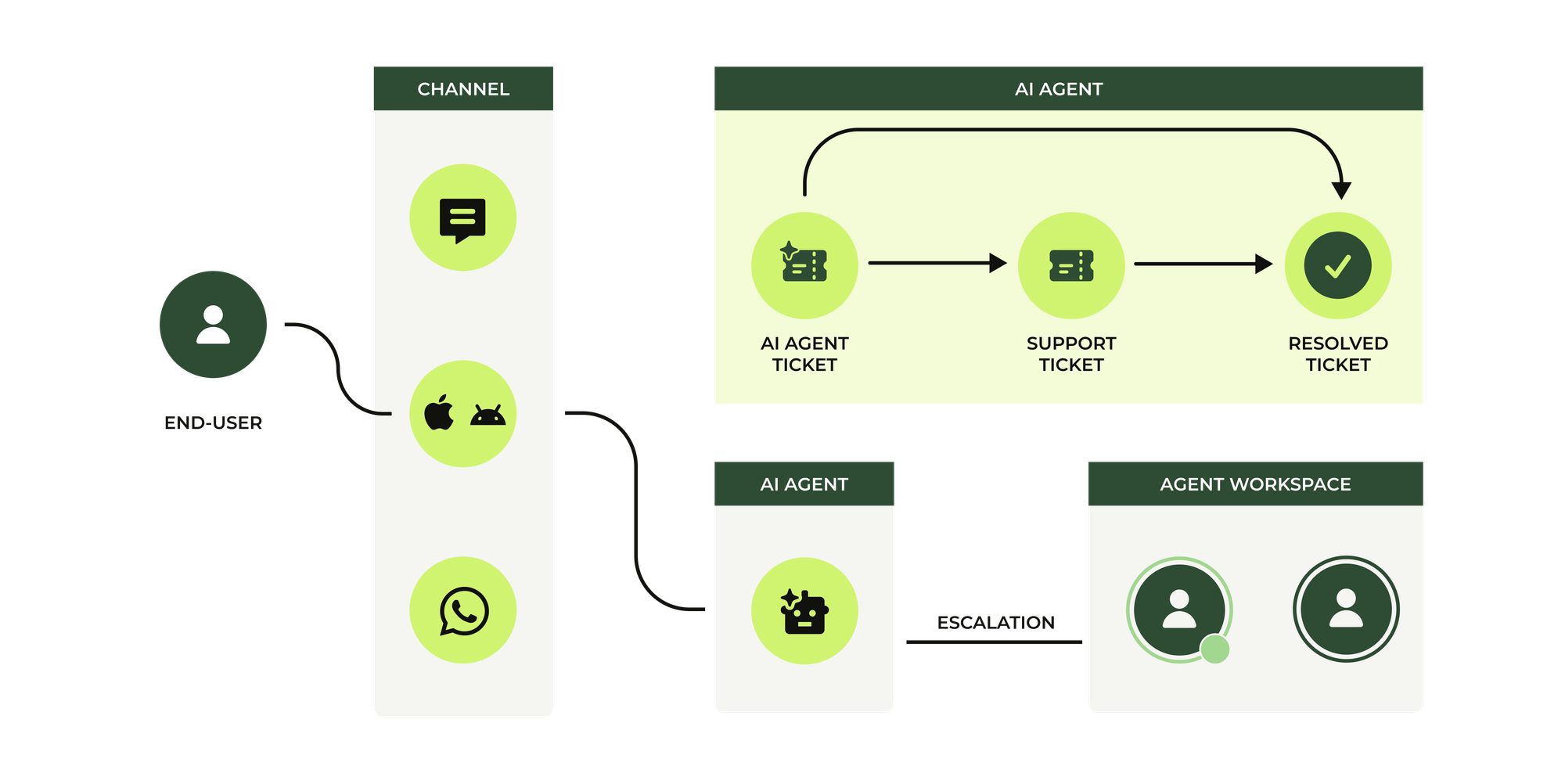
While the AI agent is handling the interaction, you can enrich that ticket, adding tags, setting fields, and capturing structured data via procedures and actions in the AI Agent dashboard.
From there, two things can happen.
- If the AI agent resolves the request, the ticket is marked as solved and later closed automatically. It remains available for reporting, QA, and historical analysis.
- If escalation is required, either by design or because no answer is found, control is passed from the AI agent to a human agent.
No new ticket is created however, it's that same ticket that gets passed to your team. It becomes a standard Zendesk support ticket, carrying the full conversation history and all metadata captured during the interaction.
Additionally, AI agent tickets include helpful indicators when an automated resolution is consumed:
- The Resolution type field lists Automated as the value.
- In the Events view, a system entry notes the date and time the automated resolution occurred.
This means every ticket starts with an AI agent and is resolved either by the AI agent or a human agent, where previously, tickets only existed after escalation. Now, they exist from the start, and follow the entire journey.
The above might be a bit confusion if you're not clear on what interaction types Zendesk offers nowadays.
- Tickets refers to any customer interaction logged in Zendesk regardless of channel
- Messaging tickets, or conversations, are handles via the web widget, mobile sdk or social channels like WhatsApp
- Email based tickets are created via email or webforms, and responses get send out via email. Any messaging or voice conversation can be turned into an email based conversation.
- There's two ticket types: AI Agent tickets are owned and updated by AI Agents and their surrounding procures and actions. Support tickets are updated by human agents, action flows or triggers.
Removing duplicate workflows
Everything in this article comes down to one rule:
One interaction = one ticket.
Zendesk's native AI Agent tickets feature is here to stay. So in order to remove duplication you need to disable any custom workaround you added.
In short, there's four different methods to create tickets in Agent Workspace based on actions in AI Agents Advanced, and each one of them is impacted by the new AI Agent tickets behaviour.
| Method | Single ticket | Ends conversation | Escalation | Resolution |
|---|---|---|---|---|
| Forward to Agent | ✅ | ✅ | AI Agent ticket turns into support ticket | AI Agent ticket is solved |
| Create Ticket action | ❌ | ❌ | Change to Forward to Agent + actions | Remove step, replaced by AI Agent ticket |
| API Integrations | ❌ | ❌ | Change to Forward to Agent + actions, unless if you escalate to other instance. | Remove step, replaced by AI Agent ticket |
| Send an email | ❌ | ✅ | Do not use, legacy method. Change to Forward to Agent combined with Action Builder | Remove step, replaced by AI Agent ticket |
Forward to an Agent
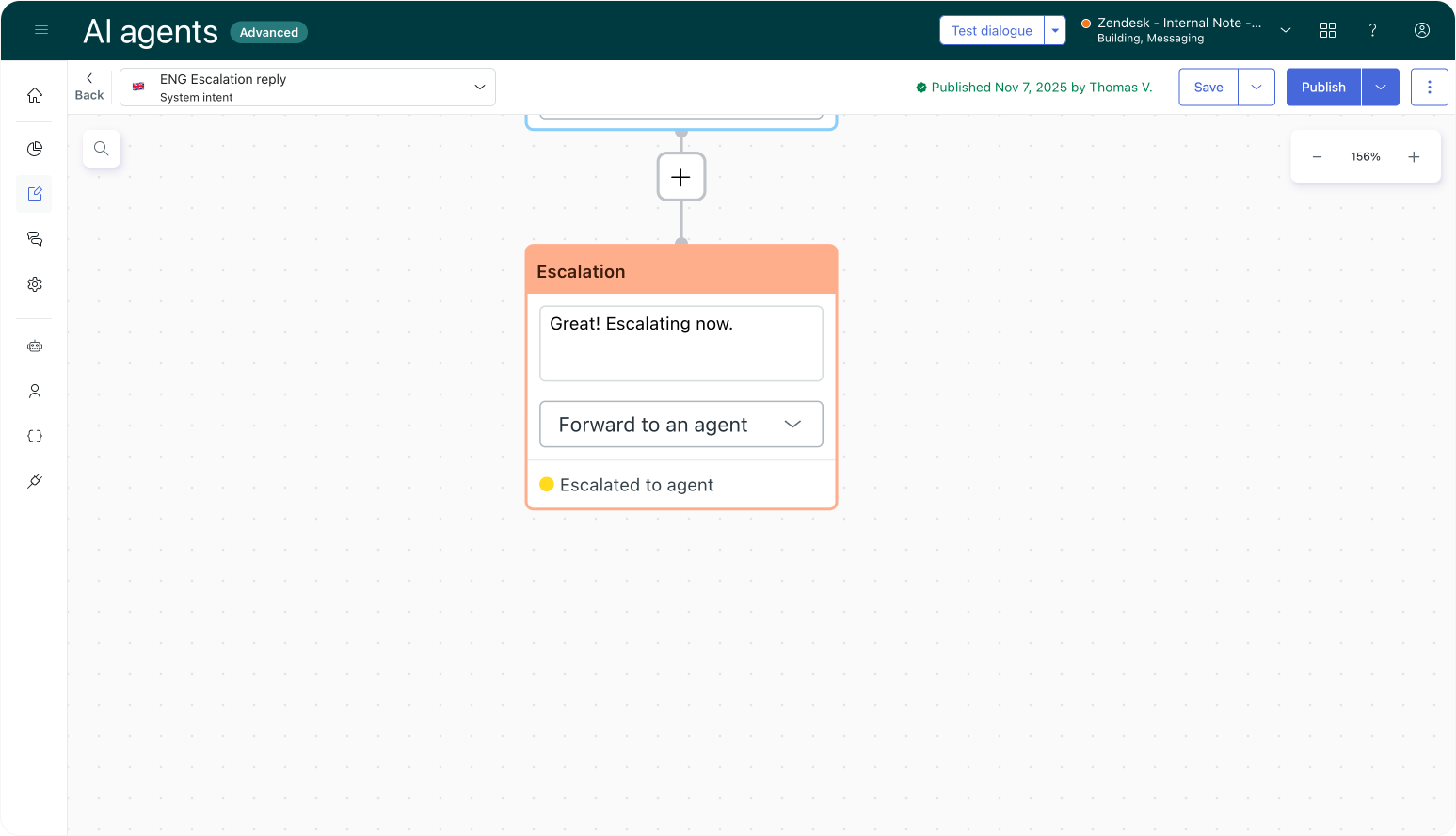
Most dialogue flows use a Forward to Agent escalation step to pass a ticket from AI Agents to human agents. This block isn't really impacted by the AI Agents ticket feature. The only new thing here is that the interaction appears in Agent Workspace before escalation happens. But since this ticket is an AI Agent ticket and not yet escalated, it won't show up in your views, and isn't picked up by Omnichannel Routing.
Once the escalation step is reached though, the ticket is converted to a Support ticket, at which time you can route, assign and modify the ticket within Agent Workspace.
This is the scenario where everything just works.
Create Ticket action
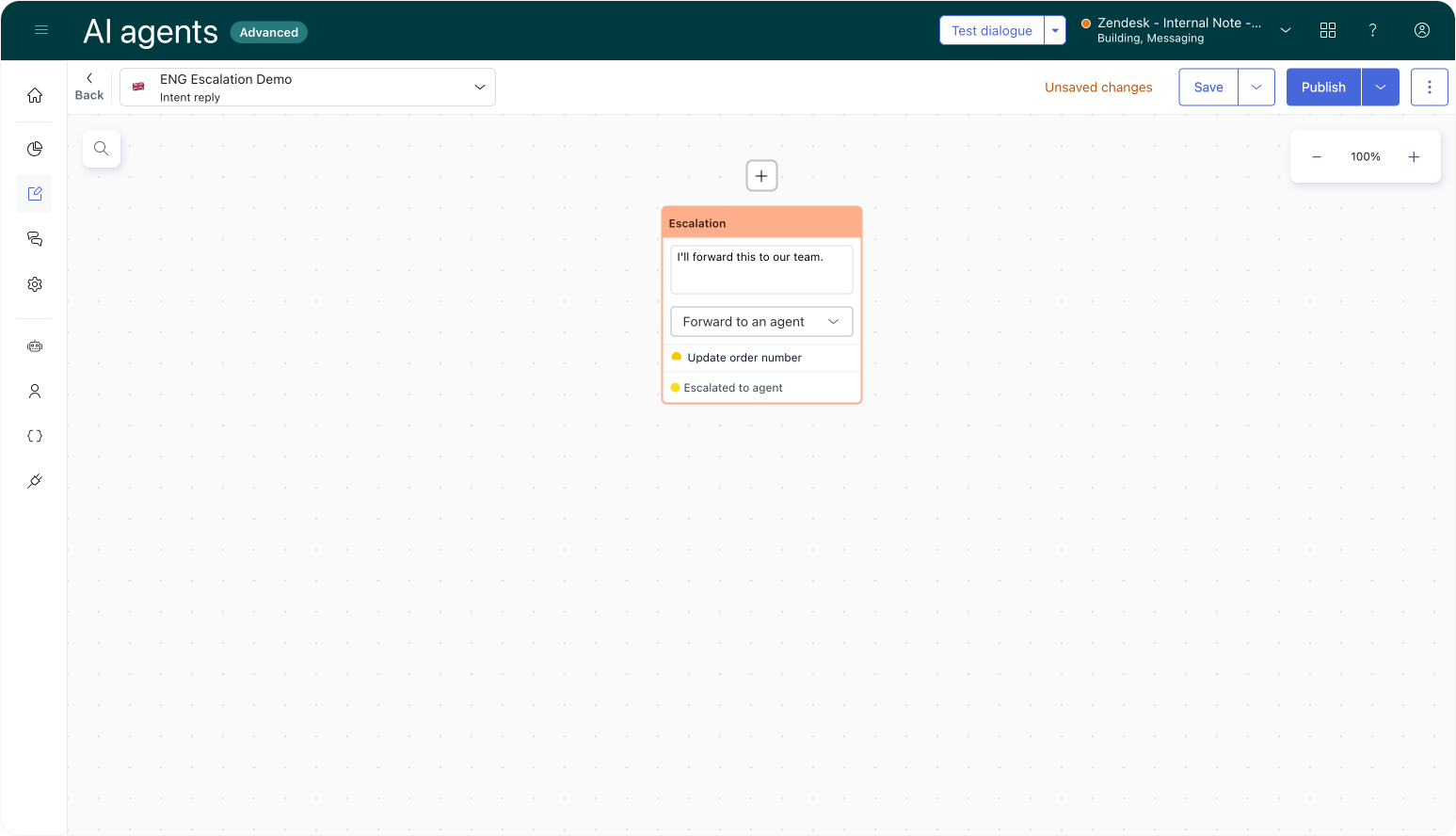
Within the Events and actions section of your AI Agent you can trigger a Create Ticket action when a conversation ends. This feature basically replicates the new native feature but is triggered by the AI Agent instead.
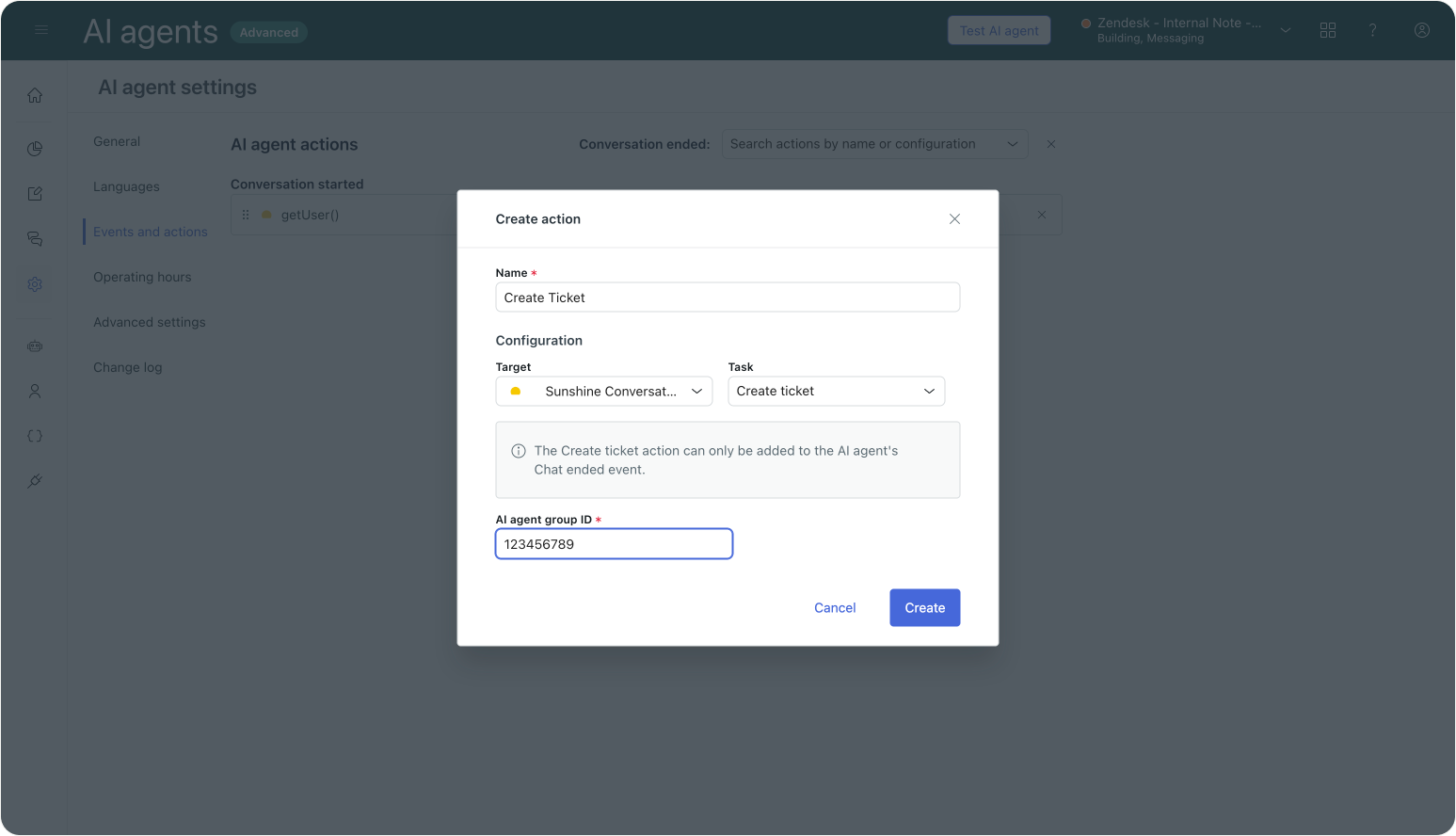
It's a remnant of when AI Agents where still called Ultimate and lived outside of the Zendesk platform. But now that we have a native option, you should remove this action. The system now takes care of that step for you by default.
Any other actions you have running ,which might add tags or other ticket metadata, should remain as is since you don't want to loose that context.
There's one caveat though. The Create Ticket action allows you to specify a group these tickets should be assigned to.
With the new AI Agent tickets, any resolved tickets won't be assigned to a group or agent. But since there's no escalation happening, that's fine since those tickets shouldn't be attributed to a specific human agent anyhow. What you do get is Intent detection, so you can use them to split out AI Agent tickets per use case or intent in your analytics.
API integrations
When you use an AI Agent in combination with Messaging, every interaction that gets escalated as a Messaging conversation to your agents. But some customers don't want to treat every conversation as a synchronous live chat that gets assigned to an agent,. They'd rather handle some use cases as classic email interactions instead.
For this purpose some customers used AI Agents' API integration to create their own custom escalations. Instead of escalating the conversation to Agent Workspace, they used the Zendesk ticketing API to create a ticket in Zendesk. This worked fine before AI Agent tickets where a thing: some interactions are escalated as conversations, and others where escalated as tickets.
But now that Zendesk logs every interaction in Agent Workspace, this split escalation does not work anymore. Tickets created over API are also available via the native AI Agent tickets. And worse, since the original conversation is never escalated, it gets solved without being marked as such, resulting in incorrect reporting data.
Escalate as email interactions
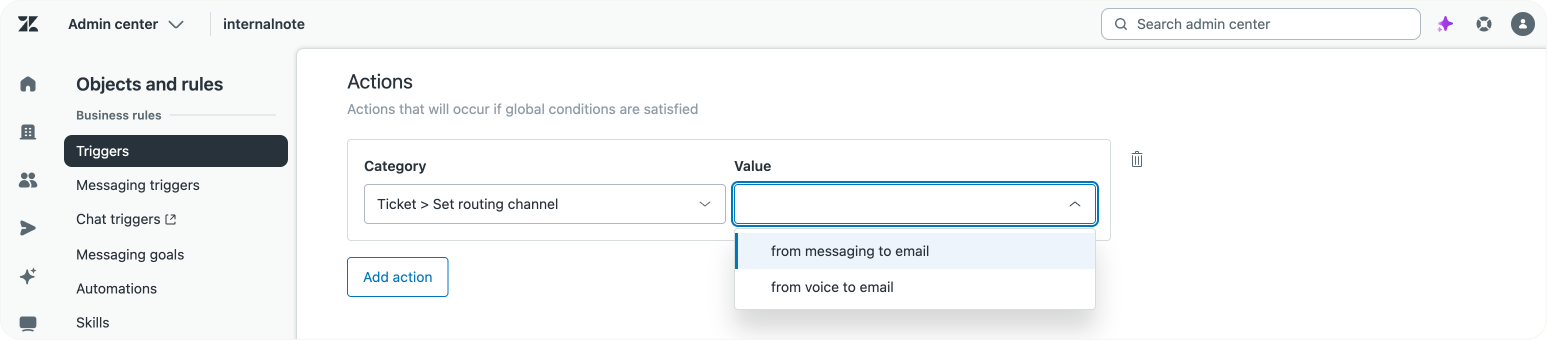
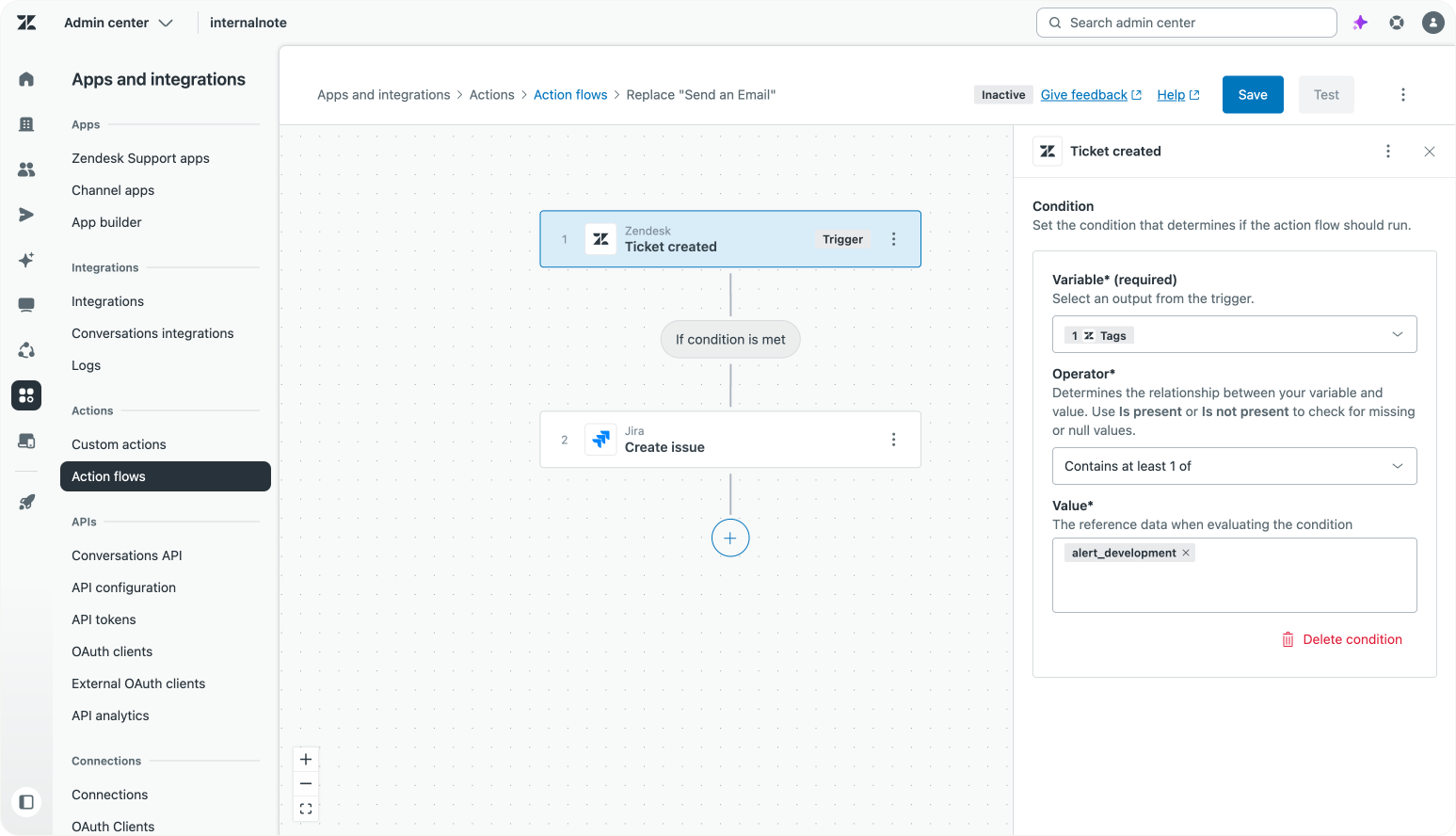
A recent update to Omnichannel Routing addresses this need to handle some tickets async, and others synchronous. Combining this with AI Agent tickets allows you to have the same result of some tickets being escalated as conversations, and others as email based tickets.
Within triggers you can now set a routing channel for your tickets. This means that, for some tickets, you can tell Zendesk to thread them as email interactions instead of messaging interactions.
If you combine this action with a ticket is created condition, and filter based on intent or tags, you can basically accomplish the same result as the API solution would, but based on the native AI Agent tickets. This way you don't have duplicated, but can still leverage the messaging vs email split.
Passing metadata
A second reason to use APIs is to add context when escalating a conversation to an agent.
Instead of relying on the API payload to set ticket fields, you now have to use Actions to add metadata to the Sunshine Conversation. These actions can also add ticket field values to tickets, just like the API would. You might need to rework your flows a bit thought: remove your API steps and add actions to previous steps in your procedure or dialogue flow.
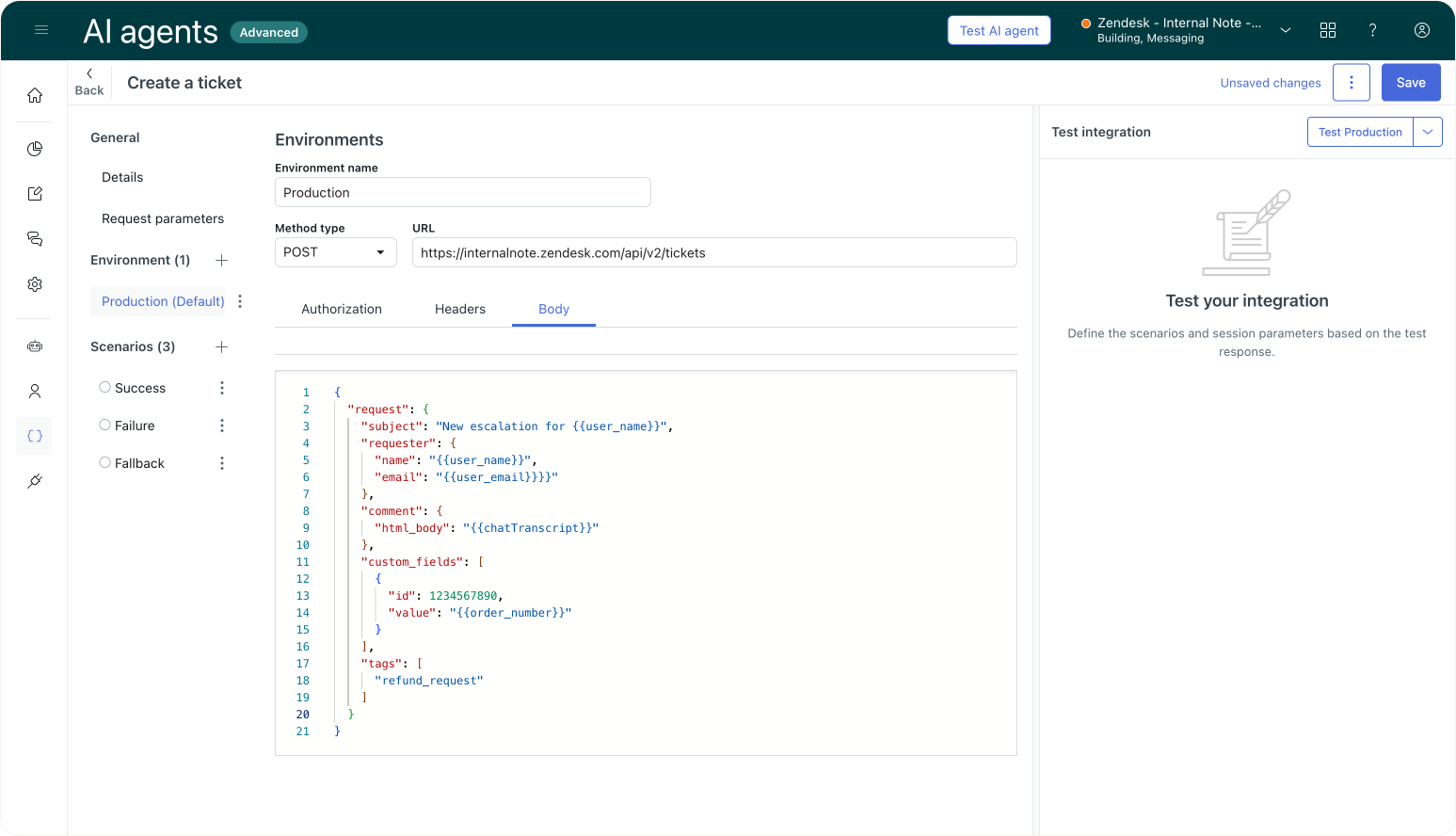
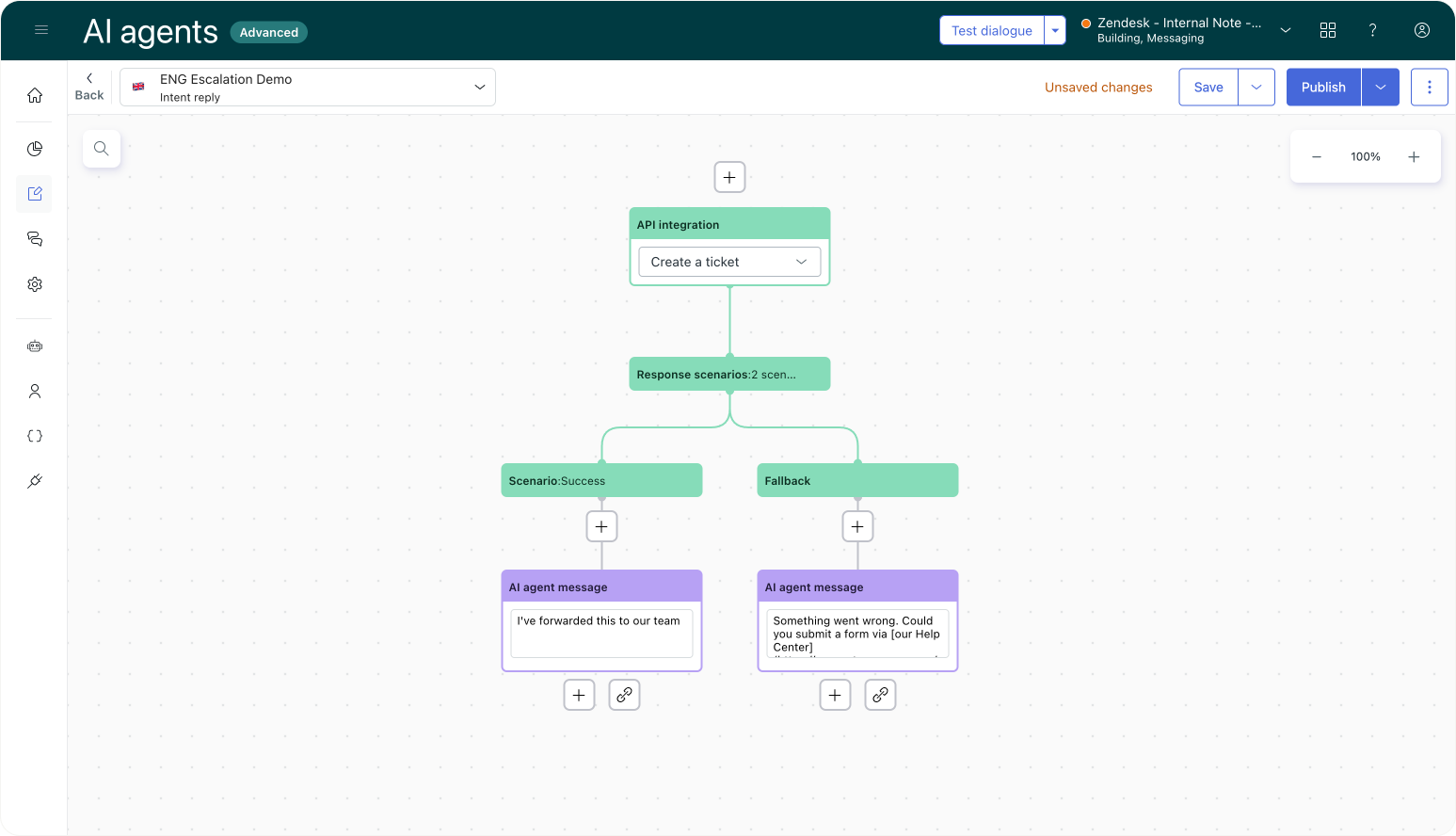
The old way of escalating via API
Logging tickets via API for reporting purposes
Some customers create tickets via API calls not for escalation, but for logging purposes. Here too, similar to the Create ticket action, they replicated the new AI Agent feature before it existed.
But that we have this native feature, these customers will also end up with two tickets in their reporting:
- The original resolved conversation
- Their API ticket
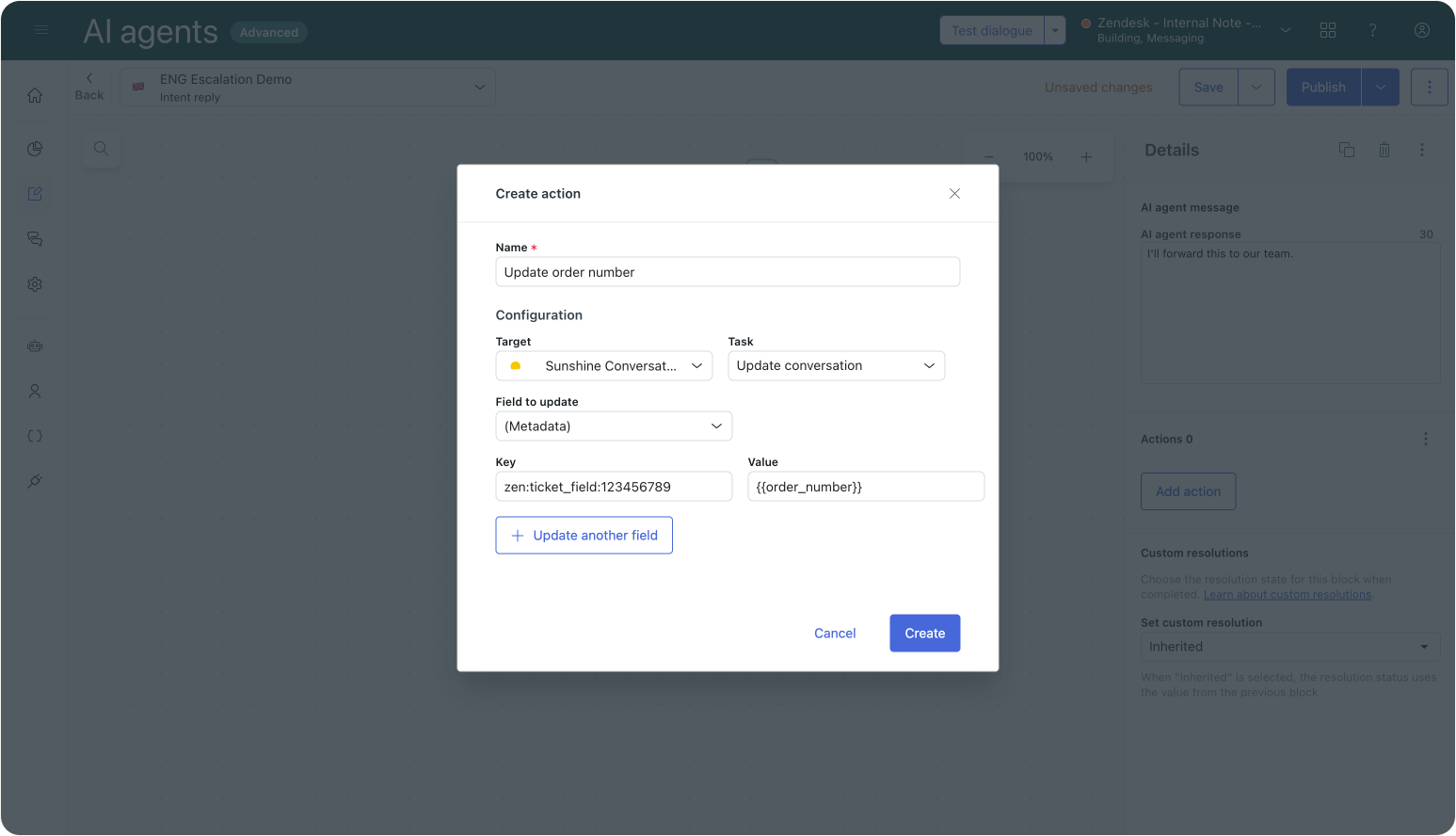
Using native escalation and passing context
The fix here is, once again, remove the API-based ticket creation and rely on the native ticket. And if you were setting ticket fields via the API, you should replace those with actions that populate those fields directly on the native ticket, similar to the previous example.
Exceptions
While replacing API Integrations with native AI Agent tickets works great, there's two scenarios where you still can't fully remove them.
If you use the API to create tickets in another Zendesk instance, you obviously can't relay on the native tickets. This might happen in an AI Agent that handles Customer Support tickets, but where the website/development team runs in a separate environment. Or in scenarios where you want a single AI Agent but for historical or security reasons each brand has their own instance.
A second scenario where you still need API integrations is for flows where you want to update a resolved conversation before its closed and rely on Zendesk triggers, webhooks and action flows to do so. Since you can't update AI Agent tickets from within Agent Workspace, your only option is to create a second ticket in Zendesk to do so. That is, until we get the ability to edit and update AI Agent tickets in Agent Workspace.
Send an email (legacy feature)
Aside from passing the conversation to an agent, or leveraging the Create Ticket action, AI Agents Advanced also has an older escalation method called Send an email.
This is an old method that's a remnant from when Ultimate was not a Zendesk product, and allowed integrating with other solutions too.
Ignoring AI Agent Tickets for a moment, this feature should not be used in combination with Zendesk at all. The email send out to your instance comes from a generic [email protected] email and is not attributed to the actual customer. This leads to assignment, routing and reply problems.
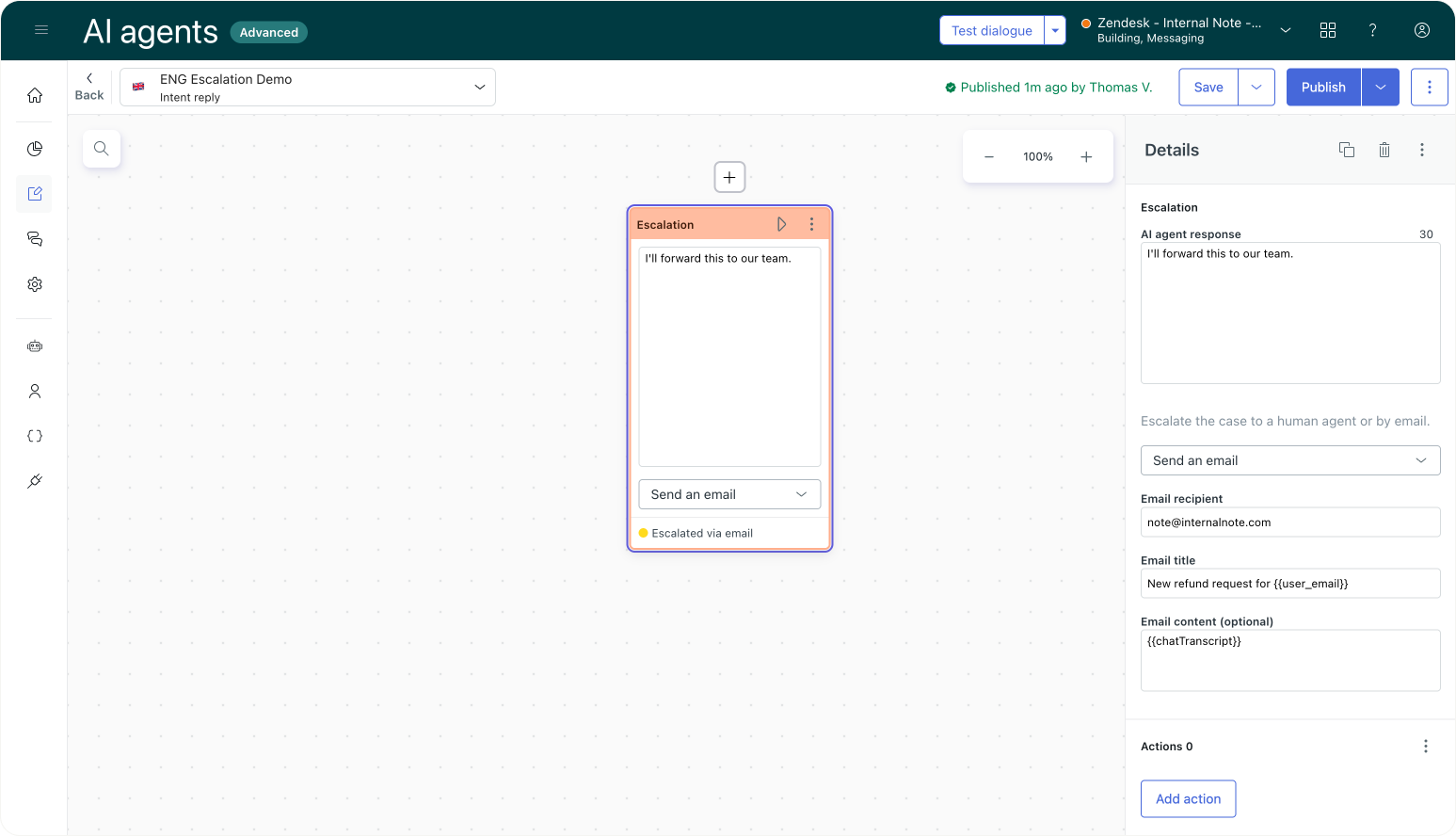
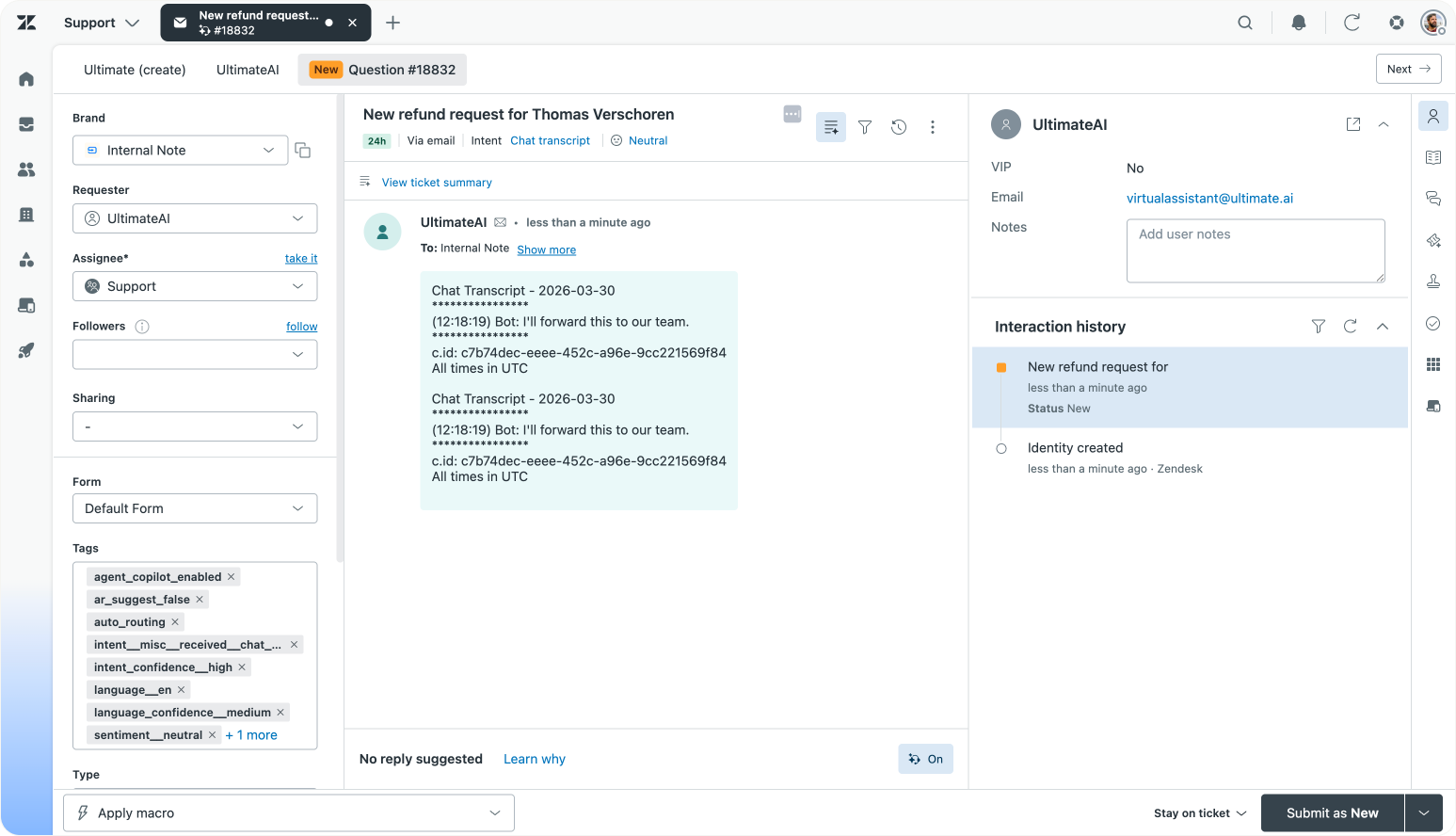
Using the legacy email escalation
Now that we have the AI Agent tickets, using this escalation step creates two tickets. The native one, and the ticket created over email. So here too I'd recommend moving to the native escalation Forward to Agent.
If you really want them to be handles as email, instead of conversations, you can also combine this with the Set Routing Channel trigger, similar to how we used this to replace the API Integration option.
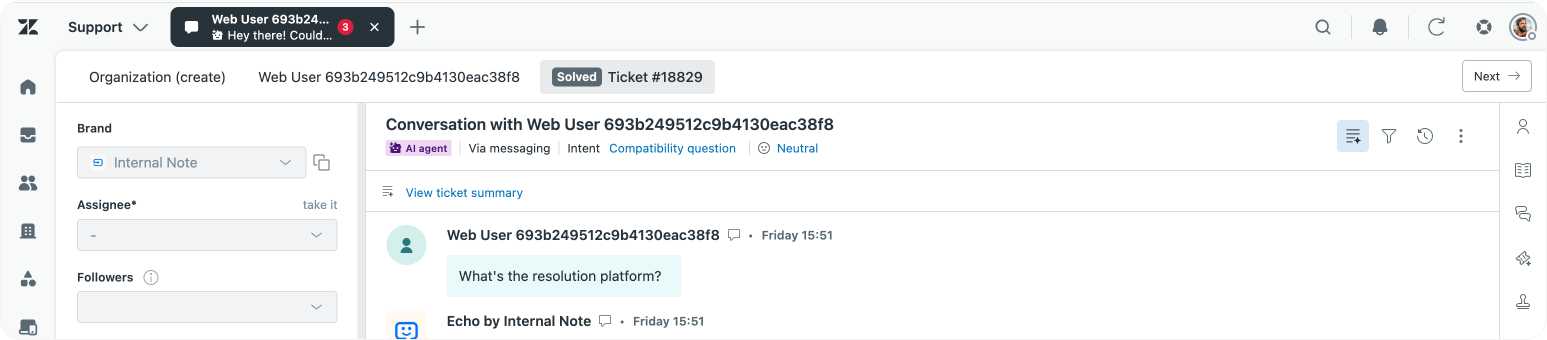
There are customers who add additional content to the email , or they use different recipient emails to route the ticket to different finance, sales or support teams.
If you need to route conversations to specific teams, make sure to add that metadata via SunCo actions or make use of Intelligent Triage's intent and entity detection in combination with Omnichannel Routing.
When setting up the Zendesk platform it's best to adhere to the one tool, one job rule.
- AI Agents' job is to resolve tickets or escalate with context.
- Omnichannel Routing addresses availability, assignment and routing based on context and queue rules
- Triggers and automations define the ticket lifecycle.
This means your AI Agent shouldn't care or know how routing works, it just needs to pass context.
Exceptions
There's scenarios where you need to escalate outside of Zendesk. For example the customer has a tracking problem which your logistics team resolves. Or they have a complaint about a marketing promotion which that team handles.
You could use the Send an email step here, although escalating the ticket to Agent Workspace in combination with an Action Builder workflow that handles the notification to external parties might be a better solution here since you can then track the escalation from within Analytics and the ticket contains all context.
How to preserve context without creating new tickets
One of the reasons customers would fall back to API integrations as a way to pass tickets from AI Agents to Agent Workspace would be to pass additional context with those tickets. That context would then be used to route tickets to the right team, provide agents with the right information to handle the ticket, or to provide richer data for reporting.
With AI Agent tickets you still have that control. You just no longer need a workaround via a new ticket to achieve it. Instead, use actions.
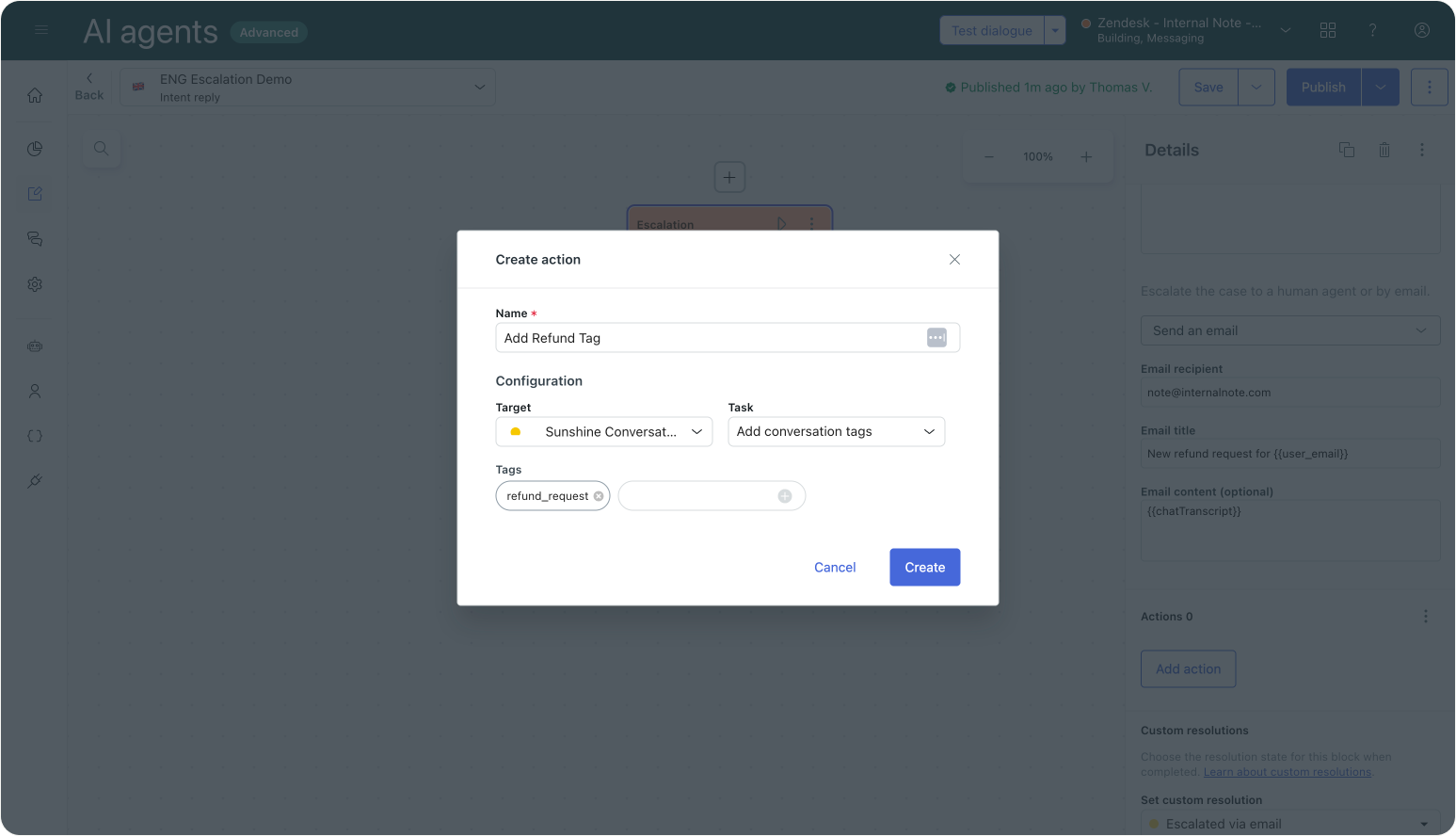
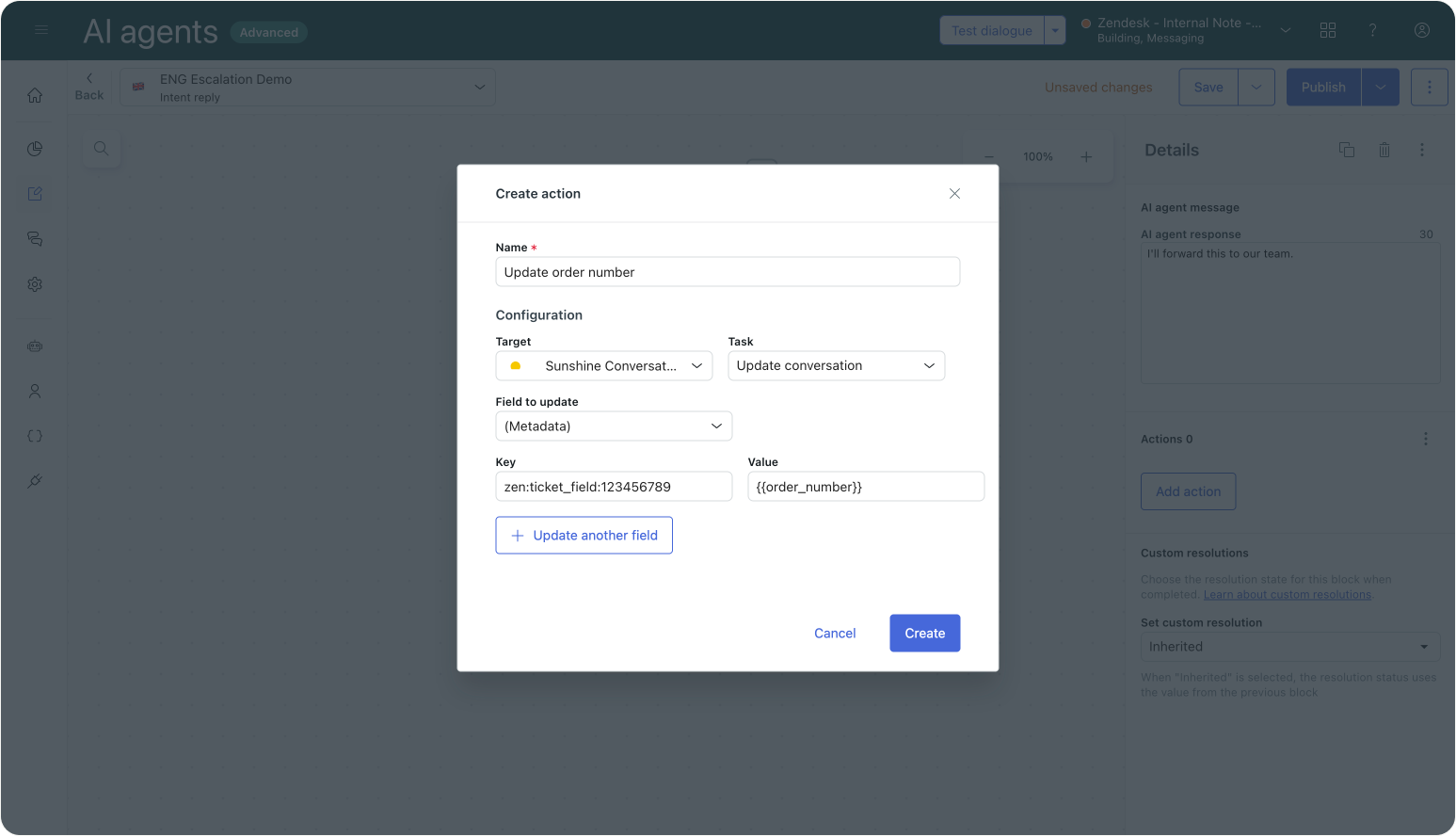
During the conversation, you can capture metadata such as order numbers, customer type, order status, refund reasons. By using Actions you can pass that metadata to the Sunshine Conversation, which in turn passes that data to Agent Workspace.
Adding tags and ticket field data via Actions
Actions can pass two types of information. One is tags, which you can use in triggers to set priority, as a filter in Analytics reports or use Omnichannel Routing queues to route tickets to the right agent.
The other is metadata, which you can use to fill in ticket fields. To specify what ticket fields gets updated, use the format "zen:ticket_field:1234567890": "Blade Runner" with 123456789 being the ID of the ticket field.
Actions don't know about the specific type a ticket field has. So make sure you the correct format (e.g. dropdown values, booleans, text, numbers, dates).
 Thomas Verschoren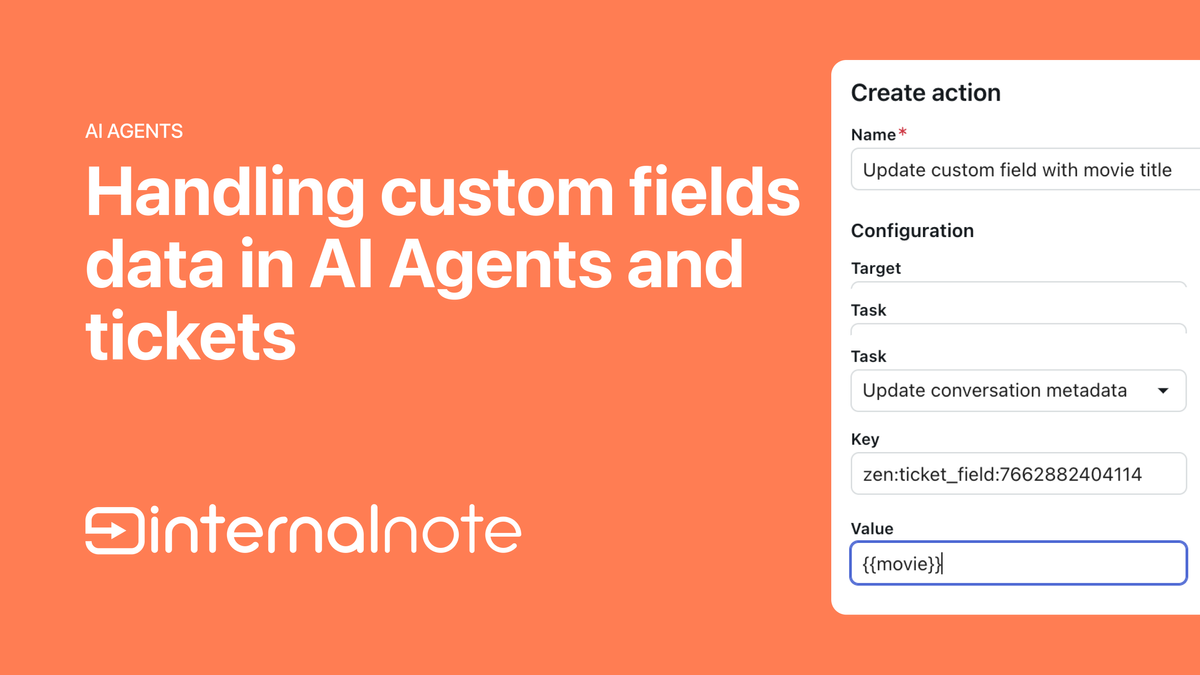
By enriching the ticket throughout the dialogue flow with actions, you ensure that when escalation happens, the agent receives a complete, structured, ready-to-work ticket, and thanks to the native AI Agent tickets, without duplication.
What this means going forward
Zendesk used to be a collection of distinct products that passed data from one to the other.
The web widget would capture user input, which was passed to an AI Agent. When that AI Agent failed or reached an escalation point, it would pass the conversation to Agent Workspace. And when an agent wrapped up the ticket, QA and reporting would work on those solved tickets and report back with insights.
But since Relate 2024 and thanks to the arrival of Zendesk AI, we're seeing an active shift from a suite of products towards a Resolution Platform. Instead of a set of features, Zendesk is becoming a cohesive engine where its capabilities work together on the same dataset, and where questions lead to resolutions, and insights lead to opportunities to improve.
To feed that Learning Loop, having the entire platform work on one ticket that gets updated by AI Agents or humans, and read by QA or Analytics makes that possible.
Similarly, having the Help Center, AI Agents and Agent Copilot run on the same Knowledge Graph, or procedures and triggers leveraging the same Action Builder workflows and connectors are other examples of the platform becoming more tightly integrated.
But to reach that point, sometimes we need to remove the old, in order to get the benefits of the new: Tickets now start at the beginning of the interaction and AI and human support share the same ticket. The result is that every interaction is fully visible across its lifecycle and workarounds are no longer needed.
But while we migrate towards this platform future, you'll see some issues occur when legacy workarounds clash with modern solutions. Like we see here with duplicate tickets being created after AI Agent tickets were launched.
For new customers this unified ticket approach is the default and they get a better Zendesk out of the box. For existing customers, the path forward is simple:
- Identify where tickets are created in addition to the native AI Agent tickets.
- Remove those steps.
- Add actions to make sure context is preserved.
If there’s one thing to remember, it’s this:
One interaction should equal one ticket.
Let that ticket start with the AI agent, enrich it during the conversation, and pass it seamlessly to a human agent when needed.
That’s the model Zendesk now supports, and the one that gives you the cleanest data, the best workflows, and the strongest foundation for continuous improvement.