

Towards automated resolutions #4: Using data to act, update and resolve
Explore Zendesk’s Resolution Platform in part 4 of our series, focusing on Data & Actions. Learn how to harness customer data, automate workflows, and design smart, reusable actions that empower AI Agents and agents to resolve tickets faster and smarter.

Towards automated resolutions #4: Using data to act, update and resolve
Explore Zendesk’s Resolution Platform in part 4 of our series, focusing on Data & Actions. Learn how to harness customer data, automate workflows, and design smart, reusable actions that empower AI Agents and agents to resolve tickets faster and smarter.

On this page
Welcome to part four of our Resolution Path series. In this series, we explore Zendesk’s Resolution Platform and reveal how its core components work together to guide customers seamlessly from their initial inquiry to fully resolved tickets.
Up to now, we’ve examined various ticket resolution approaches: from fully autonomous AI Agents managing questions end-to-end, to hybrid models where your agents are empowered by Agent Copilot, providing contextual insights and actionable suggestions.
But this raises key challenges: How do you effectively manage and leverage the underlying data that powers these interactions? Where and how should you build the logic and actions that respond to customer needs? And how can you balance automation with human oversight to maximize efficiency and quality?
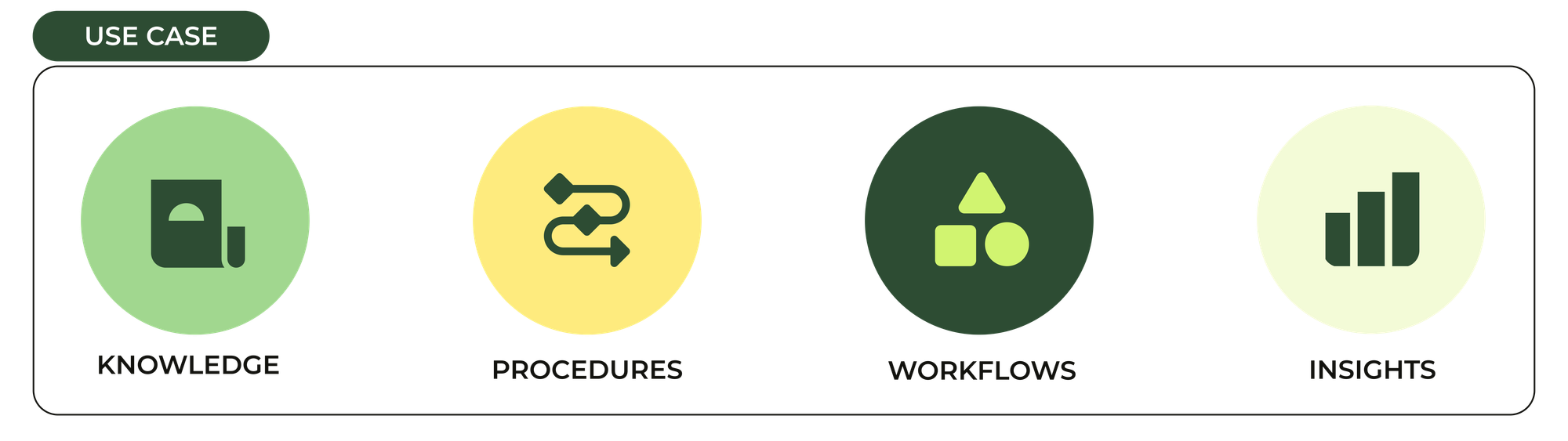
At the heart of the platform lie four key pillars:
- Knowledge: The information your team and AI rely on to accurately answer customer questions.
- Procedures: The workflows and rules that define how you resolve cases consistently.
- Data and Actions: The contextual, personal, and static data that fuel decisions, combined with the integrations and operations that enable you to act on that data—retrieving, updating, and triggering outcomes.
- Insights: The measurement and analytics that help you understand performance and continuously improve your processes.
This article focuses on Data and Actions. The crucial bridge that moves your processes from simply understanding customer context to actively resolving queries through intelligent, automated workflows.
Data, actions and decisions
Handling data effectively within automation flows can be challenging, often the place where teams stall. Your data typically exists outside Zendesk; it’s dynamic, unique, and constantly evolving. But by designing clear data interactions and embedding actions that read, validate, and update this data, you can unlock powerful, data-driven workflows that accelerate automation and improve customer experiences.
As we’ve learned in the previous article in our series, you need to write down your process first, before you can start thinking about automating the process.
A customer requests a refund. Refunds are allowed for unopened products within 7 days of purchase, or for defects on products under €250. Products over €250 receive a replacement instead.We first verify the customer's identity and collect their order number. Then we retrieve the order data, ask for the refund reason, and check eligibility. If approved, we process the refund (3-5 days). If denied (e.g., excessive refund history), we explain why and link to our policy.
Breaking down this refund process into our four pillars:
- Knowledge: The refund policy that explains eligibility criteria to customers
- Procedures: The step-by-step flow we need follow: gather order info, validate eligibility, and execute a refund or denial
- Data and Actions:
- Retrieving order details from your system, verifying customer identity, checking refund limits, and recording refund status
- Executing refund requests via finance systems, sending customer notifications, and logging outcomes for analysis
- Insights: Measuring how often refunds are approved, declined, or require agent intervention to optimize your workflows
Here, data and actions represent the critical link between understanding the customer’s context and doing what’s needed to resolve their request.
Types of data
When working with data, we distinguish between:
- Static data: Information that rarely changes, like business hours, product catalogs, locations. This is typically stored in custom objects or retrieved via API. This data is ideal for fully automated responses since it’s consistent and publicly accessible.
- Personal/contextual data: Customer-specific info tied to tickets or conversations, like order numbers, booking details, or VIP status. This data is sensitive and dynamic. It requires validation and authentication, and often demands more nuanced, hybrid handling since answers vary per customer.
Static data is the easiest to work with. Sharing business hours, or listing your products and providing answers based on that information can be done to both anonymous and known users. The answer for a given question about that product is always identical, and that kind of data is ideal for a full automation.
Personal or contextual data however is a bit trickier. For one, you need to be sure you’re talking to the actual customer. So elements like identification and authentication come into play. And while the process of answering an order status question is always the same, the answer will be unique, and the chance of edge cases and the need for escalation will be high. Especially in the beginning when you design your procedures for the ideal path, and not for all the broken scenario.
On the other hand, once you include this personal context in your answers, you’ll be truly automating your CX processes and you’ll actually be able to provide useful and effective solutions for your customers.
Automation thrives when static data enables quick, consistent answers, and when personal data is securely integrated to drive personalised, effective actions, turning data and knowledge into resolution.
Types of actions
Having data available is just the start. You need to act on it. Actions in the platform generally fall into three categories:
- Gathering context: Collecting information from customers (e.g., asking for an order number) or retrieving relevant data from your systems via API calls.
- Processing and decisions: Validating inputs, checking eligibility, assessing risks. These logic-driven steps determine the appropriate next actions.
- Executing outcomes: Performing tasks such as updating systems, requesting approvals, processing refunds, or notifying customers of results.
Beyond what needs to be done with data, an essential consideration is who performs these actions, and when they are authorised to do so.
Before making the shift from human-led processes toward automation-first workflows, most actions will be performed by people. Customers provide initial information like order numbers. Agents then collect and validate that data, run eligibility checks, and execute refund requests within finance systems. Sometimes, refunds require separate approval from a finance team member before processing.
For every action, consider:
- What data do I need to know?
- What must I do with that data?
- Am I allowed to perform this action?
- What outcome or result should the action produce?
Even before exploring API integrations or automation, it’s critical to clearly identify these elements: the required data, its source, who can modify it, and under what conditions.
Once you understand these factors, you can begin automating steps with confidence.
For example:
- If you need to look up customer information in your CRM, this is a strong candidate for API-driven retrieval.
- If finance approval is required, consider automating the approval request to reduce delays, or, even better, evaluate whether approval criteria can be translated into rules that your support team can handle directly.
- If data needs updating in your CRM, explore API options to push changes automatically. But first, clearly define when such updates are permitted to avoid errors.
Knowing what must be done, how it’s done, who can do it, and when it’s allowed provides a foundation for flexible automation. This can range from an agent manually handling a task, to agents requesting support from other teams, to Agent Copilot prompting for approval before automating execution, or even fully autonomous AI Agents managing the entire process.
Data is the input and output.
Workflows, procedures, actions, and processes still define what should happen, when, and how. But at their core, data acts as both the input (context) and output (result) that drives these steps.
In some cases, an API action handles both logic and decisions internally. For example, you provide an order number as input when submitting a refund request, and receive back a result—either success or an error message:
{error: "order too old"}
However, often you’ll want to add business logic outside the API call, within your procedures, to better handle decision-making. This can happen because APIs may return unclear error responses or because your process requires different actions depending on contextual nuances.
Consider this example flow:
- Ask the customer for an order ID.
- Retrieve order details via
ACTION: get order info. - Check if the order is older than 7 days.
- If yes, notify the customer the refund can’t be processed due to age.
- If no, proceed to execute the refund with
ACTION: execute refund.
Writing logic explicitly in procedures has advantages: anyone reviewing the workflow can clearly see and understand the decision criteria, making it easier to update (e.g., changing the refund window from 7 to 14 days). This logic can also drive suggested replies and comments during the conversation.
On the downside, embedding logic in multiple procedures reduces reusability. If refund eligibility applies across various use cases, lost orders, broken devices, return flows, you risk duplicated and potentially conflicting logic scattered in multiple places.
Complex logic also makes procedures bulky and harder to maintain. For example, refund eligibility may depend on order history, product type, fraud detection, payment method, and other factors. If your procedures are overwhelmed by conditional checks, they lose focus on resolving the customer’s issue efficiently.
When your business logic grows complex or needs to be reused across multiple workflows, it’s best to encapsulate it in an Action Builder workflow. Agent Copilot (and soon AI Agents) can then invoke this reusable workflow as a single unit, showing agents only the essential outcome—such as “allowed,” “denied,” or “finance approval required”—while the intricate logic remains neatly wrapped inside.
Your simplified procedure might then look like this:
- Ask the customer for an order ID.
- Call
WORKFLOW: Handle refundsto process eligibility and refund logic. - Communicate the result to the customer, including a link to the
ARTICLE: Refund policyif the refund is denied.
(Note: In practice, actions are linked via Agent Copilot trigger steps calling Action Builder flows, but the effect is the same.)
This approach highlights three tiers of action and data handling within procedures:
- API integrations: Retrieve and return data directly, with the procedure passing results straight back to the customer.
- Procedural logic: The procedure itself manages decision-making based on customer input and API responses.
- Hybrid flows: Agent Copilot drives the conversation and calls Action Builder workflows to handle complex decision logic behind the scenes.
As your procedures grow in complexity and you incorporate more contextual data and API calls, you’ll increasingly rely on these hybrid approaches—balancing clarity, reusability, and automation efficiency.
Handling data and actions in Zendesk
Zendesk offers multiple powerful ways to integrate and automate data-driven actions—whether handled autonomously by AI Agents, triggered through automated workflows, or interactively suggested by Agent Copilot.
Each tool serves distinct roles in how you collect data, run logic, and do things across your customer support lifecycle.
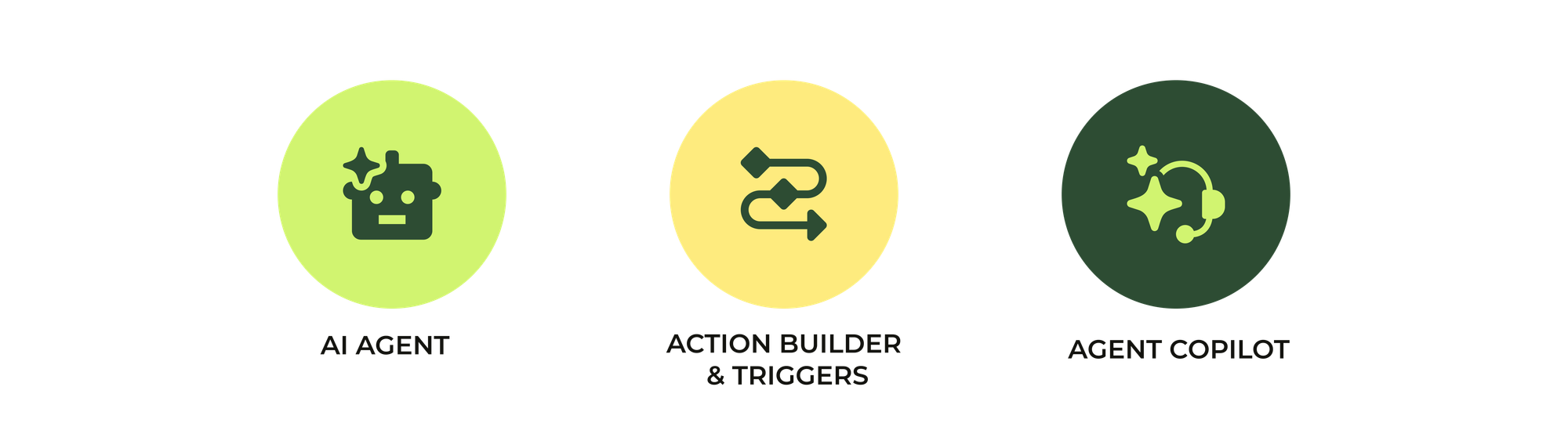
- AI Agents who can run autonomously run agentic procedures, gather conversational context and execute API integrations.
- Triggers and Action Builder that can run logic and execute actions based on ticket conditions and call API integrations.
- Agent Copilot that can run procedures and suggest next best actions and suggested replies to your team, based on the output of API Integrations, ticket context or Action Builder flows.
Handling data and actions in AI Agents
Conversation metadata
AI Agents leverage conversational metadata. Rich context about the user and conversation channels that powers intelligent decision-making and automate actions.
 Thomas Verschoren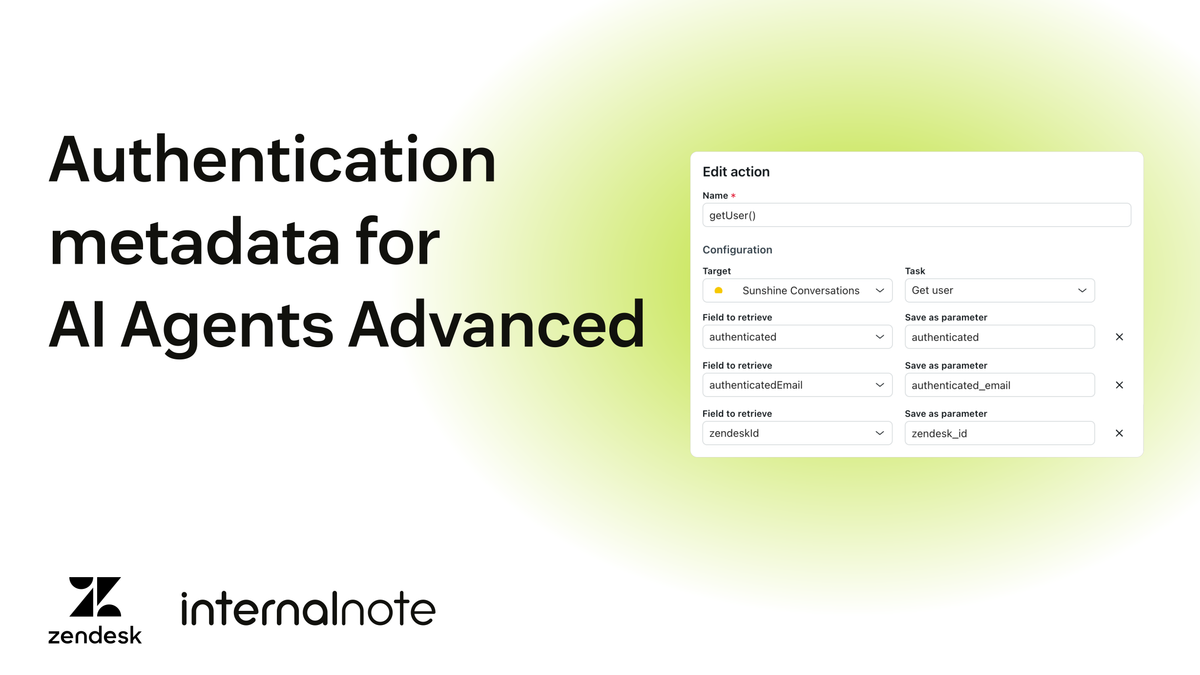
By capturing and updating this data throughout interactions, AI Agents dynamically tailor responses, invoke APIs to retrieve or update information, and seamlessly execute complex workflows without human intervention.
This context can be based on the channel the conversation is started from (e.g. locale, channel id, …)
It can also be personal information of the end-user. They could be an unauthenticated user, or they could be an authenticated user in which case you get an email, name, external id and verified status to work with.
{
    "user": {
        "zendeskId": "19777656776082",
        "identities": [
            {
                "type": "email",
                "value": "[email protected]",
                "verification": "sso"
            }
        ],
        "id": "667c6c4f477fbd4e83d5b410",
        "profile": {
            "surname": "Bond",
            "givenName": "user_name",
            "email": "user_email",
            "locale": "en-GB",
            "localeOrigin": "apiRequest"
        },
        "metadata": {
            "conversationId": "690ddff2bd6e45c38c772704"
        },
        "authenticated": true
    }
}
Or it could be metadata you pass to the web widget or mobile sdk via the API
zE("messenger:set", "conversationFields", [
  { id: "7662882404114", value: "Blade Runner" }
])
All this data becomes available to your AI Agent and can be leveraged in dialogue flows or procedures to run your use case logic.
For example, if a customer is looking at a product page, you can pass the product SKU to your AI Agent to give more contextual answers. Or if they are on an order status page, you can pass that order number and retrieve its status without asking the customer for that value.
Or you can use the customers’ ID to identify them, add them to the right segment and retrieve the right knowledge answers based on search rules.
Conversation metadata isn’t just relevant when a conversation initialises though. Output from API integrations, context gathered and decision made can be stored as metadata during the conversation too, and upon escalation to Agent Workspace that data will become available as ticket field values, making sure your team gets started with the right context from the get go.
Actions
AI Agents can run actions based on changes made to the conversation (started, ended, escalated), or as part of steps in a procedure. These actions can get or set values for conversation parameters, or conversation metadata. For example, when a customer shares an order number, we can set an order_number parameter that can be used in future API actions.
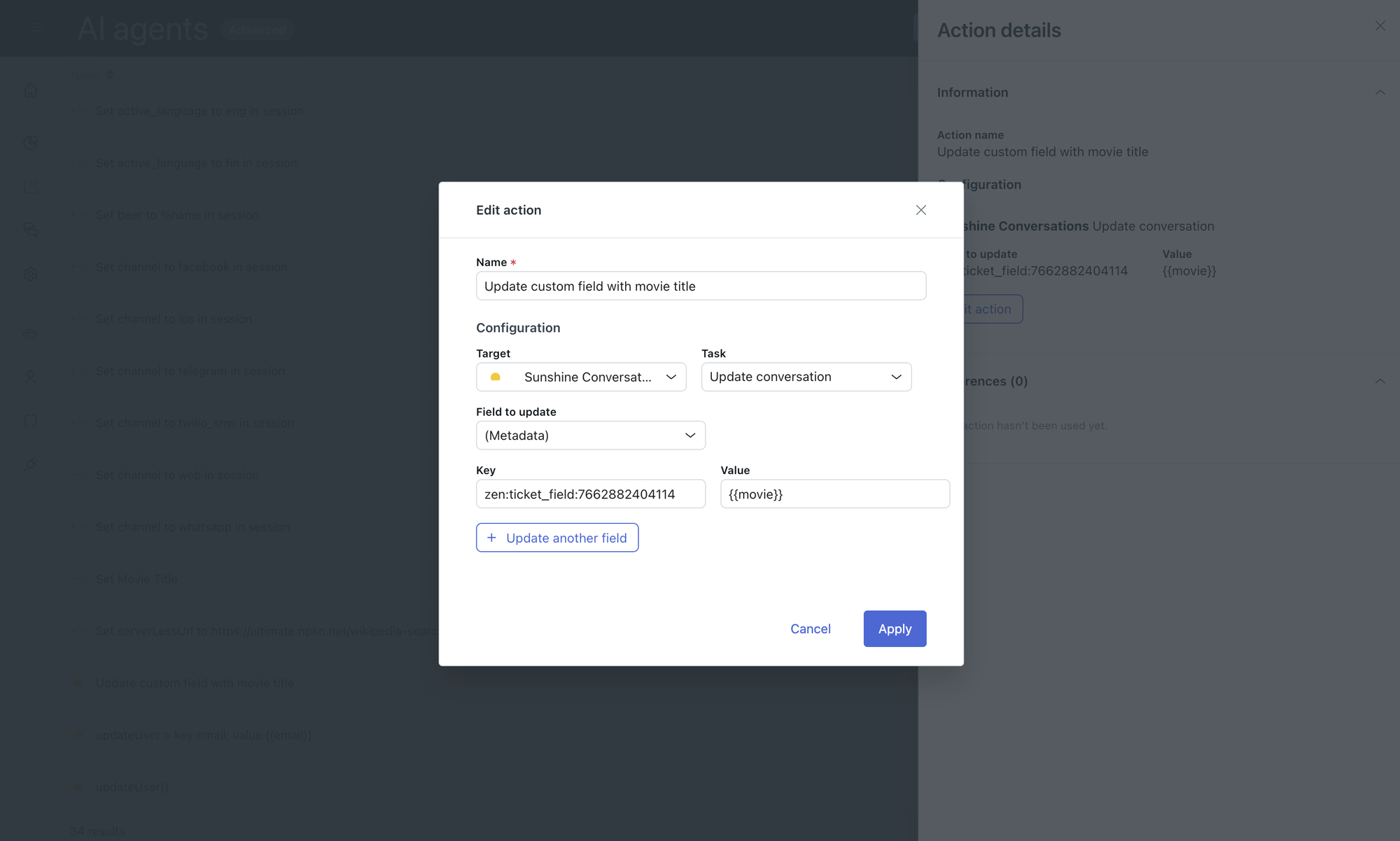
With the arrival of agentic procedures for AI Agents, the use of these actions has lessened since we no longer need to explicitly set each parameter before we can pass it along to an API integration.
But for setting conversation metadata, especially those we want to pass to a Zendesk ticket during escalation, they are still highly relevant today.
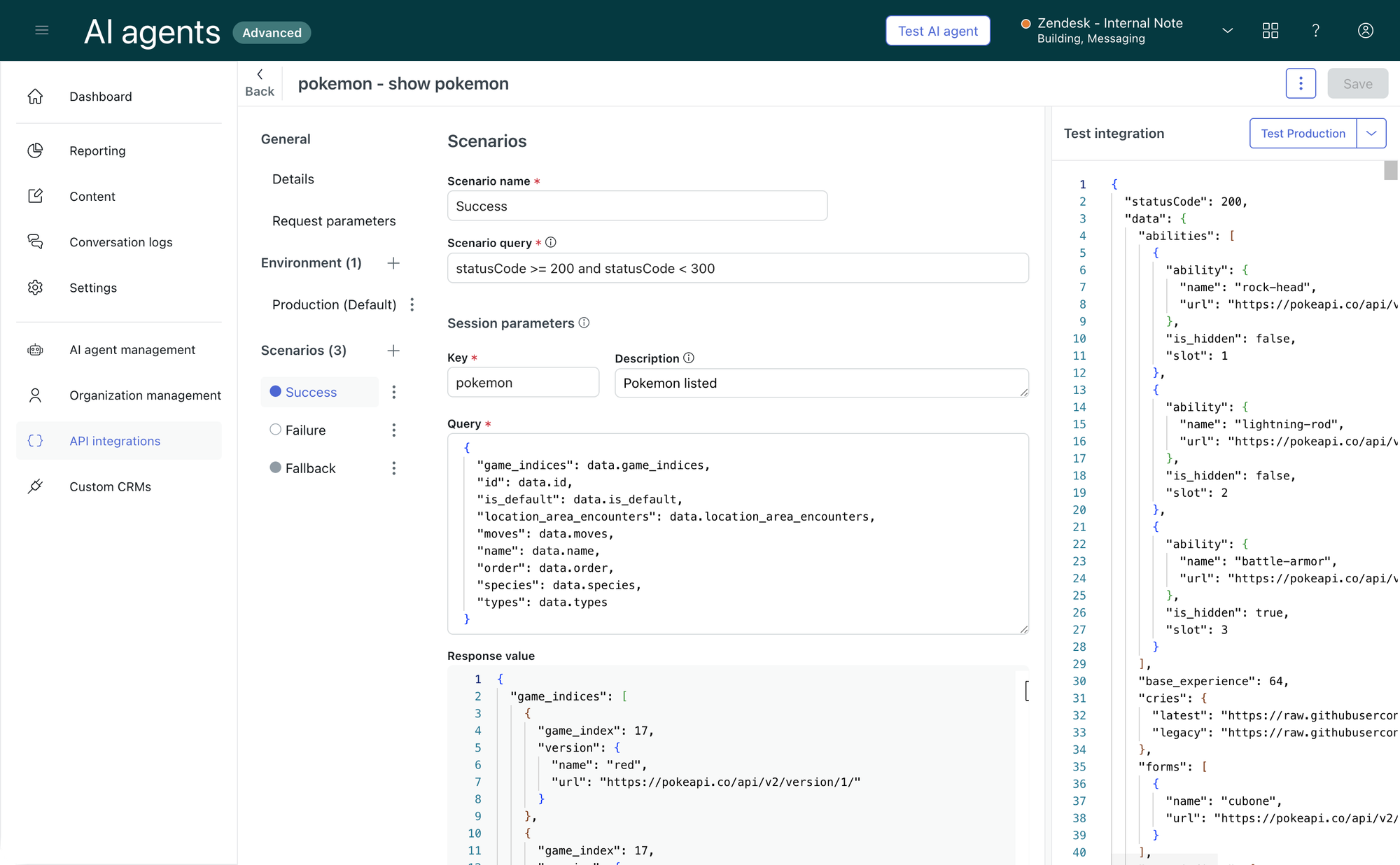
API integrations
A conversation’s context isn’t just limited to what a customer provides. Most of the actual relevant information you need is stored outside of Zendesk within your CRM, order management system of finance tools.
This is where API Integrations come into play. These integrations allow you to make API calls to external platforms (or Zendesk itself). They have a set of predefined input parameters, and a predefined set of output parameters. These parameters can be used within procedures and can be chained together. You could for example ask the customer for an order_number. Use that as the input parameter for an API call to our order management system. That GETS the order data, and outputs an order_date and order_amount. We can then uses that order_amount to POST to our finance system to perform a /refund for that order_amount.
Transforming data
API integrations serve as the building blocks for connecting external systems to your workflows. They take defined input parameters, call APIs, and return outputs—usually raw data or error codes.
While APIs don’t natively handle complex business logic or data validation, your procedures and workflows can transform and interpret these results to drive dynamic decisions and actions.
By clearly separating data retrieval (API calls) from decision logic (procedures), you create modular, maintainable automations that are easier to update and reuse across use cases.
With AI Agents’ support for JSONata we can perform some transformations on the output, but mostly you’ll need to defer all actual logic (e.g is this older than 7 days) to your procedure.
For example, let’s say our integration returns this list of movies:
{
  "movies": [
    { "title": "Dr. No", "year": 1962, "actor": "Sean Connery", "villain": "Dr. Julius No" },
    { "title": "From Russia with Love", "year": 1963, "actor": "Sean Connery", "villain": "Red Grant" },
    { "title": "Goldfinger", "year": 1964, "actor": "Sean Connery", "villain": "Auric Goldfinger" },
    { "title": "On Her Majesty's Secret Service", "year": 1969, "actor": "George Lazenby", "villain": "Blofeld" },
    { "title": "Diamonds Are Forever", "year": 1971, "actor": "Sean Connery", "villain": "Blofeld" },
    { "title": "Casino Royale", "year": 2006, "actor": "Daniel Craig", "villain": "Le Chiffre" }
  ]
}
We can run JSONata to return only those with the real James Bond, and limit the results to maximum 10 so it works with Carousels.
movies[actor = "Sean Connery"].{
  "movie": $uppercase(title),
  "debrief": "Released in " & year
} [0..9]
which returns:
[
  {
    "movie": "DR. NO",
    "debrief": "Released in 1962"
  },
  {
    "movie": "FROM RUSSIA WITH LOVE",
    "debrief": "Released in 1963"
  },
  {
    "movie": "GOLDFINGER",
    "debrief": "Released in 1964"
  }
]
But if you want to run logic against your data, you have to add that logic to your Procedure or Dialogue Builder flow.
Observability
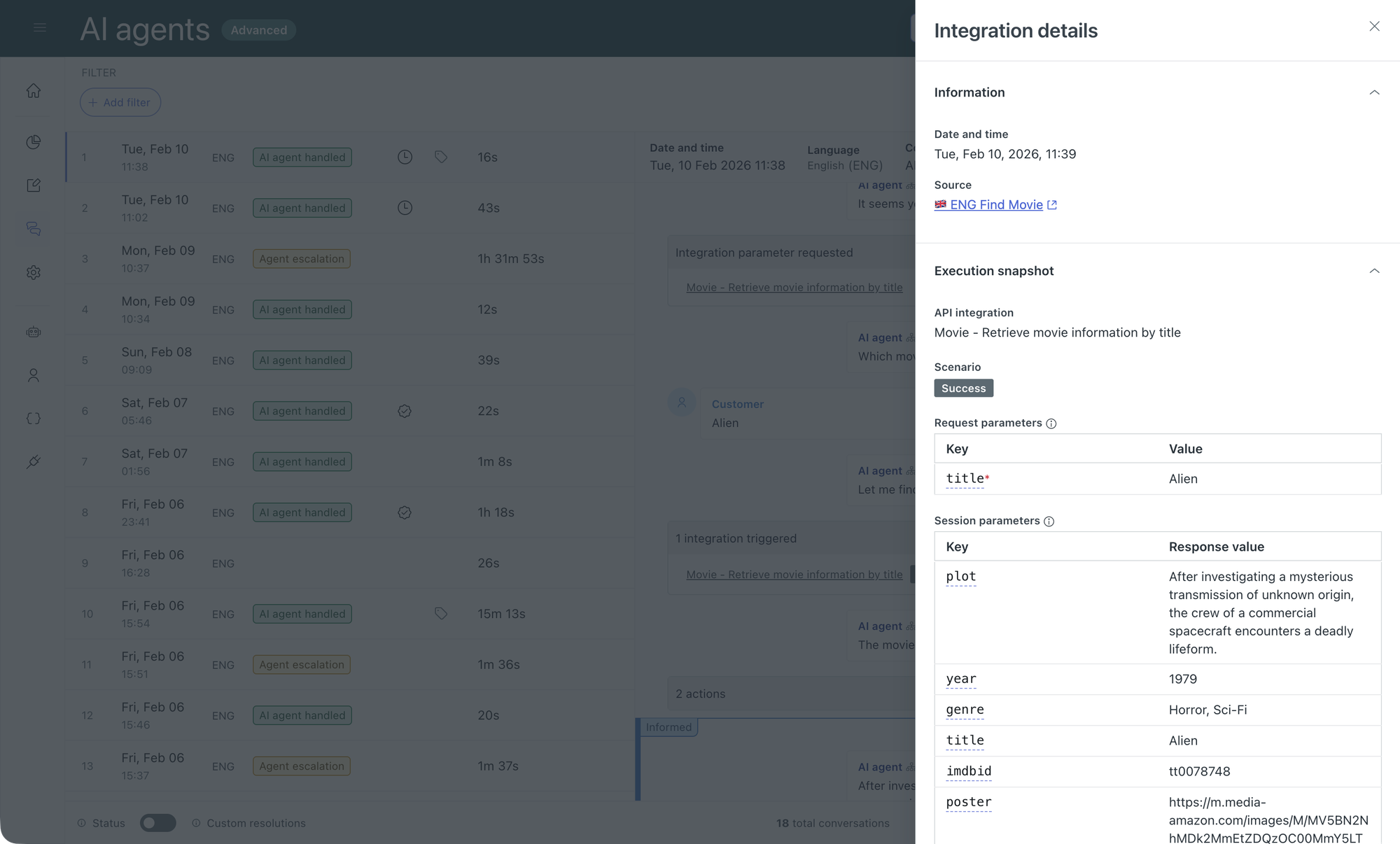
A second key element to API integrations is observability. Similar to how the conversation logs show you the reasoning behind an AI Agents response, these same logs now show you what actions an API integration took, and what the result of that API call was. Perfect for both troubleshooting during development, as well as having an auditable log for accountability.
This end-to-end visibility into API calls, parameters, and outputs not only expedites debugging but also builds confidence in automation workflows, paving the way for more robust and accountable customer experiences.
Entity detection
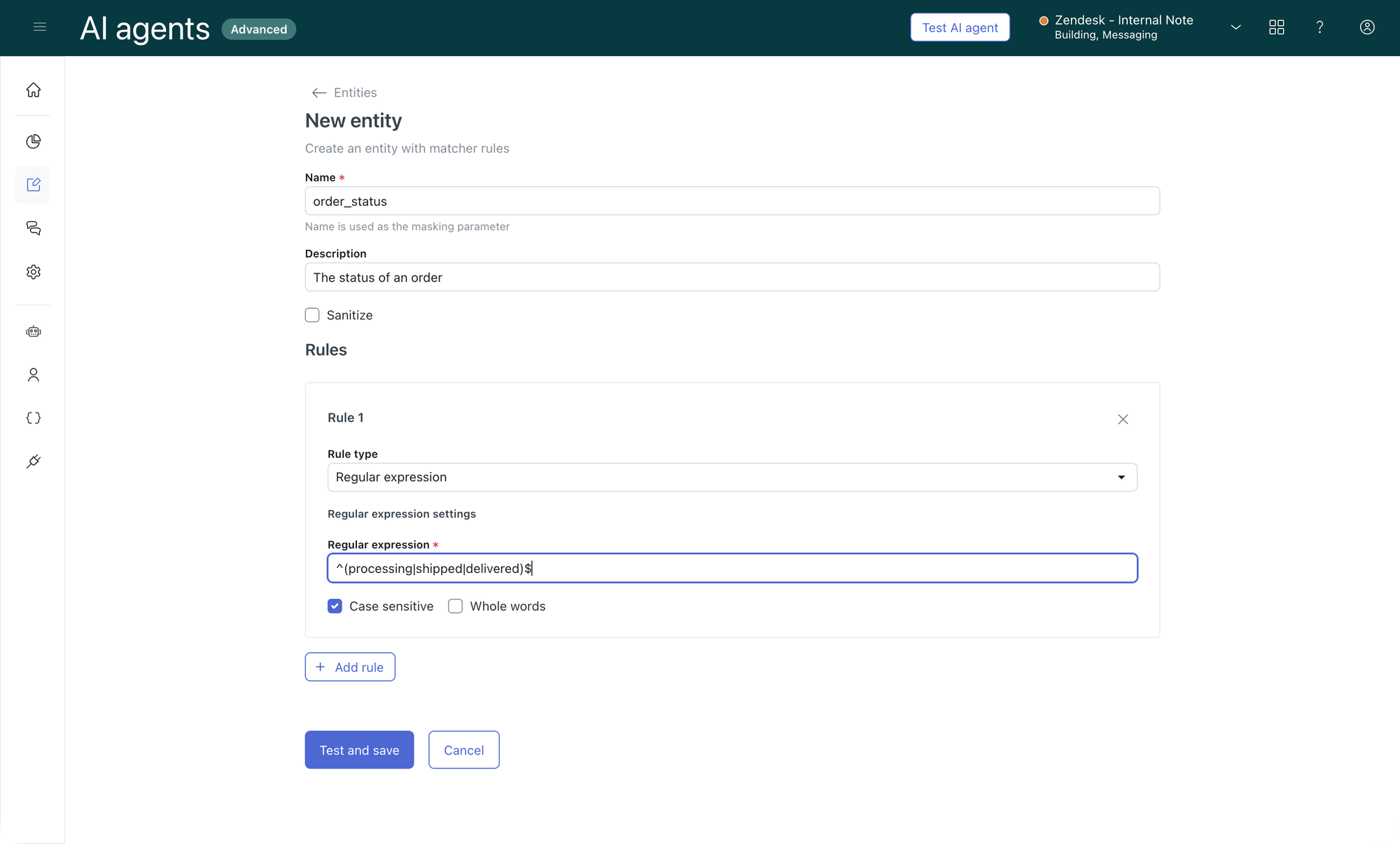
Context and data can be retrieved from both customers and API integrations. But before you pass one to the other, you need to validate the information you have is actually in the right format. An order number has 5 digits. A status can only be processing, shipped or delivered. An email contains an @ and a domain name.
AI Agents has entity detection built-in to detect and confirm specific data in your conversations. It looks at customer responses and can confirm the format matches your requirements. The value itself will then be stored in a parameter you can use in your procedures or API integrations
Entity detection bridges unstructured conversation data and structured input parameters. By extracting and validating critical data elements—like order numbers, email addresses, or status codes—AI Agents ensure that downstream actions receive high-quality data, reducing errors and enabling smooth automation.
One current issue we have in AI Agents Advanced is that parameters are not a separate element that’s easily reviewable. Parameters can be defined in conversation actions, API integrations and during procedure or dialogue builder writing. But there is no single place where you can see all the parameters you’ve defined. This means you run the risk of having duplicate uses (e.g. ordernumber and order_number) or two procedures using the same parameter name for different use cases, risking one overwriting another’s value (e.g. status for both the order status as well as the shipping status).
Additionally, Entities for AI Agents are separate from those of Agent Copilot’s Intelligent Triage. Personally, I hope Zendesk fixes both elements in the future. As their AI capabilities get deeper integrated with the core platform, I can see a future where we have a single Entity page, that contains both regex-defined parameters, as well as all other parameters we use across API Integrations and custom actions across AI Agent and Agent Copilot alike.
Procedure logic
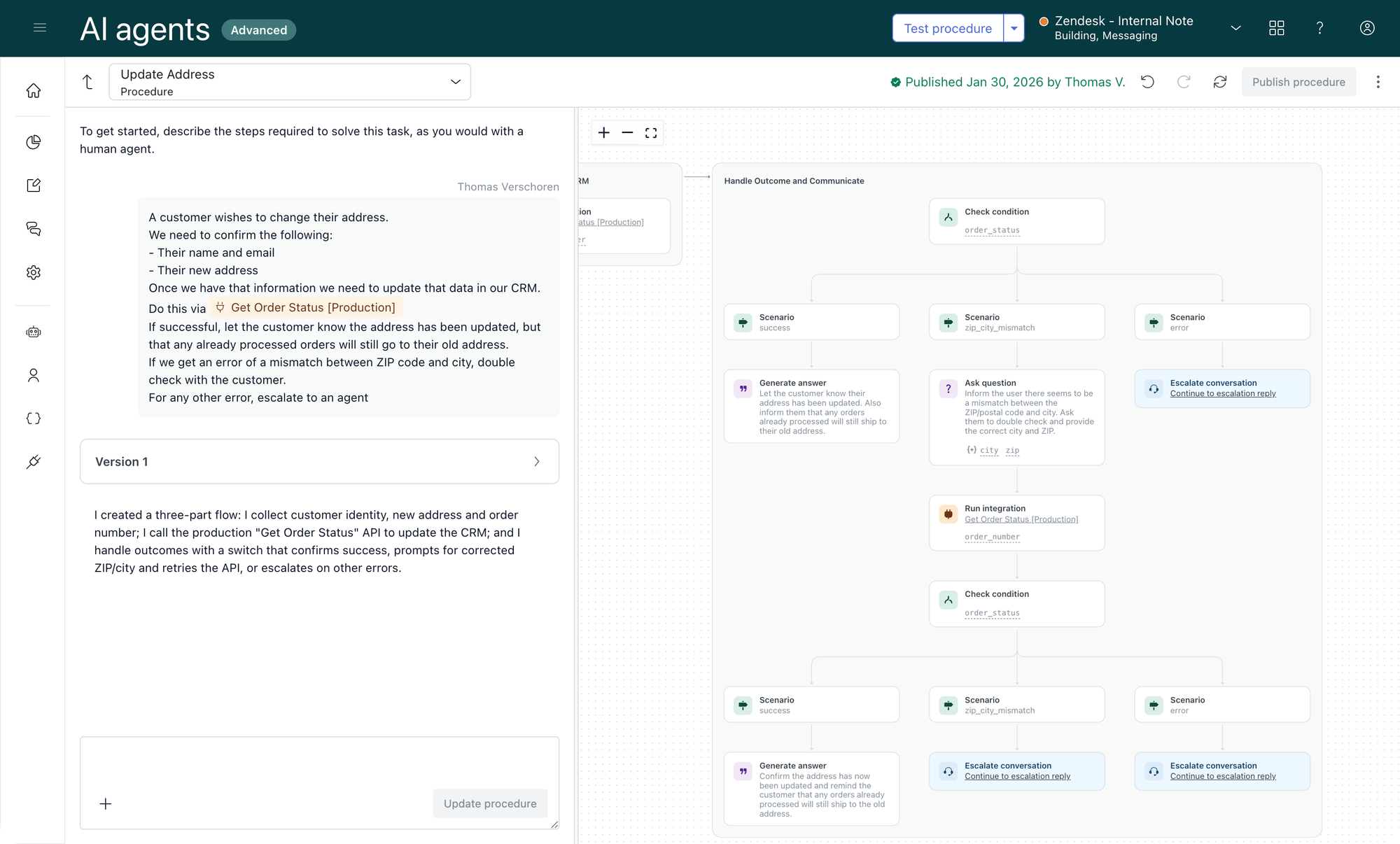
While procedures can’t themselves perform API calls, they orchestrate data validation, branching logic, and action triggers, coordinating how and when external APIs are used. Writing explicit procedure logic ensures your team understands the flow of data, enabling you to spot opportunities for optimisation or automation.
Handling data in Agent Workspace
It’s not only AI Agents that run actions and handle data to drive conversations. When a ticket gets escalated to Agent Workspace, there too we need run actions and gather context. But where AI Agents do this fully autonomously, within Agent Workspace we’ve got a couple of options.
In Agent Workspace, providing agents with comprehensive actionable context, through enriched ticket data, sidebar apps, and agent guidance tools like Agent Copilot, empowers them to resolve tickets faster and more accurately by working directly with relevant data and systems.
A ticket can be handled entirely by your team. This means we need to make sure your agents have context, integrations and permissions to gather data and make changes right at their finger tips.
Some things can also be automated by the system. A trigger or Action Builder workflow might gather context and enrich a ticket before it gets assigned to an agent for example. Or we can leverage Omnichannel Routing to route the ticket to the right team, while Intelligent Triage detects entities and intents.
And in most cases, we’ll end up with a hybrid approach where Agent Copilot surfaces context and suggest next best actions to agents. Your agents approve these suggestions, which sends messages to your customers, executes API integrations, or runs Action Builder workflows.
Neither of these approaches is “the right one”. Depending on your use cases, you’ll use a combined approach of manual, automated and hybrid actions to resolve your tickets.
Ticket metadata
The most obvious part to start when looking at what data is available to your agents and Agent Copilot is your ticket metadata. Elements like the requester (and associated data like organisation or VIP tags), ticket fields, and context gathered by Intelligent Triage.
There are however a few approaches you can take to make this data manageable.
Keep it minimal
Tickets should contain only the necessary reference data that enable fast and accurate lookups, while volatile or complex data stays in the source systems. Intelligent Triage advances this by automatically categorising tickets and extracting key data fields (entities), transforming free-form messages into structured data. This enables agents and automation tools to quickly apply relevant knowledge, trigger workflows, and initiate data-driven actions, streamlining resolution.
For example, when handling a question about orders, storing the order number in a ticket field is useful. It makes future lookups of that order possible, you can cross reference multiple tickets about the same order, and sidebar apps or custom actions can use that order number to pull info from your CRM. But the order status, the amount or shipping address? Those should remain in the order system. It’s data that changes (especially order status), and it can always be retrieved when needed in the future.
Similarly, if your user contains an email and external id, you have enough information to know who they are. You could sync their VIP status to Zendesk to set a different priority, or you could leverage Action Builder workflows to capture the current state when a user creates a ticket, and check their VIP status that way. Where the former has the benefit of not hitting your CRM endpoints for each new ticket created, the later removes the need for a syncing engine and you can be sure you always have the latest customer information.
No more manual data input
Traditionally it was up to agents or customers to make sure tickets had the right context. Webforms required customers to enter their order number and contact reason, and agents had required fields for product sku, order number and category they needed to complete before they could solve a ticket.
This created a couple of problems:
- There’s overhead and double work. A customers message probably already contains that context. But still they, or agents, need to manual copy that context to the proper ticket fields.
- Second is a quality issue. A customer who’s asked to select a contact reason will either map their problem to the wrong team (it doesn’t work so its a support question, where it’s actual a feature locked behind a different license, so a sales question), or they pick the team based on speed of resolution (surely sales answers faster than support). Similarly, out of laziness, speed or lack of options, your other category will always be overloaded.
- Third is a chicken and egg problem. If we leave it to agents to categorise tickets, that means we can only route and triage once that information is entered.
So, how do we fix this? The answer lies in Zendesk’s Intelligent Triage feature, part of Agent Copilot. Intelligent Triage can map an intent to each ticket based on the conversation. This removes the need for both agents and customers to manually select categories. It also offers a more nuanced category selection since intents can be in the hundreds, whereas efficient category input often means you reduce your options to a few dozen tops.
Intent suggestions also allow the platform to continuously monitor for new use cases. These will be surfaced by Intelligent Triage, giving you the opportunity to decide how you want to handle these new customer questions. (And conveniently, when you get started it will surface a lot of existing topics you didn’t know about, hidden in your other category).
 Thomas Verschoren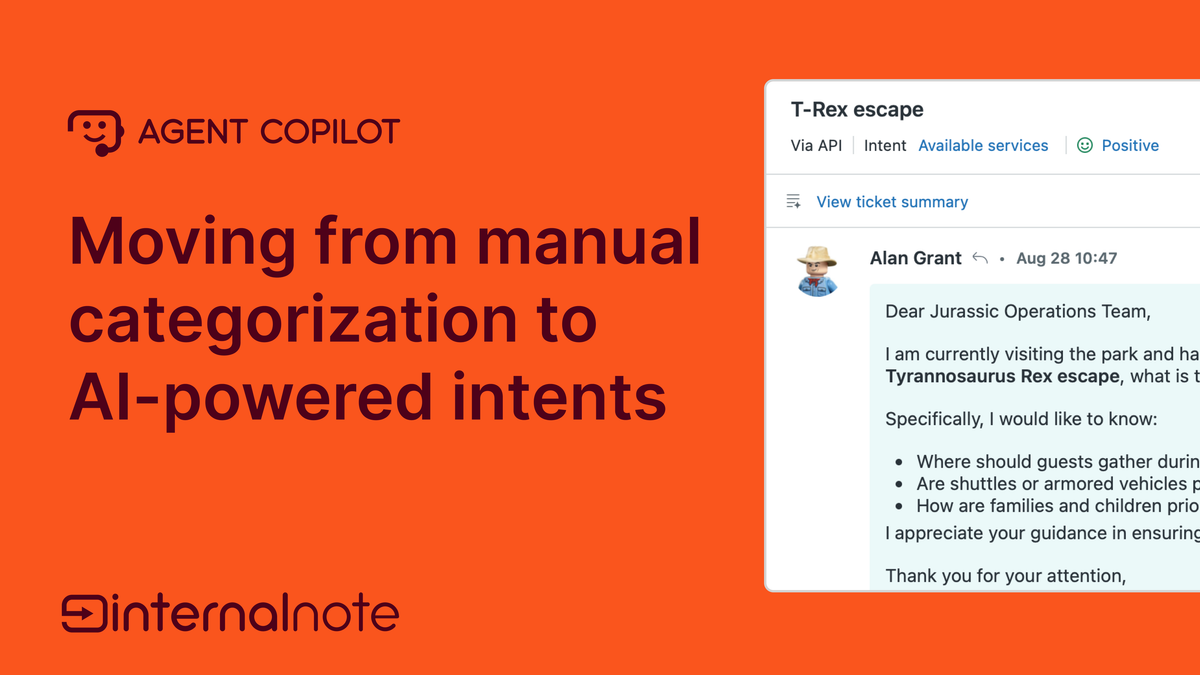
While automatic categorisation is great for both routing and reporting, the real power of Intelligent Triage lies in its entity detection feature. This feature scans every comment for known patterns, extracts that data, and stores it in ticket fields. For example, when you define a color, product and serial number entity in your instance, a message like:
I have a problem with Game Boy. It’s a purple model with serial THX-1138. The screen doesn’t turn on.
Will be parsed by Intelligent Triage and turns into:
I have a problem withGame Boy. It’s apurplemodel with serialTHX-1138. The screen doesn’t turn on.
| Field | Value |
|---|---|
| Intent | Broken Device::Screen Problem |
| Color | Purple |
| Serial | THX-1138 |
| Model | Game Boy |
This gives your agents and automations like Agent Copilot or Action Builder the immediate context they need to start resolving the issue. We can surface repair manuals for Game Boys, check warranty based on the serial number e.a.
Connect the dots
Chances are big that before a ticket reaches your team, it’ll have passed through an AI Agent first. This means you’ve got the opportunity to make sure your agents have as much context as possible. Any data the AI Agent collects should and can be mapped to ticket fields via the following metadata values in your AI Agent actions: zen:ticket_field:7662882404114
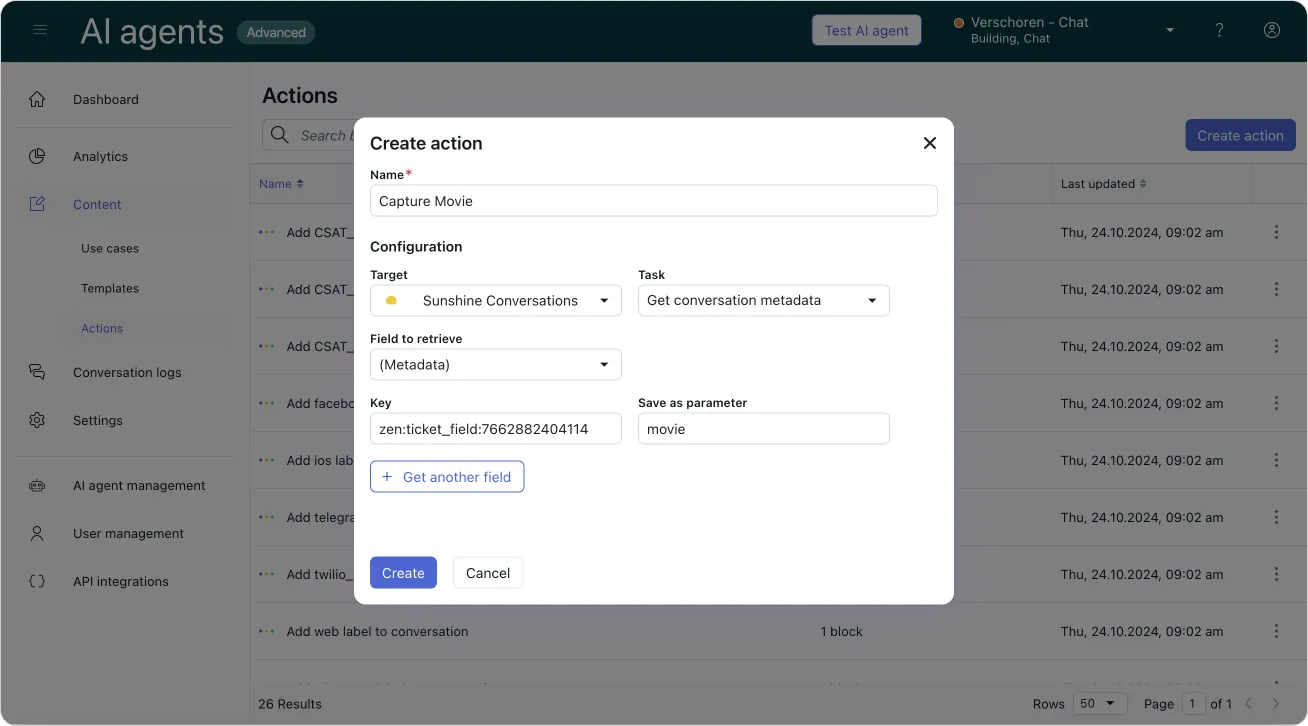
Additionally, if you know your agents will need more info than your AI Agent currently collects, make sure to add these questions to your procedure too. This gives your team the chance to start immediately with all context, without losing time asking for that information first.
Agent sidebar apps
Context needed to resolve tickets isn’t only stored in tickets, users and conversations. More often than not, in order to resolve a ticket, your team needs to reference data stored in your CRM, order management system or finance tools.
Zendesk offers the ability to install apps within Agent Workspace o make that information visible to your team. These apps are the user interface through which agents take action on data, perform updates, and trigger workflows. They show information, or add integration actions to do something with that data. Add, modify or deleting information, requesting refunds, cancelling orders e.a.
There’s a few ways you can get these apps installed in your Zendesk instance.
Marketplace
The easiest way is to leverage the Zendesk Marketplace. This store contains apps built by Zendesk, Zendesk Partners and major platforms and allows you to install e.g. a Shopify, Salesforce or Jira application directly into Zendesk. Most applications are free, and some offer premium or paid versions with more capabilities.
Zendesk App Toolkit
The second option is a build your own approach leveraging Zendesk’s application platform. These set of APIs offer ways to build apps, fetch data from external platforms or leverage data in your Zendesk environment, all while running the application logic safely within your Zendesk environment. You can built these apps yourself, or you can contact a Zendesk Partner to build one for you.
App Builder
The third and newest option is Zendesk's App Builder.
This AI coding tool allows you to leverage AI to generate apps based on prompts.
And while AI based coding tools are also provided by major AI players like OpenAi’s Codex, Claude Code or Gemini, what makes App Builder unique is that it’s built by Zendesk for Zendesk. This means App Builder understands all Zendesk APIs. It knows how Zendesk works and how the data models are structured. And it knows our Garden design system.
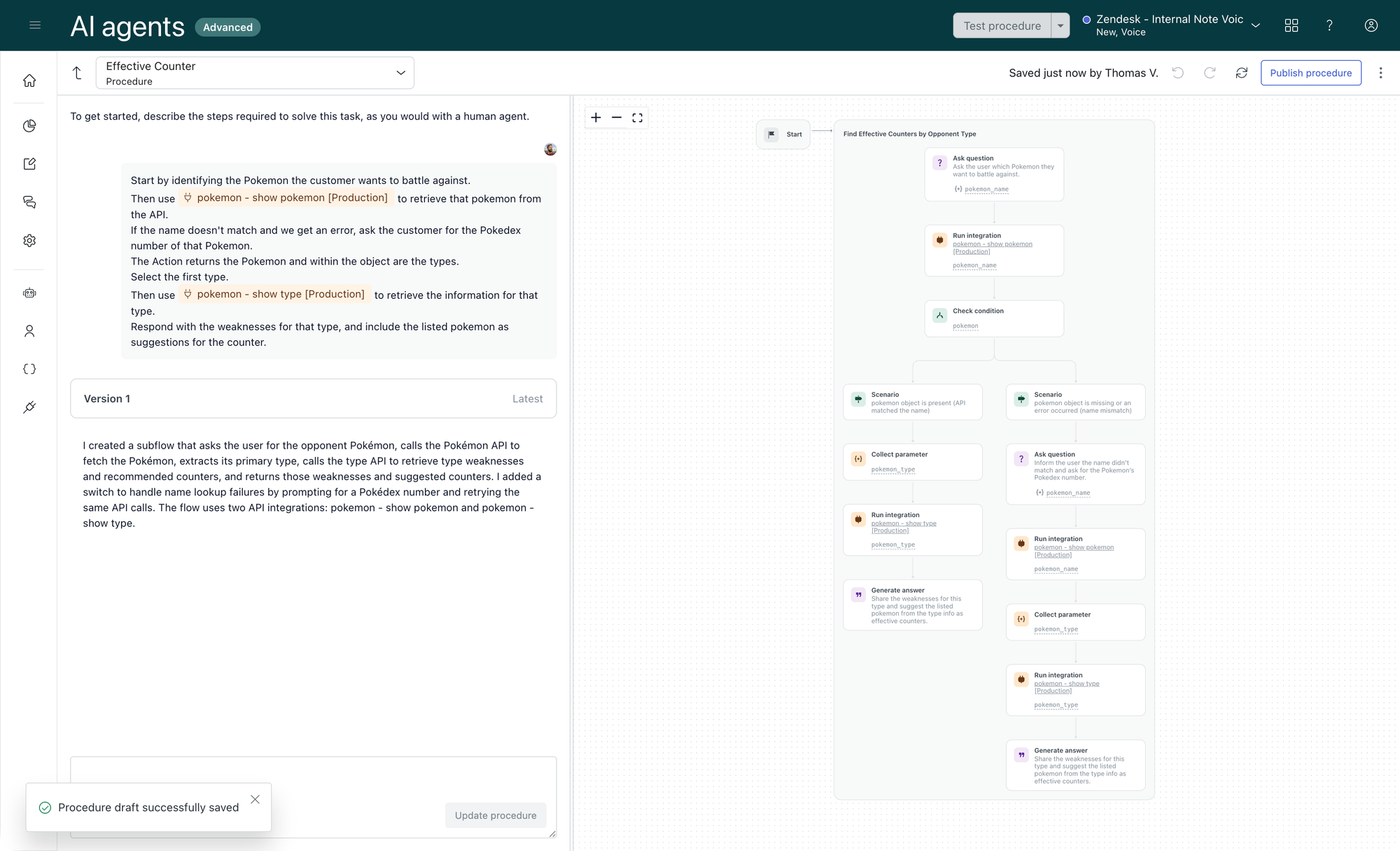
Combining these elements means that “Built an app that shows similar tickets” immediately turns into a rich ticket management tool for your agents.
In reality, your prompt will probably be a bit richer with more context, but just this one line shows the power of App Builder.
Agent Copilot
So far, we’ve explored ways to add context to tickets, automate categorization, and provide agents with tools to view and interact with external data via apps. While these capabilities improve efficiency, their impact on average handling time is often modest. Saving a few minutes copying data from tickets to ticket fields is helpful, and at scale, measurable—but the real transformation happens when you automate the processes and actions agents perform.
This is where Agent Copilot and its support for running actions come into play.
Agent Copilot acts as an intelligent orchestrator working alongside your team. It integrates data, procedures, and external systems, continuously analyzing conversations to surface timely, contextually relevant suggestions. Whether updating ticket fields, triggering API calls, or running complex workflows, Agent Copilot enables agents to take fast, data-driven actions—significantly improving resolution speed and quality.
Following your defined procedures, it offers next best actions precisely when needed. These suggestions might be ticket-based (e.g., setting fields, changing status, replying to customers) or operate outside the ticket (e.g., interacting with external systems or running Action Builder workflows).
This delivers two key efficiency gains:
- Agents receive guided suggestions, requiring only approval or minor edits—streamlining their workflow and allowing them to move faster through tickets.
- Agent Copilot can run multiple actions sequentially, validating refund eligibility, executing the refund, and communicating the outcome, all with a single agent approval, far quicker than manually completing each step via sidebar apps.
Agent Copilot action
Agent Copilot supports three types of actions:
- Direct ticket or conversation interactions
- Custom Actions that invoke APIs with the procedure managing the subsequent logic
- Action Builder workflows that encapsulate complex logic, API calls, conditional steps, and outputs into reusable, standalone workflows
Together, these capabilities empower your team to focus on what matters while automating the routine action steps that drive resolution forward.
Trigger based actions
The third type of actions we can run are trigger-based actions. Like AI Agents, these operate fully autonomously, responding to events that occur on a ticket. Both classic triggers and Action Builder provide event-driven automation that offloads repetitive tasks from your agents, allowing them to focus on complex cases and deliver empathetic, personalized support.
For example:
- When a ticket is created, a trigger might set priority based on the ticket’s intent.
- If a ticket with a Refund intent is created, an Action Builder workflow could evaluate eligibility and alert the agent with an internal comment such as, “This is the sixth refund for this customer this week.”
- When a ticket is marked as a bug, an integration might automatically create a new Jira issue—potentially enhanced by an OpenAI prompt to summarize and format the bug report.
Zendesk offers two ways to configure these actions:
- Classic triggers: The simplest method, where you define conditions (e.g., ticket created, requester is VIP, intent equals “Modify booking”) and corresponding actions (e.g., change priority, add followers). Triggers are linear and straightforward.
- Action Builder workflows: These are far more powerful and flexible. Triggered by any ticket update, workflows can contain complex conditional logic all within a single flow. For example, you can check a customer’s support tier (gold, silver, bronze) and set priority accordingly—handling multiple branching conditions without building multiple triggers.
Regardless of the tool, automating actions at the right points in a ticket’s lifecycle reduces manual agent work, ensures tickets keep progressing smoothly, and minimises the risk of human error or oversight.
The Zendesk Action Platform
As highlighted earlier, Agent Workspace provides multiple ways to execute actions on your tickets. Whether these actions are initiated by Agent Copilot or triggered automatically, Zendesk offers different layers of complexity and control to tailor automation precisely to your needs.
Webhooks
Webhooks are the oldest and most basic ways to run actions from Zendesk. Webhooks are basic HTTP API requests that push data from Zendesk to another system. There’s no feedback loop, and we can’t handle the output of these API calls.
They’re ideal for logging data in external systems, or notifying people via e.g. a Slack notification over API.
Webhooks can only be invoked via classic triggers and while they have their uses, the lack of a way to handle their output can be a reason not to use them.
Custom Actions
Custom Actions are a newer way to integrate with external systems. They allow you to define inputs, they can make API calls to external systems, and you can define output parameters for these actions.
A typical use case would be an order_number input, that you user to GET order information, which outputs a shipping_status and tracking_number.
Custom actions don’t stand on their own though. They are invoked by either Agent Copilot procedures or Action Builder workflows, where the logic contained within these flows handles both providing the correct input, and reacting to an Custom Action’s output.
Action Builder
Which brings us to Action Builder. Action Builder is Zendesk’s workflow builder that allows you to define deterministic workflows with specified outputs.
Workflows can be triggered by ticket updates, Agent Copilot procedures or external webhooks. Each workflow contains a set of steps, or blocks, which are chained together with conditional logic. Each block leads to the next, and the output of each block defines what happens next.
Blocks can be:
- Conditional blocks (e.g. is this user a VIP? Yes, or No).
- Zendesk Actions, getting and setting ticket or user data in Zendesk
- Integration blocks, leveraging custom actions or built-in connectors to popular platforms like Jira, Shopify or Slack. Integrations can both get or set data.
- Code blocks, to run custom javascript logic on the data within your workflow
- Promptable blocks (OpenAI) to leverage LLM prompts to convert or reason on the data in your workflow.
Action Builder workflows are great for wrapping specific business logic or actions in a contained, reusable element across your tickets. You can use an Action Builder workflow to set ticket priority based on multiple nested conditions. You can use it to pull data from multiple sources and enrich both ticket and user profiles. Or you can use it to make decisions based on data in external tools and conditionals. The decision itself can then be used to move a ticket or Agent Copilot procedure forward.
Together, webhooks, custom actions, and Action Builder workflows create a powerful automation stack, letting you progressively orchestrate simple notifications up to complex, conditional business processes that read, write, and act upon rich data, all integrated seamlessly within Zendesk.
Conclusion
The arrival of Agentic Procedures for AI Agents, Agent Copilot Procedures, and Action Builder workflows presents a powerful toolkit for transforming how you automate customer conversations and processes.
On one hand, these capabilities enable you to streamline workflows, reduce manual effort, and improve quality by orchestrating data-driven decisions and actions seamlessly across your platform.
On the other, they raise important questions: Where should I build my actions? and Where does my data come from? With multiple overlapping features offering automation, reasoning, and data integration, choosing the right layer for each use case is critical to success.
Zendesk’s Resolution Platform delivers its greatest value when you embrace an automation-first mindset, designing dynamic, flexible journeys where data drives decisions, and actions turn those decisions into real outcomes.
To guide your approach, consider these three levels:
- Fully autonomous AI Agent procedures that handle end-to-end automation whenever decisions and actions can safely be executed without human intervention.
- Agent Copilot procedures that keep agents in the loop for approvals or judgment calls, blending automation with human expertise.
- Action Builder workflows to encapsulate complex or shared business logic as reusable components invoked by both AI Agents and Agent Copilot, ensuring consistency and scalability.
Underpinning all of this is the critical foundation of data, both as input fueling your logic and as the output manipulated via actions across APIs, external systems, and workflows. Understanding what data you need, how it flows, who can access or modify it, and when actions are permitted shapes every successful automation.
Looking ahead, the final part of this series will explore Insights. How measuring your processes and automation outcomes feeds a continuous learning loop. By monitoring how your workflows perform, spotting trends, and uncovering opportunities, you gain the actionable feedback needed to refine your procedures and deliver ever-better customer experiences.
Together, these pillars, Knowledge, Procedures, Data & Actions, and Insights, form the backbone of a truly modern Resolution Platform. Harnessing them effectively means turning automation into a strategic advantage that accelerates resolution, empowers your teams, and delights your customers.