Zendesk Relate 2026 - Specialised AI Agents
Zendesk Relate 2026 - Specialised AI Agents

On this page
In the previous article in this series, I laid out the new shape of the Resolution Platform. Resolution sits in the middle. Two flows feed it. The resolution flow handles the customer's question. The learning flow makes the platform better at the next one.
This article is about the first flow. The front-end. Where an autonomous service workforce of AI Agents meets customers and turns questions into resolutions.
It's the loop most Zendesk customers know best. AI Agents have been live across messaging, email for a while now. Their agentic procedures, announced at Relate 2025, are now generally available. Most teams have at least some kind of AI Agent active today.
The next phase isn't about getting AI Agents to resolve more. They already do. The next phase is about specialisation. Moving from general-purpose conversational AI Agents to a coordinated team of specialised agents that reason, take action and resolve work across every channel and every workflow.
This is what Zendesk is calling the Autonomous Service Workforce. And it's the headline of Relate 2026.
The three releases that build the workforce
Zendesk frames the Relate 2026 AI Agent announcements in three connected releases.
- Agentic AI Agents. Now generally available for messaging and recently for email. They are the foundation everything else builds on.
- Voice AI Agents. They’ll be available later this year for both Zendesk Voice and Contact Center. The same agentic capabilities, applied to the phone channel.
- Agent Builder and Custom Agents. A transformative way to create custom agents that let you automate your business workflows.
Together these turn the AI Agent product from "one capable AI Agent" into a coordinated workforce of autonomous service agents.
Pricing that follows the work
In the last year we moved from counting tickets toward measuring resolutions. Success means actually helping customers, not just deflecting tickets.
Until now, Zendesk charged a flat rate per AI Agent resolution, where resolution roughly meant "the AI Agent didn't escalate." That measurement made sense when escalation was the main failure mode. As AI Agents take on more nuanced and complex work, the way we measure their effectiveness needs to be sharper.

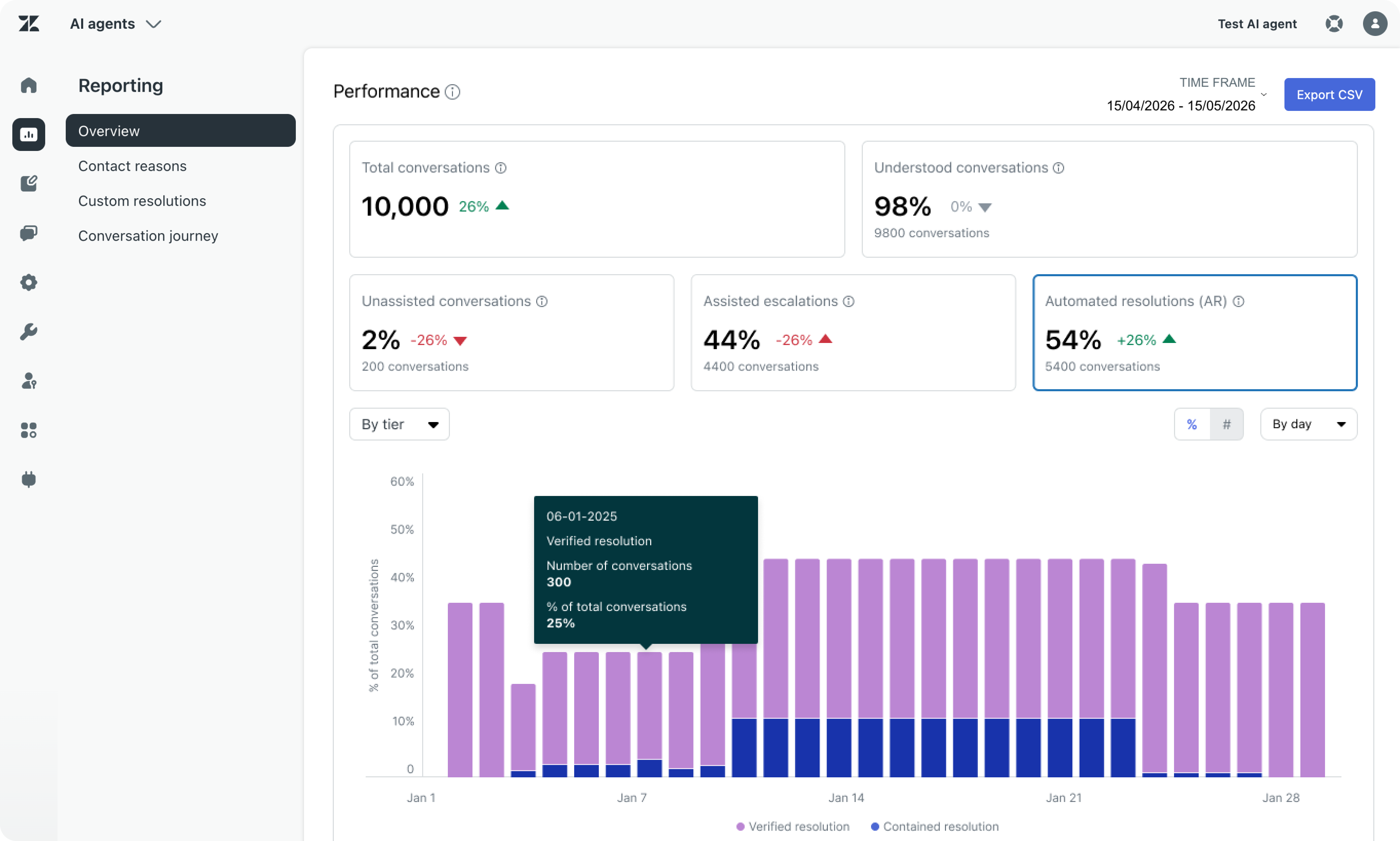
Four new tiers replace the single resolution rate.
- Unassisted conversation (Free)
The conversation triggered only small talk or system replies and no automation was performed. - Assisted Escalation (Free)
The AI Agent contributed to the interaction, but a human agent completed the resolution. The AI did some work, just not all of it. - Contained Resolution (Free)
The AI Agent handled the request from start to finish. No human involvement. The customer didn't come back, so we can assume it's resolved. - Verified Resolution (Paid Resolution)
The AI Agent fully resolved the request, and a verification step confirmed the customer's issue actually got resolved.
These new resolution metrics are now visible throughout the system. They appear in AI Agents reporting, and show up in ticket audit logs of AI Agent or Support tickets.
Agentic on every channel
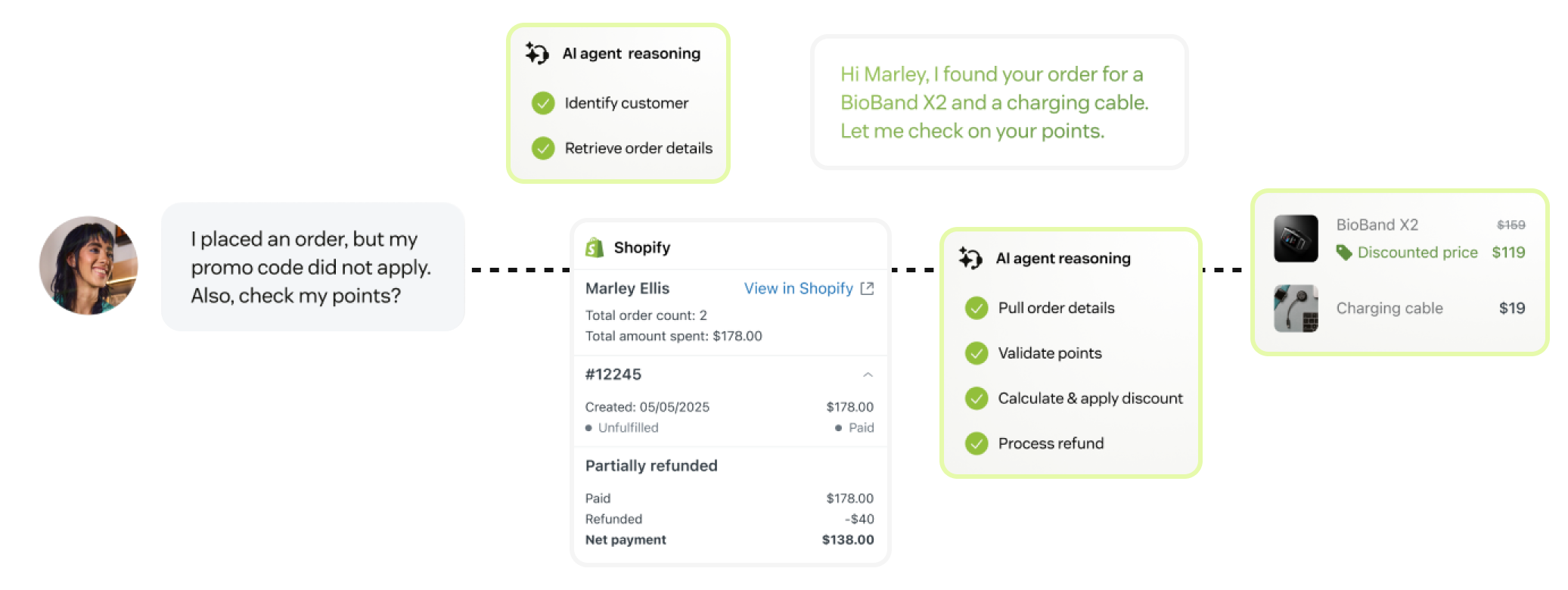
The agentic capabilities Zendesk announced at Relate 2025 are now generally available across messaging and email. That's a meaningful expansion. Email has historically been the hardest channel to automate well.
For messaging, agentic procedures and generative knowledge replies are the new default. The Knowledge Reply (the successor to the old uGPT flow) now behaves like a procedure you can edit and extend. Procedures and dialogue flows can link to each other.
For email, agentic AI just became the new default too. AI Agents understand incoming emails, answer from connected knowledge sources and execute business procedures through integrations, all without hand-built dialogue flows.
For more depth on what changed, see my full overview article on What's New for Zendesk AI Agents Advanced.
Voice AI Agents
Voice has been the holdout channel for serious automation capabilities. Until now most voice systems were built around routing. Get the call to the right human. Don't lose the customer on hold. That's a reasonable goal when the AI can't actually resolve the question.
Voice AI Agents change that. The same agentic capabilities running on messaging and email now run on voice. The AI understands the request. Uses your knowledge and policies. Completes the task. Not just passes it along.
Imagine a stranded traveller trying to rebook a cancelled flight. The classic experience is a phone tree. Press 1 for existing bookings. Press 2 for changes. Hold music. A long wait. A repeat of everything the IVR already collected when a human finally picks up.
The Voice AI Agent experience is different. The AI identifies the customer, asks for context, finds the available options and confirms the booking. No human intervention. No menu navigation. No wait.
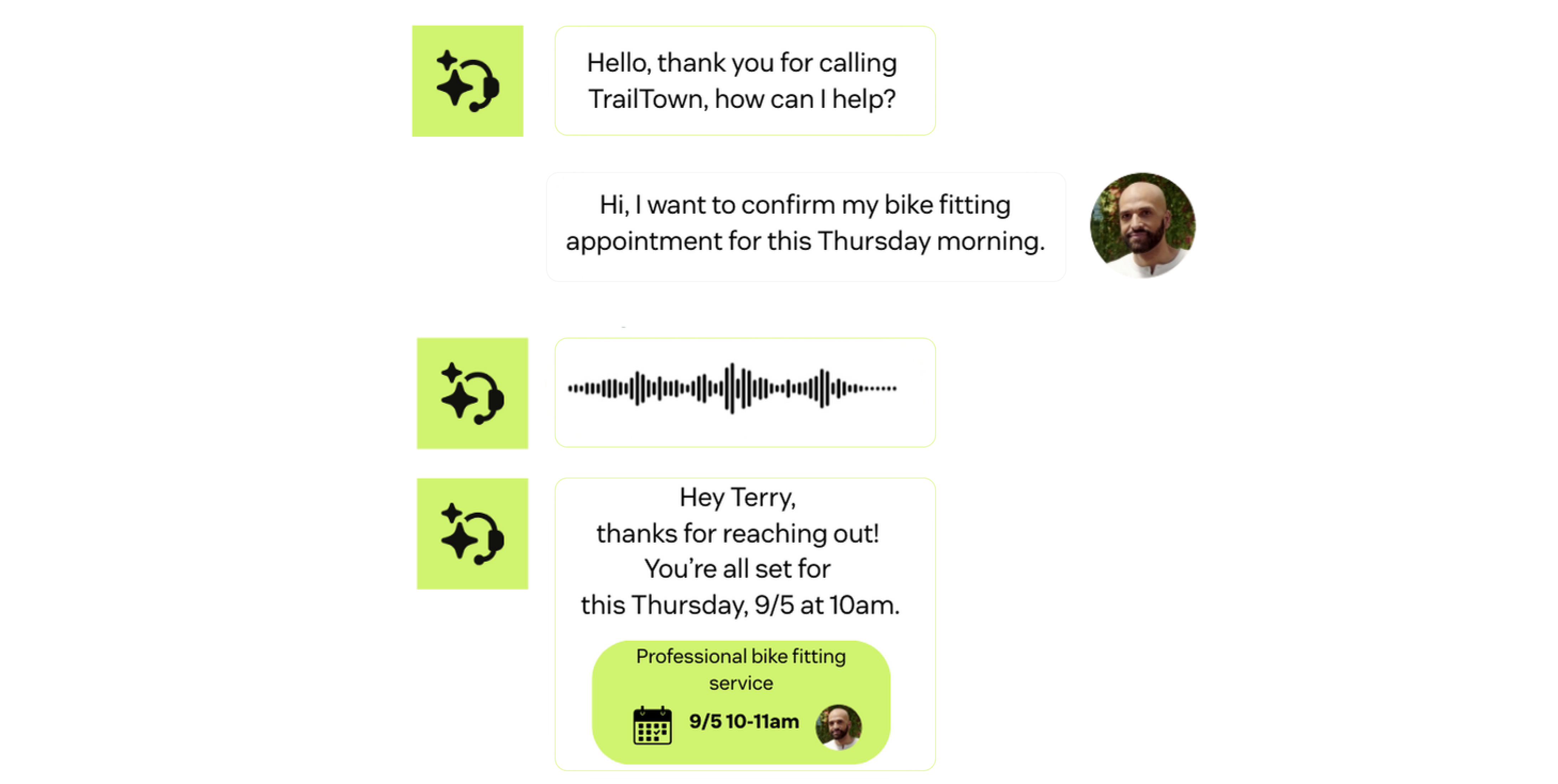
What makes this work at scale is the combination of capabilities Zendesk has been building. Since Voice AI runs on the same automation stack as its other AI Agents, they can pull in Knowledge, procedures and actions to automate use cases over voice, while also allowing for a seamless handover to a human agent with context.
Agent Builder: a workforce of custom agents
The headline release of the AI Agents pillar has to be the new Agent Builder. A new capability in the platform that lets you create custom AI agents for unique business workflows.
Custom AI agents aren't customer-facing. They handle the back-office work that sits behind a customer interaction. Validating data. Reading attachments. Processing claims. Confirming eligibility. Processes that are an extension of customer interactions, but aren't visible to the customer.
Why Custom Agents?
The Zendesk platform has always had this tendency to have multiple features that execute on the same actions in different ways. Chat and Messaging both offer conversational interactions. Views and Agent Home both surface work to be done. Triggers and Omnichannel Routing both assign tickets. Triggers and Action Builder workflows both run conditional actions. Macros and Auto-assist both automate replies.
The difference between each one is the underlying technology that powers them. Views, Action Builder workflows, macros and triggers are deterministic and hardcoded elements. Omnichannel Routing, suggested replies and Agent Home are based on Zendesk's newer adaptive AI capabilities. As the platform evolves, more and more of the older capabilities get replaced with similar, but more powerful, features.
The same goes for Custom Agents. They take the deterministic logic that Action Builder offers and turn it agentic. So why does that matter?
Action Builder workflows are conditional decision trees. One step leads into the next, and you can branch flows based on a condition (is the order older than 30 days?). But as the number of conditions grows, so does the complexity of maintaining that flow. If you want to check three conditions, you quickly end up with an unmanageable set of branches.
For those that used Dialogue Builder or Flow Builder for Zendesk's AI Agent and Answer Bot, this might sound familiar. Similar to how Agentic Procedures made it easier to define complex logic for AI Agents, Custom Agents will do the same for Action Builder workflows. Instead of building a rigid decision tree, you have instructions the Custom Agent should follow, reason about, and provide an output for powered by modern LLMs and AI capabilities.
When to use Custom Agents
Zendesk's Action Platform serves one purpose. Based on input triggers, a flow is followed, which results in an output to run business logic.
Those input triggers can be AI Agent or Agent Copilot procedures. They can be things that happen to a ticket or custom object. An external webhook. Or another workflow or Custom Agent.
The output can be passed back to the trigger that called the flow. Or it can pass information and actions to external systems or to Zendesk via the available integrations. And during the flow, the system uses branches, conditions, internal and external integrations to work through its logic.
Action Builder workflows are great for deterministic flows where we expect A to go to B and then branch into C or D.
Custom Agents are the answer for when you've got complex logic, for flows that can't easily be described as a chain of events, or when you need AI capabilities like LLMs, text generation, image classification, data extraction, summarisation or all those other cool capabilities modern AI Assistants have.
So that's when to choose a Custom Agent over an Action Builder flow from a technical perspective. But there's also a decision to be made from an architecture standpoint. Both Custom Agents and AI Agents or Agent Copilot auto-assist procedures can run agentic reasoning logic. So when do you put logic in a procedure and when do you assign it to a Custom Agent?
For me there are three things to look at:
- Complexity. How complex is the logic? Does it overload an admin trying to understand the procedure if we contain it all in one giant procedure?
- Reusability. Is this decision or reasoning something we need for a single process? Or are there multiple use cases where this logic reappears?
- Capabilities. Do we need AI capabilities that procedures don't have, like image classification?
If the answer to any of the above is yes, that's a good signal to extract your logic from a procedure and build a Custom Agent instead.
Any part of the platform that needs to verify VIP status or check return eligibility can call a specific Custom Agent that handles that logic. The input is the context (the customer email or order number). The output is the decision (this is a VIP, and no you can't get a refund because the order is older than 30 days).
This simplifies your agentic procedures a lot. An AI Agent procedure can offload the refund eligibility check to a Custom Agent, which returns just the outcome, after which the AI Agent procedure resumes.
Similarly, an escalated ticket can trigger a workflow that first checks "customer type" and changes priority based on the type, which then influences routing. And Agent Copilot can alert an agent handling a ticket that this customer is a high fraud risk because they've already requested 42 refunds this year.
Action Platform, available to every kind of agent
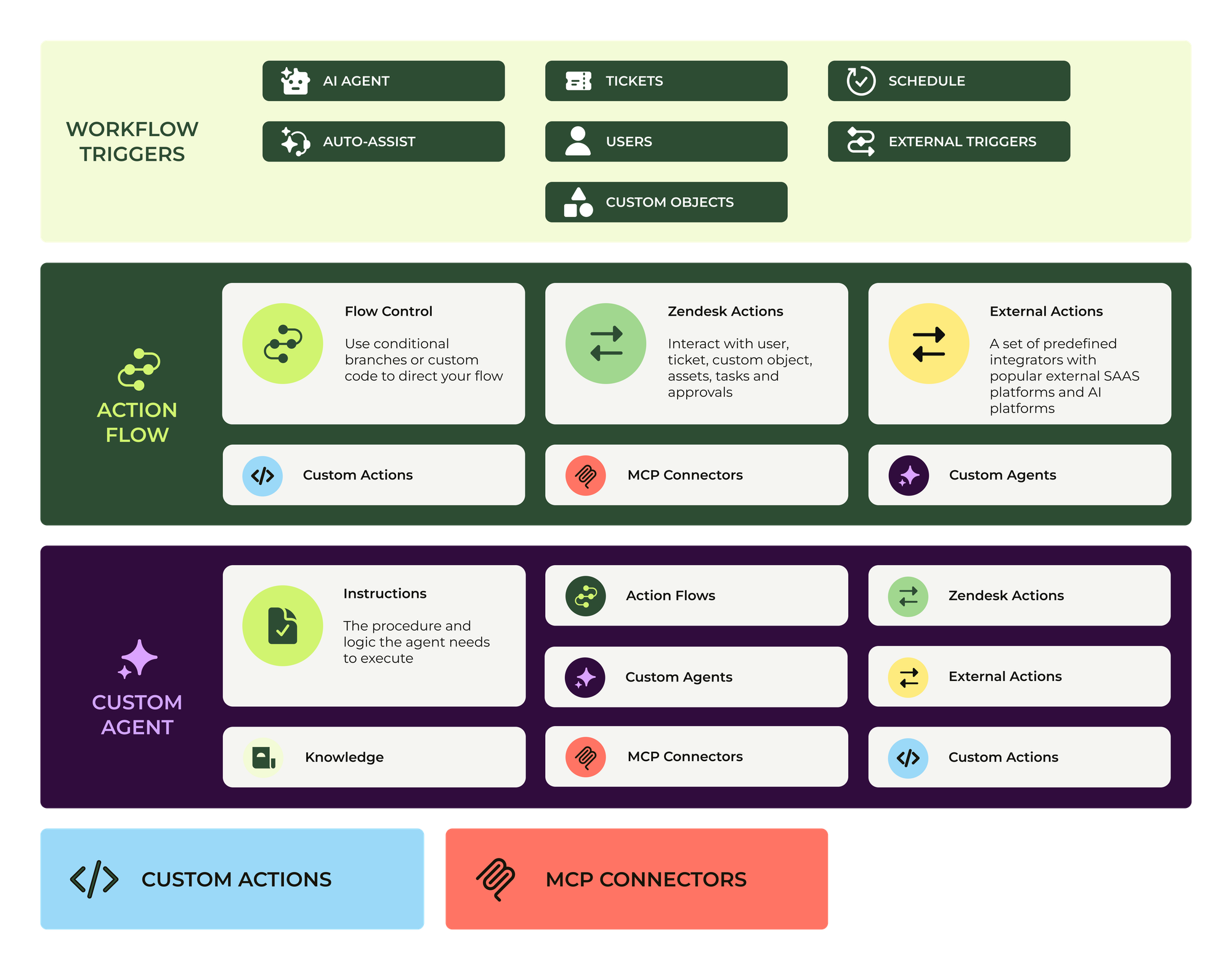
If we take a look at all features that run logic in Zendesk, we can redefine them as follows now that Custom Agents are available:
- AI Agents autonomously resolve customer questions. They use agentic procedures to do this. These procedures can retrieve knowledge, call Action Builder workflows or Custom Agents to get the input and output they need to move forward.
- Agent Copilot runs procedures alongside human agents. It assists agents with suggested replies and can run workflows and Custom Agents by either suggesting them or executing them autonomously or calli into knowledge and custom actions to get the input it needs.
- The ticket lifecycle can also require logic to be run. A ticket needs context so it can be routed correctly, for example. This context can be gathered by Action Builder workflows or Custom Agents.
- Action Builder workflows run through their determisitic decision tree when called. This can be deterministic logic, or they can invoke Custom Agents when reasoning is required. They can get and set data in Zendesk, and connect to external platforms via pre-configured connectors, custom API actions or MCP connectors.
- Custom Agents run agentic logic when invoked. They can use their own knowledge sources, call API integrations, or invoke other workflows or Custom Agents to run their logic.
Combined they turn into Zendesk’s Action Platform where multiple types of triggers can invoke workflows, custom agents, custom actions or a combination theirof.
Integrating Custom Agents in your environment
Three approaches to start using Custom Agents today
If you're an existing customer who already uses AI Agent and Agent Copilot procedures, you might wonder how Custom Agents fit into this setup. There’s three realities that inform that process.
The first one is that procedures grow in complexity over time. A procedure that handles refunds might look at just the order date at the start, but can quickly grow into a complex process with multiple checks and validation steps. To keep your procedure manageable, you can use Custom Agents to extract all the "refund eligibility" logic out of the procedure into its own Refund Agent. The input is the customer and order number. The output is a yes or no with an explainer.
The second opportunity lies in noticing when you're reusing logic. If both your "make a reservation" and "modify a reservation" use cases need to check availability, you can extract that logic from both procedures into a "check availability" workflow and call that workflow from both procedures. This way you're sure that all procedures that need that check follow the same logic, and if that logic ever changes you only need to modify it once.
The third opportunity lies in that component logic. Overtime you'll build a large library of workflows and agents that all run specific business logic. As you start covering more use cases, or shift use cases from human-handled to AI agent-automated, you can reuse those exact building blocks or recombine them for new flows, or one of Zendesk’s Copilot can suggest an existing flows that might be a perfect fit to add to another procedure.
Leveraging the Action Platform in procedures
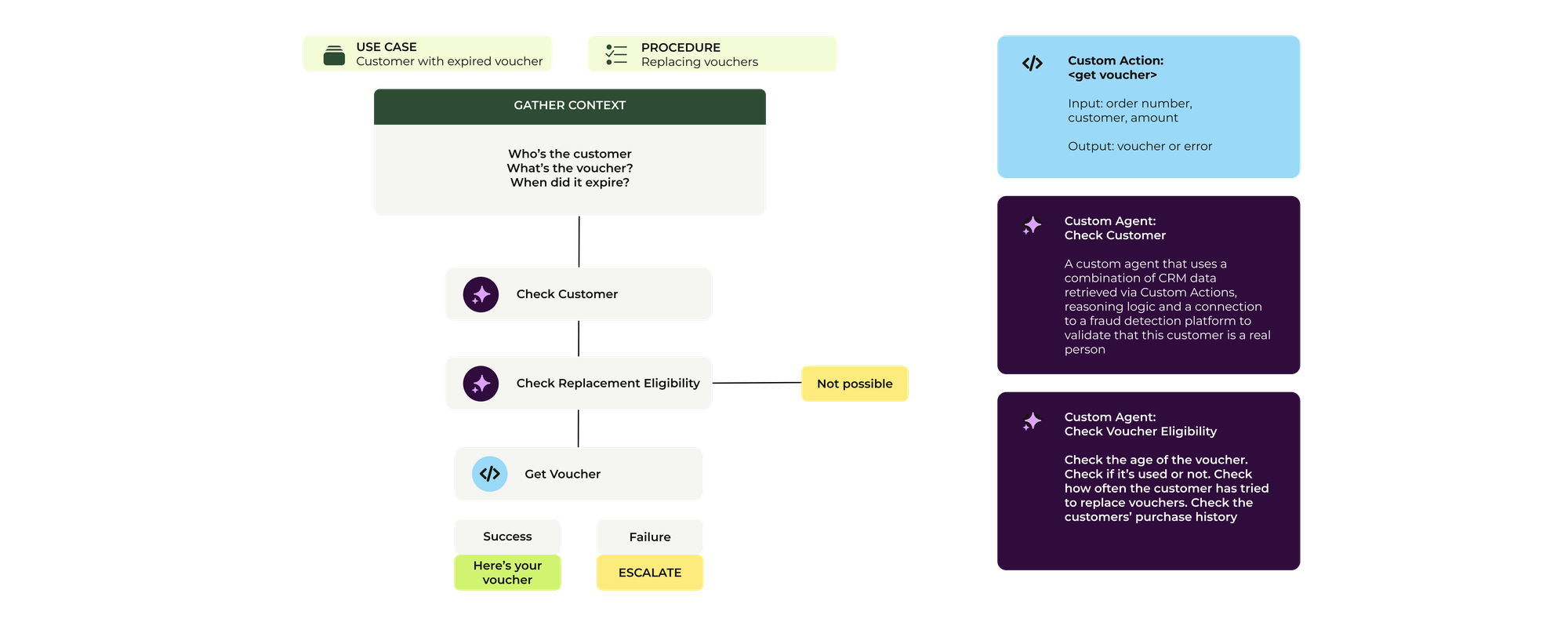
Take a look at the flow below. This is a typical refund use case where we first get context. We then validate the customer, check eligibility, and then offer the customer options on how they want to get repaid. Traditionally you’d write down this logic as part of an AI Agent or Agent Copilot procedure, documenting all the necessary steps in the process while leveraging API integrations to get and set data.
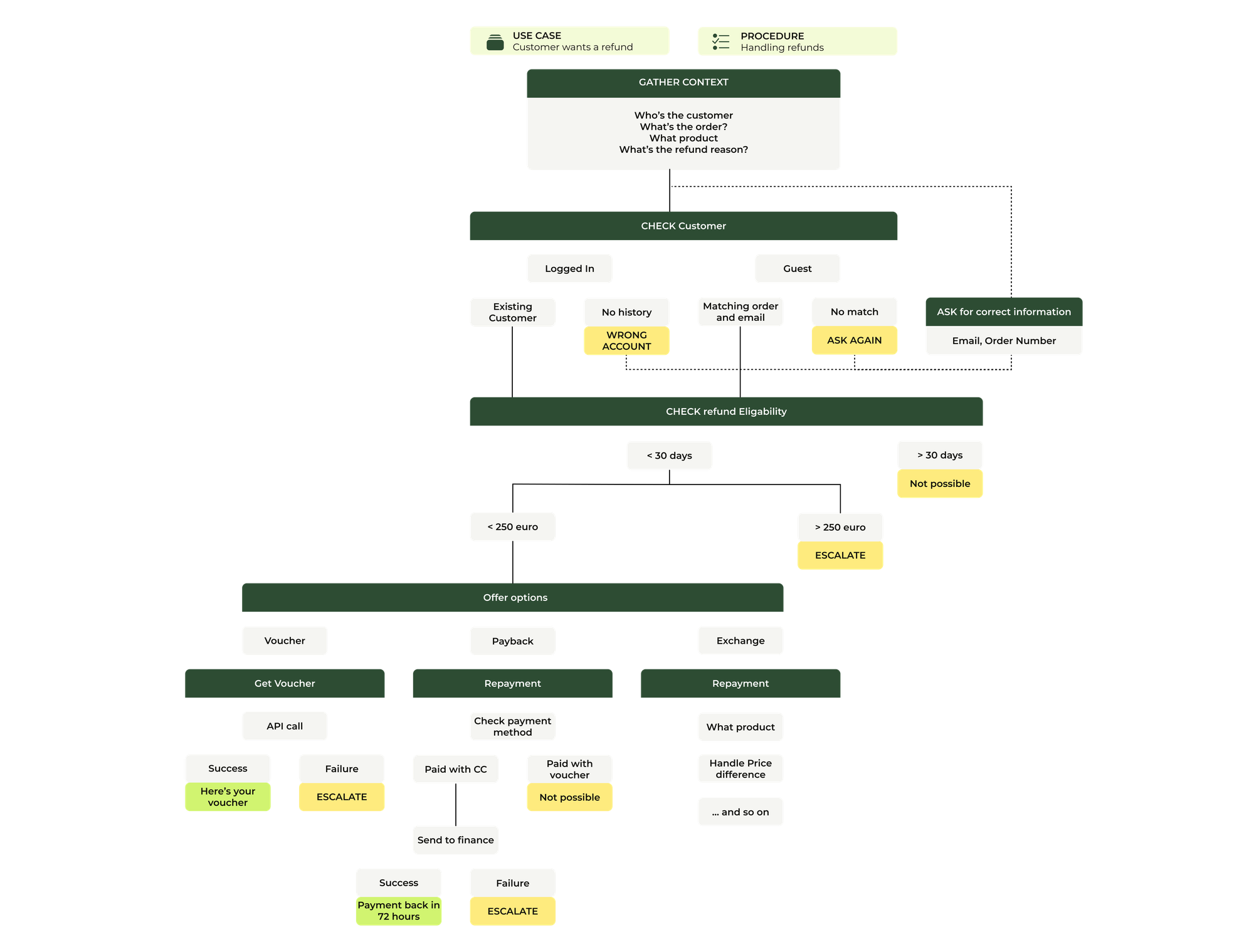
But if you take a look at this entire process, you see there are smaller elements of logic that run within that overall flow. There’s the verification step. There’s the eligibilty step. There’s the handling of each of the three choices at the end. With Zendesk’s new Action Platform approach, we can extract these elements and put them in Custom Agents, Action Flows or Custom Actions depending on the type of logic we need to run.
Our Refund procedure becomes a lot more manageable, and we can contain the complexity of each of these separate pieces of business logic as separate building blocks. What type of block we choose, depends on the complexity of the decision, and the type of logic we need.
Custom Actions are ideal if you want just the output of an API. We can use that to retrieve a voucher code.
Action flows are good for determenistic logic, so it’s ideal to request a repayment from Finance and let the customer know it’ll happen,. And the new Custom Agents excel at complex logic that requires a lot of input and conditions like checking for fraud, or running all eligibility logic.
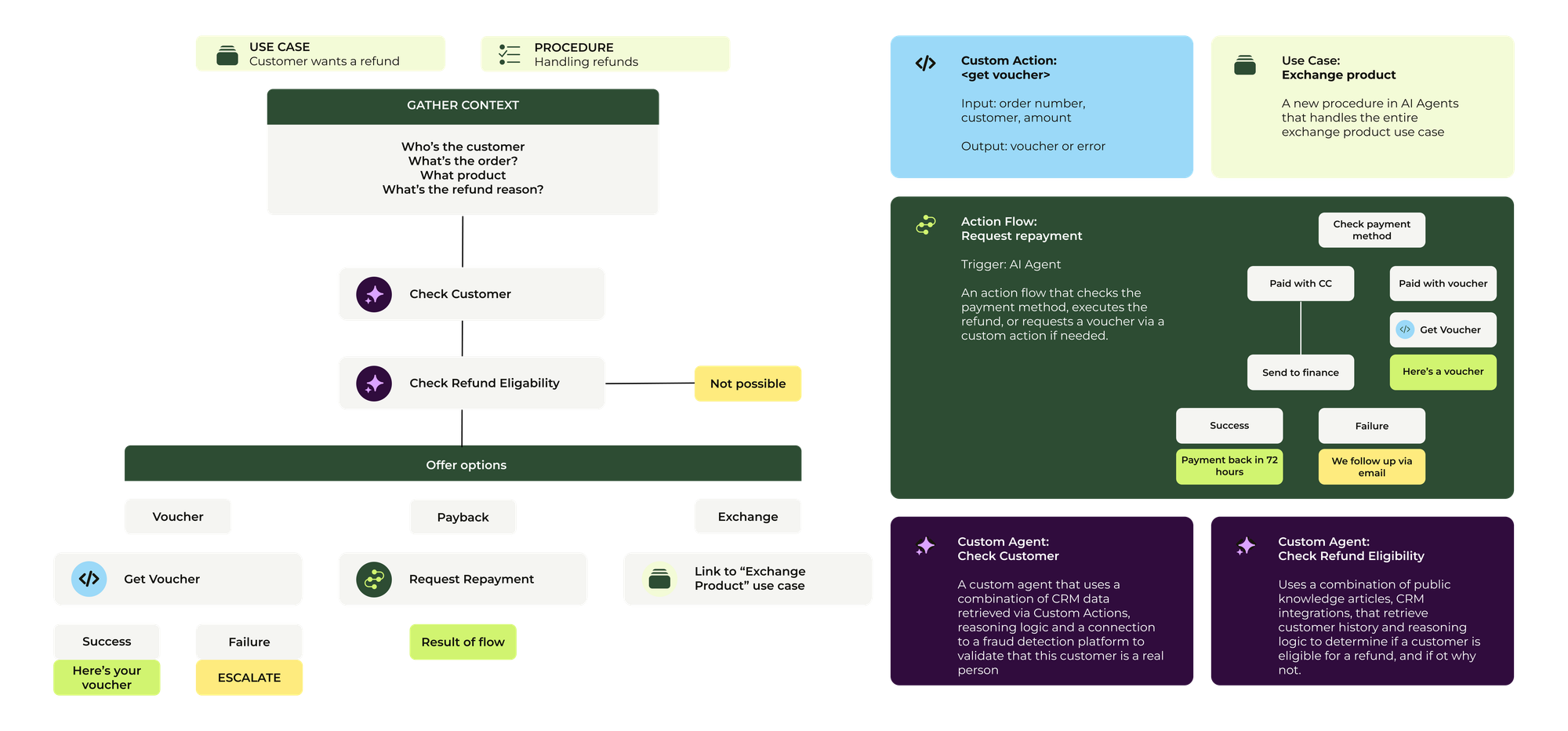
If we replace all procedure logic with actions that call each of these blocks, we can make the procedure a lot shorter. But the business logic underneath that process still exists, nicely contained with the Custom Actions, Action flows and Custom Agents,
And now that we have turned one Use Case into a combination of procedure and action blocks, we can reuse some of these components for another similar flow, like this flow to replace a voucher. And if at a certain moment we need to modify a piece of logic, we can update just the Custom Agent or Action Flow. Or, we can even invoke a Custom Agent within our Finance flow that parses the invoice and extract the required billing information!
One platform to rule them all
I noted earlier that old technology gets replaced and improved with newer capabilities. Assignment via triggers, for example, is quickly being replaced with Omnichannel Routing.
The same will happen with the arrival of Custom Agents and the integration of Action Builder workflows across all agents. Both AI Agent and Agent Copilot procedures will get simpler thanks to Custom Agents. The Custom Agent runs the decision logic. The procedure drives the conversation forward.
Similarly, external logic that today runs in Zapier, Make or AI Agents built on top of other platforms, can be pulled into the platform and run on agentic models that understand your CX operations, because they're built on top of the Zendesk Context Graph.
What ties these changes together is that neither Action Builder workflows nor Custom Agents drive customer-facing conversations directly. They're running business processes that previously required either a custom-coded apps or a human running through a checklist. With Agent Builder they become native objects in the platform.
The Agent Builder itself is no-code. Admins describe the role, the instructions, the tools and the data in natural language. The interface is native to Zendesk, which means the agent is grounded in your existing knowledge, data, integrations and action flows. No custom code. No custom integrations. No retraining a model.
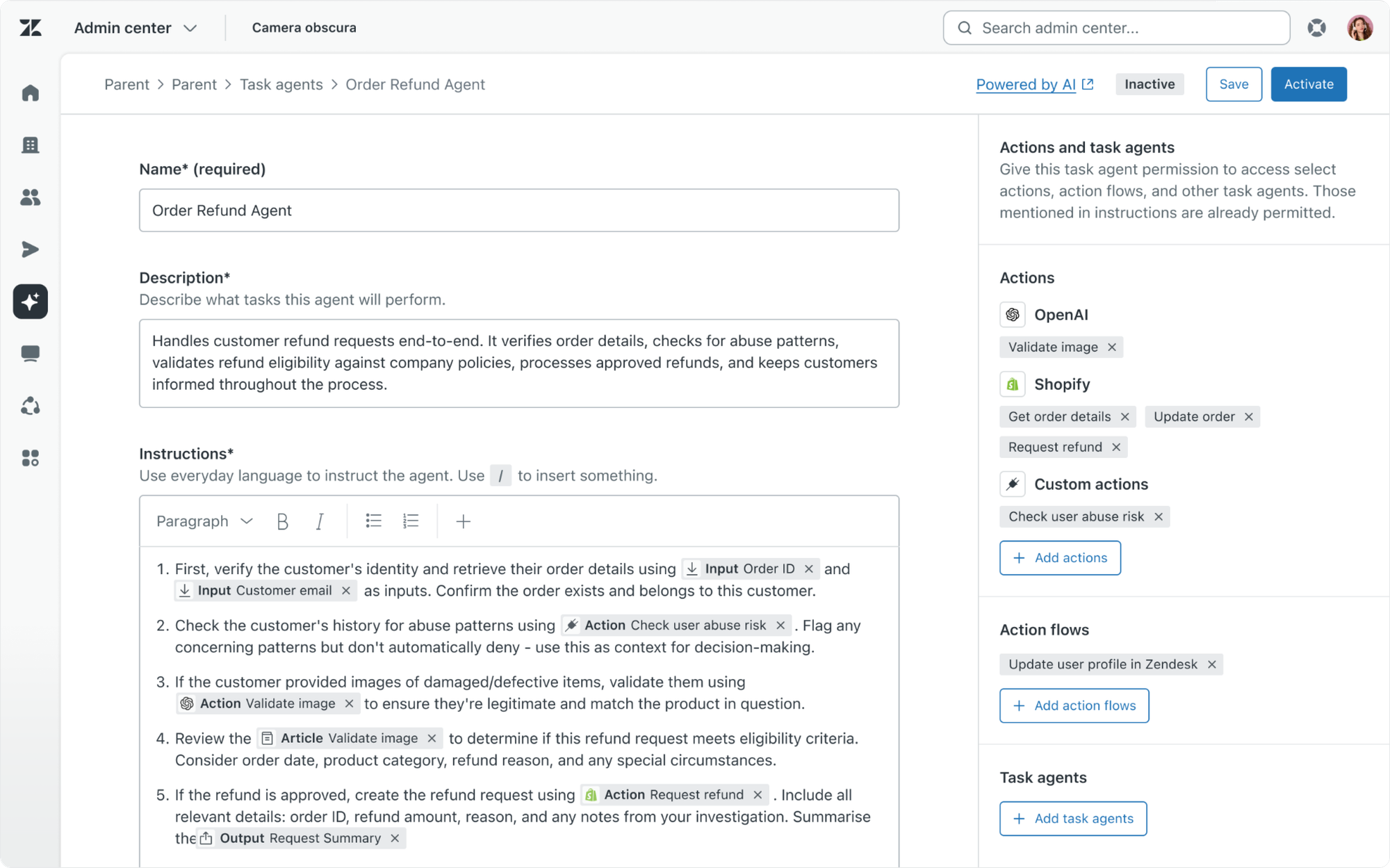
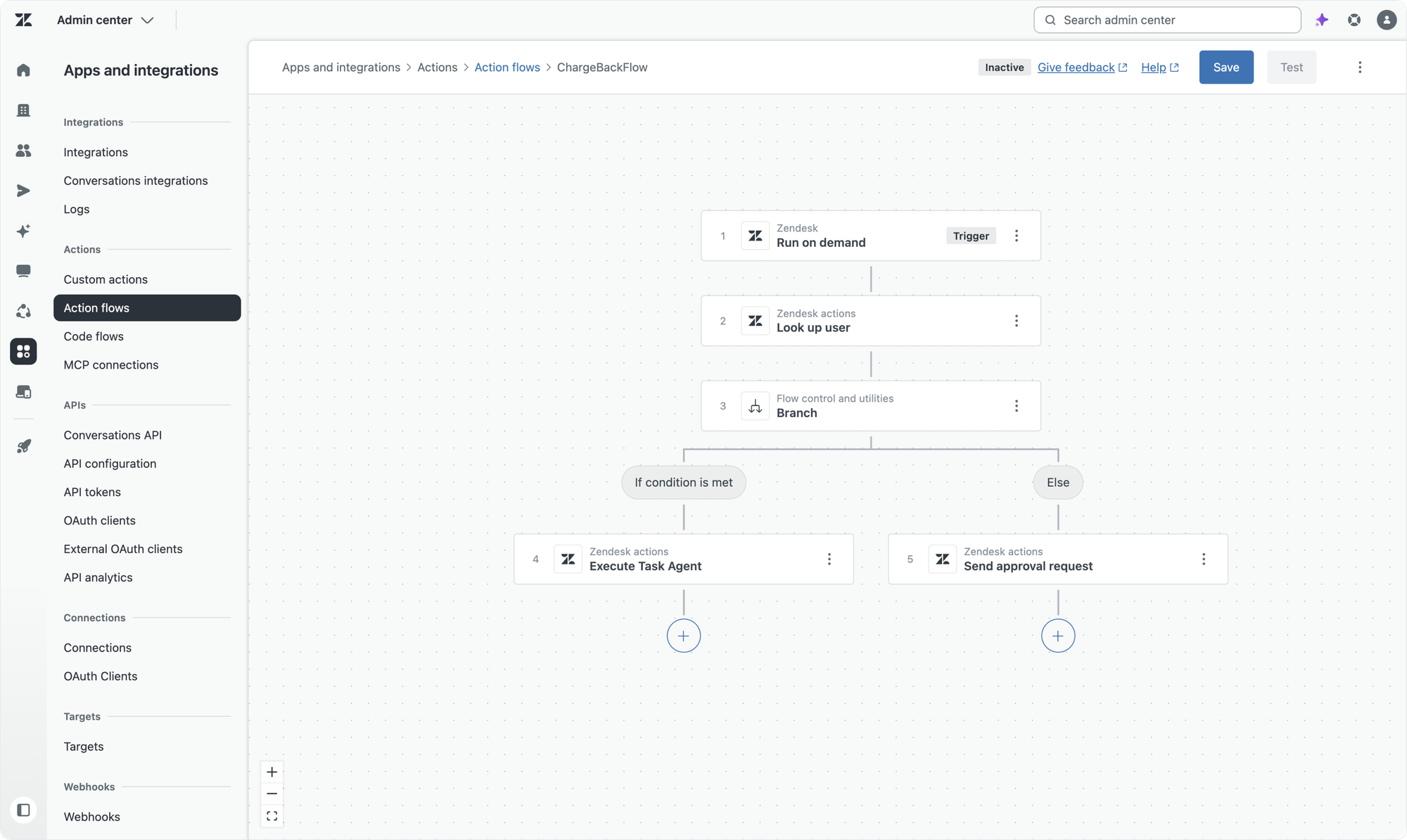

I will write a deep-dive on how Agent Builder and Custom Agents work after Relate. If you want to get that article in your inbox, subscribe today. It's free!
Autonomous Service Workforce
The agents are the platform now. AI Agents handle the customer conversation across messaging, email and voice. Custom Agents built in Agent Builder handle the logic and processes behind it. Action Builder handles the system integrations. Forethought extends the same capabilities to platforms outside Zendesk. Agent Copilot assists the humans who step in when the AI agents can't.
This is the Autonomous Service Workforce. Teams of specialised agents working together on a unified platform. Each one doing what it does best. All sharing the same knowledge, the same actions, the same procedures, the same context.
And that logic is quickly turning into build-once, reuse everywhere. The same knowledge, Action flows and Custom Agents are reused across AI Agents, Agent Copilot and triggers. The same AI Agents run across messaging, email, voice and soon AI Chatbots. It all uses the same platform, with different interfaces on top.
That platform that lies under all of it, getting better on its own. The platform finds its own gaps. Drafts its own fixes. Tests its own changes. Measures its own results. Copilots surface those insights and recommendations, keeping your team stays in the loop where it matters and allowing them to jump in and improve their operations based on actionable data.
That's the resolution flow and learning flow going hand in hand.
That learning flow, the one that powers the improvements, is the subject of the next article in this series. Proactive Copilots.