Zendesk Relate 2026 - Proactive Copilots
Zendesk Relate 2026 - Proactive Copilots

On this page
In my introduction to Relate 2026 I described the Resolution Platform as two flows feeding each other. The resolution flow handles a customer's question. The learning flow makes the platform better at handling the next one.
The previous article in this series covered the first flow. The Autonomous Service Workforce that actually helps customers. AI Agents on every channel and Custom Agents built in Agent Builder. This article covers the second flow. The Copilots that help your team improve the platform.
AI Agents are powerful, but they only handle the customer interaction. But once they wrap up a conversation, we need to evaluate how and what they did. These are the moments where judgment matters. That’s were traditionally a Zendesk Admin, Analyst or Knowledge manager entered the room They read reports, gather insights, define improvements and deploy these.
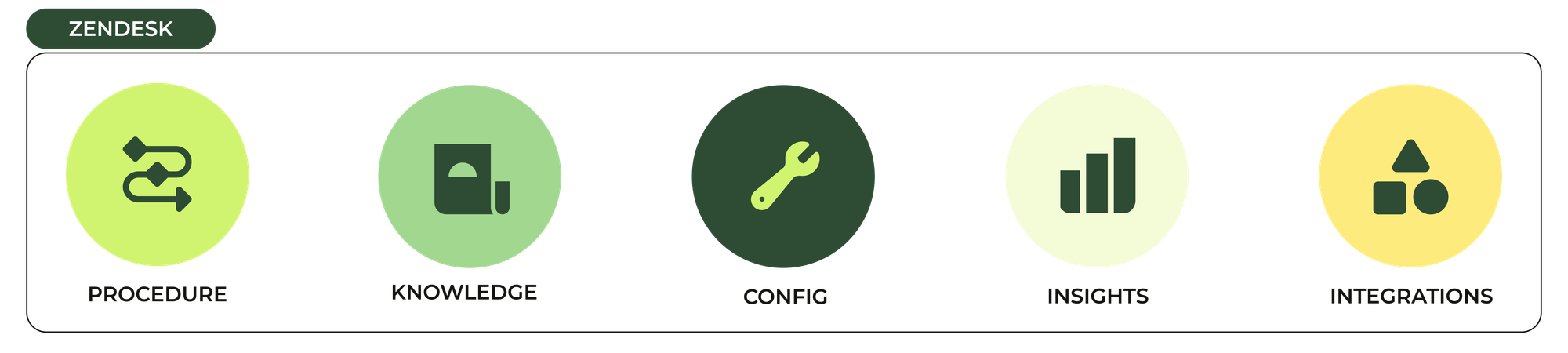
Where these actions are traditionally driven by human action, the core elements of your Zendesk setup now all get a Copilot. Analytics. Knowledge. Agents. The setup itself. Each one turns work that used to be manual maintenance into a conversation between your team and the platform.
Zendesk's Copilots sit in the middle. They translate what the system sees into something your team understands, and help your team turn their vision into changes on the platform.
From simple to sophisticated
To show where Copilots shine, let's start with a concrete example of the Learning Loop in action.
You start simple. When a customer asks "where's my order?" you solve that use case by pointing them to the order status page on your website. A simple procedure that shows a nice drop in what used to be tickets handled by your team.
Then the reporting data tells you something. Half the customers can't log in to check the page or don't bother to do so and ask for a human. The amount of tickets handled by your team is still high. So you revise the procedure. The AI Agent now asks for an order number, looks it up via a Custom Action and returns the order status with a tracking link. After deploying this new and improved procedure, you see another drop in escalations. The customers who know their order number get an answer. The ones who don’t, still escalate.
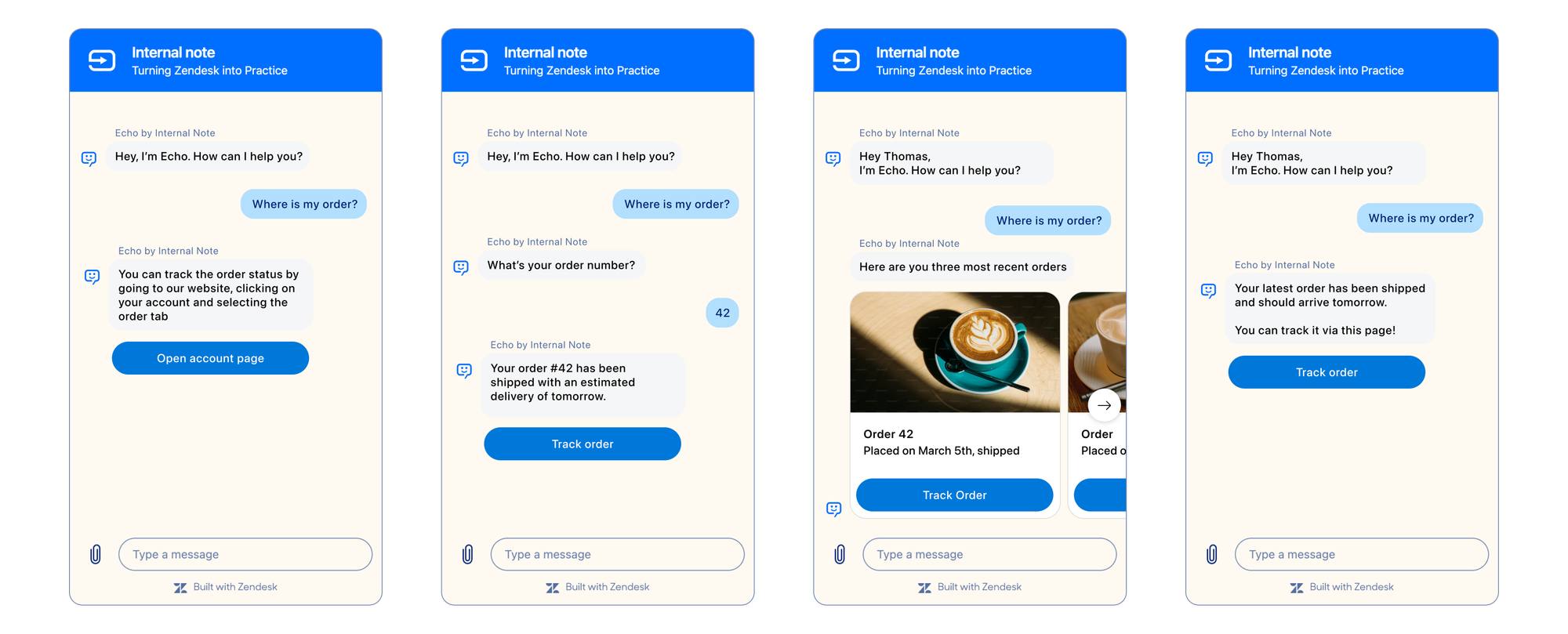
If that escalated number is too high, you need to revise the procedure further. You can add single sign-on so customers don't have to log in to the website. Once you idenitify the customer you do a lookup against the customer's email, so they don't need to provide the order number at all. This personalisation makes the flow richer. The resolution rate climbs.
For each improvement round there’s a decision to be made: Is the volume of escalated conversations more costly than the effort to improve that specific use case? The data tells you. But manually tracking the data for each and every use case isn't scalable. Not when you're handling hundreds of intents across multiple regions and channels.
And while analytics can show you where the escalations happen, every step to improve a use case costs effort to build. Procedures get rewritten. Knowledge gets updated. Intents get tuned. Routing rules get changed. Multiply that across every use case in your business and the build cost is real. Multiply it across every team, every region and every product, and the maintenance cost gets worse.
What you actually need is a system that knows wha to improve and do next. Better still, a system that does the building for you too.
That's where the Resolution Learning Loop and Zendesk's Copilots come in. The platform learns from each conversation to improve the next one. Every interaction generates an outcome signal. Did the customer come back? Did the issue get resolved? Was a human needed? What did the QA score say? Those signals feed the platform's improvement engine. Knowledge gaps get detected. New articles get drafted. Underperforming procedures can get refined. The system reports on what changed and why.
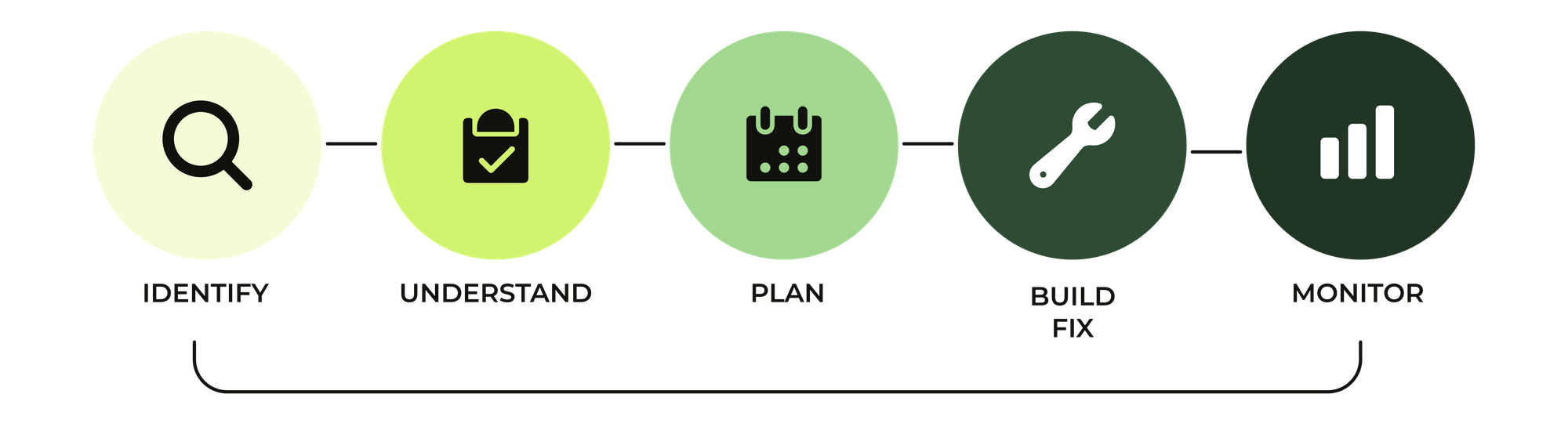
Pieces of this loop have been live for a while. Intelligent Triage detects intent and suggests new ones. Analytics in AI Agents show the effectiveness of use cases and where in a procedure a customer drops off. What the platform hadn't shipped, until now, was the closing step. The "find the gap" part has been there. The "recommending fixes for those gaps and guiding you through the process" part wasn't.
Zendesk's Copilots close that gap. The platform proactively suggests improvements. Your team can see why the suggestion has been made and dive in to understand how to fix it. And the Copilots can execute on that plan.
Agentic Analytics: insights powered by context
Last year Zendesk announced that they had bought HyperArc, an AI-first analytics platform that set itself apart from the competition by being interactive. Customers didn't just see data. They could talk to their data and ask it questions. Fast forward to Relate 2026, and we see Agentic Analytics and Analyst Copilot as the result of that acquisition.
Before we dive into the specifics, let's look at Analytics as a feature first. One problem every analytics tool has is that it needs to cater to three personas.
- Some people just need the number. The CSAT. The first reply time. The volume. They want a clean answer, no fuss.
- Others need to understand the number. Why is the handling time up this week? Which agents are dragging the average? What's the relationship between intent and resolution time? They need narrative, not just data.
- A third group builds the dashboards that produce the numbers. They write the queries. They tune the filters. They schedule the reports.
Each of those jobs is served differently by traditional BI tools. Which is why most service teams end up with a patchwork of analytics surfaces nobody fully trusts. One dashboard for corporate. Another query from finance. The Zendesk Explore reports built three years ago. A weekly export for data engineering. Each measures success differently. Each captures part of the story. Nobody reconciles them.
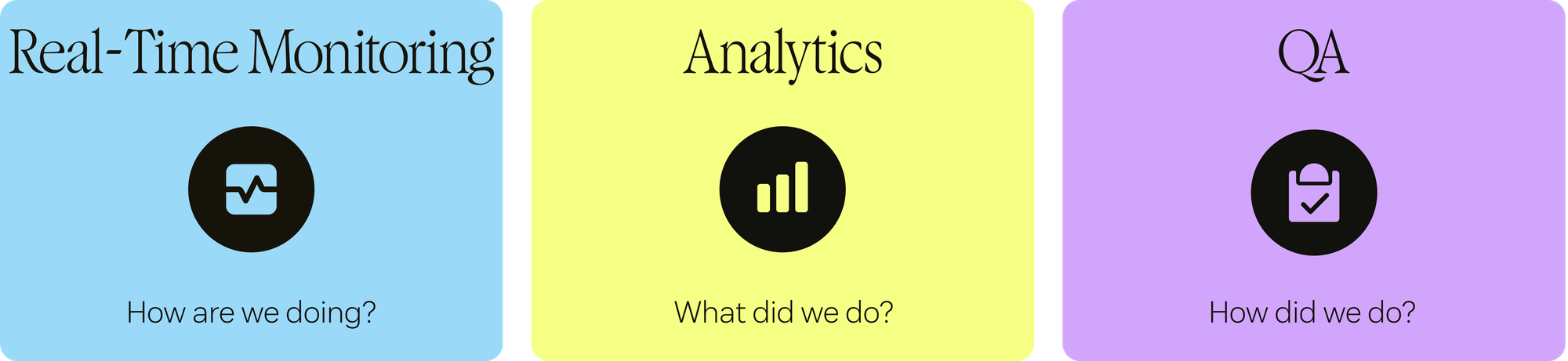
The newly introduced Agentic Analytics is Zendesk's answer to this problem. It offers a Suite of Analytics tools that span the lifecycle of a ticket.
Context Graph
Underneath Zendesk's Agentic Analytics sits the new Context Graph. This system runs alongside everything that happens in your Zendesk instance. It captures conversations, but also stores every interaction you have with your data inside Analytics. This way it can learn from previous reporting and insights, and improve your answers, recommendations and insights over time.
Every Zendesk element feeds into this graph. Your AI Agent conversations. Your Agent Copilot suggestions. Intelligent Triage tagging. Omnichannel Routing. QA analysis. WFM data. It's all combined in one connected data layer you can use to get insights, recommendations and answers.
The way you interact with that data happens in two ways.
On one side you have the traditional reporting dashboards in Zendesk's pre-built analytics. These reports and queries are ready out of the box for Support, Copilot, Knowledge, ITAM and more.
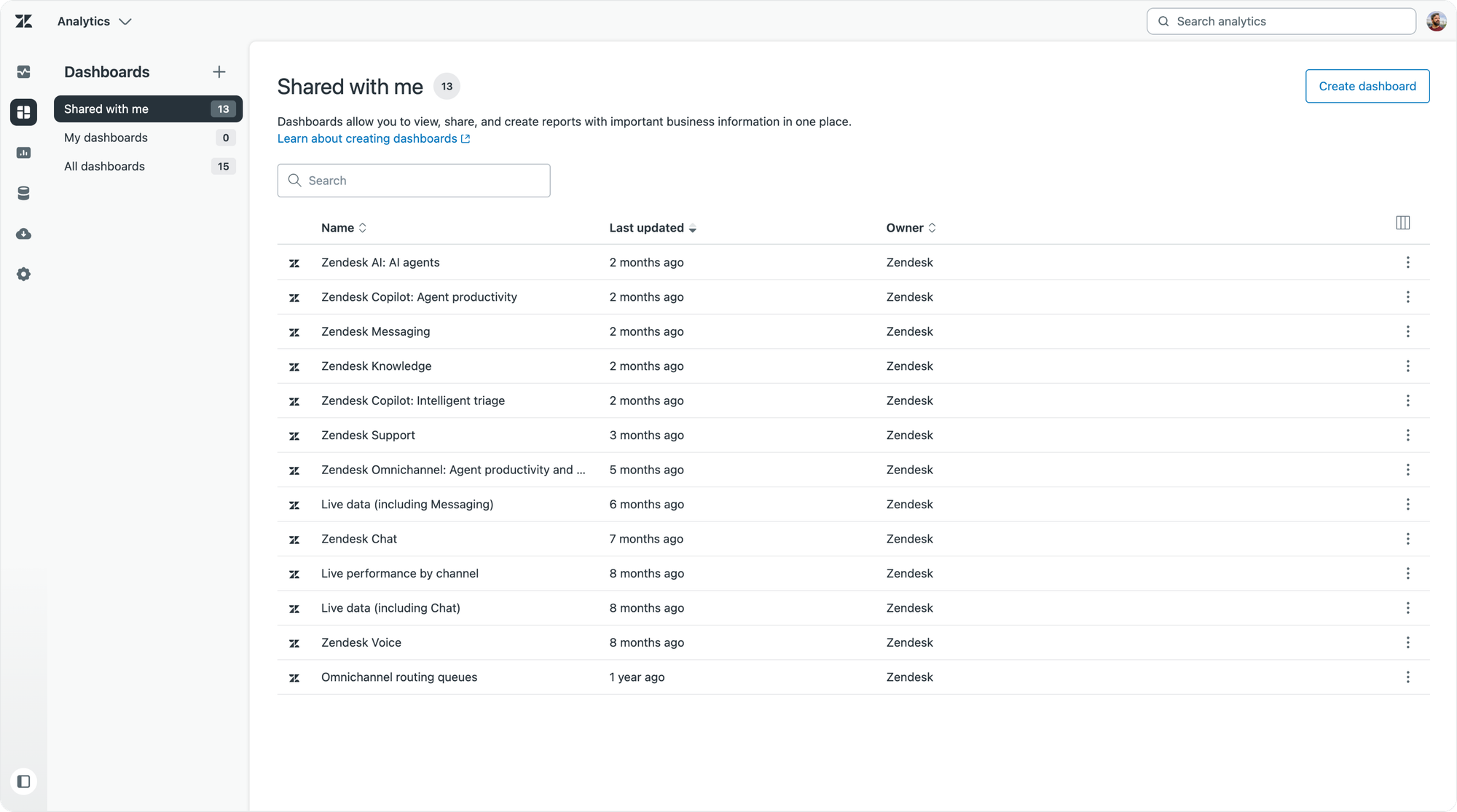
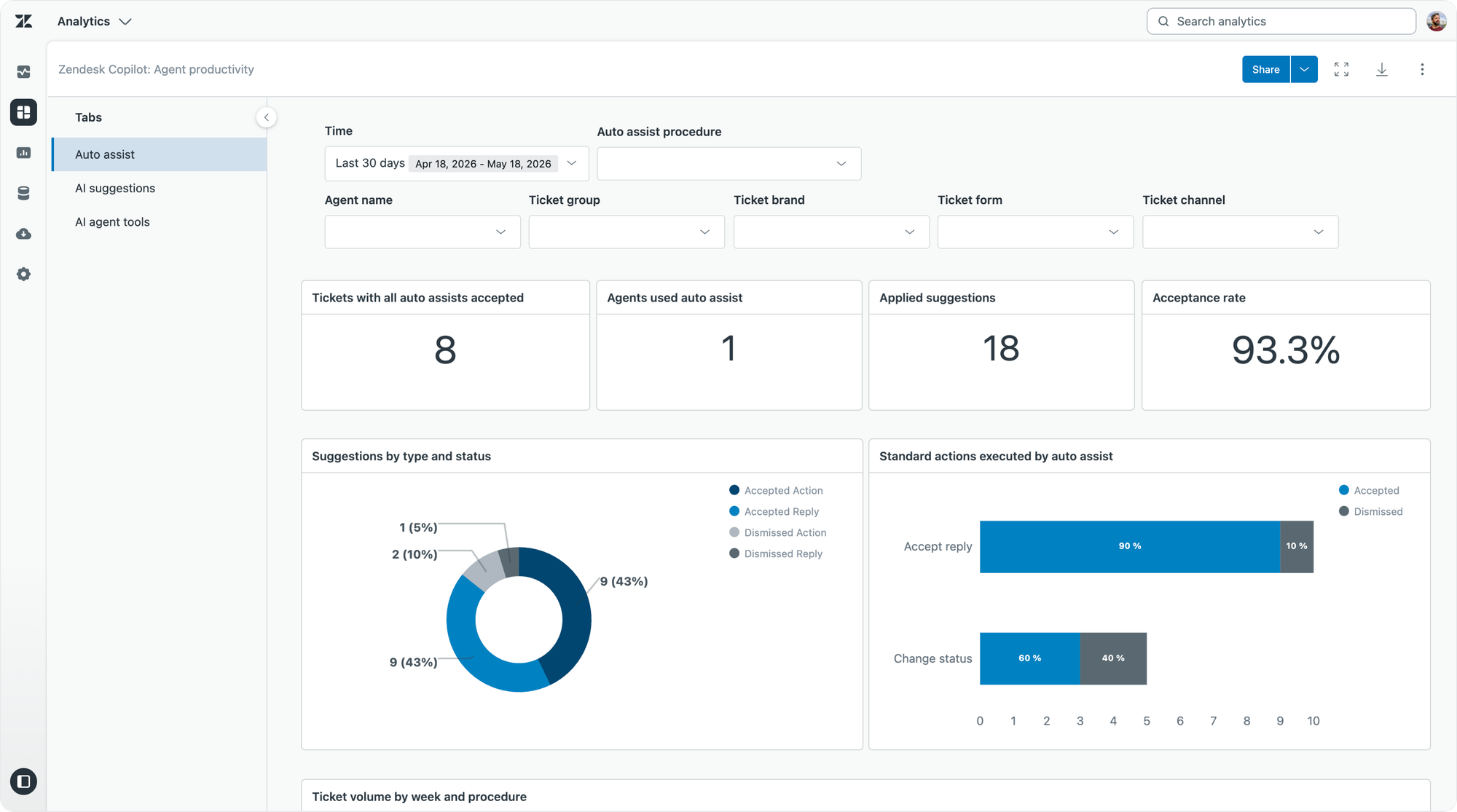
On the other side you've got the new Analyst Copilot which allows you to interact with your data. You can ask it questions. You can ask it to explain why something happened. And you can instruct it to build reports.
AI Agent tickets became the default for all Zendesk customers earlier this month, as a key input to the new Context Graph.
As Zendesk shifts from counting tickets to measuring resolutions, both the platform and the people using it need access to all conversation data. By keeping every conversation available from question to resolution, the Context Graph can deliver better insights and reporting. And for accountability and auditability, those conversations must also be inspectable by admins and agents.
That’s why Zendesk is moving beyond Support tickets alone to include the full conversation journey — both AI Agent and Support tickets, or automated and escalated conversations.
Analyst Copilot: an analyst that remembers
Analyst Copilot is Zendesk’s analytics assistant built for service that gets more accurate the longer you use it. That's the pitch. And the mechanism that makes it work is Memory.
Most AI analytics tools have no memory. Every new question starts from scratch. Past analysis doesn't compound. Definitions don't carry between conversations. Teams reconcile reports endlessly because nobody remembers what "first contact resolution" actually means in this specific instance, or why a change in numbers today is the result of insights and actions taken last month.
Analyst Copilot captures every analysis as a memory. The question that was asked. The data that was analysed. The result that was found. What happened when someone acted on it. Each memory feeds the next analysis. Over time, the recommendations sharpen because the system has a record of what you've already tried and what worked.
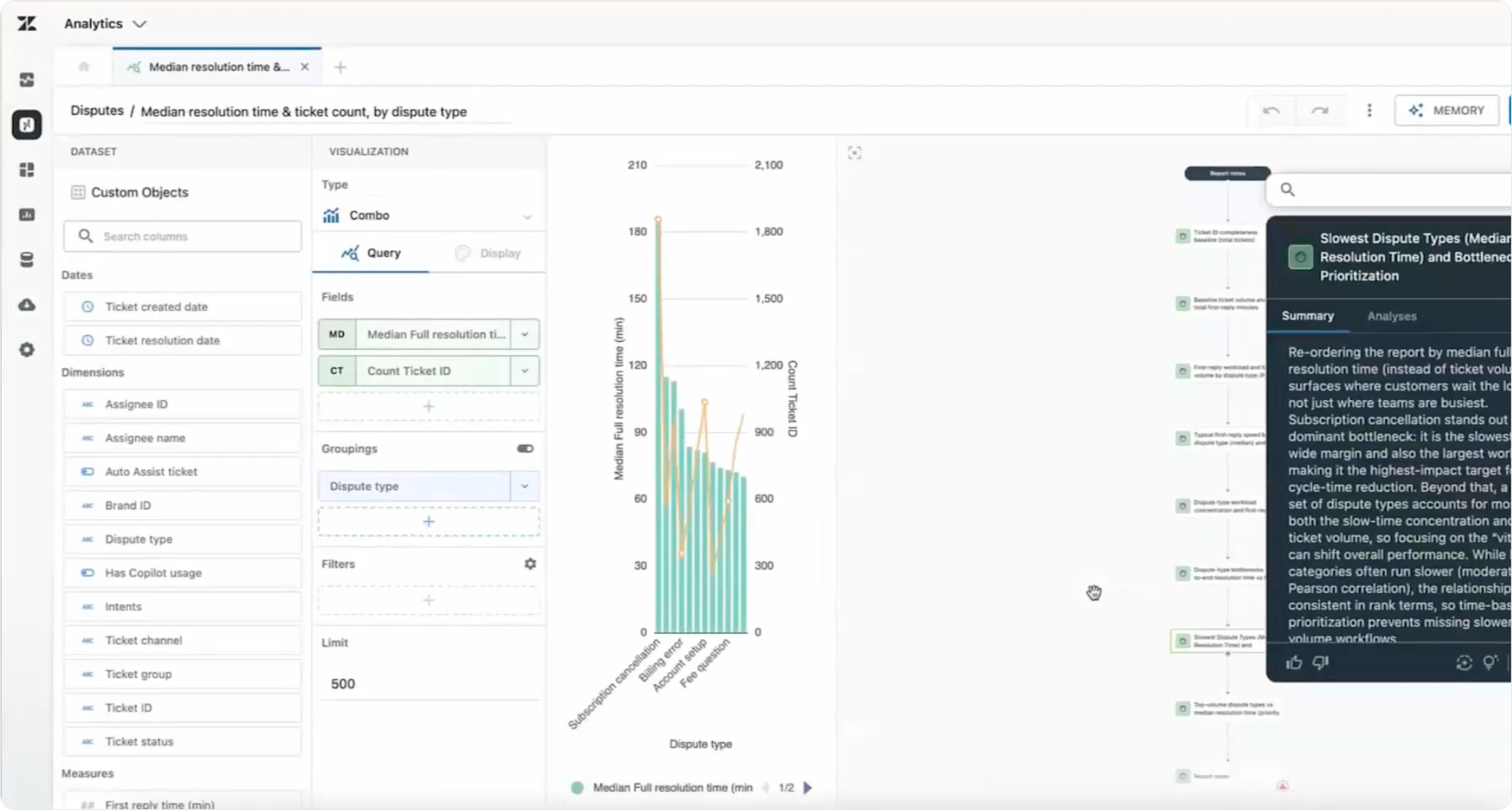
Let's make this real with an example use case:
A fictional bank’s head of service is told ticket volume is unusually high, so they ask Analyst Copilot a plain-language question. It returns a narrative answer with data citations, pulling together both Zendesk native data and custom objects.
They see the spike is tied to disputes related to recurring subscriptions, with volume climbing steadily because of duplicate charges after cancellations. Data that was previously locked away in Custom Objects, and invisible in standard reports, is now front and center.
From there, they drill deeper. They click into a memory about dispute resolution time, see subscription cancellations driving the spike, and ask whether agents have the right guidance. They then check auto-assist usage by dispute type and notice it’s much lower on these tickets than on others. Analyst Copilot summarizes the findings in plain language, and they act on it by creating a new procedure and updating a routing rule.
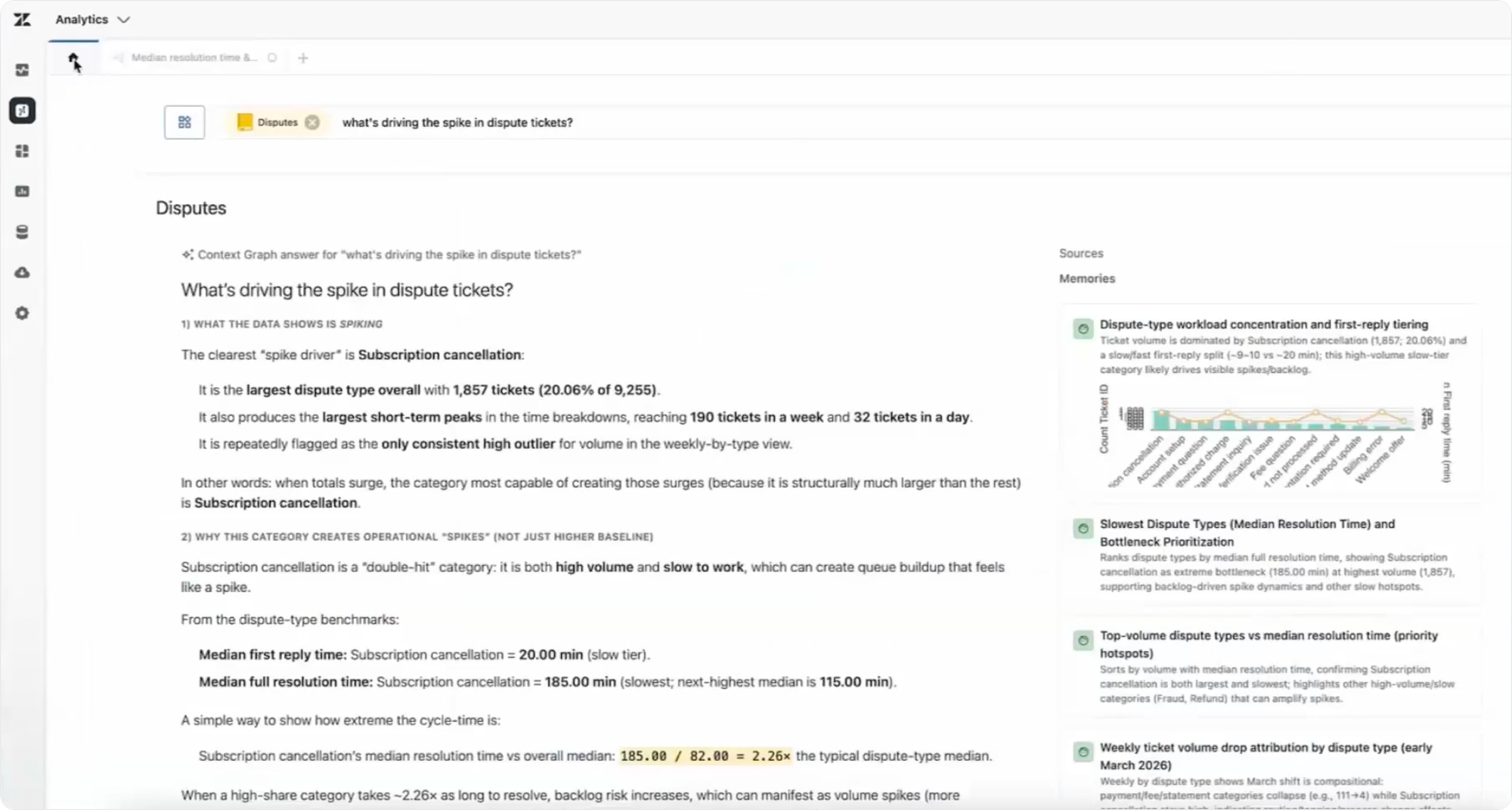
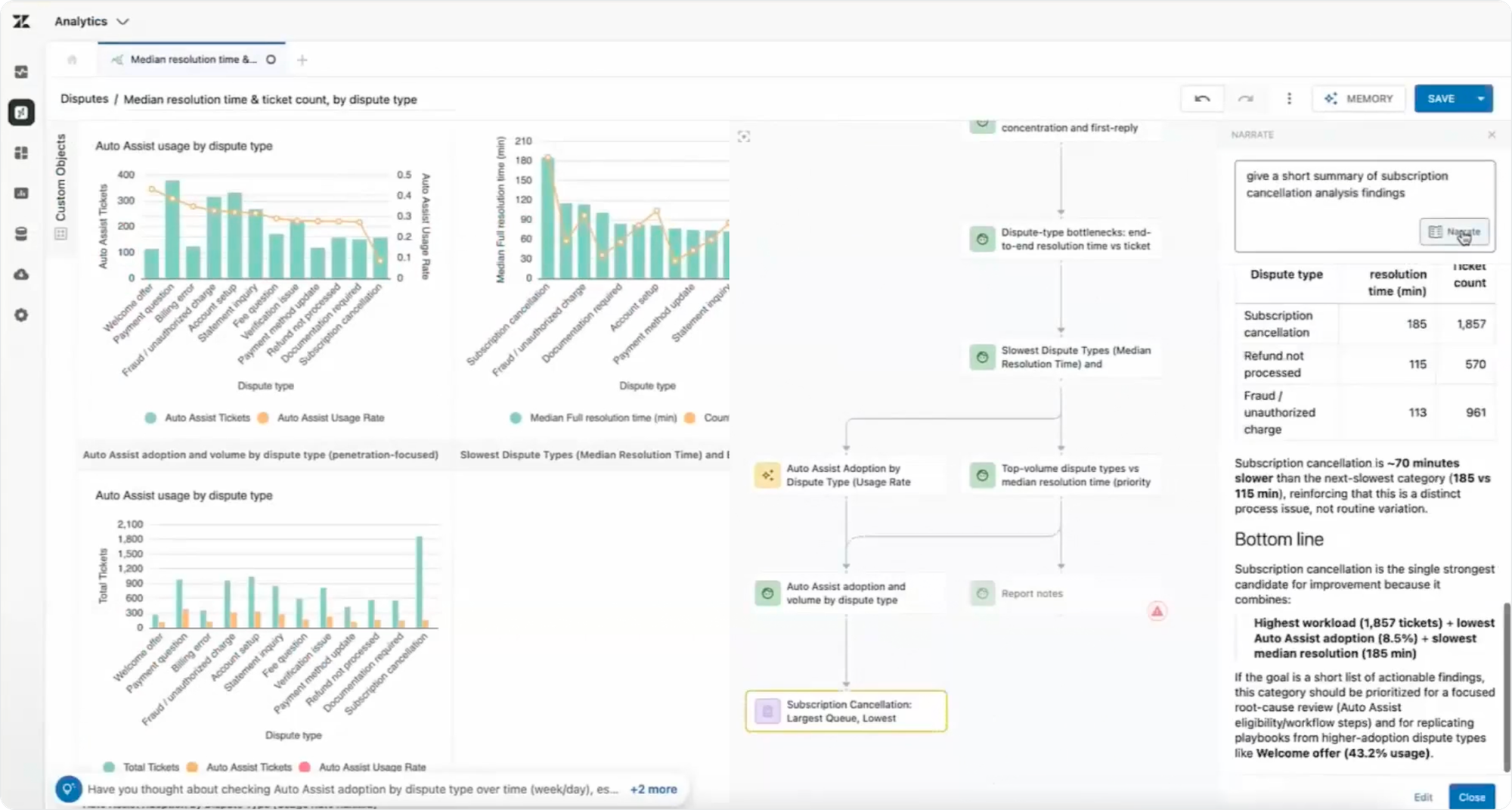
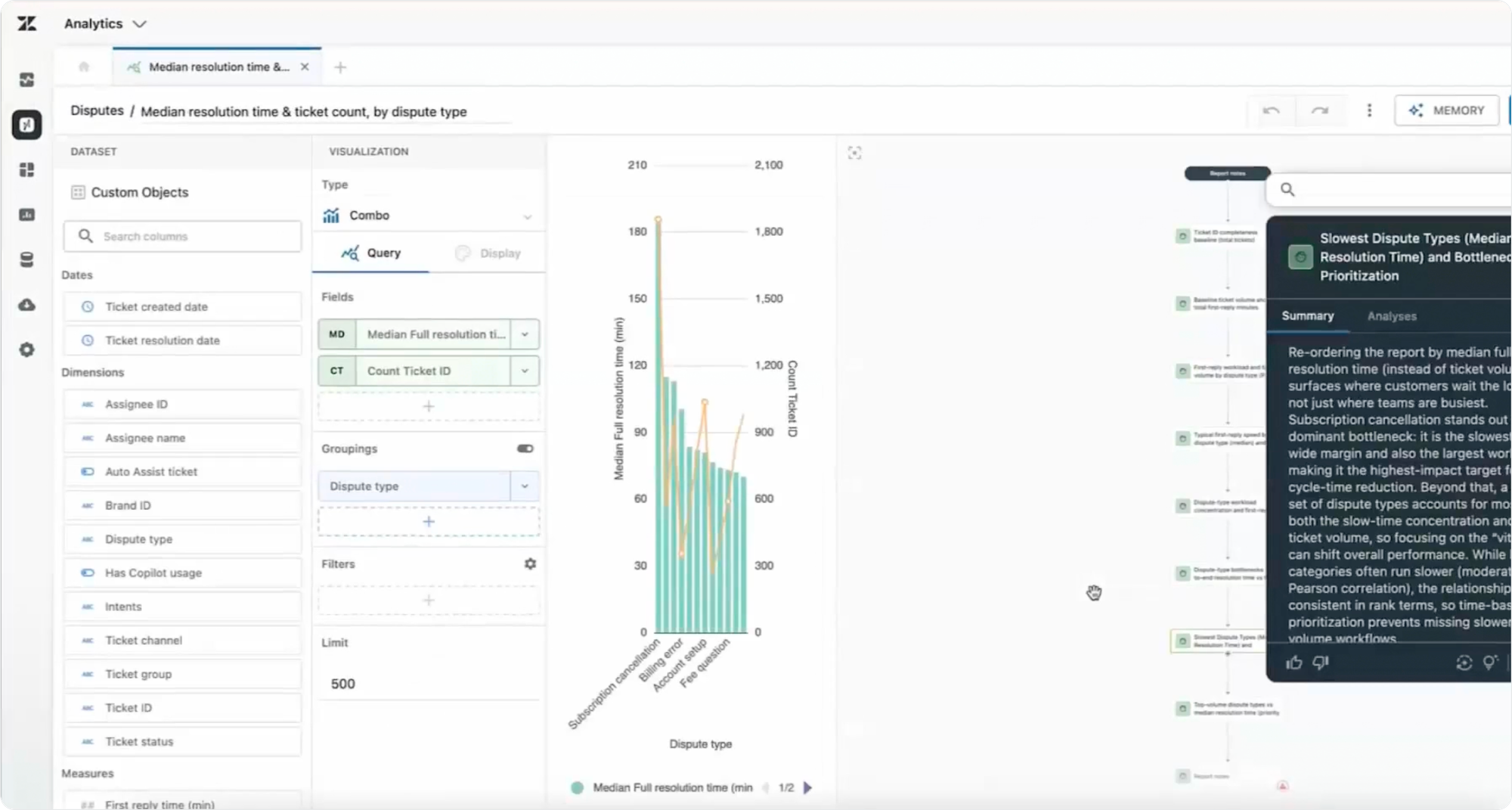
Every step in this flow gets captured as a memory. The next person on her team asking a similar question doesn't start from scratch. Analyst Copilot draws on the questions and insights from this previous analysis to deliver a better answer faster, because it builds on existing work.
Real-Time Monitoring: what's happening right now
Analytics and reporting happen after the resolution step. They give you insight into what you did and how you did. But as tickets are flowing through the system, you need visibility on what's happening now. Real-Time Monitoring is Zendesk's answer to that question.
Three pre-built omnichannel dashboards ship for every Suite Professional (or higher) customer. Each combines real-time data with seven days of recent historical context, so you can tell normal fluctuation apart from a real spike.
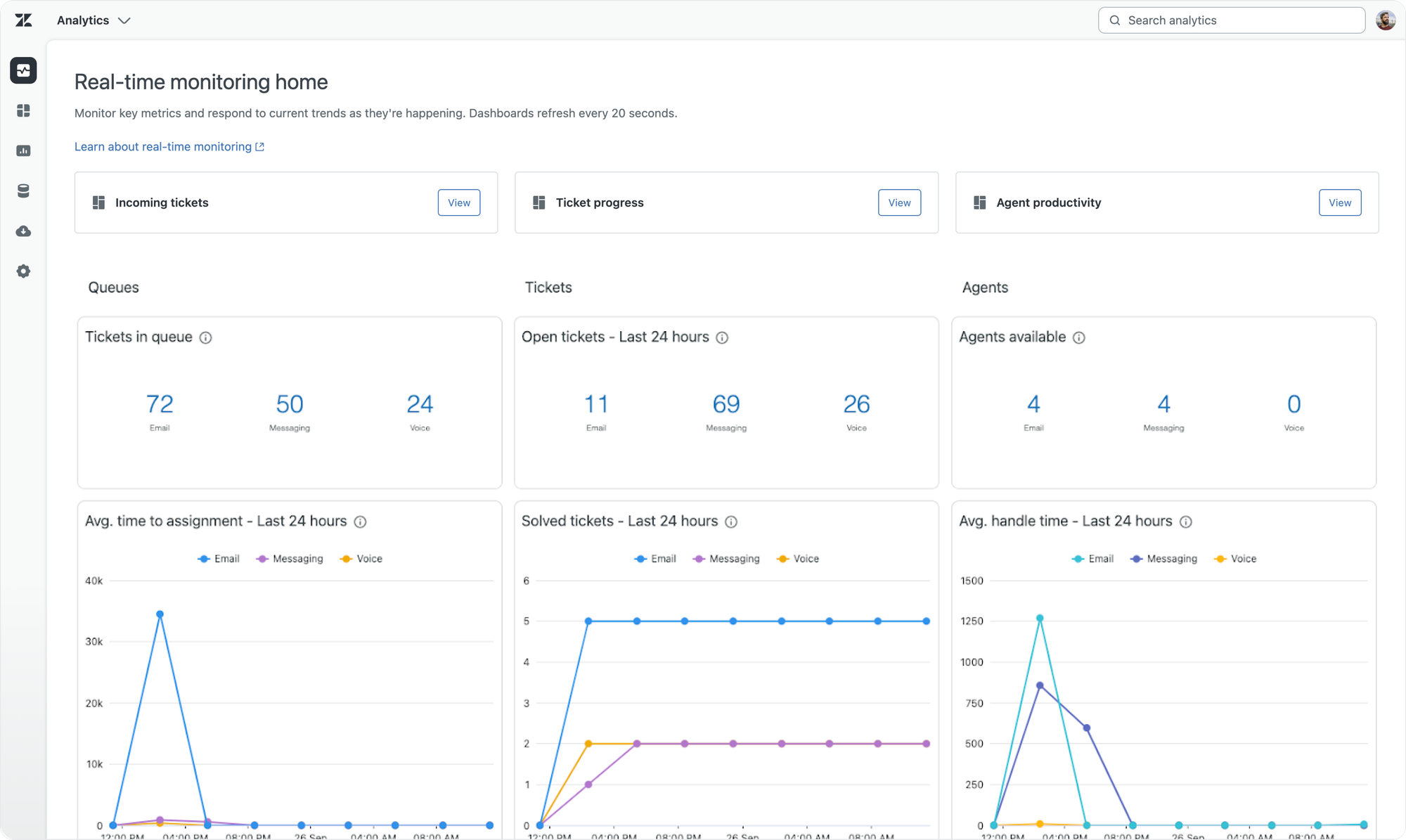
- Incoming Tickets shows your queue backlog with drill-in capabilities based on omnichannel routing and custom queues. It shows you what's happening before tickets reach your agents.
- Ticket Progress covers in-progress and recently solved tickets, surfacing key metrics like average time to assignment, first reply time and full resolution time.
- Agent Productivity provides an overview of how agents and groups are performing, with insights on availability, efficiency and productivity across email, messaging and voice.
Quality Score: every ticket, automatically scored
Sitting next to Analytics is the QA story. Zendesk QA reviews every conversation and gives you insight into your team's performance.
Before Zendesk QA, managers picked a sample and scored a subset of tickets, giving you a partial and potentially biased view of your operations. None of that scales when ticket volumes rise, AI Agents handle most of the front line and human agents handle the harder cases. You need quality measured on every ticket, automatically, to find the insights you're looking for.
Zendesk QA does exactly that. It reads every interaction, both those handled by AI Agents and your team, and surfaces trends, quality gaps and coaching opportunities across every channel. It scores conversations against your team's own standards (empathy, accuracy, policy adherence, tone) and flags the ones that need follow-up. All natively inside the Zendesk platform with no extra tools required. It also includes a leaderboard view for spotting top and underperforming agents, real-time SLA visibility, and the ability to detect escalations and churn risk before they become bigger problems.
One of the trends this year is that Zendesk is making AI accessible to more customers.Most Suite customers get access to the new unified AI Agents. Some Agent Copilot features like summaries and writing tools are available (with usage caps) in Suite. AI-powered writing tools in Knowledge are generally available and no longer locked behind an Enterprise license.
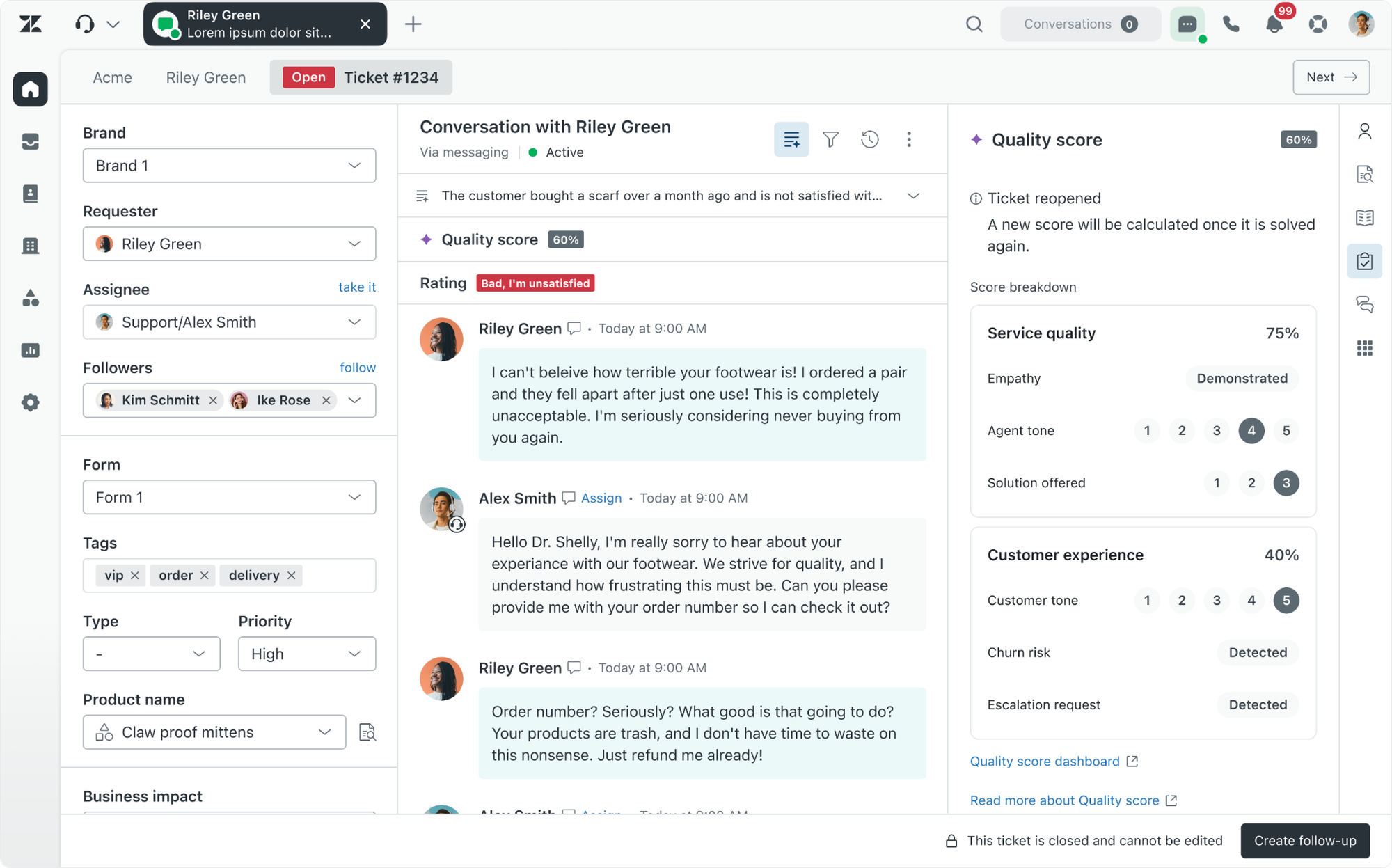
That trend continues with QA. The new Zendesk Quality Score rates every solved conversation based on six ratings.
- Empathy. Did the agent demonstrate care for the customer's situation?
- Agent tone. Was the agent's tone appropriate and professional?
- Customer tone. What was the customer's tone, and how did it shift?
- Solution. Was a solution offered?
- Escalation risk. Did the conversation need escalation, and was it handled?
- Churn risk. Are there signals the customer might leave?
Each ticket gets a composite score from the six ratings. Agents see the score right next to the ticket. Team-level trends surface on a dashboard.
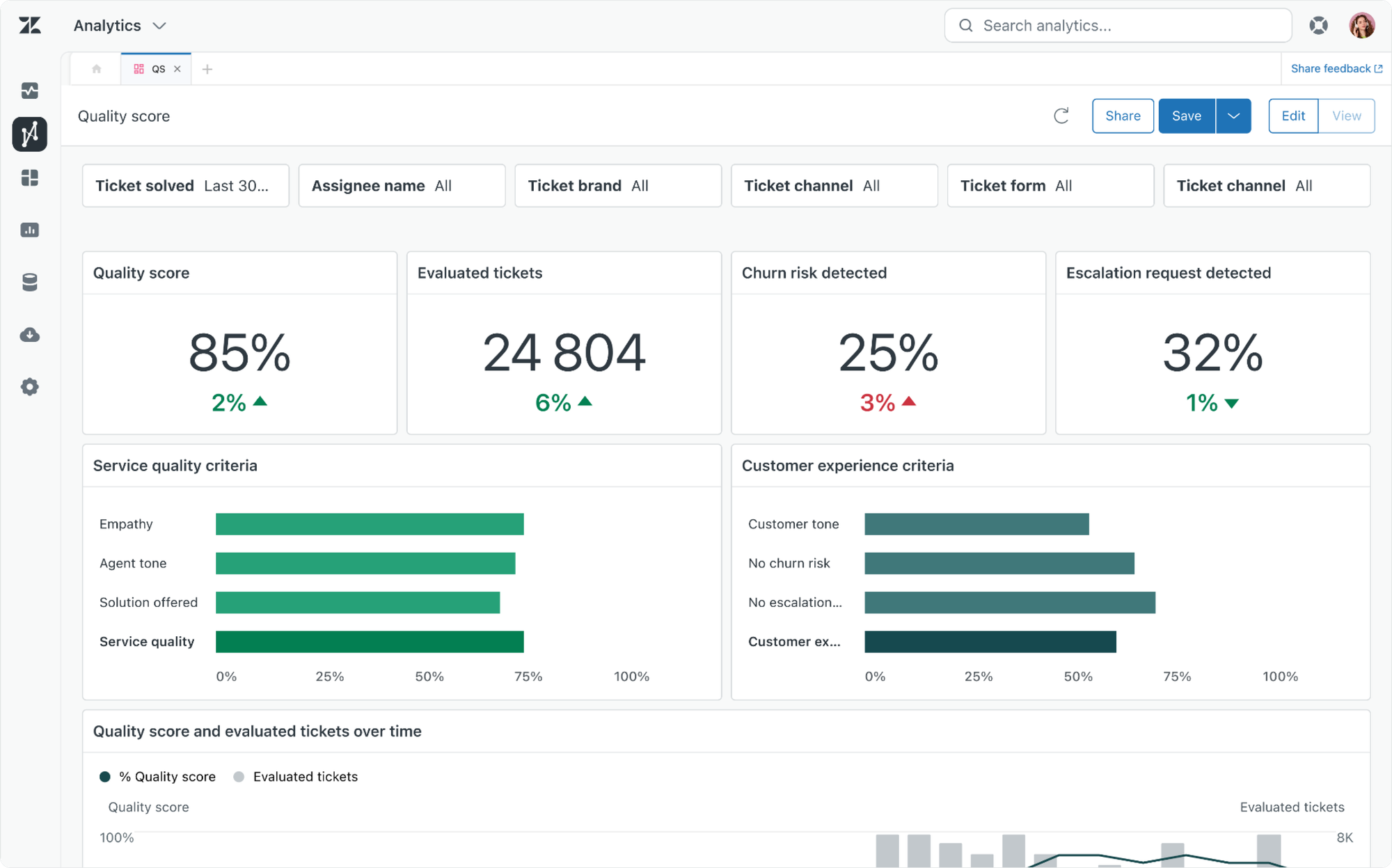
Two things make Quality Score genuinely interesting.
First, it's a different KPI from CSAT. CSAT is what customers told you. Quality Score is what the system infers from the interaction itself. They're complementary, not redundant. CSAT tells you how the customer felt. Quality Score tells you whether the interaction met your standard regardless of how the customer felt.
Second, Quality Score gives the resolution-based pricing something to verify against. Verified Resolution charge per conversation when the AI Agent fully resolved an issue. Quality Score is one of the signals that allow you to verify that decision, combined with the new AI Agent analytics and Ticket Audit log that shows the resolution type.
The new analyst
Zendesk's analytics solution offers a modern answer to those three original roles reporting always had.
For those who just need the number, the number still shows up in the dashboards.
For those who need to understand the numbers, the effort changes. They can ask Analyst Copilot why. Copilot can explain in detail. They can drill down, get more insights and export a summary of your findings. More importantly, that research is stored in the platform as a memory so others can build on it and see the numbers evolve. This makes analysis more accessible. Anyone can ask for the why. You no longer need to be an analyst.
Those who built dashboards can shift away from building reports and evolve into people who analyse and understand operations. Now that Analyst Copilot gathers and shows the data, the need to be able to manually build dashboards goes away. That makes data accessible to more people and frees up time to do what matters: act on those insights to make changes and improve your operations.
More importantly, understanding what's happening in your environment sets the basis for making changes to improve the next customer interaction you have. The data in your insights helps you understand what to change next, and why.
Knowledge Graph, the foundation of your resolutions
Knowledge is the foundation everything else builds on. Every AI Agent starts with it. So does every Agent Copilot procedure. So does every Help Center answer. If your knowledge isn't ready, nothing downstream works properly. I've written about this at length in Building AI-ready Knowledge in Zendesk and in the Towards Automated Resolutions series.
The challenge is that knowledge isn't a one-time job. Articles drift out of date. Translations lag behind the source. New procedures get added without retiring old ones. Customers ask questions nobody has answered yet. Reporting on knowledge health exists, but it's buried and rarely actionable.
The result is escalations. Customers ask about a specific policy. The relevant content is outdated. The AI Agent escalates because it can't confidently answer. The human agent gets stuck because they can't find the right reference either. Quality drops. Escalations rise.
Knowledge Copilot
Knowledge Copilot is the command centre that closes that gap. Much like Admin Copilot (see below) keeps your setup tuned, Knowledge Copilot keeps your knowledge fresh.
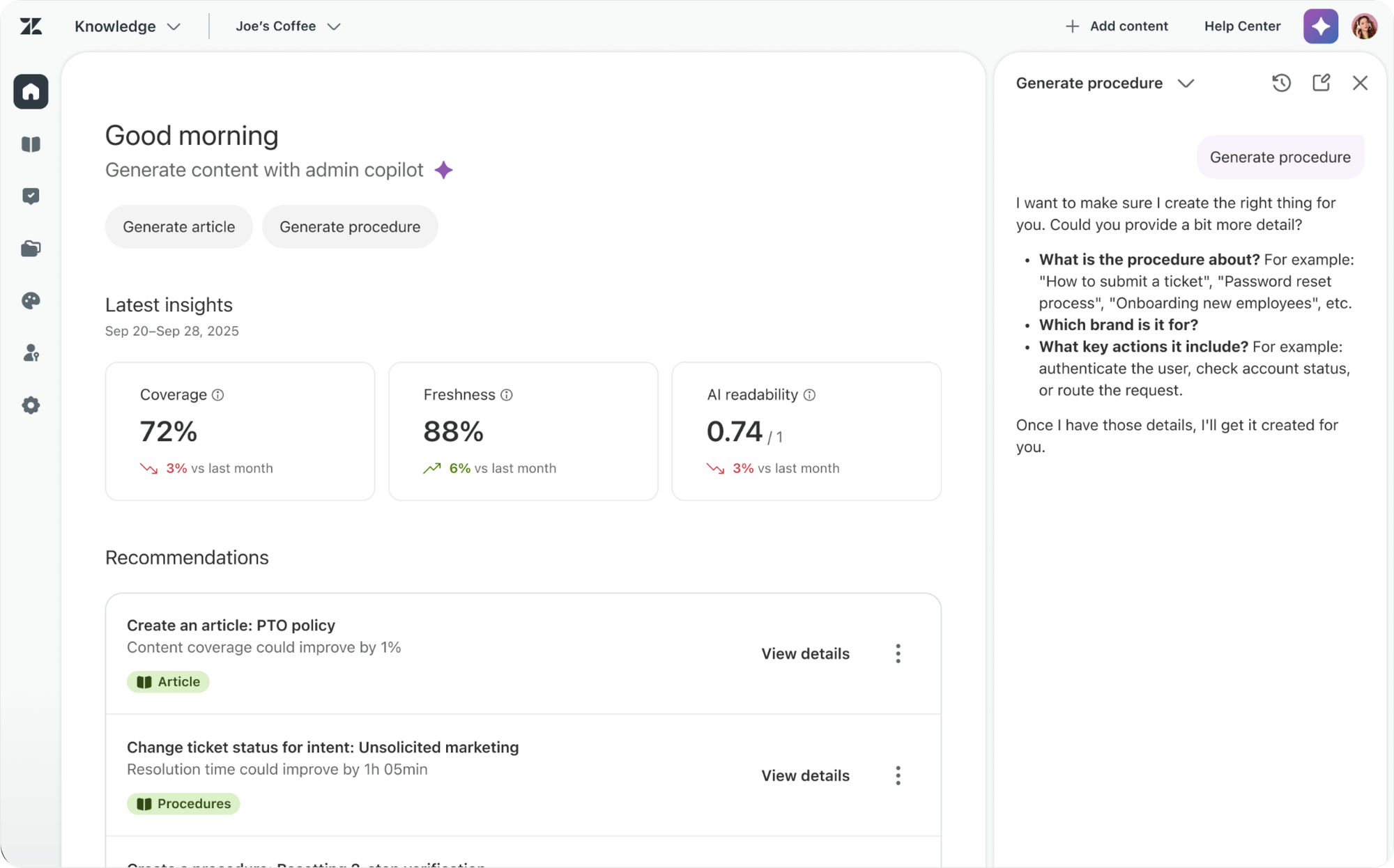
The Knowledge homepage now shows three health metrics, updated weekly.
- Coverage. Do you have the right articles for the questions customers actually ask?
- Freshness. Are they up to date?
- AI Readability. Are they structured in a way AI Agents can use reliably?
These three metrics give knowledge teams a quick pulse on their content. Together they answer the question every knowledge team gets asked but rarely has data to answer. Is our knowledge ready?
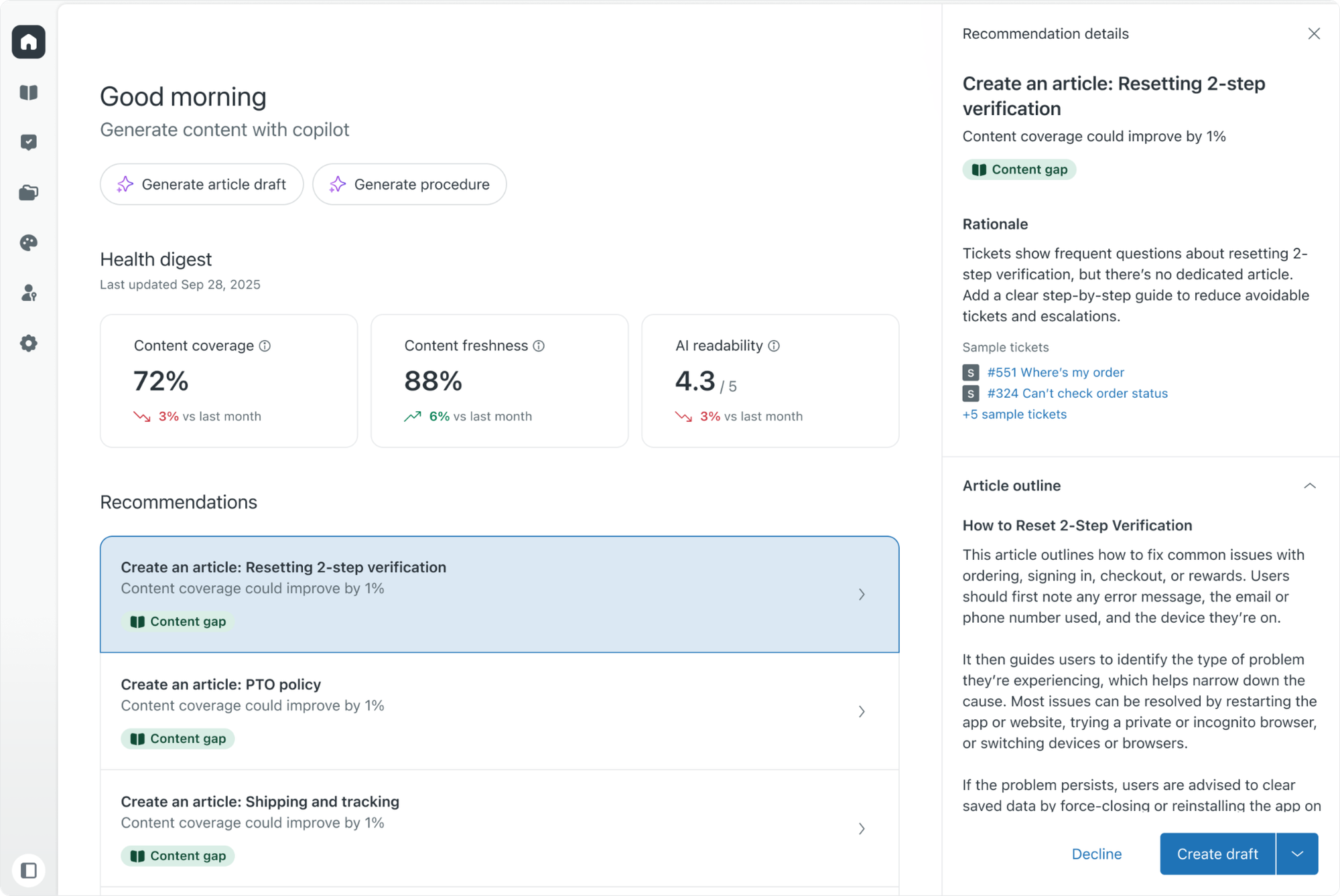
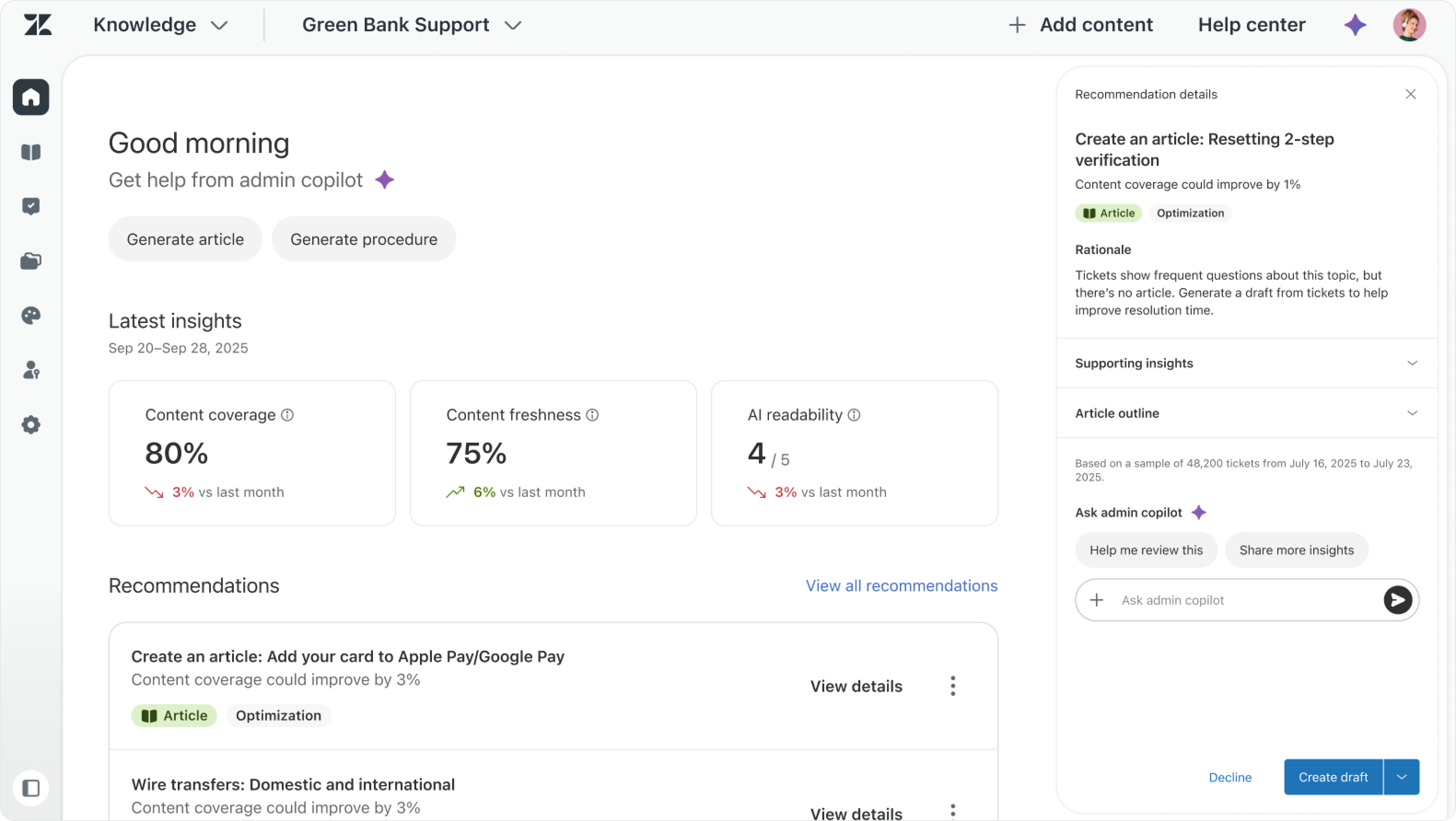
Below the metrics, Knowledge Copilot proactively recommends improvements or new content based on real customer interactions. It identifies where knowledge is missing or outdated: if end users keep asking about a specific information and the relevant content is outdated, those tickets usually show up as an escalation. Knowledge Copilot identifies that pattern, looks for the answer given by your team, surfaces the gap and generates a new draft with that additional content for you.
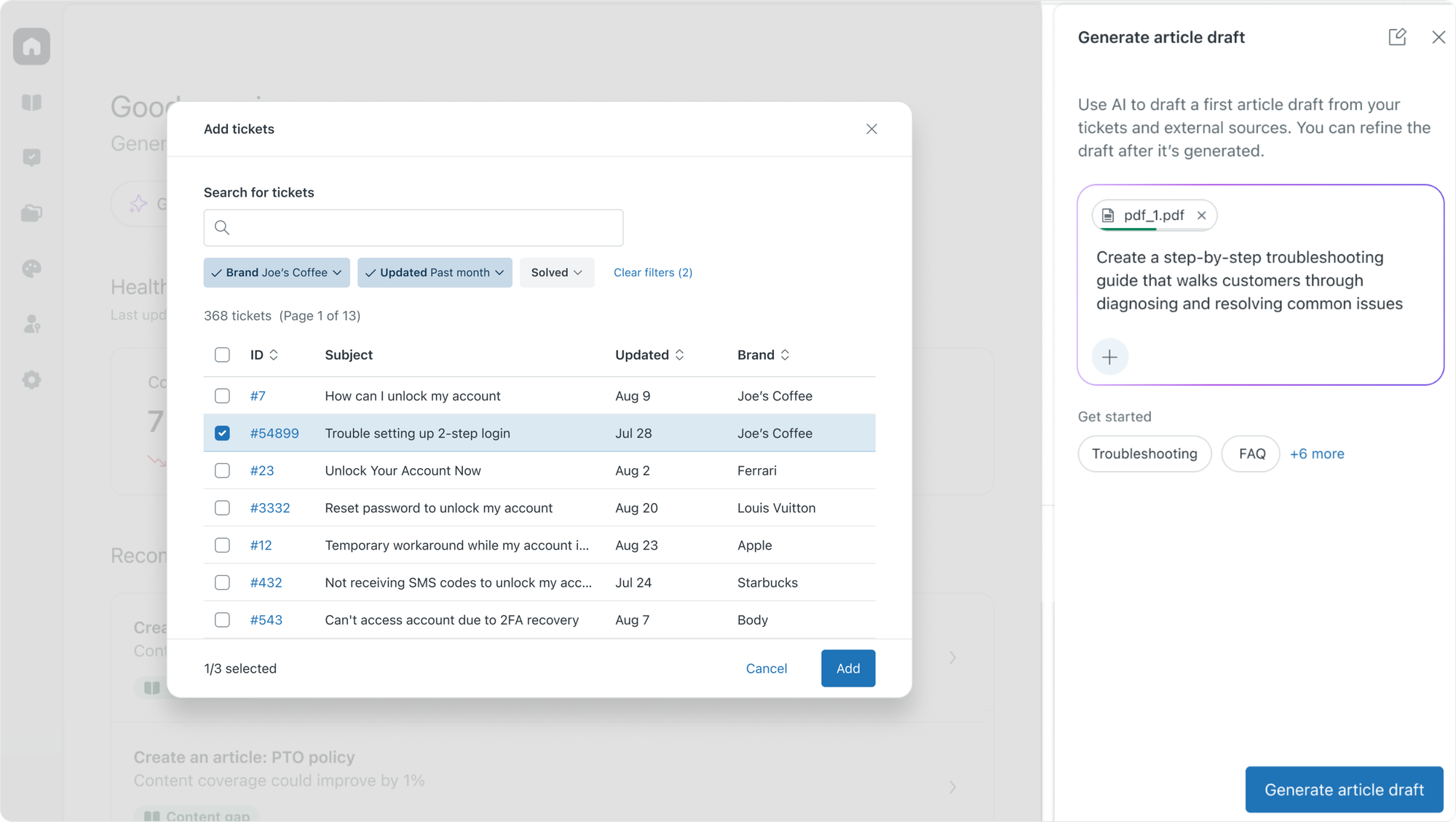
From there, admins can generate a draft article in a few clicks. The Copilot creates a first version, asks where to save it, then opens it in the editor for review before publishing. The admin stays in control. The Copilot does the heavy lifting.
In cases where you want to write an article from scratch, you can also provide the Copilot with reference material and related tickets, and the draft gets generated from there.
Knowledge Connectors
Knowledge Copilot live inside the broader Knowledge Graph story.
Zendesk traditionally focused on support articles visible in a Help Center. Customers went to the Help Center, searched for an article, and got their answer. But as use cases grow, and especially now that the platform caters to both Customer and Employee service, the places where content lives has also changed. What used to be a list of articles stored in a single location, has evolved into a Knowledge Graph that combines content pulled from support articles, indexed websites, imported content and connected knowledge sources.
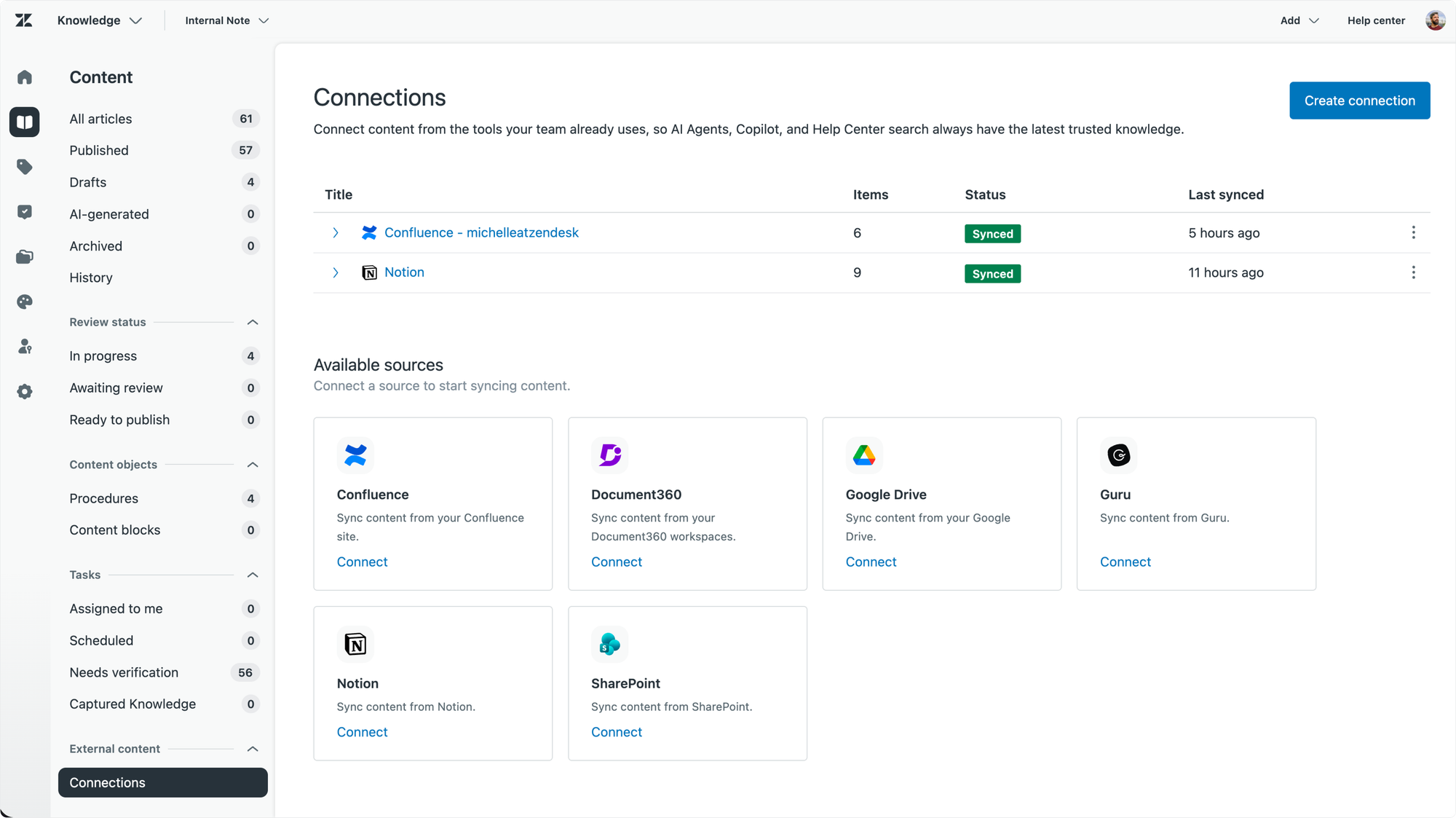
Knowledge Connectors especially are a powerful now capability since they make it super easy to add data stored in popular external platforms like Confluence or Sharepoint. Newly announced at Relate are connectors for Google Drive, Notion, Contentful and Guru.
The web crawler also got an update by which they can now automatically index and discover content on your website by following links, instead of relying solely on a sitemap.
Whatever the source, the content gets unified into a single governed foundation that AI Agents and human agents both rely on.
Bulk Translations
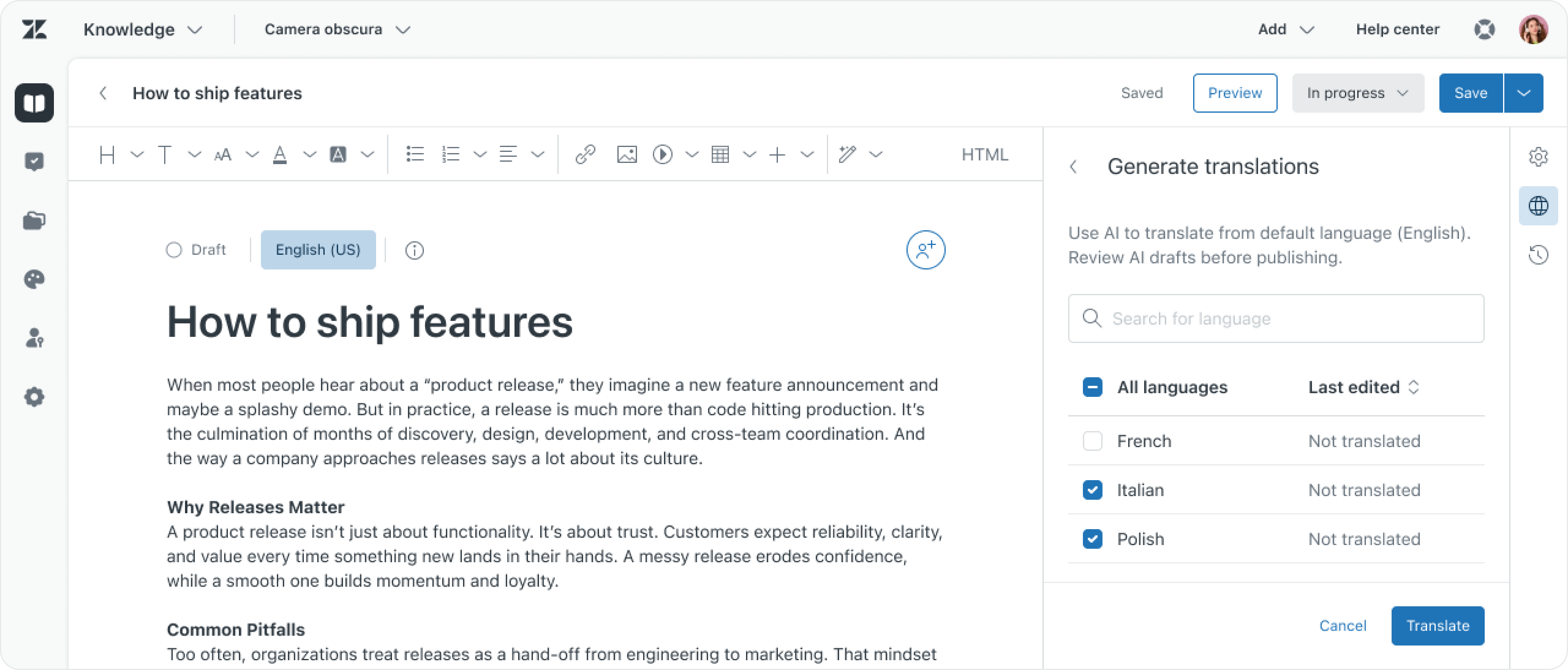
A small but meaningful improvement is that articles can now be translated in bulk through a single workflow rather than article by article. For multi-region teams, this collapses a lot of work into a single action. But as always, while the system does the heavy lifting, you're still in control of what gets published.
Particularly useful for the Translation gap detection coming later, which can flag missing translations across your knowledge base and propose them en masse.
Agent Copilot: routing and procedures that improve themselves
Once knowledge is in place, auto-assist and routing are next. They're how the system and human agents both know what to do when a particular kind of ticket arrives.
Writing procedures has historically been the slowest part of getting Agent Copilot to deliver real value. Relate 2026 changes that. Agent Copilot improves the onboarding experience, making it easier to get started.
The first new capability is the guided setup for auto-assist that makes it work right out of the box. Customers connect their knowledge and past tickets. Agent Copilot generates procedures based on that interaction history. This means that from day one it starts suggesting responses to human agents. And as the system learns, it'll start recommending improvements to those procedures over time.
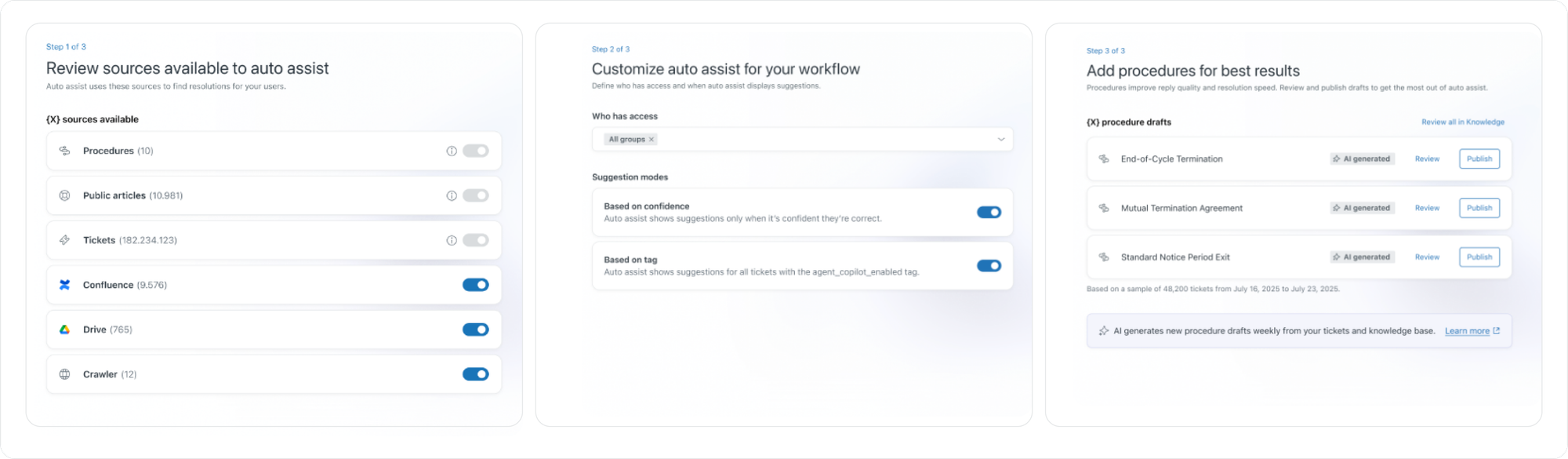
Auto-assist also analyses your solved tickets and surfaces recommendations to improve or add procedures. Undocumented steps that agents take repeatedly in tickets become draft procedures. Auto-assist suggestions with low acceptance rates get flagged. You can then review, tweak and publish those suggested changes, improving your auto-assist procedures over time.
The last announcement is the new Procedure Builder. Similar to how we build procedures for AI Agents, this lets you generate new procedures based on a plain-language description. When the business evolves and you need a change, you describe the change in natural language. The Copilot rebuilds it, or writes one from scratch. Before you can publish the new procedure, the system simulates the changes against real ticket data, showing you if the changes you or it made will actually have an impact.
Intelligent Triage: the right ticket to the right place
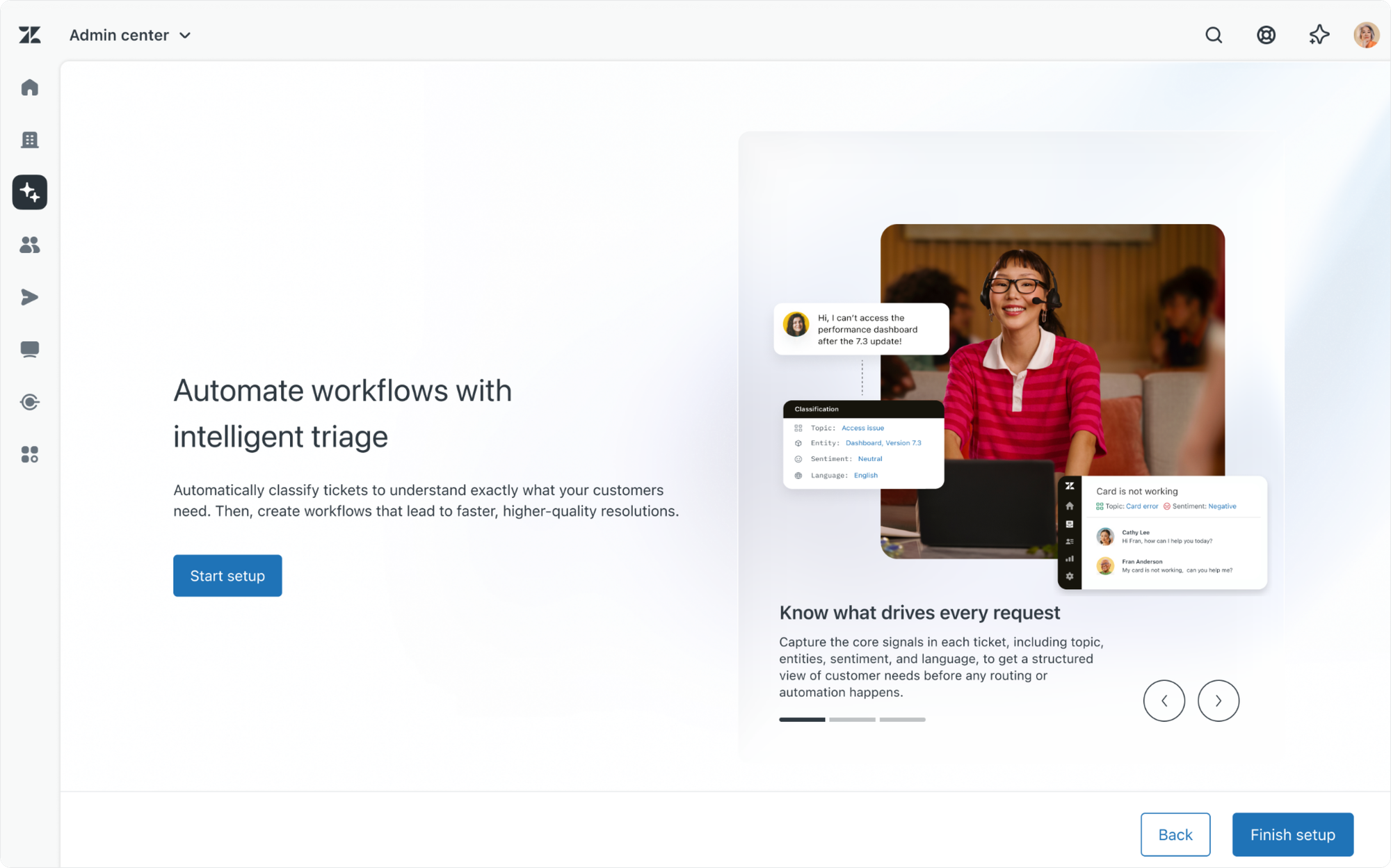
Procedures only work if they match the right ticket. Similarly, Omnichannel Routing needs that same input to match tickets to the right team, agent and queue. That's where Intelligent Triage comes in.
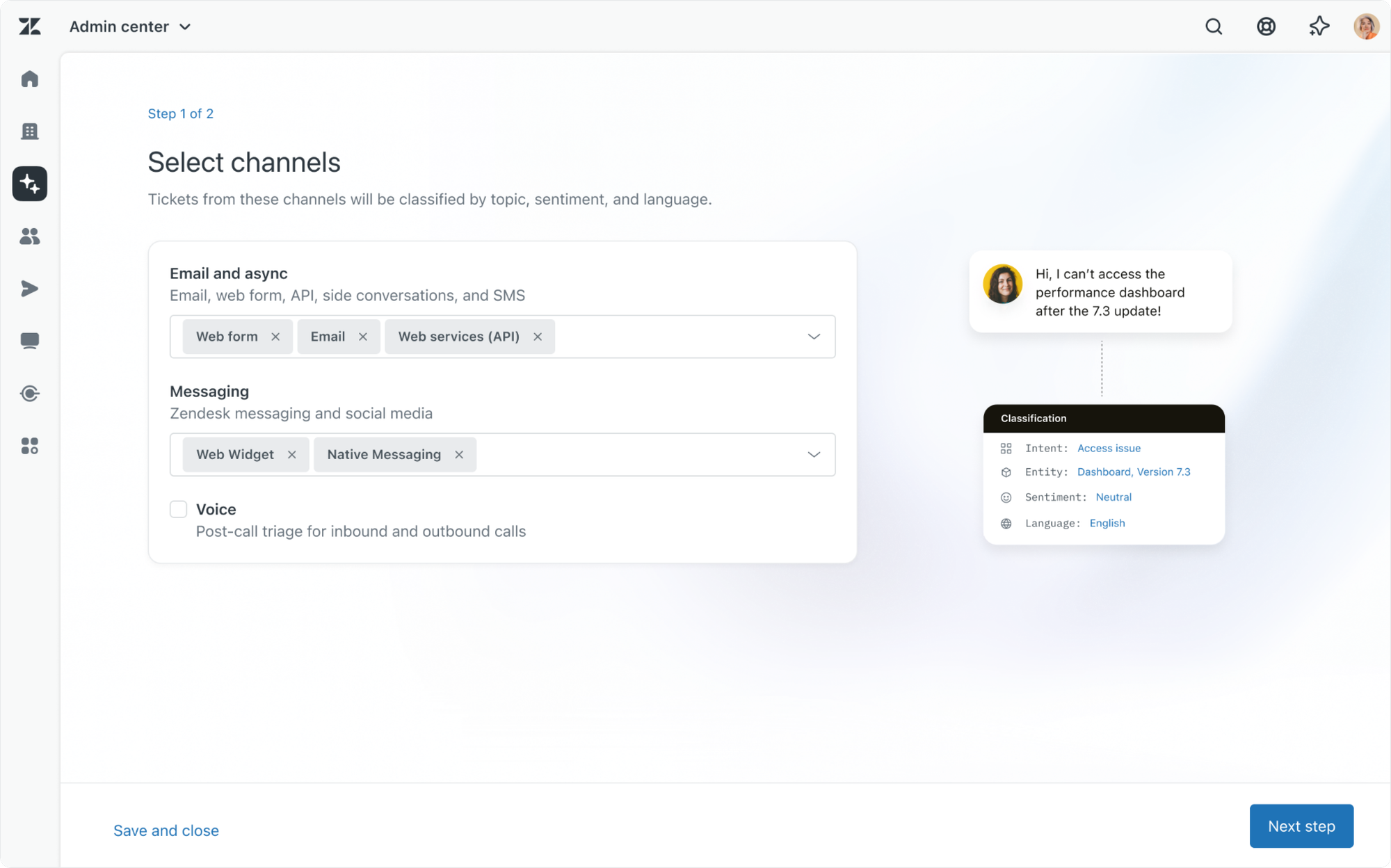
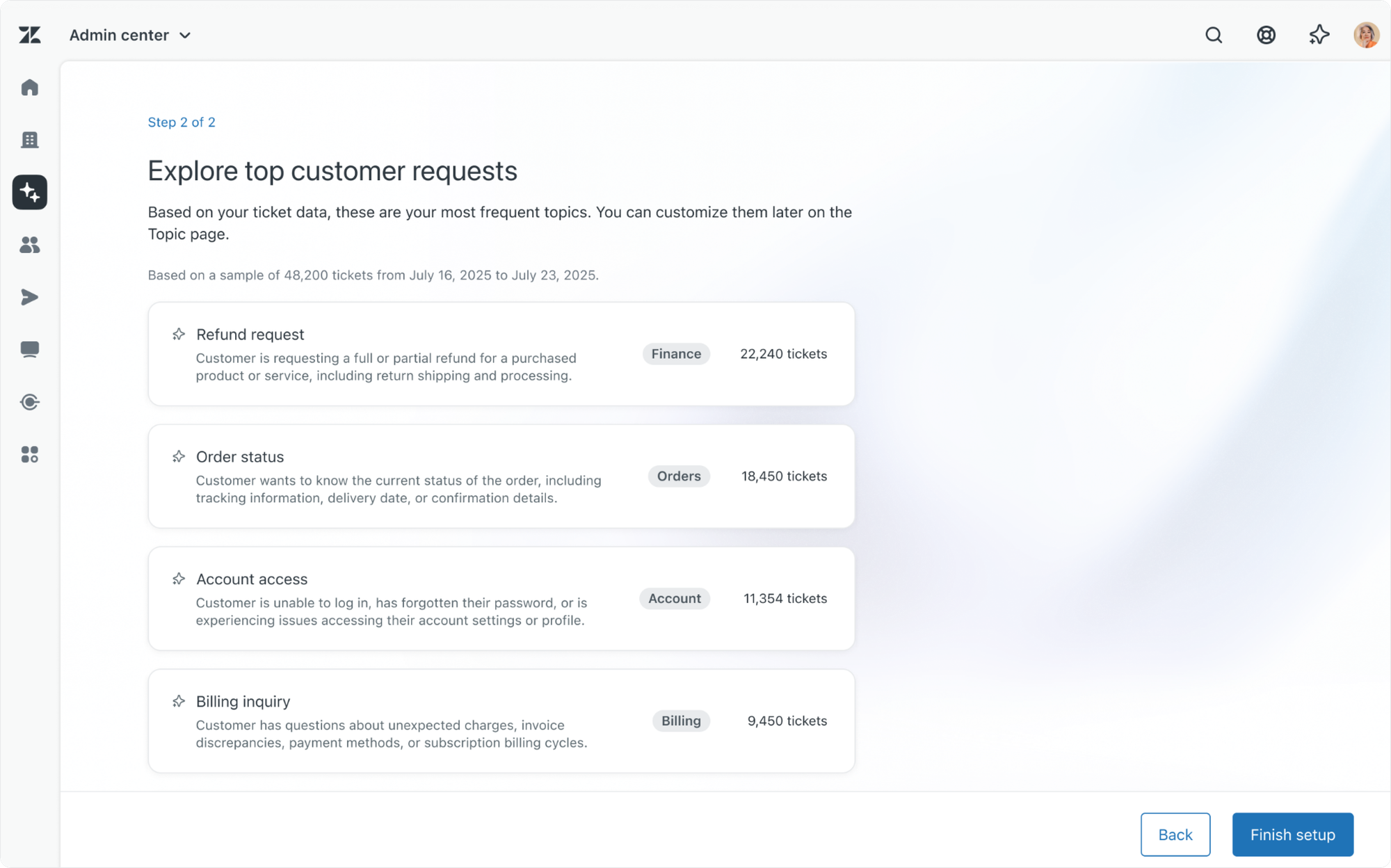
Intelligent Triage gets a new guided onboarding. Similar to Agent Copilot, this is part of a new trend of slowly transforming Admin Center's wall of checkboxes into more friendly and approachable UIs that make it more accessible for new customers.
Also noted, but not really new, is the improved intent management I already wrote about in a previous article with intent recommendations and more capable custom intent detection.
 Thomas Verschoren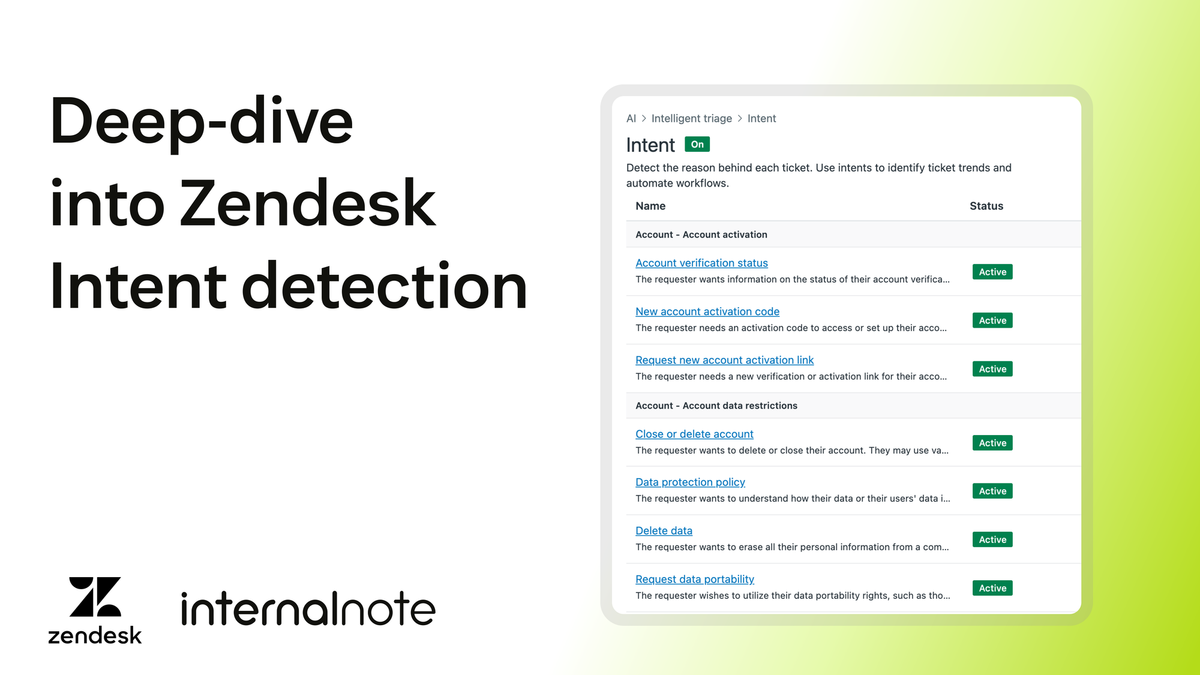
Predictive Routing: routing based on outcomes
Intelligent Triage tells you what's in a ticket. Omnichannel Routing decides who gets it. Today that decision is based on availability, group membership, capacity and skills, and configured via queues. It works. But it doesn't account for actual performance. A ticket might be routed to an agent with availability, but they might still not be the best for a specific intent.
Predictive Routing fills that gap. The system looks at the ticket's attributes and intent. It pulls each eligible agent's performance history for similar tickets. It scores agents by their likelihood of delivering a fast, high-quality resolution. The most likely match gets the assignment.
Existing OCR rules still apply. Capacity, schedule, group membership and availability still act as filters. Predictive Routing chooses among the eligible.
This is where the Resolution Learning Loop shows up in the routing layer. Outcomes from every resolution feed back into the model. Agent profiles update. Routing decisions sharpen. AI Agents learn from outcomes. Procedures learn from outcomes. Now routing does too. Same pattern, applied to who handles the ticket rather than what gets answered.
Admin Copilot: the setup layer
Zendesk's Resolution Platform runs on top of knowledge, procedures, actions and data. Its learning loop is powered by analytics and insights. But to keep that platform running you need to keep your Zendesk configuration up to date too. Someone has to maintain and configure the triggers. Routing rules. Workspaces. Permissions. Custom roles. Macros. The list runs long, and keeps growing.
Admin Copilot is the Copilot for that work. It looks at what's happening in your setup and flags what needs attention. It recommends what to improve. Your admin can inspect those recommendations, ask the AI Assistant for more context and then plan a change while talking to Admin Copilot. Once the plan looks good, the admin approves and Copilot makes the required changes.
Admin Copilot is available for free for all Zendesk Suite professional (or higher) customers. I wrote a full overview of Admin Copilot earlier this month, so take a look if you want to know more.
 Thomas Verschoren
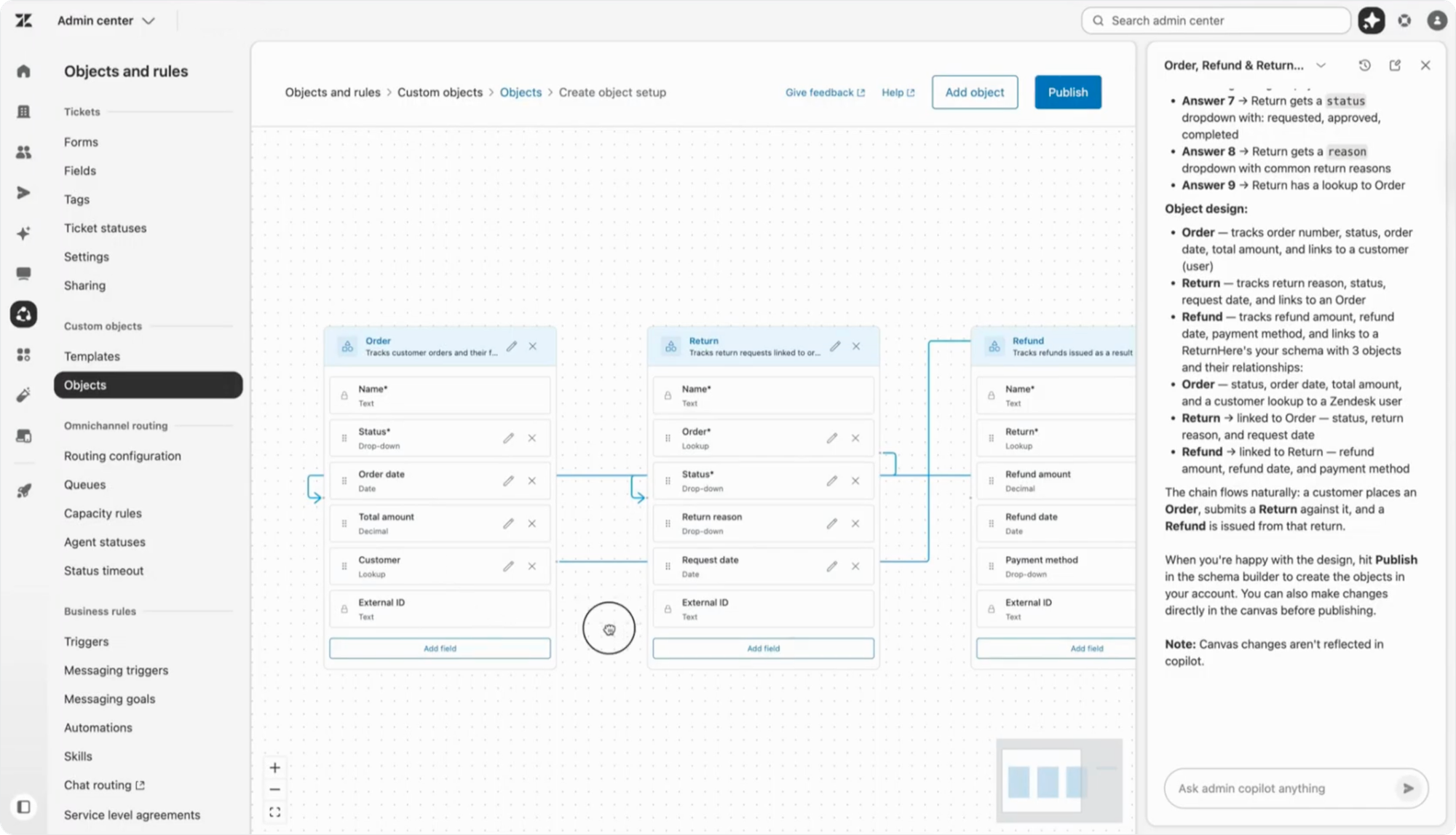
What’s new at Relate on top of this existing release, is the launch of the new Custom Object Builder. It allows you to talk to Admin Copilot to describe the object you need, and a new visualiser will build out the entire structure for you including object fields, lookup relationships and other required elements.
Here too we see a shift from building towards planning. Building custom objects, especially when it comes to planning out the relationship between the objects can be daunting. By having a Copilot running alongside you that turns your ideas into real objects, creating them becomes a lot easier and approachable
Zendesk Copilot, applied to every layer
For Admin Copilot specifically, but also applicable to all the other Copilots, is the shift it implies for the role of a Zendesk admin. Traditionally you had people who built your Zendesk. An Analyst who knew how to build reports. A Knowledge Manager who could write good content. A Team Lead who owned routing and assignment.
But now big parts of those roles get automated. It's the Copilot that builds, drafts and routes. It bridges the gap between coding an crafting. That takes away big parts of work that used to be done manually by product specialists in your team.
At the same time, it also makes those same elements more accessible, since you no longer need to have deep knowledge on how to build or configure the platform.
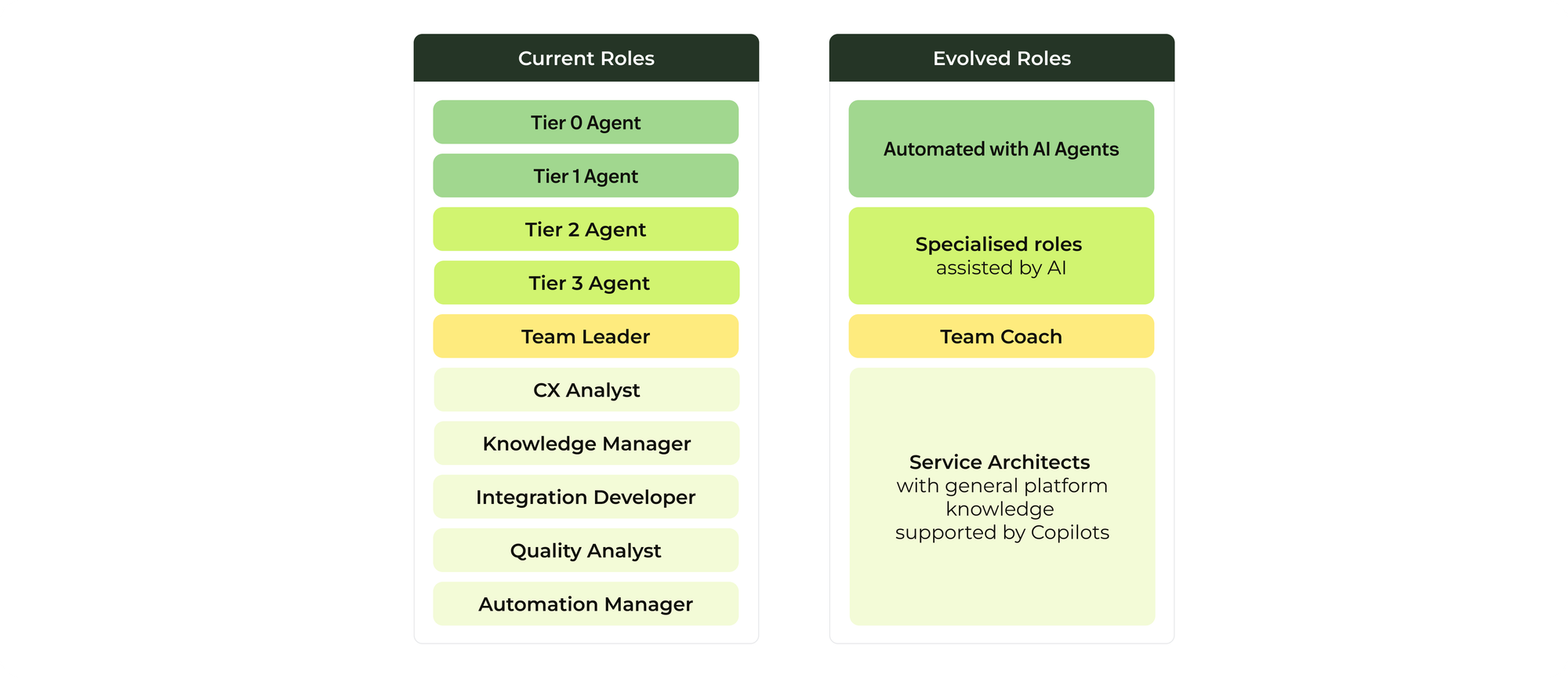
The roles of specific product specialists will evolve into more general service architect roles who can operate across the entire Zendesk platform, assisted by Copilot. The time they gain can be used to focus on strategy. They can look forward and plan, using the insights Copilot gives them to get the data they need to impact the future.
Zendesk Copilot sits between your team and the platform, keeping the humans and the machines talking to each other. Or in other words..

I am C-3PO, human-cyborg relations
How might I serve you?
Potential risks
There are two risks worth flagging: optimisation without a goal, and accepting without understanding.
The first is optimisation without a goal. Once the platform starts suggesting improvements, it’s tempting to optimise for whatever it measures. But if you don’t set clear goals and values for your team upfront, you can end up with a system that performs beautifully on paper and badly in practice since it's optimising for the wrong things. What's a high valuable conversation for one company, might be a low value one for another.
The fix isn’t to slow the Copilots down. It’s to define what success actually looks like for your business, not just for the metric, but for the experience the metric is meant to represent. What values should guide the trade-offs? What edge cases still need human judgment, even when the data says automate? Copilots are tools for executing strategy faster. They don’t replace strategy; they make the absence of strategy more visible.
The second risk is accepting without understanding: taking the recommendation and skipping the reasoning behind it. That’s the quieter danger, a slow drift toward not understanding what's actually happening doing. People can end up knowing which buttons to press, but not why those buttons exist.
That’s why Zendesk’s Admin Copilot shows the insight, recommends the change, and explains why it’s making that recommendation and what impact it will have. Because in the end, you still want to understand what happened and how it works, for accountability, and for good judgment.
Three new admin paradigms
The Proactive Copilots release is what makes the Resolution Learning Loop real. They also indicate three significant changes in the way admins interact with the platform.
- Without Copilots, operation management runs at the speed of admin time. With them, the loop runs at the speed of the platform. Faster insights, better recommendations.
- Secondly we see a big shift from building towards planning. The role of an admin moves towards validating insights and approving them. The manual building of more and more automated.
- And thirdly we see a change in the interface admins use. New onboarding flows turn walls of checkboxes into best-practices. Manual configuration turns into prompting.
This article focused on the learning flow. Where every conversation becomes an input to learn and do better. The previous article focused on the resolution flow. The Autonomous Service Workforce that meets customers.
Both flows need something underneath them to actually make them run. A platform that connects to the rest of your business. Reaches the systems where the work happens. Speaks the integration standards that vendors are converging on.
That's what's we're going to explore in the the third set of announcements, Connected AI Systems, the next article in this series.