Zendesk Relate 2026 - Connected AI systems
Zendesk Relate 2026 - Connected AI systems

On this page
The previous two articles in this series covered the two sides of the Resolution Platform. AI Agents resolving customer questions. Copilots closing the learning loop. But underneath these processes lies the platform itself. The engine that powers the resolution flow, runs the learning flow, and connects both to the rest of your business.
When we look back at Zendesk from a few years ago, you had clearly defined interfaces for each operation. The Help Center ran self-service and ticket deflection. Agent Workspace was where the work happened. Explore was where you went for reporting on that effort. But as we shift from human-driven work toward automated resolutions, so does the way we interact with the platform.
The Help Center has shifted toward a knowledge graph whose content serves the Help Center, AI Agents, auto-assist and human agents. Tickets in Agent Workspace evolved into conversations that start with an AI Agent and end up in QA. Reporting evolved from static dashboards toward proactive recommendations and interactive insights provided by Copilots.
This turns Zendesk from "the tool your team logs into" into "the engine your operations run on." The UI becomes something you choose. Maybe it's Agent Workspace. Maybe it's the Help Center. Maybe it's a custom app you built. Maybe it's ChatGPT. But what powers all of these interactions is the platform underneath.
That's the Resolution Platform. And it's quickly evolving from predefined interfaces into a customizable Zendesk you can build into and on top of. The brain that powers your operations, accessible via multiple interfaces by customers, agents and admins.
From code to conversation
There's a shift happening across the entire software industry that Zendesk's announcements this year sit inside. Similar to how an admin's job has evolved from configuring to describing, so has integrating Zendesk with the rest of your company.
Building integrations used to be a developer job. You wrote, shipped and maintained code. Every connection between two systems was a separate engineering project.
That model is breaking down.
On one side you have a new expectation of connectivity. The more adoption ChatGPT, Claude or Gemini get, the more customers expect those AI tools to connect to their other tools. Their task manager. Their email inbox. Their meeting notes. Most platforms that used to be standalone SaaS environments are quickly evolving into data layers that these AI Agents interact with. The same data, but a new interface.
On the other side of the coin, Anthropic's Claude Code and OpenAI's Codex have spent the last few years proving you can now describe what you want in plain English and get working software back. Custom apps, integrations, automations and agents are increasingly built by prompt rather than by hand. Building custom interfaces to work in, or custom logic to run your business, is becoming very accessible to anyone.
Zendesk's platform is evolving to meet those new customer expectations.
Action Builder is replacing triggers and webhooks with visual flows that run deterministic logic and are easier to configure. The built-in connectors and custom actions let you interact with the data stored in Jira, Asana, Notion or any other business platform you have. Knowledge Connectors brought external content into the Knowledge Graph. App Builder turned Zendesk apps from a developer task into a no-code prompt.
Each release connects the Zendesk platform deeper into your business data and tools, and moves business logic in Zendesk from "building what you need" more and more toward "describing what you need."
Relate 2026 takes the next logical step in this trajectory. Connected AI Systems brings together four releases that turn Zendesk's integration story into a connected whole.
- Action flows for AI Agents. AI Agents can now invoke any Action Builder flow. The same flows that human agents and Agent Copilot already use.
- MCP Client. Zendesk connects out to any third-party MCP Server. The integration backbone expands without custom code.
- MCP Server. External AI tools connect into Zendesk. Microsoft Copilot, ChatGPT and others can create tickets and trigger workflows.
- LLM as a Channel. ChatGPT becomes a governed service surface. Customers get on-brand answers directly where they are.
The bigger consequence of these releases isn't just a faster road to integration. It's that integrating stops being something you build and starts being something you switch on.
Action flows for AI Agents
Action Builder is the integration backbone of the Resolution Platform. It lets you define deterministic workflows that run logic and interact with both Zendesk's platform and external systems.
Until now, Action Builder flows were only available to Agent Copilot, or could be triggered by actions in the platform or via external webhooks. The big exception was AI Agents. Anything an AI Agent needed to do via API had to be configured separately as an API integration. That's about to change.
From now on, AI Agents can access the same Action Builder workflows the rest of the system already uses. This gives you a couple of benefits.
- You can reuse the exact same logic across AI Agents and Agent Copilot. A flow that looks up an order, retrieves its tracking code and returns a shipping status can now be built once and reused across any procedure that needs it.
- Action Builder combines logic with integrations. This means that instead of writing out the entire refund eligibility logic in a procedure, you can extract that logic from the procedure and codify it in a workflow. Your procedure becomes less complex, and it's easier to improve the conversational experience it offers your customers, while abstracting away the business logic from those writing down the procedures.
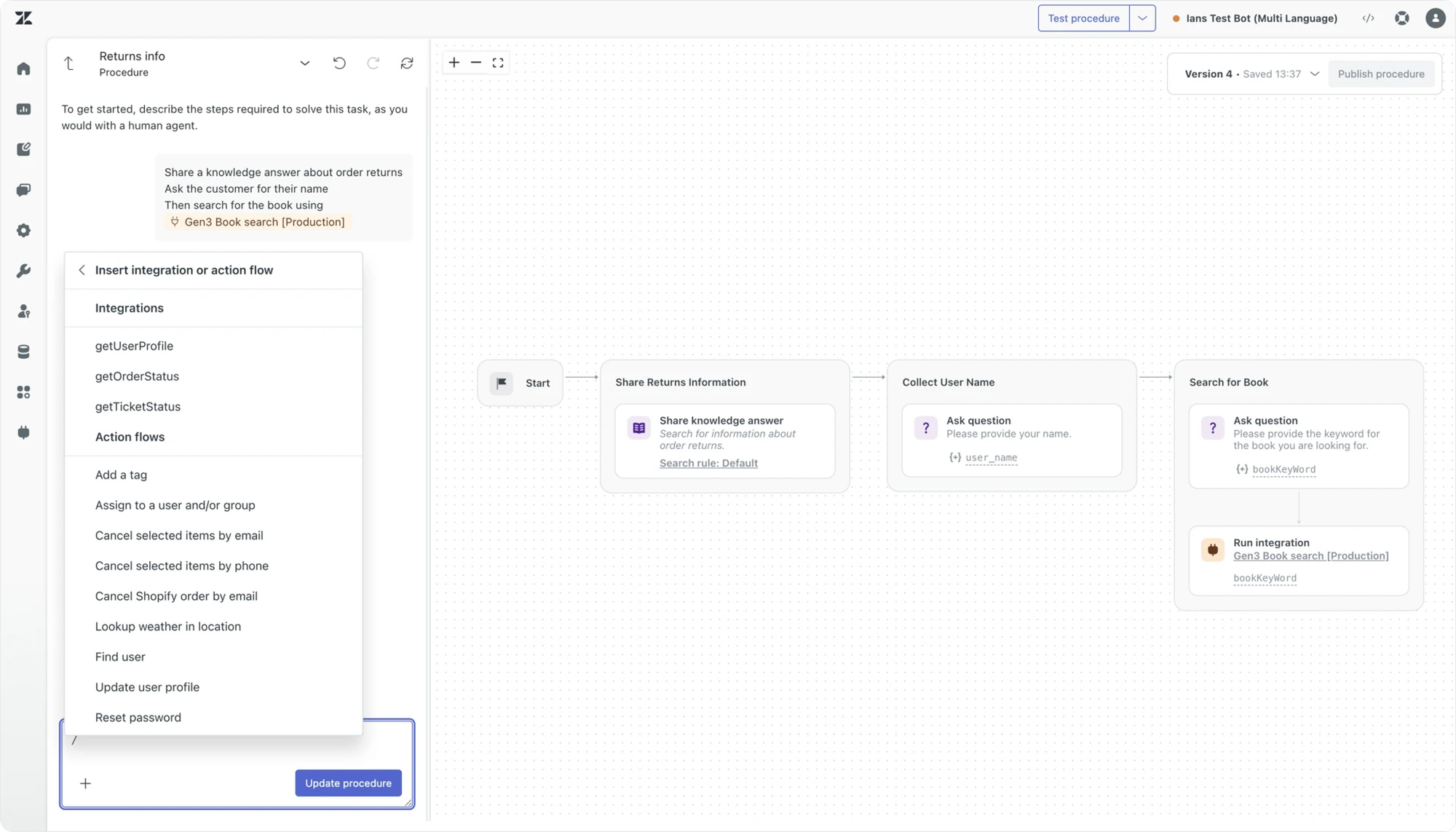
Aside from these two benefits, there's also the simplification of the platform itself. Instead of building the same API integration in the AI Agent dashboard and in a Custom Action, you now only need the latter. There's no overhead of learning two integration systems anymore. Your admins and developers only need to learn and configure one.
This pairs directly with Agent Builder, covered in the Specialised AI Agents article. Both are about extracting logic out of the conversation and giving it a predictable, reusable home. The AI Agent procedure stays focused on the conversation. Action Builder handles the deterministic business logic. Custom agents handle the processes that need reasoning. Together they make the AI Agent the orchestrator of your conversations rather than the place where everything lives.
There's a bonus tucked into this release. Via its Action Builder integration AI Agents also gain access to many of the existing external connectors: Shopify. Salesforce. Jira.
At the same time, Action Builder itself gains a couple of new features too. You can now trigger workflows based on a schedule trigger. There's now actions for users and custom objects. There's expanded support for objects and arrays, and drop-downs (finally) support variables.
As Zendesk is evolving into a family of autonomous agents, underneath the platform itself is evolving into a platform that makes it easier to connect with other tools, making those same agents smarter and deeper integrated with your company.
Model Context Protocol
Although Action Builder comes with a dozen pre-built connectors, these will never cover every integration any customer needs. There's always a system that isn't on the list. Always a custom API. Always a specific vendor that doesn't natively integrate with Zendesk.
The traditional answer to that gap is adding new API calls to the platform where you need them, and building logic around those. A Custom Action to get an order status. Another to cancel an order. Another to check its shipping status. As your procedure and use case coverage grows, so grows the library of integrations needed. Any new procedure needs a potential new capability to be integrated. And until now, that meant looking up the API call in the documentation and adding it as a custom action to the platform. It works, but it scales with manual effort.
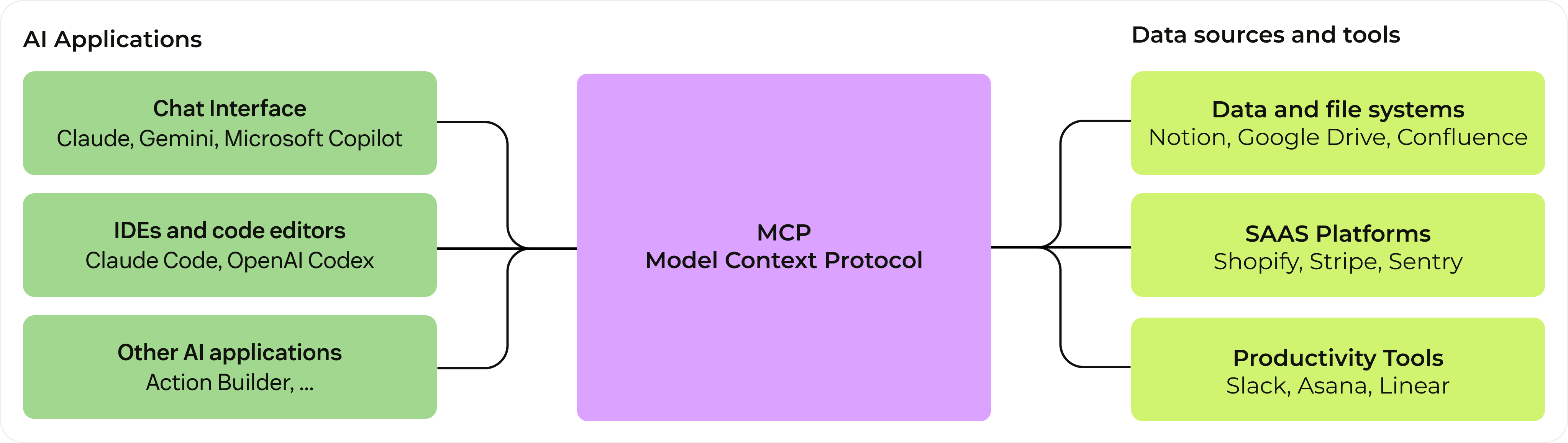
The answer to that problem is MCP, or Model Context Protocol. A standardised framework for AI-to-system integrations.
Model Context Protocol, explained briefly
MCP is to AI integration what USB-C is to peripherals. A single connector pattern that any AI system can speak.
Before MCP, integrating AI with a software platform required a number of API endpoints and custom integrations. Each one a separate setup. Each one built when you needed it. Each one requiring maintenance every time the platform updated.
After MCP, that same platform houses all its tools in a single MCP Server. An AI agent connects to the server once, via an MCP Client, and gets access to every action the server exposes. When the platform adds a new capability, the platform sees it automatically. No new integration. No rebuild.
Let's say you want to connect to your booking platform to let customers manage their flight bookings. This means you need to retrieve flight details. Search for flights. Book new ones. Doing this with classic APIs means adding and maintaining a dozen of separate actions, and defining the input and output for each.
When you connect to your booking platform's MCP server however, the platform gets added to Action Builder's external actions. With one integration you get access to all of the actions available for that platform. Whenever the booking platform adds a new capability, the list gets automatically updated.
{
  name: "searchFlights",
  description: "Search for available flights",
  inputSchema: {
    type: "object",
    properties: {
      origin: { type: "string", description: "Departure city" },
      destination: { type: "string", description: "Arrival city" },
      date: { type: "string", format: "date", description: "Travel date" }
    },
    required: ["origin", "destination", "date"]
  }
},
{
  name: "bookFlight",
  description: "Book a selected flight",
  inputSchema: {
    type: "object",
    properties: {
      flightId: { type: "string", description: "Unique flight identifier" },
      passengerName: { type: "string", description: "Name of the passenger" },
      email: { type: "string", format: "email", description: "Passenger email address" }
    },
    required: ["flightId", "passengerName", "email"]
  }
}
MCP Client support: Accessing MCP connections in Zendesk
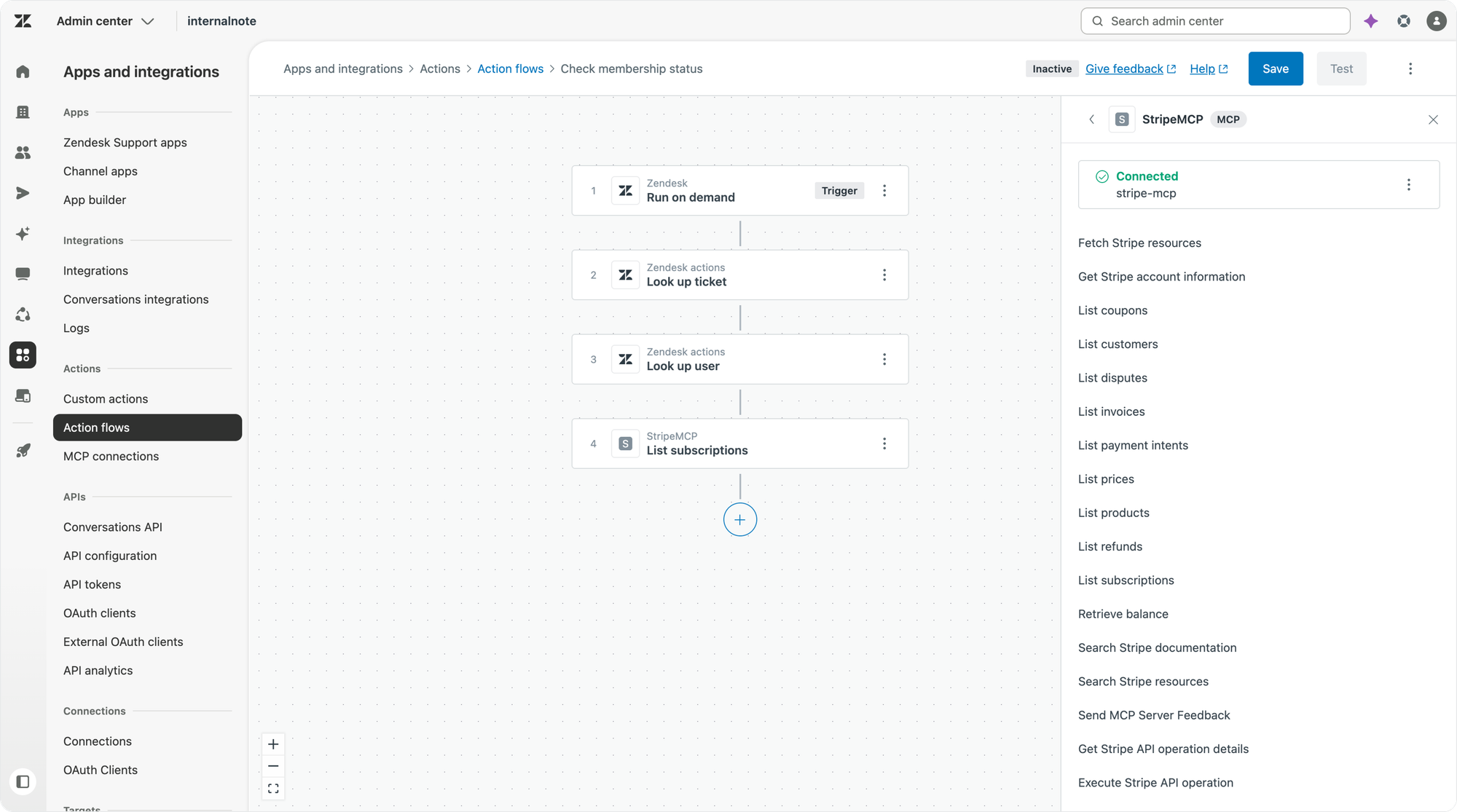
MCP connections join the native connectors and Custom Actions available in Action Builder workflows. When building out your workflows or custom agents, admins can now select an MCP connector and get access to all the capabilities it provides.
This also means AI Agents can more easily integrate with other platforms, since they too can use Action Builder and its new MCP Client capabilities. In the future, Zendesk plans to add direct entry points in Copilot and AI Agents, so MCP connections become directly callable without going through Action Builder.
What this all amounts to is that Action Builder can now connect to anything. Existing pre-built connectors. Classic APIs. Custom agents built in Agent Builder. MCP servers. Webhooks. All shapes of integration sit behind the same surface. The choice of integration type becomes a question of which is most convenient. Not whether it's possible.
Zendesk MCP Server: when external AI tools connect into Zendesk
The third release in the Connected AI Systems pillar inverts the direction. Aside from being able to ingest other MCP Servers, Zendesk will soon offer its own MCP server.
So far in this article, every release has been about Zendesk connecting to external systems. The MCP Server release is about allowing external AI systems to connect into Zendesk.
A customer wants to use Microsoft Copilot to create employee service tickets inside Zendesk. Without an MCP Server, that's a custom integration project where they need to build out a service that connects to Zendesk's HTTP API. But now you can add Zendesk's MCP Server to Microsoft Copilot (or Claude, or ChatGPT) directly. Tickets get created. Workflows get triggered. All without code.
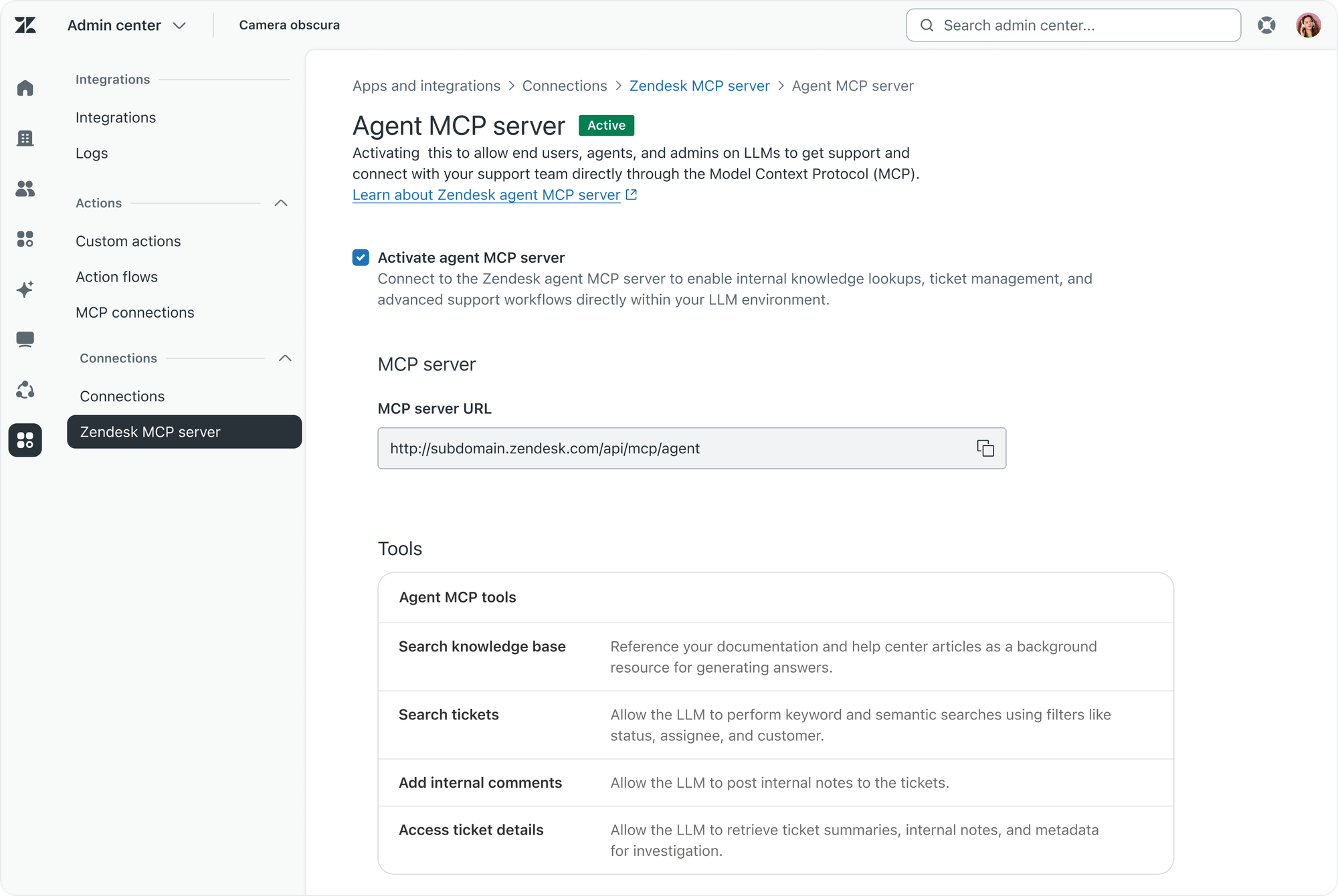
This matters because more and more enterprises are building their own AI infrastructure or interfaces. Internal Copilots. Agentic systems. Custom workflow tools. Those tools need access to the data and workflows that live in Zendesk. The MCP Server makes that connection a standard pattern rather than a bespoke project.
This all fits into the broader concept of turning Zendesk into a System of Aaction. One where AI Agents, knowledge, procedures, actions and insights run your CX and ES operations. On top of that platform, people should be able to build their own interfaces, or integrate with their existing tools. We see that with Slack and the new AI Agents for Employee Service powered by Unleash. And we see that with MCP connecting to Microsoft Copilot.
The MCP Server launches in EAP later in 2026.
New conversational interfaces
Connected AI Systems isn't only about making it easier for the platform to reach out to other services. It's also about making the way customers and employees interact with your teams ready for an era where the interface is quickly turning into a conversational one driven by AI assistants.
AI Agents for Employee Service
Last year Zendesk acquired Unleash. Unleash is an AI-powered enterprise search platform designed to connect knowledge across systems. This year's Relate shows the result of that acquisition with the release of AI Agents for Employee Service.
Different from customer-facing AI Agents, Employee Service has its own constraints. Knowledge sits across dozens of internal systems. Information is sensitive, role-based and has strict permissions. Work doesn't happen in support portals. It happens in Slack and Microsoft Teams.
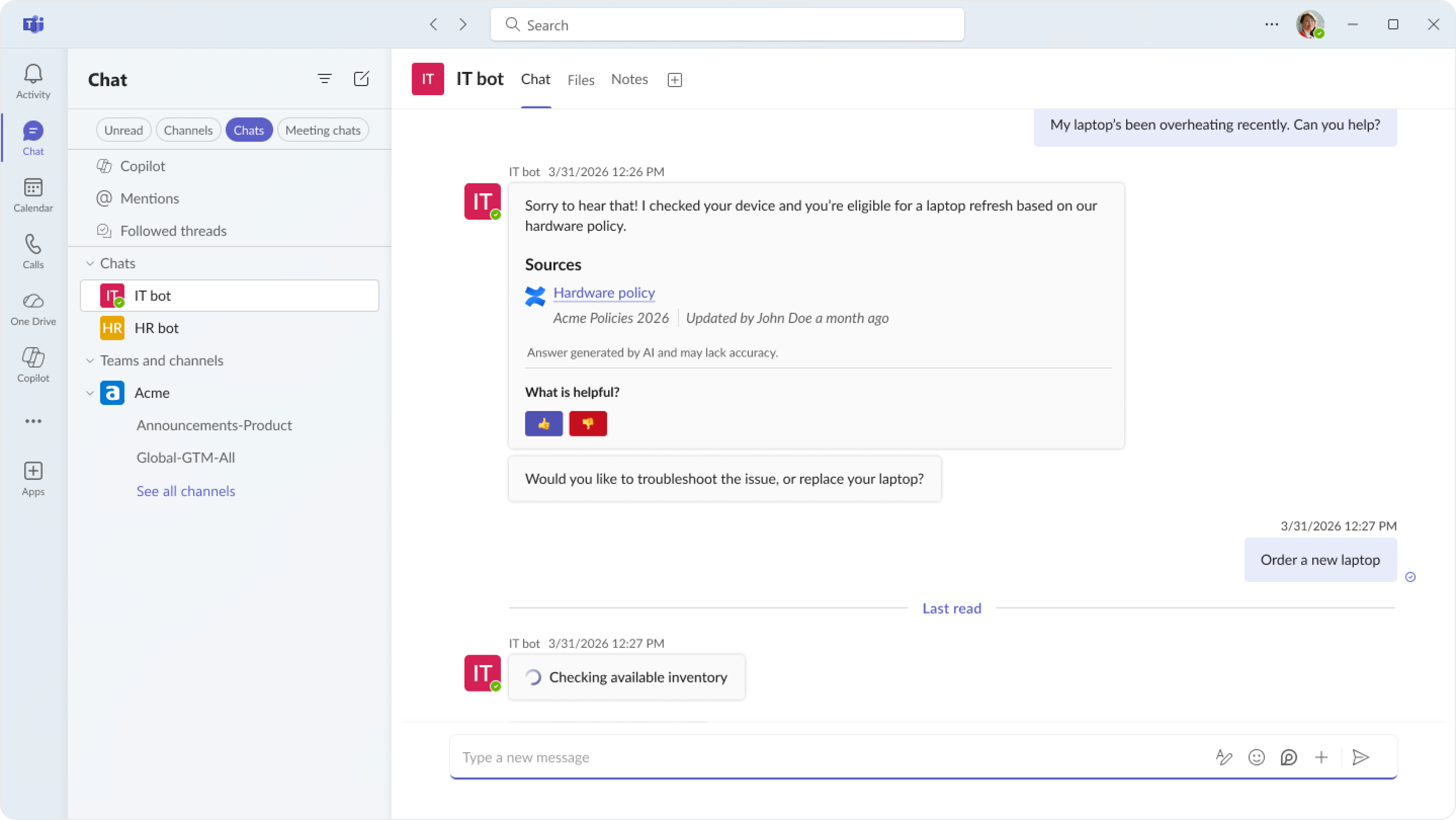
The new AI Agents for Employee Service provide an answer to those unique requirements.
- Pulls knowledge from popular enterprise systems. Google Drive. SharePoint. Confluence. Notion. AI Agents for ES index the platforms where internal documentation actually lives. That content is indexed without duplication or migration, so it can stay where it lives.
- Delivers answers where employees work. While Zendesk does offer a portal for service requests, most employees work and live in Slack or Microsoft Teams. They don't have to leave these tools to get help. Resolutions happen where the work happens, as conversations inside those platforms.
- Honours permissions at the source. The AI Agent operates within existing role-based access. It doesn't see what the requesting employee shouldn't see. This is what Zendesk calls "permission-aware AI."
LLM as a channel
LLM as a channel turns ChatGPT into a real service surface. Customers asking questions get on-brand answers grounded in your approved knowledge by using ChatGPT's new apps platform. They can take approved actions. They can escalate to a Zendesk human agent with the full conversation context preserved.
Service has historically been delivered on the brand's surfaces. Help center. Messaging widget. Voice line.
But ChatGPT now serves more than 900 million users per week. For an entire category of customer questions, the first stop is no longer Google or your help centre.
The traditional service model has no answer to that. If your customer asks ChatGPT about your return policy and ChatGPT hallucinates, your customer leaves with the wrong information. You have no way to be there. No control. No data. No follow-up.
Similar to how AI Agents that integrate with social channels, service should go wherever the customer is. The customer stays in their preferred AI assistant. The brand stays in control of the experience.
LLM as a channel is Zendesk's answer to this new behaviour. Businesses can build apps in the ChatGPT App Store and connect those apps to Zendesk. When a customer interacts with a company's app inside ChatGPT, they get on-brand answers grounded in the company's approved knowledge. They can take approved actions. They can be escalated to a Zendesk AI or human agent with the full conversation context preserved.
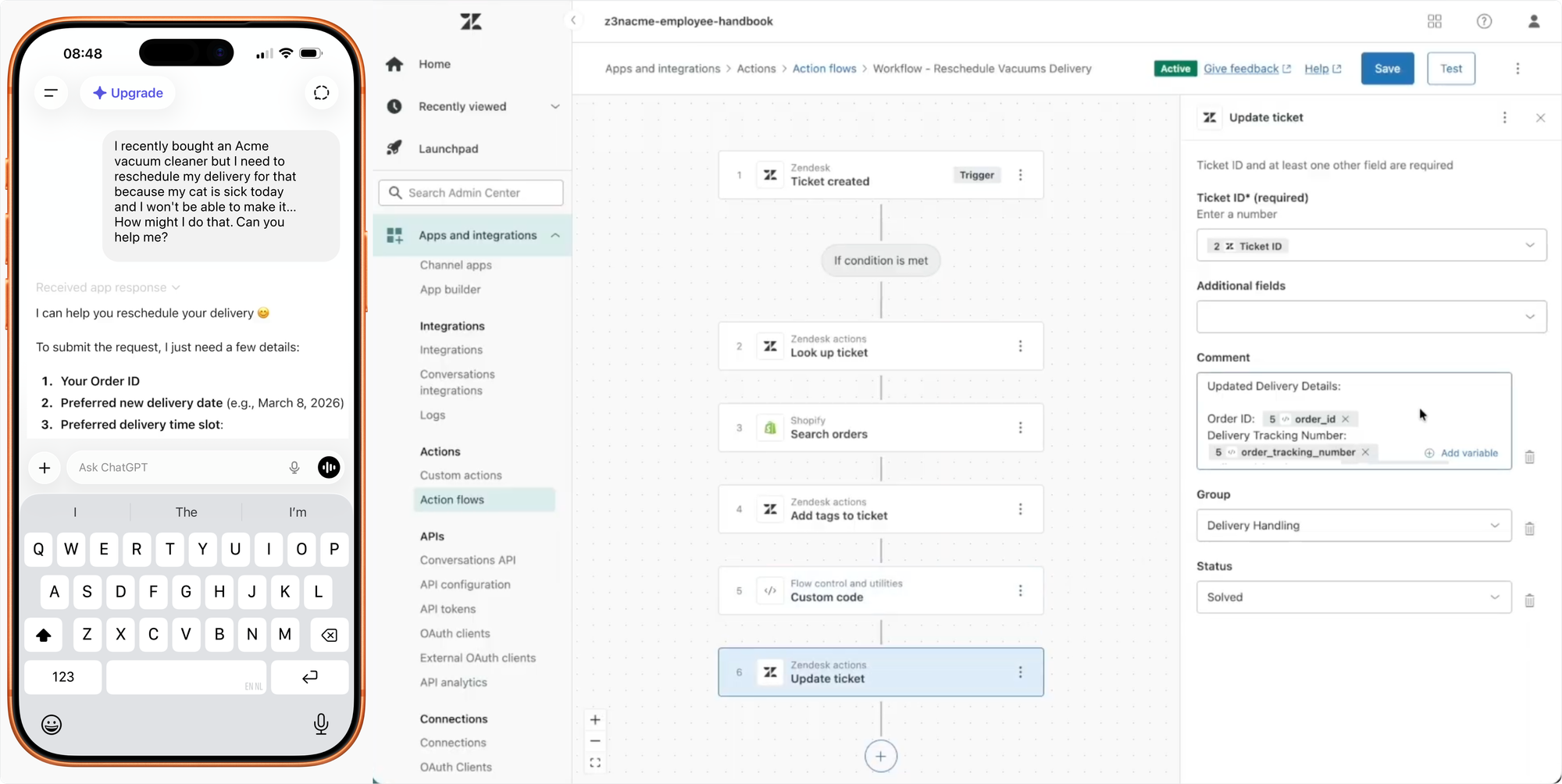
Here too, the concept of Zendesk as a platform shows up. Your Zendesk-powered AI Agent already runs on messaging, on email, on voice, on social, in the Help Center, on mobile, and now, it runs inside ChatGPT (and soon Gemini, Claude or other platforms). The same logic, the same knowledge, the same procedures. Just on different surfaces, all powered by the same engine underneath.
A connected and customisable AI platform
For most of Zendesk's history, the product was the thing your team logged into. Agent Workspace. Admin Center. The Help Center your customers visited. The mobile SDK in your app. Zendesk was a set of UIs, with a platform underneath that you configured to make those UIs work for you.
Relate 2026 inverts that relationship. The platform moves to the centre. The UIs become consumers of the platform. AI Agents on the front-end. Copilots on the back-end. Action Builder, Custom Objects and App Builder turn it from a closed system into something you can build on. MCP support means anything you build connects to anything else, without code.
Your AI Agent on messaging is the same agent running inside ChatGPT. Your Custom Objects schema is the same data backing the apps you build in App Builder. Your knowledge from SharePoint is the same knowledge feeding your help centre. Your action flows are the same flows running inside human agent procedures and AI Agent reasoning.
One engine. Many faces. That's what makes the Resolution Platform actually a platform rather than a suite of products.