
Conversation takeover & editing AI Agent tickets in Agent Workspace
Conversation takeover & editing AI Agent tickets in Agent Workspace

On this page
Customer interactions do not all follow the same route. Some requests can be handled and resolved by an AI Agent without a person getting involved. Others need a support agent from the outset, while some may begin with an AI Agent and need human attention later. The platform needs to support all of these paths, while keeping the interaction and its history available to the people responsible for the customer.
AI Agents and your support agents do the work of handling those interactions. An AI Agent can understand a request and resolve it autonomously; a support agent can apply human judgement, handle more complex work or continue a conversation when needed. Sometimes they work at different points in the interaction, but both contribute to the customer’s support experience.
There is also work to do around the interaction: understanding how it went and where the service could improve. Agentic Analytics can help teams identify patterns across AI-handled conversations, while QA can assess the quality of individual interactions. Admin Copilot can help admins act on what they learn by configuring the workflows and tools that support the service. Each plays a different part in the review and improvement cycle.
AI Agent tickets provide the shared record that connects these activities. A ticket is created from the start of an AI-handled conversation, rather than only when it needs human support. If the AI Agent resolves the request, the ticket remains available for reporting and review. If a support agent is needed, that same conversation becomes available to them to work in Agent Workspace.
Making those conversations visible across their lifecycle was an important first step made last year. But teams also need ways to add notes and context, change metadata, or intervene when appropriate. With the rollout of AI Agent ticket takeover and editing, agents can now do that directly in Agent Workspace.
One interaction, one ticket
An AI Agent ticket follows the customer interaction through its lifecycle. The conversation starts with the AI Agent and can be resolved there, or move to a support agent when human help is needed. In either case, the interaction is available as a ticket in Agent Workspace.
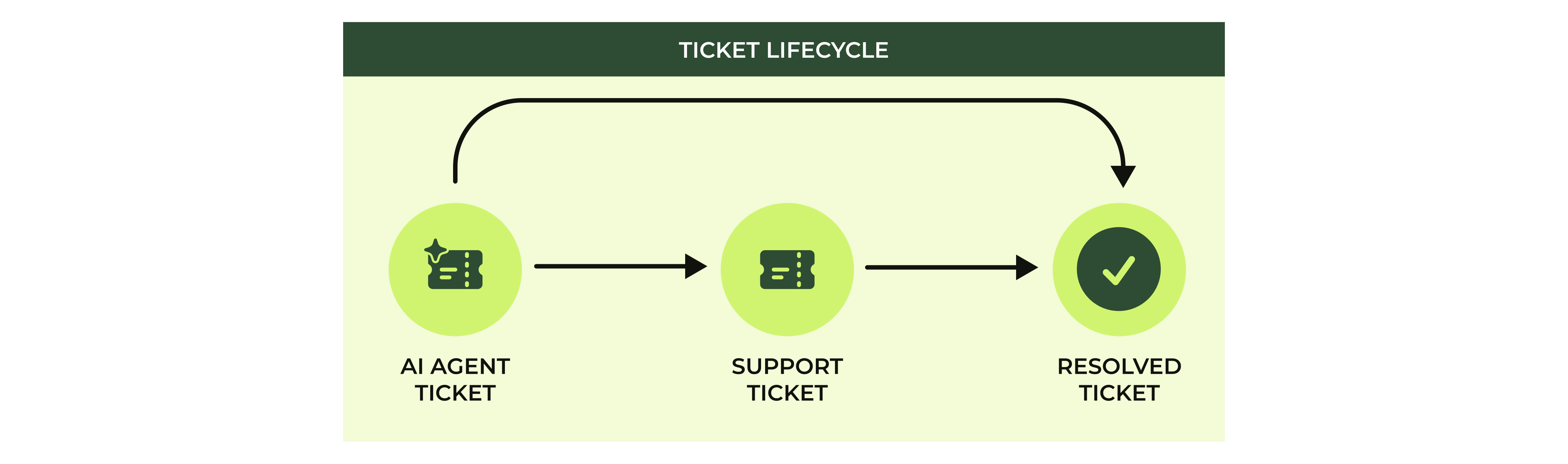
This gives teams a fuller picture than looking only at tickets that reached a human queue. They can see what customers asked, what the AI Agent did, and where a person became involved. The ticket connects the initial question, the AI Agent’s handling and any later support work.
Why visibility wasn’t enough
When AI Agent tickets first became available in Agent Workspace, agents could read the conversation, but the ticket was read-only. They could not add an internal note, edit fields or tags, or take control of the conversation from the ticket.
That left a gap between seeing an issue and being able to act on it. An agent might notice that the AI Agent gave an incorrect answer, or that a customer needed help with a sensitive request, but there was no direct way to record a review on the ticket or intervene while the AI Agent still had control.
Teams could use the ticket for context and reporting, but they could not correct any metadata making sure reality aligned with reporting.
What’s new
Admins and agents with the relevant custom role permissions can now intervene in AI Agent tickets directly from Agent Workspace. The new controls let them take over a conversation, add an internal note (pun intended) or edit ticket information. Escalation and assignment events are also recorded on the ticket.
Conversation takeover
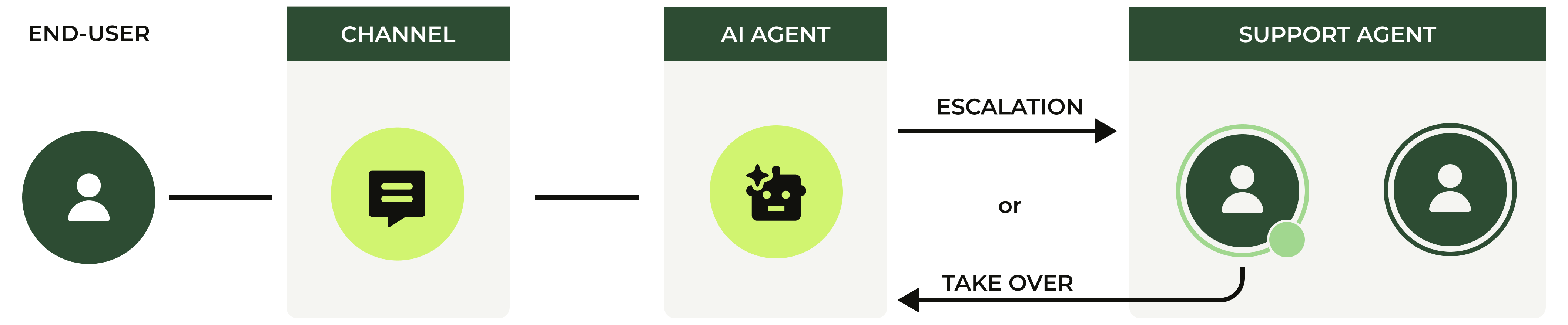
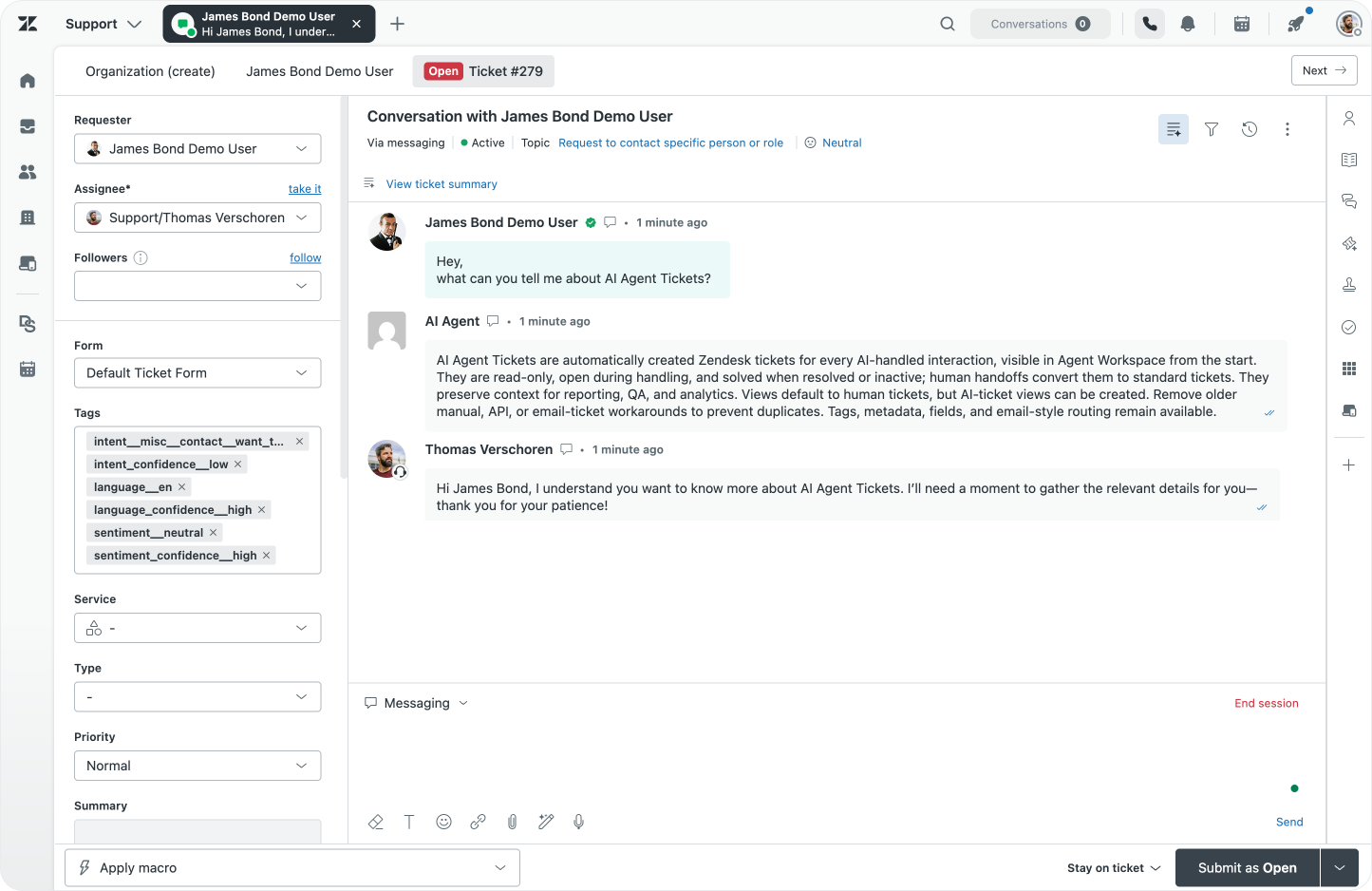
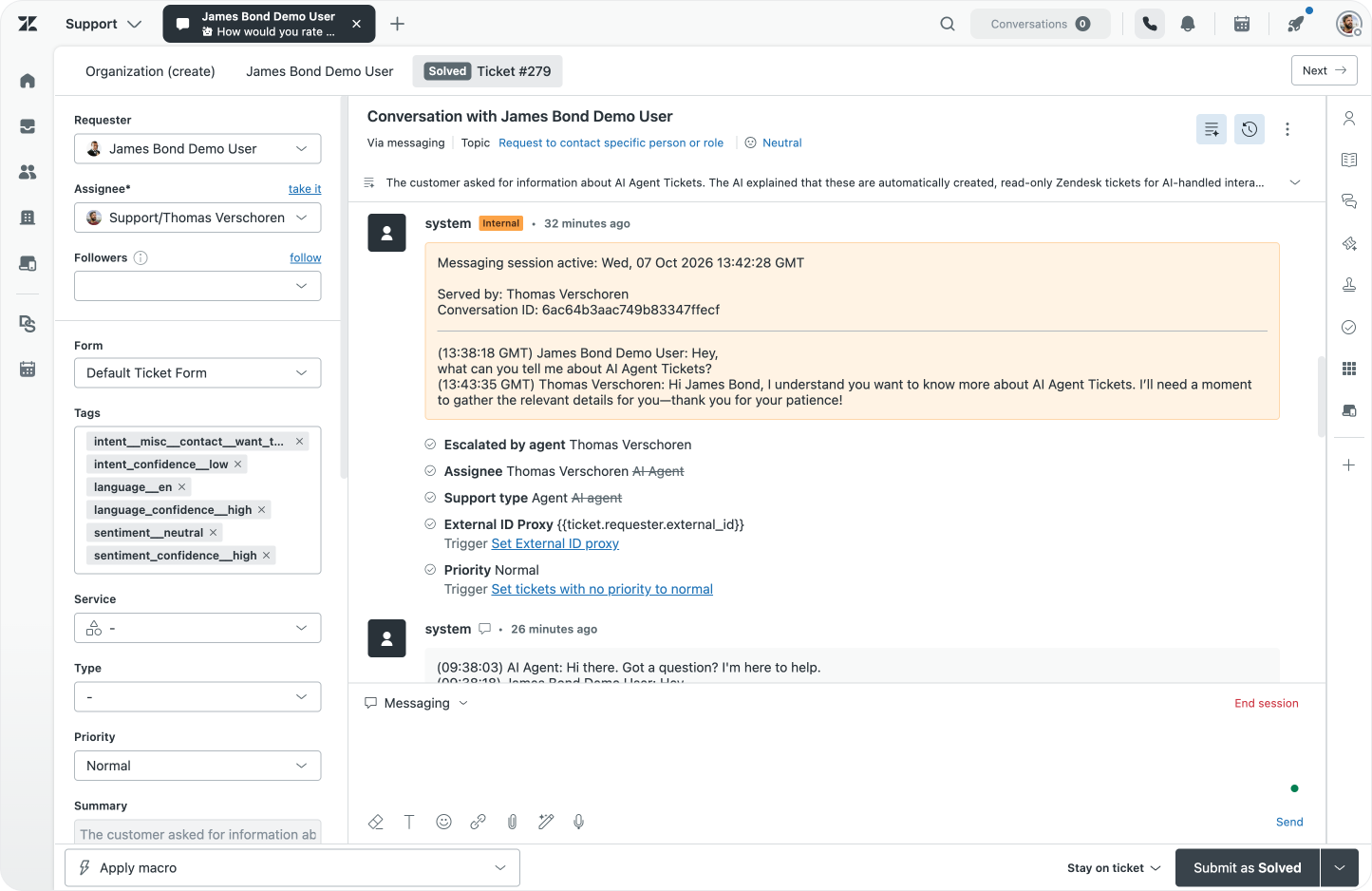
When a conversation needs a person, an authorised agent can use Take over to move it from the AI Agent to human support. The ticket is escalated as a normal support ticket and will be assigned to the agent doing so. The ticket history records the escalation and assignment.
This is useful when a customer is speaking to a human on another channel while also messaging the AI Agent, or when real-time analytics alert of topics that need attention. An agent can take responsibility for the conversation in the same ticket rather than asking the customer to start again.
Add an internal note
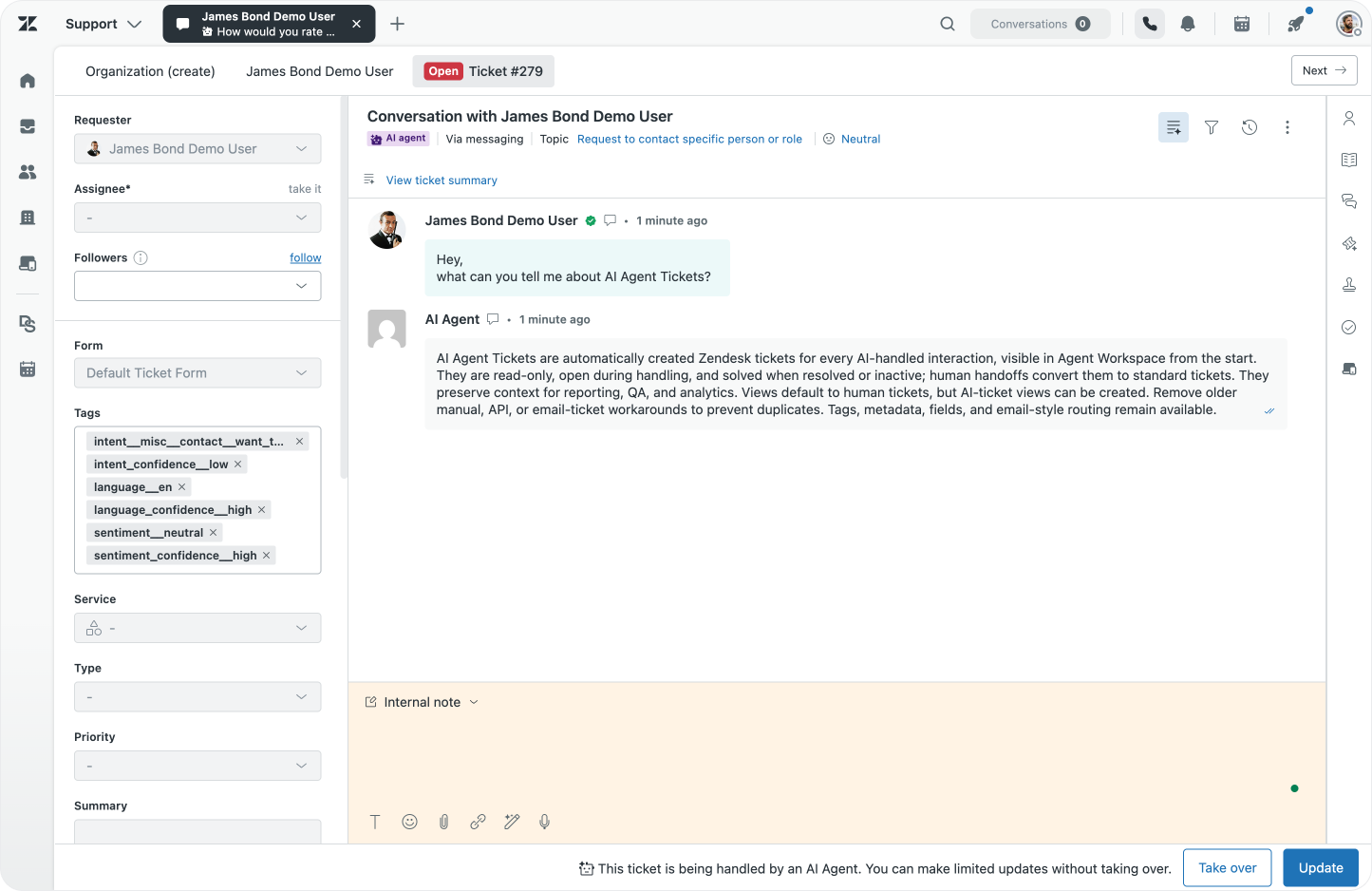
An agent can add an internal note while the ticket is still with the AI Agent. That note is for the support team; it is not sent to the customer.
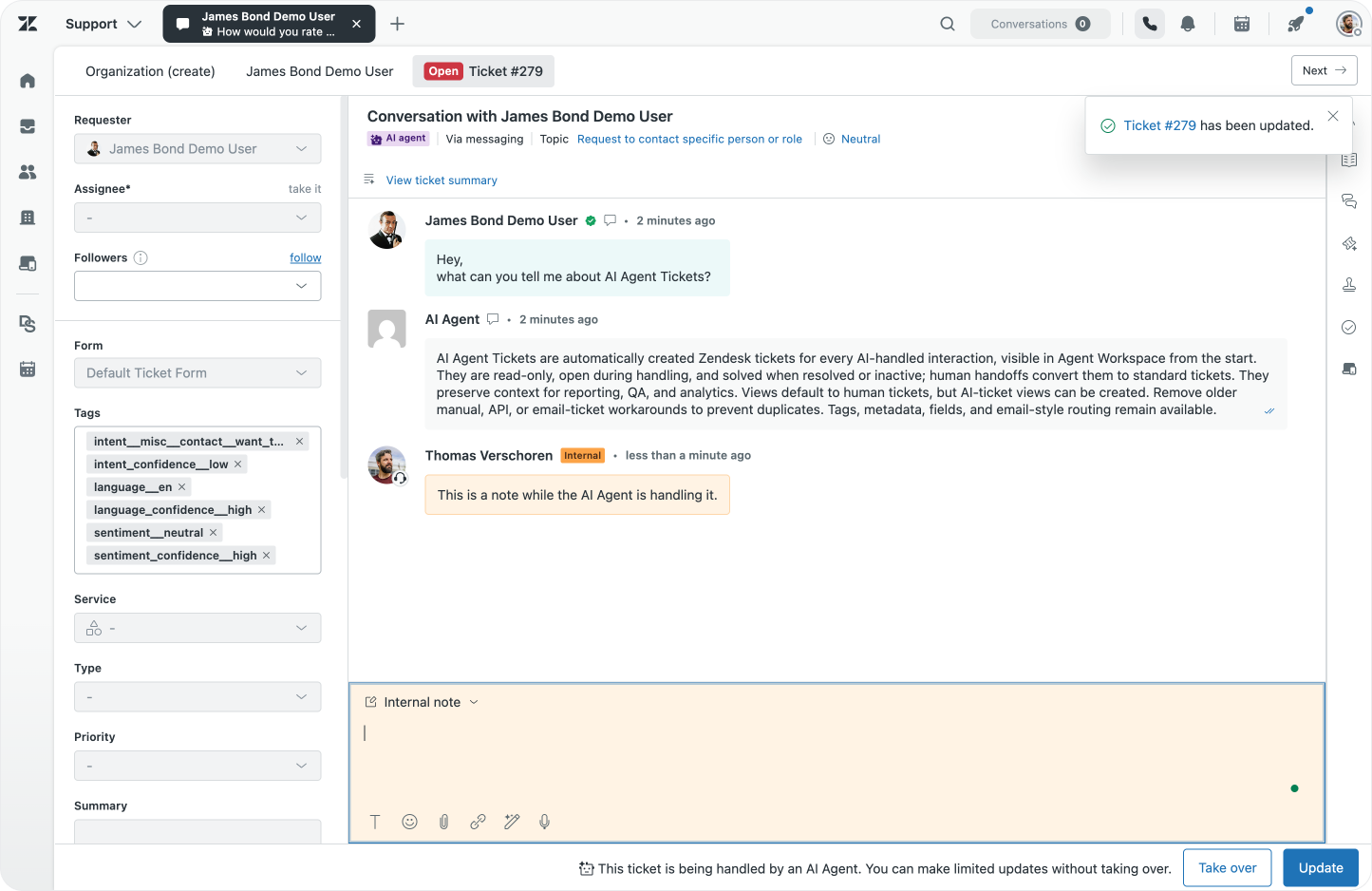
This gives teams a way to record a quality review, flag a concern or leave context for a colleague without taking control away from the AI Agent. An agent can also @mention a colleague, which adds them as a follower. That makes it easier to involve the right person and keep them informed while the conversation continues.
Edit ticket information
Agents with edit permission can update supported ticket fields and tags while the ticket is still an AI Agent ticket. This includes custom fields and the Followers field.
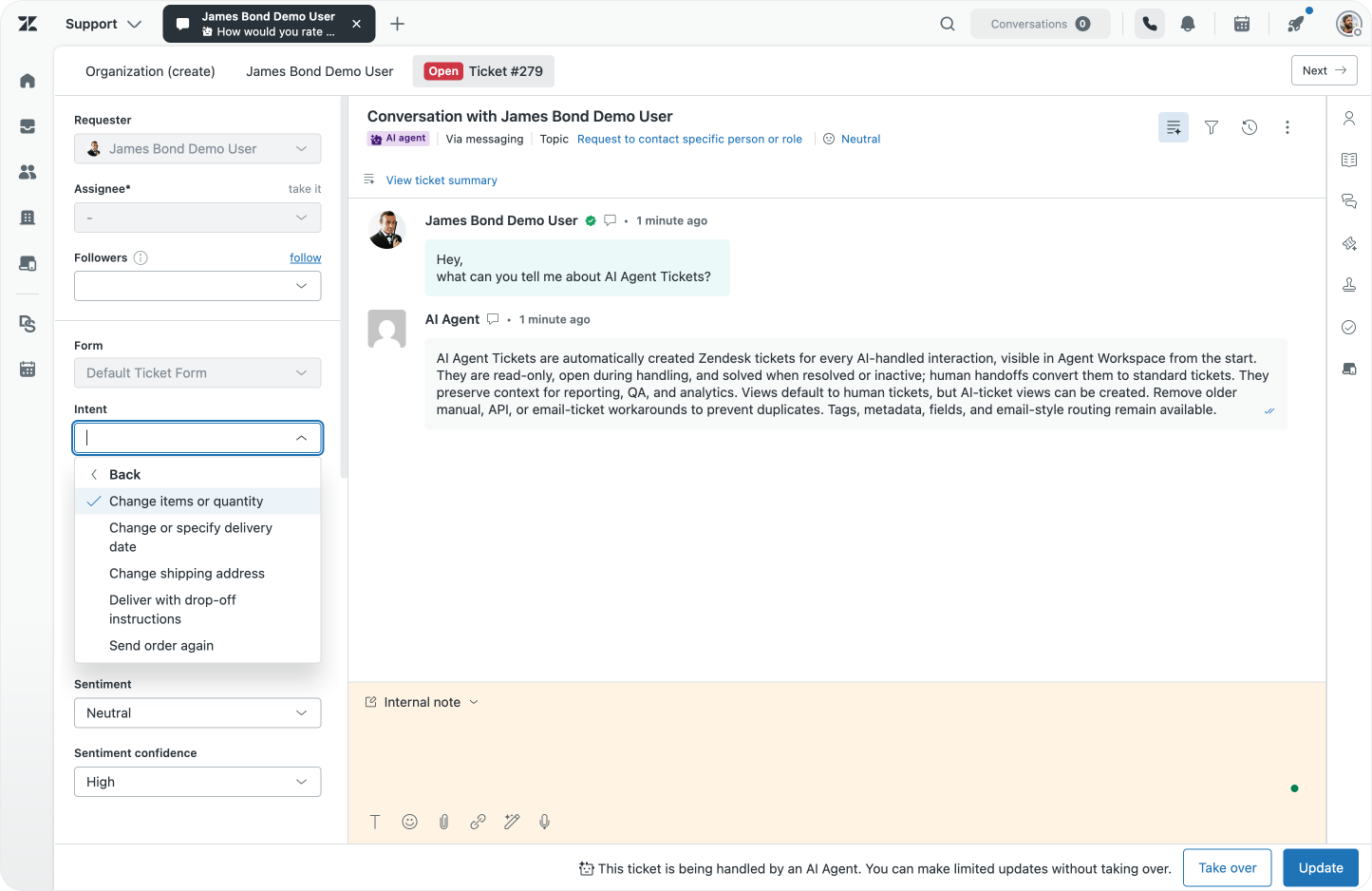
Editing is useful when the ticket needs better classification or context, but the AI Agent can continue handling the conversation. For example, an agent can correct a topic or add a tag for reporting without taking over the interaction.
Review escalation and assignment events
Escalation and assignment events are now added to the ticket history. Teams can see when an AI Agent ticket was handed over and how it was assigned, supporting a clearer audit trail of human intervention.
Under the hood
The ticket in Agent Workspace and the conversation the customer sees in the web widget are connected. The ticket can be interacted with via the Zendesk Ticketing API, and the conversation lives in Sunshine Conversations.
They describe different parts of the interaction. Sunshine Conversations manages the conversation and which integration has control. The Zendesk ticket provides the record agents review and work within Agent Workspace.
A new conversation begins with the defaultResponder routing it at the switchboard level. An AI Agent gets the conversation and handles it. When the AI Agent reaches a point where it should hand the conversation to a person, its configuration determines who gets control when it performs a passControl.
The activeSwitchboardIntegration shows which integration is currently in control.
{
    "conversation": {
        "id": "6ac64b3aac749b83347ffecf",
        "activeSwitchboardIntegration": {
            "name": "ultimate",
            "integrationType": "ultimate"
        }
    }
}
/sc/v2/apps/{app_id}/conversations/6ac64b3aac749b83347ffecf
Before that handoff, the ticket can be updated as the conversation progresses, but it was always read-only to your support agents. After control passes to Agent Workspace, the ticket becomes a normal support ticket and agents can work it as they would other support tickets. And when a ticket was resolved it immediately became a read-only solved ticket. Updating the ticket allows for the new editing and internal note capabilities and lets authorised agents make specific changes before that handoff; Take over initiates the handoff itself.
At the ticket level, the ticketing API identifies an AI Agent ticket through support_type:
{
  "ticket": {
    "id": 279,
    "subject": "Conversation with James Bond Demo User",
    "from_messaging_channel": true,
    "support_type": "ai_agent"
  }
}
/api/v2/tickets/279
The comments payload shows the ticket’s comments or messages exposed through the Zendesk API. For example, here we see a placeholder for the messaging comments, and an Internal Note on a ticket still owned by the AI Agent on the Ticket level:
{
  "comments": [
    {
      "type": "Comment",
      "author_id": 11338003744794,
      "body": "Conversation with James Bond Demo User",
      "plain_body": "Conversation with James Bond Demo User",
      "public": false,
      "via": {
        "channel": "native_messaging",
      }
    },
    {
      "type": "Comment",
      "author_id": 9851690015130,
      "body": "This is a note while the AI Agent is handling it.",
      "plain_body": "This is a note while the AI Agent is handling it.",
      "public": false,
      "via": {
        "channel": "web",
      }
    },
  ],
}
/api/v2/tickets/279/comments
Whereas on the Conversation level we do not see that internal note, but can inspec the entire messaging thread.
{
    "messages": [
        {
            "author": {
                "displayName": "AI Agent",
                "type": "business"
            },
            "content": {
                "text": "Hi there. Got a question? I'm here to help."
            },
            "source": {
                "type": "ultimate",
            }
        },
        {
            "author": {
                "displayName": "James Bond Demo User",
                "type": "user"
            },
            "content": {
                "text": "Hey,\nwhat can you tell me about AI Agent Tickets?"
            },
            "source": {
                "type": "web",
            }
        },
        {
            "author": {
                "displayName": "AI Agent",
                "type": "business"
            },
            "content": {
                "text": "AI Agent Tickets are automatically created Zendesk tickets for every AI-handled interaction, (...)"
            },
            "source": {
                "type": "ultimate",
            }
        }
    ]
}
/sc/v2/apps/{app_id}/conversations/6ac64b3aac749b83347ffecf/messages
The Take over action at the conversation level
The Take over button performs a passControl at the Sunshine Conversations level.
{
    "operationName": "takeOverMessagingSession",
    "variables": {
        "ticketId": "279"
    },

    "query": (...)
}
Agent Workspace taking control
Here we see our conversation being owned by Agent Workspace after we take over:
{
    "conversation": {
        "id": "6ac64b3aac749b83347ffecf",
        "activeSwitchboardIntegration": {
            "name": "zd-agentWorkspace",
            "integrationType": "zd:agentWorkspace"
        }
    }
}
Which corresponds to new support_type:agent for our ticket.
{
  "ticket": {
    "id": 279,
    "via": {
      "channel": "native_messaging",
    },
    "subject": "Conversation with James Bond Demo User",
    "from_messaging_channel": true,
    "support_type": "agent"
  }
}
Choose who can edit and take over
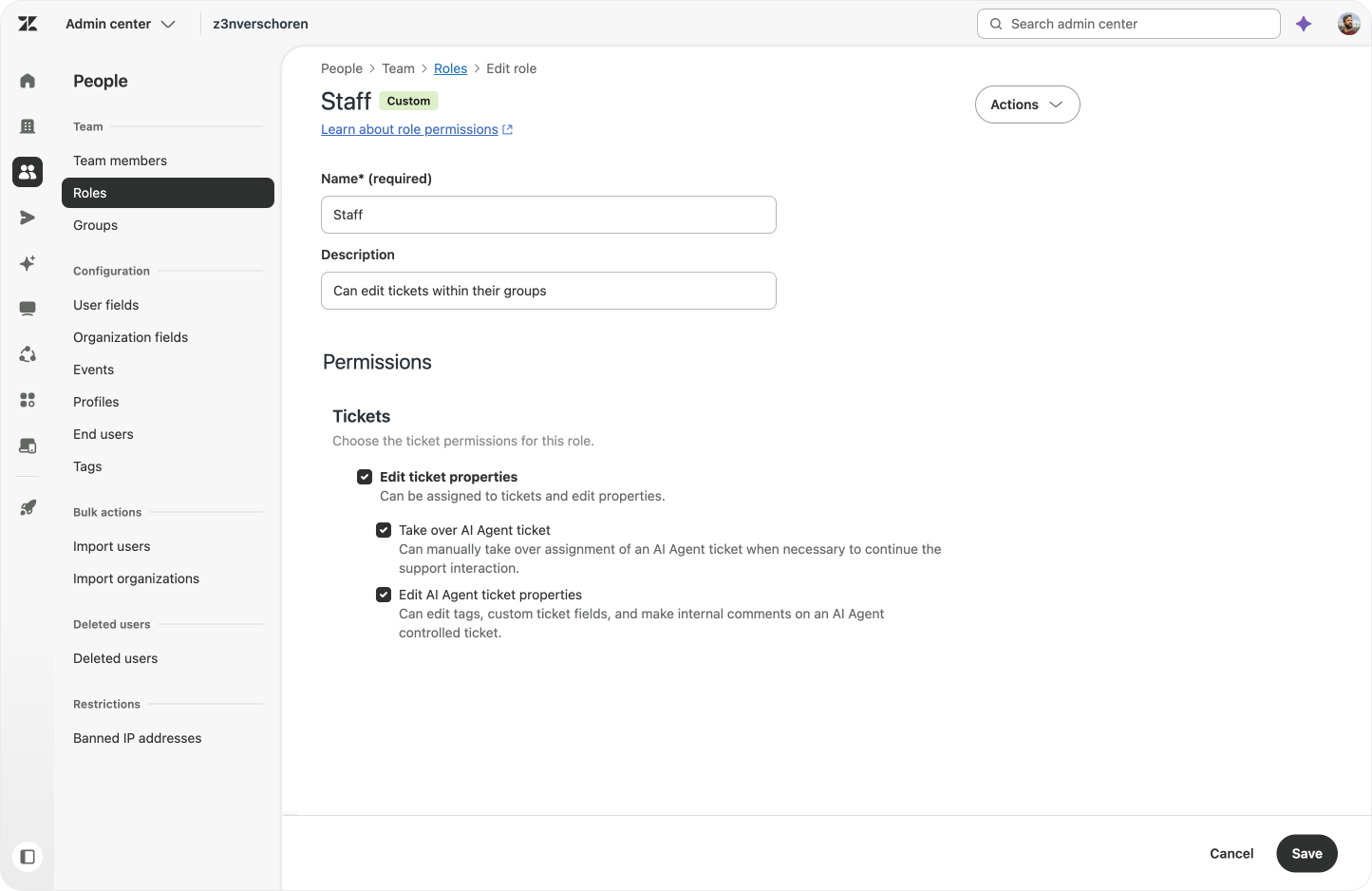
Admins can assign AI Agent ticket editing and take over permissions through custom roles. A role can allow agents to edit AI Agent tickets, take them over, or do both. This lets teams give people access according to their responsibilities: some agents may need to review and update ticket details, while others may also need to take responsibility for the conversation.
What this enables
AI Agent tickets gave teams visibility into conversations handled by AI. Editing and takeover make that visibility actionable.
Teams can record reviews, involve followers, correct ticket information and step in when a conversation needs human judgement. They can use the same ticket for AI oversight and quality assurance, follow up on critical operations such as refunds, and respond to alerts raised by an Action Flow. When a human needs to take over, the conversation can move to support in the same ticket, with escalation and assignment recorded in its history.
The result is a more practical way to supervise AI Agent interactions while keeping the conversation and its support history together in Agent Workspace.