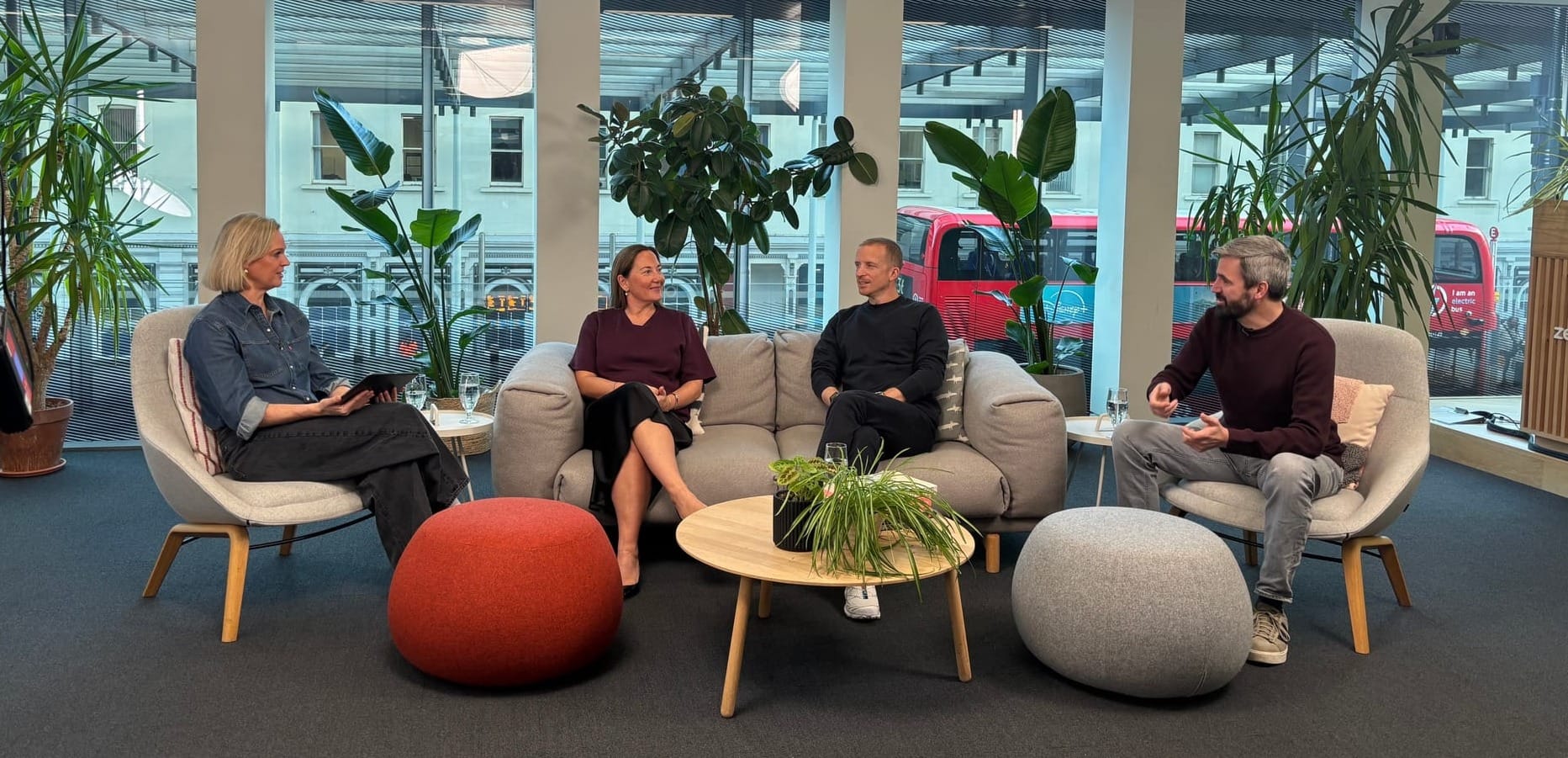
AI Summit: a more adaptable path to better outcomes
AI Summit: a more adaptable path to better outcomes

On this page
I’ve always loved my Nintendo Switch. My kids love it too. On the road, it’s a gaming console that fits in my backpack. I can take it out and play wherever I am. When the kids want to play together, I detach the controllers, give them one each, and suddenly the same small screen becomes a shared racing game.
At home, I put it in the dock and continue on the television, with a bigger picture and better resolution. We can keep using those same controllers or connect a few full-size ones that fit more comfortably in our hands. The console stays the same, but where we play, who we play with and how we interact with it can change. That adaptability is a big part of its appeal: one console fits into different parts of our life without needing to replace the games or compromise on the experience.
Now, I’m not here to sell you a Nintendo Switch. This is still a blog about Zendesk. But I see a similar evolution happening in the Zendesk experience. For a long time, buying Zendesk was a bit like buying a traditional gaming console. You knew where it lived, which screens you would use and how you would interact with them. Agents worked in Agent Workspace. Customers visited the Help Center or opened the Web Widget. Analysts went to Explore to understand what was happening. And Admins used Admin Center or the API to configure the platform.
Those traditional experiences are powerful and made the platform what it is. But both the work we do and the way we use software are changing, and Zendesk is becoming more adaptable to accommodate these new environments as a result.

A platform that adapts to the way you work
You can see it in the changes on the audiences Zendesk serves and the processes it supports. The same foundation that used to focus on customer service can now help customers and employees, handle familiar requests across industries and run business-specific workflows. Companies have more room to adapt Zendesk to the work they need (it) to do, and get to the outcomes they want.
The places where that work happens are changing too. Instead of working in bespoke apps, more and more of us are using AI tools such as ChatGPT or Claude to investigate data, configure systems and plan our work. Even end users are beginning to ask their personal AI assistants to get things done on their behalf. Zendesk’s native interfaces remain available, but they are no longer expected to be the starting point for every interaction.
Underneath, it is still Zendesk. The conversations, knowledge, business rules and analytics remain an integral part of the platform. But just like the Switch allows us to move our game experience seamlessly from a backpack to a living room TV, so will Zendesk adapt seamlessly from native interfaces to these new usage paradigms. It’s the same outcome, but what changes is how we access those capabilities and why we use them.
For me, that is the story of this year’s AI Summit: Zendesk becoming more flexible in the work it can do, the places you can use it and the way you improve it as your business changes.
In this article, I’ll walk through the releases that make that shift concrete, with upcoming deep dives into Zendesk Bridge and Agentic Analytics for those who want to explore further.

Adapting to your business needs
Over the last few months, Zendesk has been steadily building out its Agentic Workforce: a family of AI Agents that work together to resolve conversations and run business logic. We’ve got autonomous agents handling customer and employee service, with industry agents opening new avenues.
This points to an important shift for the platform. Zendesk is putting the capabilities it developed for customer support to work across a wider range of business processes and industries. Retail, Finance, Healthcare to name just a few. More of the work around a customer relationship can happen in Zendesk, including work that starts before there is a support question. These AI Agents leverage knowledge, procedures and actions directly in the platform to help customers complete a request.
On the employee side, Zendesk for Employee Service brings the same capabilities to teams like IT, HR and finance. AI Agents can help employees find answers and carry out tasks, with Advanced Action Flows connecting that work to the systems and processes behind it.
 Thomas Verschoren

The audiences, goals and channels might differ, but the underlying need across every interaction is similar: understand what someone needs and carry out the work behind it.
Custom Agents
Custom Agents were announced at Relate earlier this year, and are now generally available, with a set of new capabilities that make them easier to run and give them more of the actions needed to complete their work.
What I like about Custom Agents is how they help with the ‘messy middle’ of service. A customer asks a fairly straightforward question, but completing the request can mean checking a policy, applying an exception or pulling information from another system. Those details are often specific to your business, and today your team does much of the work of connecting them. Custom Agents let you give a focused part of that work its own instructions and tools, so the process can reflect how your business actually operates.
That job can sit before, during or after a conversation. Before your team handles a request, a Custom Agent could extract information from an attachment so the next step has the context it needs. During a conversation, it could apply a refund policy or assess an exception, returning a result for the conversational AI Agent or your team to use. After a ticket is solved, it can check whether the customer’s questions and the team’s commitments were actually addressed.
 Thomas Verschoren
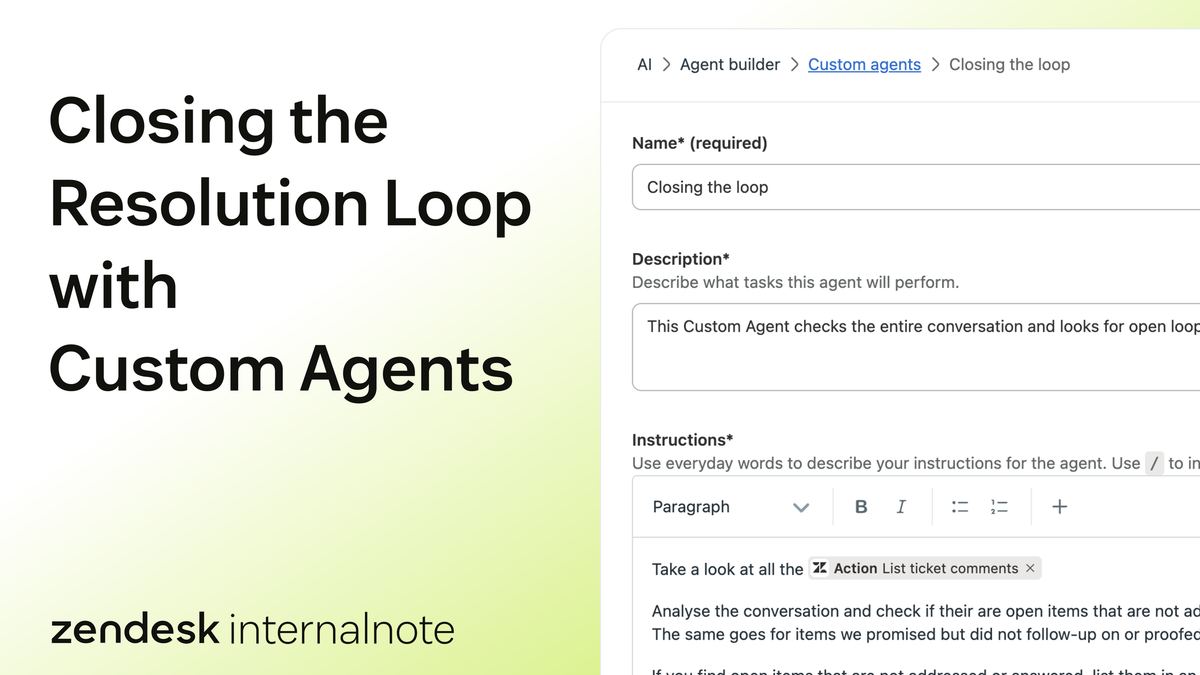
But the work doesn’t stop there. Combined with Action Flows and the broader Action Platform, Custom Agents can also run business logic that is not connected to a conversation. You can schedule or trigger flows that retrieve data from other platforms, run logic, and push these results to other systems, just like you would with Zapier or other automation tools.
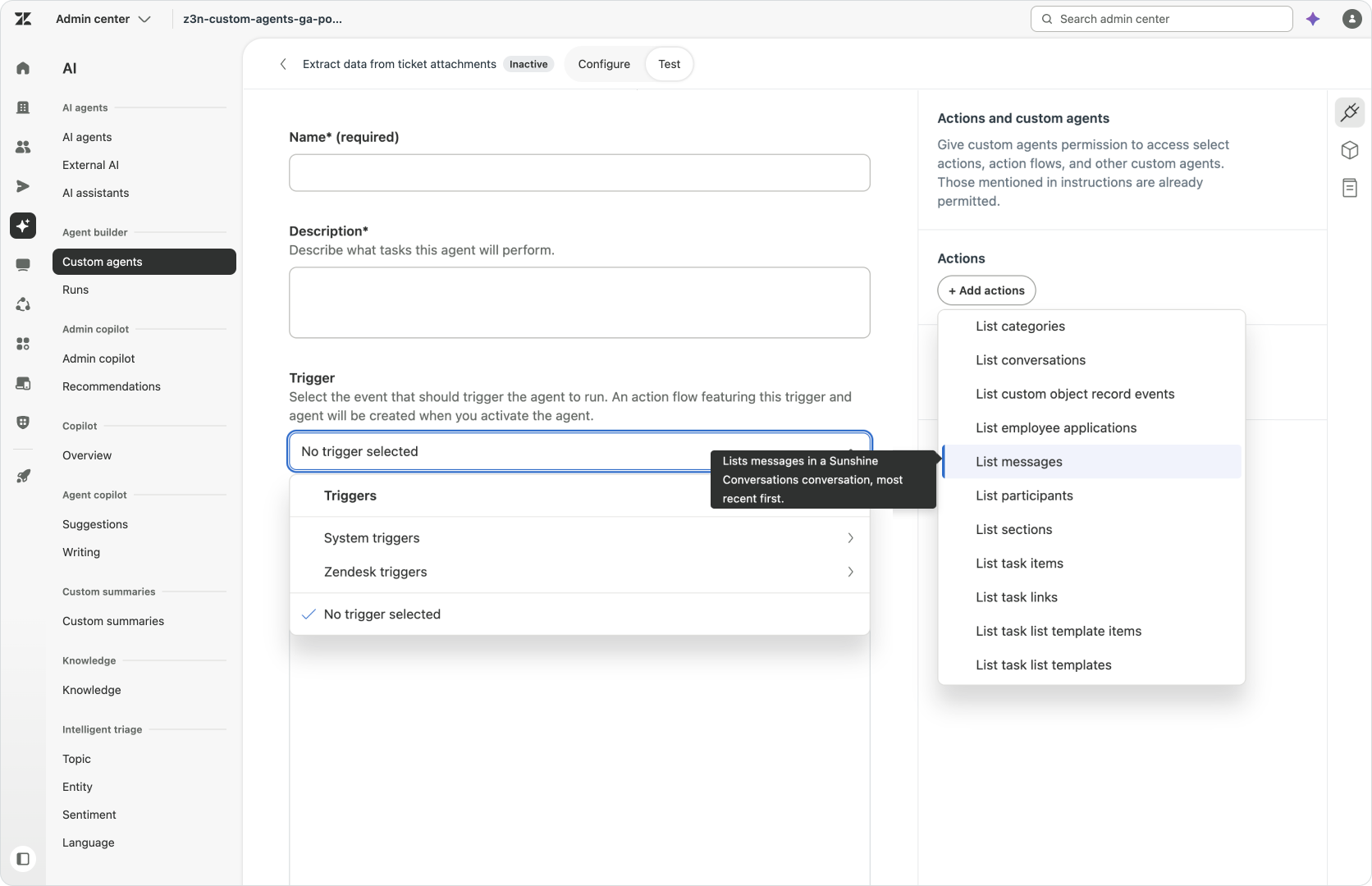
Underneath Custom Agent lies a new technical engine powered by faster and more reliable Claude models. And now that Custom Agents are generally available, they also come with some handy new capabilities like being able to trigger them directly without the need of an Action Flow.
They now also extend into Messaging and are able to handle conversations, attachments just like with the classic ticket comments it already supported. Things like handing off a conversation to a human agent, doing a unified search across the Knowledge Graph, and being able to upload attachments to external locations are just a few of the new capabilities.
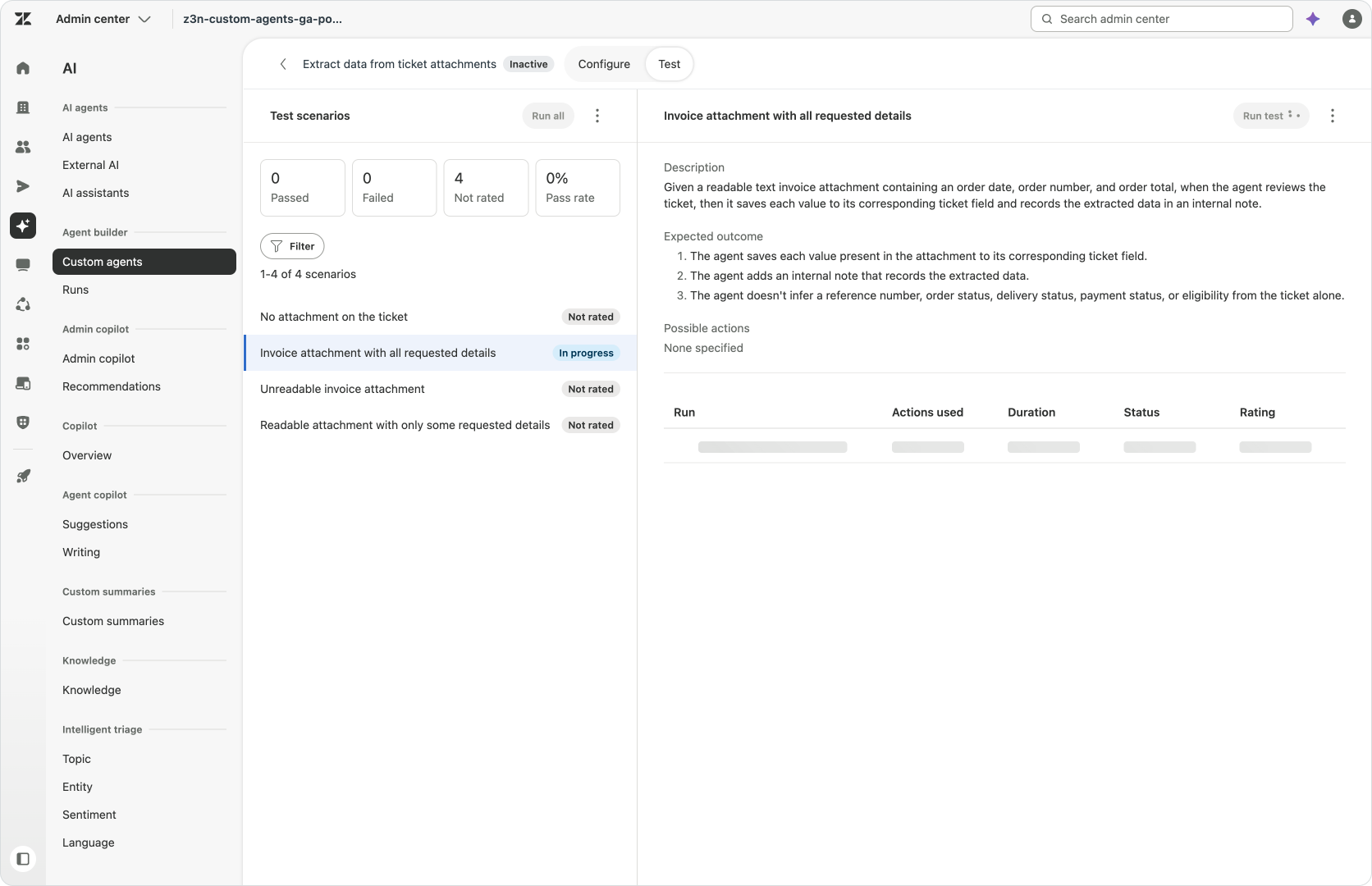
Aside from these new actions, the biggest addition is the new testing capability that lets you define scenarios and check an agent’s behaviour against them before putting it live.
Being able to trigger a Custom Agent directly is nice, but I’m still a big proponent of always wrapping a Custom Agent in an Action Flow, even if that flow just calls the Custom Agent.
Why? Because you never know what tomorrow will bring. And as the complexity of your processes grows and you learn how the platform works, there’s a big chance that you’ll want to wrap your Custom Agent in some conditional logic. Or maybe even invoke another agent, or no agent at all. By always wrapping the Custom Agent in a larger Action Flow, you get the benefit of being able to add to that flow without needing to change any of the processes or triggers that call your Custom Agent.
AI Agent Launchpad
Traditionally, launching an AI Agent in Zendesk was the equivalent of a writer facing a blank page. Writing that first procedure can seem daunting. And while an existing knowledge base helps get you started, it’s processes that take action that deliver those real automation outcomes at scale.
The newly announced AI Agent Launchpad uses your existing ticket history to make that starting point more specific to your business and put an initial sketch on that blank page.
AI Agent Launchpad offers a guided configuration for new AI Agents by helping you to add Knowledge Sources like a Help Center or Web Crawler. You can configure your tone of voice and personalise your AI Agent, and configure its initial system replies.
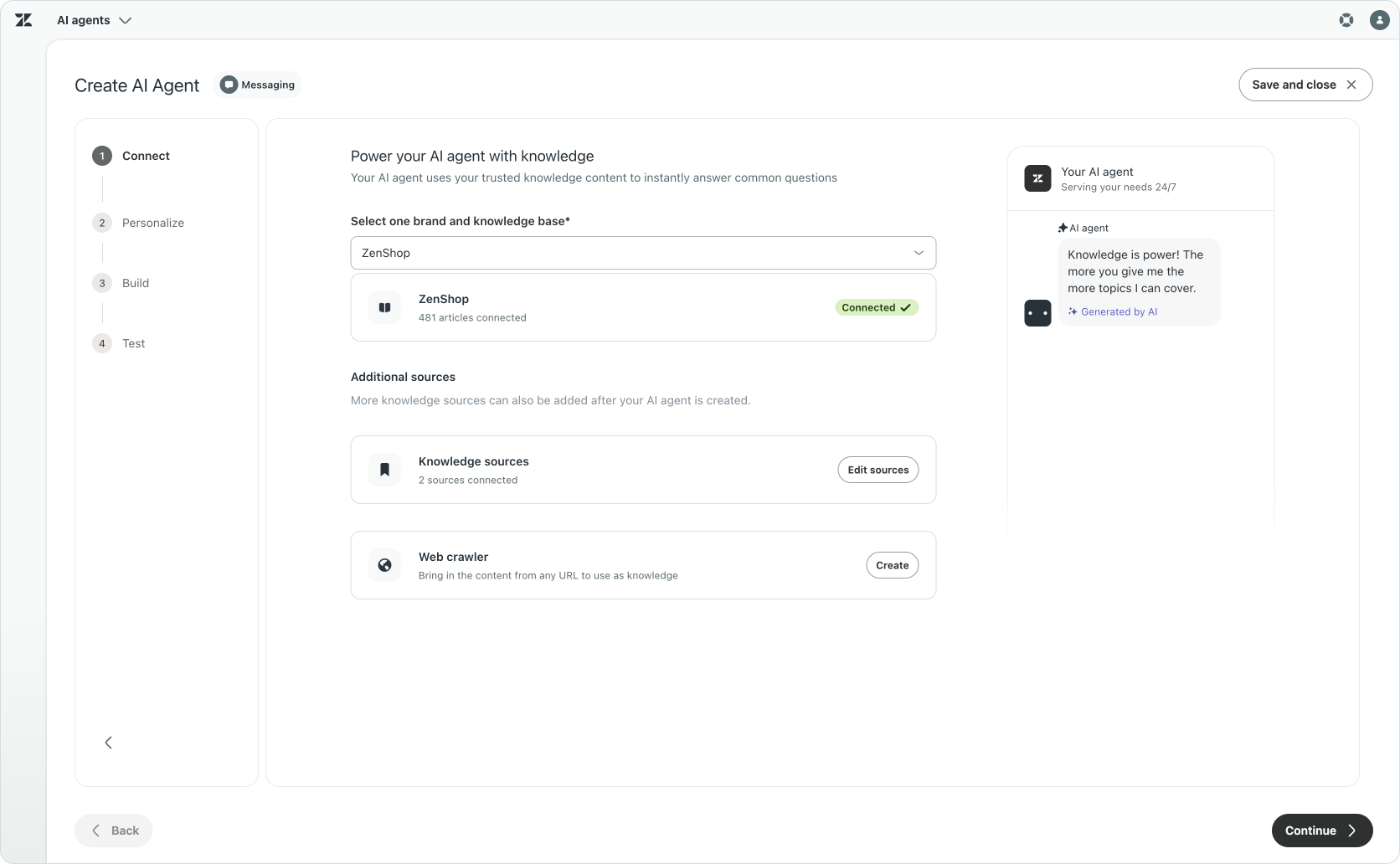
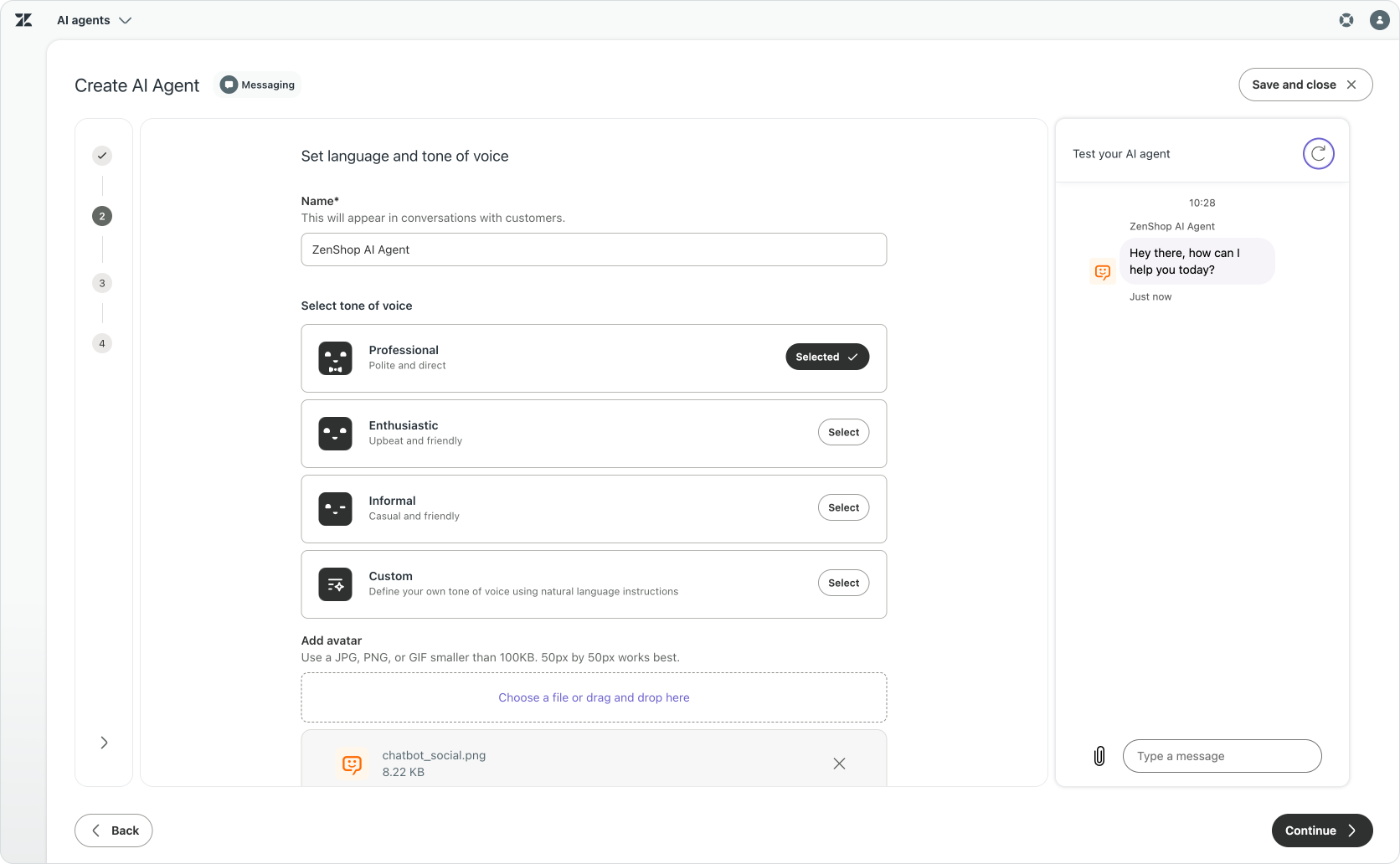
Once you’re past the initial setup, it identifies recurring customer topics and uses past interactions to propose new procedures and Help Center articles for your new AI Agent. These interactions help you get started with a new AI Agent, but they’ll appear throughout the life of your AI Agent. Admin Copilot continuously recommends new articles or procedures to add or modify.
These recommendations are based on actual interactions, and you can verify why they are offered and what they recommend changing. For supported AI Agent configurations, simulated conversations also give you a way to assess their behaviour before relying on them with customers.
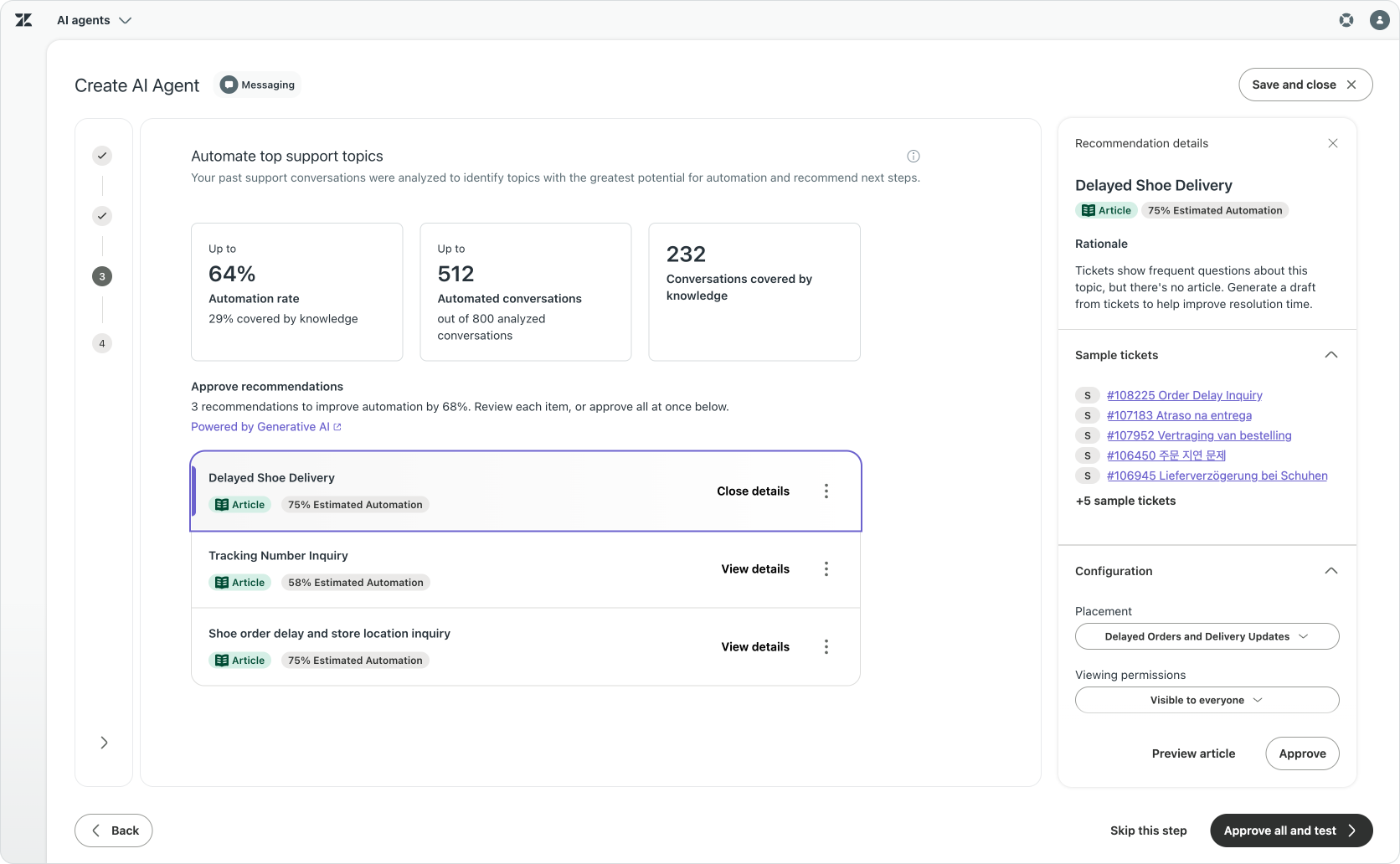
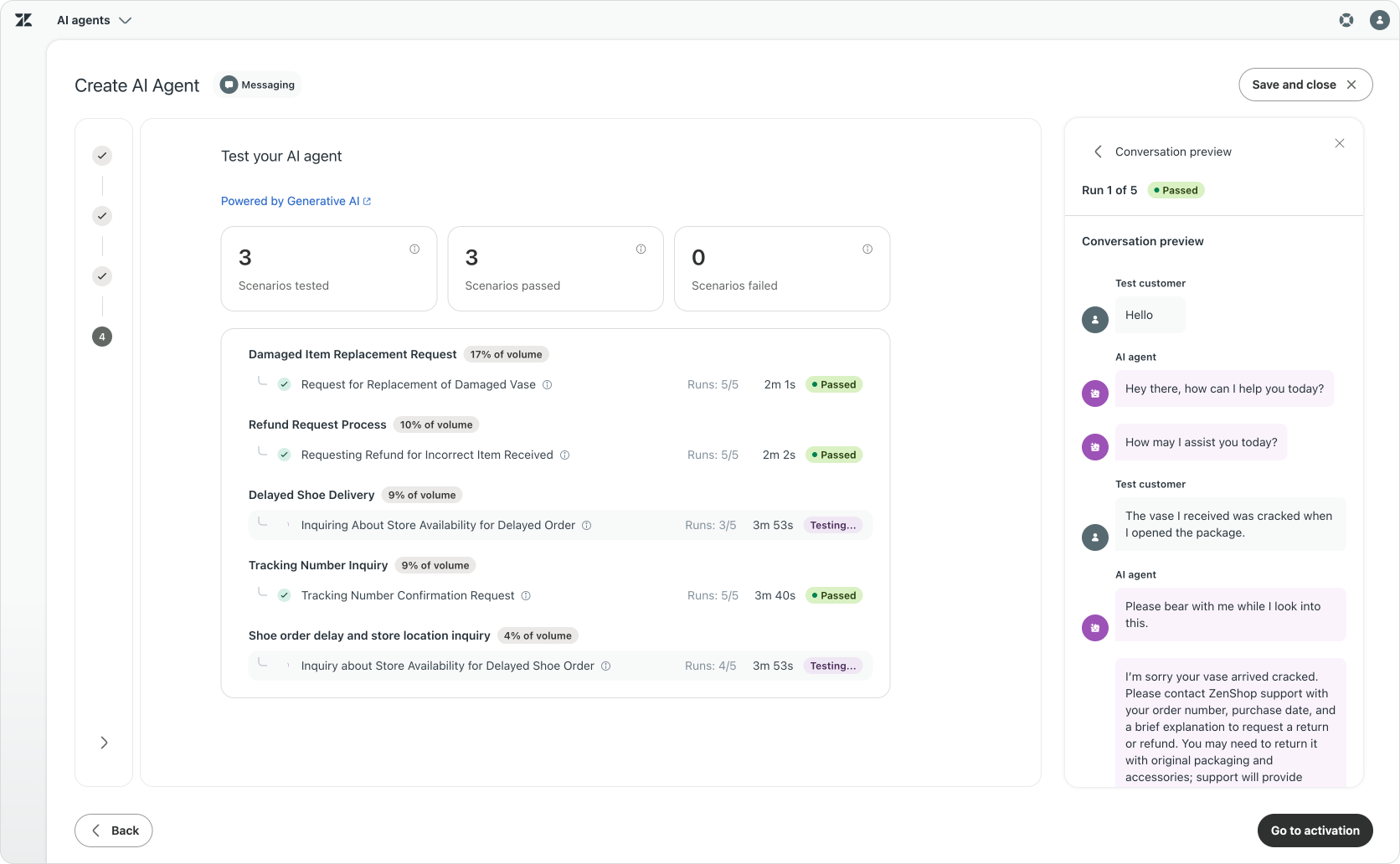
Industry-specific AI Agents and AI Launchpad provide complementary starting points for those who are new to AI Agents: the former offers an initial configuration designed for a specific type of business, while the latter offers a configuration informed by the conversations already happening in your instance.
The instructions themselves are becoming easier to adapt too. Natural-language procedures bring AI Agent authoring closer to the text-based approach used by Custom Agents and Auto assist. Currently Zendesk lets you read the generated text version of a visual procedure, with editable authoring following as the experience develops. That makes the direction tangible: start with a useful configuration, then shape the instructions around the way your business works, without rebuilding the procedure from scratch.

Adapting to where people work
The rise of AI assistants is changing where we go to get work done. Tasks used to mean opening Asana, analytics meant building dashboards in Tableau, and sales or subscription data meant going to Shopify or Stripe.
AI assistants give us another way into those systems. An analyst might bring Stripe and Shopify data into the same conversation, ask questions and generate a temporary interface around the answer. These experiences can coexist with the websites and apps we already use, but the important part is that instead of going to a platform, these users more and more expect the platforms' data and actions to come to them.
The user is no longer someone with a license or a seat or a login. It's anyone who needs the insights in the rich intelligence we've built over the last twenty years with you: Intelligence about customers, employees, and businesses that you serve. - Tom Eggemeier at AI Summit
For Zendesk, integrating with those assistants means connecting the place where a request starts to the capabilities that can handle it. An assistant needs more than a conversation window: it needs the relevant knowledge, customer context and business processes to do something useful. The company still needs control over who it acts for, what it can access and which actions it can take. Where the work starts can change, while Zendesk continues to provide the service behind it.
Zendesk Bridge
Imagine, for a moment, that we delete the Zendesk UI. Put Agent Workspace, Admin Center, Analytics and the Help Center to the side, and look at what remains underneath. There are conversations and customer records, knowledge and business data, workflows, AI Agents and analytics. Those are the parts of Zendesk that help us get work done. The interface is how we normally reach them, but it does not have to be the only way.
That is where Zendesk Bridge comes in. It gives approved external AI tools a governed way to work with supported Zendesk capabilities, so the assistant you already use can become that new interface to the platform. Bridge secures the connection and manages the permissions needed to control access, with a record of the actions taken. You can bring Zendesk into that new way of working, while keeping the familiar interfaces available for the people and tasks that suit them.
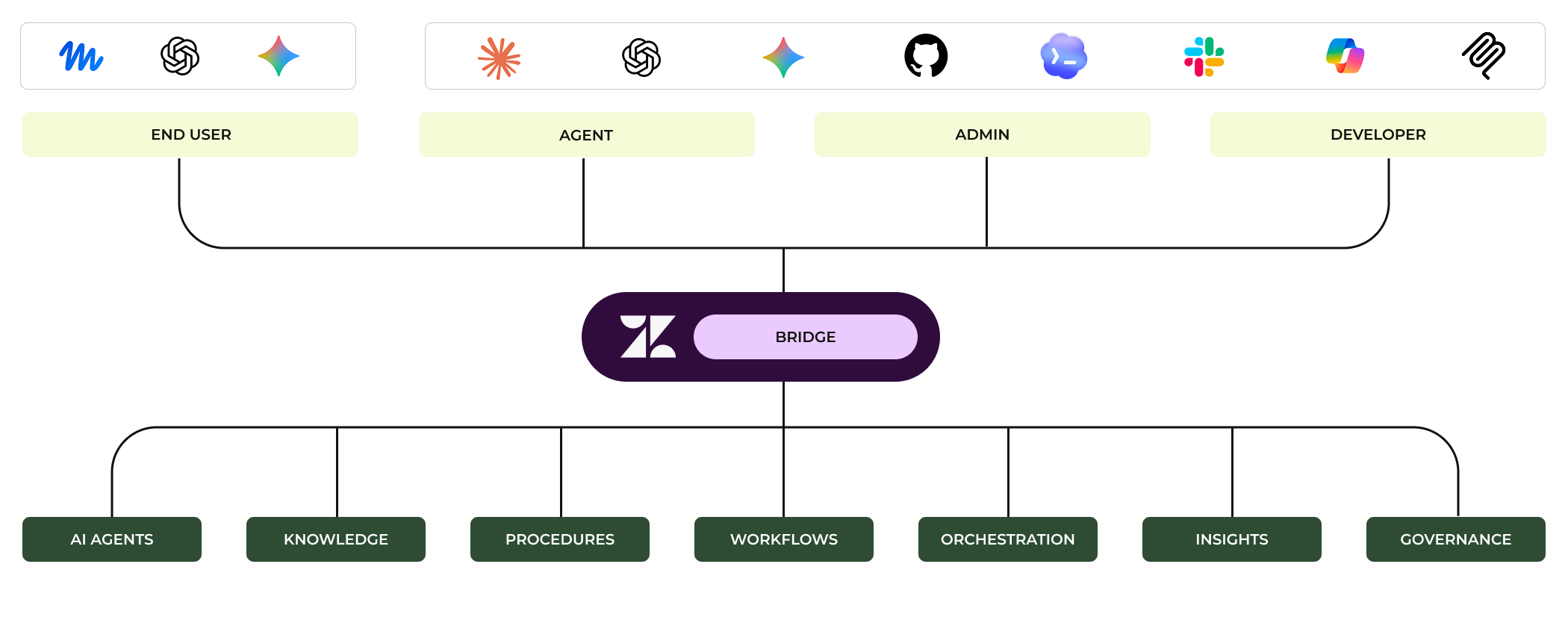
The way Bridge works is by adding support for MCP, or Model Context Protocol, to Zendesk. It makes specific Zendesk tools available to the external AI assistant, such as reading a ticket, finding knowledge or performing a supported update. Bridge also supports agent-to-agent delegation for selected tasks. An admin chooses what a connection can access, so it does not give that AI Agent or person talking to the AI assistant more access than they already have.
For example, when a new version of your product or app launches, a team member can cross-reference active problem tickets with the new release notes, and bulk reply to customers who are waiting for a fix, all from within a single conversation with ChatGPT. The AI assistant uses the “Find tickets” tool Zendesk’s MCP provides to retrieve specific tickets, run logic against release notes, and then uses an “Add public comment” tool to apply updates to every relevant ticket.
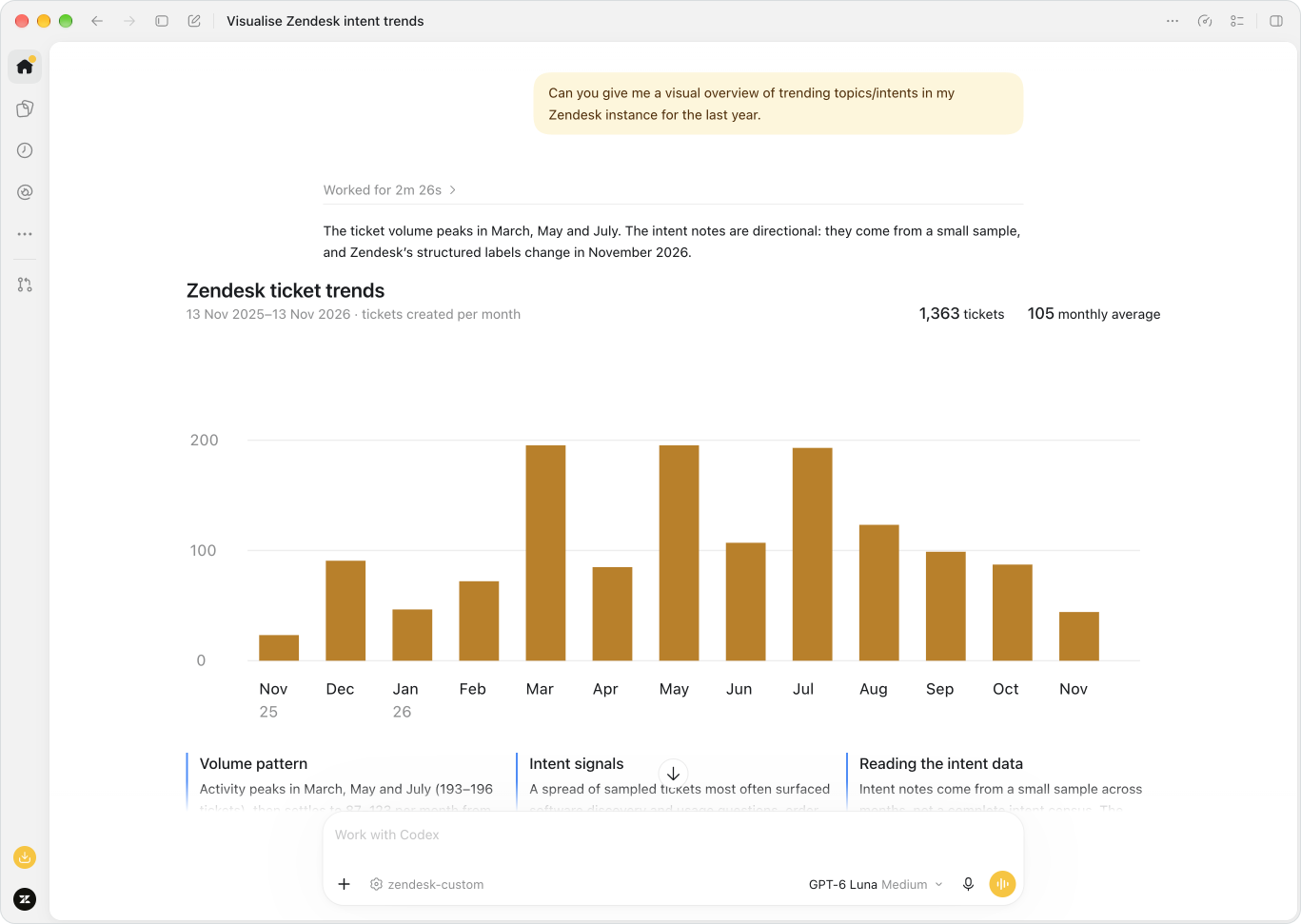
You could do most of that work in Agent Workspace too, but for most of these investigative scenarios, using an LLM is just way faster. Zendesk still holds the service context and controls access to its capabilities, while the external assistant provides the new interface.
If the company separately connects that assistant to another business system, for example GitHub to find release notes, the information from both can inform the same piece of work. Each connection retains its own permissions and scope.
 Thomas Verschoren

Open Service Directory
Zendesk Bridge allows AI assistants to connect to Zendesk, in a secure and trusted way, and making the platform capabilities available to those assistants.
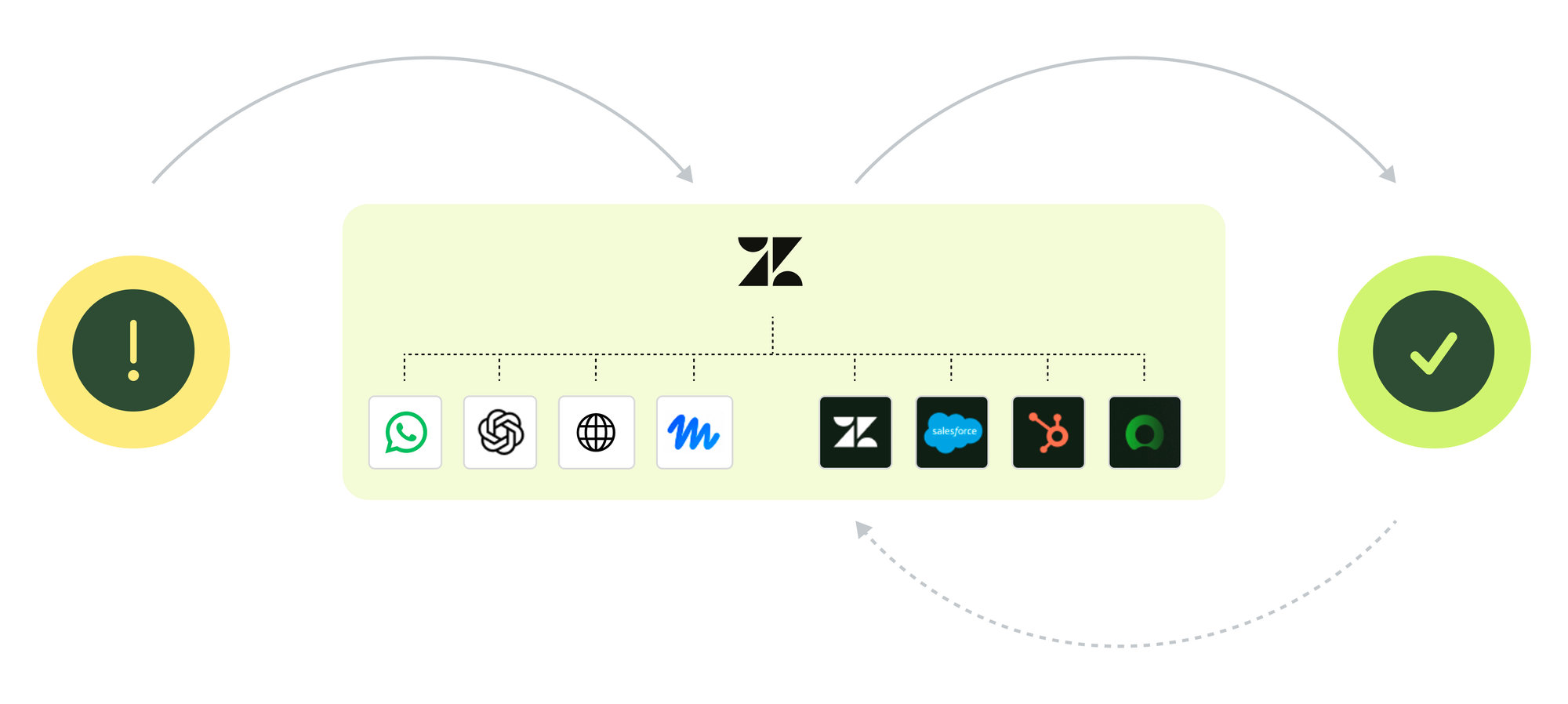
And while the previous examples focused on businesses talking to their own data, the same shift is happening on the customer’s side. A customer can ask their own AI assistant to get help and handle the service request on their behalf. That assistant needs a trustworthy way to find the company’s official service destination before it can even begin an interaction.
 Thomas Verschoren

Open Service Directory addresses that discovery step. It helps AI assistants find a brand’s verified support destination and tells them how to connect to it. The company’s service configuration determines what happens next, with procedures and guardrails in place to keep this interaction secure and structured, powered by Zendesk Bridge and Zendesk's AI Agent capabilities.
Where Bridge is the door, Open Service Directory is the address book. And Zendesk’s AI Agents are the ones who respond when a customer comes knocking.

Adapting as the work changes
Where new industries and processes are the first shift, and new interfaces the second, the third shift is on how we implement and learn from what happened.
Traditionally, improving your business starts with pulling a report, discussing what it shows and deciding what to change. Once the change is live, you wait for the next report to see whether it helped. That process can work, but there’s a lot of manual work involved that we can now automate. Not only can AI handle more of the data, it can also make it easier to get insights, and offer recommendations based on them.
All your conversations already contain useful insights. A request was resolved, escalated or came back. Escalations can point to knowledge gaps or procedures that require a person to act instead of an automated action. A quality review reveals a problem, or a failed action points to something in the process that needs fixing. Bringing those signals together helps us understand where the process needs attention.
This is where Zendesk’s Learning Loop comes into play. Analytics helps us investigate what is happening, while Admin Copilot's recommendations help us decide what to do next. Business context gives validity to the proposed changes, and the new testing capabilities help your team assess supported changes before implementing them. The results of those changes then inform the next improvement cycle.
Agentic Analytics
Reporting lies at the core of understanding what’s happening in your business. And at the core of reporting lie four tasks. First, you need to gather the required data and build the dashboard. Then you need to understand the numbers it shows. And finally, you need to define what needs to happen in order to change that number.

Building reports traditionally meant you needed to understand the underlying data set and learn how to query that data. This combination of technical expertise and platform understanding made the job of getting the data and making it visible highly complex, and mistakes at this layer made all the conclusions you drew from the data are, well, wrong.
A dashboard then shows a number or graph. But understanding why that number goes up or down is the real question. Is this number good or bad? Understanding what’s happening means linking the results to business context.
And thirdly, drafting a plan to improve that number means understanding the processes that drive that result and knowing where to adapt them.
For each report you're building, there’s a question at the start.
What’s my automated resolution rate? What topics contribute the least to that number? What can I automate to resolve more of these requests?
Each question leads to another, and where classic reporting meant building dashboards and drilling down into data, AI assistants now allow us to explore data through a conversation, following an interesting answer with the next question.
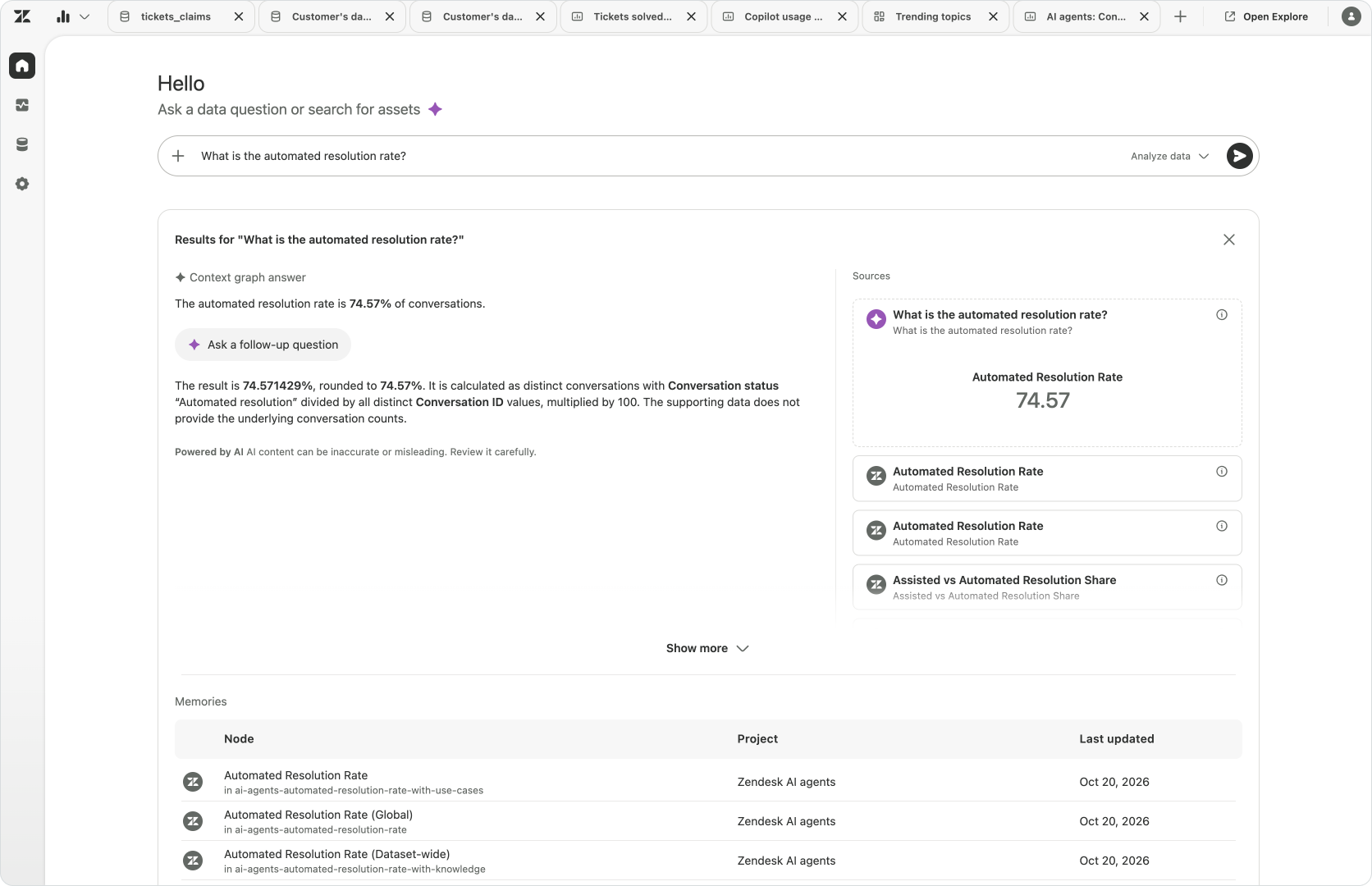
Agentic Analytics brings that approach to Zendesk. It gives the person responsible for service a conversational way to investigate their data. They can ask a question, inspect the result and follow up with a different breakdown or comparison. Useful findings can become reports and dashboards, while Memories retain analytical context so the next investigation does not have to begin with the same definitions and assumptions.
What's nice here is that the interface adapts to the question. While talking to your data Analytics can dynamically generate charts, or give you suggestions for new research paths. A rise in escalations may reflect a missing article, a policy exception or the AI Agent correctly handing a difficult request to your team. The number alone does not tell you which explanation fits. Agentic Analytics helps you investigate the affected requests and compare the relevant parts of the service process, while your knowledge of the business helps you judge what needs to change.
Agentic Analytics does more than give you access to a broad set of data and insights. It gives us proactive alerts and customisable real-time monitoring. For a full deep dive on this new release, take a look at this article:
 Thomas Verschoren

Learning Loop
Understanding what’s happening only helps if you can do something with it. The Learning Loop connects that understanding to the knowledge, procedures and configuration that shape the next customer interaction. I’ve written about this before in my Admin Copilot coverage, and the new releases at AI Summit bring more of those pieces together, with quality signals helping teams assess the work and new recommendation types helping them decide what to improve.
Alongside Quality Score, native AI Agent QA helps us look more closely at automated conversations. Its evaluation dashboard reviews eligible conversations after they end: did the AI Agent understand the customer, show empathy or keep repeating itself? Did the customer ask to speak to someone?
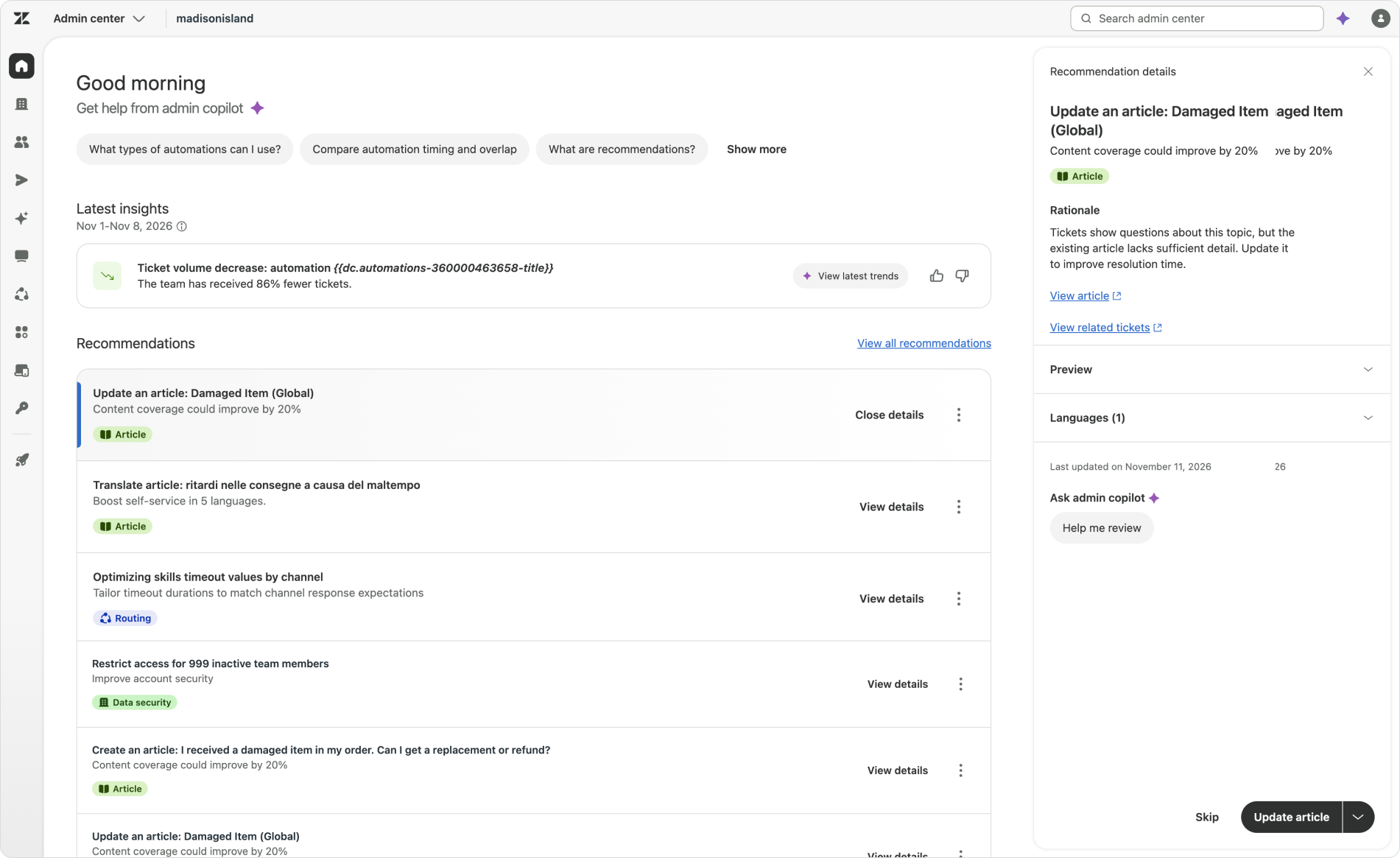
Admin Copilot works across both configuration, procedures and knowledge sources to turn these findings into something we can adapt. It can suggest an update to routing, an article to edit or a new procedure to add. You can see what’s suggested and why, review the proposed changes, modify them where needed and approve them. And since the system retains the context of what happened before, the next decision can build on the result of the previous one.
Before putting a change in front of customers, it helps to see how it behaves in a conversation. Conversation Simulator lets you choose customer profiles and scenarios for messaging and email AI Agents, then review the conversations and test results. For Auto assist, you can role-play a customer directly in the procedure editor and inspect the suggested response and its rationale. I’ll explore both testing experiences in a separate article.

From adaptability to Outcome AI
Zendesk has grown way beyond a person working through a queue of tickets. AI Agents can handle the conversation, while Copilot helps your team with the work that still needs a person. Industry Agents bring that experience to more specific business needs, and Custom Agents and the Action Platform give you room to build the processes around them. Analytics helps you understand what’s happening, QA helps assess the quality of the work, and Admin Copilot turns those insights into recommendations your team can review. Together, they give you more ways to get work done and improve how you do it.
That range of options is a big part of the adaptability we’ve explored in this article. But it also raises a practical question: how do you adopt a platform like this when the way you use it keeps changing?
Outcome AI Platform Plans
When Zendesk was mainly a place where people handled tickets, paying for seats for the people working in it was a fairly straightforward idea. As automation grows, that picture becomes more complicated. A request might involve an AI Agent, a person using Copilot, a Custom Agent or an Action Flow completing a task in another system. Seats, automated resolutions and separate add-ons each pay for part of that work, but working out which pieces you need can get in the way of deciding how you actually want to handle those interactions with Zendesk and get the best outcomes you want.
At AI Summit, Zendesk announced Zendesk Unlimited, bringing their commercial model closer to the broader platform story. The emphasis shifts towards the platform and the outcomes it helps deliver, including work that happens outside a conversation. You're no longer paying for seats, but you pay for the outcomes and the work the platform delivers.
We’re offering unlimited seats or really no seats needed with end to end outcome based pricing plans. - Tom Eggemeier at AI Summit
For me, the interesting part is the room this gives you to change that combination of capabilities you use over time within the same outcome-based model. You can start with the capabilities you need, learn what works and expand from there. Your team might handle a conversation today, use Copilot to help tomorrow, and eventually automate the process with AI Agents. Or you might use an Action Flow and a Custom Agent to run business logic alongside your tickets.
This new pricing model reflects the same flexibility we’ve seen in the product itself: combine different ways of using the platform to get to the result you want.
Adopting Zendesk at your own pace
To go back to the beginning of this article, not everybody who buys a Switch plays the same way. Some use it handheld and never connect it to a TV. Others might discover the value of playing on a bigger screen later on. They don’t need to buy a new console once they decice to do so. They just start using it differently. Having those options doesn’t mean you need to use all of them from day one, but knowing you have the option to use them is great.
That’s the kind of flexibility I see in Zendesk’s shift towards outcomes. You can put the platform to work in the way that suits your business today, then change how you use it as your needs and confidence grow.
The way you adopt Zendesk can be just as adaptable as the platform itself.