
Zendesk Bridge: bringing service into the way you work
Zendesk Bridge: bringing service into the way you work

On this page
Zendesk AI Summit this year revolved around adapting the platform to the new ways people work. Zendesk’s Agentic Workforce offers new and improved ways to automate processes, while the newly launched Agentic Analytics and AI Launchpad, combined with Admin Copilot, offer new ways to improve the processes running on the platform.
The third pillar of this year’s AI Summit was adapting the platform itself to make it accessible from the places people work today. More of us are turning to AI Assistants to investigate a question, plan a piece of work or ask for something to be done. As those AI Assistants become part of our working day, we also want them to work with the information and capabilities in the tools our business runs on.
 Thomas Verschoren

In this article, I want to dive into what happens when the work starts in an AI Assistant instead of a Zendesk interface. Customer interactions, business context, knowledge and business processes still live in Zendesk, but the person using them is working somewhere else. To understand why that matters, it helps to start with how we have traditionally used the platform.
A customer visits a company’s website, opens its web widget or reaches out by email or social media. An agent opens Agent Workspace to find the work, read the conversation and respond, with Copilot bringing the relevant knowledge and guidance into that experience. Some of that work, like approvals, already happens through connected tools such as Slack, but there is still a recognisable place where each person goes to do their job.
For an admin, that place is Admin Center. They take the company’s policies, procedures and knowledge and turn them into a configuration: routing rules, workflows, integrations and the information agents need to help customers. Beyond the service team, analysts, product managers and business leaders look at the results. They want to know what customers are asking, whether the team is reaching its goals and what needs to change. Those insights feed back into the processes the admin configures and the work the team does.
That has been the familiar pattern for SaaS products like Zendesk for a long time. You go to the tool to work with the information and capabilities inside it. Each product provides an interface for doing that work, and you learn how to use it.
The web is a series of databases, etc. We build a UI on top of it”. That describes a familiar way of using software: each platform holds part of our business, and we go to its interface to work with it.
Sundar Pichai - Decoder
A different place to do the work
AI Assistants are changing that pattern. We can ask ChatGPT a question, give Codex a goal for a piece of software, or work with Claude Code on planning an implementation. Connect those AI Assistants to the systems we use, and they can start combining company knowledge with live information, helping us make decisions and, where we give them permission, taking action. The request becomes less about finding the right screen and more about explaining what we want to achieve.
An admin provides their AI Assistant with company policies and asks for a plan to implement them in Zendesk. An analyst combines order information with customer enquiries to understand where a buying experience goes wrong. A product team examines support conversations while working on its next release, using that evidence to decide which bug or improvement deserves attention. The data still lives in the platforms that manage it, but the conversation about that data happens somewhere else.
We can even ask an AI Assistant to build a custom dashboard or interface around that work. Sometimes its output is a written answer, sometimes it’s a graph, a full report or a piece of code. And sometimes it is simply a completed action in another system. The interface becomes something the AI Assistant chooses to reflect the task at hand, rather than a fixed starting point for everything the platform does.
The same shift is beginning to happen for customers. Personal AI Assistants can act on their behalf, and Zendesk’s Open Service Directory is intended to give those tools a trusted way to find a company’s official support destination. From there, the customer’s AI Assistant can connect directly to the business’s AI Agent using protocols such as MCP or A2A, rather than navigating its website or operating its web widget. The customer follows the interaction through their AI Assistant, while the business handles the conversation in Zendesk and can track its outcome.
And while personal AI Assistants for end users are interesting on their own, for this article, I want to focus on the people in a business who use Zendesk to run their operations: agents, admins and the wider business.
Headless Zendesk
Imagine taking the Zendesk interface away for a moment. Underneath Agent Workspace, Admin Center and the Help Center, we still have tickets, conversations, knowledge, workflows, customer information and AI capabilities. We still want to use those things. We just want to reach them from those new AI tools where we’re doing most of our work today.
Zendesk Bridge provides that connection. An approved external AI Assistant can connect to the platform and use selected capabilities, while you control what it can access in Zendesk and use logs to see the work that AI Assistant performs. The AI Assistant interprets a user’s request and works out which of the available platform tools to use to reach that outcome.
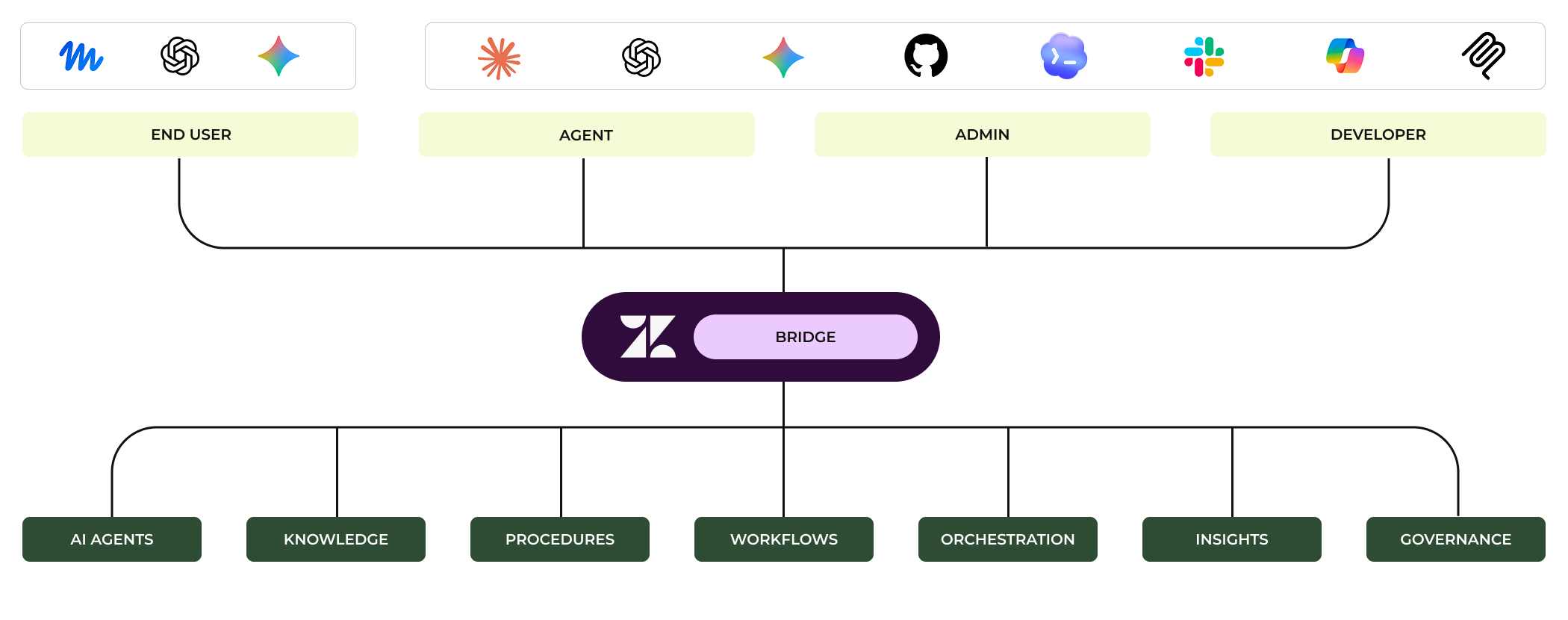
The way Zendesk is making its platform available to AI Assistants is by adding support for MCP connections. An admin can add an External AI connection, configured for a specific purpose. Once that connection is added to an AI Assistant and authenticated, the AI Assistant can discover the capabilities made available to it and use them to work with Zendesk.
Model Context Protocol, or MCP, is an open standard for connecting AI applications to external tools and information. An MCP server exposes those capabilities in a format an AI application can understand. The application uses an MCP client to discover what is available, send a request and receive the result.
For example, an AI Assistant could use a connected server to search documents, retrieve a record or perform an action in another system. MCP provides a common way for those systems to communicate, so each pairing does not need its own entirely bespoke integration. The connection still needs appropriate authentication and permissions: supporting MCP does not automatically give an AI Assistant access to everything a system can do.
Tools
Tools are the operations an AI Assistant can ask Zendesk to perform. Each tool has a defined purpose, the information it needs and a result it returns. A tool can be “retrieve ticket information”, “search knowledge” or “make a configuration change to a specific part of the platform”. Those definitions help the AI Assistant work out which operation fits a request and what it needs to provide. And importantly, this restricts the AI Assistant by making only these actions available to it.
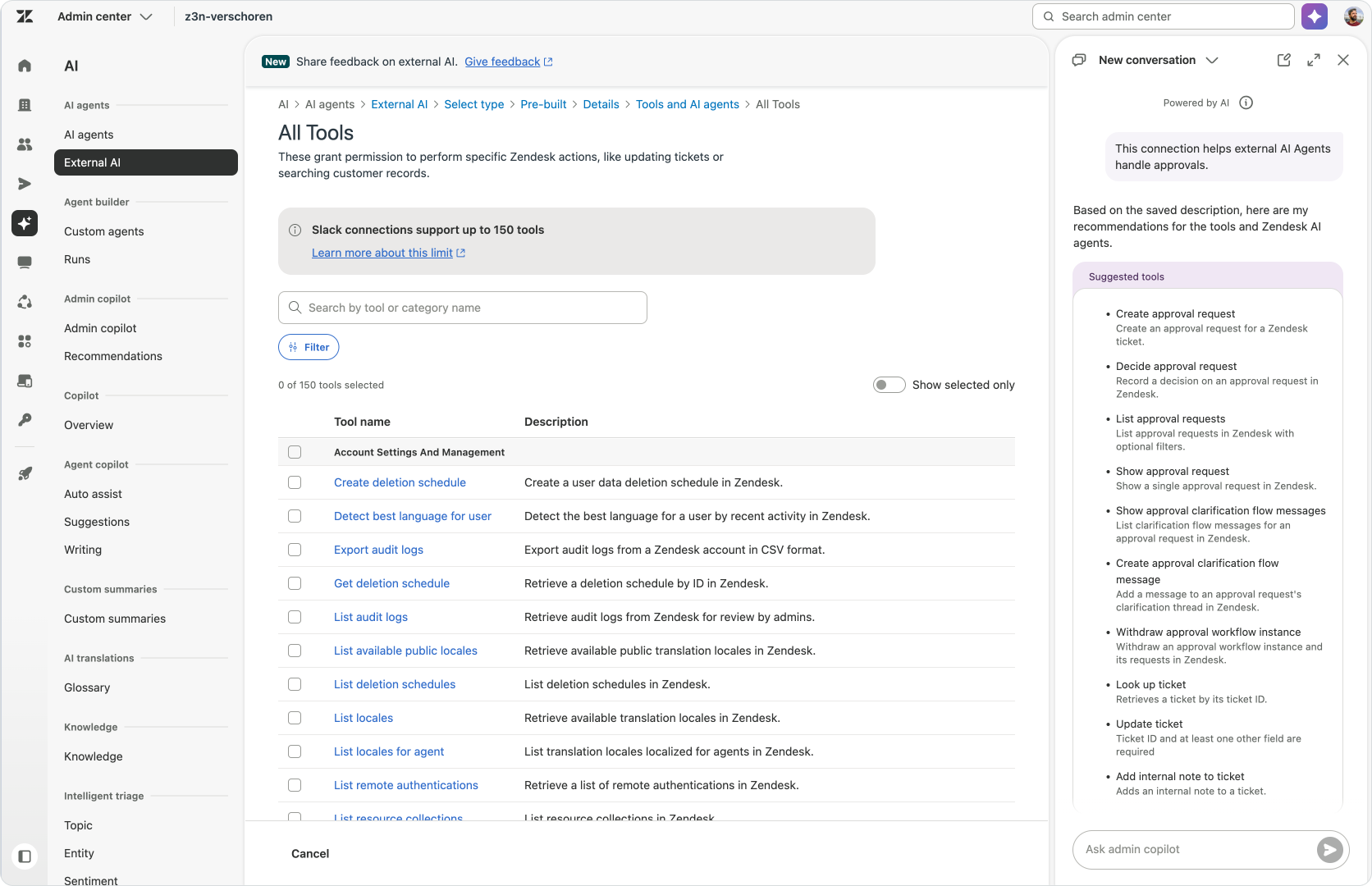
The available tools, together with the Zendesk data they can retrieve, give the AI Assistant the context to do the work. If I ask it to improve my routing, it needs to understand how Zendesk routing works and know about the existing configuration before proposing changes. If I ask about customer enquiries, it needs the relevant ticket information. The available catalog defines what it can do today, and the capabilities selected for a connection narrow that down to the job we want it to perform.
Monitoring agent
Sometimes I want to hand over a question rather than ask the AI Assistant to work through individual tools. Why did first reply time increase? Are there any active alerts I should look at? Through Bridge, an AI Assistant that supports A2A can pass those questions to Zendesk’s Monitoring agent and bring its findings back into the conversation.
The Monitoring agent can check alerts, investigate a change in a metric and suggest what to look at next. During the EAP, it works with a fixed set of metrics across email, voice and messaging. It reads and recommends; any follow-up action still needs the appropriate tools and the user’s permissions.
Observability
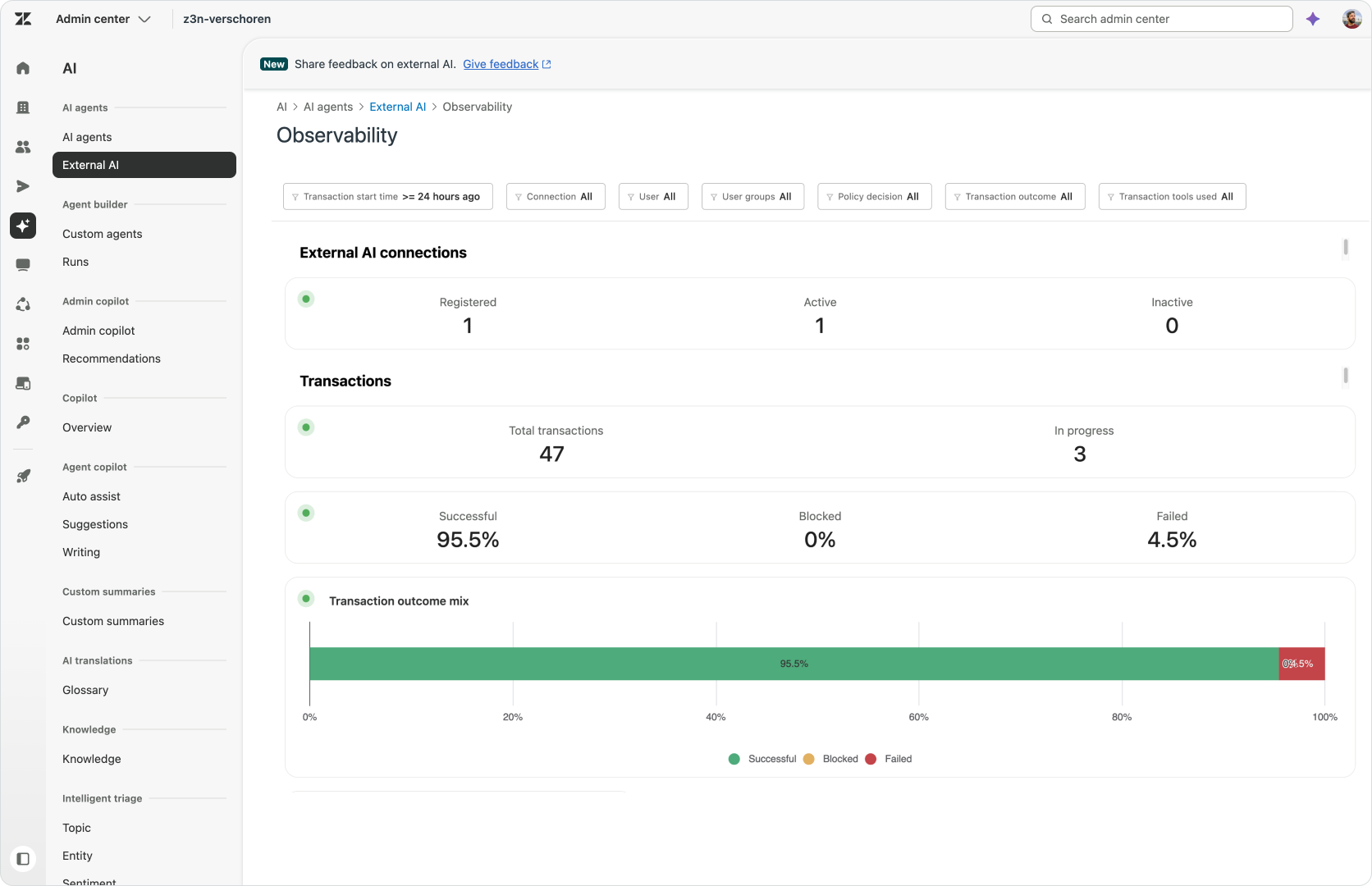
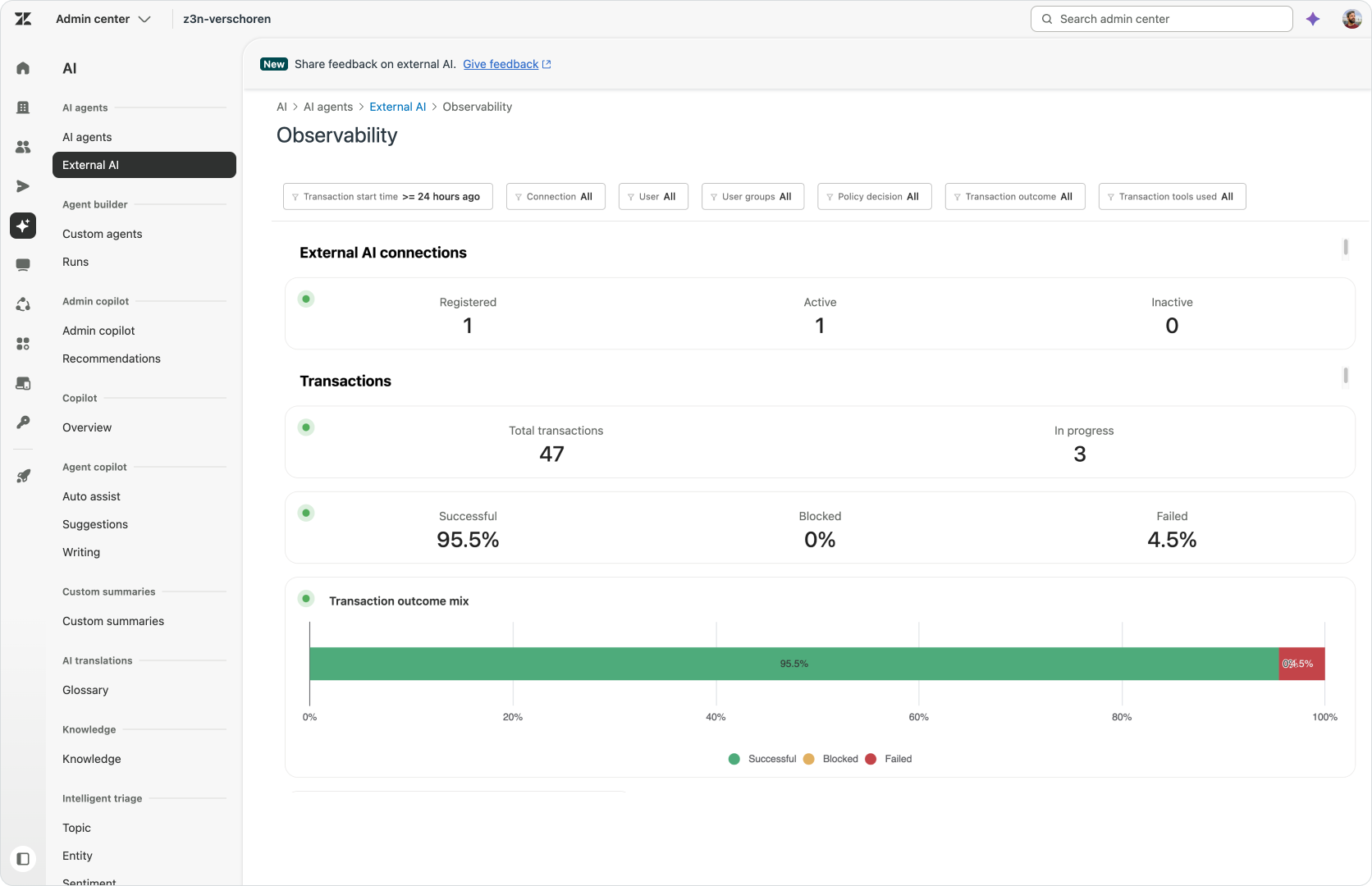
Once an AI Assistant can act on our behalf, we need a way to inspect that work. Bridge’s Observability makes connection activity visible in Admin Center, including successful, failed and blocked requests. That gives an admin a place to investigate which operation was requested and what happened, rather than relying only on the AI Assistant’s account of its work. It also makes it easier to review whether a connection still has the right scope for its job.
Setting up Zendesk Bridge
You can find Zendesk Bridge in Admin Center via AI > External AI . You might need to go into Account > Early Access to enable the early access first.
Name, description and access
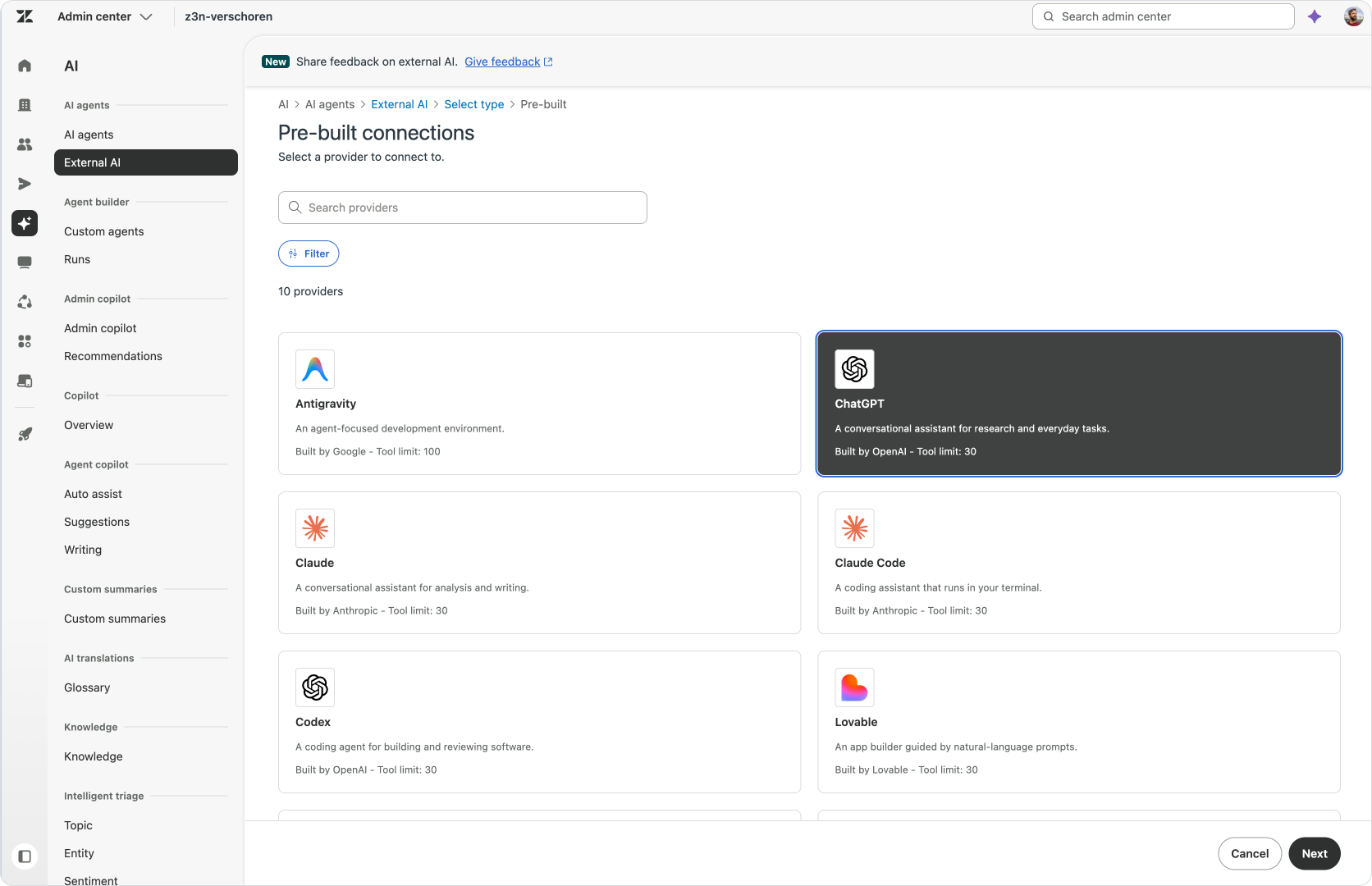
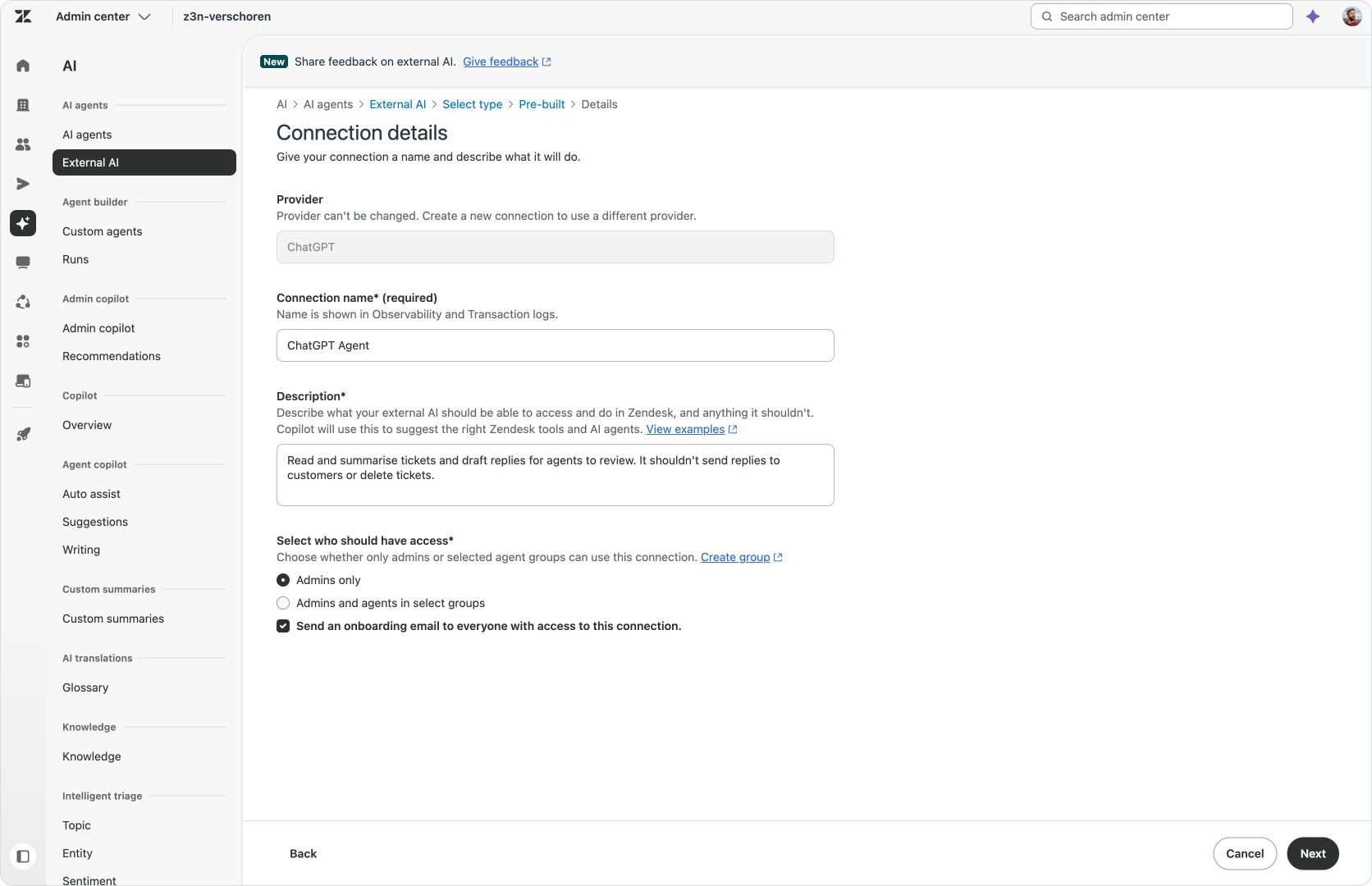
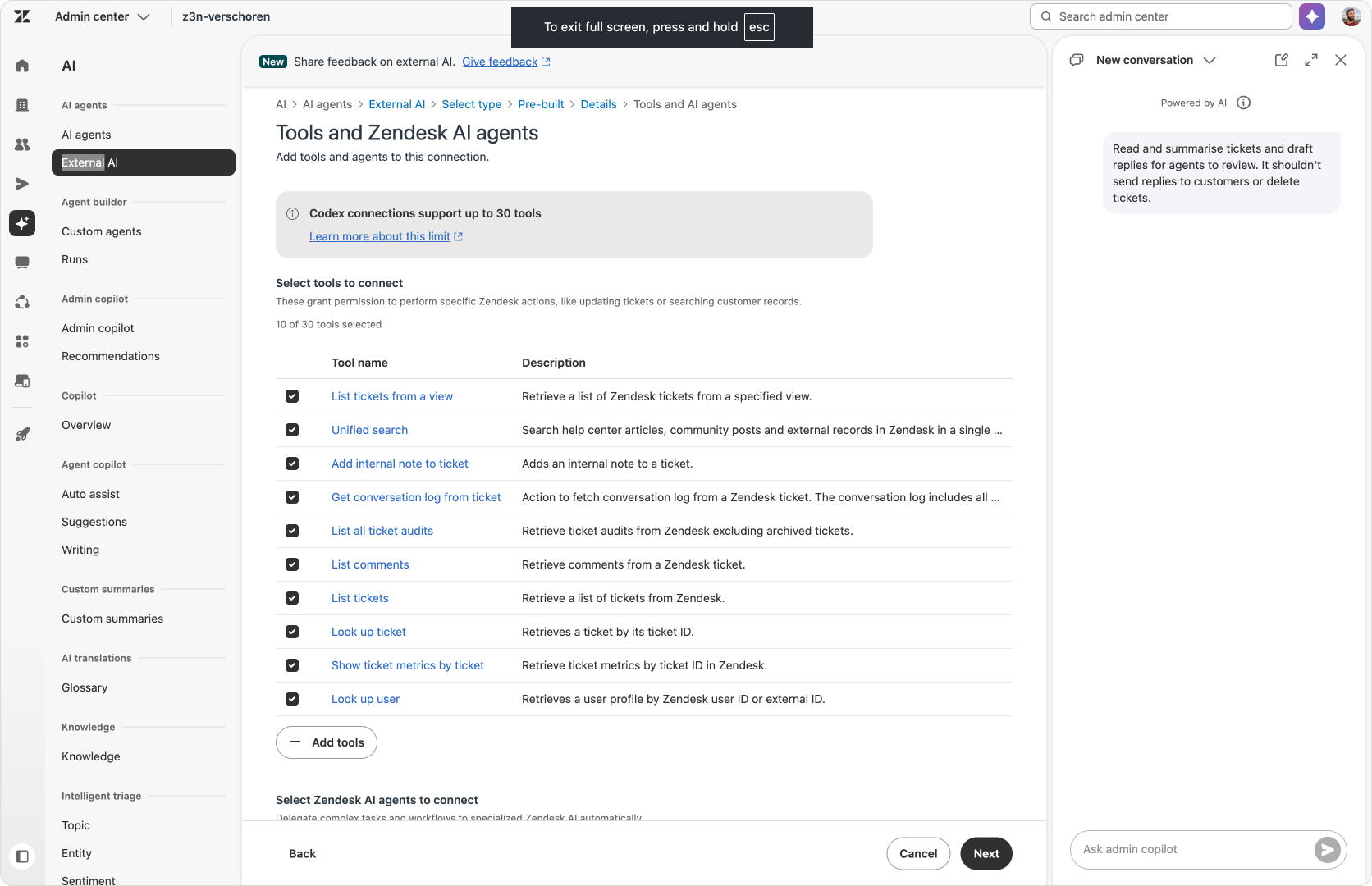
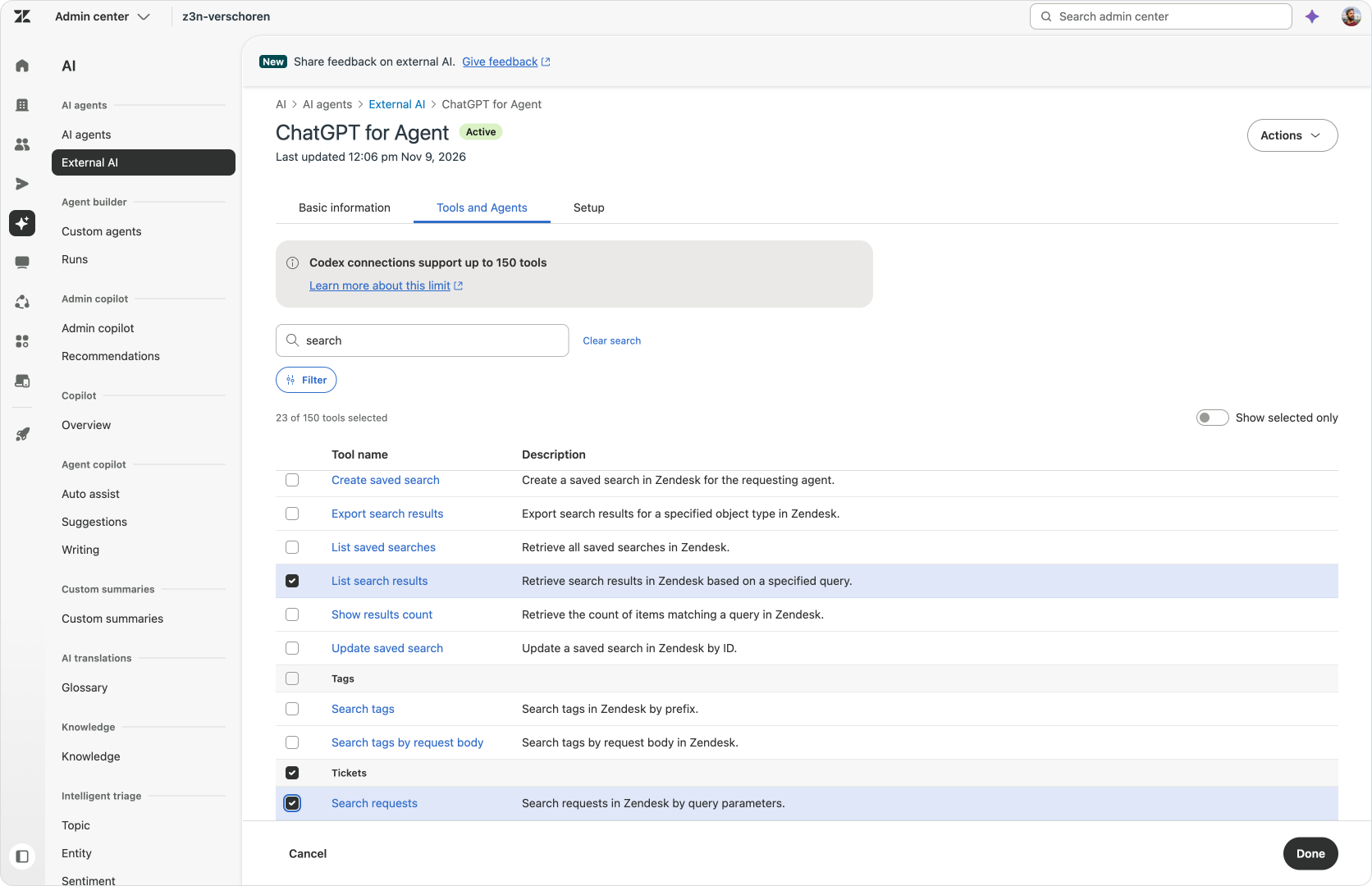
Step one is choosing a specific provider. You can choose from a whole range of popular AI Assistants, or you can choose for a custom setup. Next we need to name our connection and describing the job it will do. This description feeds directly into Admin Copilot, which will help you setup the right tools. Each custom connections can have different sets of capabilities, so a ticket-analysis connection can stay focused on reading information while an administration connection includes the tools needed to change configuration.
You also choose who can use this new connection. You can define its audience, but they do not replace the permissions of the person using it. When someone connects their AI Assistant and authenticates with Zendesk, each request will fit both the capabilities approved for the connection and that person’s existing Zendesk access.
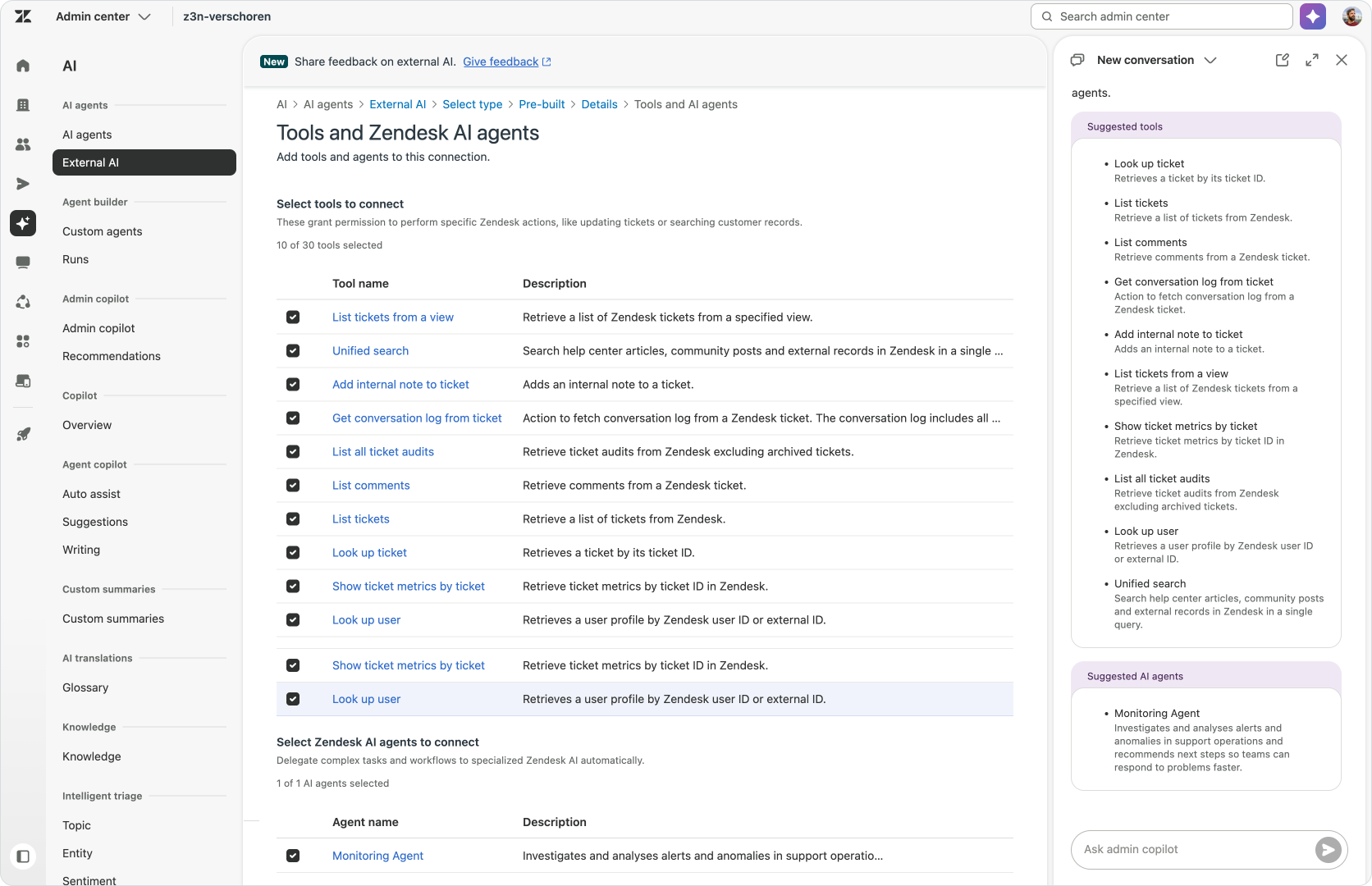
Choosing tools and the Monitoring agent
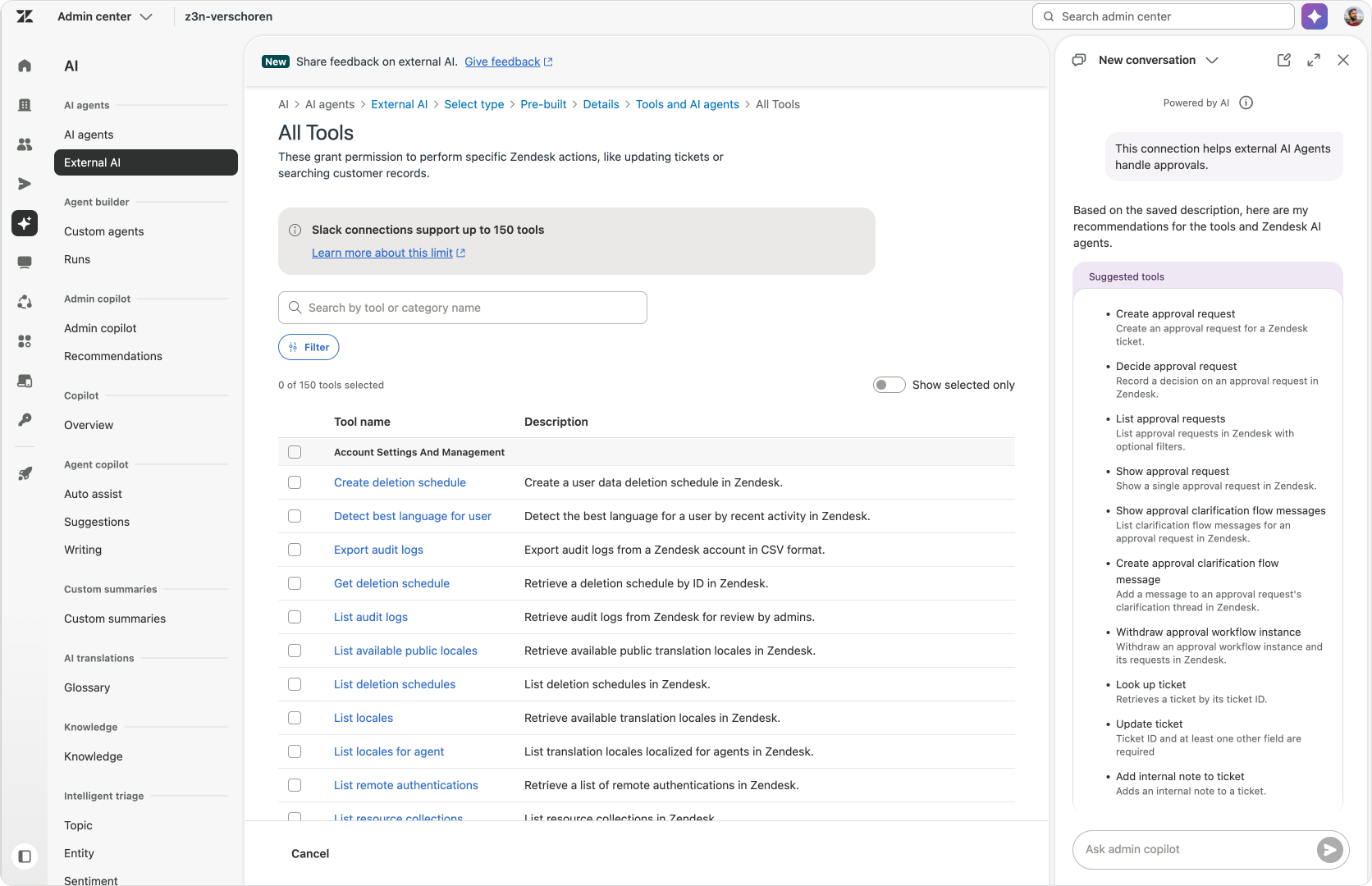
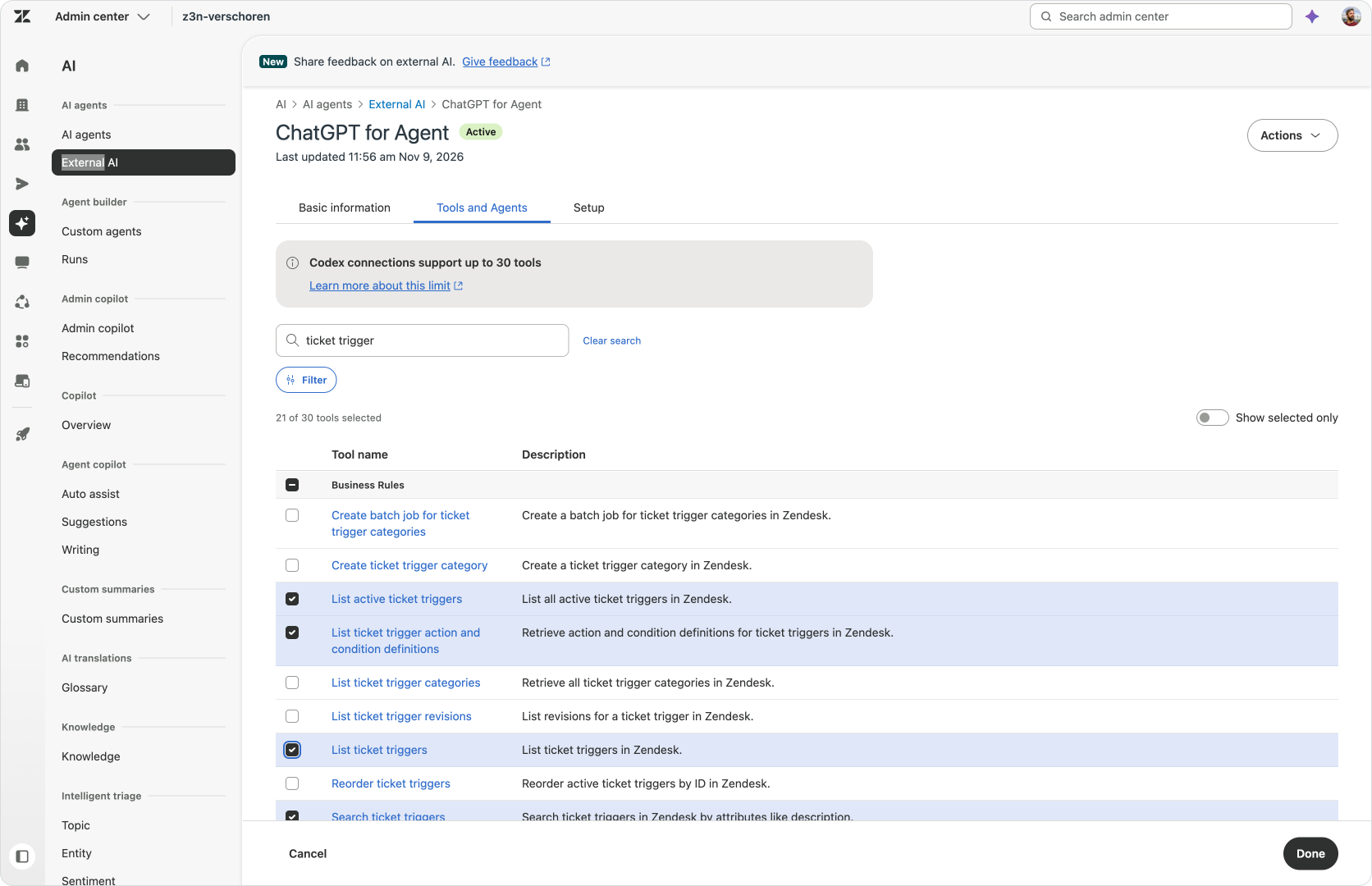
You can select the tools yourself, or describe the work to Admin Copilot and use its recommendations as a starting point. “Help me analyse customer enquiries” calls for a different selection from “Help me review and update my routing configuration.” Admin Copilot helps identify the relevant capabilities, and you review, add or remove them before approving the connection.
The aim is to give the AI Assistant what it needs for the job, rather than everything in the catalog. You can revisit that selection as the work changes, but this way you can make sure your external AI Assistant only has access to what you want.
Adding the connection to an AI Assistant
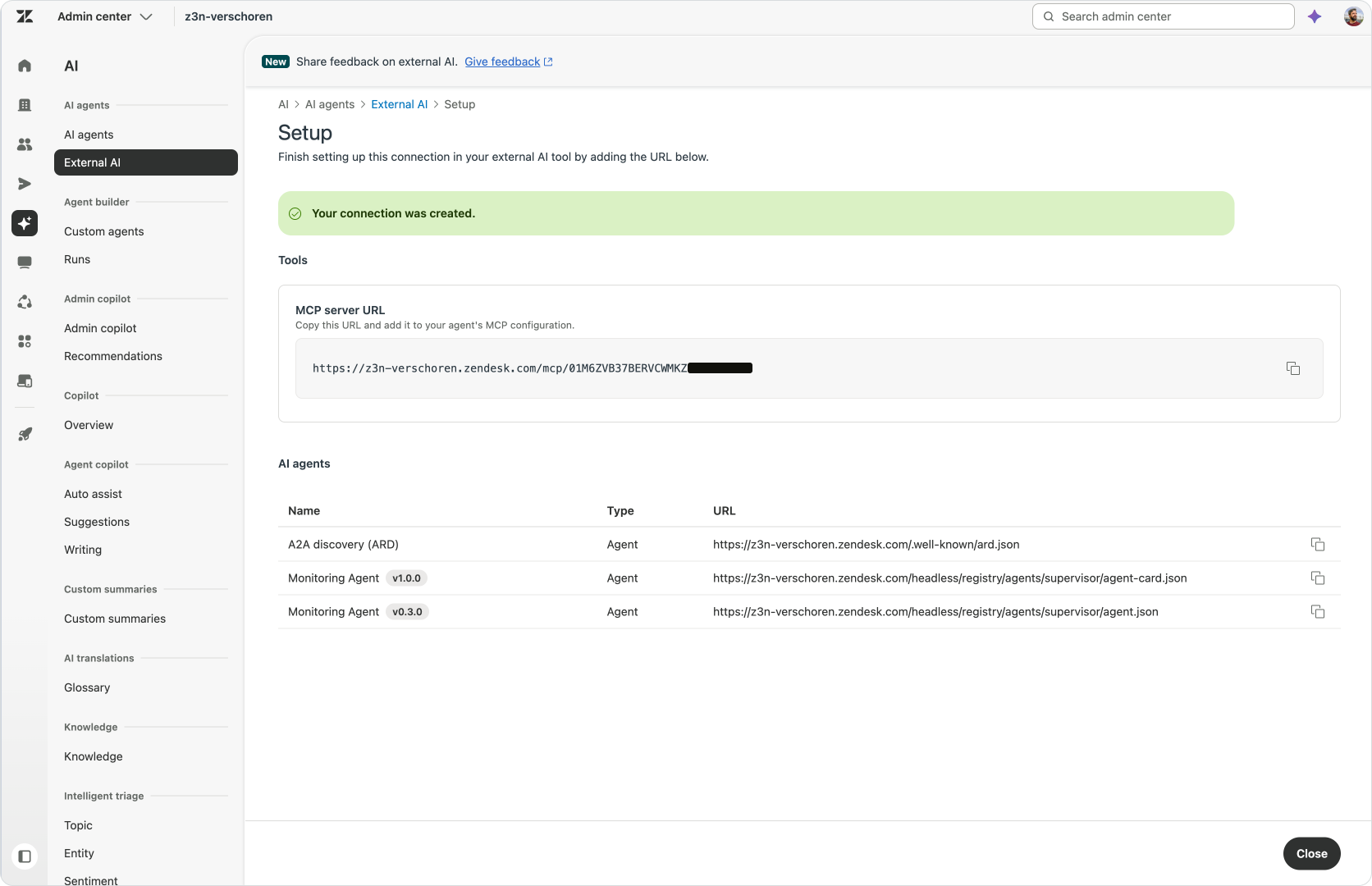
Next you copy the MCP server URL from the connection’s Setup tab, add it to your chosen AI Assistant. The AI Assistant can then discover the selected tools and use them within your Zendesk permissions.
The exact screens differ between AI tools, but the sequence is the same: configure the Zendesk connection, add it to the AI Assistant and authorise access.
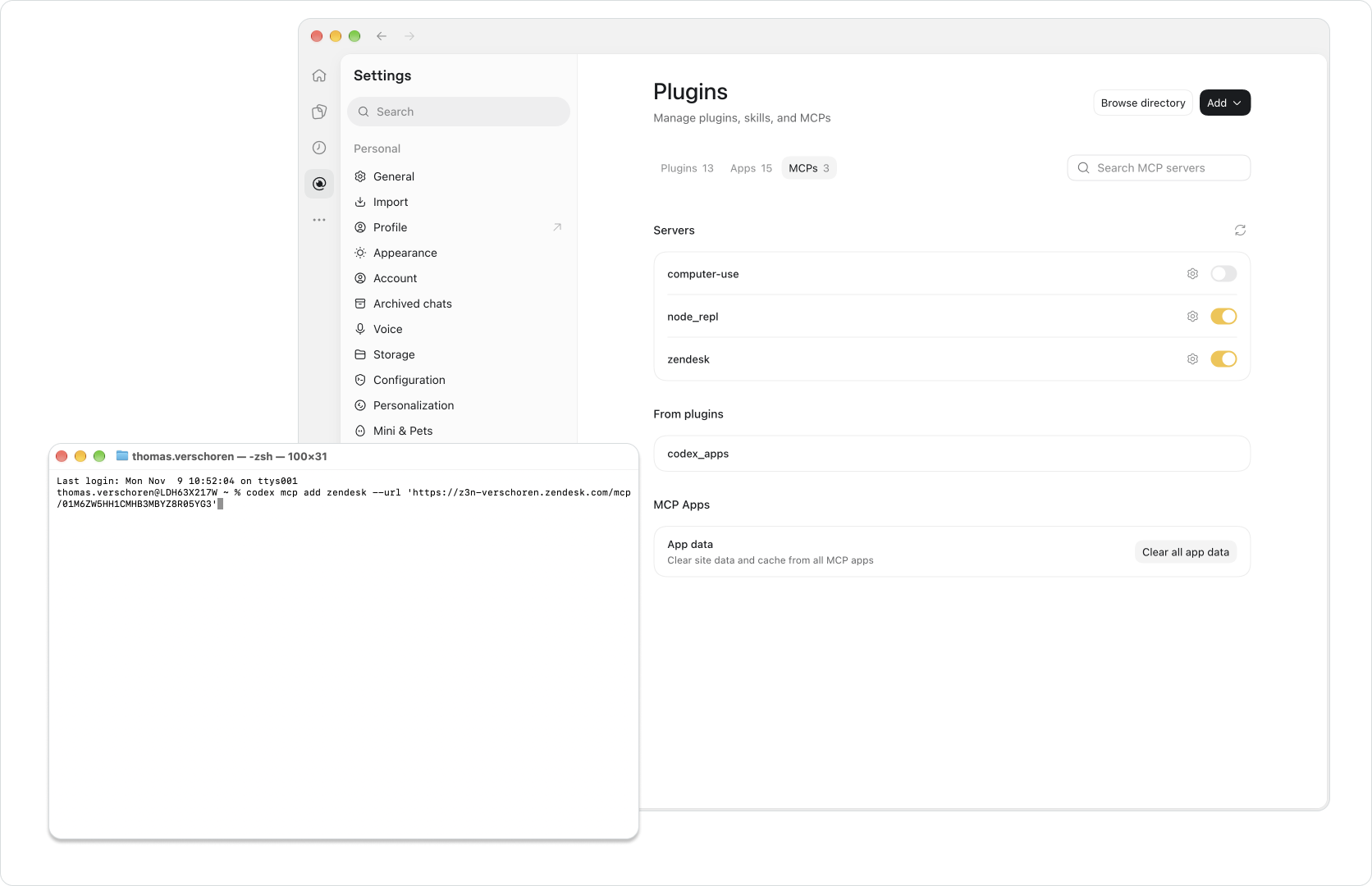
Once connected I would start with a simple lookup, compare to what you see in Zendesk and validate everything works. And then move on to a more involved task.
That also gives you a first request to inspect in Observability, so you can see how the connection behaves before using it for more work.
Putting Bridge into practice
With that connection in place, we can turn the idea into something more useful than an architecture diagram. I want to look at three jobs: an agent working through active tickets, an admin creating and then improving a set of rules, and an analyst looking for patterns in recent conversations. Each example uses the same Zendesk platform, but starts with a different goal and question in an external AI Assistant.
An agent triaging an inbox
My first example starts with a simple request. I’m a support agent working in Zendesk and I want to triage my inbox via ChatGPT. I ask it to show me my active tickets, help me work through the replies, and point out anything that might be resolved without sending another customer message. Instead of opening each ticket and building that overview myself, I can ask the AI Assistant to read the queue and organise the work around what needs to happen next.
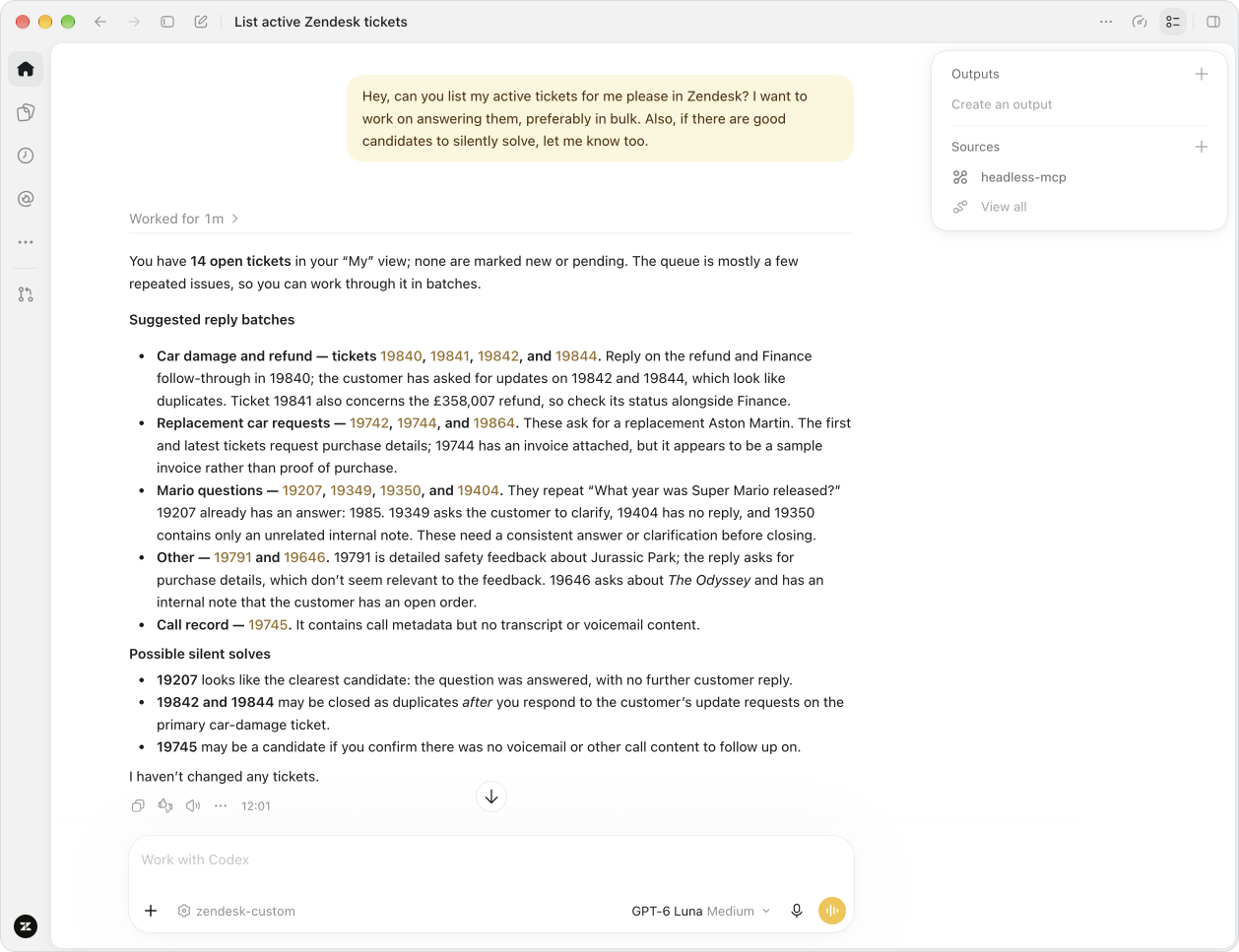
In this example, the AI Assistant reports on open tickets and groups them into related batches. It separates repeated questions from cases that still need information or a follow-up, and links the suggestions back to individual tickets. That is the useful part: not just a neat list, but an explanation of why those tickets belong together and what is still missing before I can move them forward. The same review also identifies possible silent resolutions, tickets that linger in the queue but don’t need any action anymore.
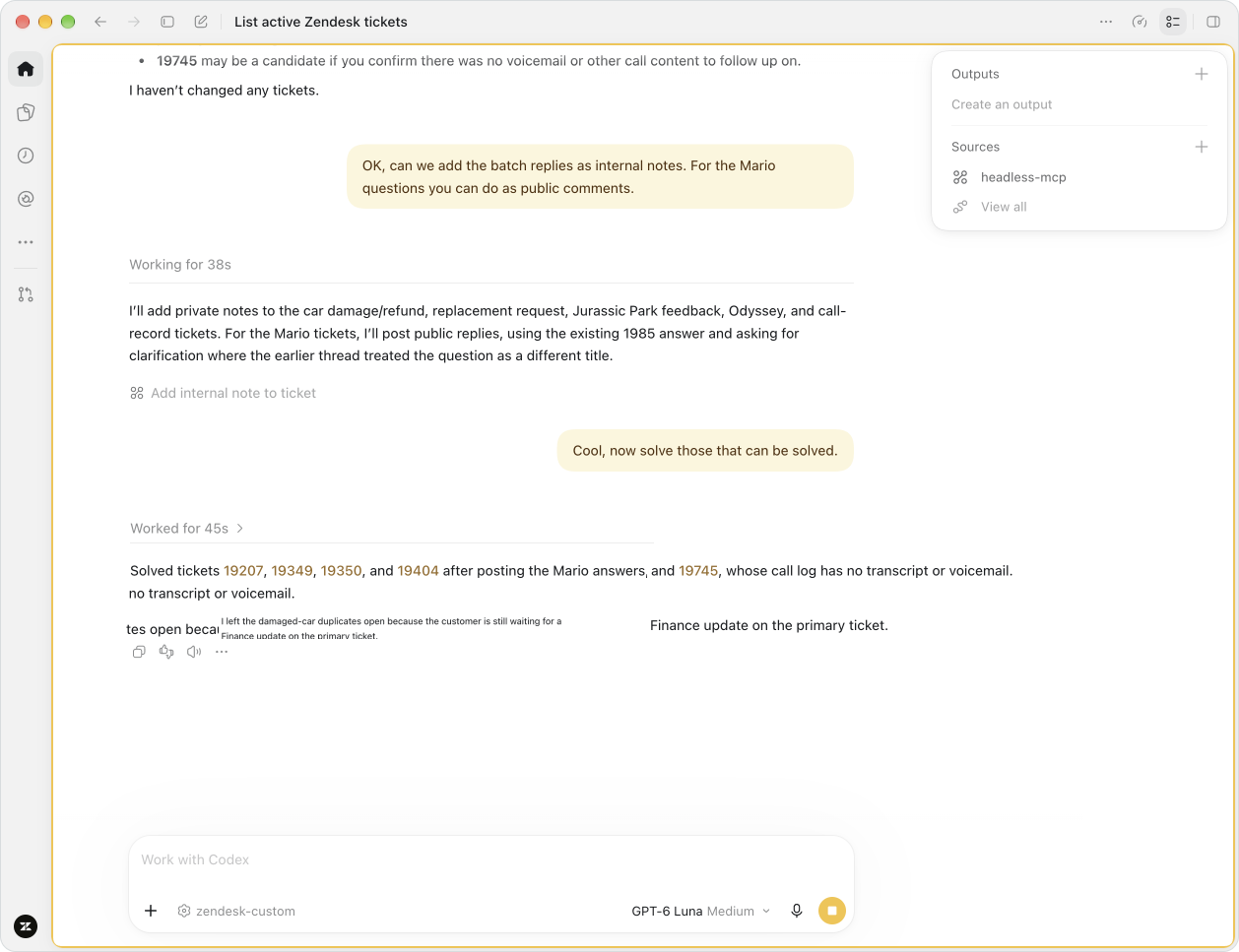
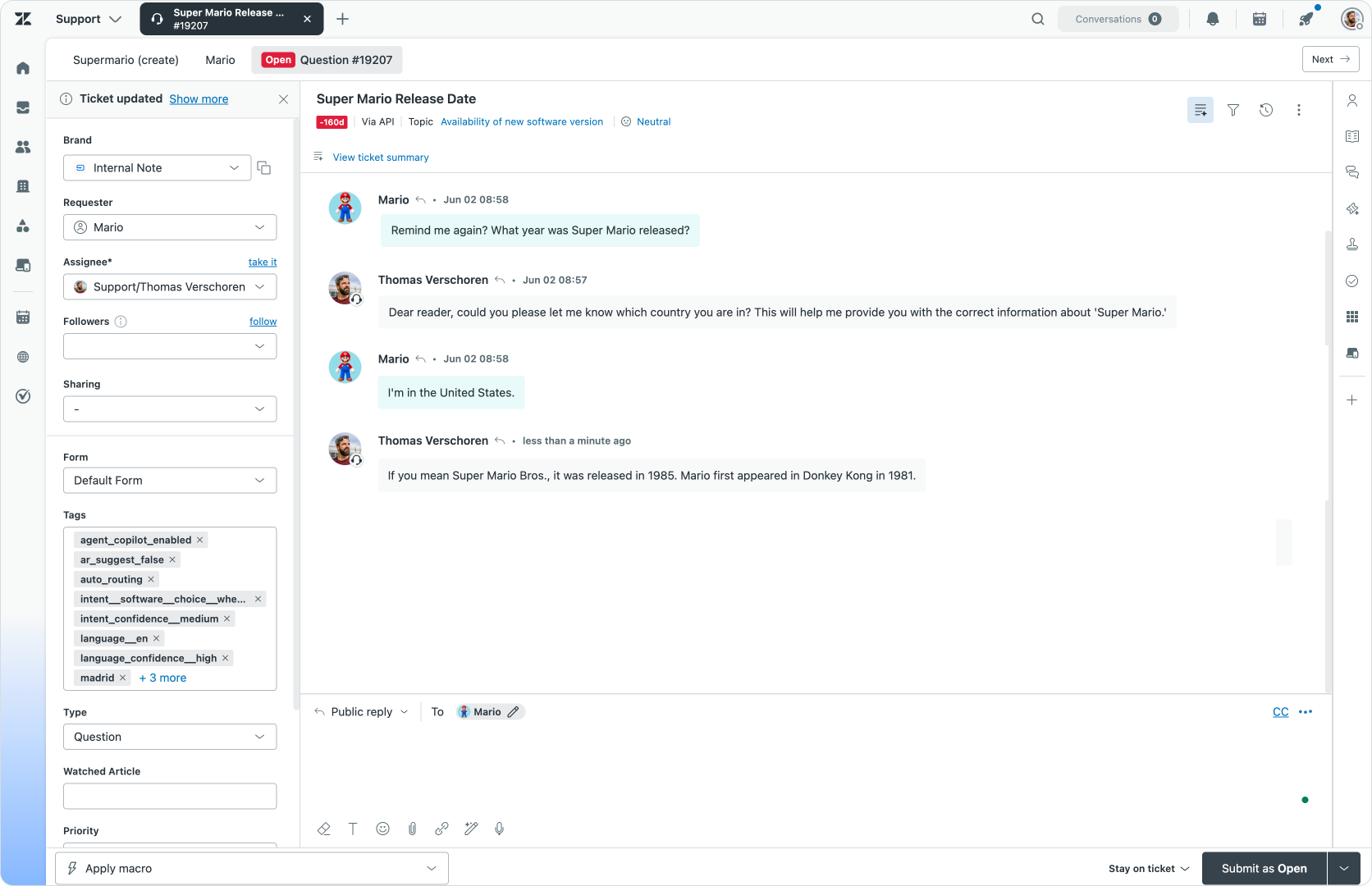
From that overview, I can ask for draft replies, keeping each ticket’s details and relevant knowledge alongside the proposed answer. I can review those drafts as a group and decide which ones are ready to send. The same applies to resolving those inactive tickets without another public reply. Bridge gives me another way to work through the queue, with the actual updates still happening in Zendesk.
An admin modifying a configuration
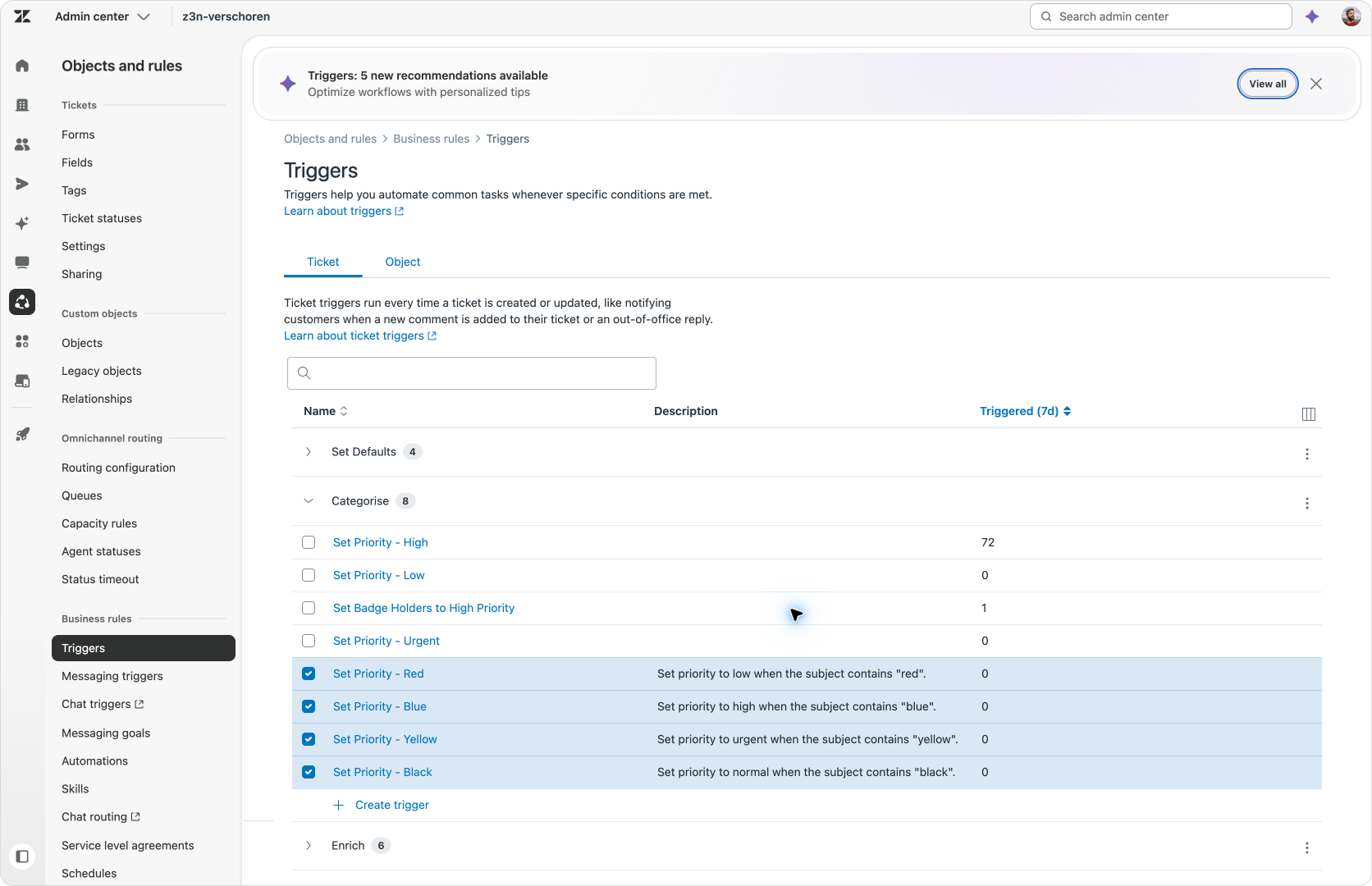
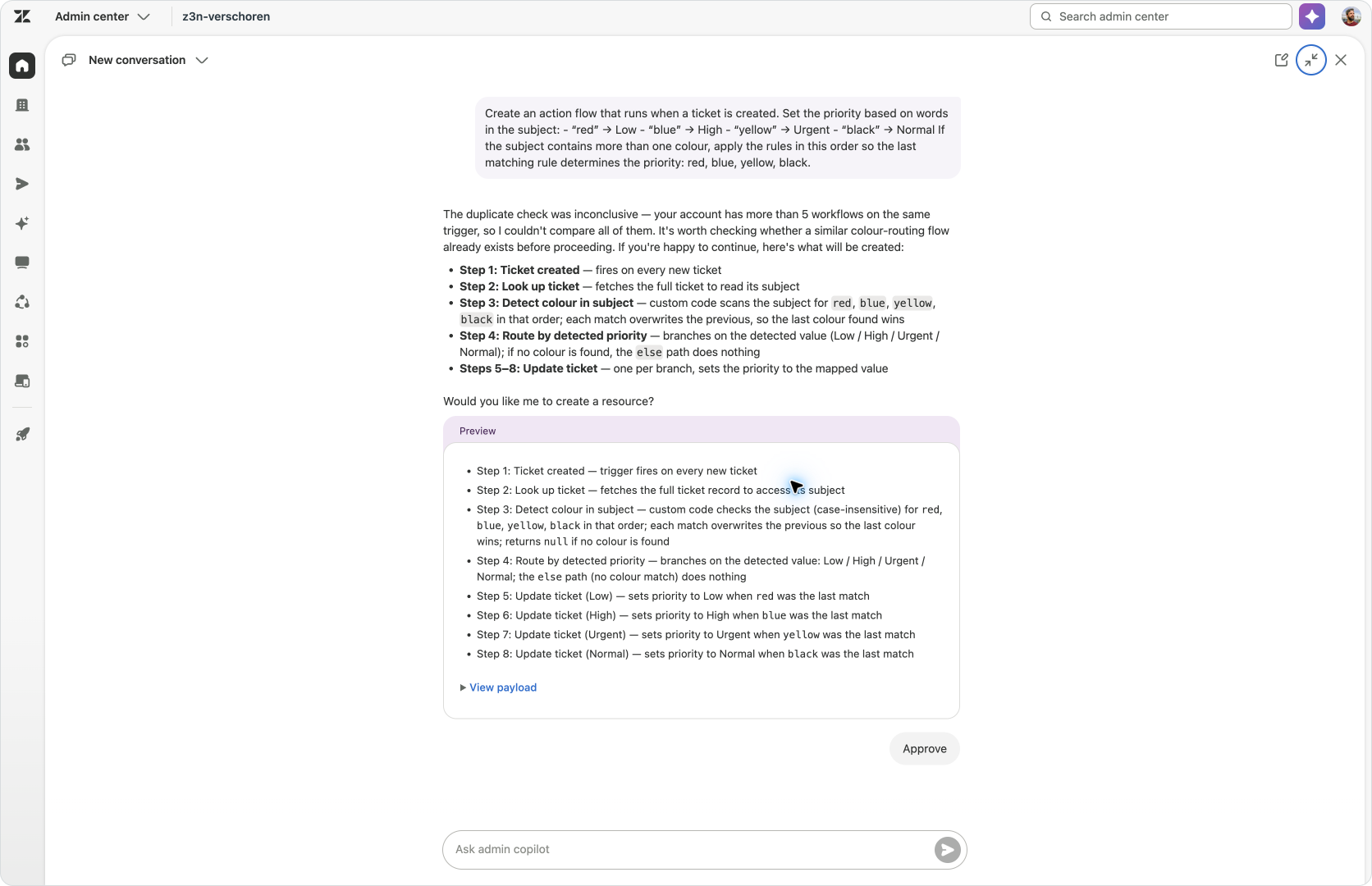
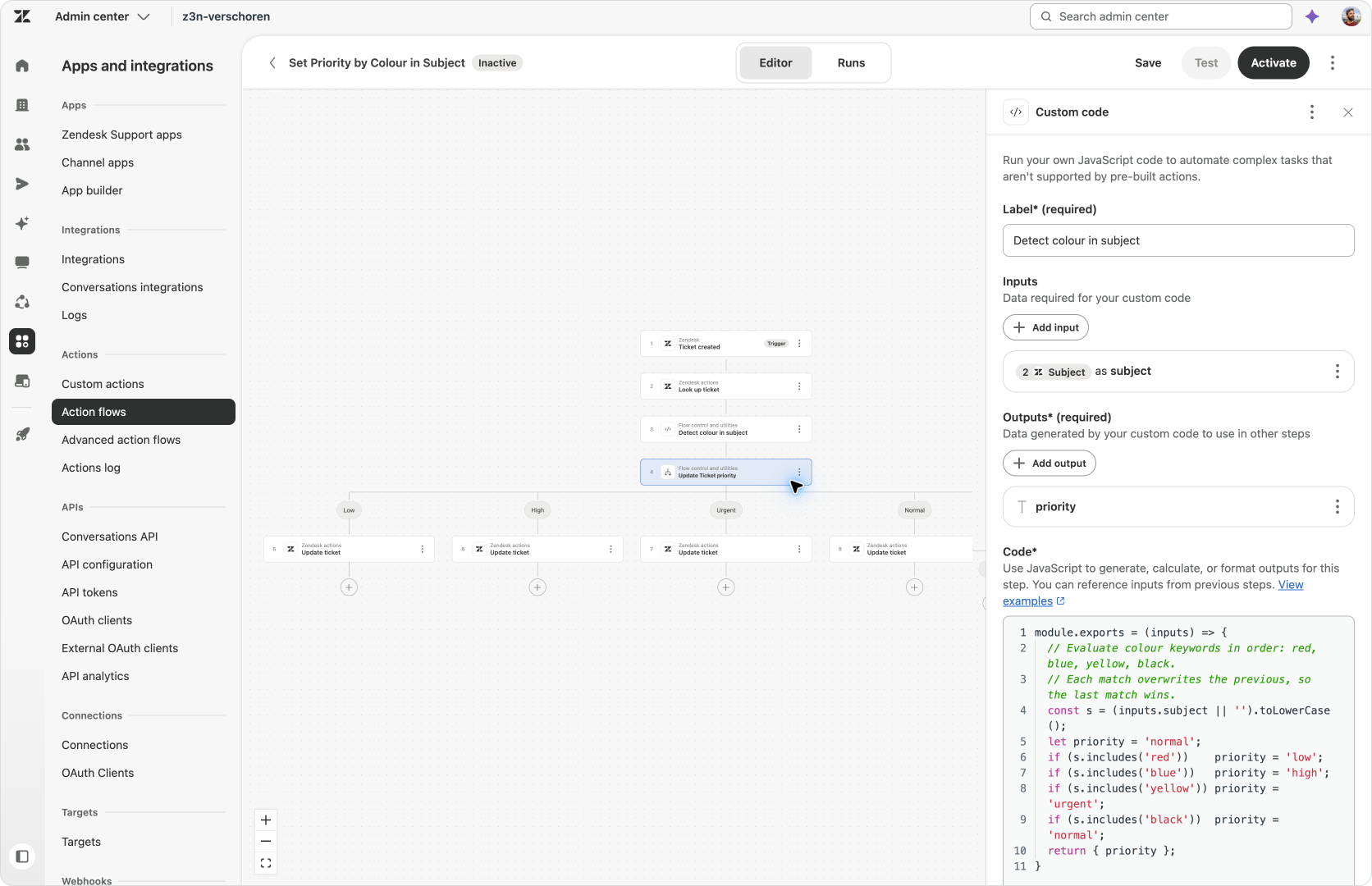
My administrator example has two parts. First, use an external AI Assistant to create a set of priority triggers in bulk. Then review the existing priority logic and prepare a prompt for Admin Copilot to combine all these triggers into an Action Flow.
Where the first example shows how we can do bulk actions in Zendesk, the latter shows how Bridge allows an AI Assistant to understand a configuration, reason about it and generate an outcome that interacts with another part of the platform.
Creating priority triggers in bulk
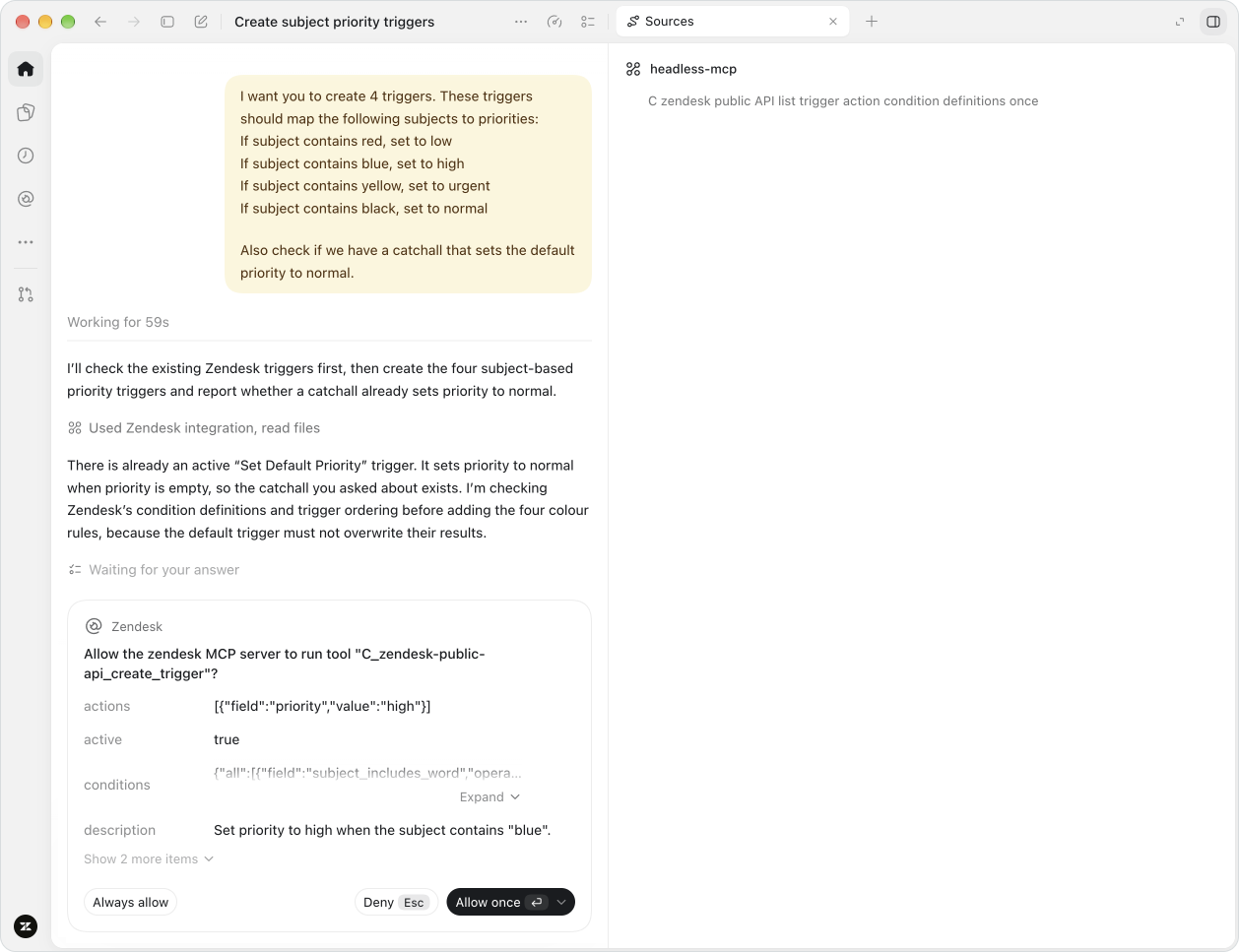
For the first part this demo, I want to create multiple triggers that set priority based on specific words in a ticket’s subject. Before adding those rules, I ask the AI Assistant to check whether an existing catchall already sets a default priority. It finds a rule that sets the priority to normal when it is empty, then inspects the trigger conditions and ordering so that the default does not undo the more specific rules.
This is a good example how Zendesk's MCP differs from connecting to the API or asking ChatGPT to do this without a connection to your instance. The surrounding configuration matters, and while the request sounds like a set of straightforward changes, the AI Assistant needs to understand what is already there, how triggers work and what happens when several rules match in order to setup the rules correctly. Zendesk's MCP provides that context, making the resulting setup work as expected with minimal guidance.
Changing an existing configuration
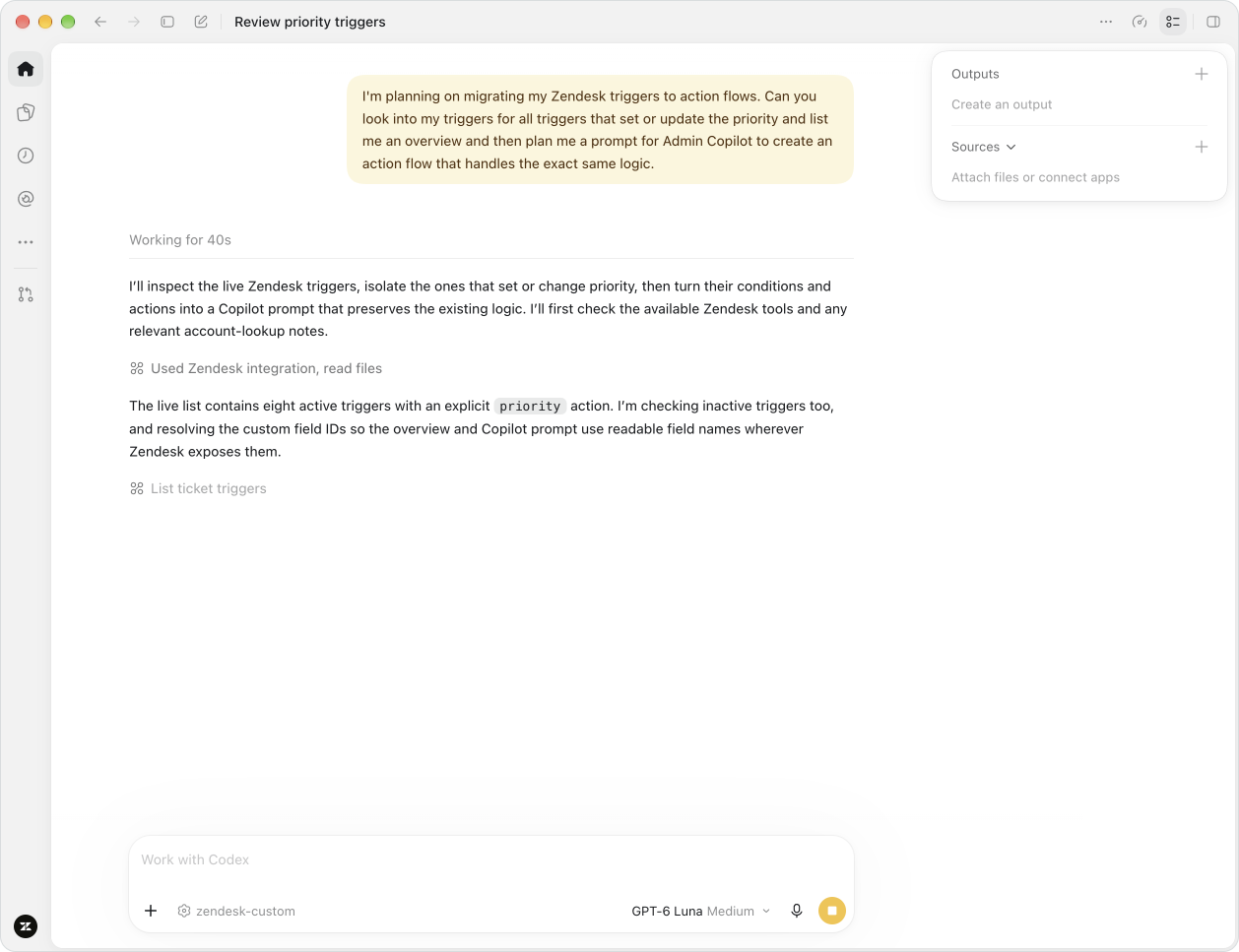
Once the rules are there, I can ask a different question: what priority logic have we accumulated, and how could we express it more clearly in an Action Flow? The external AI Assistant inspects the triggers, summarises their conditions and outputs, and helps me work through a better structure.
Here too, giving the AI Assistant access to the configuration and context lets it reason across my setup and produce usable outputs, with minimal extra context needed in my prompts.
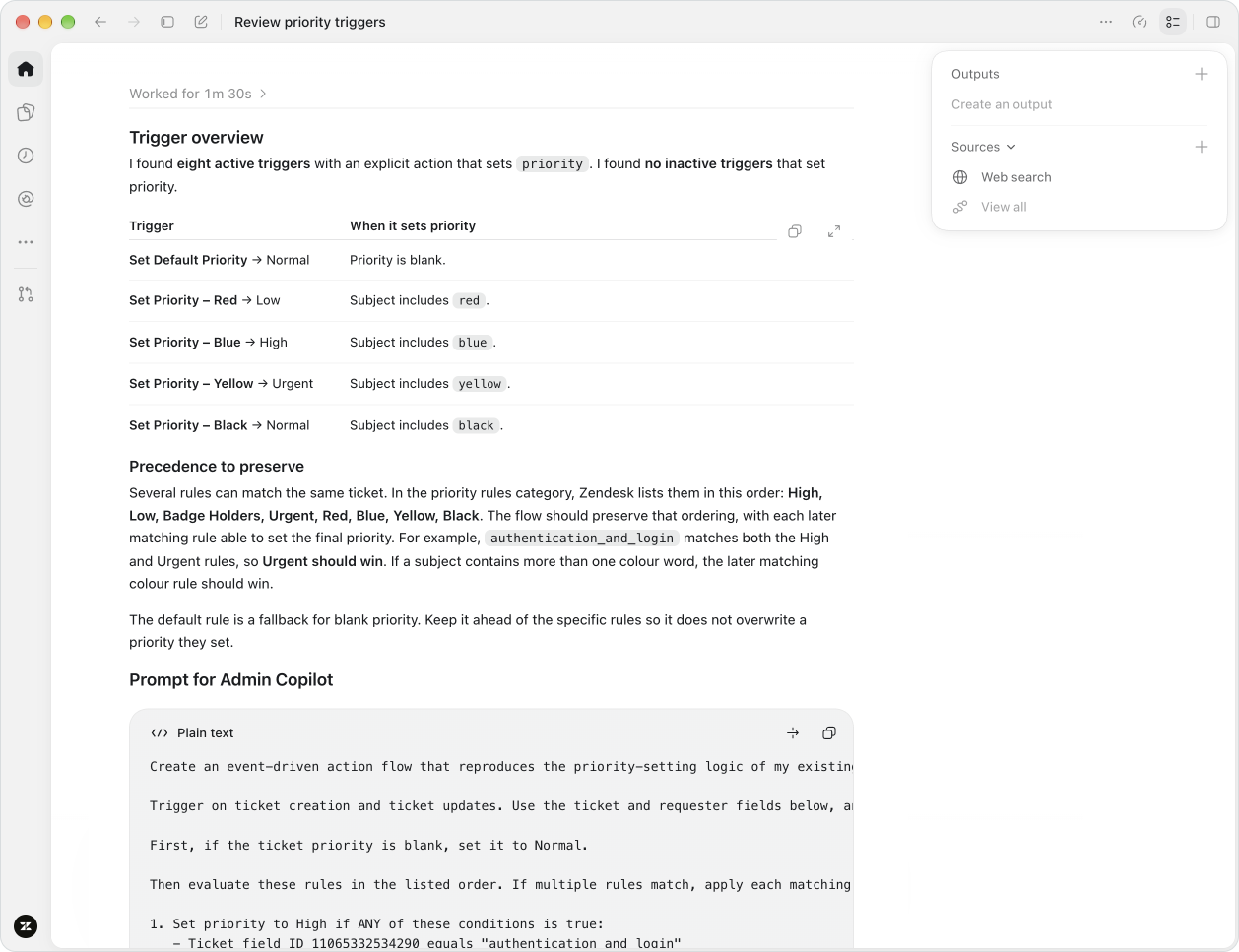
In the initial Bridge release, creating an Action Flow is not yet available as a tool. But Zendesk’s Admin Copilot can handle that part, as I covered in my article on prompting Action Flows with Admin Copilot. So I ask the AI Assistant to turn our analysis into a prompt, copy it into Admin Copilot and continue the work there.
An analyst turning conversations into improvements
The third example starts with a different question. Instead of asking which tickets need an answer today, I want to understand what the past few weeks of conversations can tell us about the way we work. Which topics keep coming back? Where do customers struggle, and what could we change to help them reach a better result?
For this job, I configure a Bridge connection with the tools needed to search and retrieve the relevant ticket information. I can then ask it to examine the tickets by topic, using Zendesk’s topic or intent information where available, and work through the patterns with me.
That conversation becomes more useful when I bring in the rest of the company’s context. Order data might help explain why delivery questions increased. Product documentation might reveal a missing instruction behind a recurring setup problem. With separately authorised connections to those sources, the AI Assistant can combine them with the Zendesk evidence and help me identify opportunities to improve a procedure, change an intake question or fix a recurring issue.
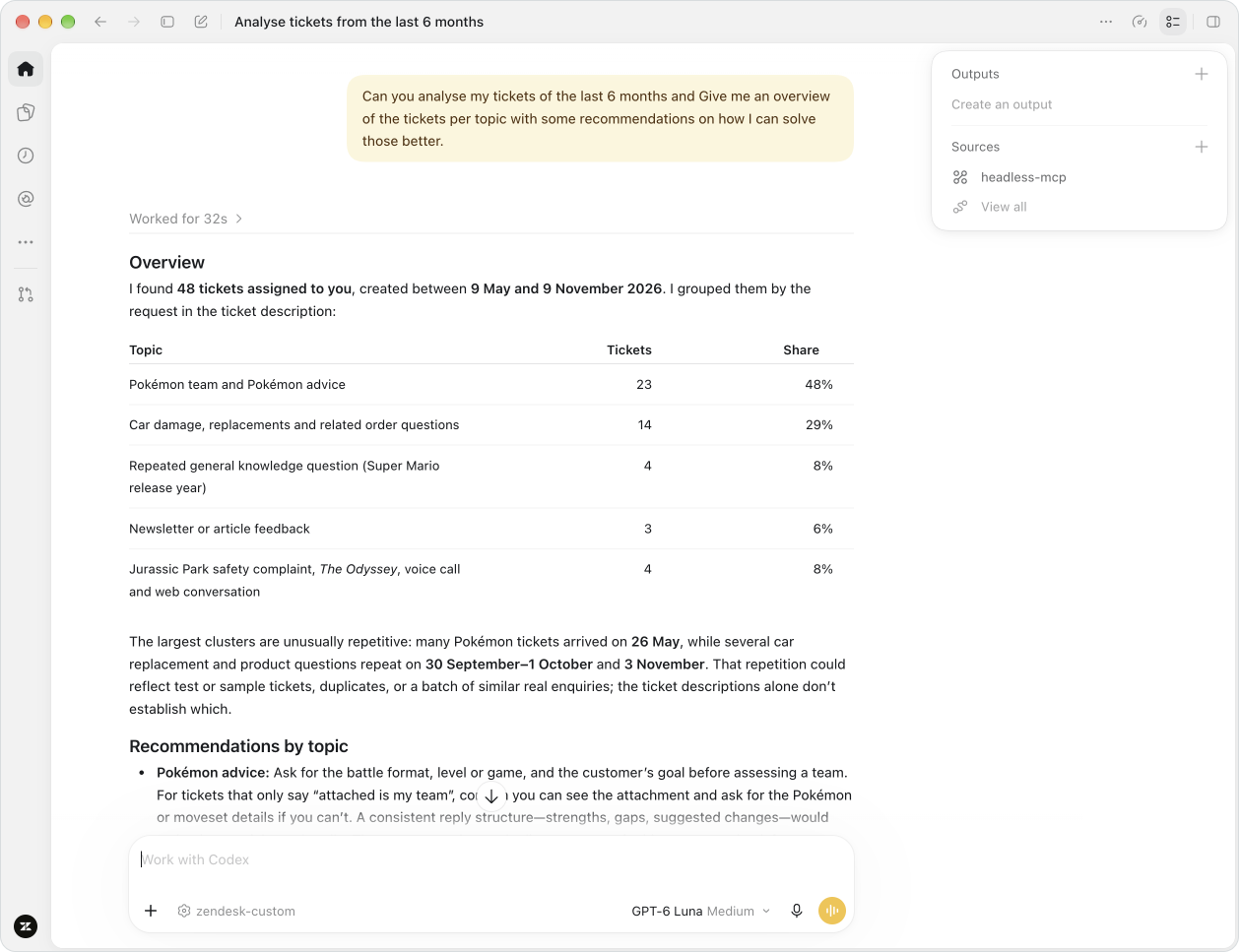
I can keep working through those ideas in the same conversation. Ask for the tickets behind a recommendation, compare that suggestion with the procedure we use today, then draft an improved version for review. That gives me a practical path from customer feedback to something the team can change, while keeping the evidence available to check.
This connects naturally to the Agentic Analytics released at AI Summit. In this example, the external AI Assistant is analysing ticket information retrieved through Bridge. As Agentic Analytics and the Bridge toolset evolve, we can see these two worlds converging, and Agentic Analytics providing direct insights about your Zendesk environment to an external AI Agent.
 Thomas Verschoren

Working with Zendesk in a wider context
For me, some of the most interesting immediate uses of Bridge are on the admin and analyst side. These are jobs where the work already crosses several systems. An admin is trying to turn company processes into a configuration. An analyst is trying to connect customer behaviour with what is happening elsewhere in the business. Being able to talk to Zendesk’s data and configuration from the same place as that wider context gives both of them more room to work.
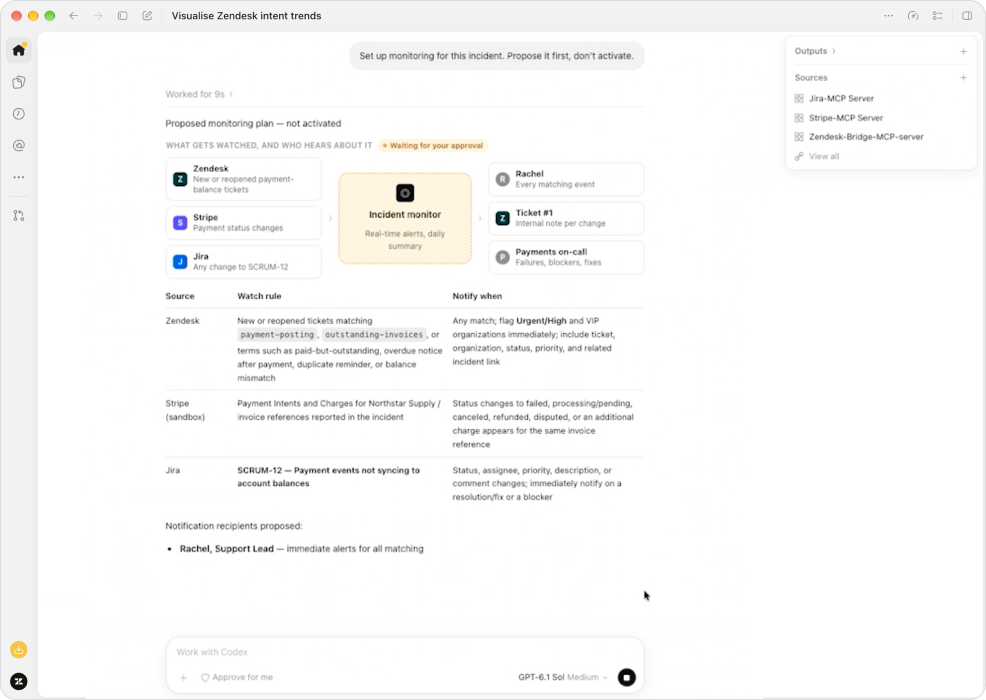
The demo at AI Summit showed this in practice. Working in Codex, a support lead used Zendesk to find customers being asked to pay invoices they had already settled, checked the payments in Stripe and found the underlying synchronisation issue in Jira. She could then review and approve a customer update, with Zendesk sending the message and recording the action. Each system still needs its own authorised connection, and each step depends on the capabilities those connections expose, but combined they allow for some powerful workflows being executed fast and reliable.
The other part of this is you can go from understanding how something works and then doing something with those insights. We can investigate a problem, challenge a recommendation, plan an improvement and use the supported tools to make the change. Where a tool is missing, the Admin Copilot example shows that a handoff can still keep the work moving by moving to traditional interfaces. We do not need every step to happen in the same interface for the process to be useful.
Where should I do the work?
Having these options raises a practical question: when should I open Admin Center or Agent Workspace, and when should I start in an external AI Assistant? For me, the answer depends on the work I want to do. Being able to talk to my Zendesk configuration through ChatGPT does not stop me from using Admin Copilot. I can use both and move between them as the task requires.
An AI Assistant can help me introduce new concepts with my existing configuration and work through a plan. Admin Copilot can then help me implement that plan in Zendesk where current tools are missing, as we saw in the Action Flow example. Similarly, an agent can use an AI Assistant to get an overview of their queue, then continue a conversation in Agent Workspace with the context and guidance available there. Each gives us a useful way to approach a different part of the job.
Having both available means I can start where the work makes sense and bring the relevant Zendesk information and capabilities into that process, within the access I have configured. Sometimes the best interface for the job is Zendesk itself. Sometimes it is an external AI Assistant. The value is in having those options work together, so I can use the strengths of each without having to choose.
This brings us back to the adaptability behind the AI Summit announcements. We are still using Zendesk to manage conversations, apply business logic and understand what customers need. Bridge gives us another way to put those capabilities to work, alongside the information and tools we use for the rest of the job. With Bridge, Zendesk can be part of that work without always being the place where it starts.