From custom to native: evolving your Zendesk AI workflows
From custom to native: evolving your Zendesk AI workflows

On this page
Custom Agents and Action Flows let you build your own logic within Zendesk. They run that logic during, before or after a conversation happens. They can read information from an attachment, get data from another system or bring several actions together around the way your business works.
Sometimes they solve unique logic specific to your business, like following refund eligibility logic and giving you a go or no-go decision. But other times you can use them to fill product gaps in Zendesk, without waiting for that exact feature to be built as part of the product roadmap. Using Custom Agents to read the content of a document is a good example of this. And before Intelligent Triage became generally available to all customers, some might have used Custom Agents to run similar topic detection.
But as more customers build similar custom experiences with those tools, some of those solutions might be good candidates to become part of the platform itself. What started as something you had to assemble yourself, becomes something you can now just activate, and the custom work you were quite happy with a few months ago might now offer a more integrated experience that requires less maintenance.
This has happened for sending out reminders in Messaging. Reminding a customer about an unanswered conversation used to require your own triggers; messaging reminders made that a native capability.
There are plenty more examples where this happened, and personally, I like that progression, because a successful custom solution doesn't have to remain custom forever. If the platform can take care of the common part of the work, I can spend my time on the parts that actually make a process different, instead of (re)creating or maintaining copies of platform features.
The same progression is now happening across AI Agents and the Action Platform. Attachment understanding, which used to be only possible via Custom Agents, is now natively available for AI Agents on the email channel.
Custom summaries add flexibility to the existing Summary feature, removing the need to build a Custom Agent for custom summarization. Similarly the range of native Zendesk actions in Action Flows keeps expanding, while the new managed authentication option makes adding any remaining custom API calls to Zendesk easier to set up.
You still decide what the process and configuration should achieve, but less of its implementation needs to sit in something you have to build and maintain yourself, because the system now manages more of it for you.
This article looks at three recent upgrades where custom work becomes a native feature. We'll explore these capabilities through the lens of a conversation where an employee reports that their personal vehicle was damaged during business use.
AI Agent OCR
An employee emails a support team to report that their personal vehicle was damaged during business use, attaching the original purchase invoice and a photograph of the damage. The invoice contains the purchase details, while the image helps the team understand the reported damage. To assess the request, the procedure needs to extract the relevant invoice information and inspect what is visible in the photograph.
A support agent in your team could do this manually, but this is exactly the sort of use case for which you would use a Custom Agent: inspect the attachments, extract an order number, describe what is shown in the image and return those findings to the conversation to move the process forward.
Making that work inside an AI Agent procedure meant connecting the different platform pieces. The procedure would need to call an on-demand Action Flow, the flow would invoke the Custom Agent, and its output would need to make its way back into the procedure so the conversation could continue. That setup is certainly possible to build in Zendesk, and once you’ve built a few of these flows, setting up OCR for AI Agent procedures with Action Flows is actually quite straightforward. But it is a lot of surrounding setup work when the requirement is simply to read a purchase invoice. You have to think about the integration as well as the instructions, and make sure that the information returned is something the next step can use.
AI Agents (Advanced) on the email channel can now read supported image and PDF attachments directly. The procedure can describe what it needs and handle that request itself, rather than handing the job to a separately integrated Custom Agent.
By doing this, Zendesk brings the capability closer to the conversation and simplifies how you use it, making it more accessible for admins setting up their agents. For a regular attachment-reading use case, this is the easiest way to get that capability, with Custom Agents still available if you want to run more complex logic on top of the OCR work, like validating the data against external systems, or cleaning up the data before returning it to the AI Agent.
Setting up an OCR procedure
For this damaged-vehicle procedure, we need two items of information.
First, we need to establish the invoice number of the employee’s original purchase. A copy of that invoice might arrive as a PDF or as a photograph of a printed document, and the procedure can retrieve the required information from that document. Once retrieved, it can then continue with whatever lookup and verification the process requires. Or if the information is missing, it can ask the employee for it.
Second, we need to understand the damage the employee is reporting. A photograph might show a damaged door or window or another visible problem, and if the employee hasn't supplied a photo, the procedure can ask for it.
Reading text from a PDF and interpreting a photograph are different jobs, and both are supported in this new release.
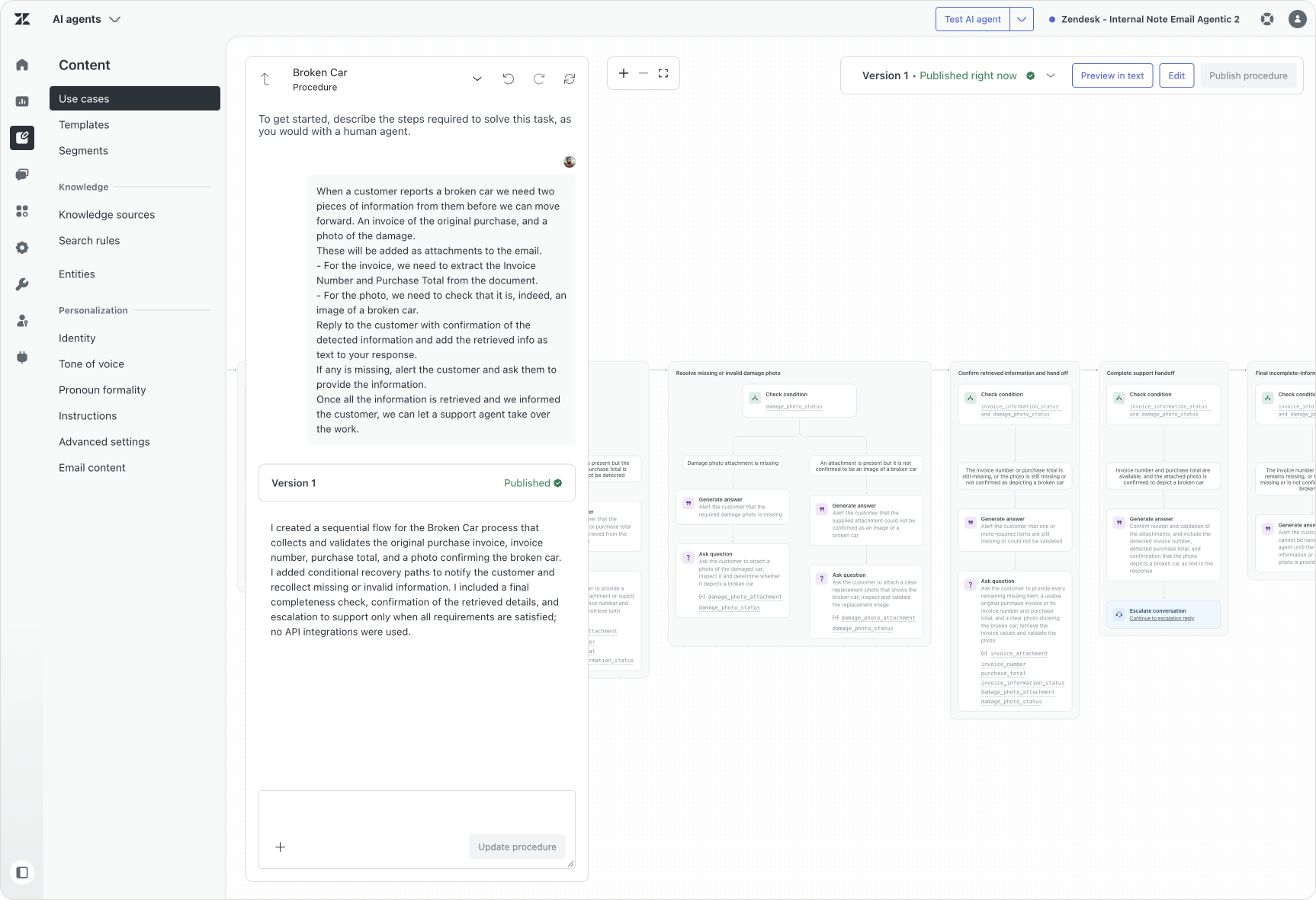
Just like any other procedure, you tell the procedure what information is required, where to find it, and how to handle missing information. You might need to add context on what’s a valid invoice number or what you are specifically looking for in the image. The procedure can ask for clarification or involve a real human agent when the provided evidence is unclear. Those specific decisions are where your procedure instructions add value: defining the information required, the checks you apply and the point at which the conversation should move to Support.
But what we no longer need to do is add any action flow or agent. We can now tell the procedure to retrieve the information from attachment, and the system will do so. No setup required.
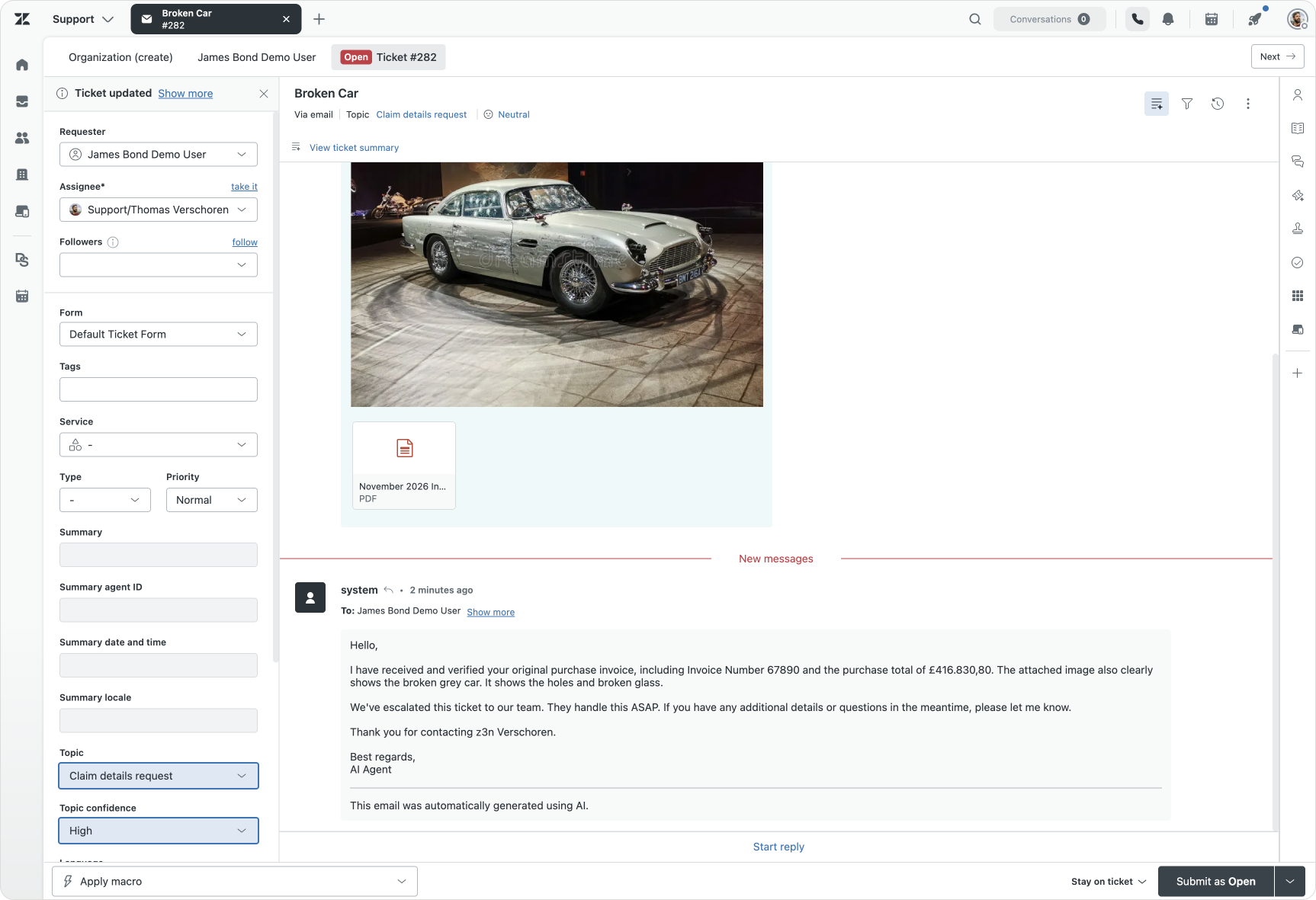
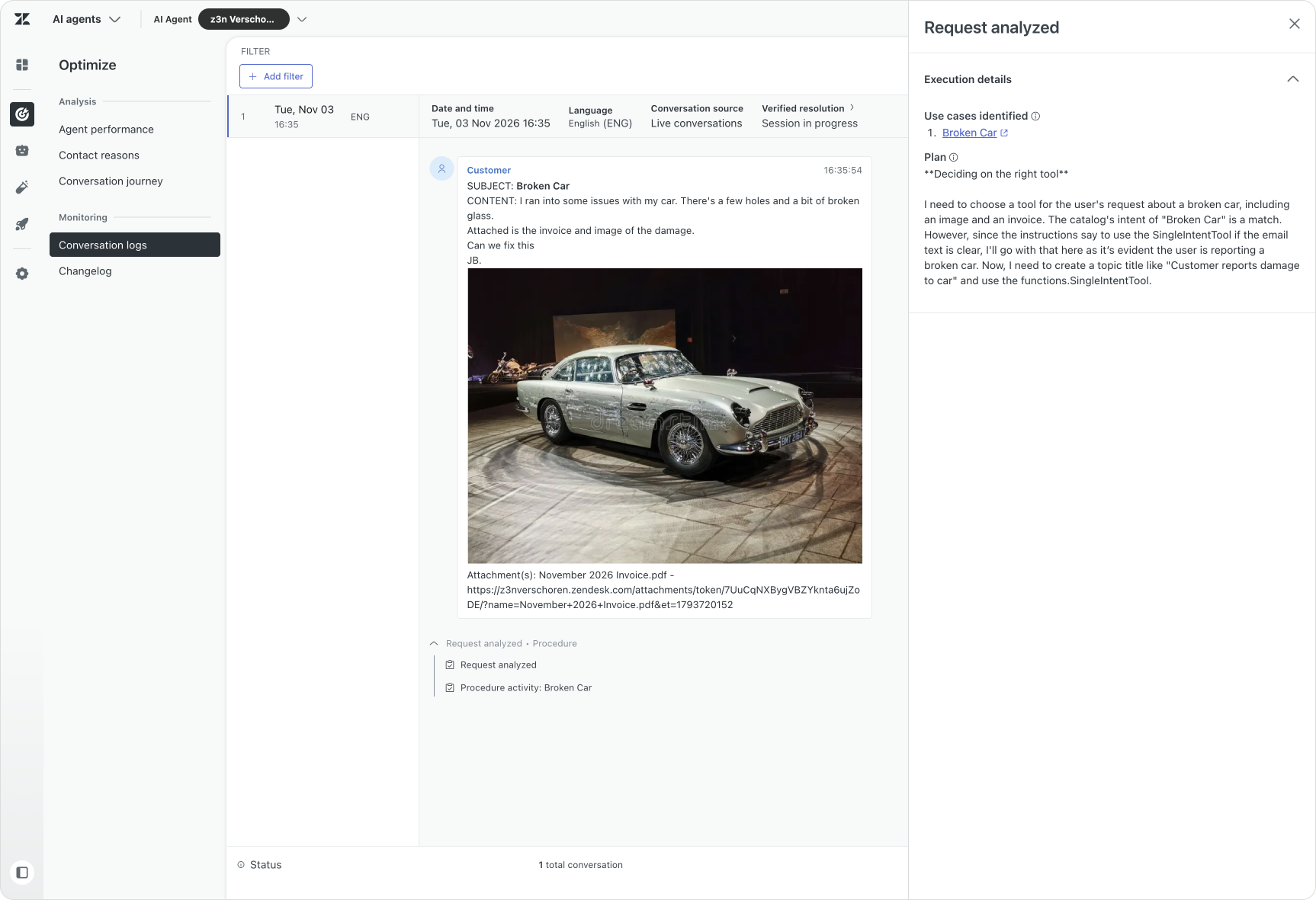
Our AI Agent extracting the required info from attachment, and logging its decisions in a conversation log.
For more specialised work, a Custom Agent can still be useful. You might need to validate the extracted information against another system, combine several documents or apply business-specific logic before returning a result to the procedure. In those cases, the additional setup work with Action Flows and Custom Agent serves a valid purpose. But the simpler lookups? They can now happen with a procedure.
Custom Summaries
Eventually, some of the conversations handled by your AI Agent might be escalated to your support team. In our scenario, the employee has supplied their purchase invoice and photograph of the damage, and the AI Agent has gathered and confirmed that initial information. Our conversation is then escalated to a support agent.
When the conversation reaches that human agent, a summary helps the support agent catch up with what happened before the ticket got escalated.

Zendesk’s Agent Copilot has provided support for summaries for a while now, and almost every customer gets them right out of the box (with usage limits). But the standard version might not emphasise the details your team cares about. Support wants to know what is wrong, what the employee already tried, and what still needs doing. Finance, later in the process, needs to view the refund details. Both teams are reading the same conversation, but they are using it to do different work.
Zendesk already has a summary experience; what was missing was the ability to shape it around a particular team's needs. To get that specificity, you could build a Custom Agent with your own instructions and have it write its output to a custom ticket field or an internal comment. That produces the summary you want, but it lives alongside the existing summary feature, with its own configuration and a separate place for the team to find the result.
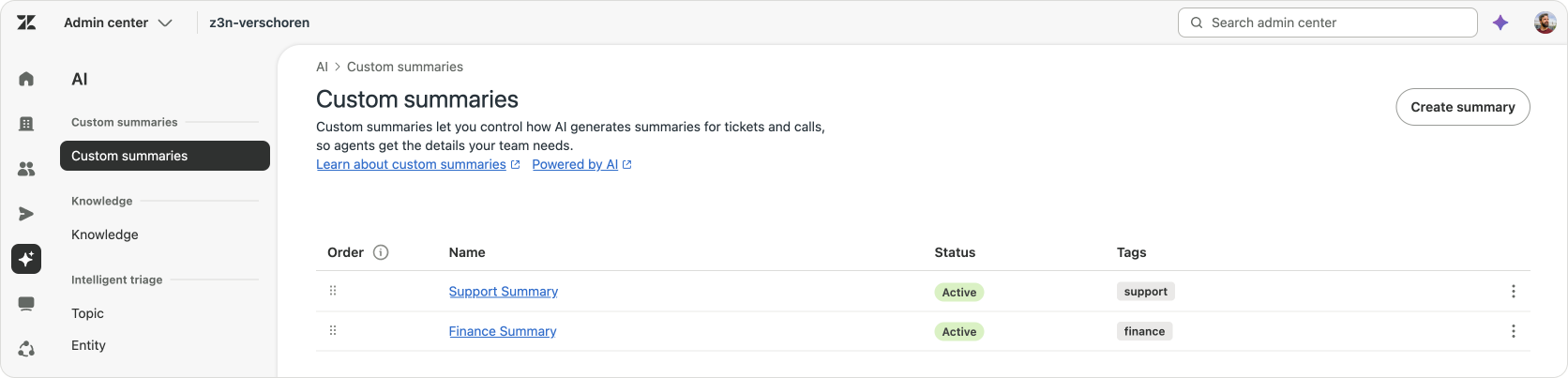
With the newly released custom summaries, you can now define the structure, tone and format you want summaries to provide. You still provide the instructions, but you no longer need a separate Custom Agent and Action Flow to get those custom summaries. The native experience now becomes flexible enough to cover a use case that previously justified a custom solution. Here too we see a similar move as we saw with the OCR capabilities earlier. A custom use case that required Custom Agents, now becomes a native piece of functionality that is integrated cleanly into the existing platform.
For me, those are good reasons to reconsider the custom version: the value of custom summaries lies in the team-specific information, not in maintaining another way to generate and display them. So I'd recommend moving your custom summarisation agents to these new custom summaries asap.
Setting up summaries
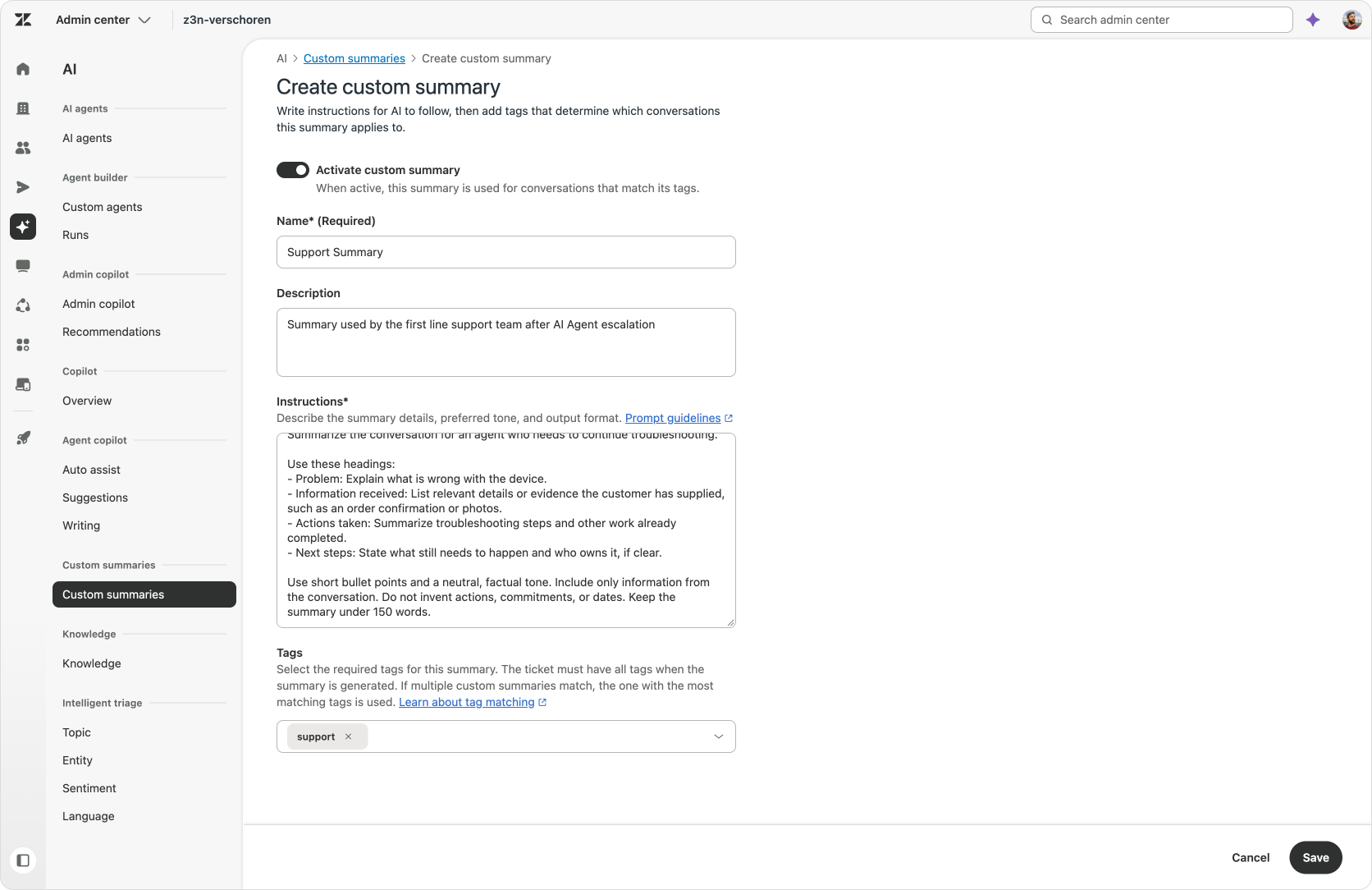
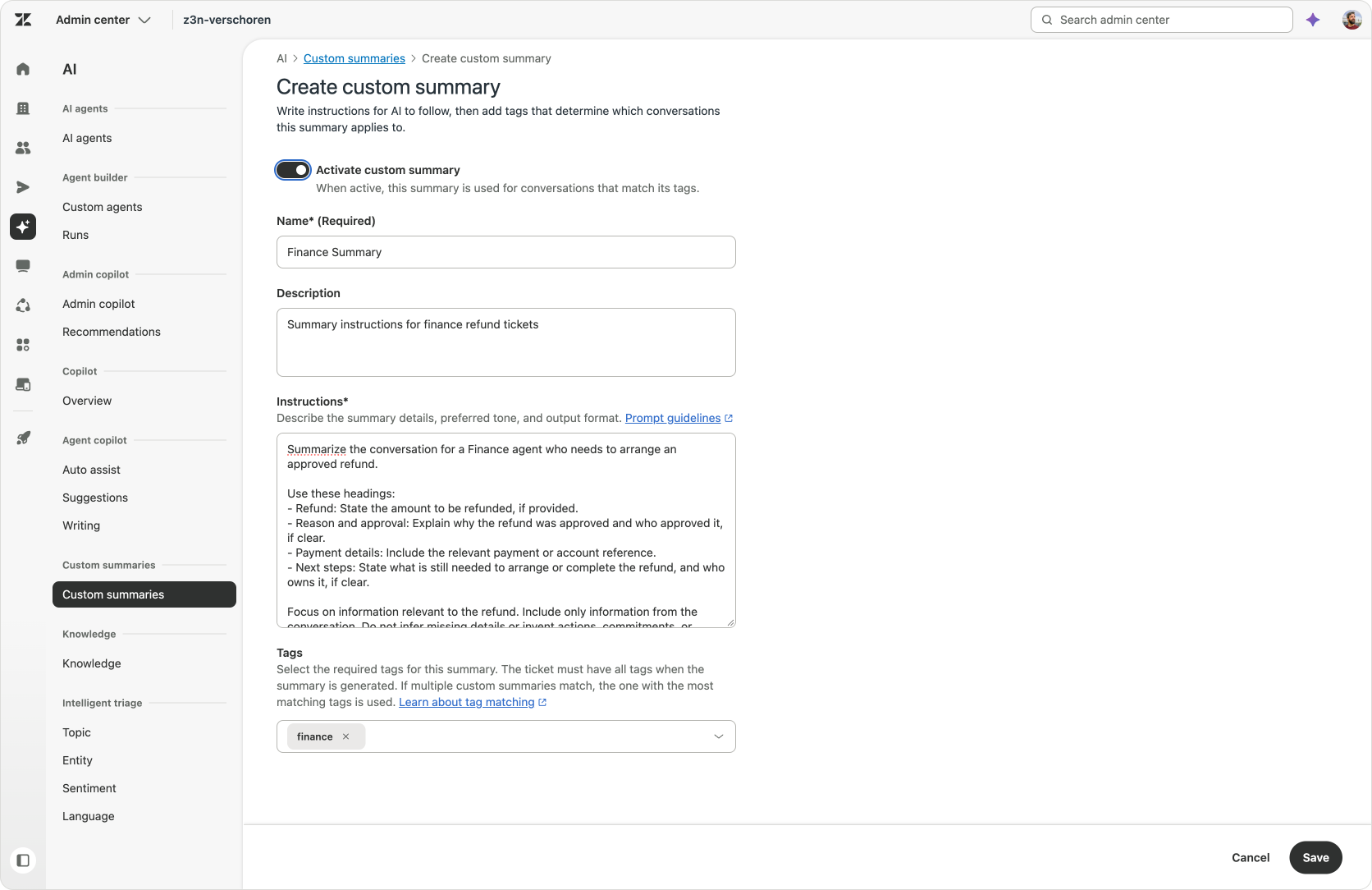
Setting up custom summaries starts with a name, description and instructions for the information, tone and structure you want. If you already built one with Custom Agents, you can probably copy over most, if not all, of your instructions.
You can then assign one or more tags to that configuration. When all of those tags match a ticket, Zendesk uses the matching instructions when it generates the summary, giving you a way to adapt the existing summaries to the specific teams handling the work.
You might already have a set of tags that match your needs, or you can define new tags for these summaries. To set the tags to my conversations, I chose to create a single Action Flow that adds tags to tickets based on specific group assignments. But you can adapt this method to tag tickets based on topics or forms. Once the tags are added, each time an agent generates a summary, the system uses the applicable custom summary instructions or, if none apply, the default format.
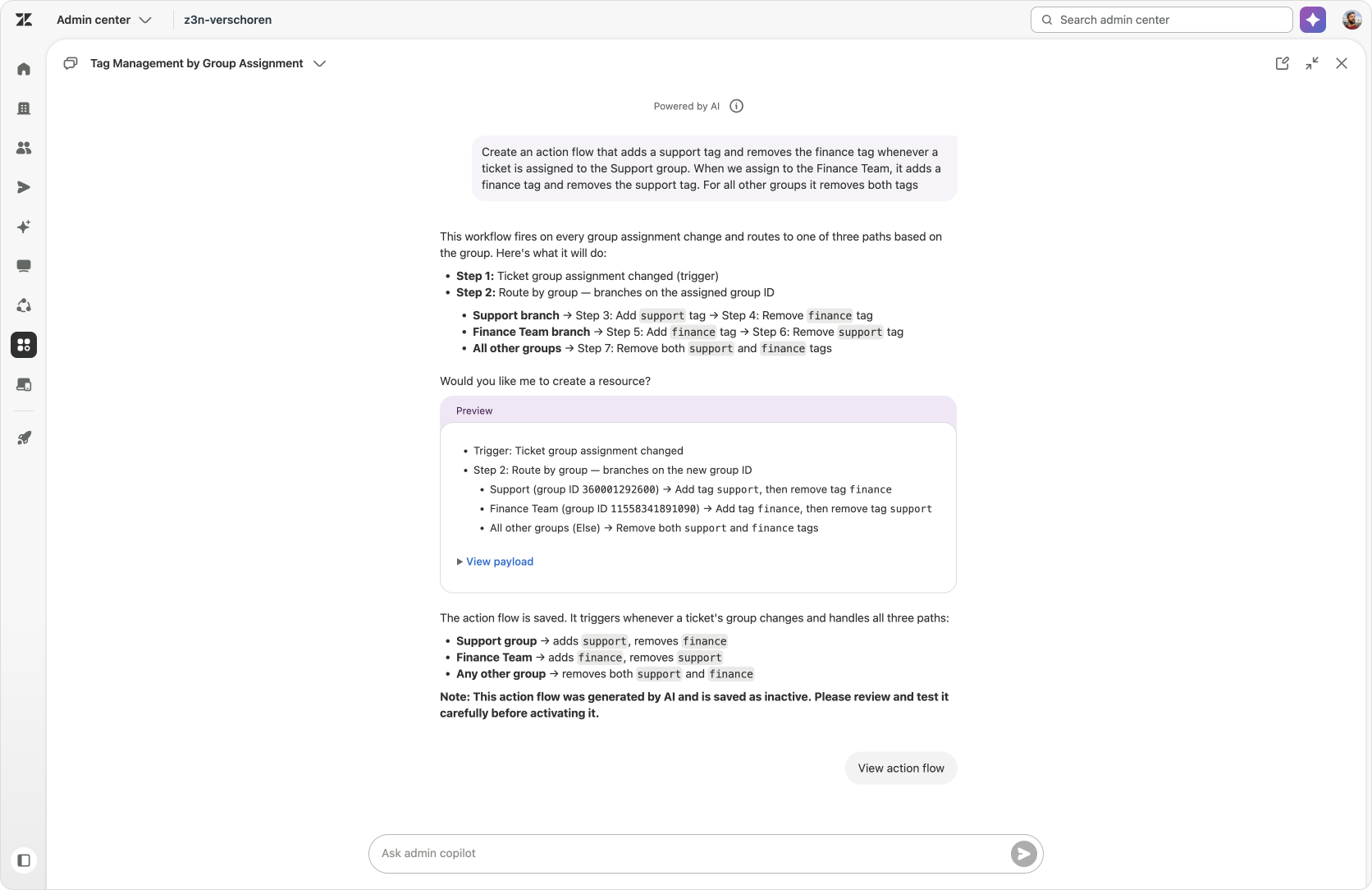
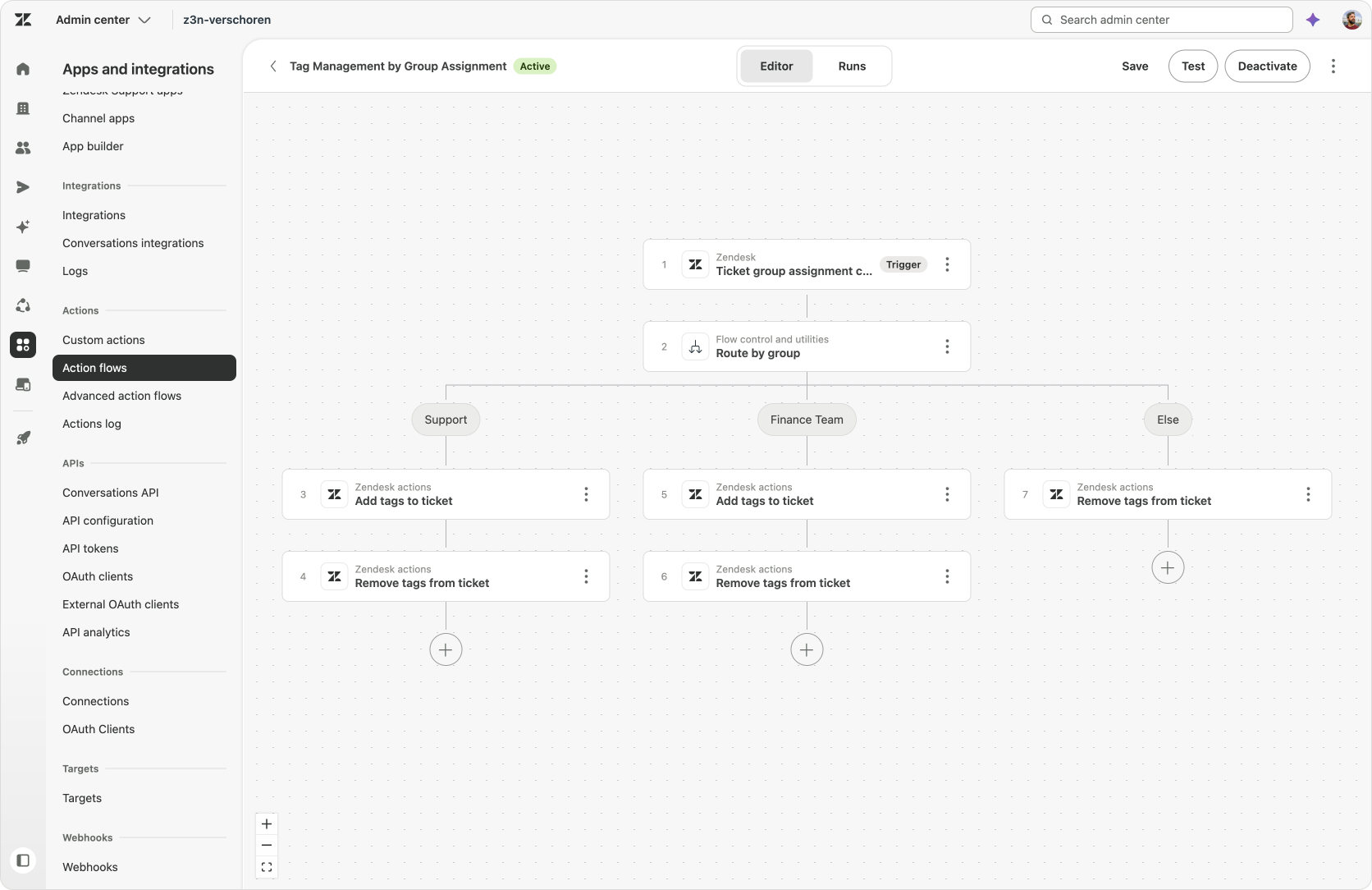
Using Admin Copilot to generate an Action Flow that sets the required tags
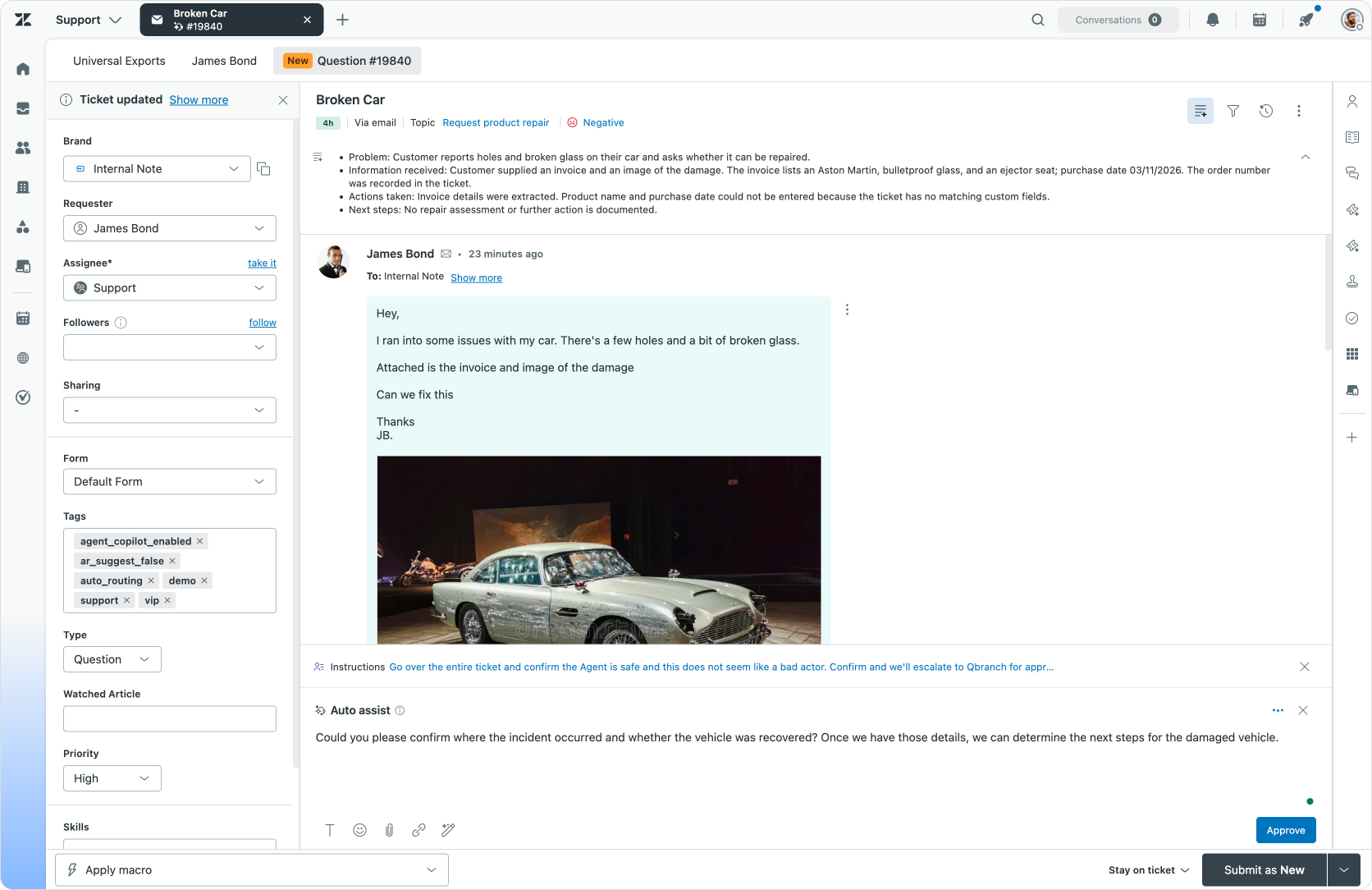
For my Support team, I created instructions around four elements: the problem, information received, actions taken and next steps. In this example, the summary should make it clear that the employee’s personal vehicle was damaged during business use, that the employee has already sent an invoice reference and a photograph, and what has happened so far.
Now, let's say the team has agreed to refund the employee’s cost following the reported damage during business use. The team collects the required refund information and passes the ticket to Finance.
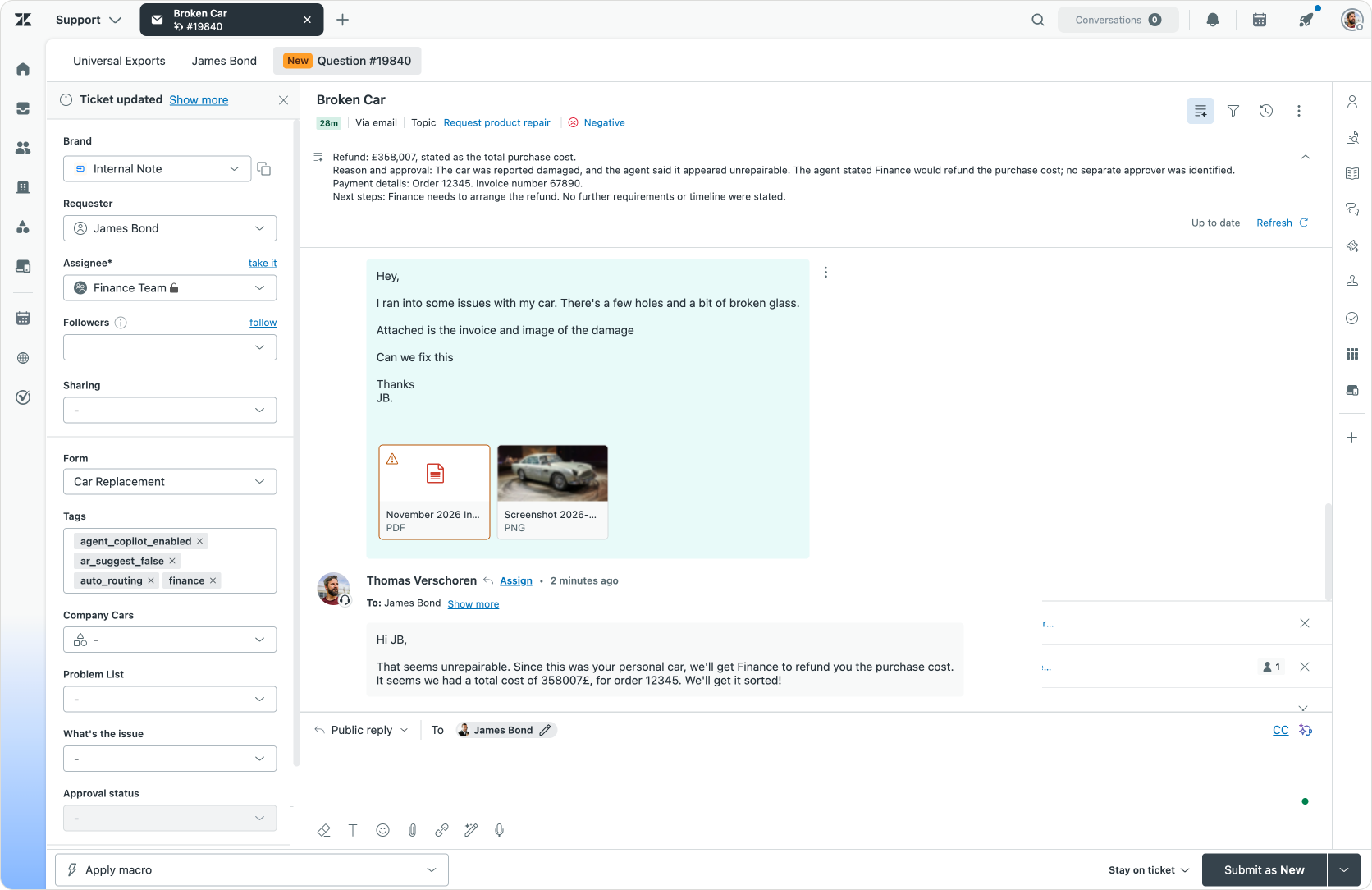
When the ticket is picked up by the Finance team, they want a different emphasis: They need the refund amount, the reason, the payment or account reference and anything still missing at a glance. A second summary definition can focus on those elements. The Action Flow tags tickets assigned to Finance, so when that team generates its summary it receives an overview of its part of the work rather than another recap designed for Support.
Action Flows
Assigning the ticket to your Finance team is one way to handle a refund request. Another option to involve Finance could be through a separate Side Conversation, while Support continues handling the employee’s request.
Instead of assigning the ticket to Finance, you want Support to retain ownership and interact with Finance through that side conversation. But the Finance team still needs a focused refund summary. But this time its destination is a comment in the side conversation, rather than the summary experience in Agent Workspace.
An Action Flow can bring that process together: retrieve the relevant ticket comments, summarise the information Finance needs, and pass the result to a Custom Action that creates the side conversation.
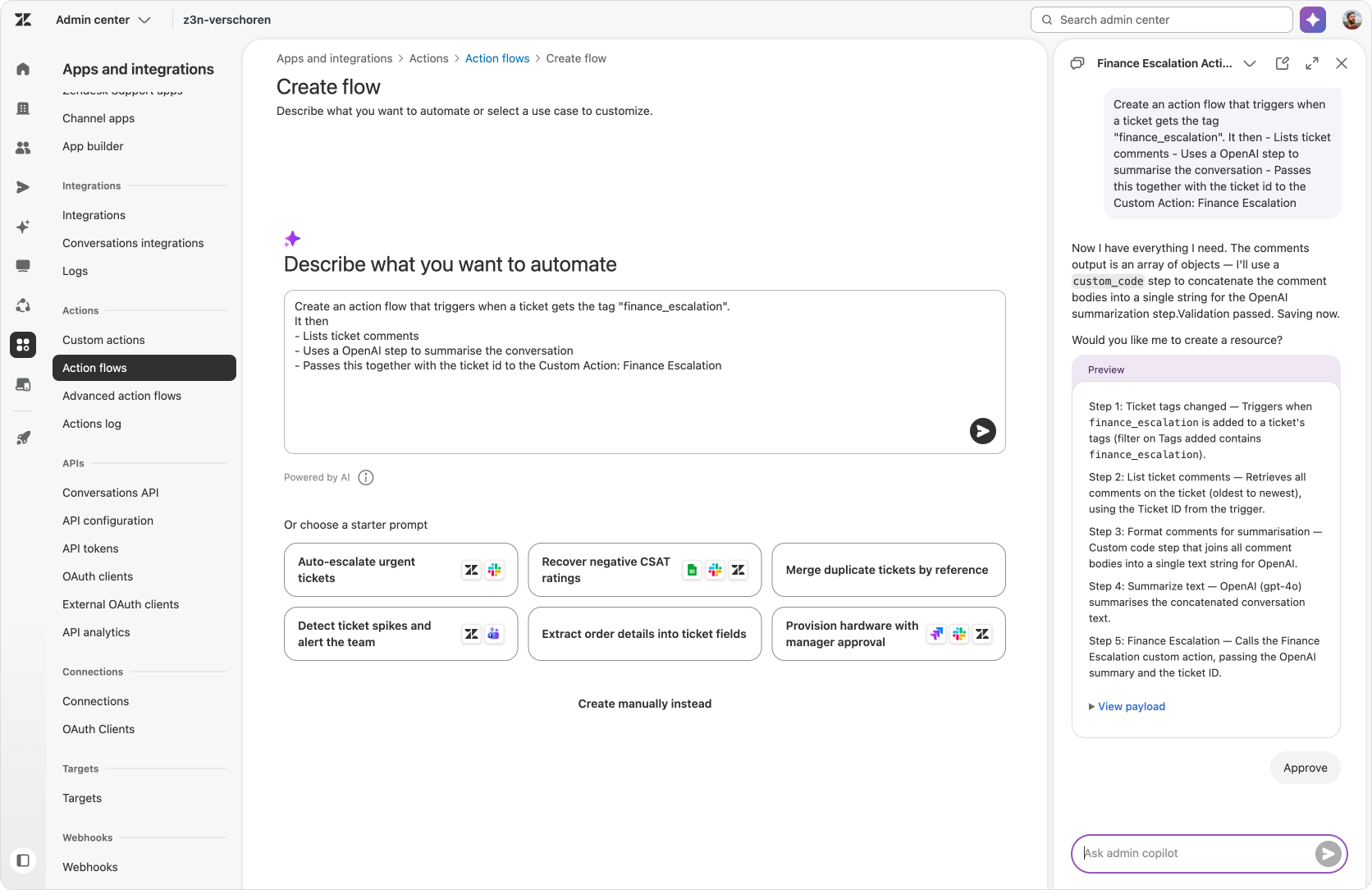
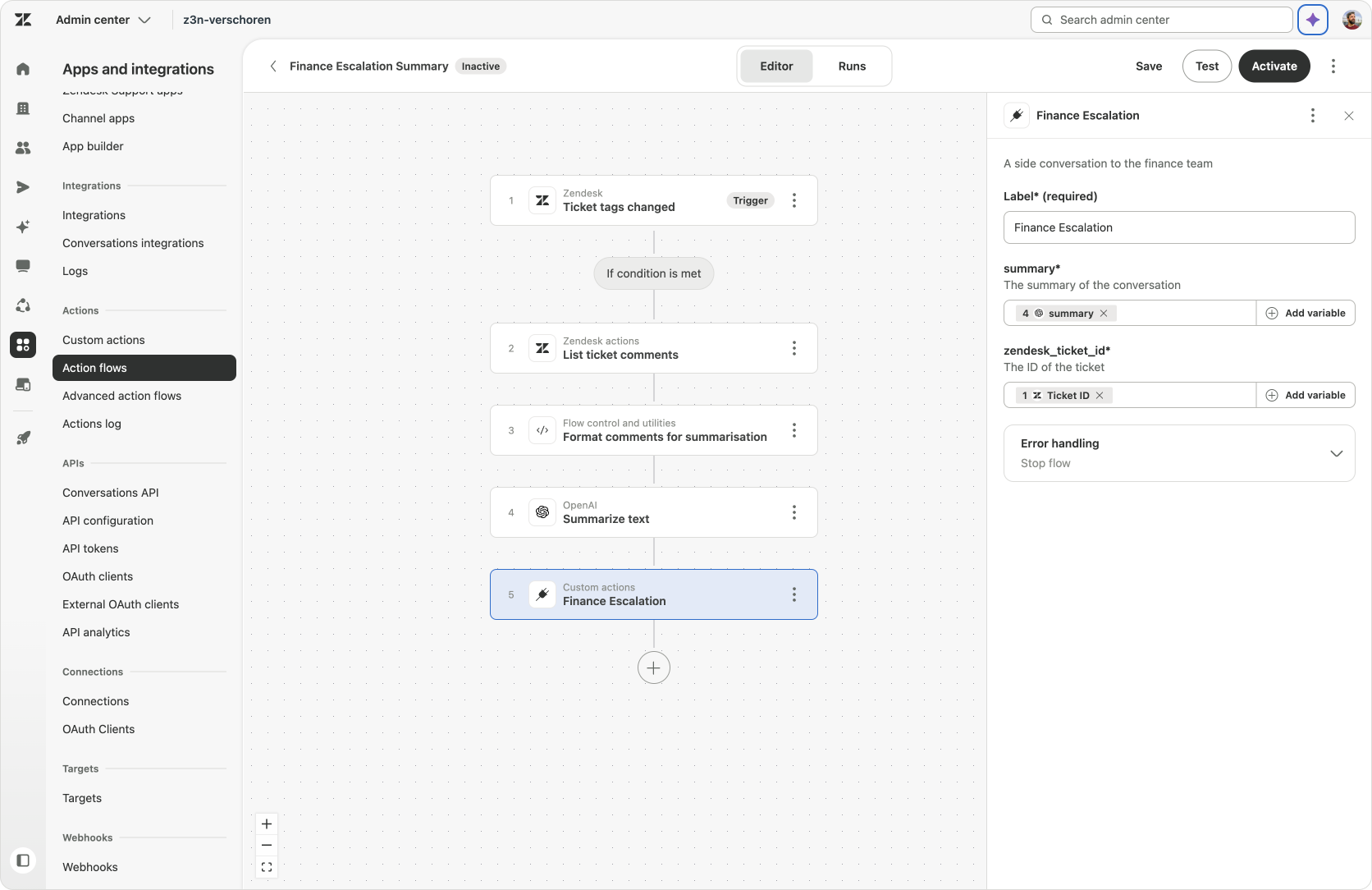
Creating our escalation flow via a Side Conversation with Admin Copilot
Zendesk Actions
The recently added List Ticket Comments step gives you a native way to retrieve the conversation thread. In our example, we pass those comments to an AI step, which has instructions to summarise the refund information for Finance.
Previously, this step would have required its own Custom Action to retrieve ticket comments via an API call to /api/v2/tickets/{{ticket.id}}/comments; but now you can select a new native Zendesk Action right within Action Flows that does just that.
Listing ticket comments is one example of Zendesk making more and more of its own capabilities available as native actions. Searching Custom Object records lets a flow retrieve records that match its criteria, such as an employee’s associated records or an organization’s active contracts, without a separate custom retrieval action. Task-related actions follow the same direction with adding tasks or tasks list now being available as native options. And as the platform grows, so will the amount of native capabilities within Action Flows.
Custom Actions
There is, however, no native step (yet) for Side Conversations. They still require a Custom Action that calls the Zendesk API. It is one of the native actions I would personally love to see added, but until then using the API lets you complete the process just the same.
When making calls to the Zendesk API from within the platform, there’s now less setup around that custom call. Before you needed to create a connection first that held an API token for your Zendesk instance. But from now on, Zendesk will create an OAuth connection automatically for Custom Actions that call its own API. This means you can configure the Side Conversation action against your own instance without separately setting up authentication for that API call.
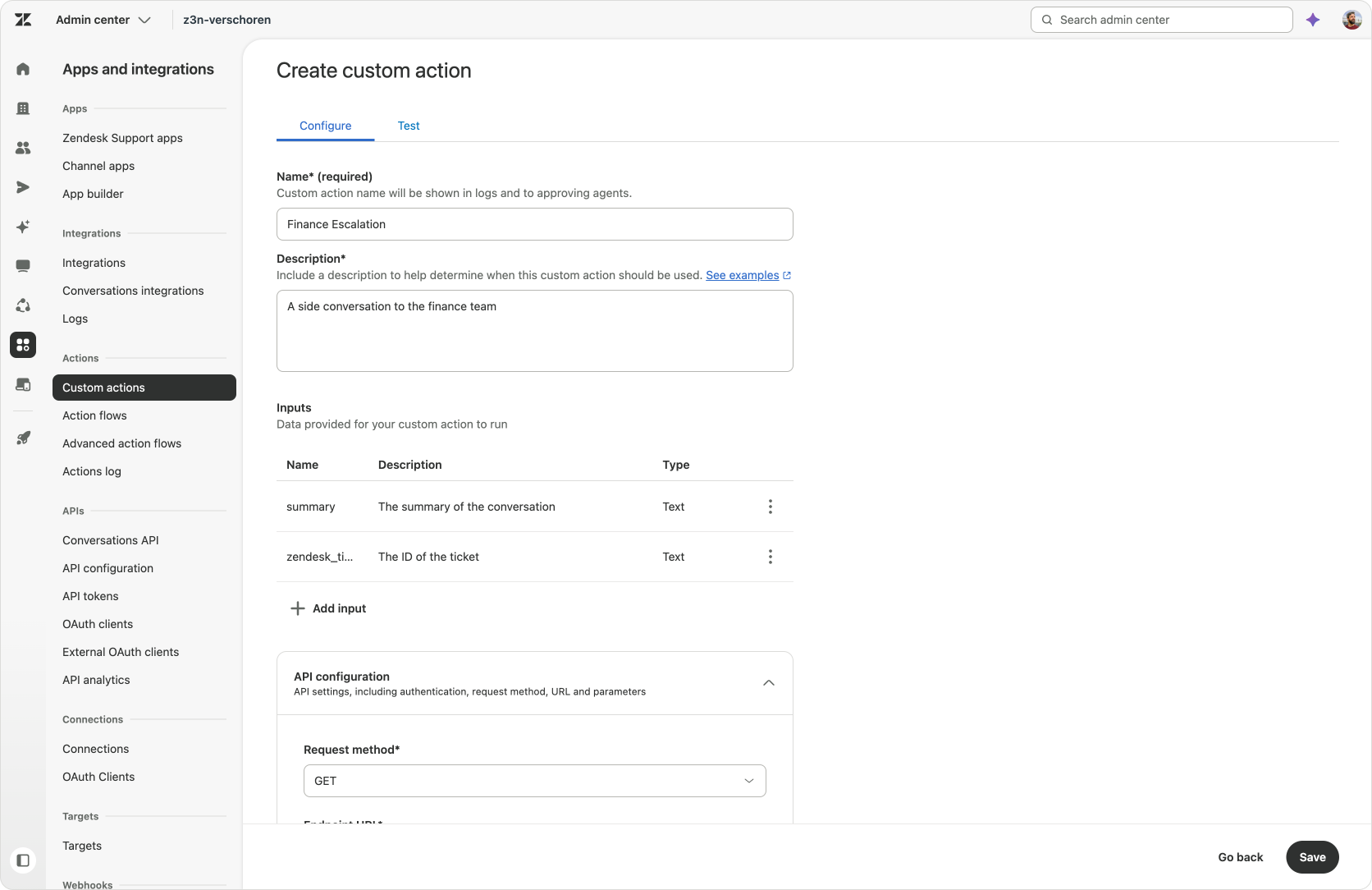
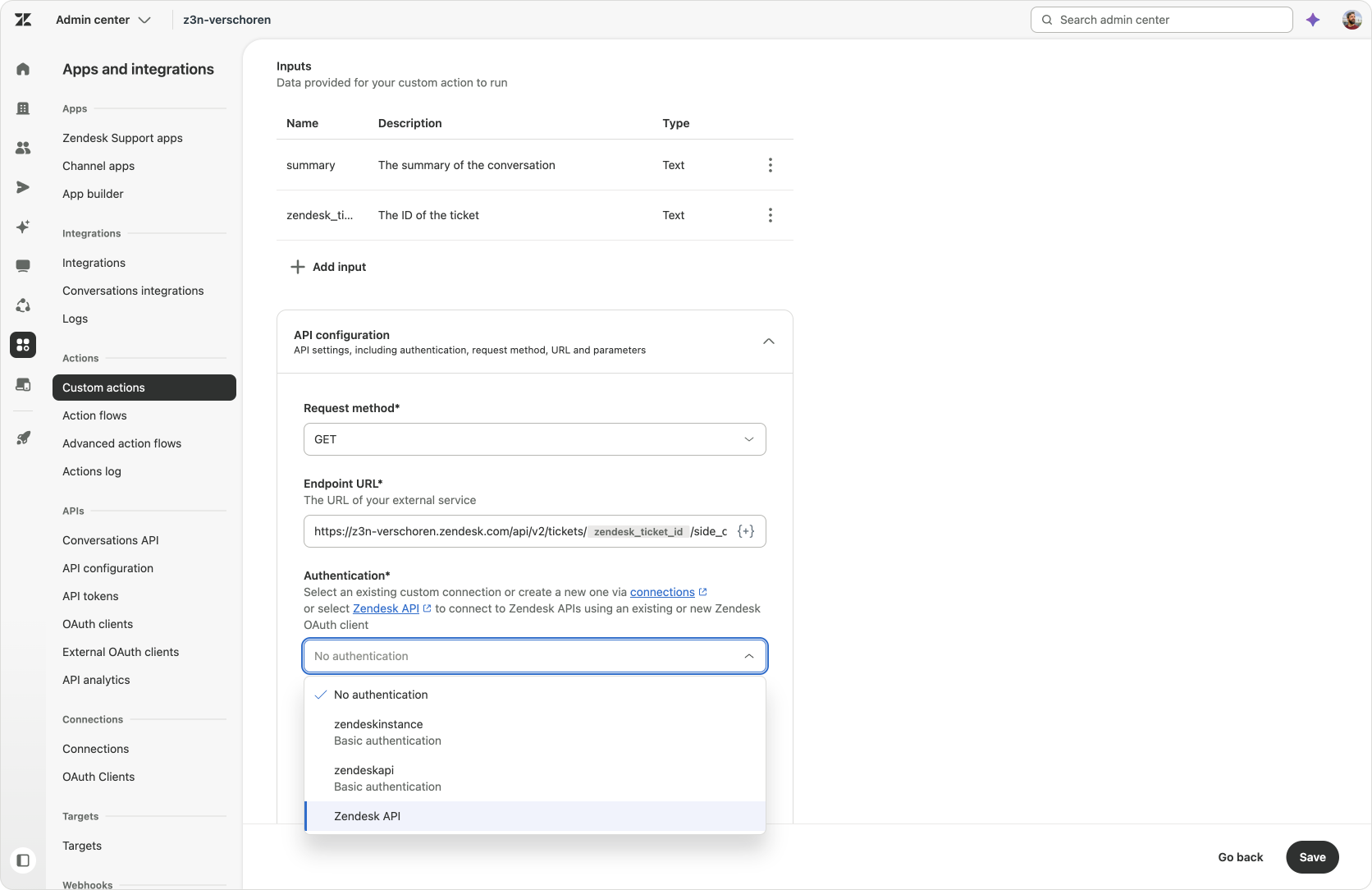
Creating a custom action now leverages built-in Zendesk authentication
Our Action Flow shows two improvements at once: Native List Ticket Comments replace a custom actions altogether, while managed OAuth makes the remaining Custom Actions easier to create.
Zendesk is retiring Support API tokens: new token creation was blocked on 27 October 2026, and remaining tokens are scheduled to be disabled on 30 April 2027.
That makes this a useful moment to review any Custom Actions that still depend on a token. Some calls may now have a native equivalent; for those that still need to remain custom, the managed Zendesk OAuth connection offers a way to remove that token dependency.
Existing actions are not automatically migrated by the availability of this connection. You still need to review their authentication, update the relevant configuration and test that each action behaves as expected. Managed OAuth makes that work easier, but it is a migration option rather than an automatic conversion of everything you have already built.
Just when I thought I was out, they pull me back in.
I like seeing the platform catch up with new ways customers have found to use it. And for me, that’s becoming an interesting part of the build-versus-buy conversation.
AI makes it easier than ever to build custom agents and integrations both within or on on top of the platform when the native product doesn’t quite do what you need. You can fill that gap now, without waiting for the native feature to appear. But AI also makes it easier for platforms to develop those capabilities natively. So the answer to “should we build this ourselves?” can change over time.
When a native feature appears that meets your needs, you can bring that part of the process back into the platform and let the platform owner take on its maintenance and ongoing development. The custom solution you built yourself still did its job: it solved a problem when you needed it to and helped you understand what the process required.
That doesn’t mean rebuilding everything whenever a new feature appears. You can make the switch one piece at a time, keep the logic that’s specific to your business, and spend less time maintaining capabilities that are now part of what you’ve already bought. That leaves more room to focus on the next thing you want to build.