
Introducing Admin Copilot. Keep your Zendesk on target.
Zendesk Admin Copilot turns admins from manual configuration hunters into strategic operators. It surfaces account-specific insights, recommends fixes, and helps execute changes with approval, closing the loop between data, AI, and action.
Introducing Admin Copilot. Keep your Zendesk on target.

On this page
Technical platforms accumulate complexity faster than they simplify it. Every new capability adds another page to navigate, another setting to locate, another rule to maintain. When something breaks, you open half a dozen tabs. You cross-reference logs. You hunt for the trigger that fired unexpectedly, the routing rule that stopped working, the automation that is quietly doing the wrong thing. You piece the picture together from fragments spread across different corners of the interface, and you do it hoping you recognise the pattern before the issue has an impact on your customer experience.
For Zendesk admins, that experience has been the default for years. And as Zendesk has grown more capable, it has also grown harder to operate. This is not a criticism of the platform or its Admin Center. Organising hundreds of settings and features in a logical structure is one challenge. Arranging them in a way that fits the workflow a specific team wants to deploy is another. Scaling that to work across every possible scenario is a third. Over time, as the complexity of a platform grows, so does the mental model an admin needs to hold in their head just to navigate it.
What if you did not have to click through five pages to configure a flow? What if you could describe the concept and have the system execute on it? What if the platform could explain why something happened? What if it told you what needed attention before you went looking?
A role that outgrew its tools
The Zendesk admin role was built around a particular set of responsibilities: configure the triggers, maintain the routing, keep the macros clean, and make sure the automations fire correctly. It was fundamentally a technical job. You needed to know where everything lived and how the pieces connected.
That role is no longer sufficient on its own. AI Agents are handling Tier 0 and Tier 1 volume. Agent Copilot is guiding human agents through complex interactions. Intelligent Triage allows for classifying and routing based on intent. Configuring those capabilities requires operational design: procedures written, triggers structured, routing logic mapped, escalation paths defined. More importantly, it also requires that design to evolve continuously as customer behaviour changes and new capabilities become available.
The admin who succeeds in this environment is not primarily someone who knows where every toggle lives. It is someone who understands the business well enough to know what good looks like: what resolution time to target, which intents should be handled automatically, where the handoff between AI and human agent should sit, and what a spike in reopens means for the configuration. The job is becoming less about building and more about architecting, less about maintenance and more about strategy.
The gap is that the tooling has not made that transition until now. Admins who wanted to move from reactive maintenance to proactive improvement still had to do it manually: pulling reports, cross-referencing configuration logs, trying to connect operational data to specific business rules buried somewhere in Admin Center. This takes time, and spending time looking for things to change is not the best way to make a change.
The result is that AI adoption stalls not at the front line but behind it. Copilot underperforms when procedures are poorly configured. AI Agents miss use cases that no one has defined. New features ship and go unused because no one had the capacity or trigger to implement them. And critically: the more volume AI handles, the faster the maintenance overhead grows. Every new automated interaction is a potential signal that something in the configuration needs tuning. The operational backbone determines how much value the front-line AI delivers.
Admin Copilot is currently in early access. This means the product is still in active development. Features and capabilities are subject to change.
You can learn more about the EAP via the link below.
Enter Admin Copilot
Admin Copilot is a proactive AI assistant built into Admin Center. It watches what is happening in your account, surfaces what matters, recommends what to change, and helps you make that change. All without going on a journey through the Admin Center interface.
To understand what makes Admin Copilot structurally different from a dashboard notification or a generic chatbot, it helps to understand where it sits within the Resolution Platform.
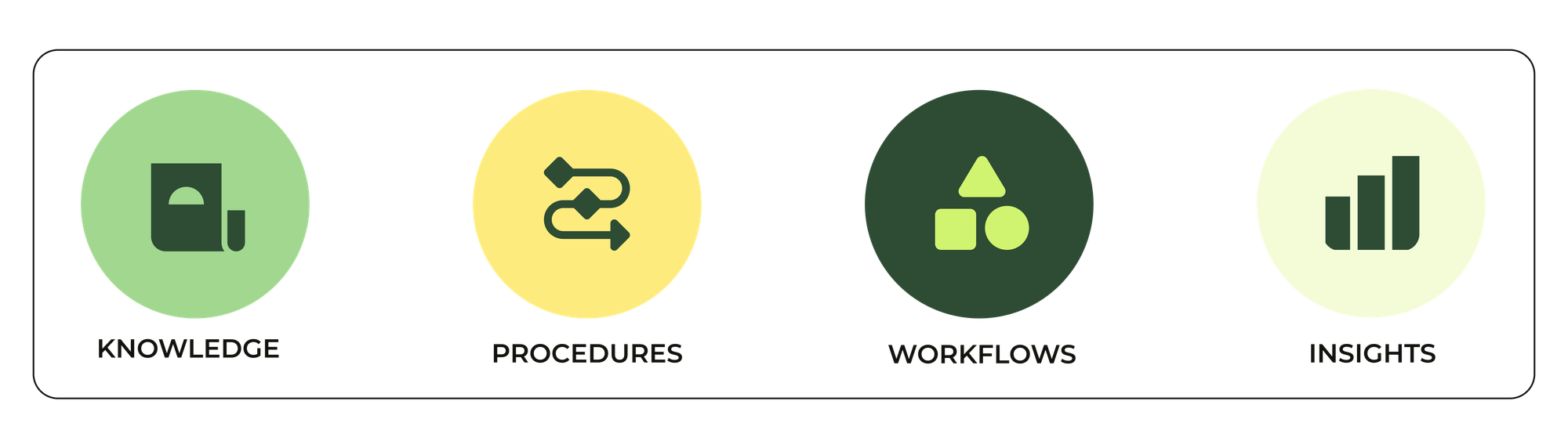
Zendesk's Resolution Platform is built on four pillars: knowledge, procedures, data, and insights. Knowledge fuels AI Agents and Agent Copilot with answers. Procedures define how resolutions happen step by step. Data provides the who, what, and when behind each interaction. Insights close the loop, measuring what happened, identifying what needs to improve, and feeding that back into the system. Admin Copilot is the operational expression of that fourth pillar. It is where the insights layer connects back to configuration.
That connection is what Zendesk calls the Resolution Learning Loop. Every customer interaction generates data. That data feeds Intelligent Triage, QA scoring, and analytics. Admin Copilot reads those signals continuously, ticket volumes, resolution trends, routing performance, auto-assist takeover rates, and identifies the gap between what is happening in your operation and what your configuration is designed to deliver. It then surfaces that gap as an insight, a recommendation, or a prompt, and gives you a direct path to act on it.
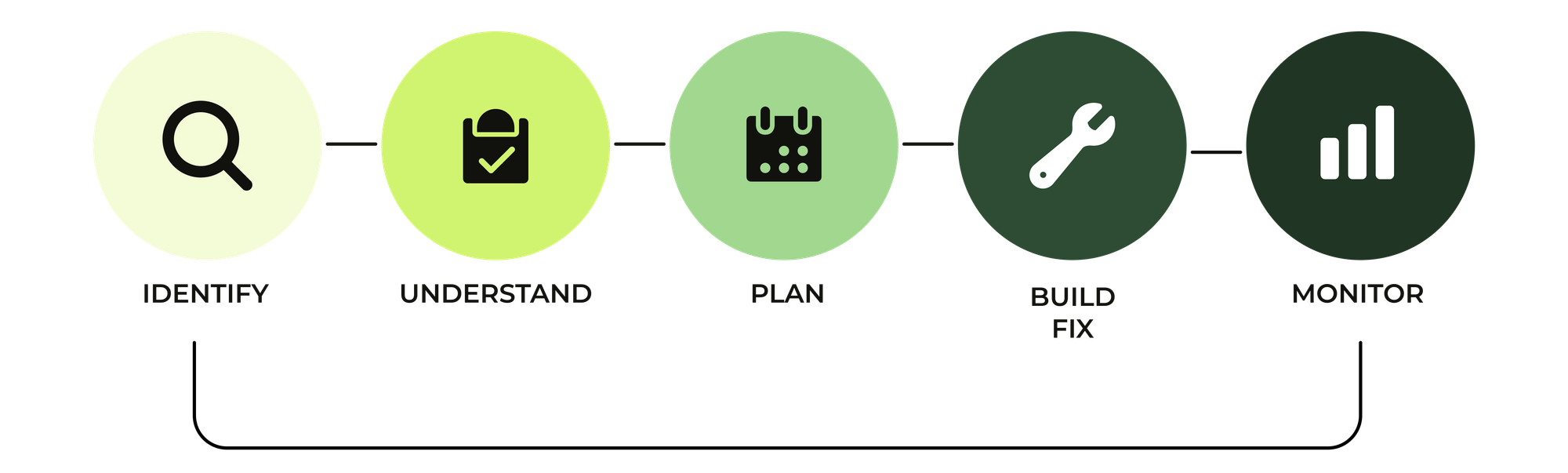
Until now, that improvement cycle was manual. Admins monitored AI performance, spotted gaps, and built fixes one by one. It worked, but it did not scale. Admin Copilot is what lets the operational layer keep pace with the front-line AI it supports.
That loop does not stop after you act. Changes impact how your environment runs. The following week, the weekly insights reflect whether the change moved the numbers, and new recommendations appear for the next wave of revisions. Over time, Admin Copilot builds an increasingly accurate picture of your operation: what is working, what is drifting, and where the next improvement opportunity sits.
This is a different relationship with the platform. Instead of the admin periodically auditing the configuration and hoping to catch problems before they escalate, the platform is doing the auditing continuously and bringing the findings to the admin. The admin's job shifts from searching to deciding. The time saved on investigation and configuration goes back to the admin.to plan, to align with company goals, to make informed decisions about what to change and why.
And critically: the admin stays in control. Admin Copilot does not make changes autonomously. Every proposal requires explicit approval before anything is applied.
The Weekly Digest
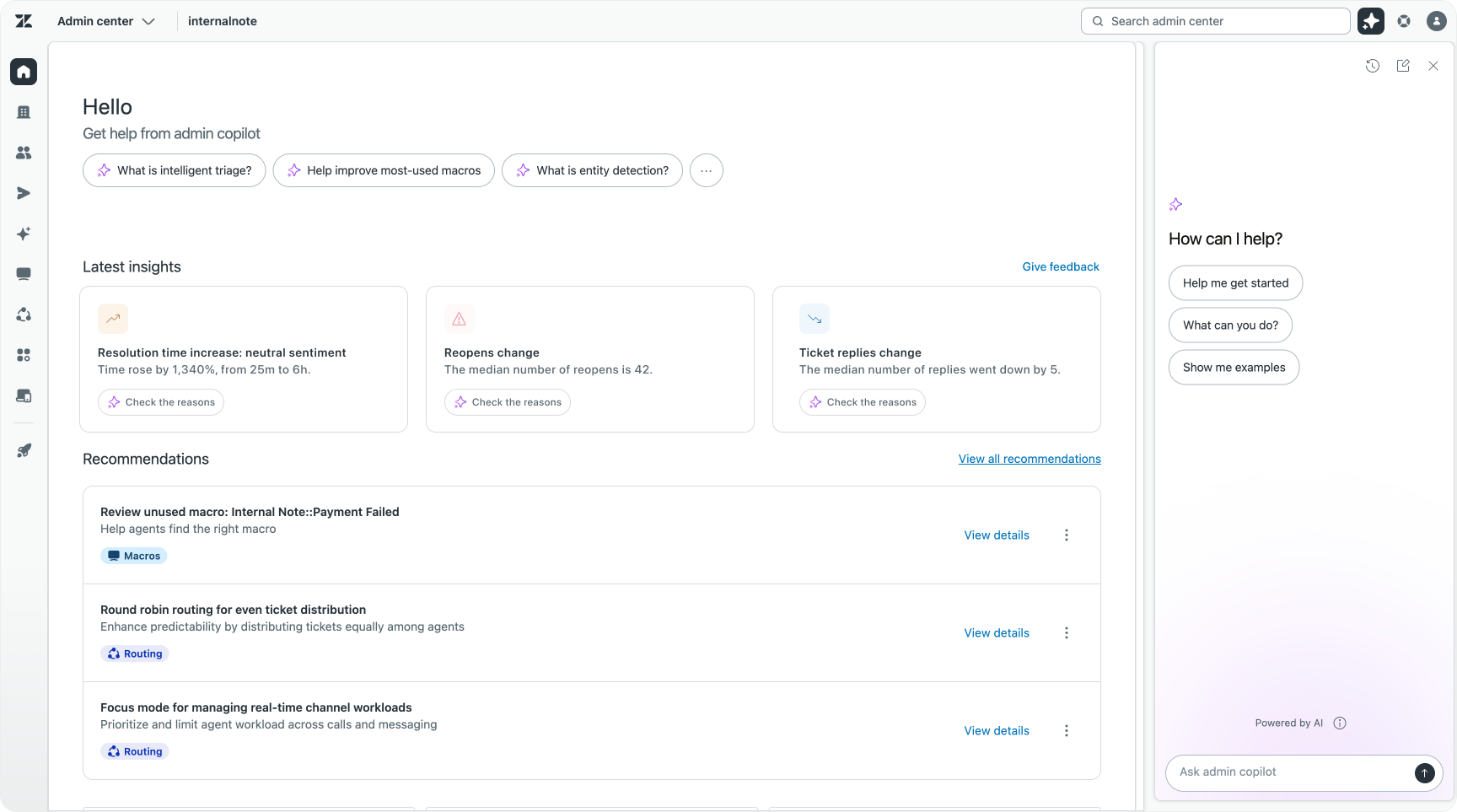
The Weekly Digest lands at the top of Admin Center at the start of each week. It is not a summary of activity for activity's sake. It surfaces what has materially changed in the past seven days: resolution times trending upward, a spike in ticket reopens, a drop in auto-assist performance, a volume increase in a specific intent category.
Each insight is grounded in your account's actual data, not platform-wide averages or generic benchmarks. The digest reflects your specific configuration, your specific traffic patterns, and your specific week.
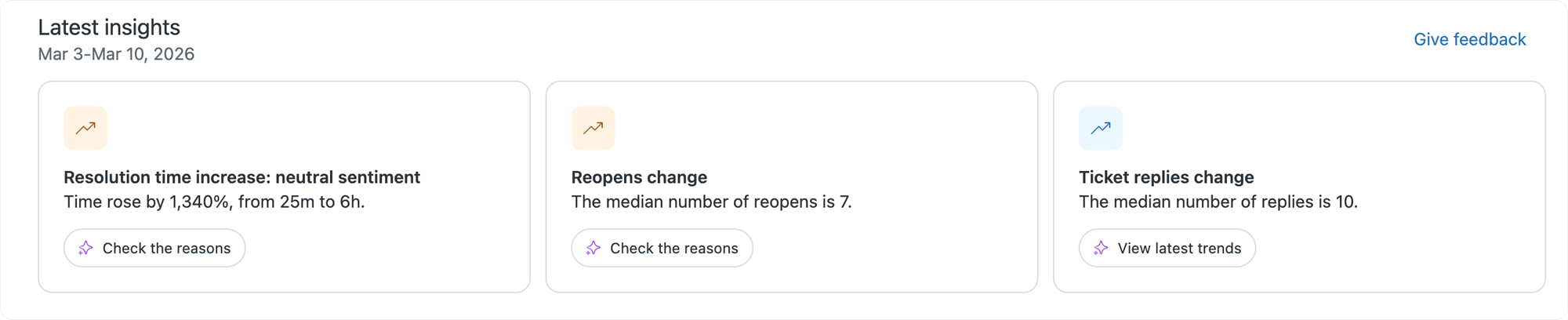
From any insight, you can move directly into the conversational assistant to investigate further. You can ask why resolution times increased, which triggers or routing rules might be contributing, and what the system recommends doing about it. The digest is the entry point. The assistant is where the investigation and action happen.
The digest also closes the loop on changes you have already made. If you updated a routing rule two weeks ago in response to an insight, this week's digest shows you whether it worked. That feedback is what turns individual configuration changes into a practice of continuous improvement rather than a series of disconnected interventions.
Recommendations
The Recommendations engine runs continuously in the background. It analyses your configuration against your operational data and surfaces prioritised suggestions for what to improve. These are not generic best-practice tips. They are specific to your account, grounded in what your data shows.
The coverage is broad. On the workflow side, it identifies stale triggers that have not fired in months, duplicate macros with overlapping logic, automations that are running but no longer serving a clear purpose. On the AI configuration side, it flags procedures with high agent takeover rates, intent categories that are receiving significant volume but have no trigger or autoreply configured, auto-assist setups where a tag configuration is blocking automation from activating. On the routing side, it surfaces recommendations for capacity rules, queue logic, and omnichannel routing settings that could be better aligned with how your team actually operates.
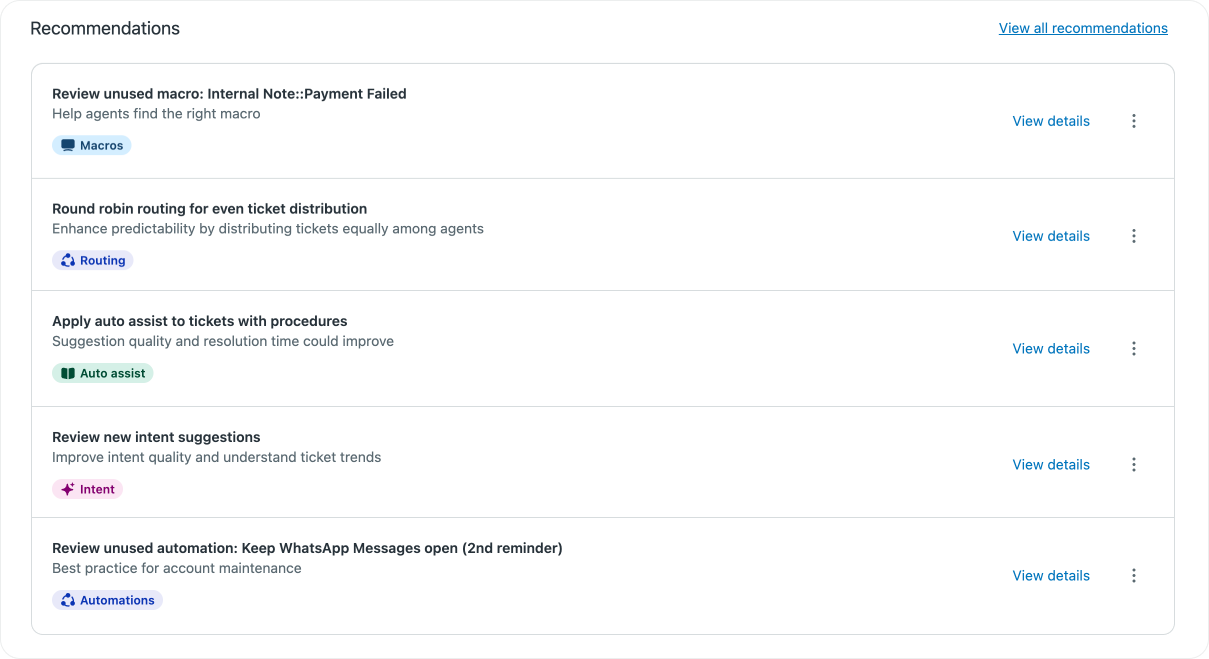
Each recommendation includes the reasoning behind it: what the data showed, what action is proposed, and what outcome is expected if you take it. You can implement the change directly from the conversational assistant with a single approval, or dismiss it and provide feedback that makes future recommendations more relevant.
This is also where new feature adoption becomes meaningfully easier. When Zendesk ships a new capability, Admin Copilot can surface it as a recommendation at the moment it becomes relevant to your specific account. You do not need to track every release note or schedule time to evaluate whether a new feature applies to you. The system brings it to you when the conditions in your account make it worth considering.
If you want to know more, you can dive into the Conversational Assistant to explore the new feature more deeply.
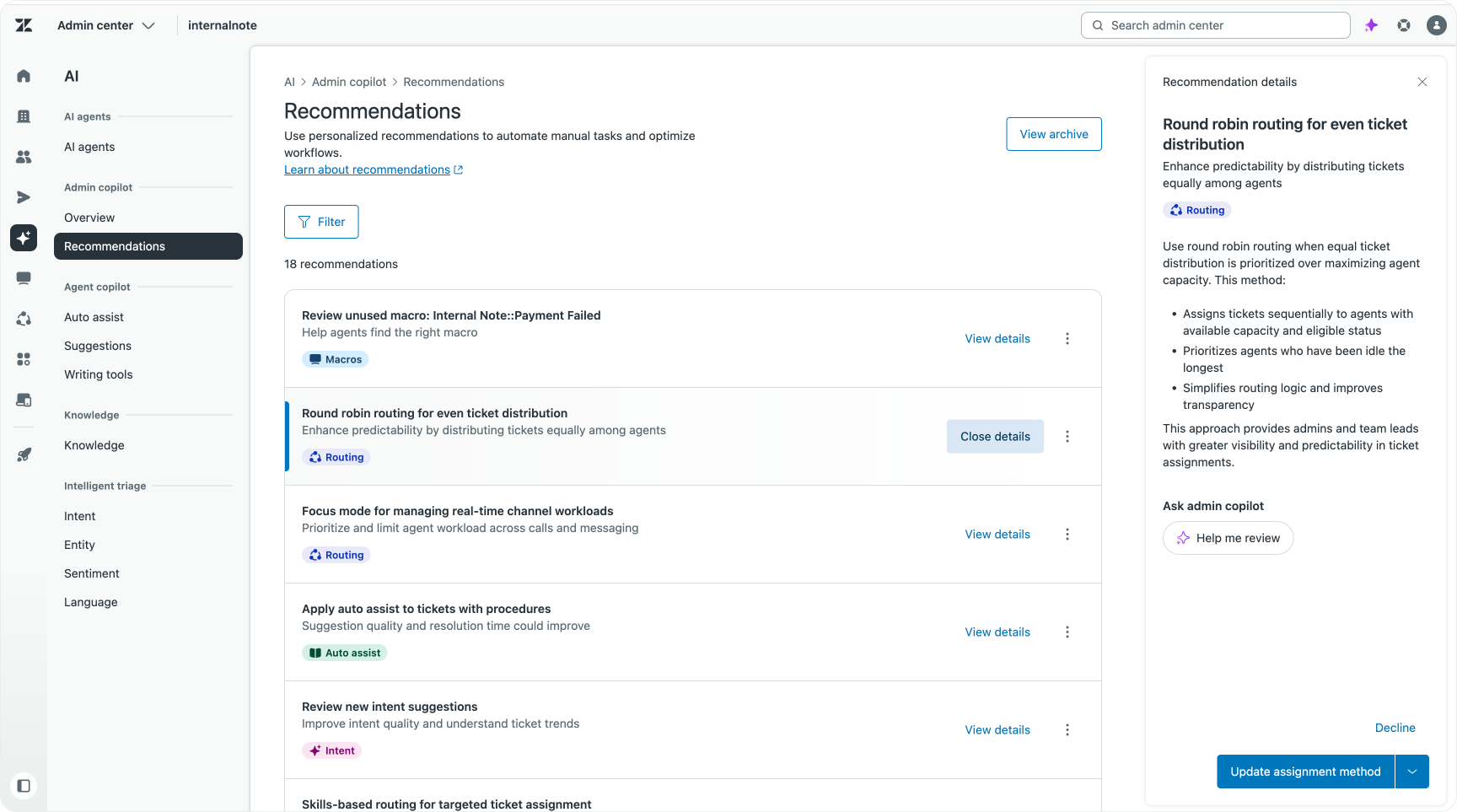
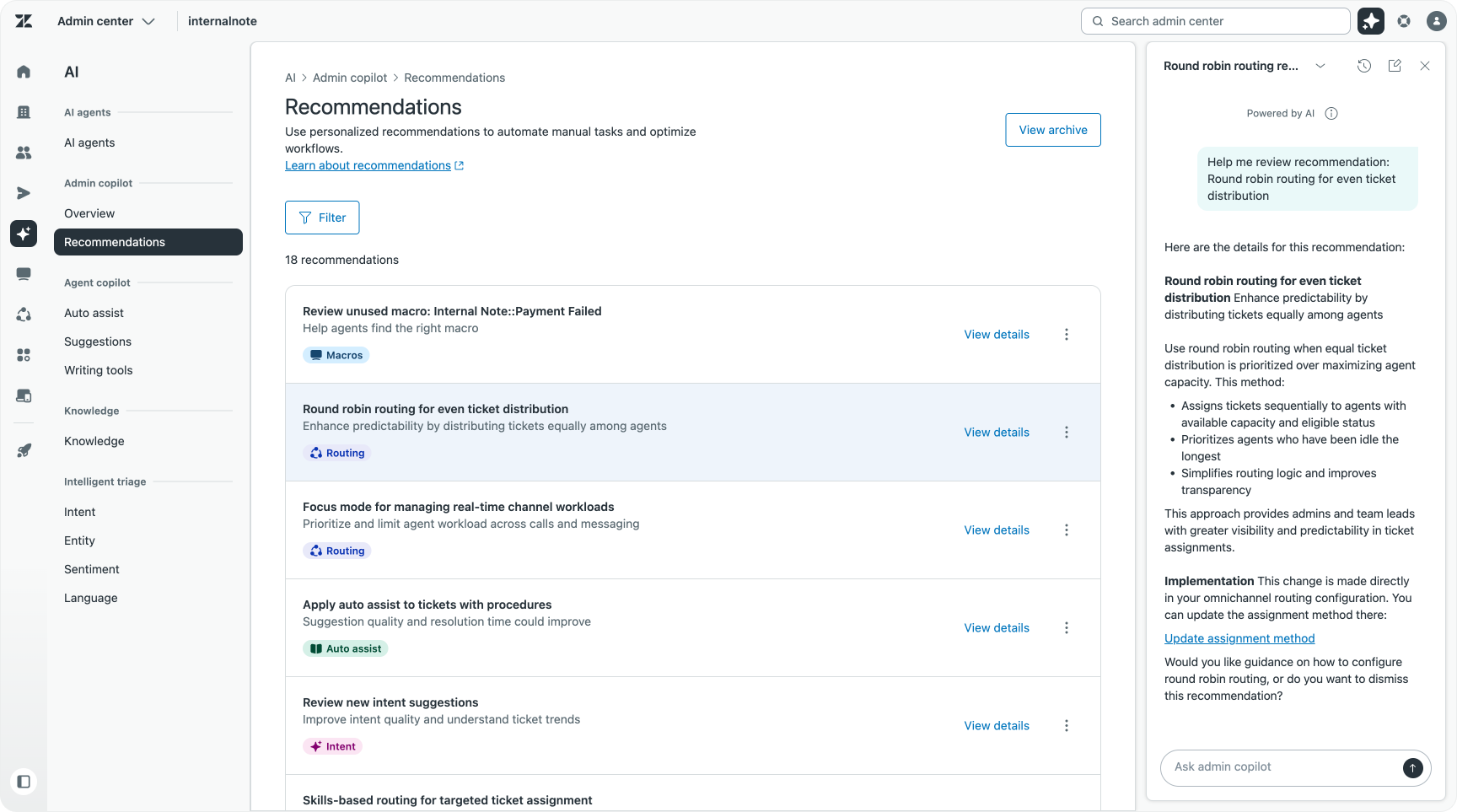
Recommendations appear in two places: on the home page of Admin Center for reviewing them in sequence, and contextual banners on specific Admin Center pages. Visit the Triggers page and relevant trigger recommendations appear inline. Visit the macros and you see macro-specific suggestions. The placement means improvements surface where the work is already happening.

As Zendesk expands its recommendation types, new suggestions will continue to appear. Currently supported areas include task automation based on Intelligent Triage signals, workflow management for unused or redundant business rules, auto-assist configuration guidance, AI-generated procedure drafts drawn from your top ticket intents, and omnichannel routing recommendations for capacity rules and queue logic.
The Conversational Assistant
Both the Weekly Digest and the recommendations are two core elements of Admin Copilot. They surface what’s happening now, and give insight into what should happen next.
But when most people hear the words Admin Copilot, they immediately think of the third element of the feature: the conversational assistant.
This assistant is available from any page in the Admin Center. It is the execution layer where investigation turns into action.
You can ask it direct questions about your setup. You can describe a problem in plain language and ask it to identify the cause. You can instruct it to create a new trigger, update a routing rule, restructure a macro, modify an SLA policy, and it will generate a detailed proposal for your review before applying any change.
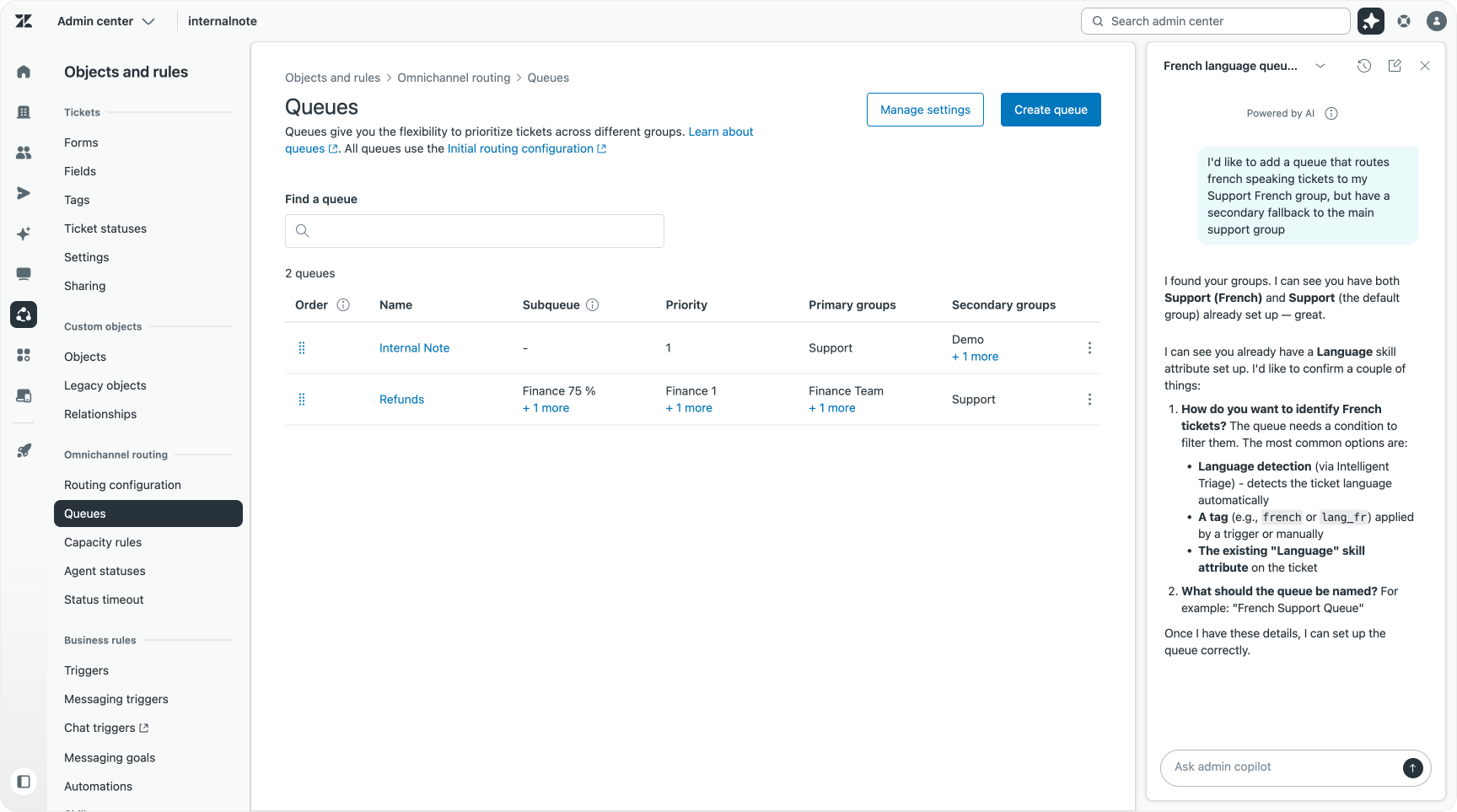
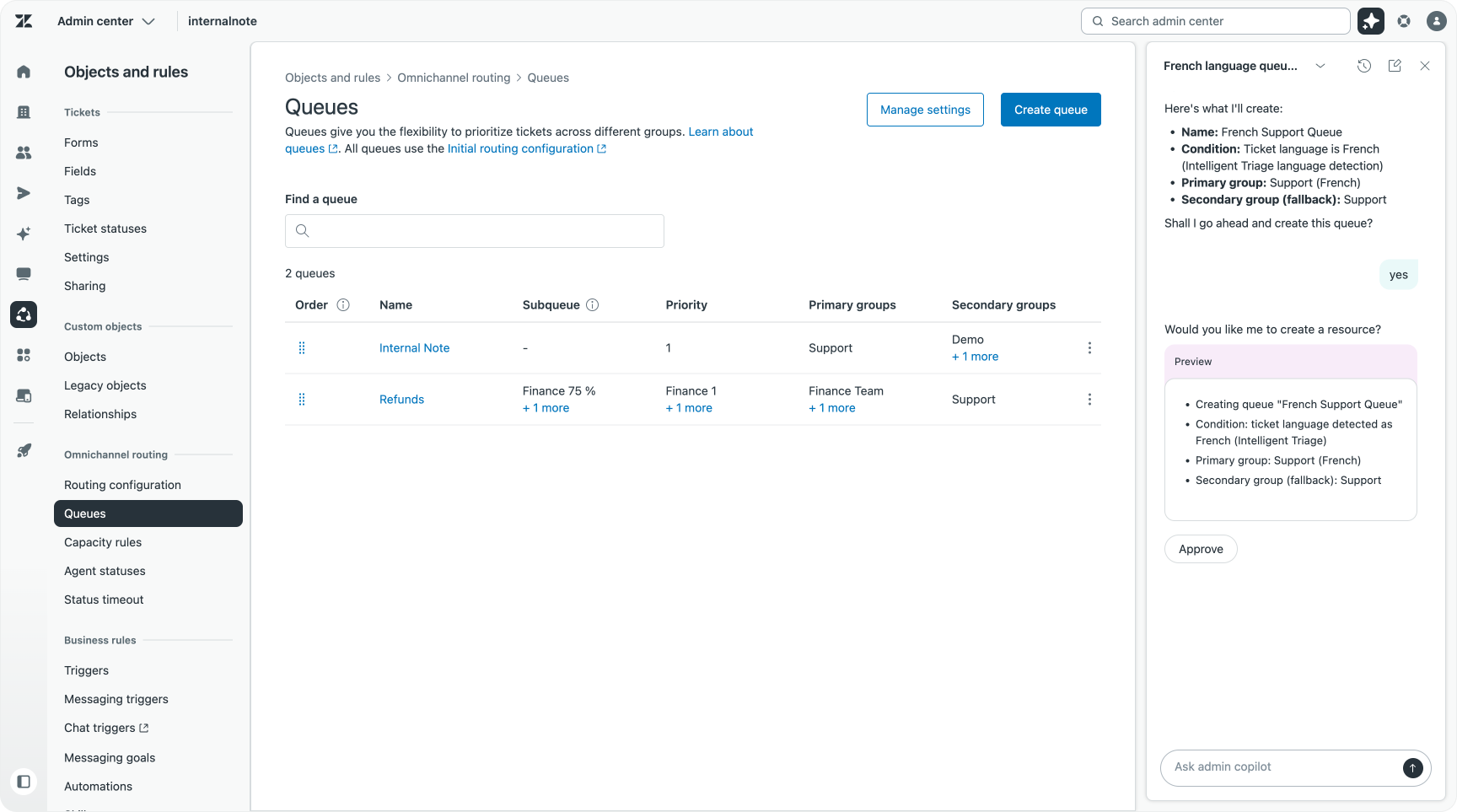
The assistant has read and write access across the full set of objects an admin interacts with: triggers, automations, macros, users, groups, organisations, ticket fields, ticket forms, brands, user fields, webhooks, custom objects, views, workspaces, custom statuses, skills, and SLA policies. Configuration tasks that previously required navigating through multiple Admin Center sections can be handled in a single conversation.
The approval model is consistent throughout. Every write operation generates a detailed preview first. You see exactly what the assistant intends to do before it does anything. You approve it. Only then does it execute. Changes appear in your audit log under your name, because you authorised them. The assistant acts on your behalf, under your direction.
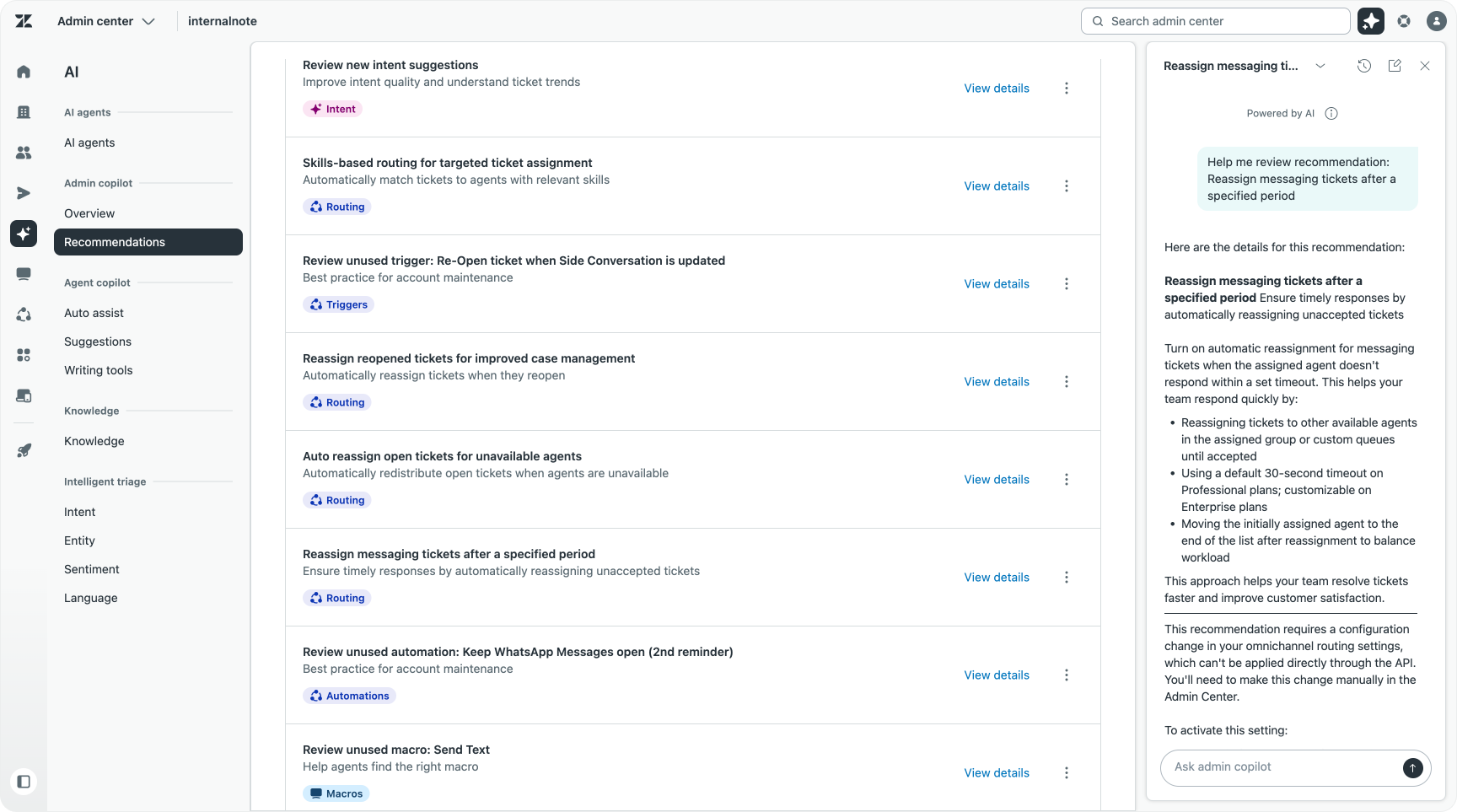
The conversational assistant also picks up context from where you are in Admin Center. If you clicked into a recommendation, the assistant already knows what that recommendation contains. If you came from a weekly digest insight, the relevant data is already in context. You do not need to re-explain the situation. The system connects the dots between what it surfaced and what you are now trying to do about it.
Changing the right things, not just changing things
A system that continuously surfaces recommendations creates a real risk: the admin becomes a recommendation-processing machine rather than a strategic decision-maker. You accept what is suggested, week after week, and optimise tactically without ever stepping back to ask whether the direction is right.
Admin Copilot is built to be directed, not followed blindly. Every recommendation can be dismissed. Every proposed change requires your approval. But the more important discipline is upstream of that: knowing what your operation is trying to achieve before you start acting on what the system surfaces.
Admin Copilot gives you the data and the execution capability. The strategic layer, understanding what the business needs, what good looks like for your customers, and which changes move the metrics that matter, stays with the admin. That is the part that cannot be automated. It is also the part that the time savings from Admin Copilot are designed to protect.
What this looks like in practice
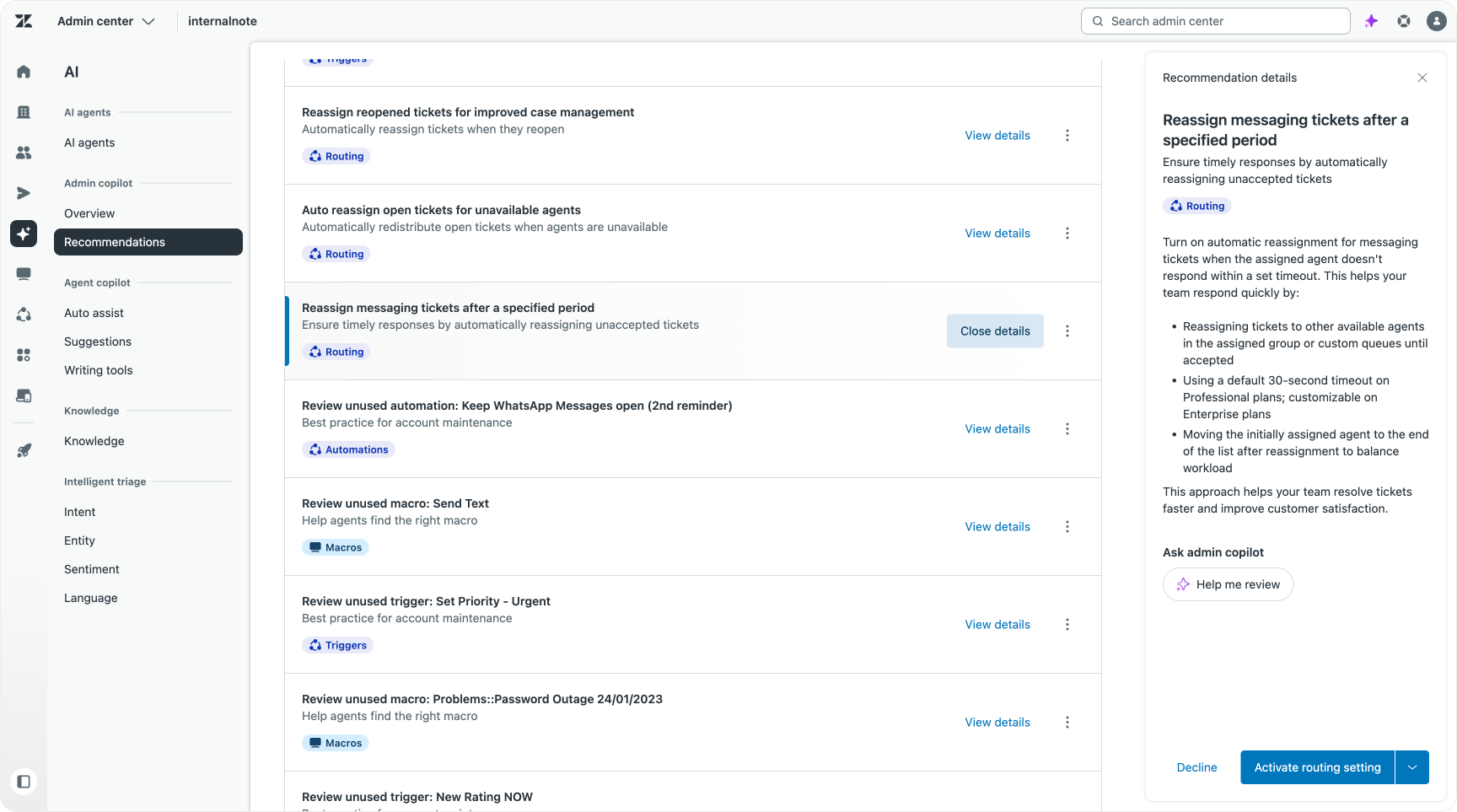
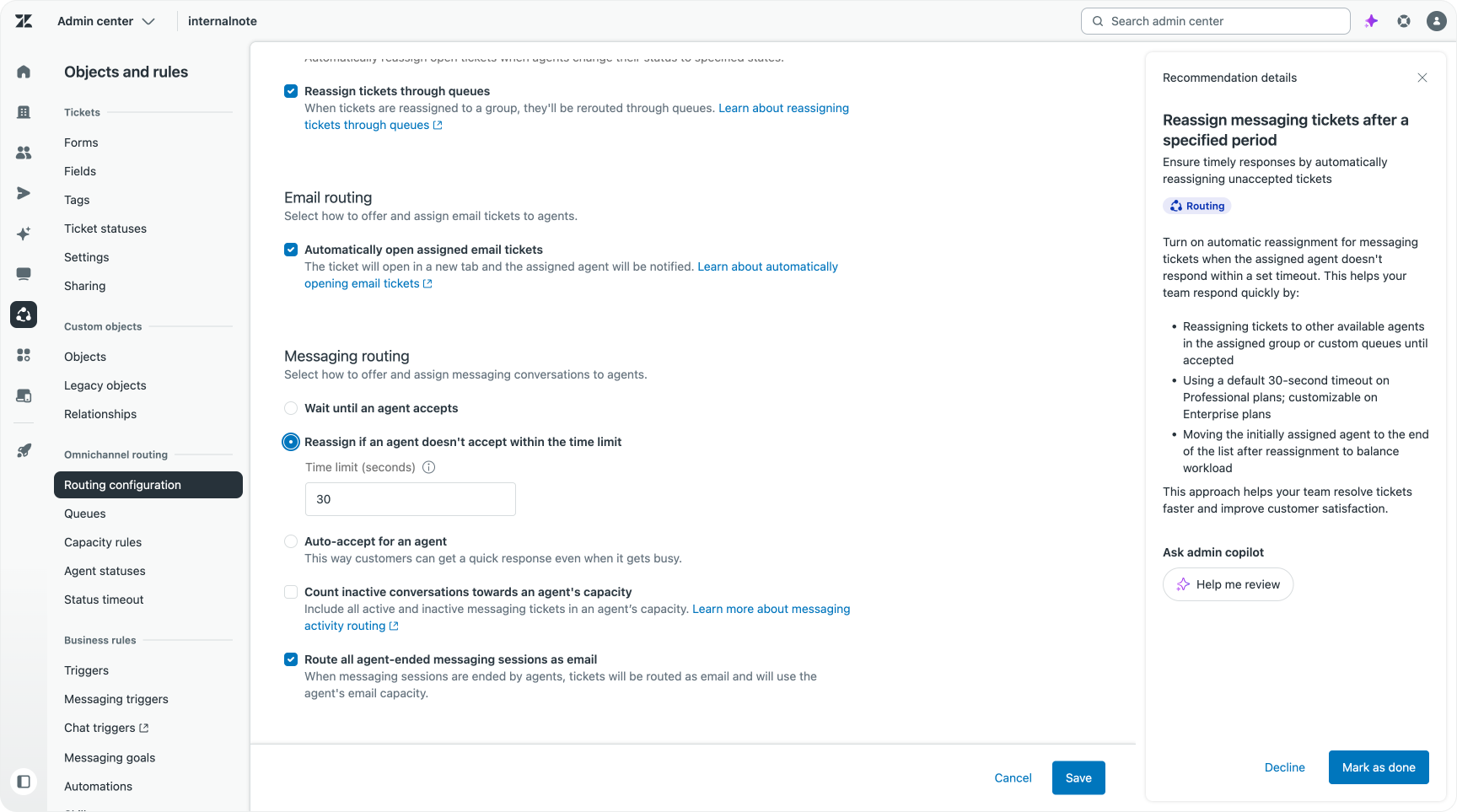
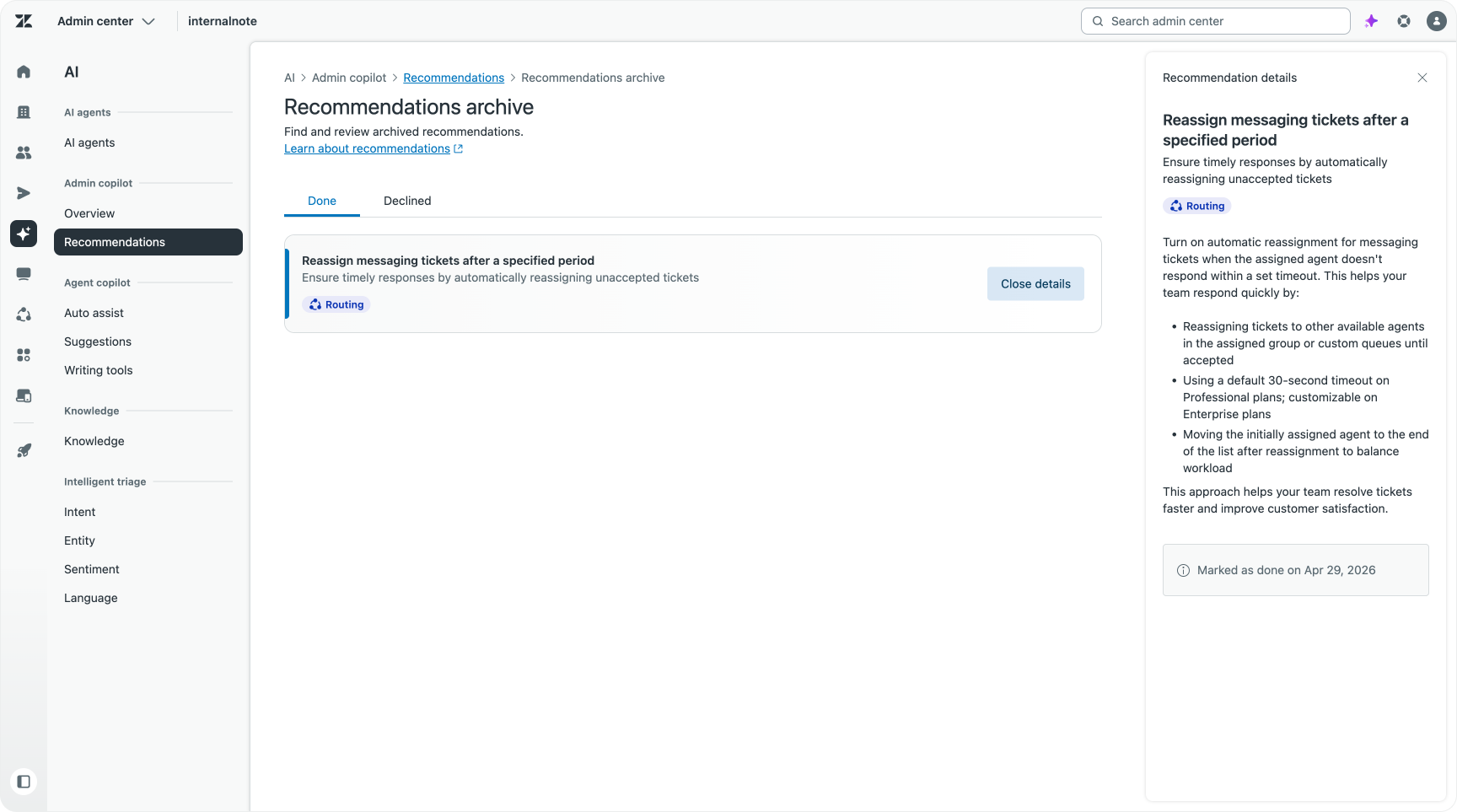
You get a recommendation to enable "Reassign messaging tickets after a specified period". The recommendation explains what the benefits are, and allows you to dive into the feature via the assistant. You can explore the feature and then you can decide to accept or decline the recommendations. Accepting the recommendation opens the right Admin Center section, where you can then enable it.
The second type of recommendations are equally common. Triggers, macros, and automations accumulate over time. Rules get added for specific scenarios that no longer exist. Macros get duplicated by different team members. Automations keep firing against conditions that have long since changed.
Admin Copilot tracks when business rules were last used and surfaces the ones that have not fired in months. You click through, review the rule, and delete it if it no longer serves a purpose. The result is a leaner configuration: fewer elements to reason about, lower risk when making future changes, and a clearer picture of what is actually doing work in your instance.
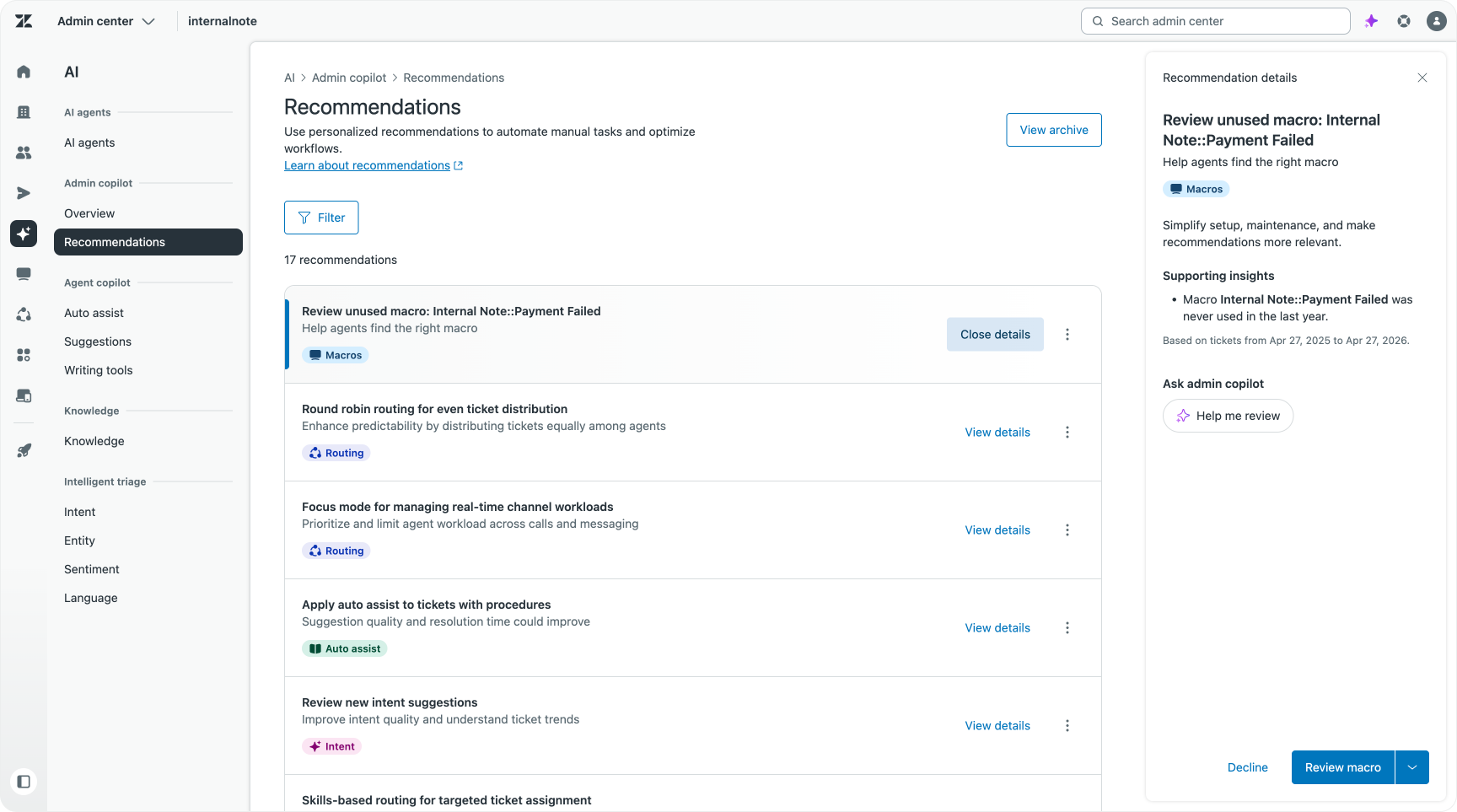
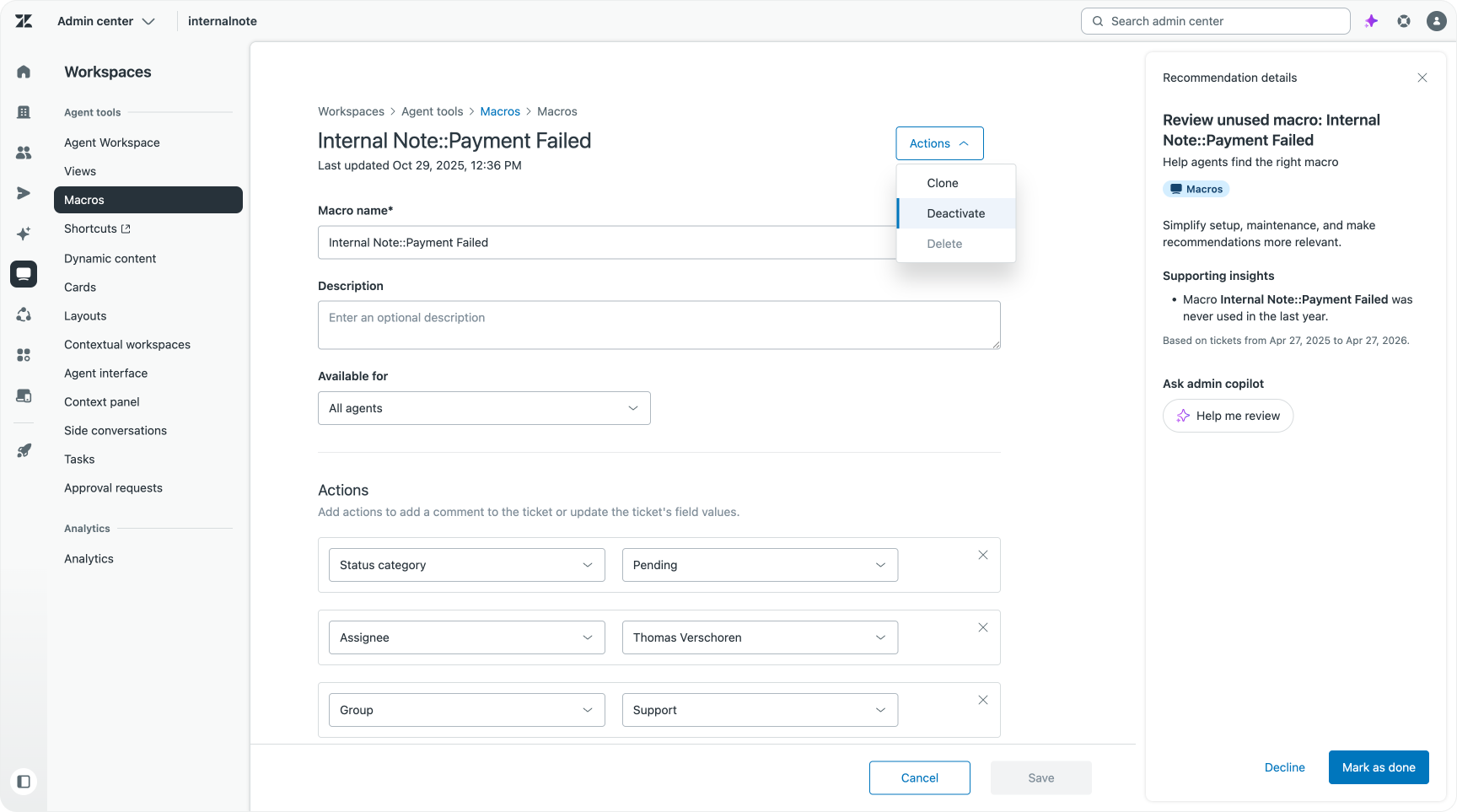
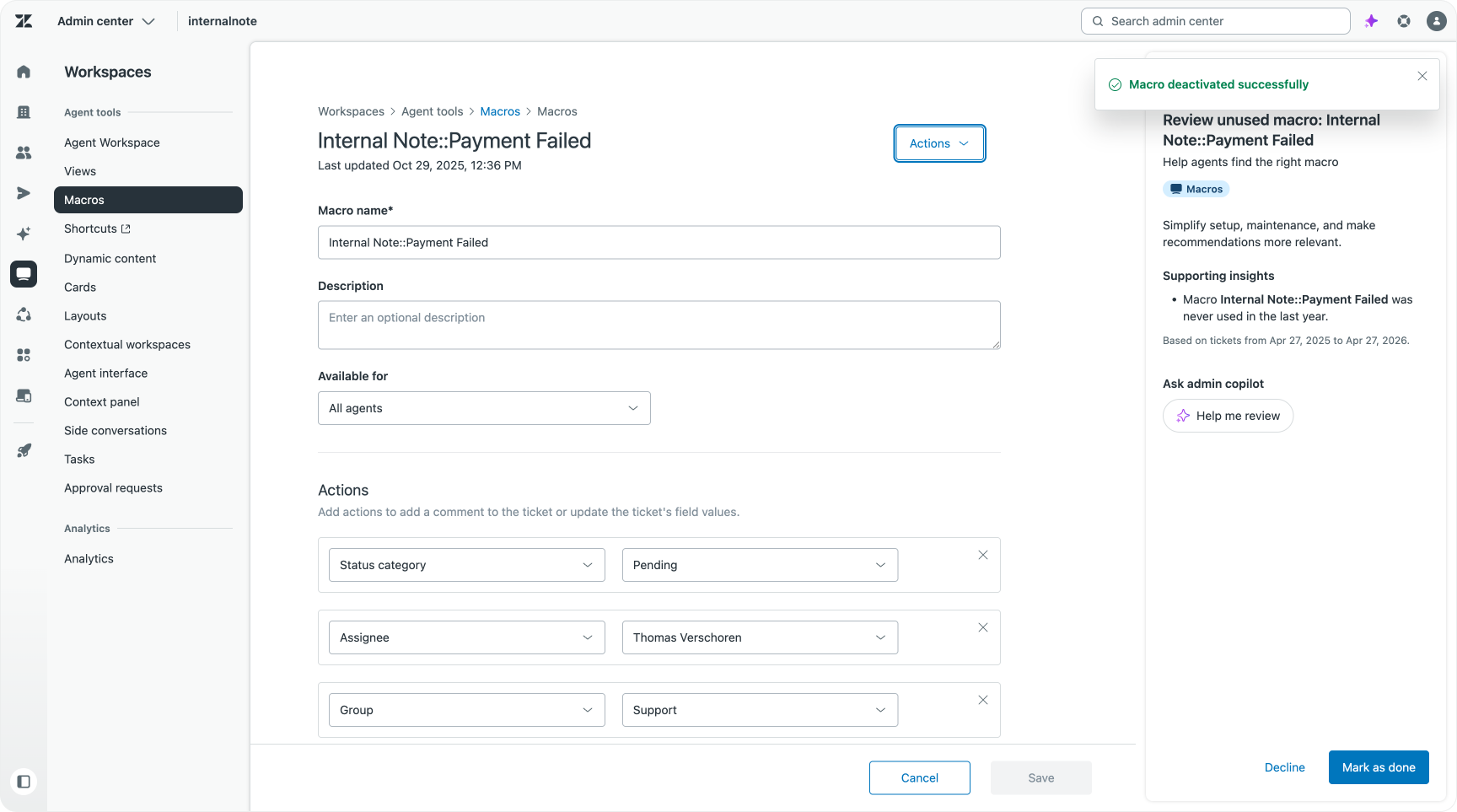
In both cases the flow is the same: Admin Copilot surfaces the finding, provides the context behind it, and takes you directly to the action. You decide whether to act. If you dismiss the recommendation, your feedback shapes what surfaces next.
Under the hood
The distinction between Admin Copilot and a general-purpose assistant starts with what it knows before you type anything.
When building AI tools that interact with complex platforms, the foundational question is what context the model has access to at the point of generation. A model without account context can offer generic advice. A model with account context can tell you what is specifically wrong with your configuration right now.
Admin Copilot has three context layers running alongside every prompt.
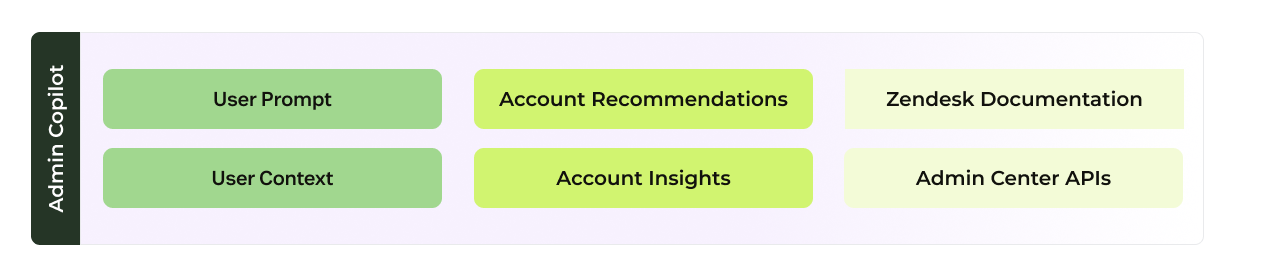
The first is user context: who the admin is, which account they are operating, which page they are on, and what they have been working on.

The second is account-level recommendations and insights: the data science layer that continuously analyses Intelligent Triage signals, auto-assist performance, trigger and macro activity, and routing data to identify where the account's configuration could be performing better.

The third is the Zendesk documentation and API platform: product knowledge that grounds the assistant's answers in accurate information about how the platform works, rather than inference. And since it uses the same API layer that the platform itself uses, it can execute changes based on expected outcomes. There is no guessing involved, the API defines what can be done, what parameters are required, and what the result will be.
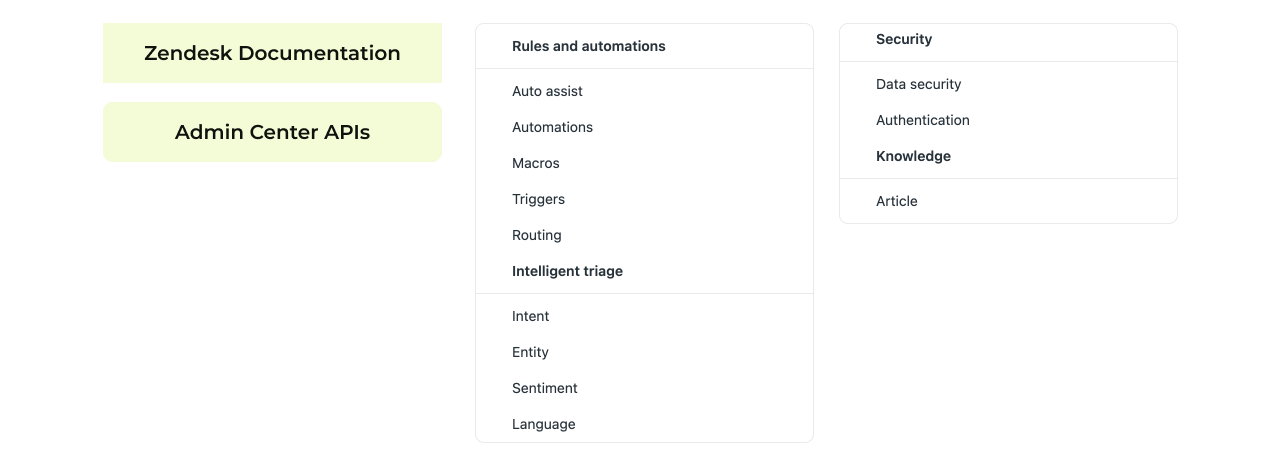
Those three layers feed into the model alongside the user's prompt. The result is a response grounded in your account, informed by product knowledge, and shaped by analytical signals about what is actually happening in your operation.
Write operations go through a strict approval gate. No change propagates without explicit admin sign-off in the interface. That constraint is architectural. The system is built so that the model cannot execute changes unilaterally, regardless of what it proposes.
Testing your changes
For Enterprise accounts, the recommended workflow is to test changes in a sandbox environment before deploying to production. You create a snapshot of your current configuration, apply and validate changes in the sandbox, compare the modified version against the snapshot to see exactly what changed, and then deploy to production when satisfied.
For accounts without a sandbox, the same principles apply in production: plan first, apply changes incrementally, and use the audit log to identify and reverse anything that does not behave as expected.

I am C-3PO, human-cyborg relations.
How might I be of service?
The admin who gets the most from Admin Copilot is not necessarily the one who knows the platform most deeply. It is the one who understands the operation most clearly. The new Zendesk Admin sits in between the human and AI. They know how their agents, team and company operate. And they know how to navigate the world of Zendesk AI: AI Agents, Agent and Admin Copilot, QA and Intelligent Triage.
They bridge the gap between people and AI.
What change does the business need? Where is the automation falling short? Which part of the configuration is causing the metric to drift? Those are questions that require business knowledge, not just platform knowledge. Admin Copilot handles the platform side: the surfacing, the analysis, the proposal, the execution. This frees the admin to focus on the part that only a person with operational context can answer , whether the proposed change is the right one for the company.
That is the shift Admin Copilot is designed to support. From an admin who maintains the configuration to a CX operator who drives the strategy and uses the platform to deliver it.
The roadmap makes the direction clear. More recommendation types. Goal-oriented guidance where admins describe an outcome and Admin Copilot works backwards to identify the configuration changes that would get there. Scenario evaluation, where a proposed change can be assessed for impact before it is committed. The improvement cycle becomes less reactive and more deliberate, shaped by business intent rather than by whatever the last week's data happened to surface.
The Resolution Learning Loop is only as good as the feedback that flows through it. Every interaction generates a signal. Every recommendation accepted or dismissed refines what surfaces next. Every change the admin approves and validates adds to the system's understanding of what good looks like for that specific operation. The platform does the monitoring. The admin does the deciding. And week by week, the loop tightens.