
Building more powerful and connected Action Flows
New Action Flow capabilities and connectors give AI Agents, Agent Copilot and background automations more ways to execute work across your business.
Building more powerful and connected Action Flows

On this page
Not every resolution can be handled with knowledge alone.
The first stage of automated service focused heavily on answers. Give an AI Agent access to accurate content and it can explain a policy, answer a product question or guide a customer through troubleshooting.
But higher levels of automated resolution require the system to do more than just answer. It needs to gather customer-specific context. It needs to follow business logic and make decisions. And it needs to execute the outcome by changing an order, updating a record, creating a task, requesting approval or notifying another team.
A refund is your typical use case for any AI Agent demo. Knowledge can explain the refund policy, but resolving the request requires a process and the ability to actually do something. Identify the customer. Retrieve the order. Check the order date and payment method. Decide whether the customer is eligible. Execute the refund. Update the ticket and tell the customer what happened.
Procedures structure that conversation flow. Actions perform individual pieces of the work, and Action Flows combine those actions into reusable business processes.
These processes and actions are not limited to AI Agents. Agent Copilot can propose the same actions to a human agent, requiring their approval before anything happens. Action Flows can also run automatically when tickets, users or custom objects change, or execute on a schedule alongside customer conversations. Custom Agents can use them to run specialised business processes in the background.
The same Action Flow might therefore be invoked by an AI Agent during a conversation, approved by a human agent through Copilot, or executed automatically when something changes on a ticket.
 Thomas Verschoren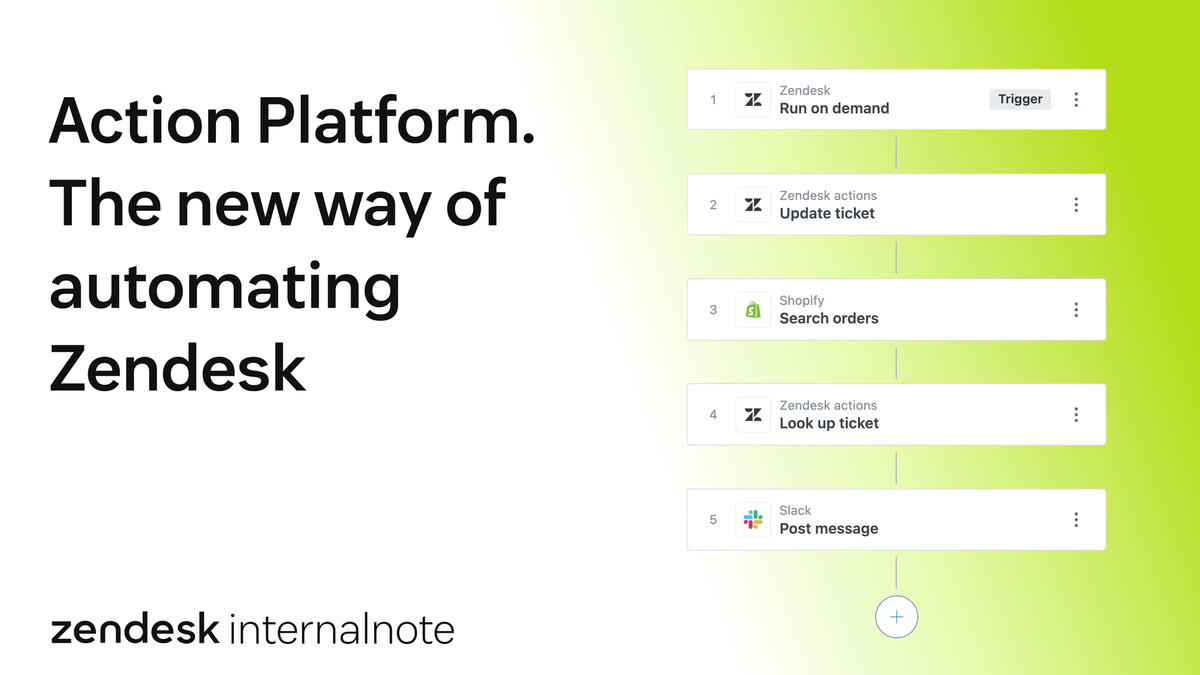
My previous article covers how Action Builder, Custom Actions and Custom Agents fit together, and which types of automation should move away from triggers and webhooks.
Over the summer, Zendesk has invested heavily in their Action Platform. Action Flows can now store variables, transform data with JavaScript, loop across results and handle failures per step. A new Connections experience makes integrations easier to discover and manage. The MCP Client is generally available. Native and partner-built connectors extend execution across more of the applications your company uses.
Usage
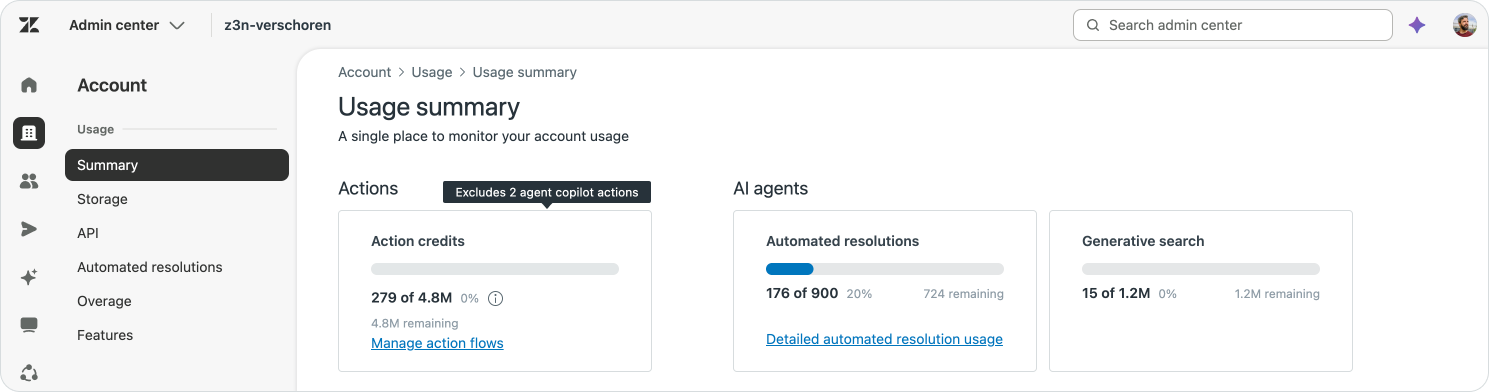
All these automation capabilities have become more accessible too.
Native Zendesk actions no longer consume action credits. Neither do Action Flow triggers, flow-control and utility steps, test runs, IT asset actions, or native actions invoked by AI Agents and Copilot. Action credits are now reserved for third-party connectors and Custom Actions.
This means you can build multi-step processes across Zendesk tickets, users, organisations, custom objects, assets, tasks and approvals without worrying about credits for every step. Your Action credits will only be used where the workflow reaches outside Zendesk.
Together, these releases make it easier and more affordable to move from answering questions towards running the processes that resolve them.
Updates to Action Flows
An Action Flow combines multiple steps into one reusable process. Each step is small and specific. Retrieve an order. Transform a response. Check a condition. Update a ticket. Notify another team.
The flow links those individual steps together and defines the order in which they should run.
The first version of Action Builder was good at chaining actions and branches. That covers plenty of workflows, but real business processes rarely stay on one clean path. APIs return lists instead of single records. Data arrives in the wrong format. A result discovered halfway through the process needs to be remembered later. External platforms fail.
Variables, custom code, logical loops and step-level error handling give Action Flows more control over those situations.

Variables
When a customer contacts your support team, the conversation often only contains part of the context. You need to know about their order, booking, subscription.
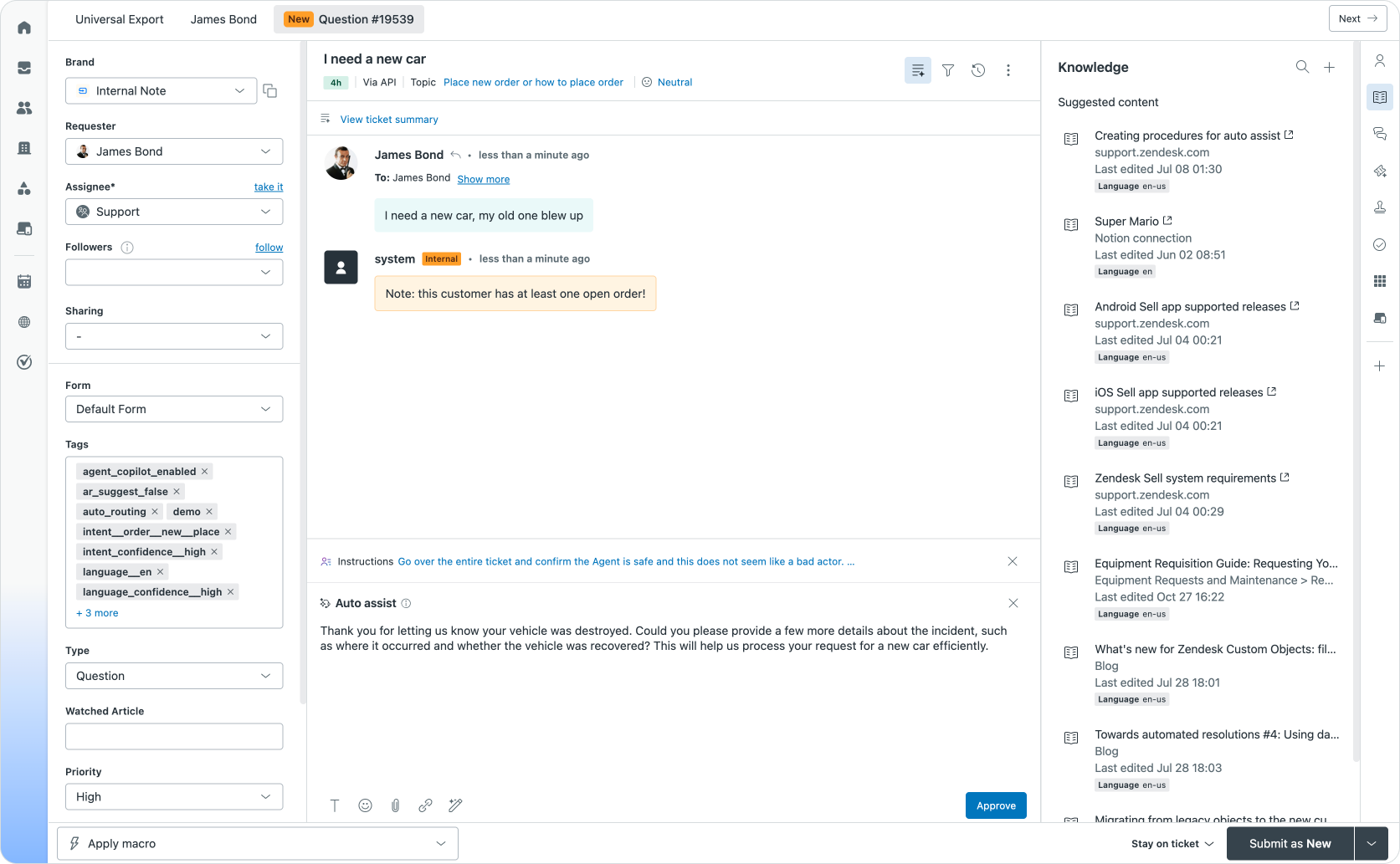
Knowing whether a customer has an open order could meaningfully change the interaction. It could prevent an agent from asking for information Zendesk can retrieve itself. It could influence routing or priority. It could help Copilot recommend the right next step before the agent even opens the order platform.
For the purpose in this article, this is the context I want to each new release, with the goal of updating a newly created ticket with:
Does this customer currently have an open order?
The order platform can return several orders for the customer that each have their own status, ranging from pending to shipped, delivered or cancelled. But what we actually care about as context is, just a simple answer: does the customer have an open order or not.
Or, if you're in a travel context, does the customer have an upcoming flight in the next 24 hours?
In order to know that answer, we need to go over each order and check its status.
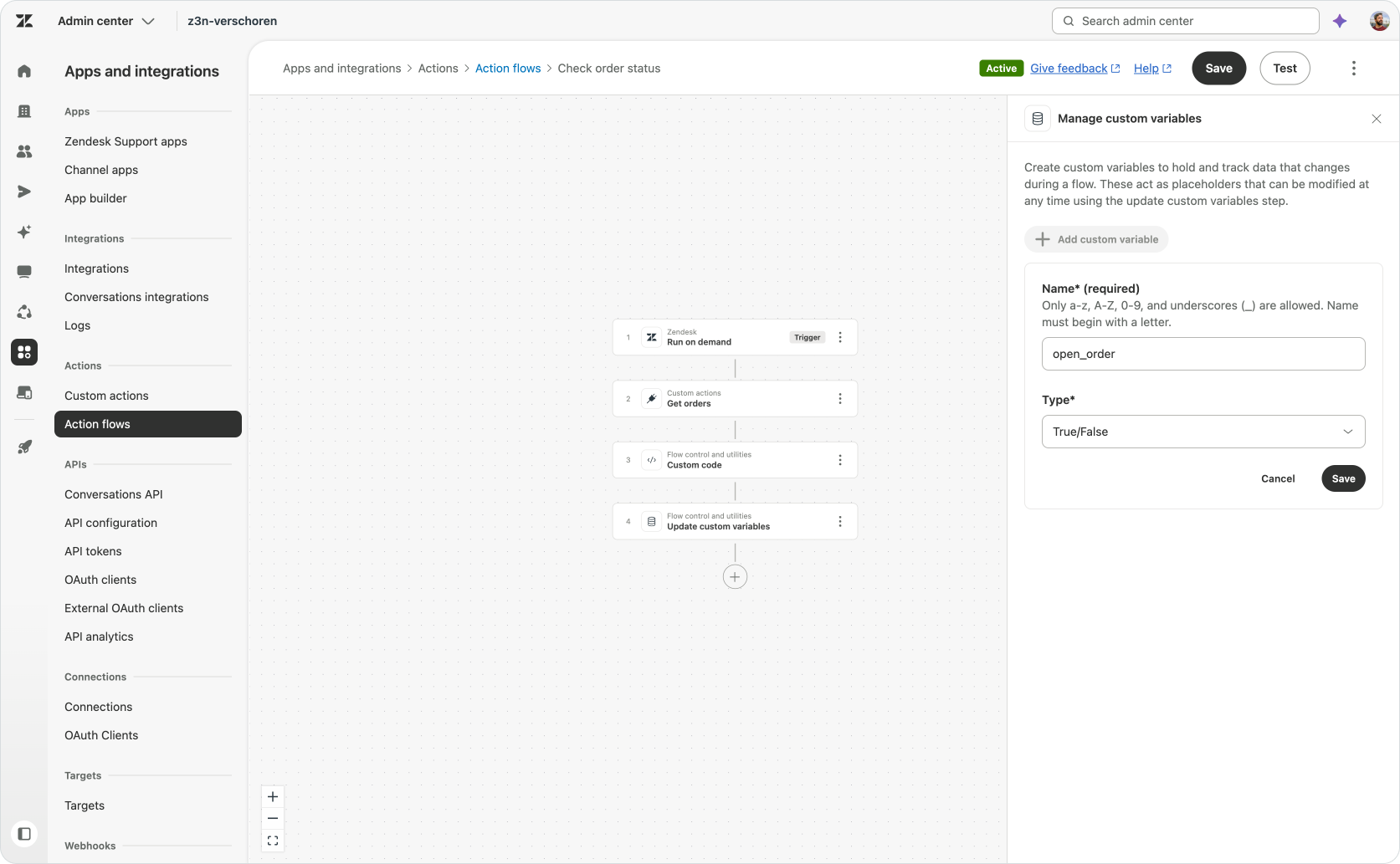
We start the flow by creating a custom variable called open_order of type boolean.
The flow then retrieves and checks the customer’s orders. If it finds an open one, it changes the variable to true. Once every order has been checked, later steps can use the final value.
Instead of using the complete order response through the rest of the workflow, the flow creates that one useful piece of context that another branch, action or procedure can understand.
Variables can also retain page numbers, count processed records or carry a value across different branches. They give the flow its own state, rather than limiting it to whatever the previous action returned.
Zendesk explains how to create and update variables in its guide to creating Action Flows.
Custom code
The next problem is the order API itself.
APIs return data in the format that suits the platform providing it. An order response might contain customer details, payment metadata, line items, pagination information and internal identifiers. Our flow only needs a clean list of orders and their statuses.
A custom JavaScript step lets us transform the response inside the Action Flow.
The code receives the output of an earlier action, processes it and returns a set of defined outputs for later steps. It can extract values, change data types, map internal identifiers to readable labels or restructure a response so another flow step can use it.
For this demo, the Custom Action returns the raw order data:
{
    "orders": [
      {"delivered":true,"order_id":"ORD1234","order_status":"confirmed"},
      {"delivered":true,"order_id":"ORD5678","order_status":"pending"},
      {"delivered":true,"order_id":"ORD2468","order_status":"cancelled"}
    ]
}
The custom code step takes that response and extracts the information required by the loop:
module.exports = (inputs) => {
  const orders = JSON.parse(inputs.orders);

  const orderStatuses = orders.map(order => order.order_status);

  return {
    orders_array: orderStatuses,
    open_order: true
  };
};
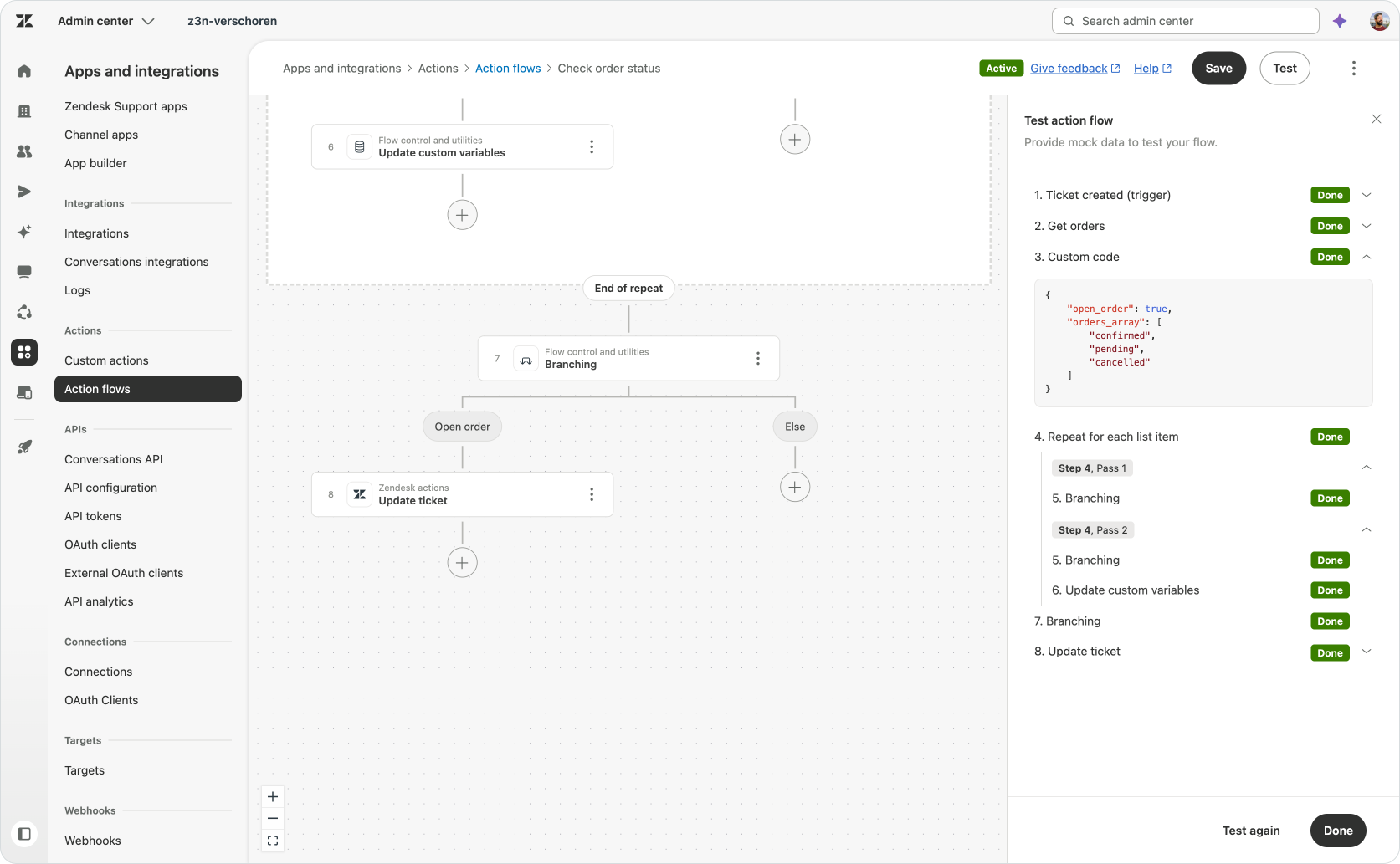
The result is a smaller and more predictable output:
{
    "open_order": true,
    "orders_array": [
        "confirmed",
        "pending",
        "cancelled"
    ]
}
The Custom Action and Custom Code step have separate jobs.
The Custom Action connects to the order platform and retrieves the data. The JavaScript Custom Code step cleans up that data. The rest of the Action Flow decides what to do with it.
Custom code cannot make network requests or import external libraries. Connections to other systems still belong in Custom Actions, native connectors or MCP tools. The code step is the transformation layer between those integrations and the rest of the workflow.
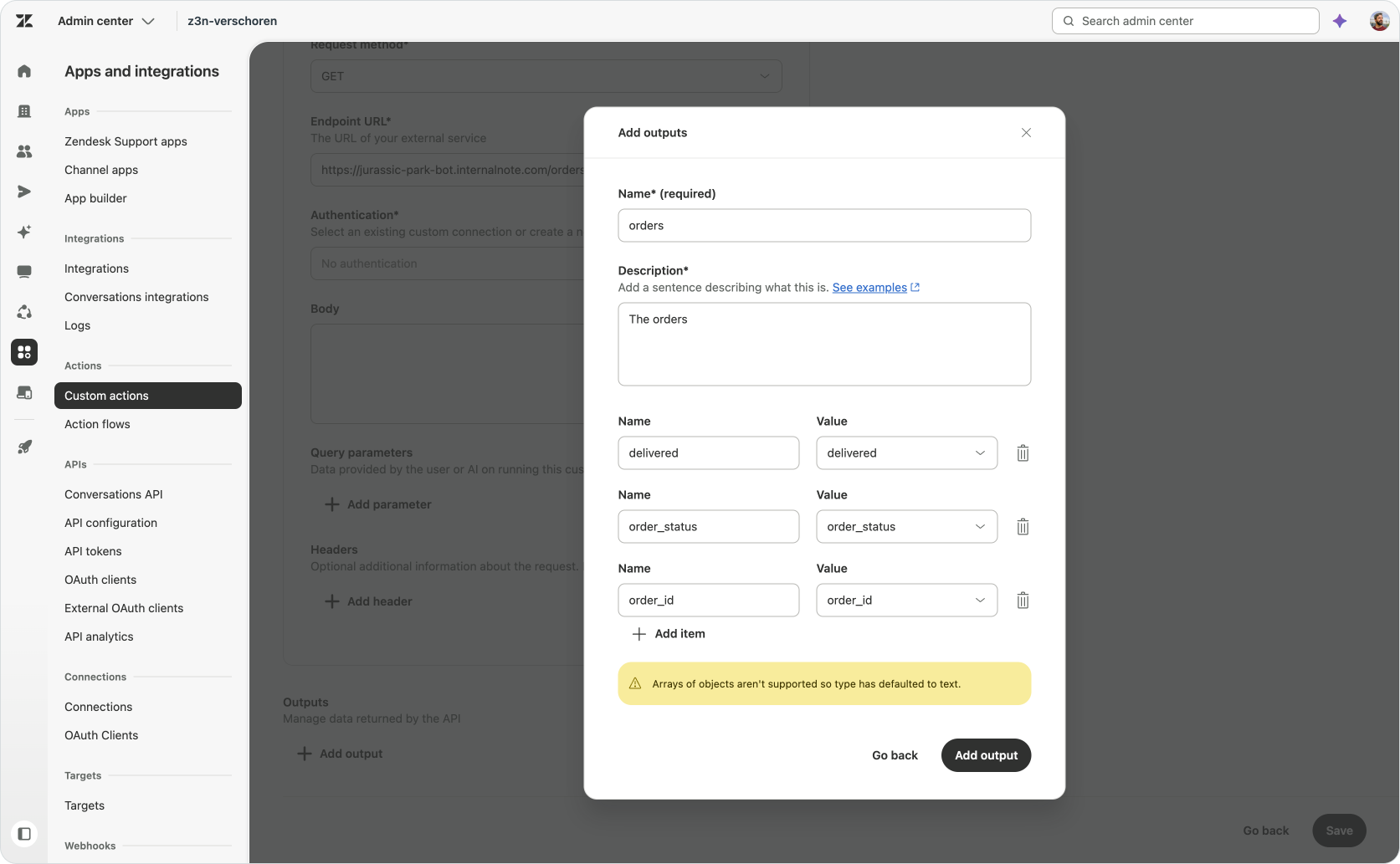
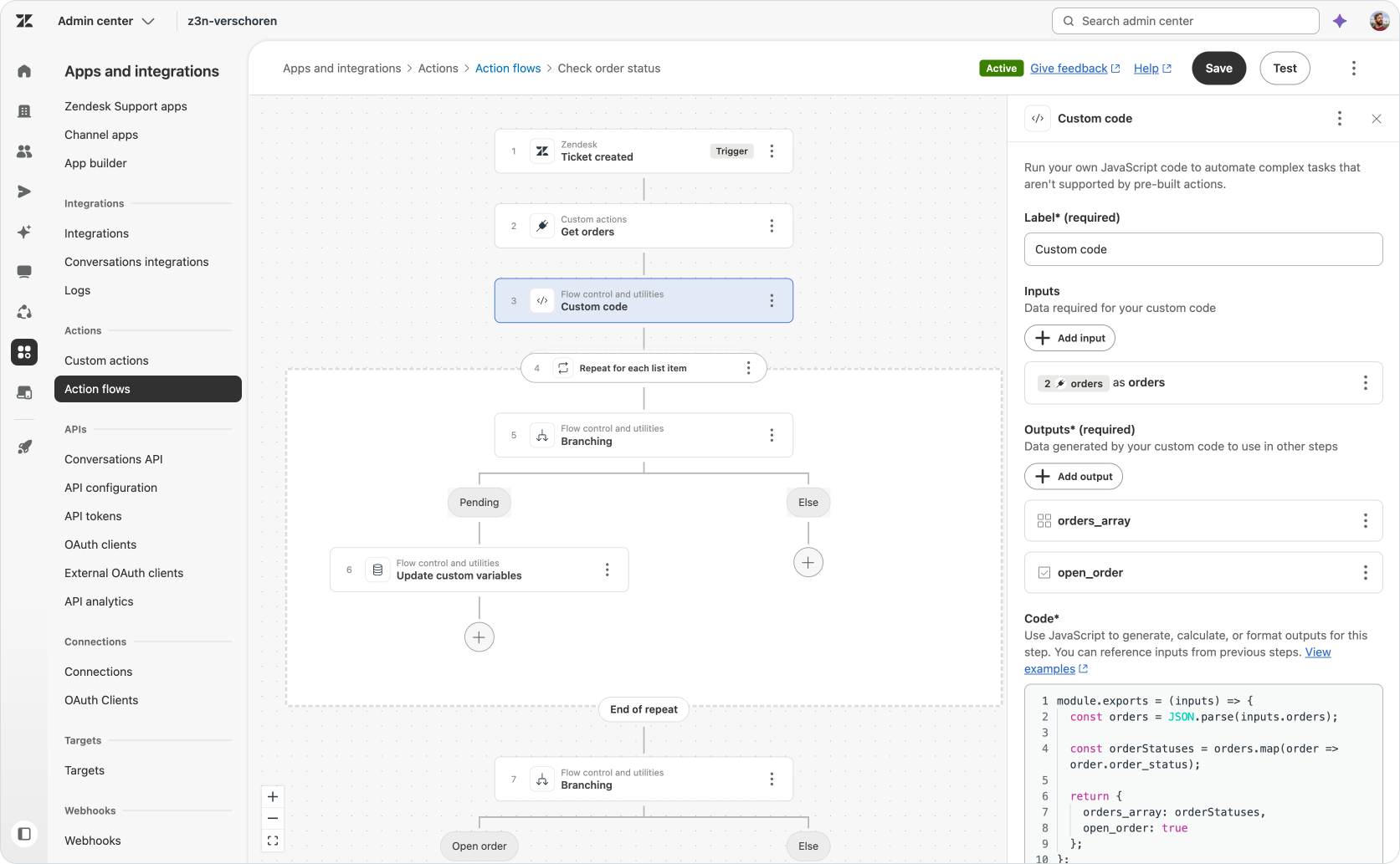
Zendesk documents the supported inputs, outputs and JavaScript restrictions in Using custom code steps in Action Flows.
If you're used to using API integrations in AI Agents Advanced, you've probably used JSONata in the past to transform the data returned from API calls.
Action Flows uses Custom Actions and Custom Code steps to accomplish the exact same thing. But by using Javascript instead of JSONata, you can do more powerful transformations, with a more familiar language.
Logical loops
Once the API response has been cleaned up, the flow needs to check every returned order.
Action Builder offers two looping patterns.
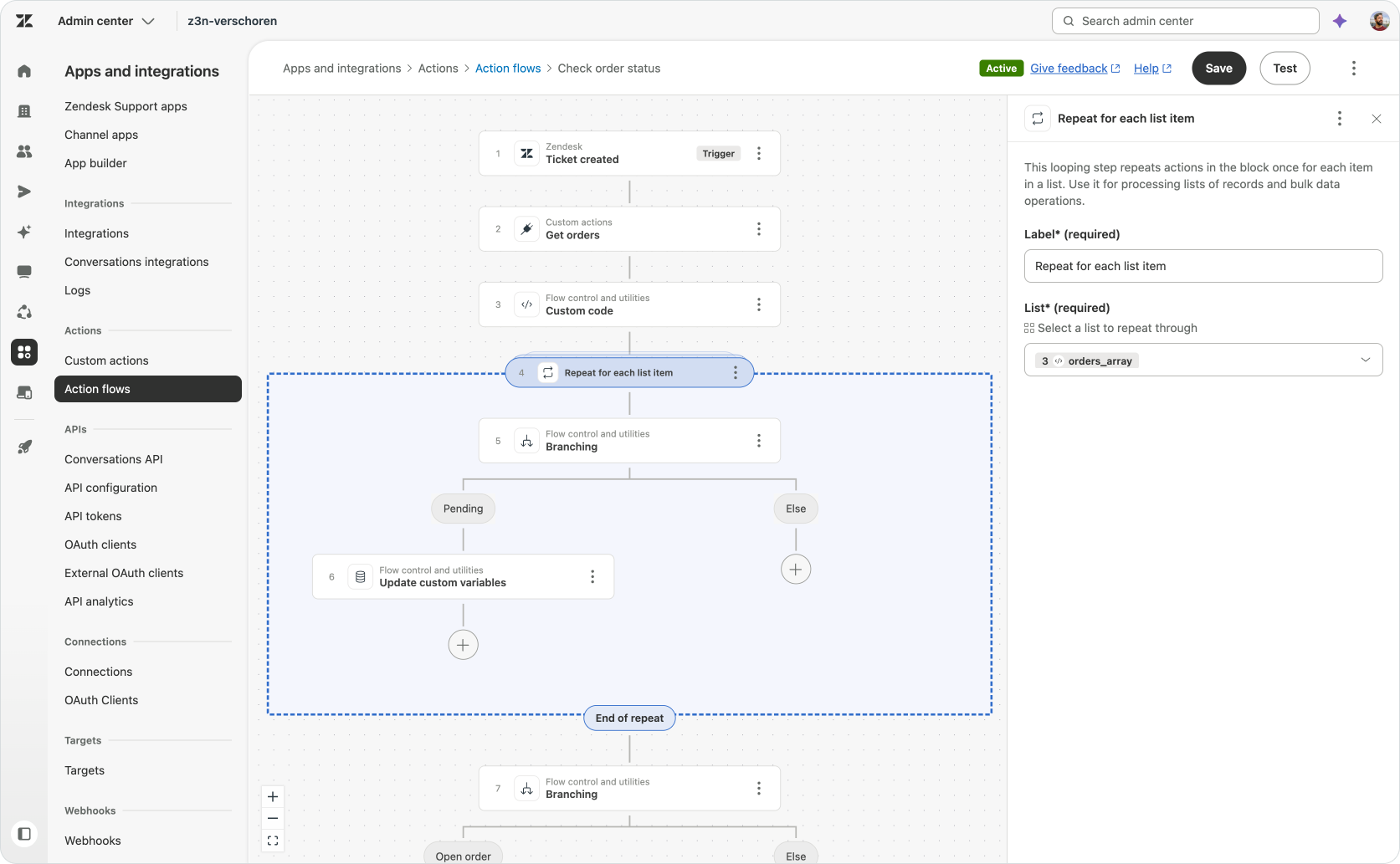
- Repeat for each runs the same steps for every item in a list. In this example, every order enters the loop and its status is checked.
- Repeat while continues running a group of steps while a condition remains true. This is useful for scenarios such as pagination, where the flow keeps requesting another page until the external system reports there are no more results.
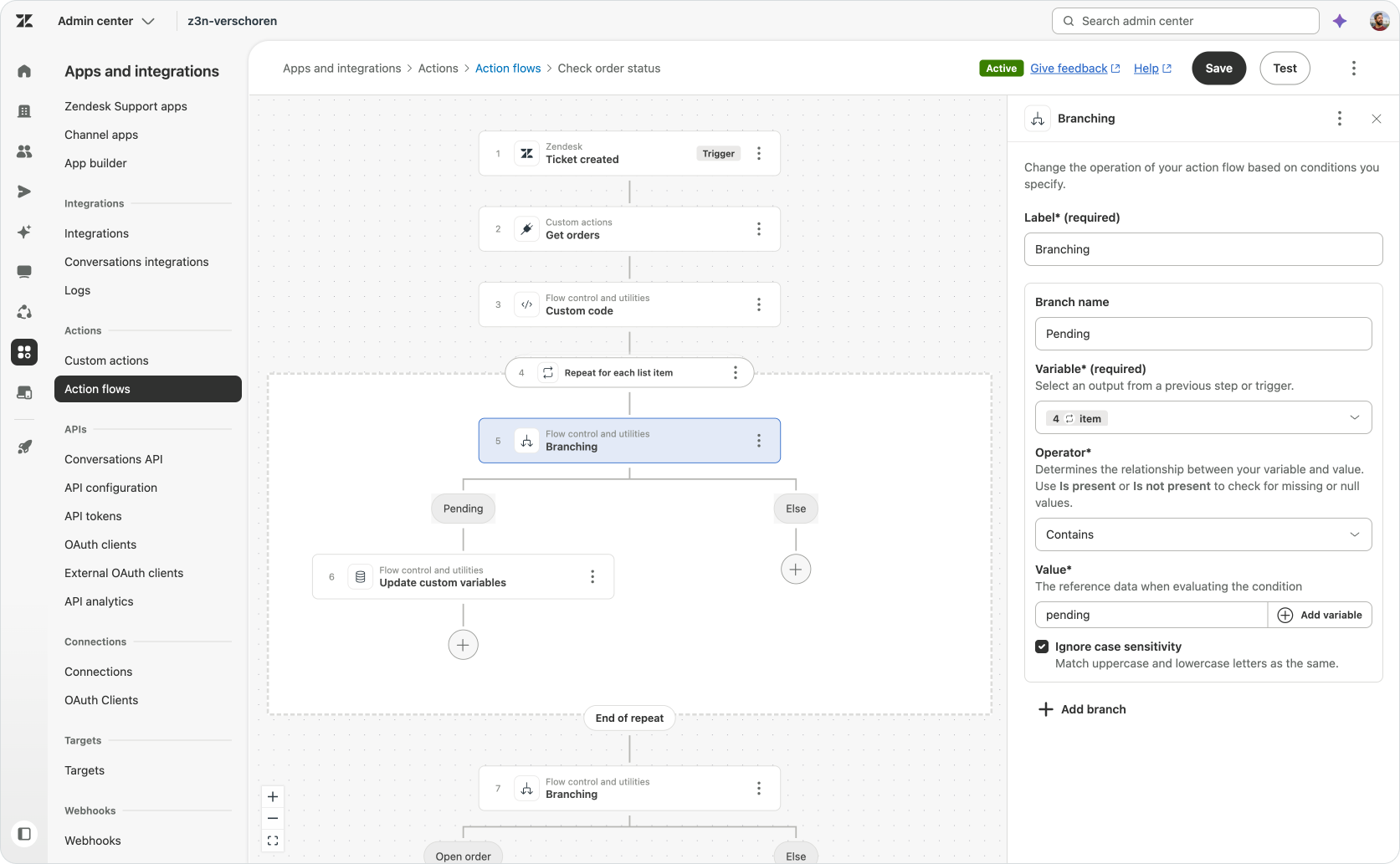
My demo uses Repeat for each and it runs against the output of the Custom Code step. Inside the loop, a branch checks the status of the each order. If the order is pending, the flow updates the custoo variable open_order to true.
After the loop completes, the variable contains the answer for the entire order list, either the default false, or true if at least one order was pending..
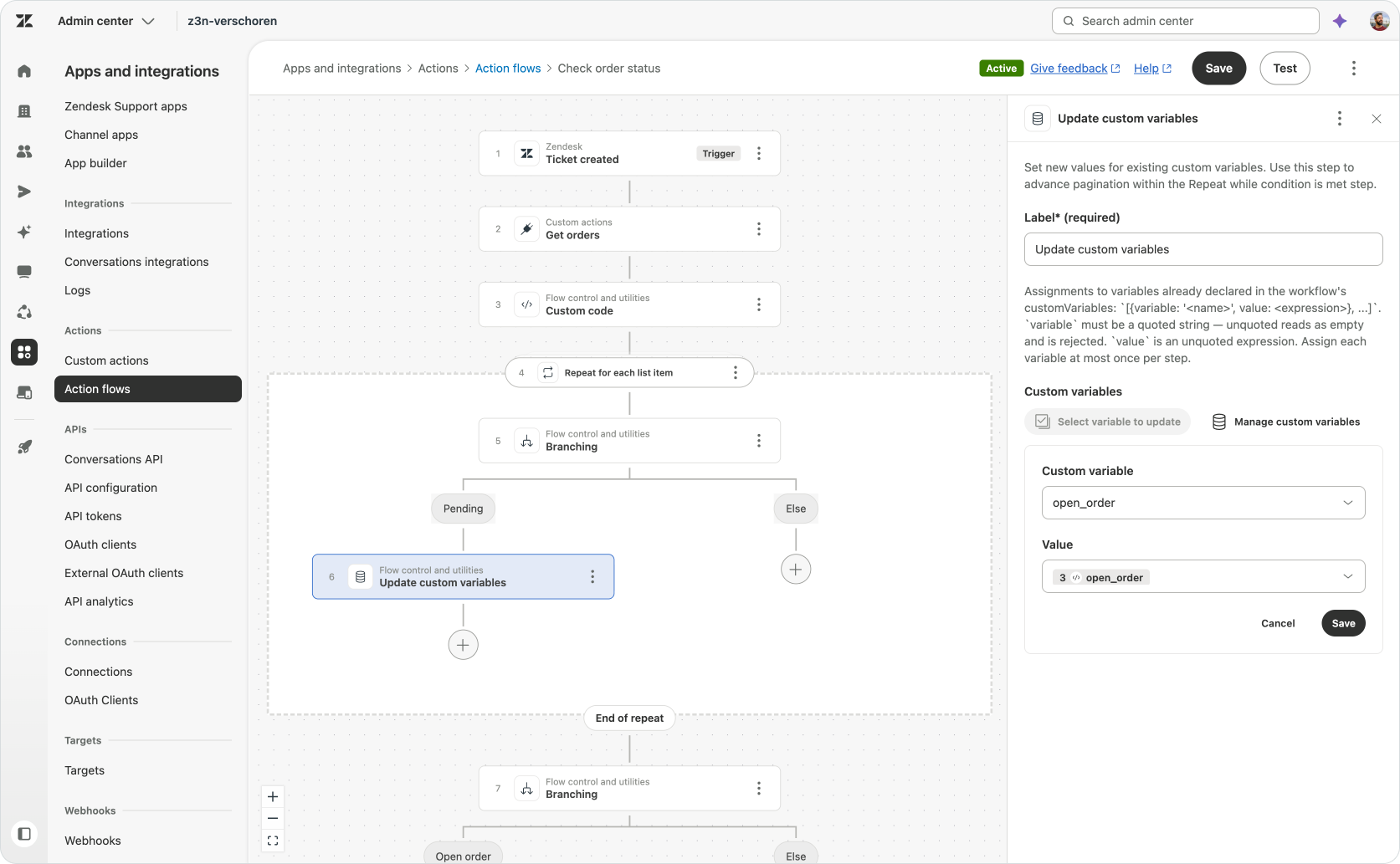
In the current builder, an Update custom variable step cannot set freely entered text. It can only reference an output from an earlier action or step.
For that reason, my Custom Code step also returns a
open_order output with the value true. When the loop finds an open order, the flow updates the variable by referencing that existing output, thus setting it to true.This is a minor workaround, but it also shows why code, variables and loops need to work together. The code prepares the values. The loop inspects each record. The variable keeps the result after the loop has finished.
Loops also open up broader background processes. A scheduled flow could retrieve expiring contracts and create a renewal ticket for each customer. An incident flow could retrieve affected services and update every related problem ticket. An onboarding flow could create a set of tasks for each new employee.
At the time of writing, Zendesk’s Action Flow documentation marks Repeat for each and Repeat while as ITAM-only. Check their availability in your account before building around them.
Error handling
A human agent has options when an external system fails. They can try again, refresh the page, leave a note or ask someone else for help. An AI Agent or Action Flow can only do what it has been instructed to do. A reliable process thus also needs instructions for what should happen when an action does not work.
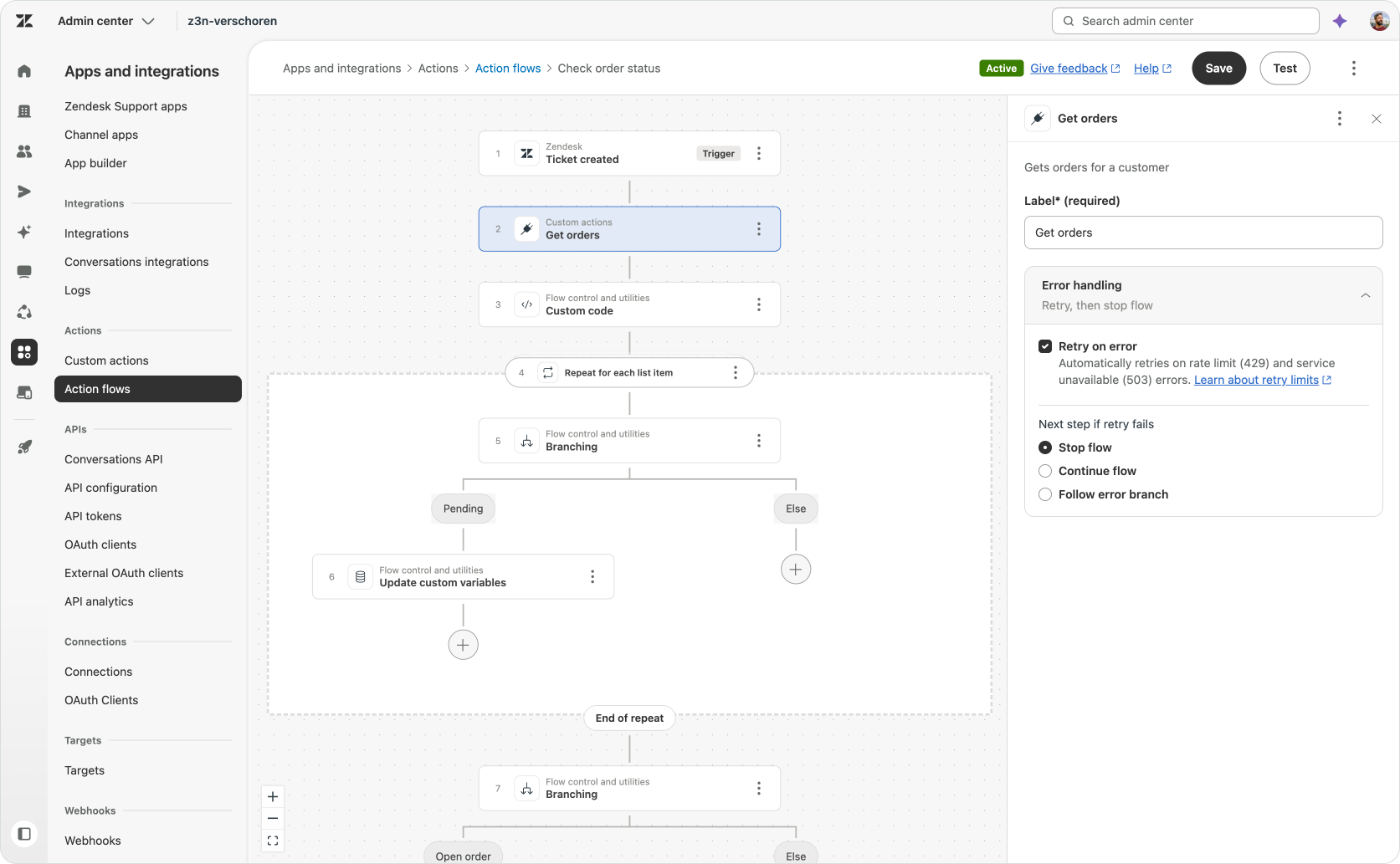
Error handling can now be configured on each step in an Action Flow. When an action fails, the flow can retry it and then follow one of three paths:
- Stop the flow.
- Continue with the next step.
- Follow a separate error branch.
The correct behaviour depends on the role that action plays.
- If a Slack notification fails after the main work is complete, the flow can probably continue, or we can branch to error flow that uses a Gmail connection to notify the team via email.
- If an enrichment lookup fails, the flow might just stop, and the agent looking at the ticket needs to manually lookup the user in the CRM.
- If the flow cannot retrieve the order data required for its decision, it should move to an error branch and probably escalate. Continuing would mean acting without the context the process depends on.
Error paths can also use the returned HTTP status, error message and response body. A flow can therefore distinguish between a missing record, invalid input, temporary outage and rate limit, then respond appropriately.
Let’s make this real
Feature lists only explain so much. For me, the easiest way to understand what a new platform capability adds is to build a small process that needs it.
For this article I wanted to enrich a ticket with order context before someone starts working on it. Throughout these article I've shown how these new additions to Zendesk Actions make such a flow possible.
The customer’s open orders live in an external order platform. The ticket only contains the customer’s email address. An agent could open the order platform, search for the customer and inspect the returned orders manually, but that is exactly the kind of repetitive lookup an Action Flow should handle.
We ended our flow with a loop across all orders, updating the open_order variable to true if we found a Pending order. Once the loop has processed every order, the flow checks the final value.
If open_order is true, a Zendesk Action adds an internal note:
This customer currently has an open order.
If it remains false, the flow ends without changing the ticket.
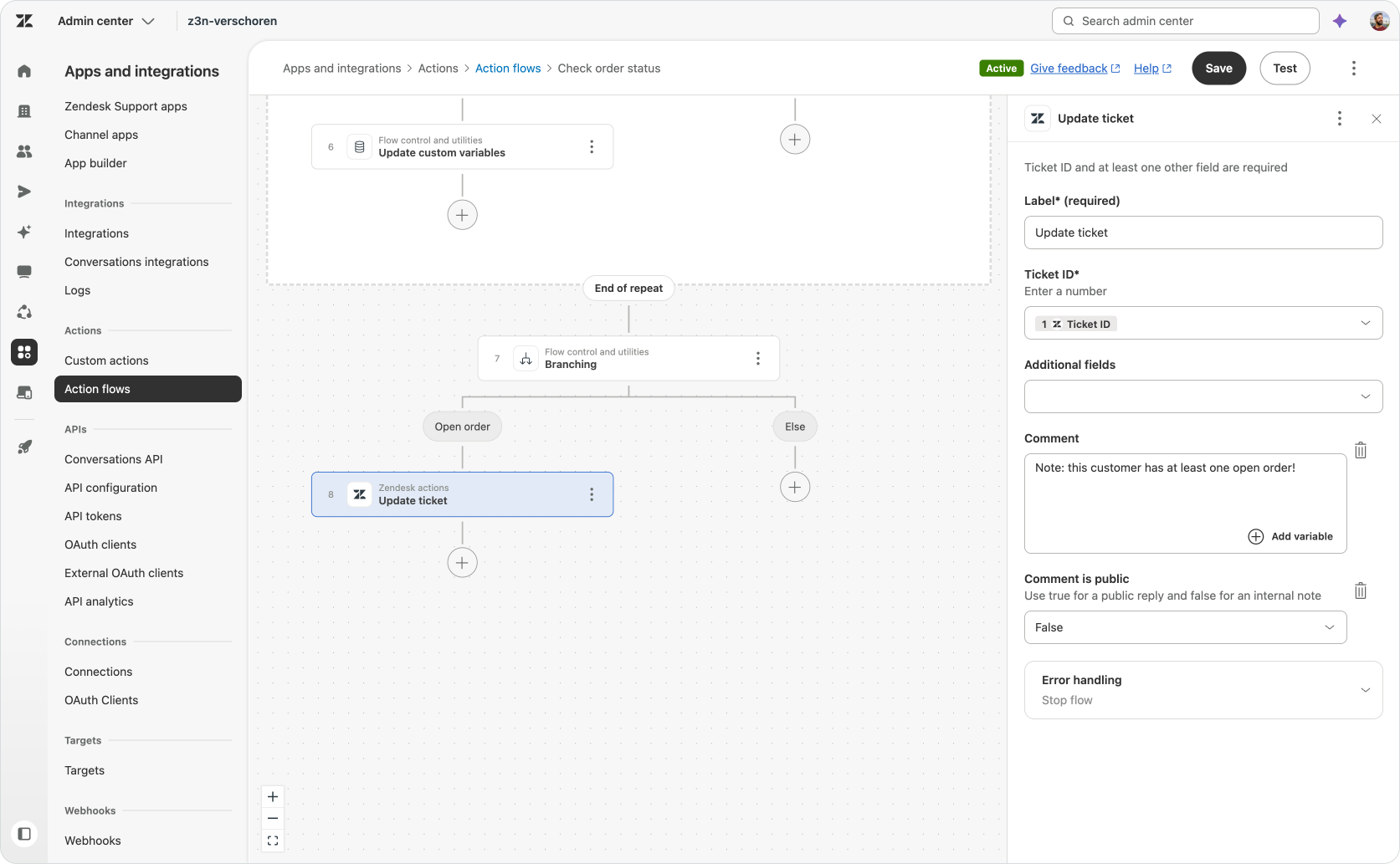
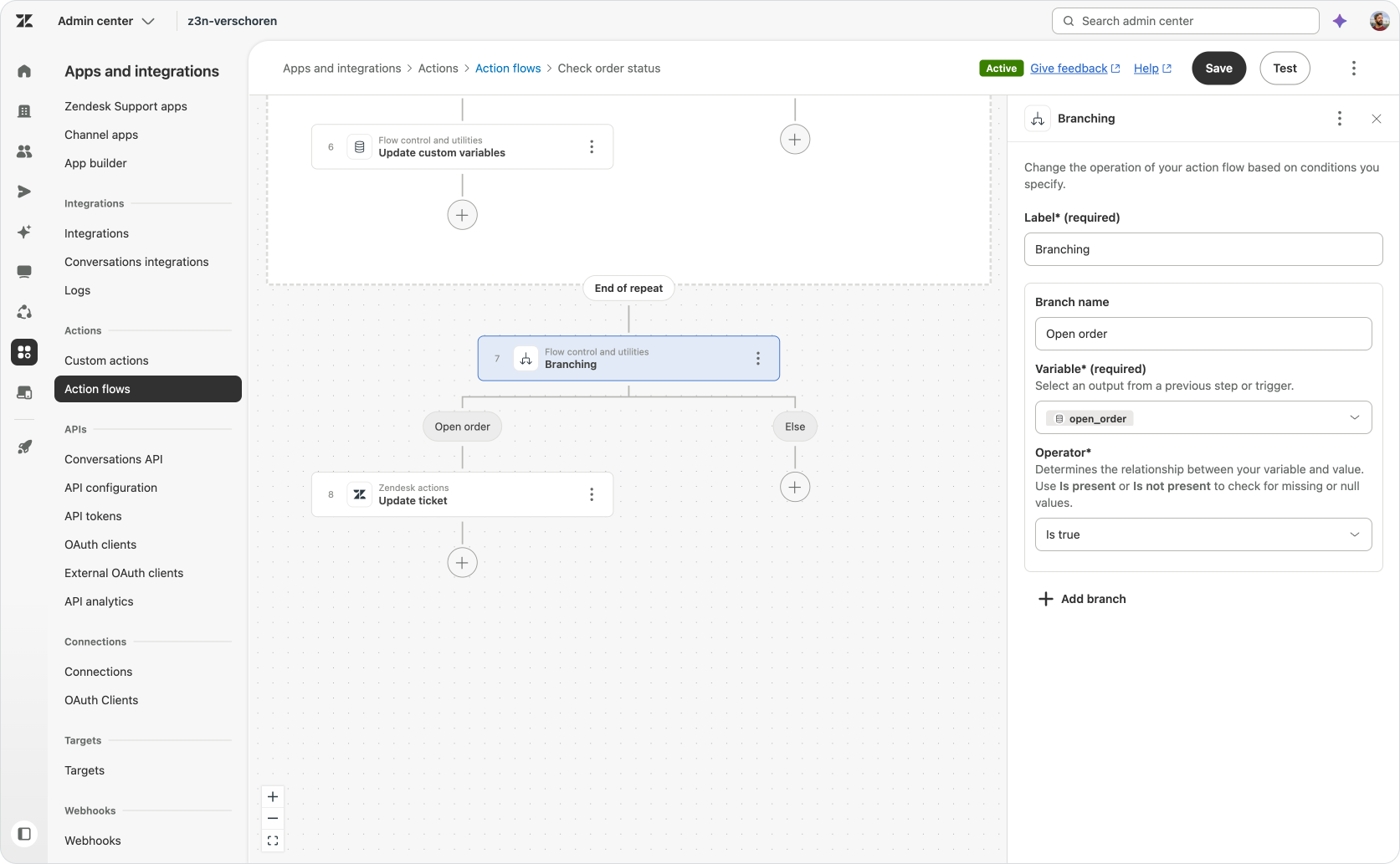
The internal note updates that status for the agent, but it is not the only possible outcome. The same result could set a ticket field, update priority, affect routing, influence a Copilot suggestion or be returned to an AI Agent procedure.
What the flow has produced is one useful piece of customer context. The procedure or person using that context does not need to understand the order API, raw JSON, loop or retry configuration. It only needs the answer.
And if the order platform changes, the integration and transformation logic can be updated in this one flow rather than in every procedure that needs order information.
That is the kind of work worth extracting into Action Flows. Small pieces of business logic, built once and reused wherever Zendesk needs them.
Connections
An Action Flow can structure work inside Zendesk, but it will need access to other systems to execute that work and make things happen across your company.
Connectors make capabilities from those external platforms available as actions inside Zendesk.
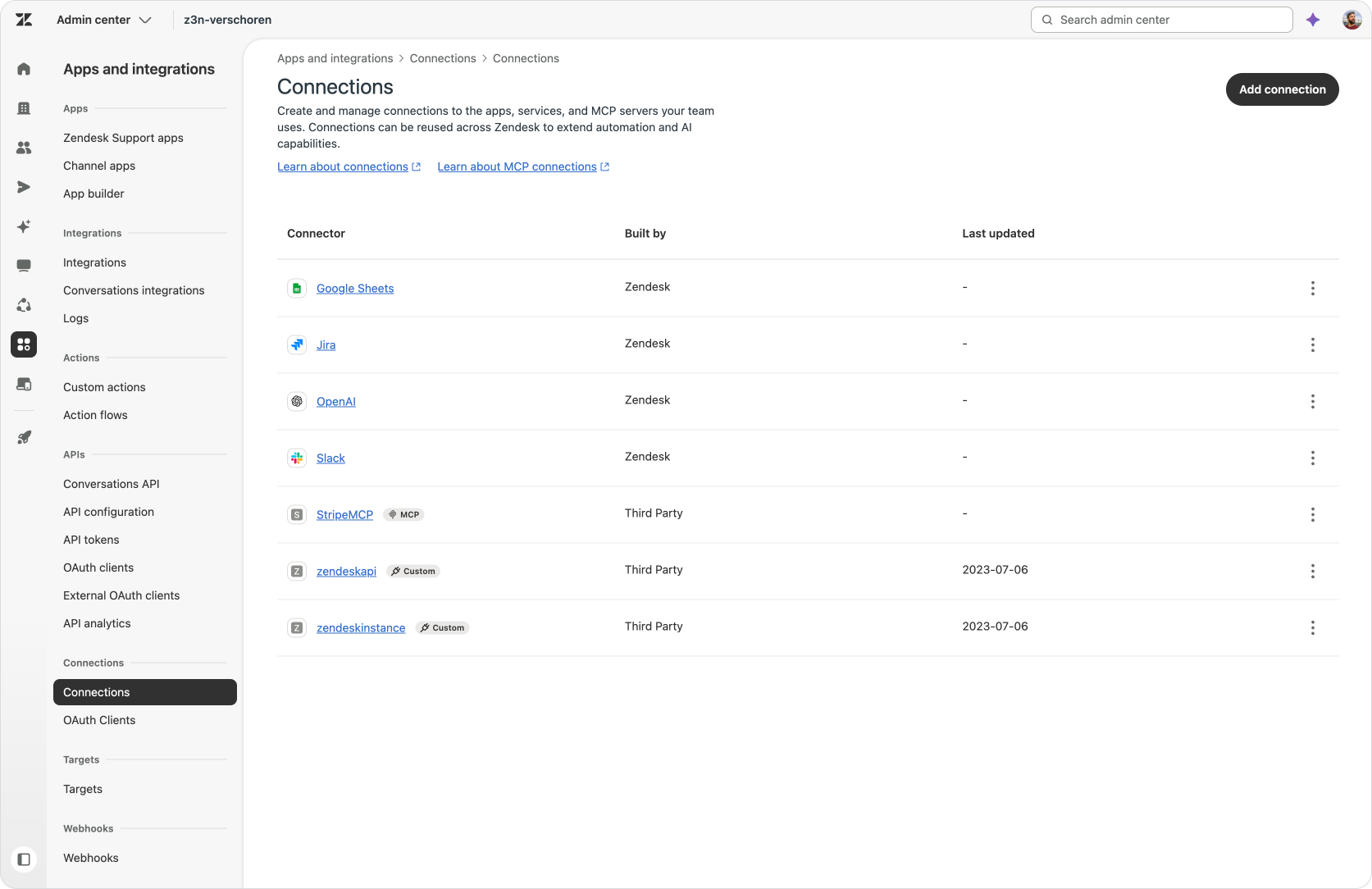
Zendesk has now moved connection management into its own area under Apps and integrations > Connections in Admin Center.
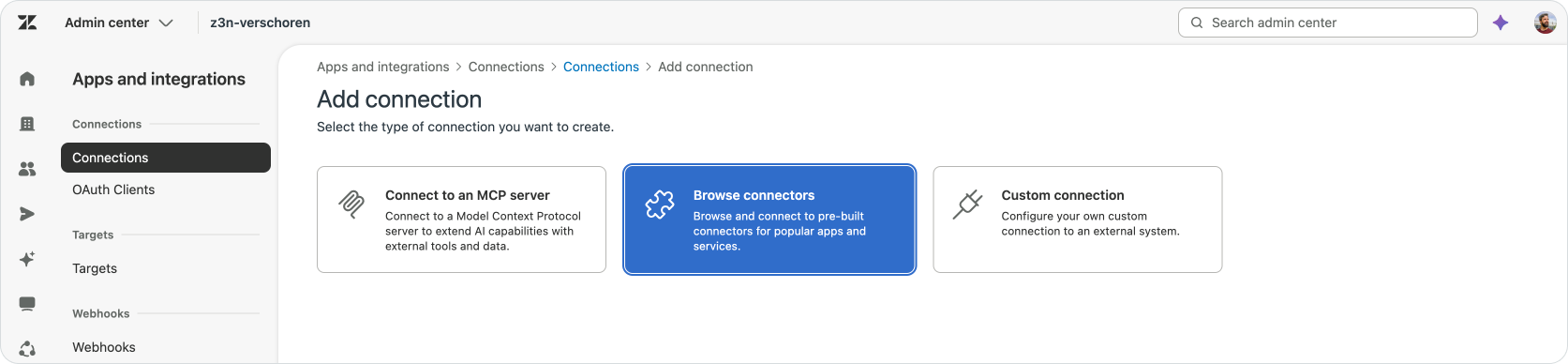
From this page, an admin can browse the connector library, connect an MCP server or create a custom connection for an API-based Custom Action.
This separates two jobs that used to be mixed together: The Connections page manages which systems Zendesk can access and how that access is authorised. And Action Builder that defines what should happen with those systems once they are connected.
Zendesk has three main ways to add external actions:
- Prebuilt connectors for supported platforms.
- MCP connections that discover tools exposed by an MCP server.
- Custom Actions for platforms that expose an API but do not have a packaged connector.
Custom connections remain the flexible option. If a platform has an API but does not offer a Zendesk connector or MCP server, you can store its authentication in Connections and define the required API calls as Custom Actions.
This is the route used by the order lookup in my demo. One connection stores access to the order platform. The Custom Action defines the request that retrieves the orders. The Action Flow decides how to process the response.
Zendesk explains the centralised experience in Managing connections to external services.
Connections in one place
Connectors used to be hidden inside the products that needed them. Action Builder exposed connections while building a flow, listing them in the same ling list as MCP servers and Custom connections. There was no central place to see which systems were connected to Zendesk, and new or available connectors were difficult to discover unless you already knew where to look.
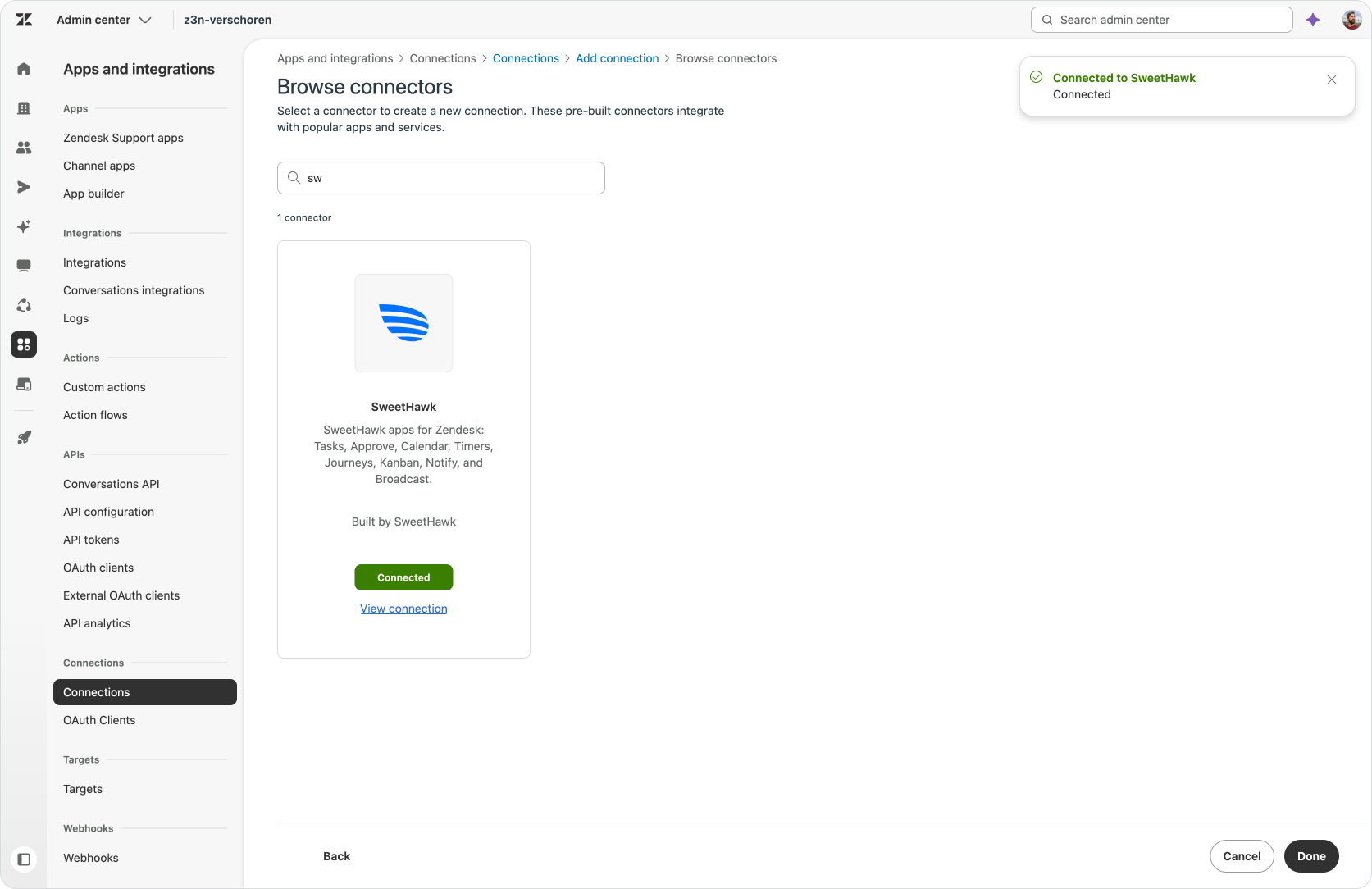
The new Connections experience includes a library where admins can browse every connector available to their account.
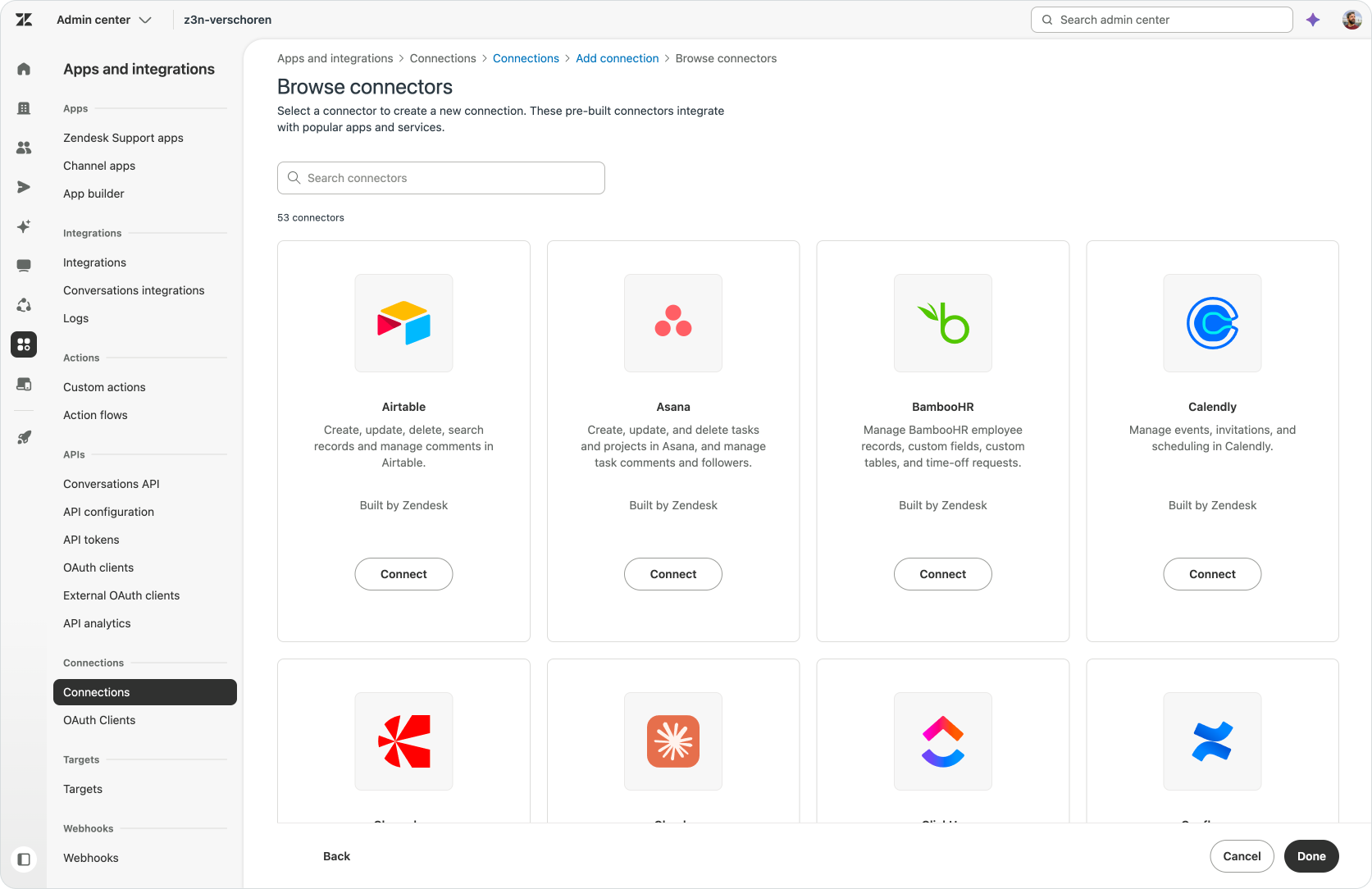
Each connector has a logo, description, builder name and Connect button. Connectors that have already been configured link to their existing connection.
Search on both the connections place and in the Action Flow sidebar makes the growing list easier to navigate.
And Zendesk keeps expanding that list. Recent additions include ServiceNow, monday.com, Microsoft Planner, Azure DevOps, Dynamics 365 Sales, Dynamics 365 Business Central, HiBob, New Relic and Snowflake. Added to an already powerful list of capabilities that OneDrive, SharePoint, incident.io, Linear, Asana and Claude.
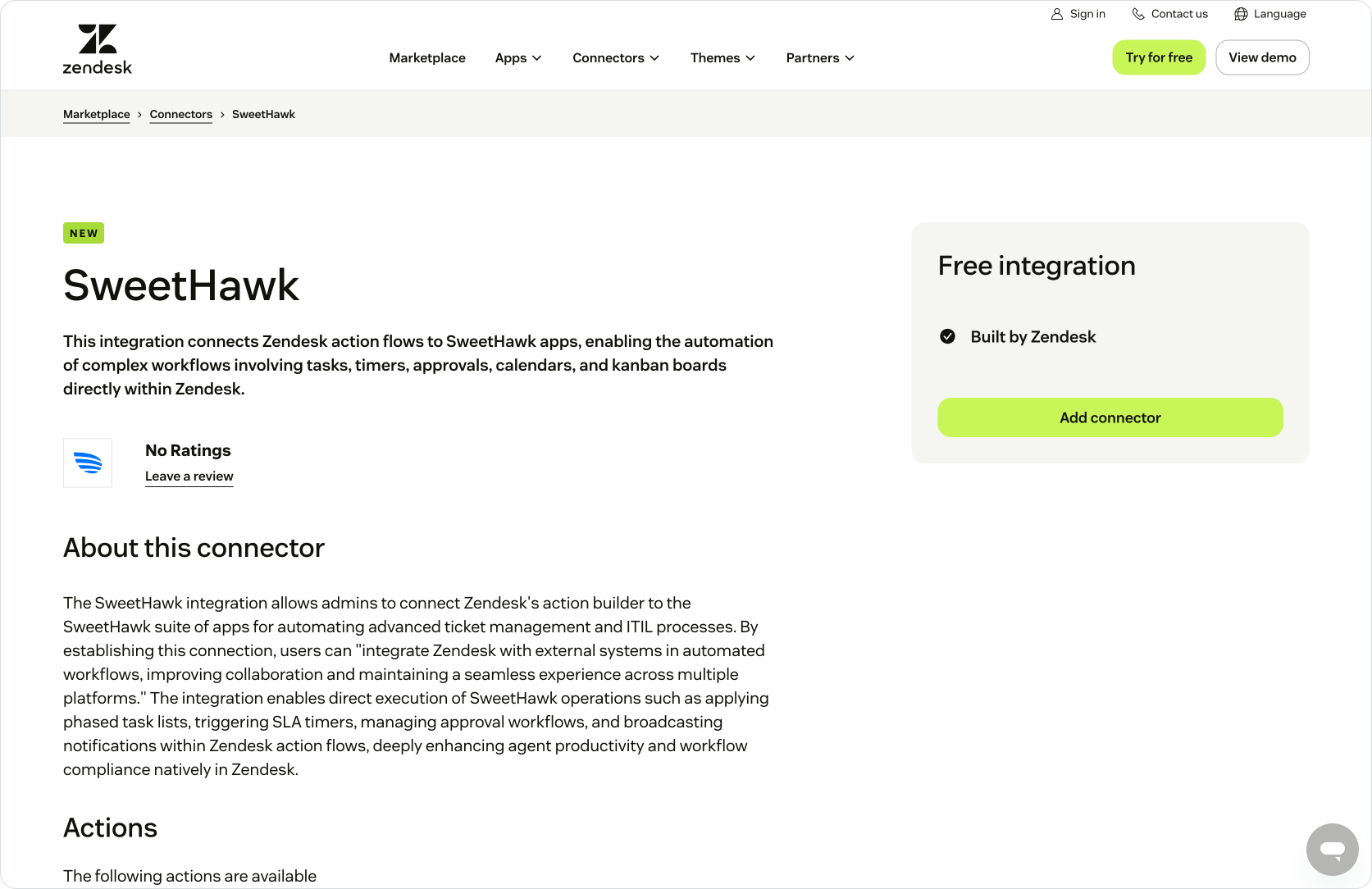
The Zendesk Marketplace also has a dedicated Action Flow connector section, making these integrations easier to discover before you start building a flow.
MCP Client support now generally available
Custom Actions work well when you have a specific API endpoint you want to use. You define the request, provide its inputs and describe the output Zendesk should retain. One action retrieves an order. Another cancels it. A third gets its delivery status.
But every new capability requires another API integration. And as the number of procedures and automated use cases grows, so does the list of endpoints you need to configure and maintain.

MCP changes that model. An MCP server publishes a catalogue of tools and describes how each one should be called. Zendesk’s MCP Client connects to the server, discovers the available tools and lets an admin choose which ones should be exposed in Action Flows.
One connection can therefore add an entire set of capabilities.
A Stripe MCP server could expose actions for customers, payments and disputes. An Asana server could provide tools for finding, creating and updating tasks. A private MCP server could give Zendesk governed access to your company’s own order, subscription or warehouse platform. The external platform describes its tools once, and any compatible MCP Client can use them.
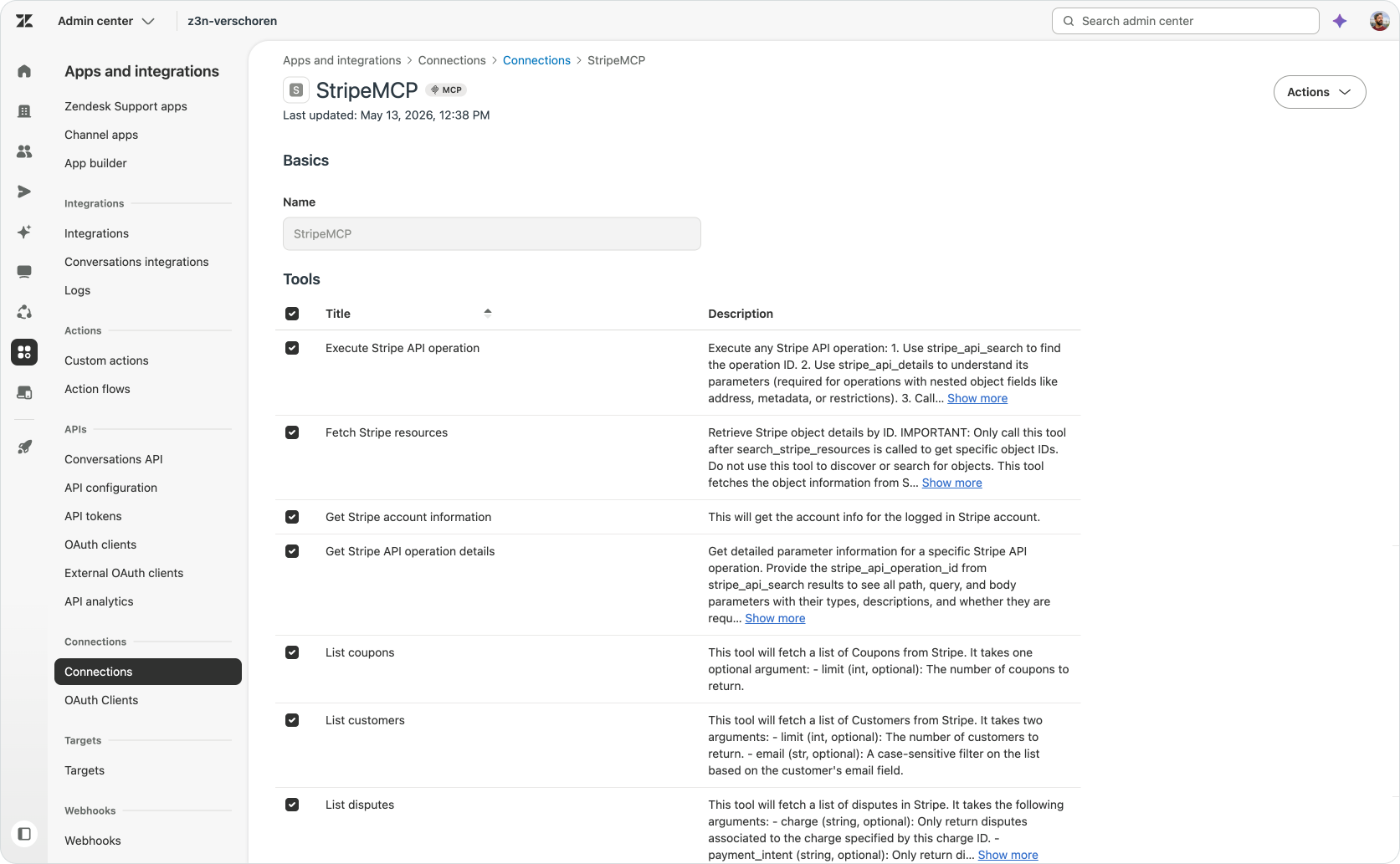
This does not make the underlying APIs disappear. Someone still needs to build and maintain the MCP server. But the Zendesk admin no longer needs to recreate every individual endpoint as a separate Custom Action.
Once a server is connected, its selected tools join the other actions available in Action Builder. Their outputs can feed branches, loops and code steps, and each action can use the same retry and error-handling options as the rest of the flows.
If you currently connect to your tools via Custom Actions, I highly recommend checking if that platform is supported via MCP. This way you can replace a dozen custom connectors with one single, always up to date, set of actions.
A new opportunity for Marketplace partners
Historically, Marketplace apps were designed around a human agent.
They added customer context to the ticket sidebar, presented a custom interface or gave agents buttons to perform actions in another platform. Many apps also installed triggers and webhooks to send ticket updates to an external service or run work in the background.
This model works when a human agent is at the centre of the process.
But an AI Agent does not need a sidebar. It cannot open an app, read the information and click a button. It needs direct access to the capability behind that interface.
Action Flow connectors give partners a new way to provide that access.
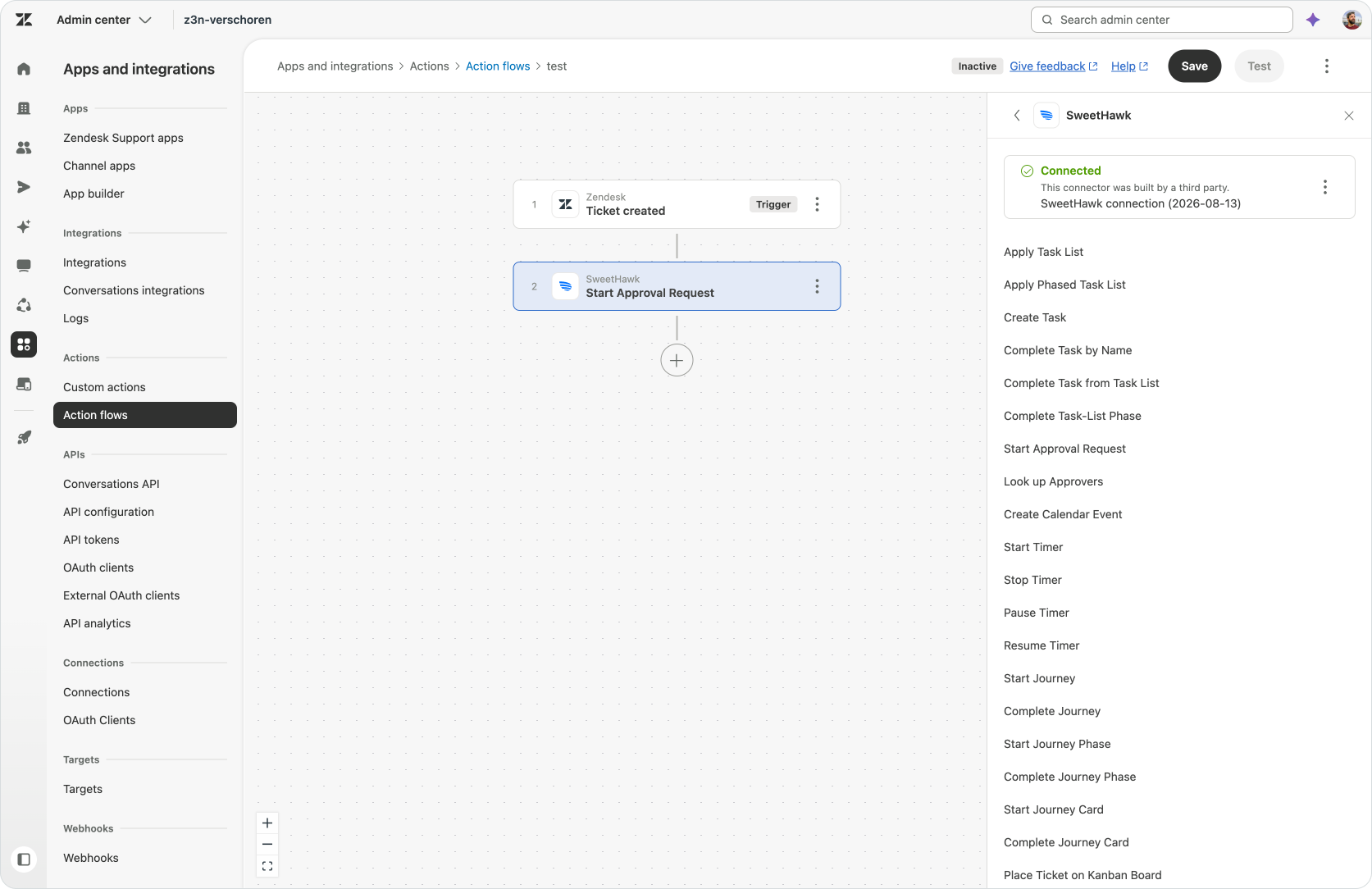
Instead of exposing their value only through a ticket app, partners can make their platform’s capabilities available as reusable Action Builder steps. Each action can accept structured inputs, return outputs and participate in the rest of the workflow.
A retail partner could expose actions to retrieve an order, validate eligibility, create a return and generate a shipping label. A finance partner could provide actions to check a payment, request approval and issue a refund. A workforce management partner could expose scheduling, availability and shift actions.
Those actions can then be used by flows triggered from tickets, users or schedules. They can be invoked by Agent Copilot, AI Agents and Custom Agents. They can run before a human touches the ticket or as part of a fully autonomous resolution.
This is a much deeper form of integration. The partner is no longer only adding an interface beside Zendesk. Its capabilities become part of the processes running inside Zendesk.
It also changes how partners should think about their Marketplace strategy.
The question used to be:
What information and controls should we put in front of an agent?
The new question is:
Which parts of our platform should Zendesk’s agents and workflows be able to execute?
The strongest partner integrations will probably offer both. A clear interface for the work that requires human review, and a catalogue of granular actions for the work that can be automated.
The first partner-built Action Flow connector comes from SweetHawk, with more partner options expected as the Marketplace category expands.
As service moves from human-driven ticket handling towards automated resolution, the value of an integration increasingly sits in the action behind the button, not only in the interface around it.
Conclusion
Zendesk continues to invest in both sides of its execution layer.
Action Flows are becoming more powerful. Variables, code, loops and error paths let them retain state, transform responses, process lists and define what should happen when a step fails.
At the same time, the connection library, MCP Client and partner ecosystem give those flows access to more of the systems where the work happens. The new Connections page brings those integrations into one discoverable and manageable place.
And with native Zendesk actions no longer consuming action credits, you can build as many steps as the process needs inside Zendesk. Credits are reserved for the third-party and custom actions that extend the workflow beyond the platform.
More capable flows. More connectivity. Fewer limits on automating the work inside Zendesk.
This creates an opportunity to pull more of your automation logic into the platform, running alongside the tickets, users, objects, agents and procedures that depend on it. So, let’s use it.
Look at the workflows you currently run in an Azure Function, Cloudflare Worker, Make or Zapier. If a workflow starts with a Zendesk event, calls an API, transforms the response and updates something in Zendesk, it may now be a good candidate for an Action Flow.
If you have not built an Action Flow yet, browse the connector library and connect one platform your team already uses. Find one manual handoff between Zendesk and that platform, then automate it.
And if you use AI Agents Advanced, take one of your existing API integrations that combines an API request with JSONata. Rebuild it as a proper Action Flow, add error handling and make that same process reusable by AI Agents,, while also making it available to Agent Copilot and the rest of the platform.
Start with one process. Bring its logic into Zendesk. Connect it to the systems it needs. Then make it available wherever that work needs to happen.