

What's new for Zendesk's Agent Copilot
Agent Copilot transforms support by shifting agents from manual execution to strategic oversight. By handling repetitive tasks like data retrieval and drafting, it frees your team to focus on human empathy and complex problem-solving. This article dives into what's new!

What's new for Zendesk's Agent Copilot
Agent Copilot transforms support by shifting agents from manual execution to strategic oversight. By handling repetitive tasks like data retrieval and drafting, it frees your team to focus on human empathy and complex problem-solving. This article dives into what's new!

On this page
Automating customer and employee services can be done in a myriad of ways. You can choose for a fully automated approach, where you leverage AI Agents with knowledge sources, procedures and actions, to go from question to resolution.
You can also opt for a hybrid approach where you leave most of the decision making on the side of your team, but leverage elements like suggested replies, actions and instructions to assist them in handling those conversations.
And while resolving conversations is the goal, it's not only what you do that matters, but also how you do it. Intent detection, Quality assurance, knowledge gap detection are just a few of the elements that can help you improve your services. And more and more these elements too can be automated with Zendesk's AI capabilities.
This article will focus on that middle part. Agent Copilot. Launched as Advanced AI three years ago, it's Zendesk's feature that handles the entire ticket lifecycle from escalation to resolution. But Agent Copilot's name might make it sound as being a single product, it's actually a family of capabilities that are deeply integrated into Agent Workspace.
Agent Copilot
Agent Copilot has four big components to it.
- Intelligent Triage
- Writing Tools
- Auto-Assist
- Recommendations & Insights
Intelligent Triage.
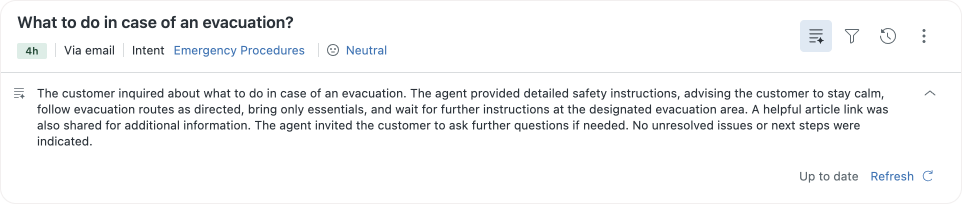
This helps you with understanding the why of why customers are contacting you, and provides context. Intents help you classify conversations, Entity detection assembles the required context, Sentiment shows you how customers are feeling. You can use this context as part of your routing rules in Omnichannel Routing. Or you can use them to decide which use cases are popular, and start writing procedures or knowledge for those. And naturally, you can use them in reporting to deep-dive into your results and split them out by intent.
Writing Tools
Even without using any of your knowledge or procedures, writing tools help your agents with writing reactions. They can shift a message's tone from casual to professional. They can shorten a lengthy comment, or they can turn a few short lines into a longer, more friendly reaction. Or they can use custom prompts to write, translate and transform their comments.
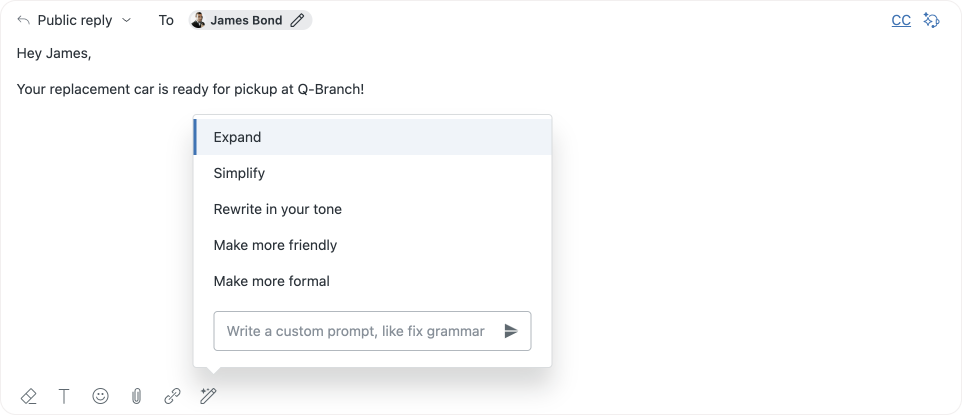
These tools are not only confined to Agent Workspace. Within Knowledge they are also available in the Article Editor to expand, simplify or translate your Help Center content, and they are available inside of Macros
Auto-assist
Where writing tools are there to transform existing text, auto-assist is there to really help your agents and guide them in handling tickets.
In its most basic form, auto-assist uses knowledge sources, previous ticket history and the current conversations' context to propose replies to your agents which they can accept, or edit, before submitting them to customers. This takes away the manual step of looking up a support article, copying the relevant passage, and rewriting it on a cohesive whole.
A more advanced version of auto-assist is powered by Procedures. These are guidelines written for a specific use case that explain how you go from question to resolution for that specific use case.
Procedures can do a myriad of things, but important to note, even if I write that a procedure does something, it'll only do that action after a human agent explicitly approves some or all of these actions.

Procedures can get context from the ticket, or ask the customer for the information needed. If the info is already available, it can validate the info and skip asking for it.
They can show instructions to your team members for manual steps they have to take. After completing these steps, the procedure takes over again.
They can update the ticket's fields and status, or run existing macros in your instance. And naturally, they can generate suggested replies for the agents to accept based on all this information.
A procedure is a written down process with the steps Agent Copilot or your team should take. And even though these can and will contain logic, for more complex reasoning and logic, or when you want to interact with data stored in an external platform, procedures have access to the Action Builder workflows and custom actions in your instance.
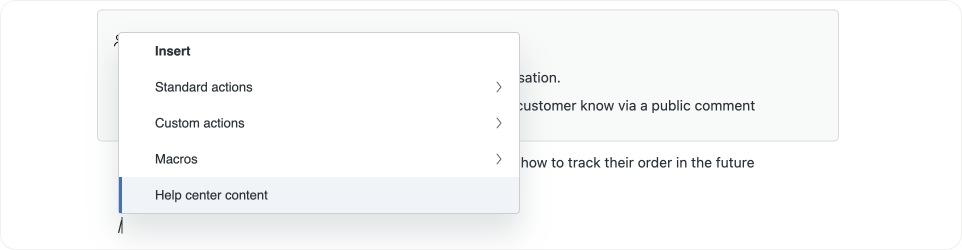
Custom actions allow Agent Copilot to get, set or send data to and from your other tools, and use that information within its process.
Action Builder workflows on the other hand have the ability to run logic. You can build deterministic flowcharts that run specific integrations, do specific actions or update tickets based on the logic you lay out in these flowcharts.
By wrapping specific business logic in a workflow you can make it reusable across multiple procedures (E.g. is this user a VIP?), and you remove a lot of complexity from your actual procedures (E.g. Is this user eligible for a refund can be just a single line with a yes/no outcome, and all the decision logic lives in the workflow)
To conclude, auto-assist is the biggest chunk of Agent Copilot, and as some AI capabilities inevitably shift from add-on to included in the Suite product, I think it's going to become the main feature of Agent Copilot.
Recommendations and Insights
That brings us to the fourth and final component of Agent Copilot: Recommendations and Insights.
Hidden within Admin Center is the AI Insights dashboard. This dashboard shows you usage metrics of all the capabilities and suggestions on which features to enable.
More importantly, these also contain the Recommendations dashboard. Recommendations are suggestions for improvements you can make to your instance to automate manual steps, or optimise existing workflows.
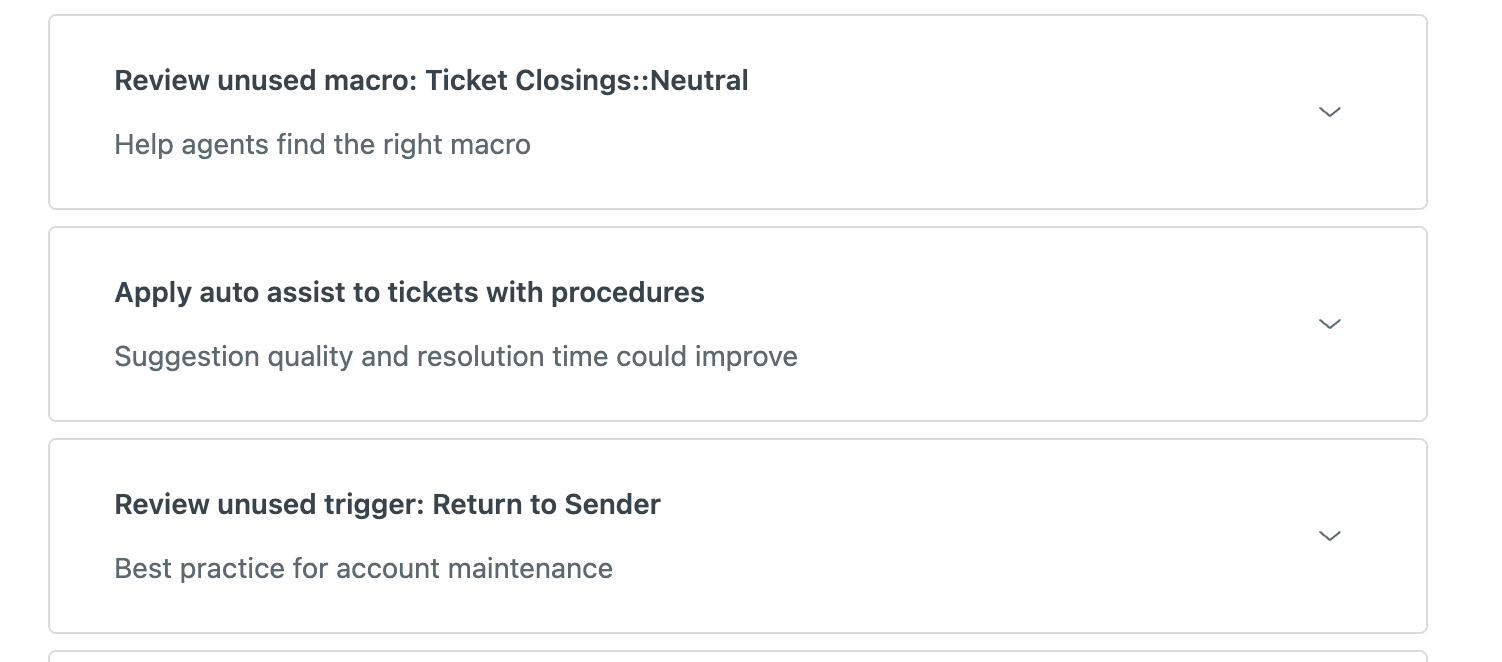
It offers suggestions for triggers to disable or modify, new auto-assist procedures, intent suggestions, or improvements you can make to your routing setup. These recommendations are based on your Zendesk's ticket data, and can react to spikes or falls in specific ticket types, as well as best practices and new features Zendesk adds to the platform which, once enabled, can further improve your setup.
These recommendations are actually part of Zendesk's new Admin Copilot initiative, previewed at the AI Summit last fall. These recommendations, combined with a Weekly Insight report and an actual Admin Copilot you can talk to to ask for information and make changes in your instance, are three new core elements of this new release, expected to launch at Relate in May.
So that's Agent Copilot. A series of powerful AI capabilities that assist your Agents in ticket handling by offering next best actions, providing context and suggesting replies. And soon we'll have Admin Copilot to offer similar capabilities in insights, improvements and changing your Zendesk instance to your team leads and Admins.
But, Agent Copilot doesn't stand still. In the last few weeks, in the last few weeks alone, it got a whole new set of capabilities ranging from small quality of life improvements, big new elements to the platform.
Procedure recommendations
Most customers that get started with Agent Copilot run into the reality that most, if not all, of their business logic lives either in agents' heads, and only some of the processes have been actually written down somewhere. Turning these into actual procedures in Zendesk isn't easy. Just like writing any guideline, you need to know it exists, and then figure out how you're doing it.
Luckily, since the way you handle tickets is reflected in those tickets, you can use them as a basis for your procedures. Hidden within your ticket history are the steps taken by agents to resolve them.
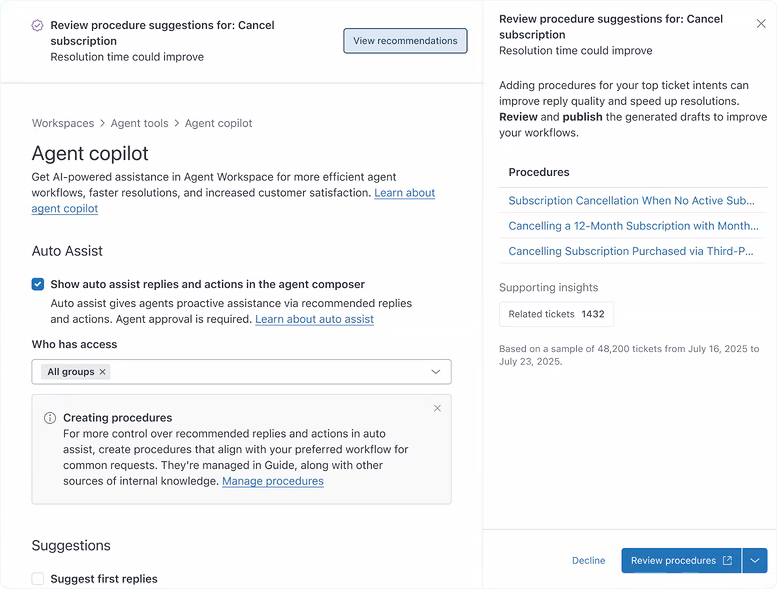
For a while now Zendesk has had Intent recommendations active in Intelligent Triage. These suggest new custom intents based on the use cases it finds across your tickets.
And now, you'll start seeing Procedure recommendations in Admin Center too. These recommendations will contain drafts of new procedures, based on detected patterns in your recent tickets.
They highlight undocumented steps taken by your team, giving you the ability to make them available for every team member by enabling them as auto-assist procedures. But before you do so, you should check them and tweak them to fit your needs.
Once live, the new Version performance view in the Procedure editor, combined with the usage insights, will allow you to detect improvements, which you can then write, deploy and measure, iterating the procedure towards higher efficiency.
Intent Recommendations
Zendesk comes out of the box with hundreds of industry specific intents, allowing you to make use of Intelligent Triage from day one with zero configuration. But as you start using these intents in your business rules, you'll quickly detect the need to add custom intents to make the detected use cases closer to your business reality.
Custom intents have been available for a while now, but recently they gained the ability to also get a custom category, which makes managing your intents a while lot easier.
While manually adding intents is great, Intent Recommendations are even better, since they actively suggest new intent based on what's happening with your customers.
These suggestions now have new types, so you get even more use out of these recommendations:
There's New intents, these are new use cases Zendesk detected which you can approve. Once approved you can use these intents in routing, reporting and triggers.
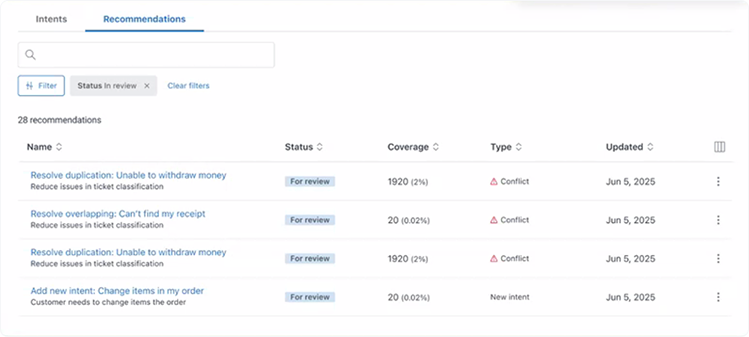
There's also a conflict type, which will highlight duplicate or confusing intents in your instance.
Duplicate intents have an identical use case. You can compare both, and decide which one to deactivate, retaining only the other intent.
And there's the overlapping intents, which are intents where there's some confusion between the two. The system will show a popup that allows you to modify the description of these intents to further differentiate them.
I wrote about shifting from categories to intents earlier. These new recommendations are another reason to do so. By continuously comparing your tickets against these intents, Zendesk will actively help you improving your intent list, giving you better insight in what's actually going on overtime.
 Thomas Verschoren
Reporting improvements
Zendesk Analytics also gained plenty of new insights to measure your Agent Copilot performance.
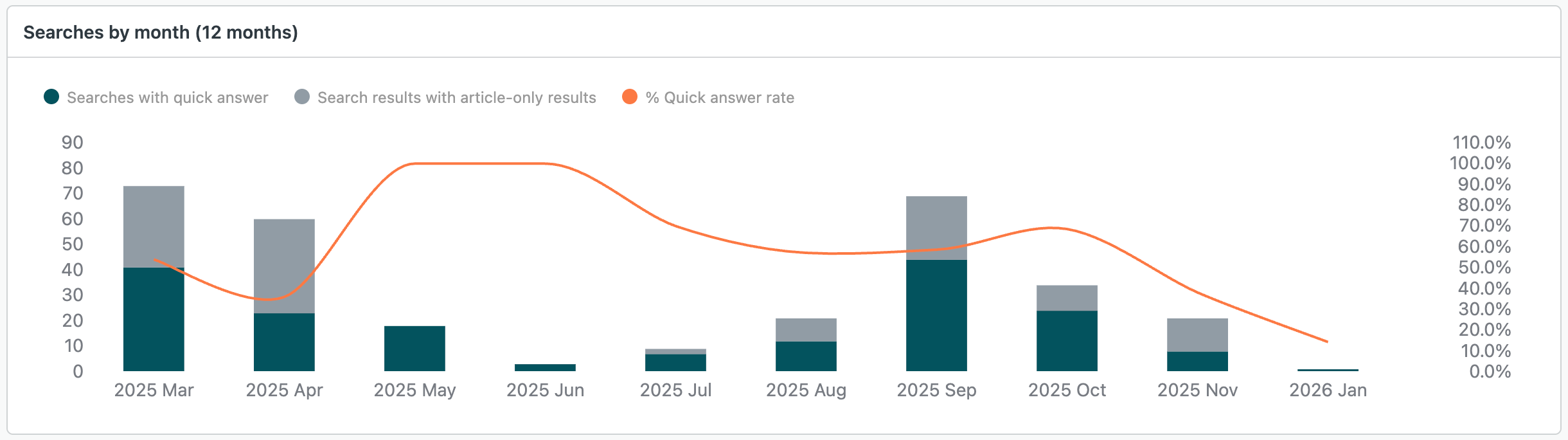
First off is a new Quick Answers tab in the Knowledge report. This allows you to measure the performance of these generated answers within your Help Center's search tab.
 Thomas Verschoren
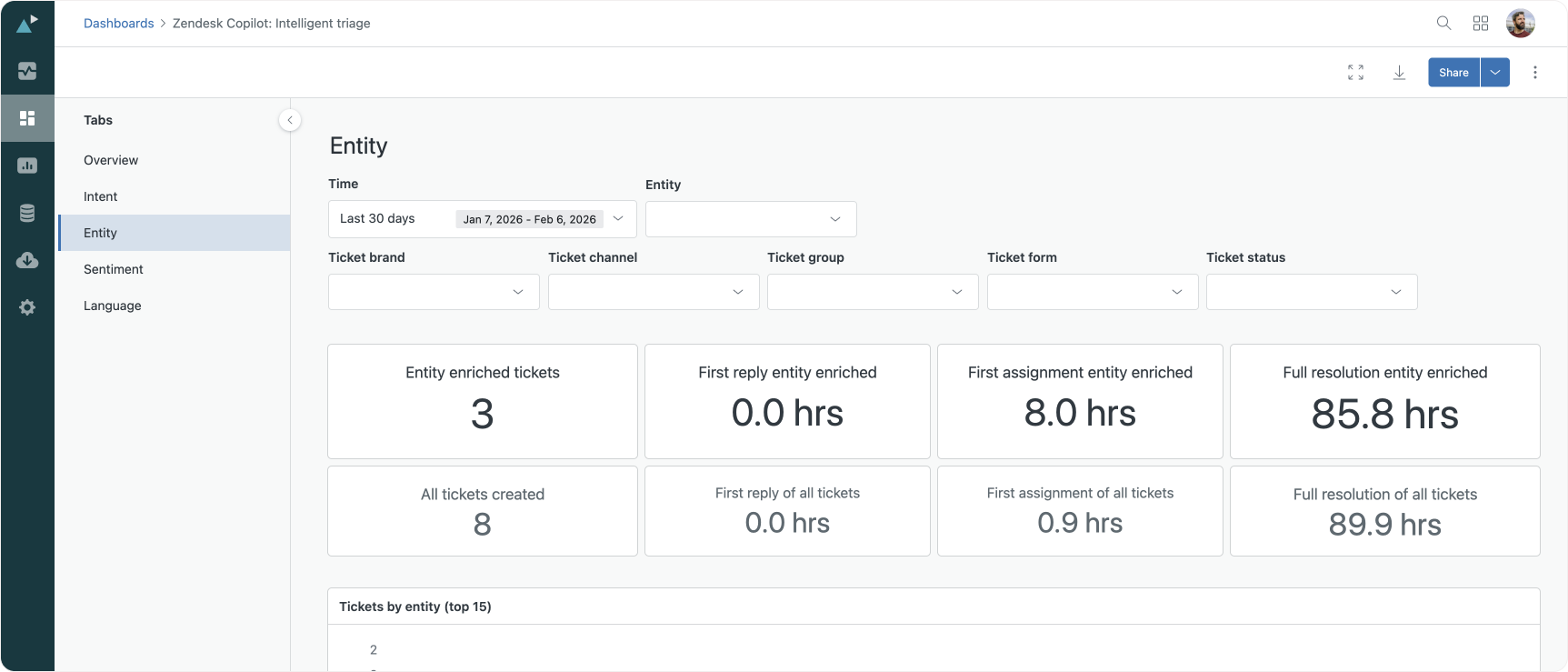
Secondly, there's an expansion to the Intelligent Triage dashboard, which now also includes support for Entities on top of the existing Intent, Sentiment and Language dashboards. And since entities are also available within custom fields, you can also use them to report on e.g. the amount of questions about Desktops vs Laptops.
Auditing and Governance
Event logging
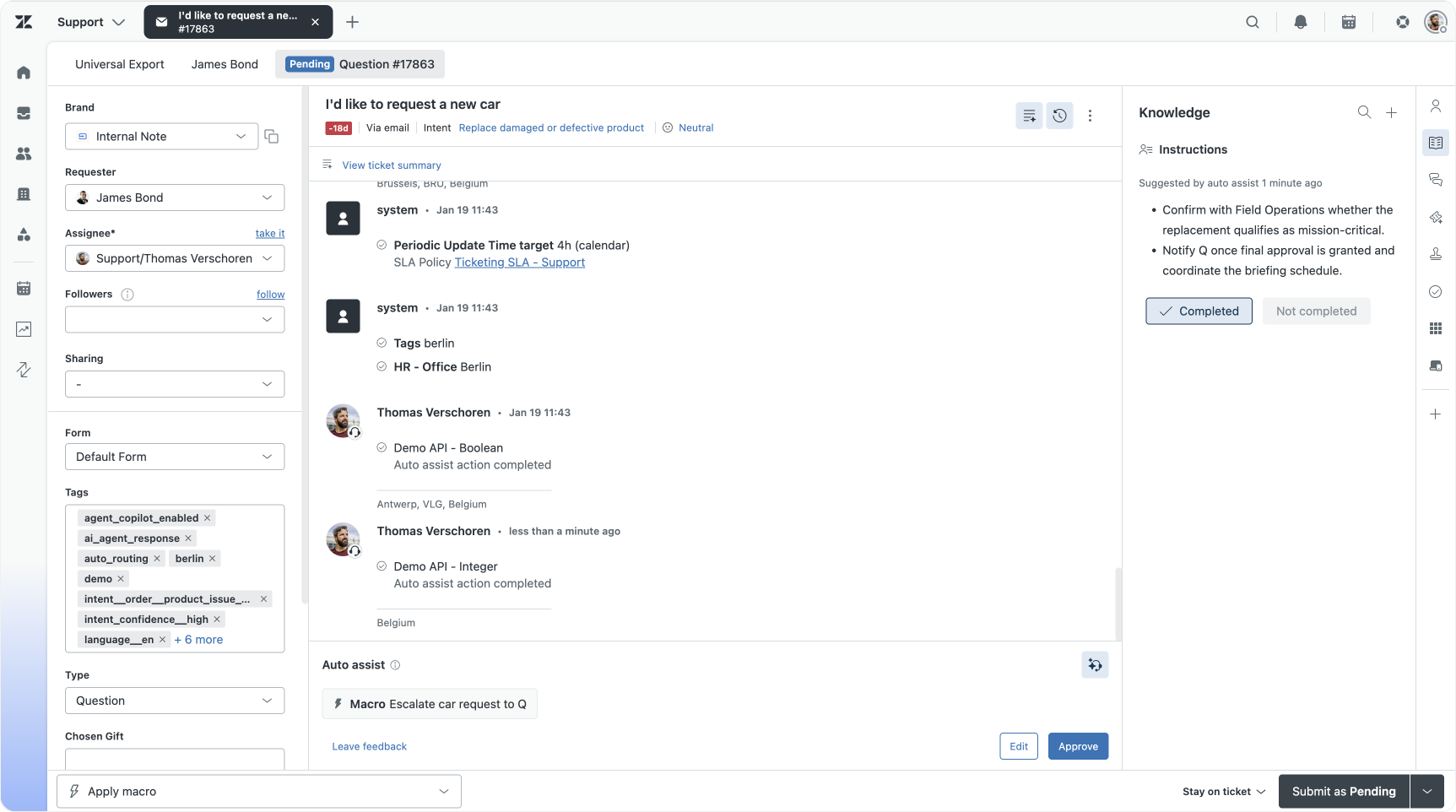
The ticket event log in Agent Workspace gives team leads an exact list of all al actions taken on a ticket. It's useful for accountability (who did what), but also for troubleshooting (what caused that?).
Released this week is the ability to see what auto-assist actions have run on the ticket, and what the result of those actions was. Today, we've got access to:
- Approved reply suggestions and the agent who approved them
- Completed actions, the name of the actor under which an action was executed, and the action execution status (completed, skipped or failed)
- Failed actions are also visible in the conversation log to make it easier for agents to understand issues when solving tickets with Auto assist
And in the next few weeks, these will also get added to the audit log:
- instructions for agents
- original reply & action suggestions + edits of suggestions (including action removal)
- takeovers (also known as pausing Auto assist)
- rationale
These actions are visible within the Agent Workspace UI:
And are also part of the api/v2/tickets/{{ticket.id}}/audits API endpoint:
{
  "id": 33128702417938,
  "ticket_id": 17863,
  "created_at": "2026-02-06T12:40:55Z",
  "author_id": 30365366426642,
  "events": [
    {
      "id": 33128702419218,
      "type": "ZenAgiEvent",
      "author_id": 30365366426642,
      "properties": {
        "name": "PlanExecution",
        "plan_id": "01KGSFFRS2Z3EN43Y7RZ8MV1YX",
        "status": "SUCCESS",
        "accepted_by": 30365366426642,
        "accepted_at": "2026-02-06T12:40:48Z",
        "actions": [
          {
            "type": "demo_api_integer_01K8NEC2JVNVNTVJGV1PXC1VTA",
            "id": "01KGSFG0YF7WM88YDXR4CWTBYR",
            "label": "Demo API - Integer",
            "executed_at": "2026-02-06T12:40:48Z",
            "status": "SUCCESS",
            "parameters": "{}"
          }
        ]
      },
      "public": true,
      "audit_id": 33128702417938
    }
  ]
}
Where the Intelligent Triage dashboard gives you an overall view on how many times a procedure has run, and what steps agent took, these event logs show you exact, traceable moments, which can help you troubleshoot weird behaviour.
Source suggestions
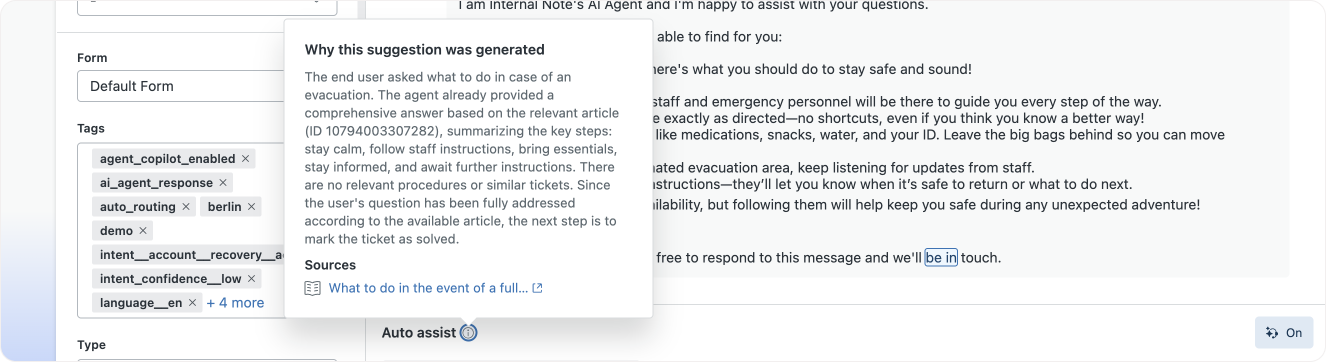
Aside from an auditable log, it's also important for your agents to understand why a suggestion was made. This way, instead of just blindly accepting suggestions, they can understand the reasoning behind, and if needed flag wrong behaviour.
This is now possible via the new info popup next to the auto-assist label.
Procedure actions
Procedures contain both logical steps, instructions for your team, as well as actions Agent Copilot can take. As noted above, they can get and set Zendesk ticket data, they can call external APIs via custom actions, and they can invoke action builder workflows and macros.
New this month is the ability to include Knowledge as native actions within a procedure. This allows you to directly reference a specific support article, or link to another procedure.
For example, in a procedure to let the customer know the status of their order, you might want to point the customer directly to the support article that explains them how to find this status themselves.
Or similarly, if the customer can't retrieve the order number, you can now tell your procedure to stop it's own logic, and start another procedure. This procedure contains all logic that helps you to authenticate a customer, and retrieve their order information.
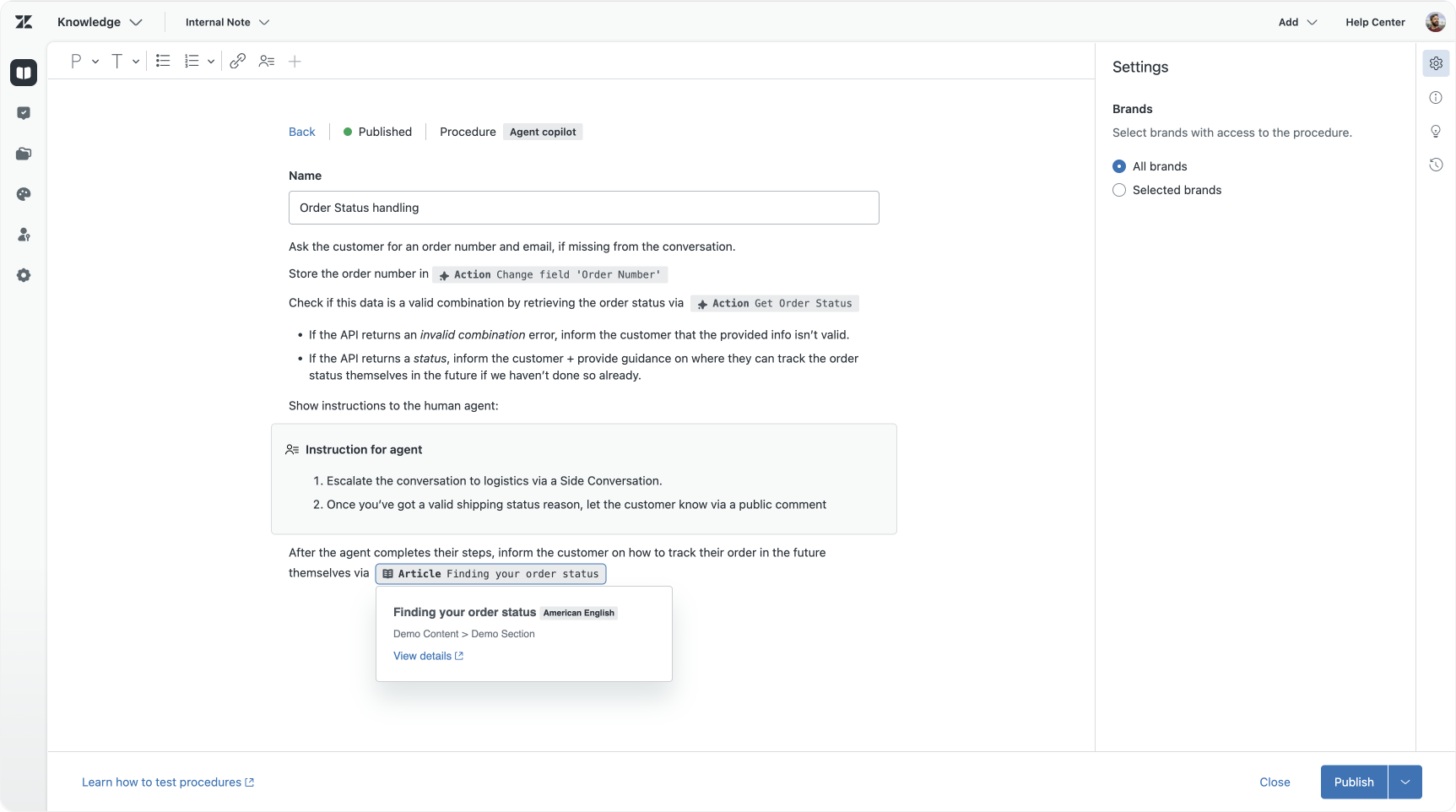
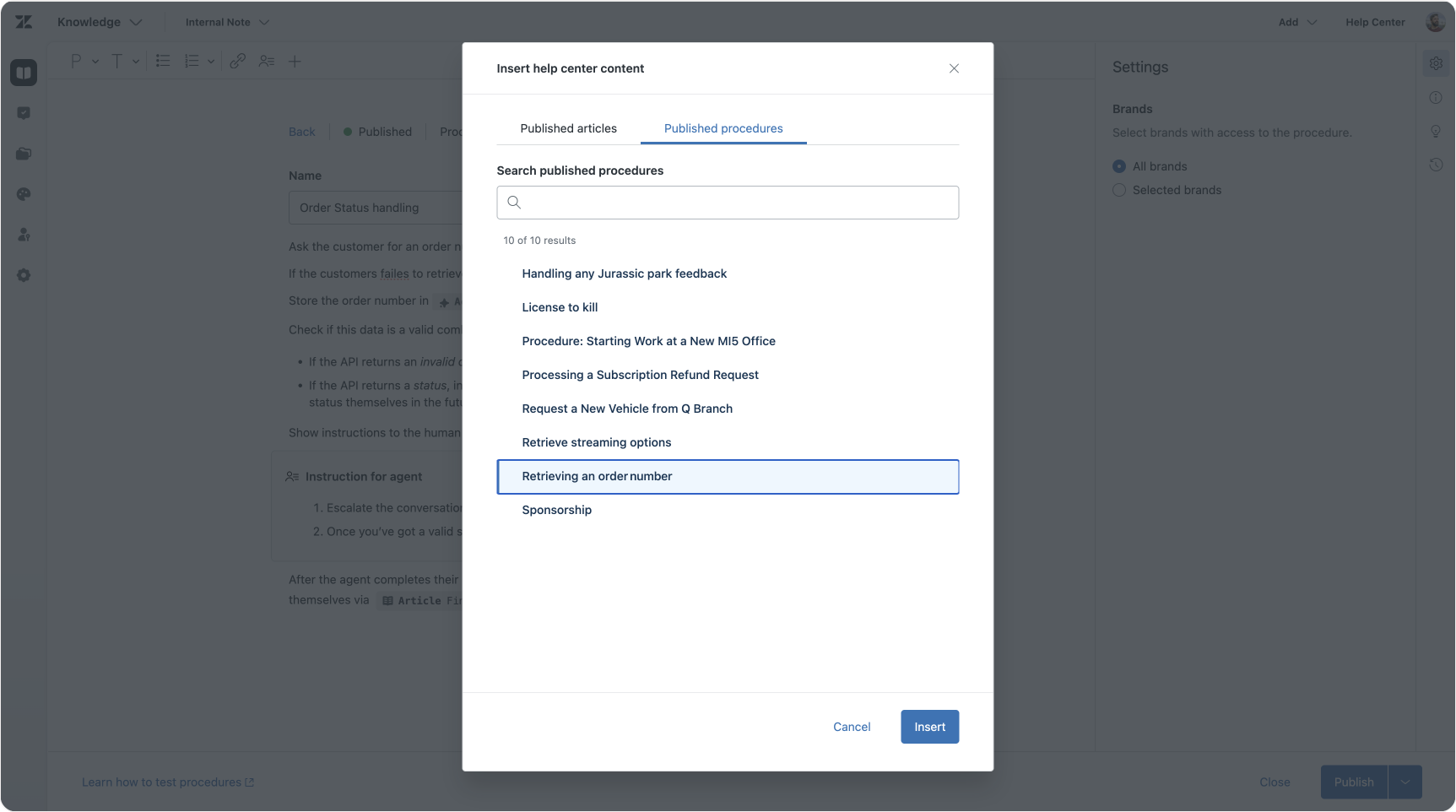
What's nice about both these new capabilities is that they allow you to simplify your procedure writing. If all the information a customer needs to have is already available on your Help Center, it's better to link to that source and retrieve the info that way, than to add the content itself to your procedure. The document becomes shorter, and there's only a single source of truth, the article.
Similar for these linked procedures. Just like we can do for dialogue builder flows (or the old Flow Builder), instead of restating the same logic across multiple procedures, we can now extract reusable logic, and link it across multiple procedures. This way some procedures can be simple routers, that invoke other procedures, or other Action Builder workflows, to run its logic.
Permissions
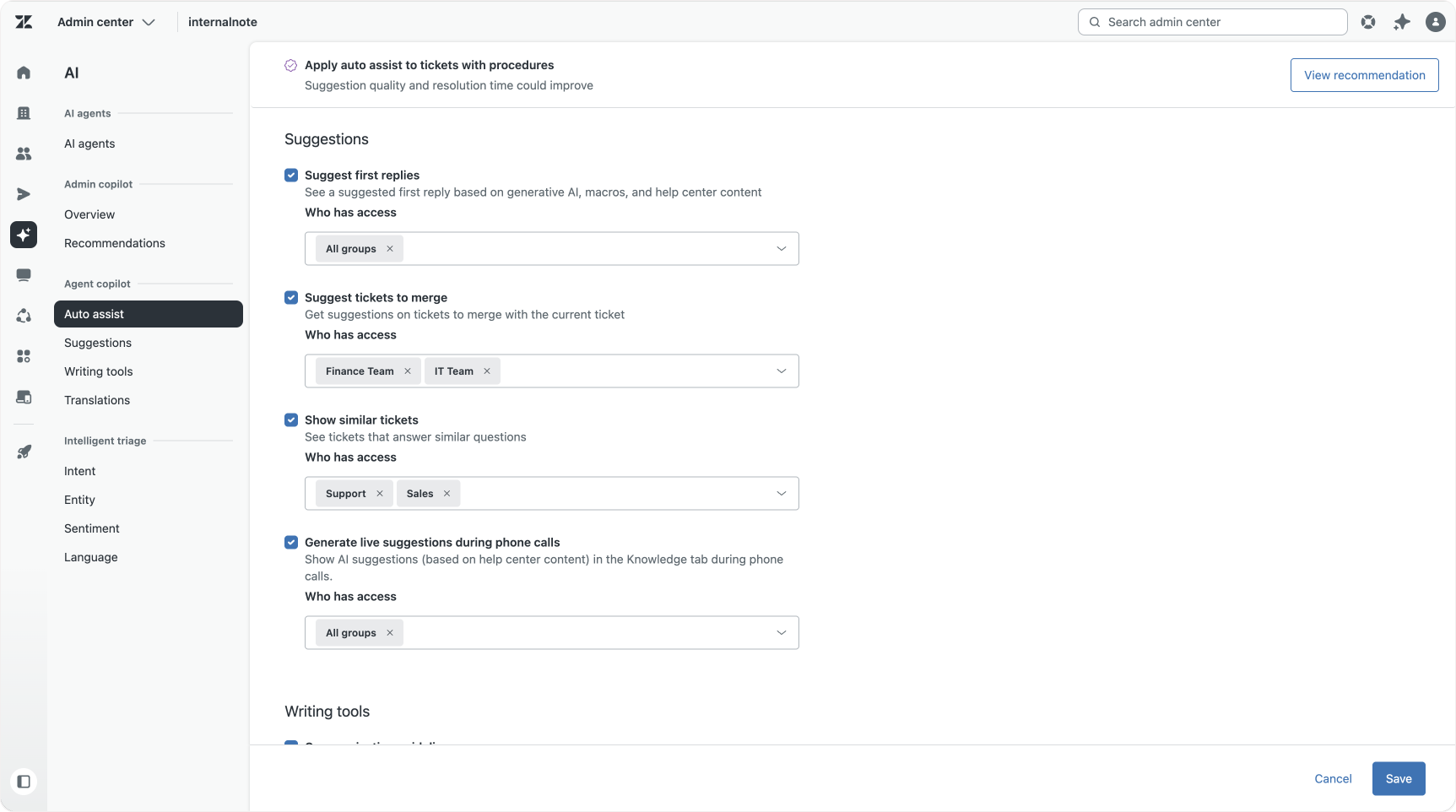
When you launch Agent Copilot you might not want every team to access every feature on day one. You might want to create a AI-team that tests out new capabilities before you go live across the company. Or there might be legal requirements to exclude specific teams from leveraging AI writing tools. Or you might not have written procedures for a team yet, and want to opt-out of auto-assist until you've had the time to write content.
With the new group-based permissions you can now allow access to Agent Copilot features on a feature-by-feature basis for some or all of your groups or brands.
Conclusion
Agent Copilot. A powerful set of capabilities that give you insight in what customers are asking, allows you to assist your team with suggested actions, runs automations on top of tickets and provides continuous insights in your Zendesk environment.
Agent Copilot runs on your email tickets, it's available for messaging conversations, and can also provide real-time suggestions during phone conversations, all based on the same set of procedures.
Soon, Agent Copilot will be joined by Admin Copilot, a set of AI capabilities that will assist admins and team leads in configuring Zendesk, while being able to understand what's happening in their instance, and why.
If you haven't reached out to your account manager for a trial, now's the time. And if you're hesitant on where to start, here's some suggestions:
- Enable Intelligent triage and shift from manual to automatic categorization - article
- Enable entities and automatically detect context in conversations - article
- Enable suggested replies and auto-assist and leverage your existing Knowledge sources, turning manual comments into suggested replies.
- Enable writing tools, which allows agents to turn predefined macro text into personalised messages, and turns short answers into nice responses.
And if you want a (5), well, try to write three procedures for use cases that are often uses, but not too complex to automate. You can always add actions and complexity later.