

App Builder for Zendesk: Bridging the gap between support and development
Zendesk’s AI-powered App Builder lets support teams rapidly create custom apps without coding. Integrated seamlessly within Zendesk, it empowers frontline agents and team leads to innovate, streamline workflows, and extend platform capabilities securely and easily.

App Builder for Zendesk: Bridging the gap between support and development
Zendesk’s AI-powered App Builder lets support teams rapidly create custom apps without coding. Integrated seamlessly within Zendesk, it empowers frontline agents and team leads to innovate, streamline workflows, and extend platform capabilities securely and easily.

On this page
Zendesk’s Resolution Platform is seen as a comprehensive solution designed to elevate customer and employee support. Out of the box, it delivers omnichannel communication, knowledge management, intelligent ticket routing, and powerful operational insights. It covers nearly every aspect needed to run an efficient support operation.
Yet even a best-in-class platform like Zendesk isn’t an island. In real-world environments, support teams collaborate with other departments and rely on data scattered across various tools. They also need the ability to act on that data, without constantly switching systems. Moreover, while Zendesk offers a rich set of features, sometimes a missing small capability, a less-than-ideal UI, or a unique workflow need can get in the way of delivering truly seamless support.
This is where Zendesk’s extensibility shines. Through its robust APIs and the App platform, organisations can integrate external data, build custom interfaces, and add tailored functionality directly inside Agent Workspace. Whether it’s a sidebar app that surfaces CRM data alongside a ticket, a navigation bar app to manage custom objects, or a popup widget to streamline workflows, the possibilities are endless.
Historically, creating these custom apps meant writing code. It requires dedicated developers and lengthy cycles. With the rise of AI-powered tools and Zendesk’s new App Builder, that barrier is rapidly falling. In this article, we explore how App Builder transforms the way support teams build, test, and deploy tailored Zendesk apps. It makes this extensibility accessible to everyone, all while staying secure, stable, and fully integrated within the platform.


App Builder
Traditionally, building apps in Zendesk meant diving into code, hiring a developer and building the entire application by coding it from scratch. But the arrival of modern AI tools, and their ability to index code bases and documentation, marks a major shift in the way we approach development today.
More and more code is written by AI coding tools, with humans there to provide quality inputs and validate the output. Code gets written faster, and the effort to go from idea to a version of the app you can start playing around with is basically the time it takes you to write down your idea.
Recognising this shift, Zendesk launched its first version of App Builder about a year ago. It’s an AI-powered development tool that generates Zendesk apps based on natural language prompts, eliminating the need for manual coding or designing.
 Thomas Verschoren
Since then, App Builder has received major upgrades, making it worth revisiting to uncover what you can build today.
Interface
At its core, App Builder retains its original conversational approach: you describe what you want to build, and App Builder uses your input to generate an app. The UI displays a live preview, allowing you to test the app in Agent Workspace or publish it once you’re satisfied.
Underneath this UI lives a combination of Zendesk specific prompts and documentation indexes, combined with Anthropic Claude Sonnet 4.6. This recent model upgrade will get you better results on more complex app scenarios.
A key enhancement is the option to create different app types: ticket sidebar apps, full-size navigation bar apps, or popup apps that live in the toolbar.
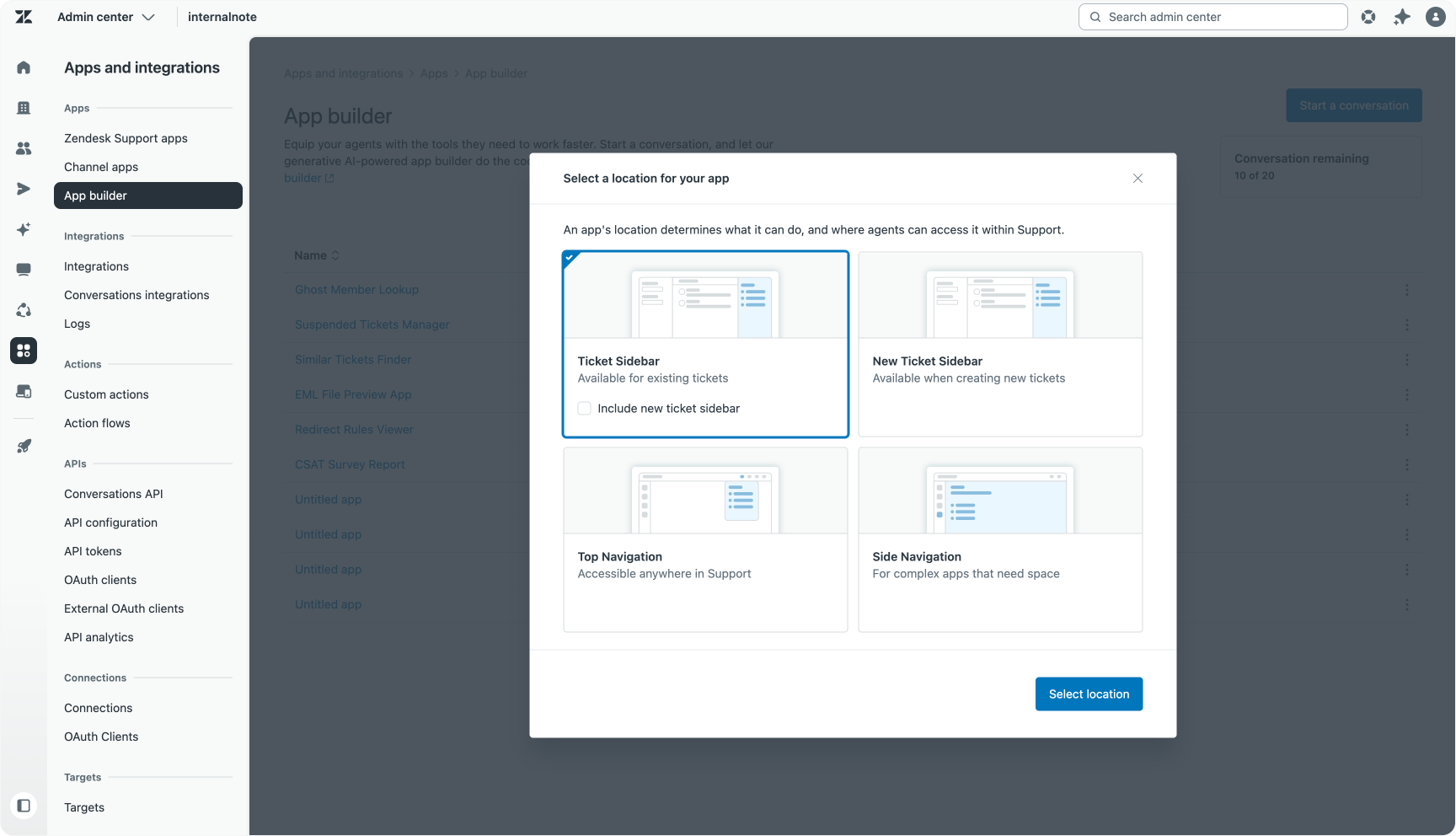
Once you select the app type, the main interface opens with a split view. The left pane is your chat with App Builder, where you issue build instructions, receive suggestions, and track the build’s progress. Your entire conversation is saved, making it easy to scroll back, reference earlier prompts, or export the thread to create a readme or share with colleagues.
The right pane showcases a live preview of your app using mock data. You can inspect and download the generated code, and configure settings like the app’s name, color, and icon.
With each prompt, App Builder generates a new app version. All versions are accessible via a dropdown, allowing you to compare iterations, revert to a previous build, or experiment without losing progress.
Publishing apps
Every app you create with App Builder is stored within a catalog inside Zendesk’s Admin Center. At any point, you can test your current version against real tickets in preview mode. While the App Builder’s built-in preview offers a solid development view, actual ticket testing often reveals bugs or usability improvements that aren’t obvious otherwise.
When you’re ready to deploy, publishing the app to your Zendesk instance is straightforward. Like Marketplace apps, you can control initial access by specifying user roles or groups. Post-installation, access settings can be managed via the Support Apps section of Admin Center.
Since your app remains in App Builder’s catalog even after deployment, you can begin working on updates immediately without disrupting your team’s workflow. Testing and previewing new versions is seamless, and once you’re happy with an update, say, a 2.0 release, you can publish it to replace the existing app for your agents.
Why App Builder
Zendesk’s App Builder isn’t the only AI-powered coding tool available. Platforms like Claude Code, OpenAI Codex, and Gemini Code Assist can also generate Zendesk apps by leveraging API documentation. So, why choose Zendesk’s native App Builder?
For starters, App Builder is built by Zendesk itself. Its underlying models and system prompts are tailored specifically for the Zendesk ecosystem. It inherently understands the relationships between tickets, users, organisations, ticket fields, custom objects, and the ticket lifecycle. Its retrieval-augmented generation (RAG) system prioritises Zendesk’s official API documentation. This minimises the risk of generating apps with invalid logic or unsupported APIs.
Additionally, App Builder has built-in knowledge of Zendesk’s Garden Design System, ensuring that generated apps adhere to Zendesk’s design guidelines and behave consistently.
Thirdly, App Builder is purpose-built for the Zendesk Apps platform, expertly handling manifest files and app structures needed for smooth operation within Zendesk.
Importantly, because App Builder removes the need for traditional coding skills, it empowers team leads and frontline support staff who intimately understand their workflows and challenges to build their own solutions. This autonomy can accelerate innovation, reduce bottlenecks, and ensure that apps are closely aligned with actual user needs.
By combining deep platform knowledge, specific coding instructions, and adherence to Zendesk standards into its prompts, App Builder gives users a significant head start compared to generic AI coding tools. This means you can focus on your app’s core functionality without explaining how Zendesk apps work.
But the benefits go beyond development speed. Since App Builder is part of Zendesk’s ecosystem, you get unique capabilities like one-click previews and tests, seamless deployment to your agents, simple updates, and no installation or deployment hassles. There’s no need to install the ZAT framework or manually upload versions. It all happens conveniently in your browser.
App Builder offers a powerful, integrated way to extend Zendesk’s functionality, keeping everything within the platform while automatically inheriting new features and UI improvements like flexible sidebars and dark mode support as they roll out.
Technical deep-dive
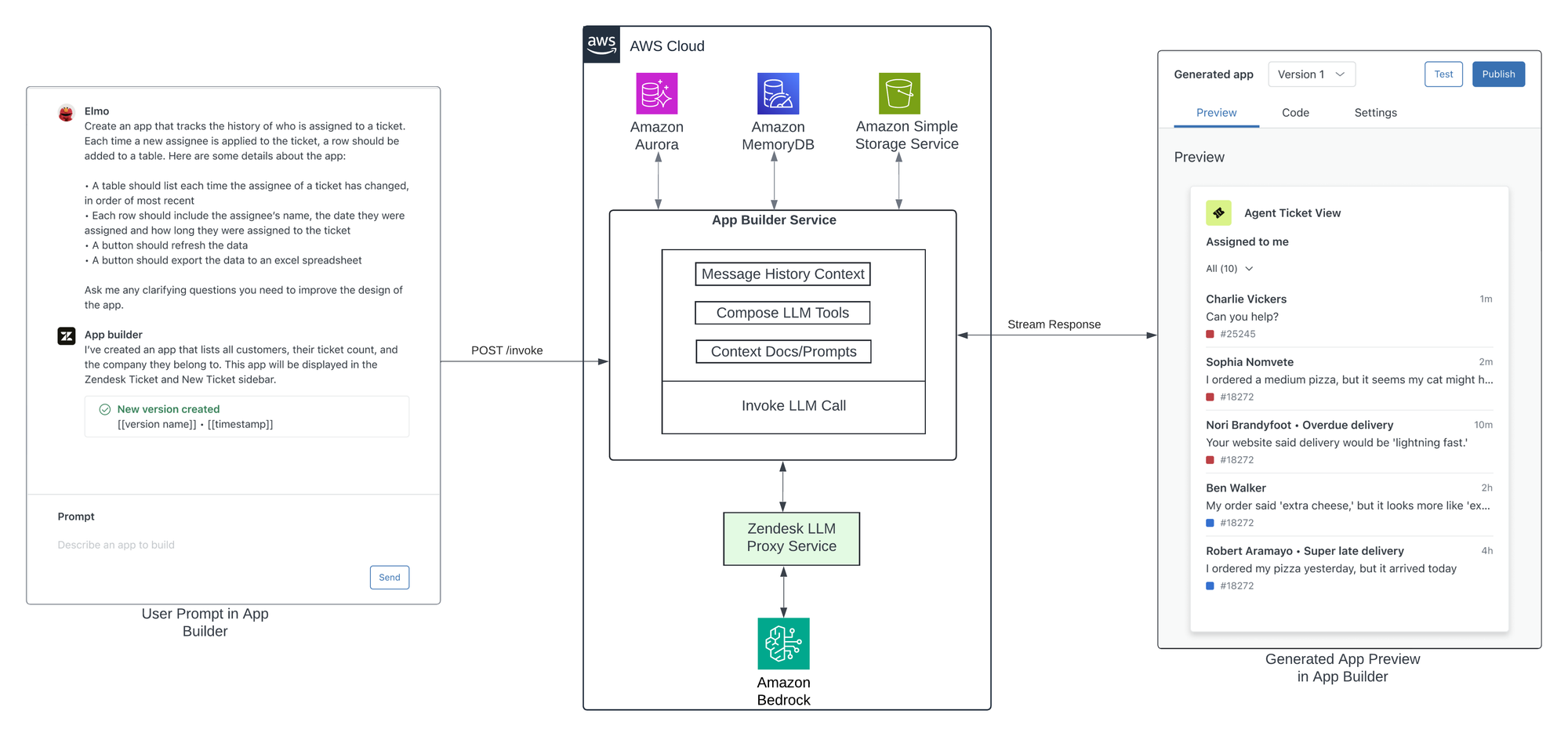
For those interested in the mechanics behind Zendesk’s App Builder, the development team has published an insightful technical deep dive on the Amazon AWS blog. The article explores how App Builder leverages Amazon Bedrock’s foundation models and integrates them with Zendesk’s APIs to enable rapid app generation from natural language prompts.


It’s a worthwhile read for anyone curious about the architecture and AI technology that power this innovative tool, offering a behind-the-scenes look at how ideas are transformed into functional Zendesk apps within minutes.
Use cases
Browsing the App Builder Community forums reveals three primary categories of applications that users commonly build with Zendesk App Builder.
The first group addresses product gaps: features or views that Zendesk doesn’t provide out of the box. Users leverage existing APIs and content to build apps that surface critical data for agents or enable actions not natively available in Agent Workspace. Examples include apps that highlight tickets sharing the same intent, display detailed Customizable CSAT scores, or even integrate with external AI platforms to generate summaries or responses from knowledge sources that Zendesk can’t index, such as Notion.
The second type of apps deliver enhanced insights by presenting data differently than Agent Workspace does today, or by making data that's not included in Analytics or QA tools visible. These might be custom dashboards reporting on CSAT metrics or sidebar apps that reformat ticket field data, like booking dates or references, into more user-friendly interfaces, improving agent efficiency.
Finally, the third category comprises more complex integrations that provide highly actionable value by connecting Zendesk to external systems. These apps can surface order data during a ticket interaction, enable agents to modify bookings directly, or link to developer bug trackers, submitting bug reports on behalf of customers without leaving the interface.
Below are several examples showcasing these use cases. For each, you’ll find the original prompt exactly as entered, a description of the generated app, and observations about the development experience including any challenges or nuances encountered along the way.
List Survey Responses
The first example taps into Zendesk’s new customizable surveys, which offer more granular response scales beyond the traditional CSAT format. While this data is stored within Zendesk, it doesn’t yet have native visibility in Agent Workspace or Analytics.
Starting with a full-size Nav Bar app, my prompt does specify the exact API endpoint for retrieving customizable survey responses to remove any ambiguity with the older classic CSAT requests.
Create an app that lets us report on the custom CSAT scale ratings using the GET /api/v2/guide/survey_responses Zendesk API endpoint showing a sparkline of customer satisfaction scores across tickets with a selectable date range (default 30 days, up to 3 years) and a table showing a list of ticket close date, ticket numbers, requester, subject, the ticket's rating and question answer.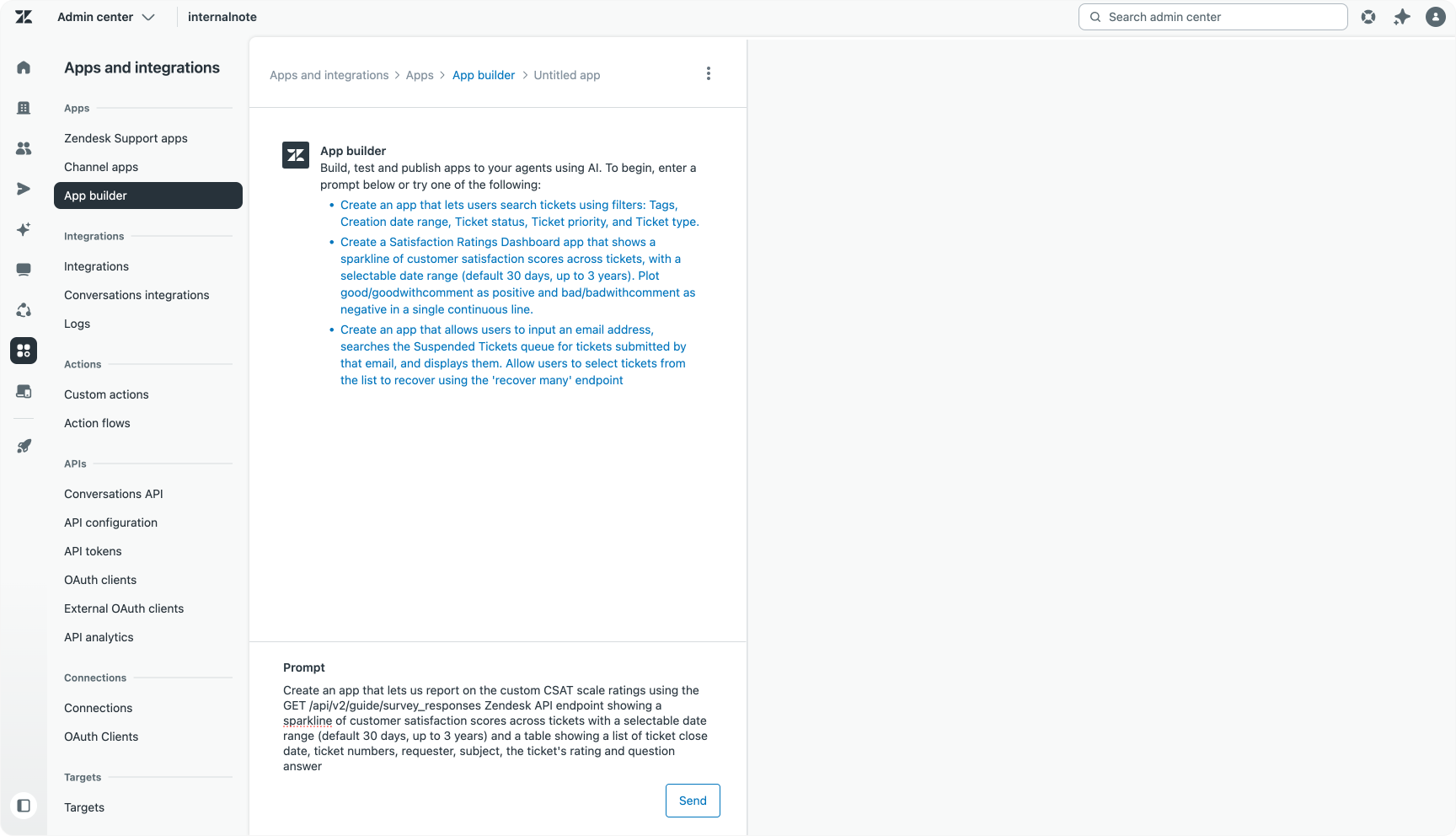
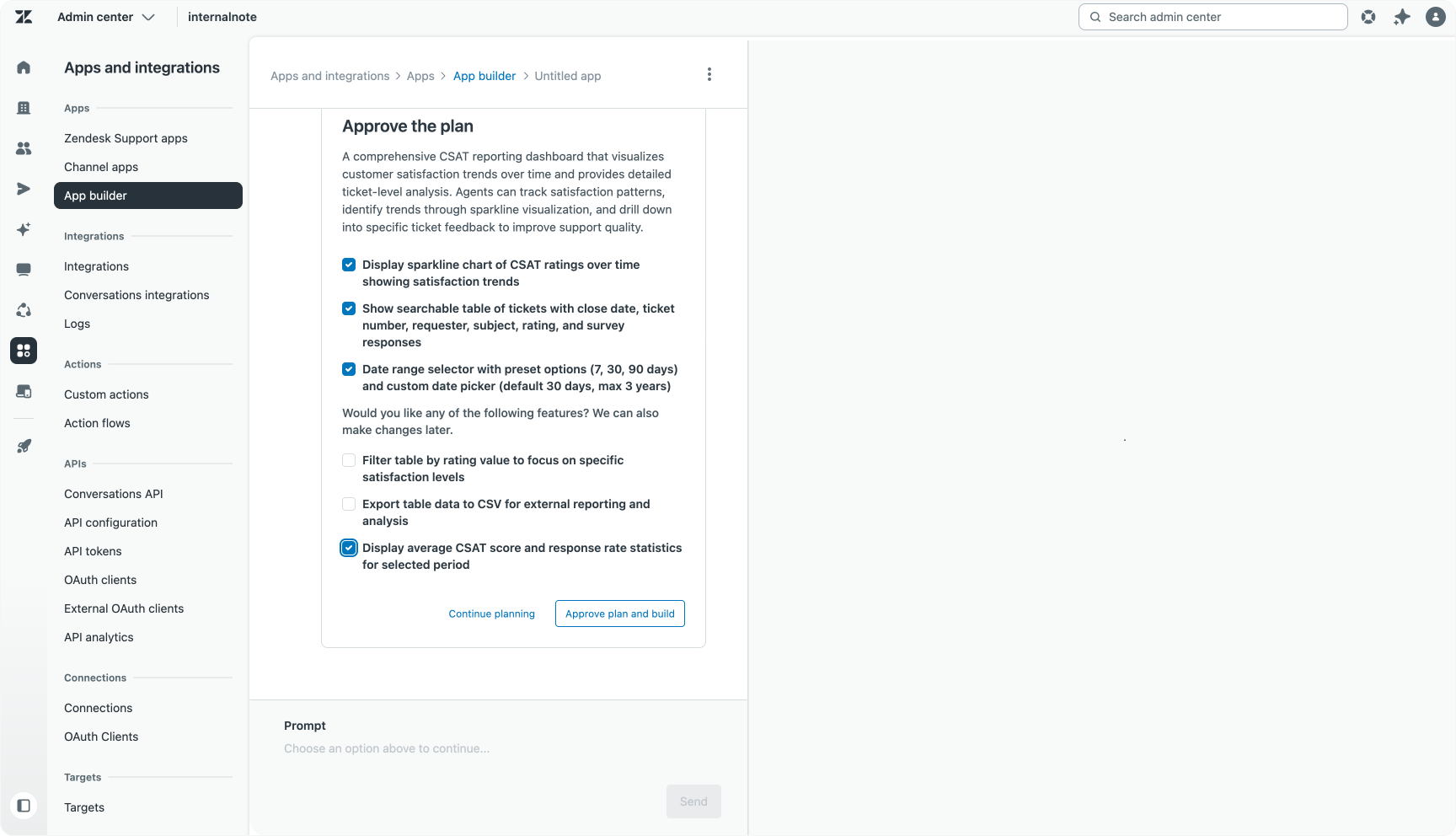
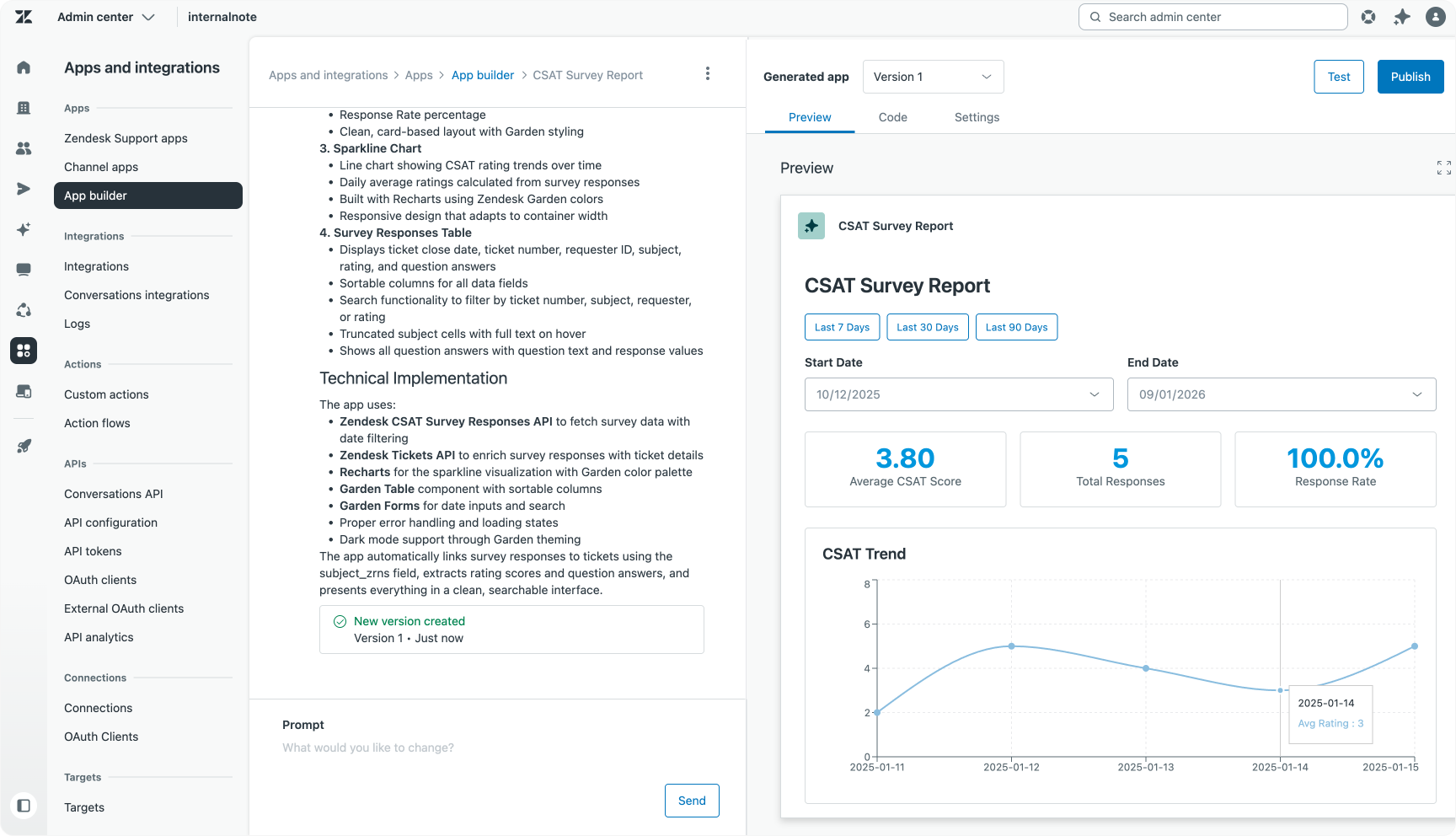
The app was straightforward to build. After the initial prompt, App Builder suggested useful additions such as calculating averages and adding data export functionality. This app is an example of a one-prompt, one-deployment success.
Show Redirect Rules
Next is an example focusing on managing Redirect Rules in Zendesk Guide. Redirect rules automatically forward customers from specific URLs to updated articles or external web pages. It's useful for vanity URLs or archiving outdated content with a link to the newer version.
While an API exists to manage these rules, there’s no official interface, limiting accessibility to technical users.
By entering the prompt for a Nav Bar app:
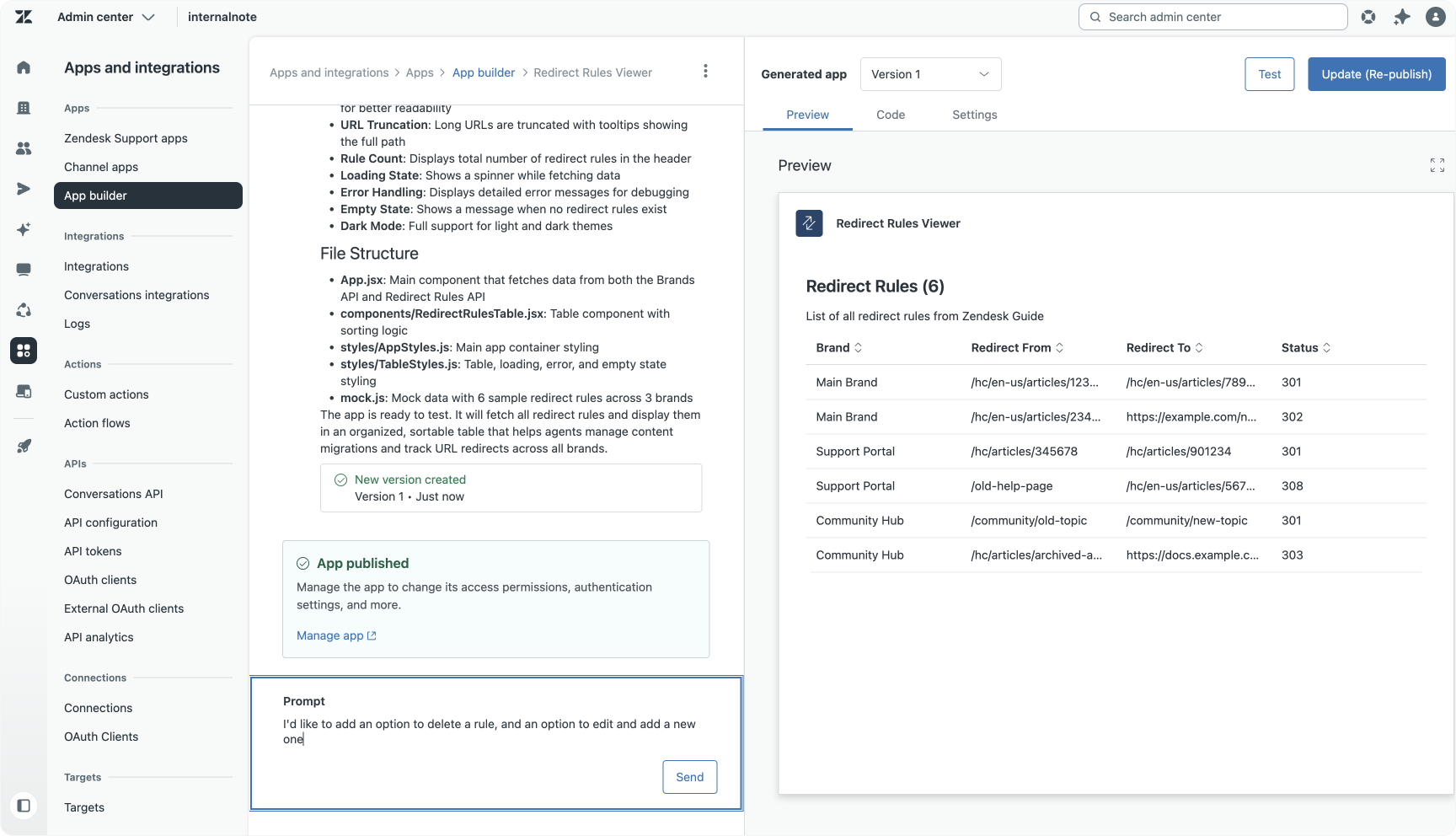
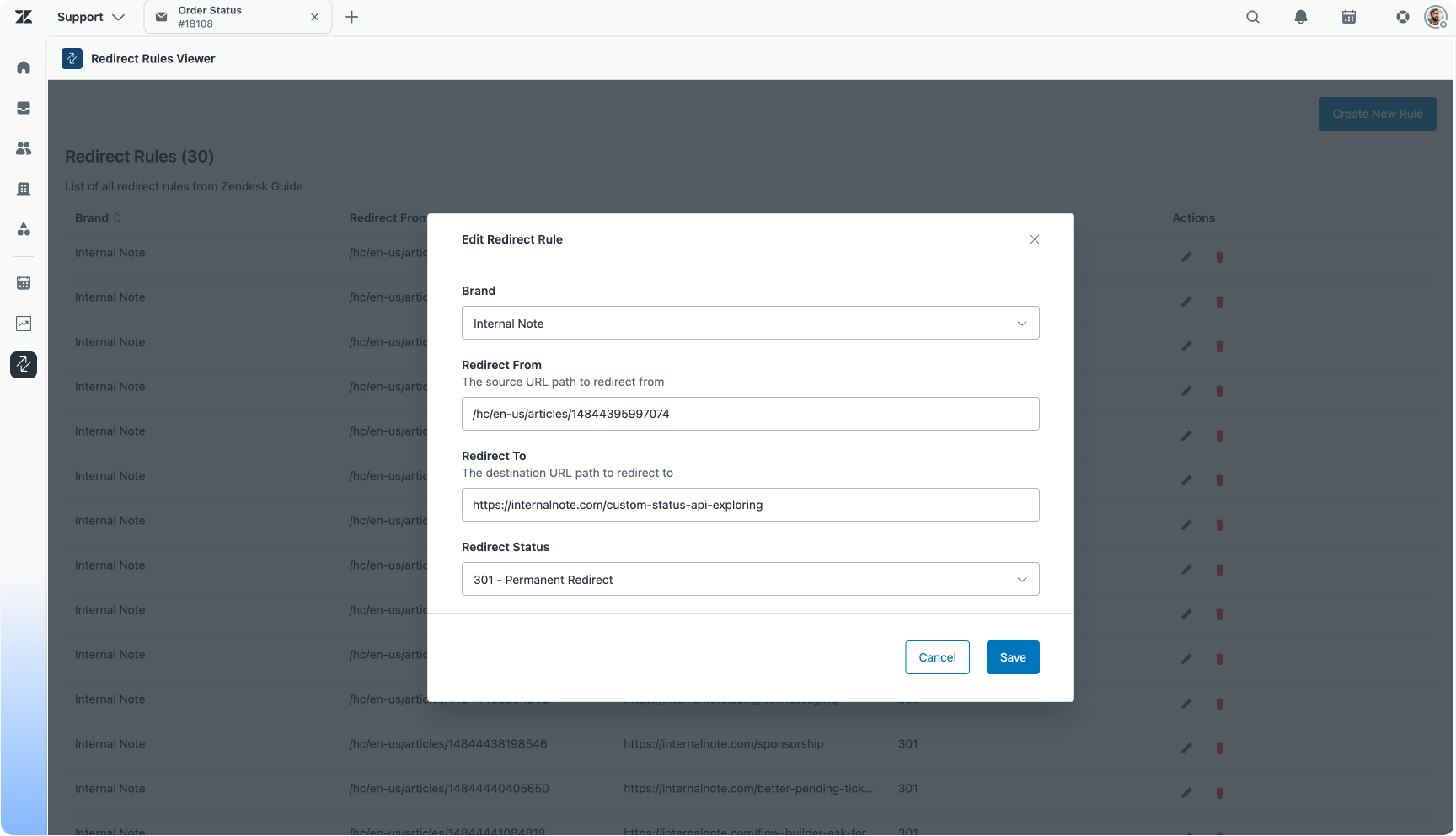
I want an app that lists all the redirect rules from GET /api/v2/guide/redirect_rules Should be a table that shows the brand, redirect_from, redirect_to and redirect_statusThe generated app was nearly perfect on the first try. Further refinement was added with a second prompt to enable editing, deleting, and adding redirect rules, turning the raw API into a fully functional management app:
I'd like to add an option to delete a rule, and an option to edit and add a new one.
This iterative approach highlights how App Builder can turn hidden APIs into everyday features through simple conversational development.
Suspended tickets manager
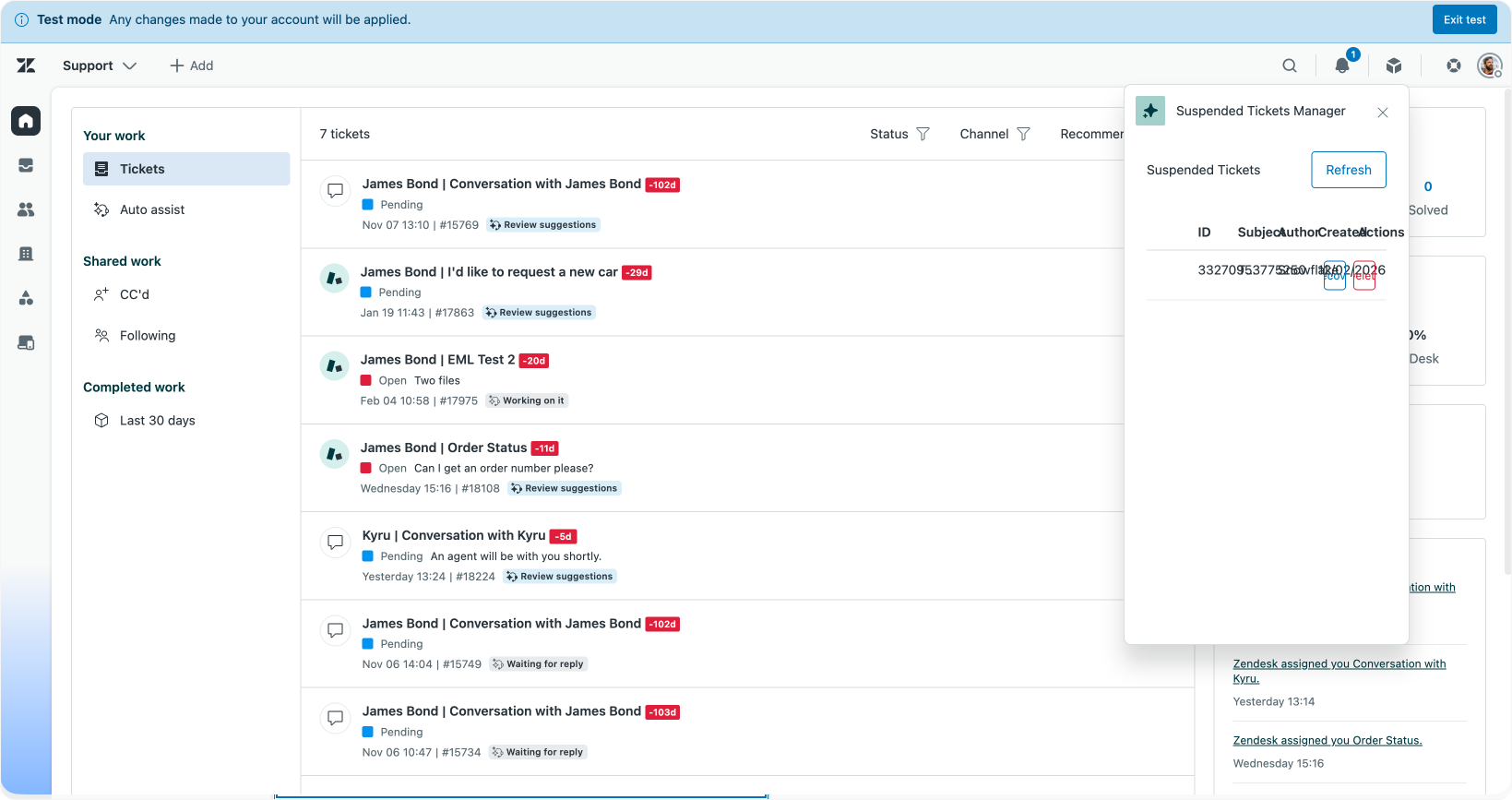
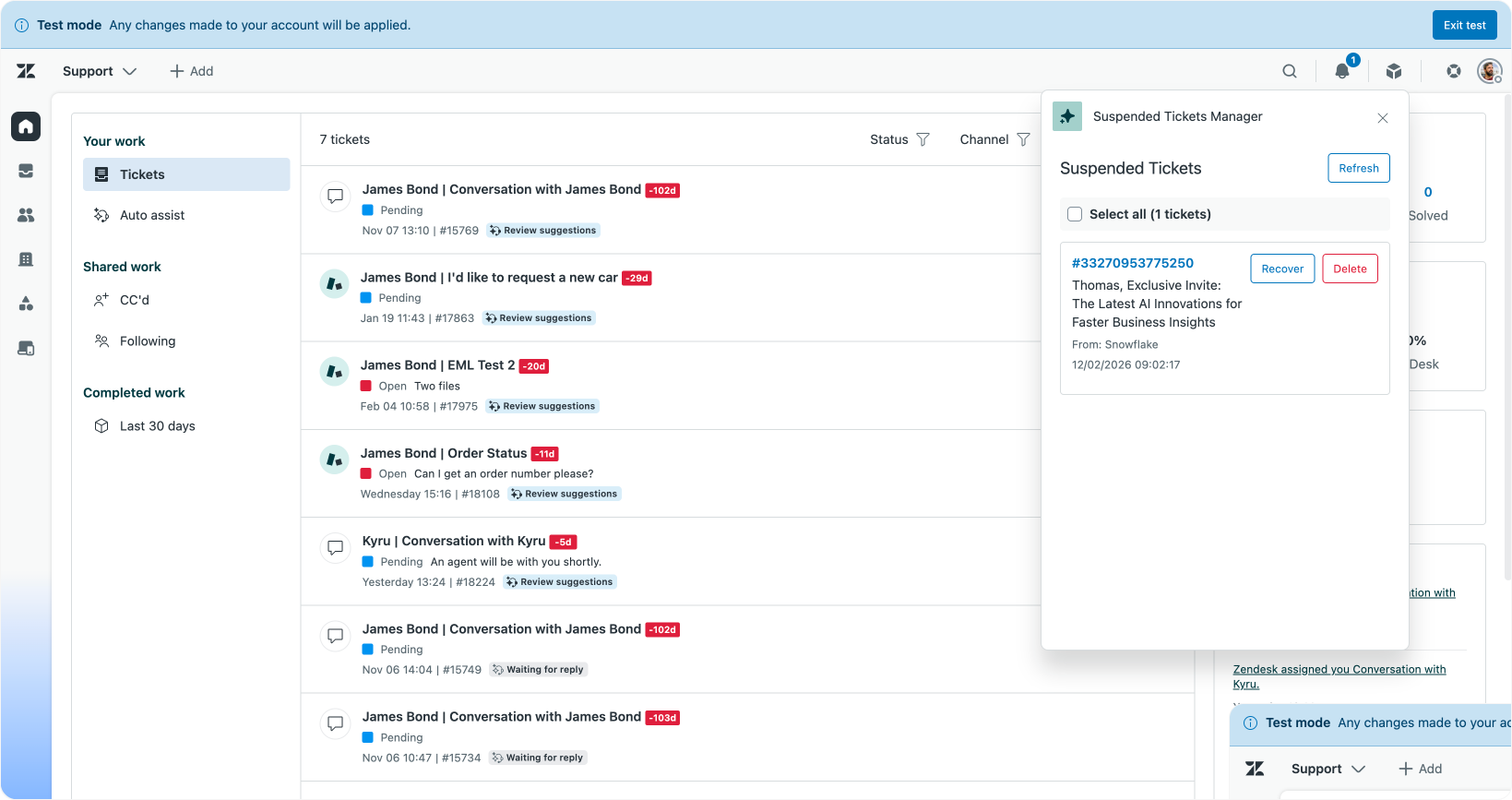
This example tackles the challenge of visibility around suspended tickets, which can often be overlooked in Zendesk environments using Agent Home and Omnichannel Routing. So let’s built a top bar application that shows suspended tickets to agents:
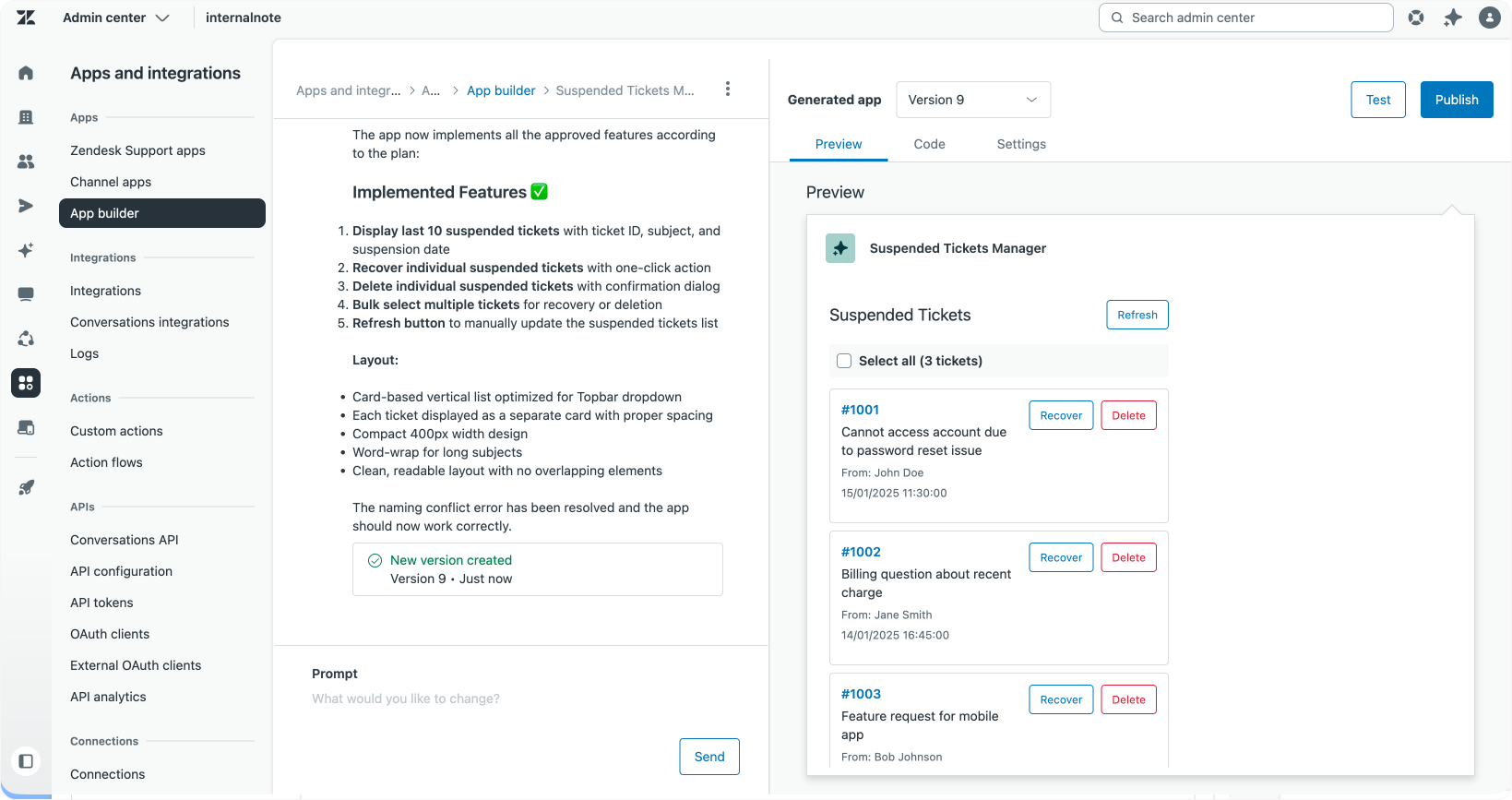
I'd like to build an app that shows the last 10 suspended tickets. Agents with the right permissions can quickly RECOVER/DELETE the tickets. We should be able to also do this in bulk.
The initial version delivered a working app, but its table layout didn’t suit the popup window’s limited space. A follow-up prompt adjusted the layout to a vertical card stack, improving usability:
This table layout does not work in the top bar popup window. It overlaps and the elements are too wide. Can you convert the layout to a card layout with each ticket a different element stacked as a vertical list?
This interaction underscores how iterative prompts can refine the design and UX even after a functioning prototype is in place.
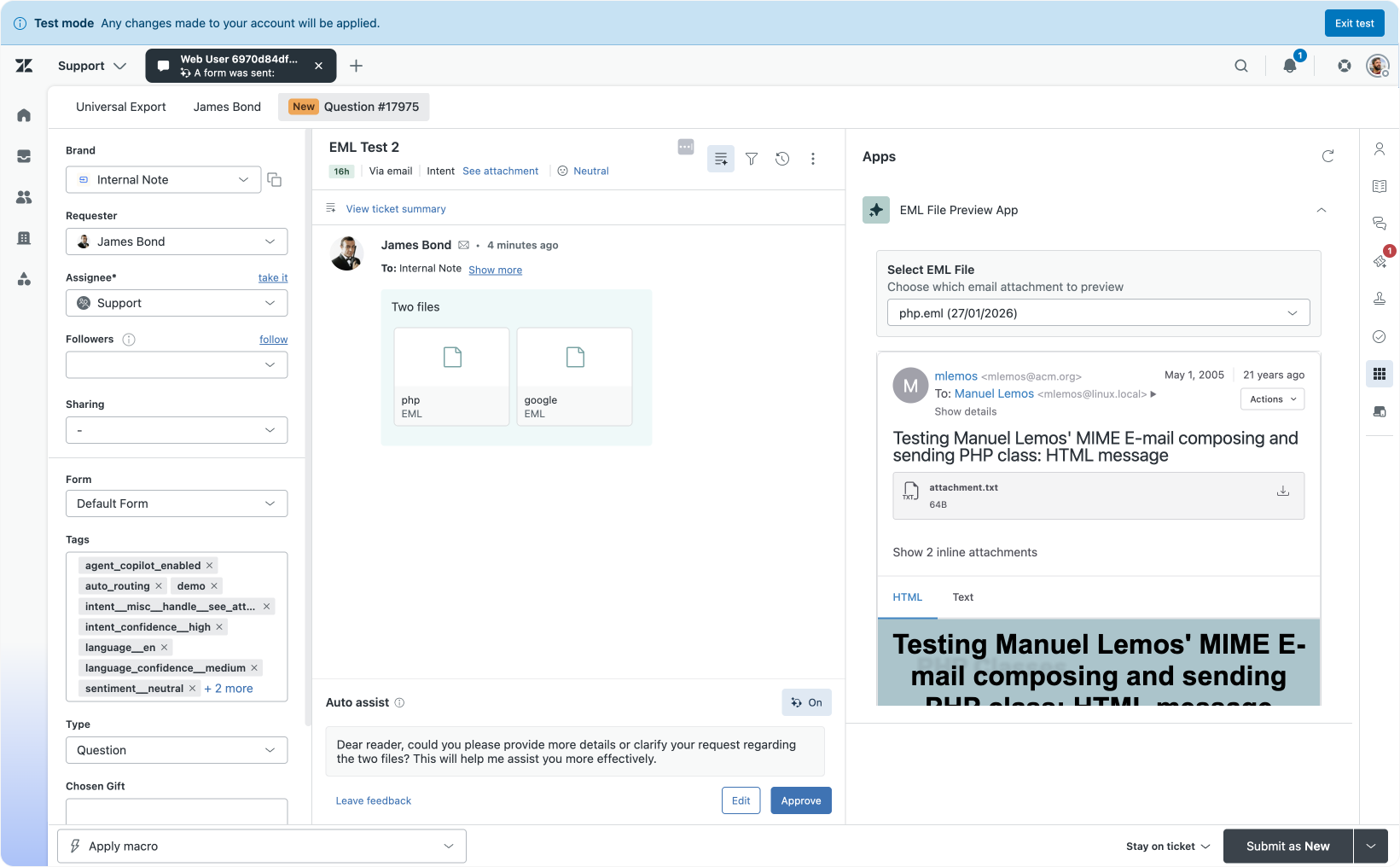
EML Viewer
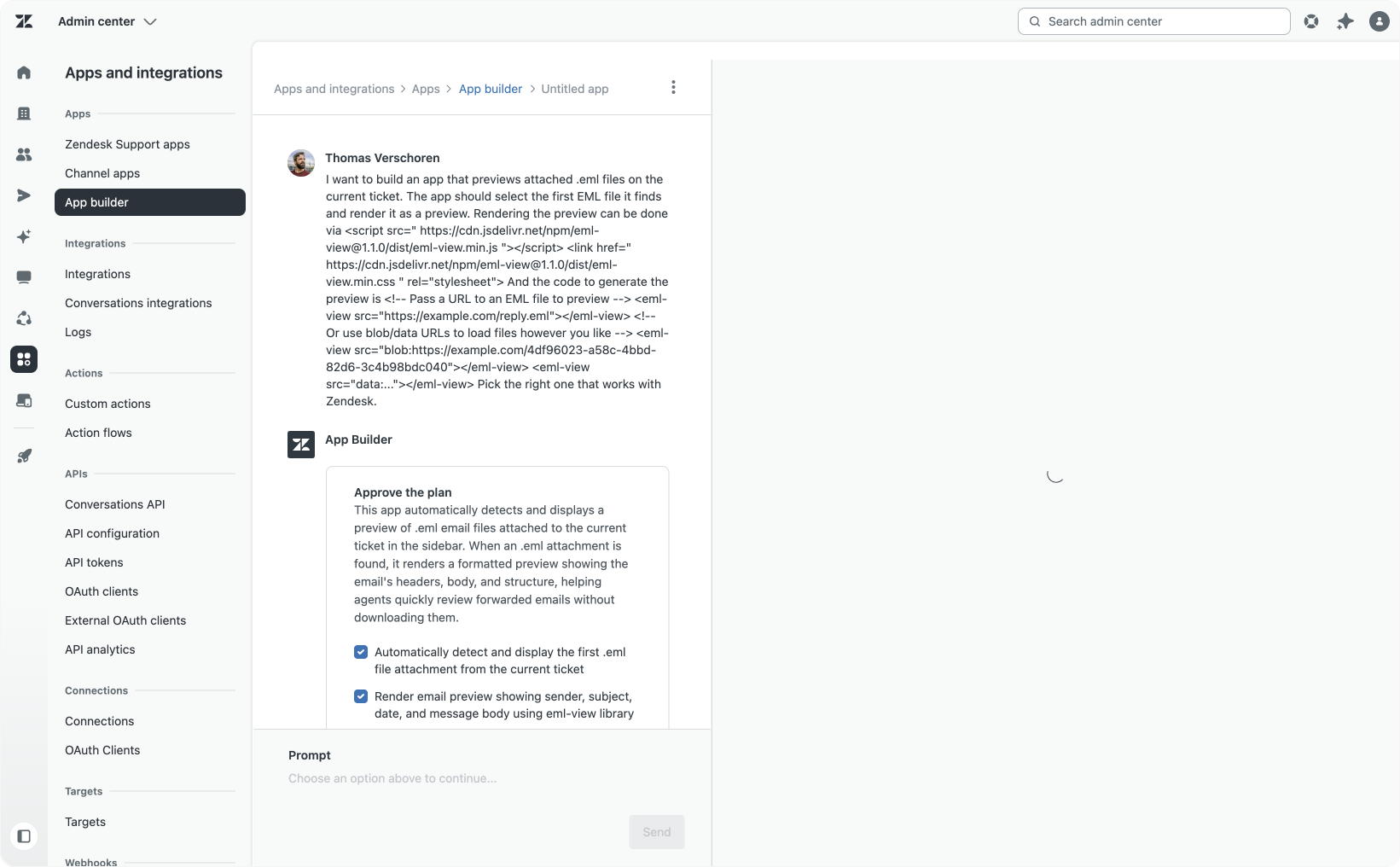
Moving beyond native platform elements, this example integrates an external JavaScript library to preview .eml email file attachments, a format customers often send instead of forwarding emails.
While Zendesk previews common image types inline, .eml attachments require agents to download files before reading them. This app aims to solve that friction by embedding an open-source EML renderer inside Agent Workspace.
The prompt guiding the build was succinct, but the necessary CSS and JS references were drawn from the library’s documentation and incorporated into the prompt.
I want to build an app that previews attached .eml files on the current ticket.
Rendering the preview can be done via:<link rel="stylesheet" href="<https://cdn.jsdelivr.net/npm/[email protected]/dist/eml-view.css>"> <script type="module" src="<https://cdn.jsdelivr.net/npm/[email protected]/dist/eml-view.js>"></script> <!– Don't forget to include Shoelace --> <link rel="stylesheet" href="<https://cdn.jsdelivr.net/npm/@shoelace-style/[email protected]/cdn/themes/light.css>"> <script type="module" src="<https://cdn.jsdelivr.net/npm/@shoelace-style/[email protected]/cdn/shoelace-autoloader.js>"></script>
And the code to generate the preview is
<!– Pass a URL to an EML file to preview --> <eml-view src="<https://example.com/reply.eml>"></eml-view> <!– Or use blob/data URLs to load files however you like --> <eml-view src="blob:<https://example.com/4df96023-a58c-4bbd-82d6-3c4b98bdc040>"></eml-view> <eml-view src="data:..."></eml-view>
Pick the right one that works with Zendesk.
Which resulted in a working app in Agent Workspace. What’s nice is that the dropdown, flexible layout e.a. are all automatically added by App Builder, so my prompt can still be as minimal as possible.
This approach demonstrates how minimal prompts combined with external APIs can quickly yield powerful apps.
Subscriber Manager
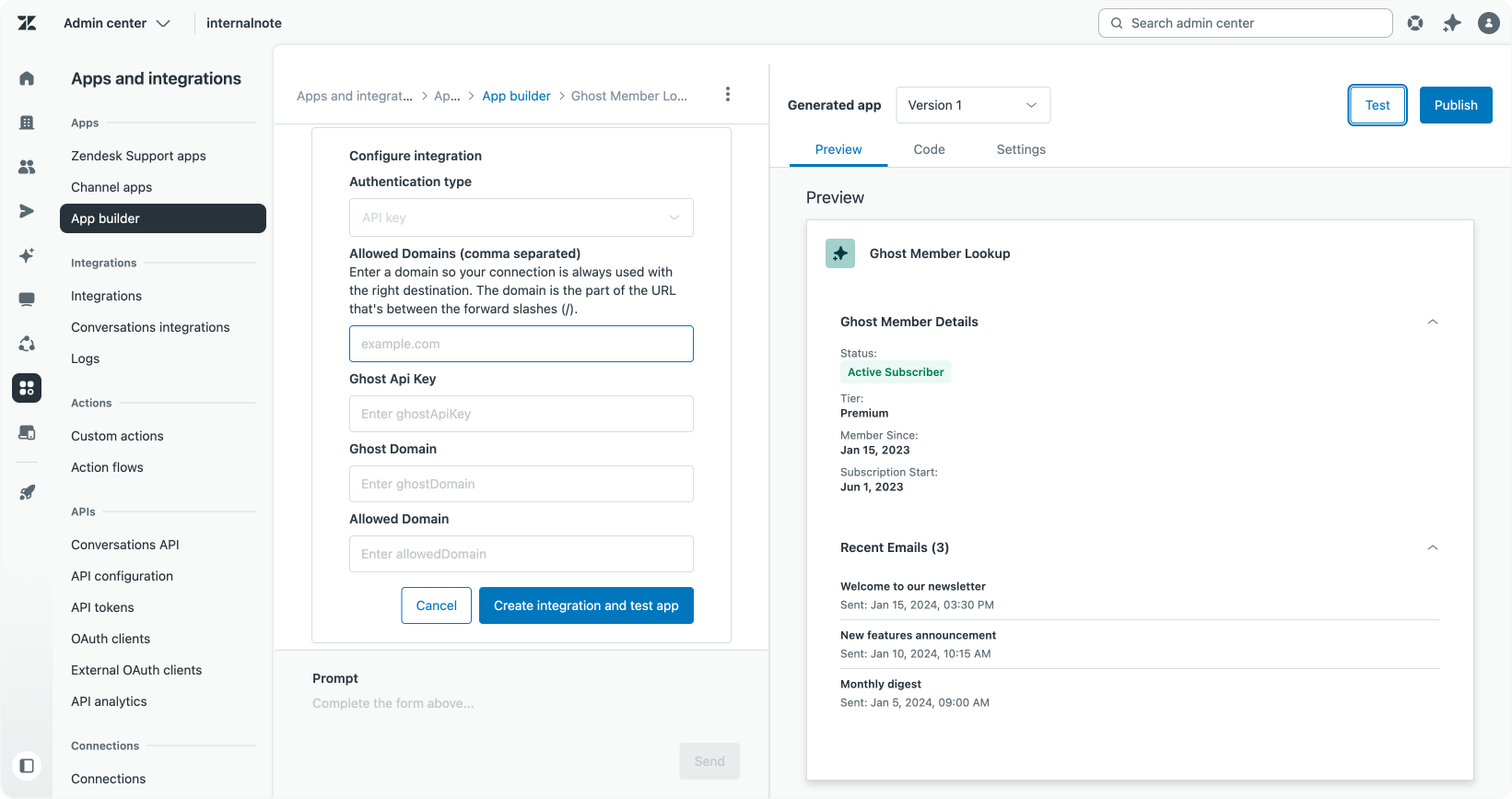
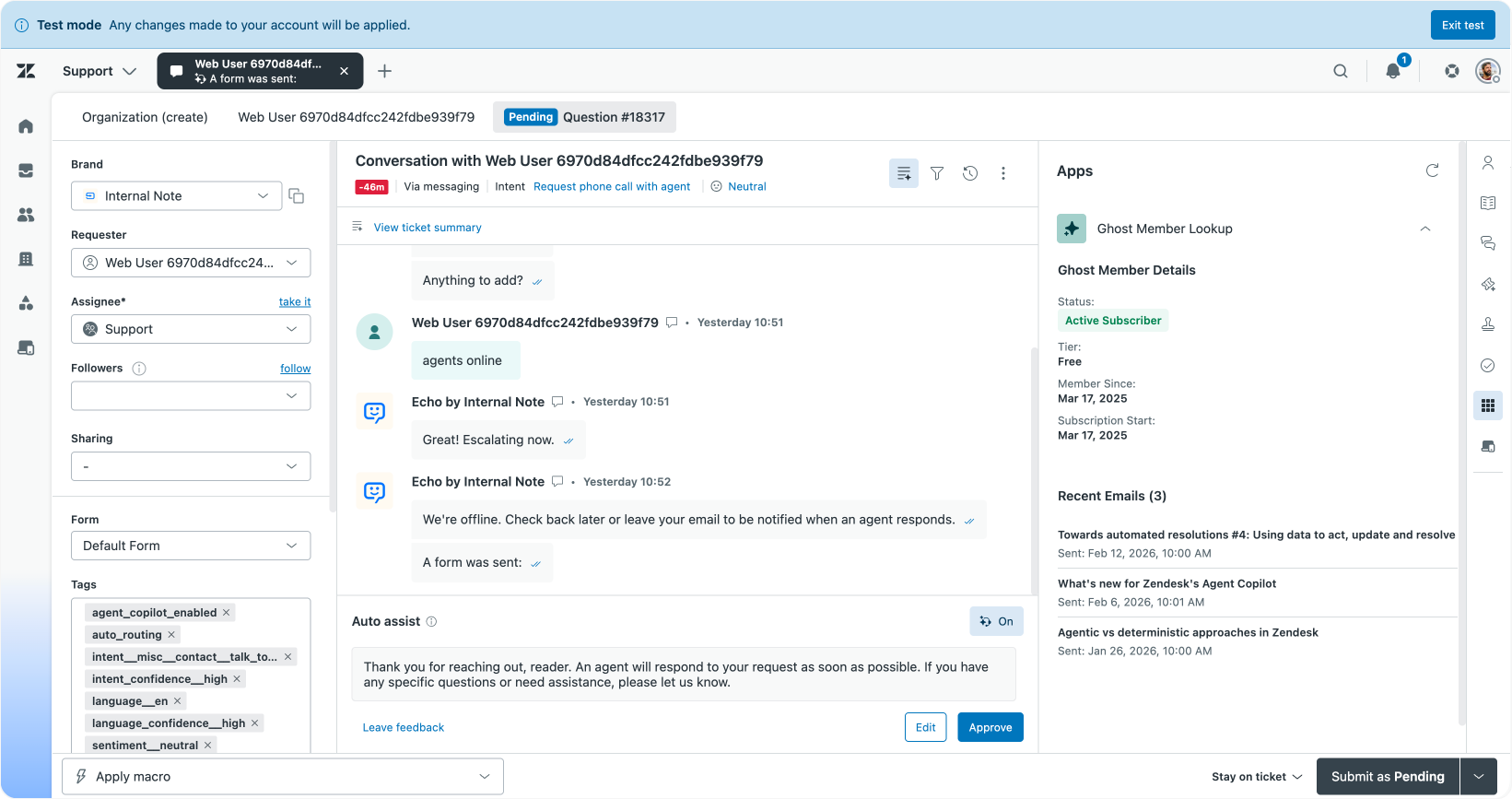
Finally, this app goes a step further by connecting Zendesk with an external blogging platform, Ghost, to manage email subscriptions.
Here, the prompt leverages App Builder’s ability to understand external APIs simply through a high-level description:
I want to create an app that looks up the ticket requester in Ghost, my blogging platform. It should show the current users' subscription state and list a few recent emails that user received.
I also want to be able to subscribe a user from the app if they aren't.
The result was a fully functional subscriber management app that handled authentication prompts seamlessly. No API documentation needed. It turns a clear natural language description transformed into a production-ready app.
This collection of use cases illustrates the versatility and power of Zendesk App Builder. Whether you need to fill product gaps, provide tailored agent insights, or create complex integrations, the tool’s conversational approach and platform native architecture empower you to rapidly innovate within your support environment.
Tips and tricks
When building apps with Zendesk App Builder, keeping a few best practices in mind can help you get the most out of the tool and streamline your development process:
- Start with a clear purpose. Spend your first prompt explaining the goal of the app and what it should achieve. Avoid over-defining UI details initially. App Builder is skilled at generating effective designs, which you can refine later.
- Trust App Builder’s suggestions. The tool often proposes useful improvements like adding delete buttons or export options before generating the first version. For common scenarios, these recommendations can save you time and effort.
- Focus feedback. In subsequent prompts, limit your requests to a single area of the app at a time, such as adjusting the order view or refining the profile display. This focus helps App Builder produce higher-quality, targeted updates.
- Handle preview errors with patience. Occasionally, the preview pane may throw errors after a new version is generated. Simply use the fix option at the bottom of the interface to prompt App Builder to rerun its logic; it usually corrects itself quickly.
For more information on how to prompt App Builder, take a look at this support article.
Conclusion
Zendesk’s App Builder represents a transformative step in how teams can extend and customise their support environment. It empowering non-developers and developers alike to build tailored apps directly within the Zendesk platform. By expanding functionality without ever leaving the ecosystem, App Builder makes powerful customisation accessible to your frontline agents, team leads, and admins. This democratisation of app development puts the power in the hands of those who best understand daily workflows and challenges. It enables your support teams to rapidly prototype, test, and deploy solutions that address unique pain points, without reliance on lengthy development cycles or external vendors.
Because these apps run natively within Zendesk, you benefit from the platform’s built-in security, stability, and seamless compatibility with evolving interface updates, with no worries about hosting, maintenance, or shadow IT risks. As Zendesk continues to evolve, so too will App Builder, automatically incorporating improvements like dark mode support and flexible UI options, ensuring your custom apps stay modern and performant.
If you’re eager to start, look no further than the common pain points and process inefficiencies your teams face every day. Whether it’s surfacing hidden data, integrating external tools, or improving agent workflows, App Builder makes it possible to fill those gaps quickly and iteratively.
For a deeper dive into leveraging the platform for internal efficiency, my Resolution Path series offers rich insights and practical examples around building with Internal Note and Zendesk apps.
Ultimately, App Builder opens new doors for innovation within your Zendesk environment, turning ideas into actionable tools. All while staying firmly grounded in the trusted Zendesk ecosystem.