
Zendesk CX Trends 2027: From AI adoption to AI management
Zendesk CX Trends 2027: From AI adoption to AI management

On this page
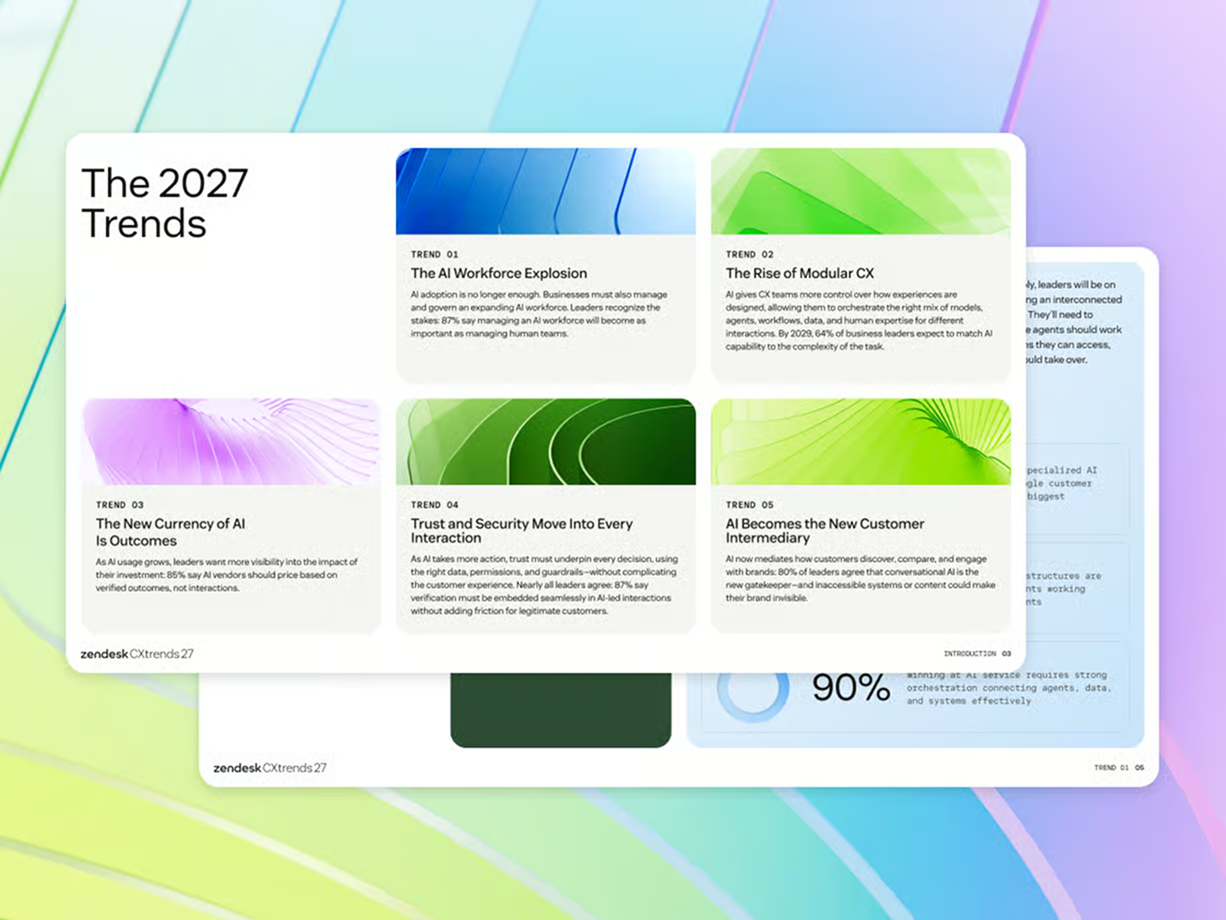
Zendesk has published its 2027 CX Trends report. Each year, the research looks at how customer expectations are changing and how technology is reshaping the way businesses meet them. What stands out to me this year is how much the questions we ask about AI have changed.
A few years ago, the question was “What can AI do for us?” Once teams saw what was possible, they started asking “How do we put it to work reliably?” Now that AI is doing real work across service operations, the question has moved up a level: “How do we manage an operation where people and AI Agents work together?”

That’s what Zendesk calls AI Management, the focus of this year’s CX Trends. Drawing on responses from more than 7,500 consumers and business leaders across ten countries, the research found that 90% of business leaders see effective coordination across AI Agents, data and systems as essential.
That feels like the right question for 2027. AI can already make decisions, work across business systems and take action on behalf of customers. As it takes on more of that work, service leaders have to decide what to delegate, how to tell whether it’s delivering the outcomes they want, and who’s accountable when it doesn’t.
What has changed since 2026?
Before we dive into the new trends, let’s look back on last years' Trends. Which ones ring true, which ones are relevant and how did the platform adapt to meet those new needs.
In my experience, in-conversation outcomes are increasing. Zendesk’s Action Platform, Agentic capabilities and Knowledge Graph give AI Agents more ways to complete a request during the conversation, while customers and teams are becoming more comfortable using AI to accomplish their goals.
Agentic Analytics is also becoming central. Prompt-based analysis can help teams see what is happening across AI-handled work and investigate why. It gives the organisation a way to manage and improve an AI workforce, rather than simply deploy one. And by being able to talk to your data, it moves the conversation (pun intended) from building dashboards to getting insights.
But what’s leading most of the conversations, for me, is the question of trust and transparency. How do we make AI do the right thing, how do we validate what it’s doing, and how do we react upon what’s happening. And as we scale out use of AI, so does the need to get those insights. And those questions and developments set up the 2027 trends.

The AI Workforce explosion
People are moving AI from individual tools that do the entire job into a workforce of specialised agents that each can make specific decisions and act across systems. As that work becomes more distributed, organisations need to decide how people and AI Agents share responsibility, how their work connects and who improves it when the overall service falls short.
For me, the shift also shows that AI is not just taking the easy tickets and leaves everything difficult to people. AI Agents can now carry out complex, long-running work across systems, while human agents spend more of their time on approvals, unique situations and exceptions that need their judgement. That means less repetition, but it also changes the job itself: someone who previously handled tickets increasingly becomes an assisted operator, working alongside AI, and can grow towards designing the system that does the work.
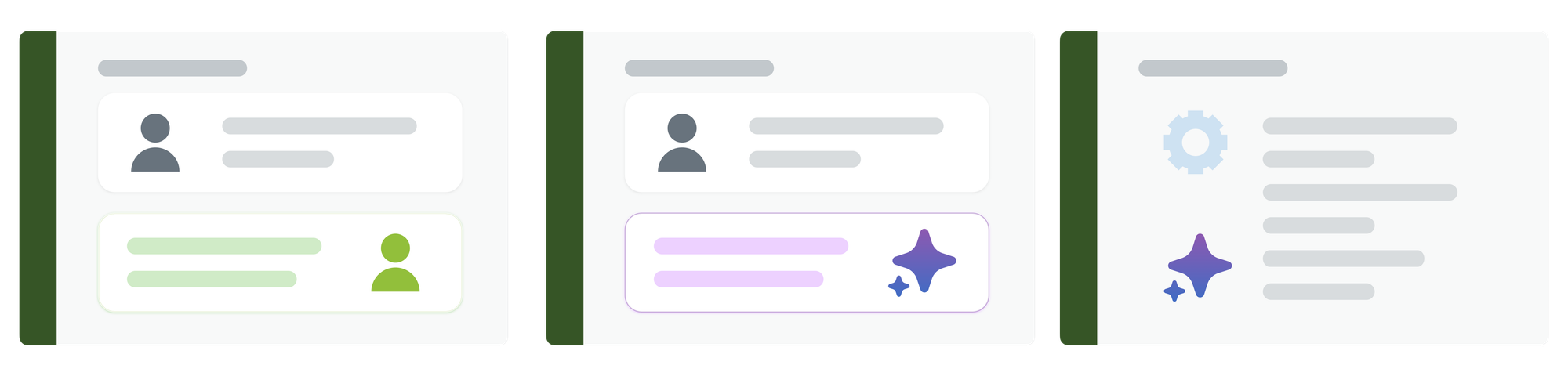
That brings planning, design and analysis into the service team’s daily work. We need people who decide how the workforce is organised, which decisions belong together and how to improve the process when it does not deliver what we intended.
Execution can now also be distributed across specialised AI Agents without transferring accountability away from each process owner. They still needs to understand how the process flows, how decisions connect and where a person should intervene.
The work of that AI workforce can also extend beyond resolving the conversation in front of us. An AI Agent might gather context for a colleague, pull together insights from related requests or move an adjacent process forward. Those tasks may support the customer experience without directly producing a customer reply, so the workforce we are designing is broader than a collection of agents that close tickets.
Managing that workforce in Zendesk
Custom Agents and Agent Builder
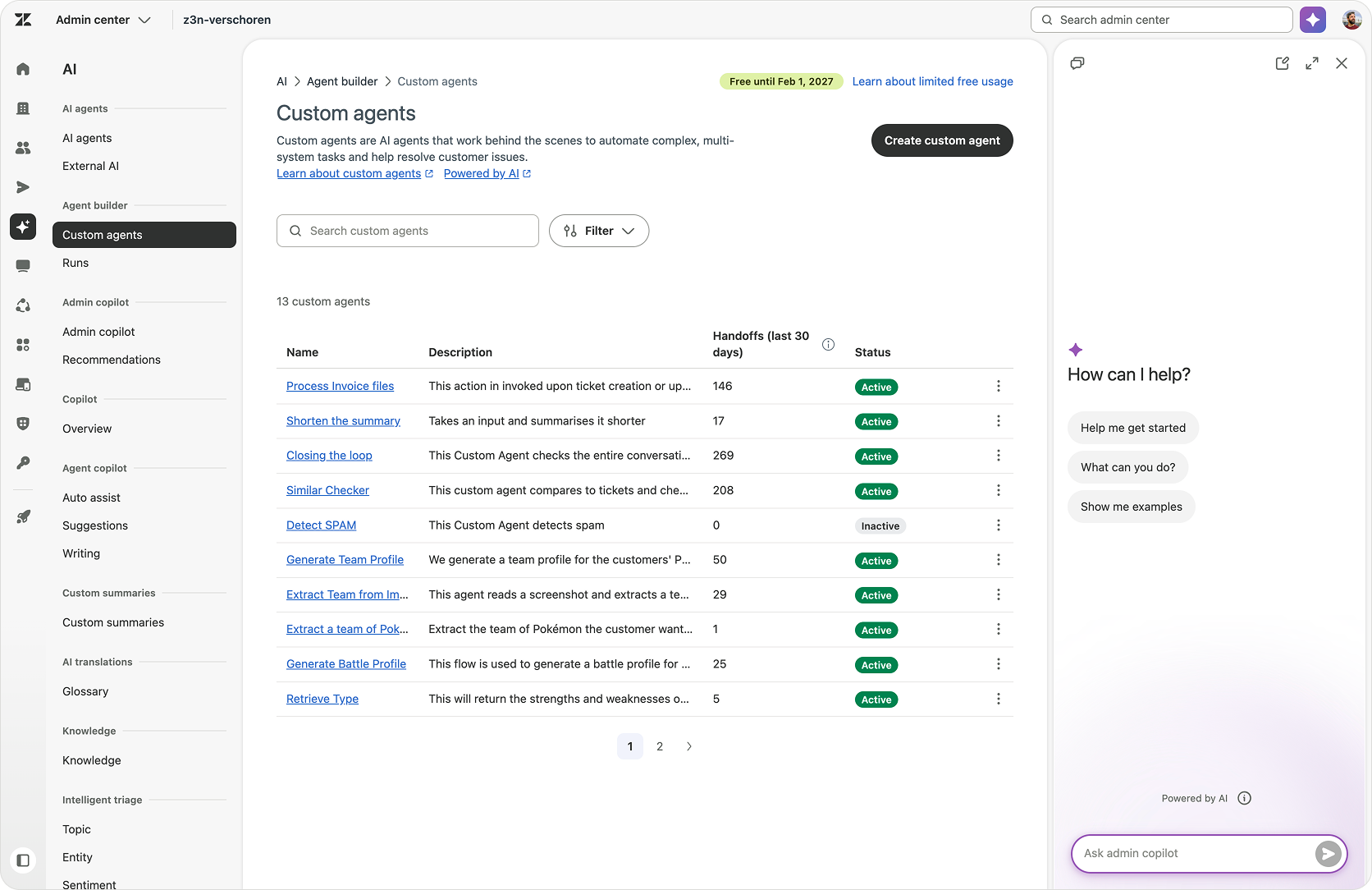
Admins can use Agent Builder to create and manage Custom Agents for specialised, multi-system tasks. That makes it possible to give a defined part of the work to an agent, including tasks that gather context or move a process forward without directly interacting with a customer. Each agent has clear instructions, an audit log and a way to test before deploying.
AI Agent conversations as tickets
Making non-escalated AI Agent conversations available in Agent Workspace gives the service team and analytics a way to see work that would otherwise sit outside its usual ticket views. That visibility matters when people are responsible for the whole workforce, rather than only the conversations that reach a human agent.
Conversation logs
Conversation logs let teams inspect messages, actions and API requests to understand how an interaction unfolded. They provide a practical starting point for reviewing an exception with the people who handle it, connecting the process the team designed with the work the AI Agent performed.
Agentic Analytics
Agentic Analytics provides dashboards and natural-language questions about AI and human performance. Teams can use it to investigate patterns across requests and decide which parts of the operation deserve attention, adding an analytical role to the day-to-day work of managing the service workforce.
Admin Copilot
Admin Copilot helps customers troubleshoot Zendesk and build workflows. For teams taking on more of the system-design role, that gives them assistance with configuring and improving the environment in which the workforce operates.

The Rise of Modular CX
CX Trends describes a more modular service operation, where teams combine agents, workflows, data and human expertise according to the work rather than use the same approach for every interaction, or have one agent handle the entire flow. What we also see is a shift where the people who understand the customer’s problem and own a specific business policy have more direct role in improving how that specific part of the process works.
For me, the useful starting place to extract an element out of a monolithic flow, is a decision. Every process is a chain of decisions that we should be able to improve individually. We might optimise one decision flow, replace the system behind another or automate something that still requires a person today, without rebuilding the entire use case. That gives us a practical self-improvement loop: look at what happened, identify the part that needs work, change it and check whether the overall result improved. The modular design makes that possible by allowing us to improve pieces of the puzzle, and have that feed into every flow that relies on it.
Ownership can follow that same logic. Finance can own the policy and approval behind a refund. Logistics might own the logic around handling the refund While CX still owns the conversation with the customer and how the decisions are communicated. The service team needs a reliable way to request a decision and understand the result, but it does need to own finance’s rules or reproduce them inside every customer journey time and time again. Clear inputs and outputs let each team improve its part while remaining accountable for the decision it owns.
Once those pieces are defined, we can reuse them across use cases. An order lookup, a refund approval or an account update should not need to be rebuilt every time a different conversation needs it. The same action or flow can support several journeys, provided its permissions and behaviour still fit the new context, and any change is tested against the journeys that depend on it.
It also means choosing the right tool for the job instead of pushing every decision into a generic solution. A fixed rule, a specialised AI Agent, an existing business system or a human approval can each handle the part they are suited to, with the workflow connecting them into one experience for the customer.
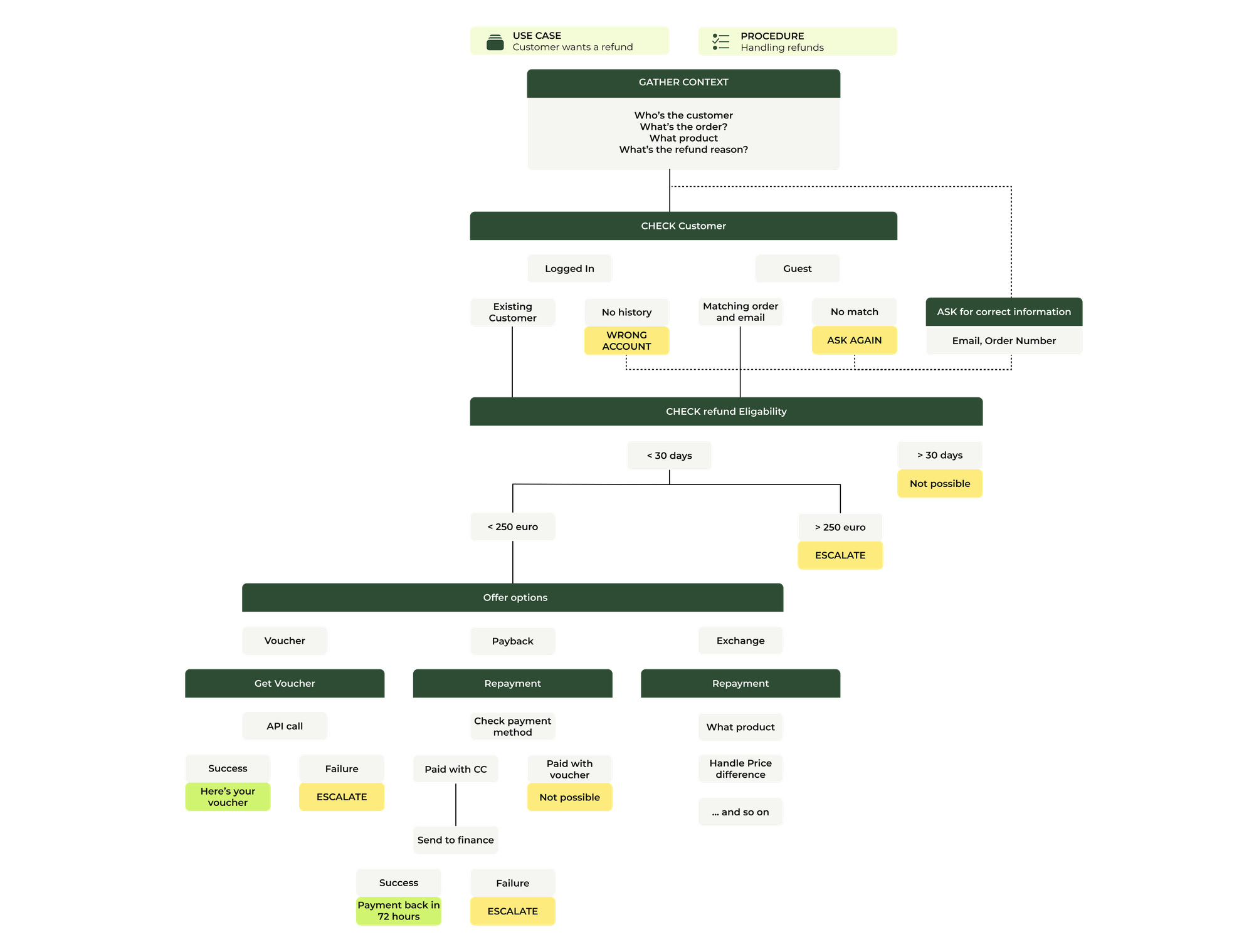
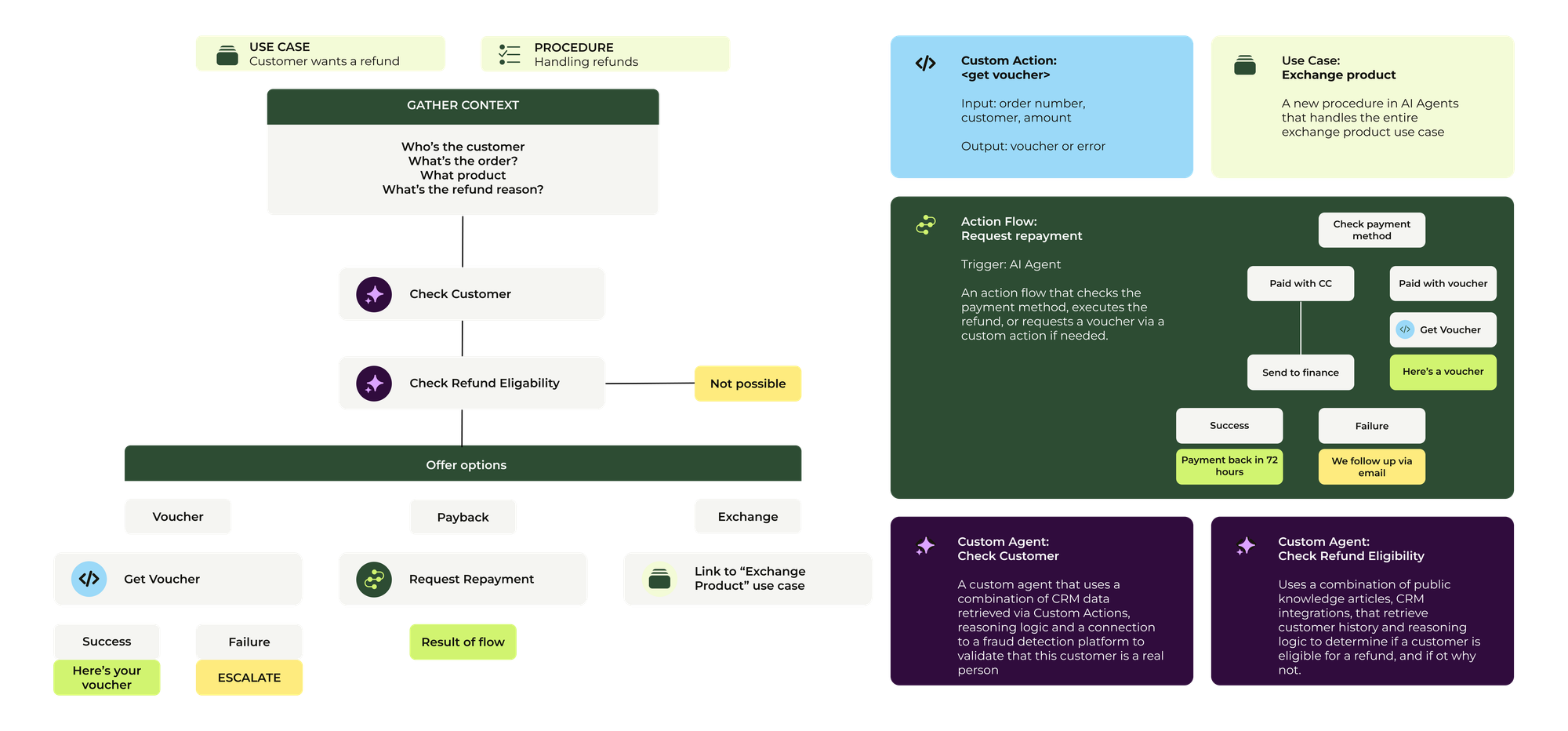
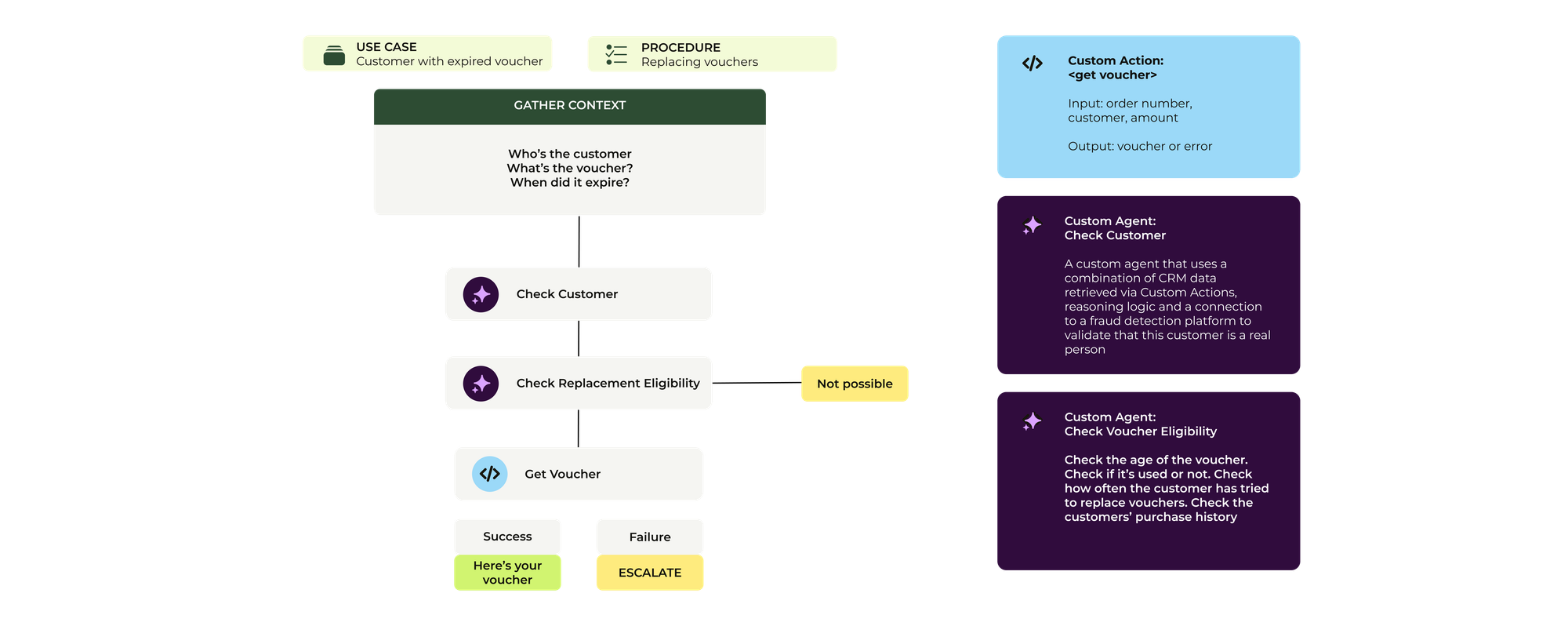
A monolithic flow, the same flow turned into reusable components, and a new flow using some of these same components.
Building reusable service capabilities
Generative procedures
Generative procedures guide an AI Agent through a process while adapting to the customer’s responses. They give the conversation a defined path towards the intended result while allowing the agent to respond to the information the customer provides, with connected actions handling the business steps along the way.
As these procedures grow in complexity, they can then be broken down and specific blocks of logic extracted and called from the parent procedure
Action Builder
Action Builder makes shared Actions and Action Flows available to AI Agents. A lookup or approval can therefore become a component that several use cases call, rather than logic rebuilt inside each conversation, with clear inputs and outputs connecting it to the wider procedure.
MCP Client
The MCP client support in Action Flows lets us use selected tools from external MCP servers. It gives teams another way to connect the tool suited to a particular step instead of reproducing that capability inside Zendesk, while keeping the selection of exposed tools part of the integration design.
Knowledge Graph
The Knowledge Graph has dozens of connectors that allow it to import different knowledge sources into Zendesk. That supports a different part of the modular design: making information from external sources available to knowledge experiences, alongside the actions and workflows that carry out the work.
Advanced Action Flows
Advanced Action Flows support longer-running processes, complex business logic and attachment workflows. They give teams a way to build reusable process components that reach beyond a single conversational step, including work that has to continue across systems before the procedure can use the result.

The new currency of AI is Outcomes
People are shifting from measuring how much work AI processes towards understanding what that work achieves, whether the result lasts and what it costs to deliver. Customers want their issue resolved rather than an immediate answer that sends them back through the same process, while businesses need to connect AI investment to value rather than usage alone.
This is the shift I described in my contribution to CX Trends:
Time-based measures helped us manage the workload of a human team. But when an AI agent can respond immediately and handle far more conversations, those measures become less central to how we judge success. What matters is whether the customer’s question was handled successfully.”
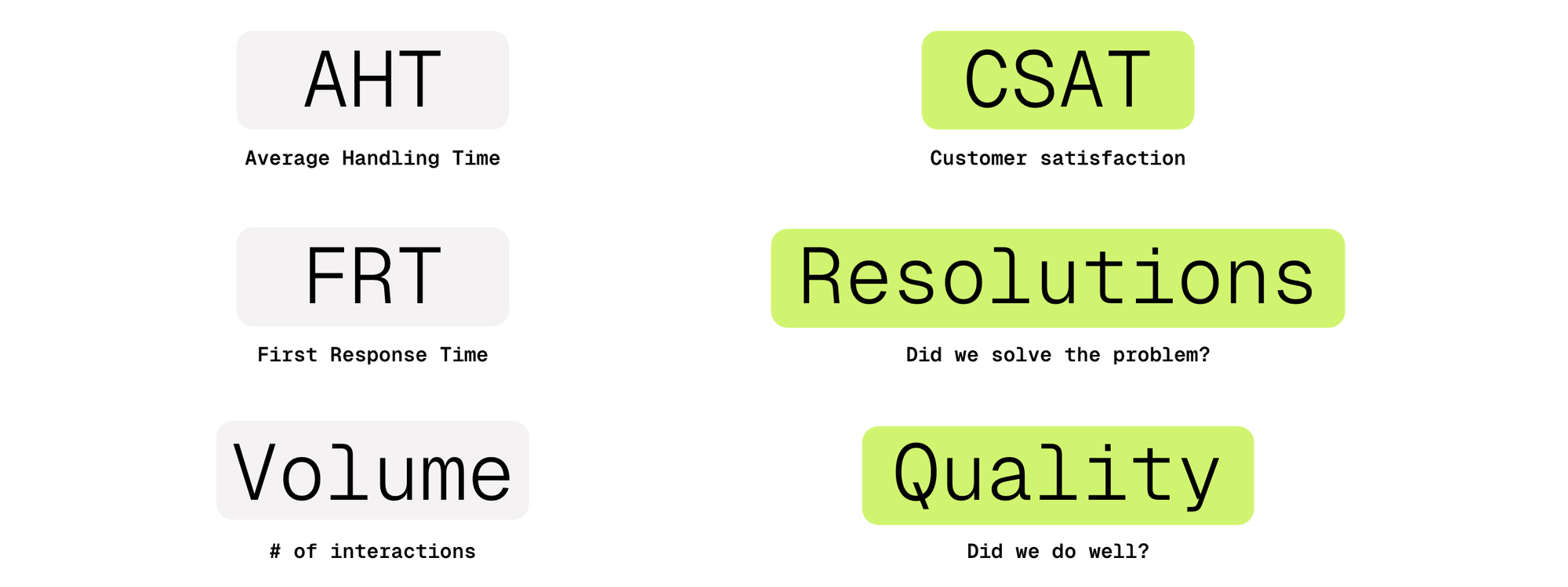
For work that can be automated, the queue should ultimately disappear and their handling time reaches zero; time and volume remain useful diagnostics, but they tell us less about value on their own.
For me, a successful outcome starts with solving the issue, but we then need to compare what happened with the goals we set for that use case. We might want customers to be more satisfied, get a useful response faster or be less likely to leave. Those goals give us a reason to evaluate the result rather than simply count the interaction as handled, whether the work was done by an AI Agent or a person using Copilot.
The useful next step is to capture whether the result aligned with those goals and why. When it did, we have something to learn from and repeat; when it did not, the review should tell us what to do differently next time. That could mean changing a procedure, providing missing context, improving an action or involving a person at a different point. Measuring outcomes becomes part of a learning and improvement loop rather than a dashboard we look at after the work is done.
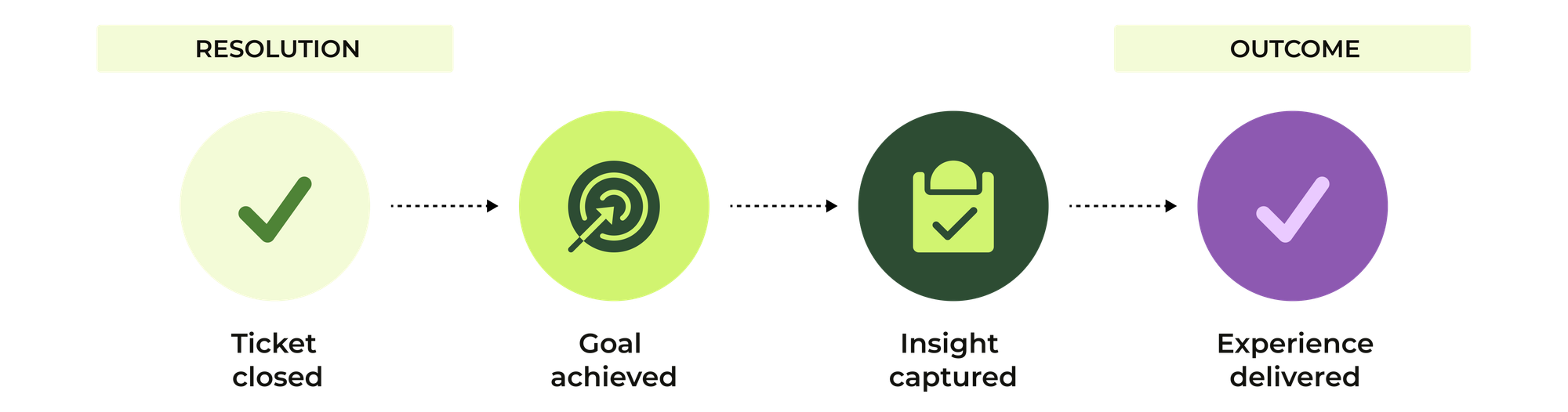
Some of that evidence belongs to the individual request, such as whether the promised change happened or how long the customer waited. Other goals, such as higher CSAT or lower churn, need to be evaluated across enough interactions and over time. A solved ticket does not prove that we prevented someone from leaving, but it can contribute evidence that helps us understand whether the service is moving in the direction we intended.
Making outcomes visible in Zendesk
Agentic Analytics
Agentic Analytics lets teams ask questions about their service data in natural language. It can help turn an outcome goal into an investigation of what is happening across the operation, while the team still needs to define the evidence that would show whether the goal is being met.
AI Agents dashboard in Analyst Copilot
The AI Agents dashboard includes automated and verified resolution rates, giving teams a view of how AI-handled work is performing. Those measures help identify patterns to investigate, but they should be read alongside the business goal for the use case rather than treated as a complete measure of its value.
Quality Score
Quality Score evaluates human service quality in eligible conversations, including those where an AI Agent also participated, but does not score the AI Agent’s service quality. It currently does not score bot-only or voice conversations. That distinction matters when using quality evidence to compare results across the different parts of the service operation.
AI Agent conversation logs
AI Agent conversation logs include verification details that help teams review individual automated resolutions. They connect the aggregate view with the evidence in a particular interaction, making it possible to investigate successful and unsuccessful attempts rather than relying on the dashboard alone.

Trust and Security move into every interaction
As AI takes over more of the work on the company side and customers start to use AI Assistants to act on their behalf, trust and security needs to be brought into every interaction itself. Verification is there to lower the risk without making every legitimate request harder, and customers need to understand how their information is being used. Governance therefore becomes something that is part of how we execute , and not just a policy written around it.
For me, trust has three parts that belong together. We need to know what happened, whether the intended process was followed and which actions were taken along the way. That gives us a basis for evaluating the result, troubleshooting a failed request and reviewing the process afterwards. An interaction marked as resolved is not enough on its own if we cannot establish whether the promised change actually happened. And a successful outcome also means its a truthful outcome we can trust. We've all had experience with an AI Assistant like ChatGPT or Claude saying it did something, and then come back with a "You're right, I did not do that".
We also need to understand why it happened well enough to fix the process when something goes wrong. That means looking at the instructions, available context, decisions and action results that shaped the interaction, rather than only reading the final answer. The evidence will not always explain every part of a model’s reasoning, but it should help us distinguish a missing piece of information from a failed integration or a procedure that needs to change.
The third part is preventing actions that should not happen in the first place. An AI Agent’s ability to do something does not mean it should be allowed to, so we need to establish who is asking and limit both the information the agent can access and the actions it can take. Least-privilege access and checks enforced by the underlying system give us boundaries that a prompt alone cannot provide. Together, visibility, investigation and prevention let us validate the service, correct it and reduce the opportunity for the same failure to recur.
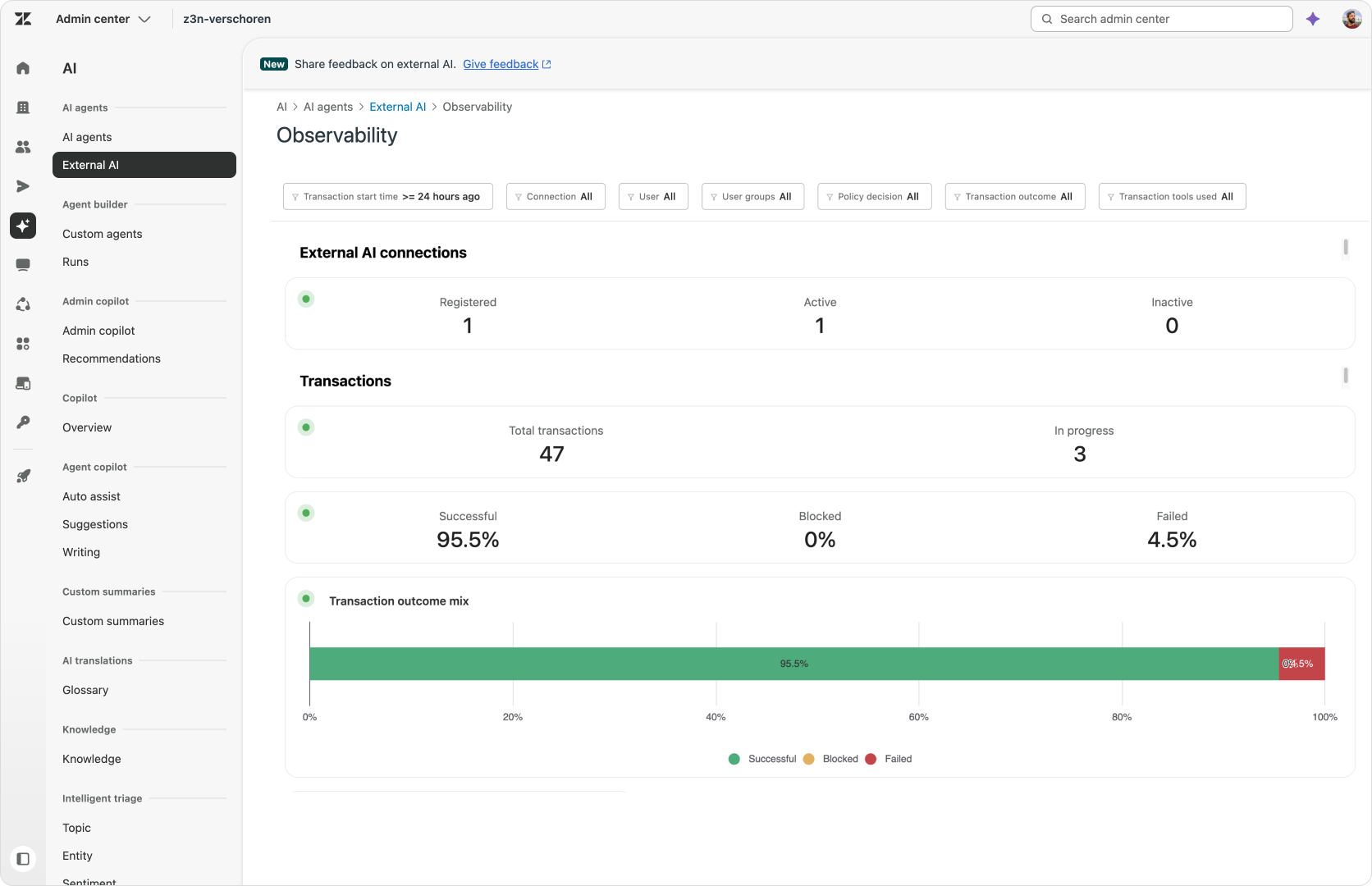
Putting permissions and oversight into the process
AI Agent use cases, procedures and authorised actions
Use cases, procedures and authorised actions let teams define what an AI Agent can do for a customer request. Those choices establish the intended scope of the process, and should be supported by permissions in the systems carrying out the actions rather than relying on instructions alone.
Human-in-the-loop approvals in Action Flows
An approval step allows a workflow to wait for an authorised person’s decision before continuing. It makes that decision an explicit part of the process, including what happens if approval is rejected, instead of leaving the team to assume that a person will notice and intervene at the right moment.
Conversation logs and MCP tool access
Conversation logs expose actions and API requests for review, giving teams evidence to investigate when a result differs from what they expected. For external tools, the MCP client uses OAuth and lets admins select which tools to expose. Review and access control serve different purposes, but both help make the workflow governable.

AI becomes the new customer intermediary
AI will increasingly sit between customers and brands, helping people discover companies, compare their options and resolve service requests. The customer may start with a personal assistant rather than the company’s own interface, which makes accessible knowledge and supported actions part of being reachable. That does not remove the need for human service; it raises the importance of getting customers to the right person with the right context when they need one.
I think this shift of customers using AI to get an answer has been underway for the past two years, but an AI Assistant can now also act on the customer’s behalf, and that changes more than just answering a question. Instead of finding the right page, explaining the request and waiting for the next step, they can ask their assistant to get something done. The opportunity is to remove the effort and delay that come from requiring the customer to participate in every part of the process, while keeping them involved in the decisions that actually need their judgement or approval.
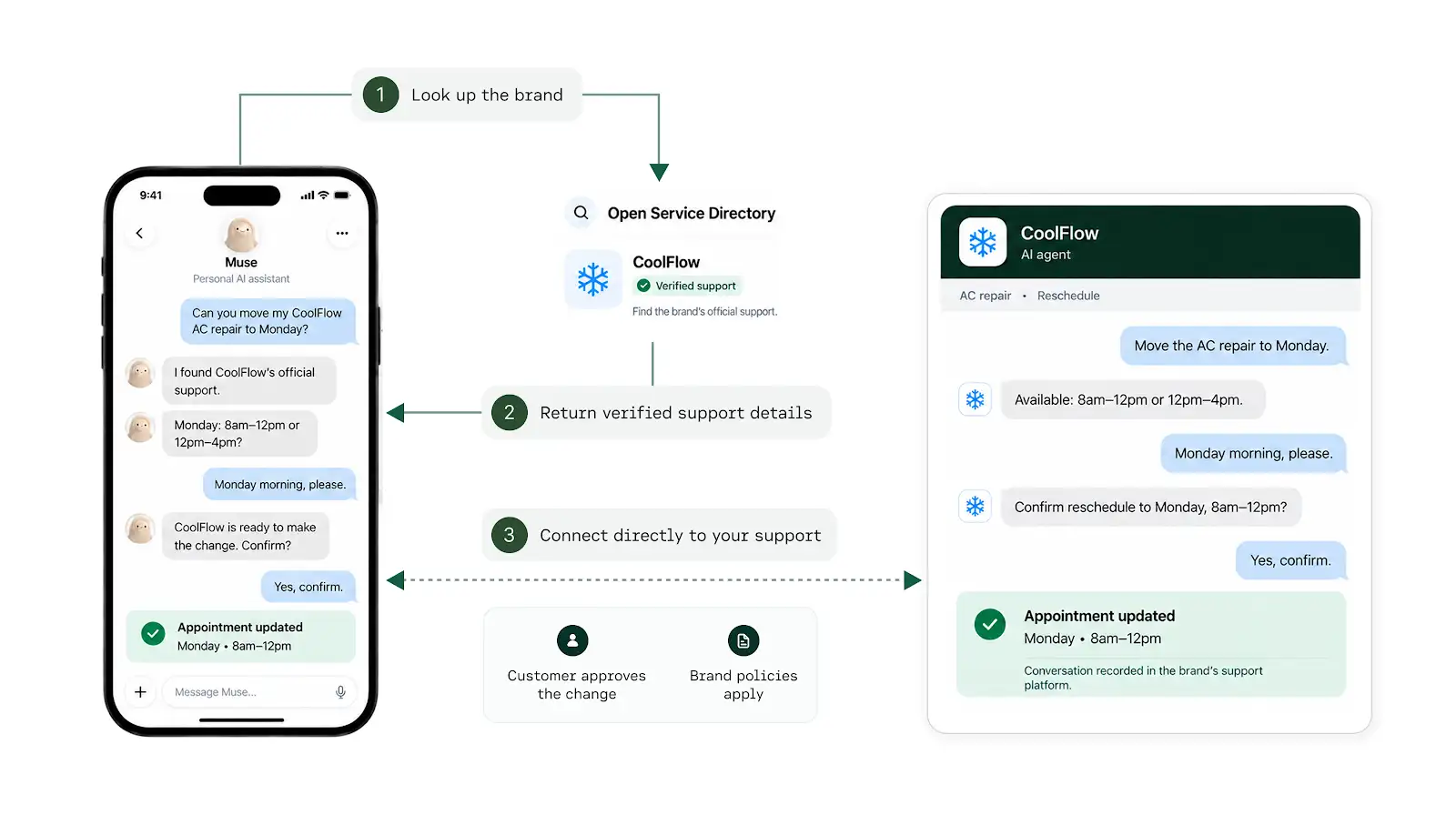
The company needs to know who the AI Assistant represents, what it is authorised to do and when it must come back to the customer. By giving a your AI Agent more useful context and access to the right actions can let those Agent to Agent requests move further without a human in the middle. That only works if identity, trust and approval are designed into the flow.
Moving a request from a customer talking to a company to a customer asking their Assistant to "just do this", could also change how often people make requests, since the burden and effort is now on the AI Assistant and company side, and no longer on the customers'. If I can ask my assistant to change a flight instead of me finding the booking, me checking the conditions and contacting the airline myself, I may be more inclined to ask. That could increase demand even while each request requires less human effort, so while the automation itself will go up, at the same time the volume of service work might do the same.
There is a change in brand experience here too. When the customer mainly interacts with their own AI Assistant, they may experience your company more through how efficiently the request gets completed than through the tone of voice of your AI Agents or the design of your Help Center.
Our channels, help centers and websites increasingly become sources of information and capabilities for those assistants, not the interfaces we expect customers to visit. The content still needs to be accurate and understandable, and the underlying service needs to be able to act on it. We are not removing the human experience; we are making the company easier to work with when the customer chooses a different interface.
Making Zendesk reachable where customers ask for help
Open Service Directory
Support through ChatGPT, through the Open Service Directory, brings Zendesk Help Center content and business processes into an interface customers already use. It provides a specific early-access route for testing service outside the company’s own interfaces, rather than requiring the customer to visit the website before starting a request.
Conversational Help Center
The conversational Help Center accepts natural-language questions, provides answers with links to source articles and supports follow-up conversations. It shows how the company’s own interface can also become more conversational, using its knowledge to help the customer progress rather than only presenting a list of articles.
I think this change in who drives the conversation will be the biggest change, cause for the first time support is no longer talking to the end-user directly. If you want to gauge your readiness for this, choose a request and test how much of you can complete without asking the customer to repeat information or switch interfaces.
Design and validate authentication and approval points around that task, including how authority is checked and when the customer must confirm a consequential choice. Then test the unsuccessful paths as carefully as the successful one, making sure that a human agent receives the relevant context when intervention is needed.
Less effort from the customer also means easier access, so this shift may generate more requests, and the question is whether those requests can be handled reliably at scale. If not, you're human team will get overwhelmed.

Where I land
My favourites are Trends 2 and 5, because together they show how service can become more adaptable while also making it clear that everyone is looking for efficiency. It's not just a business automating the outcomes, but it's also customers expecting automation based on their intent.
Modular CX gives teams a way to grow their automation over time, reusing the decisions and actions they have already built while improving the parts that need attention. That makes scaling more manageable: a new use case does not have to become another flow that the team must maintain entirely on its own, and changing one part of a process does not have to mean starting again.
The shift towards customer AI assistants takes that adaptability beyond the company's own interfaces. Open Service Directory points AI Assistants towards service that customers can reach from the AI Assistant they already use, while Bridge is part of the wider shift towards bringing Zendesk into the AI interfaces where employees choose to work. They address different sides of that change, but both challenge the assumption that someone needs to come into the platform or visit your website before we can help them get something done.
It's not just a business automating the outcomes, but it's also customers expecting automation based on their intent.
What I like about looking at the CX Trends alongside the platform capabilities, is that we can connect the changes they describe to capabilities teams can already work with today. Some trends might already be a reality, while others are part of a rapidly arriving future, but the capabilities in the platform give companies something concrete to use when defining their AI vision and deciding how to adapt to these trends. The question then becomes which part of the operation needs to adapt first, what outcome we want from that change and which capabilities will help us get there.
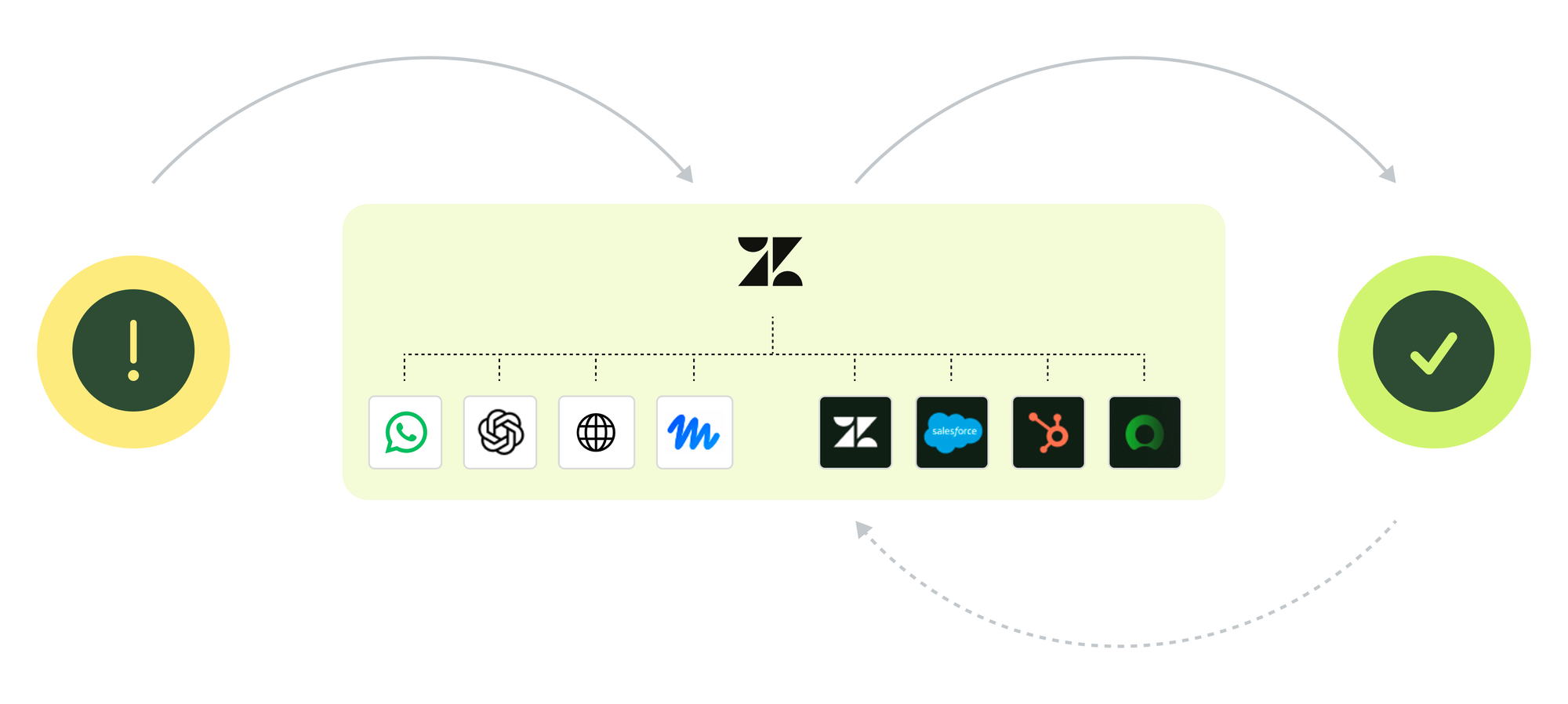
The other trends give that choice its operating model: organise the workforce and its responsibilities, agree how to judge the result, and put the visibility and controls in place to trust the work.
We can start with one customer intent, map its decisions and owners, define what AI may do and review the outcome after it runs. Then we can improve the part that needs it, carrying what we learn into the next use case.