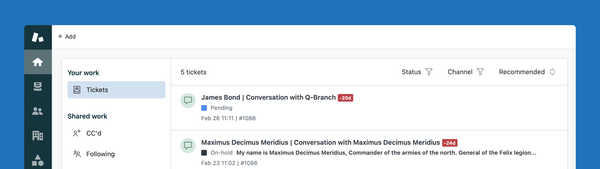
AI Agent tickets in Agent Workspace
Zendesk now shows AI Agent conversations directly in Agent Workspace. This closes data gaps between human and AI-handled interactions, improves visibility, and simplifies analytics.
Learn to navigate and optimize Zendesk’s unified Agent Workspace. From omnichannel ticket handling to workspace setup and shortcuts, we cover everything that helps agents work efficiently across messaging, email, voice, and more.
Zendesk now shows AI Agent conversations directly in Agent Workspace. This closes data gaps between human and AI-handled interactions, improves visibility, and simplifies analytics.
Zendesk introduces Department Spaces, shifting ticket access from groups to brands. This simplifies multi-brand and internal service setups, improves privacy, and streamlines routing with queues—strengthening Zendesk as a platform for both customer and employee support.
Zendesk announced support for Dark mode in Agent Workspace.
Zendesk now allows filtering your custom status per ticket form, making the list of available statuses a lot more manageable (and logical) for your agents.
Zendesk’s new Essentials Card lets you customize user profiles next to tickets, and now, Custom Object Cards do the same. You can reorder, hide, or add fields to streamline your agents’ view. A simple yet customizable update to enhance the agent experience.
This article explores ways to merge duplicate tickets from the same user. Customers often submit multiple requests via various channels, slowing response times. Solutions include using the Customer Context Panel, Zendesk AI-based Merge Suggestions, or automating ticket merges.
The new Device information section in Agent Workspace gives you information about your customers' context right next to a Messaging ticket.
This article offers a deep-dive on how to structure and sort your Zendesk triggers starting from the concept of "one trigger does one job"
This article shows you ten practical tips on how to gain the most out of Zendesk's new Agent Home.
This article contains a full tutorial on how to build a small Zendesk Support app that alerts your agents whenever they're looking at a VIP ticket.
When a crisis hits agents should focus on resolving problems and informing customers, not waste time on assigning and categorising incident tickets. This article shows you how to automate this flow!
In this article I explain my approach to Zendesk Views, and how you only need 8 views to make an efficient setup.